dsh-voice
Verified@achasoft/dsh-voice · v0.3.0 · MIT · Web UI
Voice input for the DeepSeek Harness Web Client: a microphone control in the composer, a transcription capability seam, and two selectable providers
Install
dsh plugin add @achasoft/dsh-voice Confirm the layer applied with dsh --profile default --dump-config — see the install guide.
Source
- github/achasoft/dsh-voice 0 0 archived
- github/navid-kianfar/dsh-voice 0 0
Tags
Readme
@achasoft/dsh-voice
Voice input for the DeepSeek Harness (dsh) Web Client. A microphone button in the composer records what you say and sends the clip to the dsh host for transcription. If you turn polish on, the deployment's default model then tidies the text. The result is added to the end of your draft, where you can edit it before sending. The plugin can transcribe with a local whisper.cpp binary, so the audio never leaves the machine, or with any endpoint that speaks OpenAI's /audio/transcriptions API.
Features
Microphone control
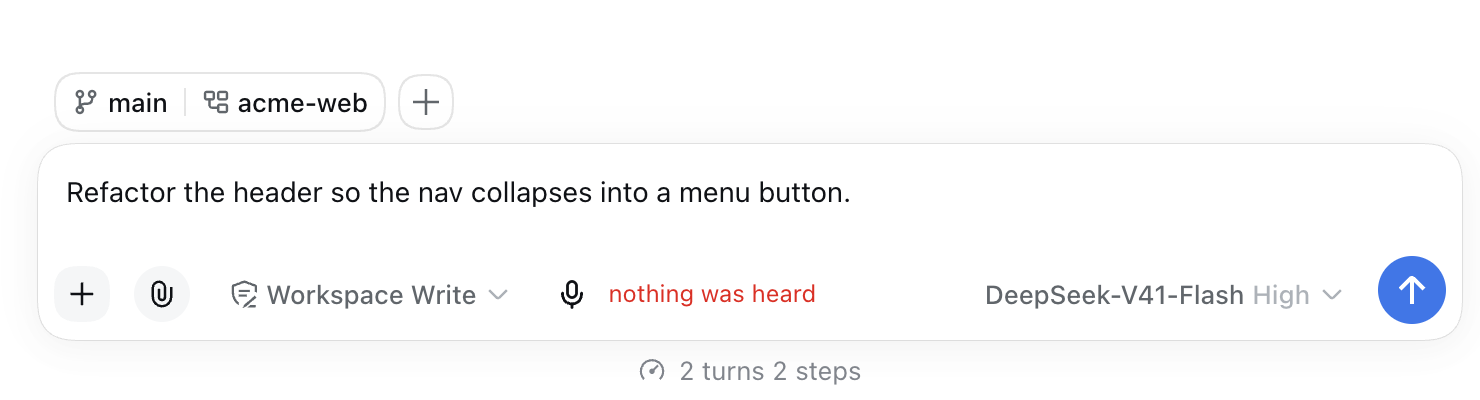
The button sits at the left of the composer's input toolbar. It appears only when a transcription provider row is enabled. With no provider, the seat renders nothing.
Gesture (interactionMode) |
Start | Stop |
|---|---|---|
toggle (default) |
Click | Click again |
hold |
Press and hold | Release |
In hold mode, releasing the button before the microphone has opened cancels the start. That usually happens while the browser's permission prompt is still showing. The control then says "hold the button while you speak". Press again once access is granted.
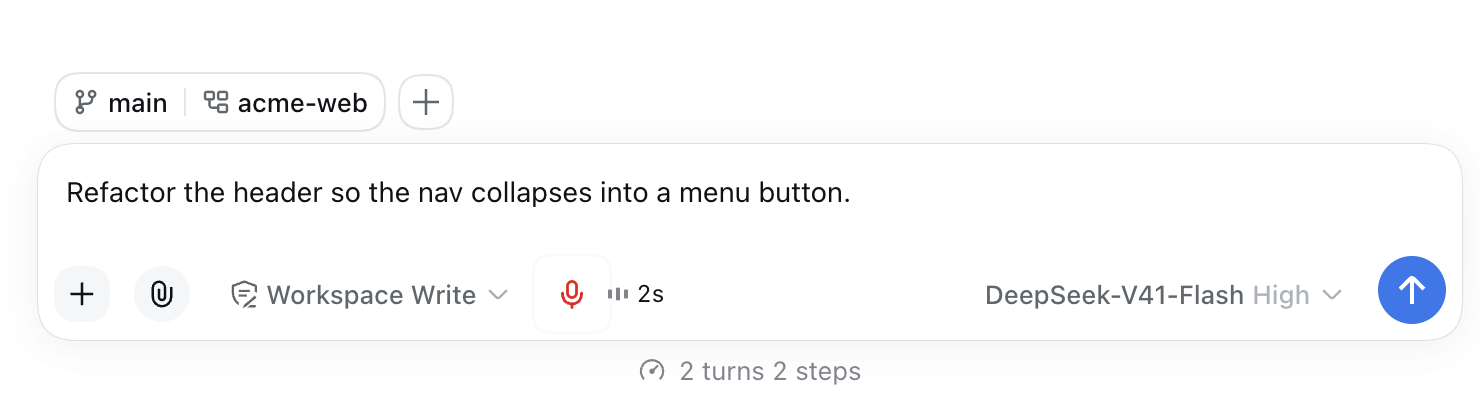
While recording, a three-bar level meter and an elapsed-seconds timer appear next to the button. The meter shows the microphone is actually picking up sound. After you stop, the button is disabled while the clip is transcribed. If polish is on, "polishing…" is shown while the model cleans up the text.
Automatic stops
- Silence (
silenceStopMs, default 2500 ms): the recording ends after that much continuous quiet, but only once speech has been heard, so a slow start is not cut off. No notice is shown. Set it to0to turn silence stop off. - Length cap (
maxClipSeconds, default 120 s): the recording ends and is transcribed as if you had stopped it. The control shows "stopped at the 120s limit".
Live preview
When liveIntervalMs is set above 0, the recording captured so far is transcribed again at that interval. The provisional text appears next to the timer. It is never written to the draft. The draft changes once, when dictation ends. Each pass starts from the beginning of the clip, so against a hosted endpoint every pass is a billed request. That is why the preview is off by default.
Where the transcript goes
append(default) adds the transcript at the end of the draft, with a separating space when needed.replaceswaps the whole draft for the transcript, but only if the draft has not changed since recording began. If you typed while dictating, the transcript is appended instead.
The text is inserted through the session's slash/input-insert-text editor command, not by rewriting the draft. Reference chips (@path references) already in the draft stay intact, and one undo removes the dictation. If the editor refuses the insert for longer than 500 ms, the control shows transcript not inserted: <text>, so the dictation is not lost.
Polish
With polish on (it is off by default), the raw transcript is sent to the deployment's default model (the agentDefaultModel selection, not the model chosen in a particular session) with a conservative cleanup instruction: remove fillers and false starts, restore punctuation, fix obvious misrecognised technical terms, and turn spoken enumerations into Markdown lists. The instruction forbids answering, summarising or translating. polishPrompt replaces the instruction. If the model request fails, or no model is configured, the raw transcript is used. Polish needs no extra credential, but it does send the transcript text to that model; see Privacy and security.
Non-speech filter
Whisper models print a word such as you or an annotation such as (beep) for silent audio, rather than nothing. The plugin filters that in three steps:
- A clip whose loudest moment (peak short-window RMS) stays below
0.005is not sent at all. The control shows "nothing was heard". The whisper-cpp provider applies the same check to the WAV it receives, before starting the binary. - Output made only of annotations (
[BLANK_AUDIO],(wind blowing),*music*, music notes) is always dropped. - A stock phrase (
you,thank you,thanks,thanks for watching,thank you for watching,bye) is dropped only when the clip's peak was below0.02. A real one-word dictation spoken at a normal level still comes through.
Messages
| Shown | Cause |
|---|---|
| no transcription provider | Provider unmounted while a clip was on its way to the host |
| the provider's readiness detail, or transcription is not configured | Provider mounted but not ready |
| microphone access was denied | Permission refused, or blocked by the page context |
| no microphone is available | No input device, or the chosen device is gone |
| this browser cannot record audio | No MediaRecorder, or navigator.mediaDevices is missing (insecure origin) |
| the transcription provider accepts no format this browser can record | The provider's formats do not overlap the browser's, and the provider does not take WAV |
| recording too long | Clip over maxClipBytes, or HTTP 413 from the endpoint |
| transcription is unreachable | Host busy (see limits) |
| transcription timed out / unsupported audio format / nothing was recorded / transcription failed | Other classified failures |
Settings card
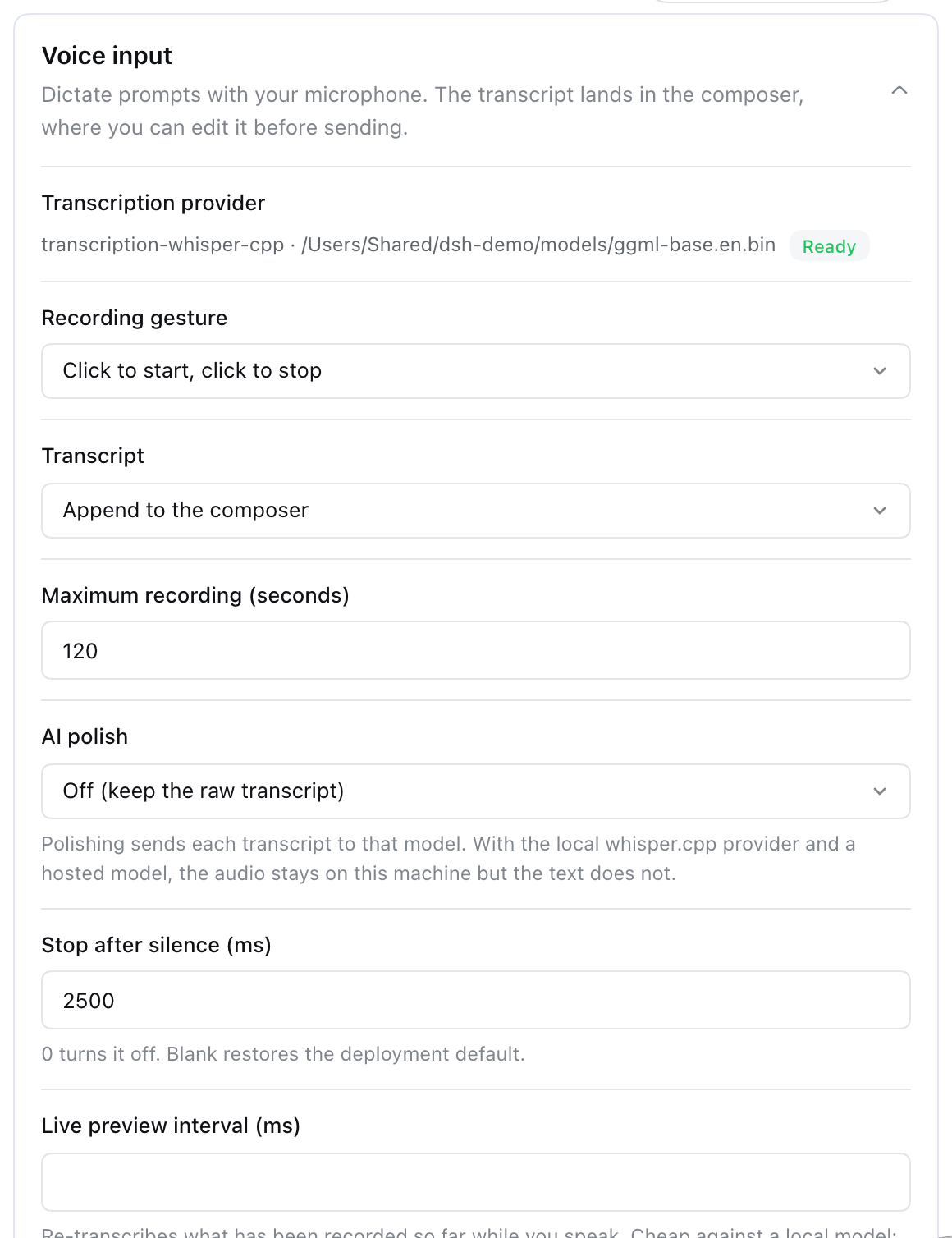
Open Settings > Plugins > Plugin configuration and expand Voice input. The card shows the provider and model with a Ready or Not ready badge (plus the reason when not ready, such as no model configured or model file not found at …; the microphone button's tooltip carries the same reason). It lets you edit the recording gesture, transcript placement, maximum recording length, AI polish and its prompt, silence stop, live preview interval, microphone and language. In the silence stop and live preview fields, 0 turns the feature off and a blank field restores the deployment's value. Edits are staged: Save writes them and Discard drops them. The microphone choice is saved immediately and stays in this browser only (localStorage key achasoft.dsh-voice.deviceId). Device names appear only after the browser has granted microphone access once.
Requirements
- dsh with the Web Client. This version was tested against dsh
0.1.5-rc.2. - Node.js
^22.19or>=24, andpnpmonPATHfordsh plugin. - A secure browser context. Browsers expose the microphone only over HTTPS or on
localhost/127.0.0.1. If you open the Web Client over plain HTTP by LAN address or host name, the button still appears, but pressing it shows "this browser cannot record audio". - Microphone permission for the Web Client's origin. Pages embedded in another app or iframe need that host to allow microphone access. Otherwise the start fails with "microphone access was denied".
- One transcription provider, set up as below.
whisper.cpp (local)
Install the binary. On macOS with Homebrew, the formula is now named whisper.cpp, and whisper-cpp still resolves to it:
brew install whisper-cpp
command -v whisper-cli     # e.g. /opt/homebrew/bin/whisper-cli
Download a GGML model to any path you choose:
mkdir -p ~/.dsh/models
curl -L -o ~/.dsh/models/ggml-base.en.bin \
  https://huggingface.co/ggerganov/whisper.cpp/resolve/main/ggml-base.en.bin
.en models are English-only. For other languages, use a multilingual model such as ggml-base.bin. When language is blank the provider passes -l auto, so the binary detects the spoken language (left to itself, whisper-cli assumes -l en). Set language to a code such as de to skip detection.
This is the exact command the provider runs, useful for checking your binary and model by hand on a 16 kHz mono WAV:
whisper-cli -m ~/.dsh/models/ggml-base.en.bin -f clip.wav --no-timestamps --no-prints -l auto
OpenAI-compatible endpoint
Any server that accepts POST <baseUrl>/audio/transcriptions as multipart form data (model, file, optional language) and returns JSON with a text field. For a hosted service, the API key must be resolvable by the harness credential seam under the name in apiKeyEnv: the launch environment, the stored credential file $DSH_HOME/.credentials.yaml, the working directory's .env, or $DSH_HOME/.env, in that order.
Install
dsh plugin --profile web add @achasoft/dsh-voice
dsh plugin runs pnpm in $DSH_HOME/profiles/web ($DSH_HOME defaults to ~/.dsh). It then adds the package to that profile's dsh.profile.bundles, because the package declares a dsh.bundle patch. Restart dsh web to load it. A local checkout (dsh plugin --profile web add ./dsh-voice, resolved from your current directory and linked) must be built first with npm run build.
Confirm the rows voice, voice-ui, voice-openai-compatible and voice-whisper-cpp are present:
dsh --profile web --dump-config
How the configuration layers
Later layers win: each bundle's cordis.patch.yml (including this package's) in bundle order, then $DSH_HOME/profiles/web/cordis.patch.yml, then $DSH_HOME/cordis.patch.yml, then --patch overlays. A patch entry that targets a row by id replaces the row's whole config, so restate every key you keep. Settings card edits are stored as user overrides in the voice: section of $DSH_HOME/settings.yaml and apply on top of the composed row.
Enable a provider
Both provider rows ship disabled, and only one can be enabled: both claim ctx.transcription, and loading fails if two are mounted. Add one of the following to $DSH_HOME/profiles/web/cordis.patch.yml.
whisper.cpp:
- id: voice-whisper-cpp
  disabled: false
  config:
    binaryPath: /opt/homebrew/bin/whisper-cli
    modelPath: /Users/you/.dsh/models/ggml-base.en.bin
    timeoutMs: 300000
    maxOutputBytes: 262144
    graceMs: 5000
OpenAI-compatible (leave out apiKeyEnv for a local server that needs no authorisation):
- id: voice-openai-compatible
  disabled: false
  config:
    baseUrl: https://api.openai.com/v1
    model: whisper-1
    apiKeyEnv: OPENAI_API_KEY
    timeoutMs: 120000
Uninstall
dsh plugin --profile web remove @achasoft/dsh-voice
Then remove any voice* rows from your profile's cordis.patch.yml.
Configuration
voice (preferences)
| Key | Default in cordis.patch.yml |
Schema | Settings card |
|---|---|---|---|
interactionMode |
toggle |
required, toggle or hold |
yes |
insertMode |
append |
required, append or replace |
yes |
maxClipSeconds |
120 |
required integer, >= 1 |
yes |
maxClipBytes |
26214400 (25 MiB) |
required integer, >= 1 |
no |
language |
unset | optional string, passed to the provider | yes |
polish |
false |
optional boolean, defaults to false |
yes |
polishPrompt |
unset (built-in instruction) | optional string | yes, while polish is on |
silenceStopMs |
2500 |
optional integer, >= 0; 0 or unset disables |
yes, see note |
liveIntervalMs |
unset (commented 2000) |
optional integer, >= 0; 0 or unset disables |
yes, see note |
maxClipSecondsis enforced by the browser.maxClipBytesis enforced by the host, which measures the base64 payload before decoding it.- Clearing an optional field in the card removes your override, so the composed value applies again. For
silenceStopMsthat is2500, so clearing it does not turn silence stop off. Enter0instead: it is stored as your override and disables the feature. The same holds forliveIntervalMswhen your profile patch sets it. polishis optional and defaults tofalse. Profiles and settings that already statepolish: truekeep it on.
voice-whisper-cpp
| Key | Default | Schema |
|---|---|---|
binaryPath |
whisper-cli |
required; an absolute path is recommended. A bare name is looked up on the host's scrubbed PATH, which is not necessarily your shell's PATH |
modelPath |
'' |
required; absolute path to the GGML model file, or one starting with ~/. Empty reports Not ready with no model configured; a relative path, a missing file or an unreadable one also reports Not ready with the reason |
threads |
unset (whisper.cpp's own default) | optional integer, >= 1; passed as -t |
timeoutMs |
300000 |
required integer, >= 1 |
maxOutputBytes |
262144 |
required integer; cap on captured stdout and stderr |
graceMs |
5000 |
required integer; delay between SIGTERM and SIGKILL on cancel or timeout |
Only audio/wav is accepted. The browser records in its native container and converts the clip to 16 kHz mono 16-bit WAV before uploading. The scratch file is written to a dsh-voice-* directory under the OS temp directory and deleted after each call.
voice-openai-compatible
| Key | Default | Schema |
|---|---|---|
baseUrl |
https://api.openai.com/v1 |
required; prefix without /audio/transcriptions; one trailing slash is removed |
model |
whisper-1 |
required |
apiKeyEnv |
OPENAI_API_KEY |
optional credential reference (the key's name, never its value) |
timeoutMs |
120000 |
required integer, >= 1 |
Accepted formats are flac, m4a, mp4, mpeg, mpga, ogg, oga, wav and webm, so browsers upload their native recording (for example WebM/Opus). HTTP 401 and 403 are reported as "transcription is not configured".
Host limits
Each host runs at most 2 transcriptions at once and queues 4 more. Beyond that, a request is answered immediately with "transcription is unreachable" (the provider-unavailable code). Live-preview passes are cancelled when you stop, so they do not hold a slot the final pass needs.
RPC and model-facing surface
The browser uses three host methods on the voice namespace:
| Method | Purpose |
|---|---|
describe() |
Whether a provider is mounted and ready, its accepted formats, and the current preferences |
transcribe({ audioBase64, mimeType }) |
One clip to text. Failures come back as { ok: false, code, message } values |
polish(text) |
Cleanup through the deployment's default model |
The plugin registers no tool, prompt or session event. A transcript reaches the conversation only when you send the draft as your own message.
Privacy and security
- Audio travels from the browser to the dsh host in the RPC request. With whisper-cpp it is processed on the host and deleted after the call. With openai-compatible it is uploaded to
baseUrl. Neither provider stores audio or transcripts. - Transcript text is sent to the deployment's default model provider when
polishis on (off by default). With whisper-cpp and a remote model, the audio stays local but the text does not. Turn polish off for fully local dictation. - API keys are resolved on the host at the start of each call and are never sent to the browser.
describe()reports only whether a key is configured. - The microphone choice is stored in the browser's
localStorageand is never written to the settings document.
Known limitations
- The transcript goes at the end of the draft, not at the caret. The control sits outside the editor and cannot read its selection.
- A gesture change applies after the next press. An open composer keeps the
interactionModeit loaded with until the button is pressed, which re-reads the settings, or the page is reloaded. The first press after a change is still handled with the previous gesture. - Embedded or insecure contexts block the microphone. See Requirements.
- No streaming. Host methods are unary, so text arrives after you stop. The live preview re-transcribes the whole clip on each pass.
- The provider check does not load the model. whisper-cpp reports Ready once the binary resolves and
modelPathnames a readable file, but it does not check that the file is a valid model. A corrupt or wrong file fails on the first dictation with the binary's error. - whisper-cli exits 0 on unreadable audio. The provider watches stderr for
error:,failed to read audioandfailed to initialize whisper contextlines instead, and reports the end of stderr as the reason. - Web Client only. The terminal UI has no capture path.
Development
Development links against a deepseek-harness checkout two directories up (../../deepseek-harness, as set by the link: devDependencies):
workspace/
├── deepseek-harness/
└── dsh-plugins/
    └── dsh-voice/   <- this repository
pnpm install
npm test                 # Typert drift check, then vitest
npm run build            # tsc emit, then tsdown bundle into lib/
npm run check:typert     # only the Typert drift check
npm run typecheck        # tsc --noEmit; needs a harness checkout matching the targeted harness
generated/ holds the Typert RPC contract. Only the harness generator can produce it, so it is committed, and npm test fails when it drifts from src/host/. Regenerate it from a clean harness checkout, one plugin at a time:
node scripts/regen-typert.mjs ../../deepseek-harness
License
MIT. See LICENSE.