antigravity-executor
Verifiedantigravity-executor · v0.7.0 · MIT · Web UI
Delegate coding tasks from DeepSeek Harness to the Google Antigravity desktop agent, and watch every turn live in a War Room dashboard: a five-stage lifecycle stepper, streaming tool-call timeline with clean/hanging/escape/destructive verdicts, dual-windo
Install
dsh plugin add antigravity-executor Confirm the layer applied with dsh --profile default --dump-config — see the install guide.
Source
Tags
Creators
Readme
antigravity-executor
English · 简体中文
Delegate coding tasks from DeepSeek Harness (dsh) to the Google Antigravity desktop agent, using the Antigravity account you are already signed in to.
A dsh bundle plugin. It registers three tools on ctx.tools and runs entirely
in-process — no MCP server, no sidecar, no external dependencies, no API key.
Every delegation can be watched live in the War Room dashboard, either from
a sidebar panel inside dsh or at http://127.0.0.1:18420 in a browser.
[!WARNING] This plugin may violate Google's Antigravity terms of service.
It drives the Antigravity Language Server through its local
agentapisurface, reusing the OAuth session of your signed-in desktop app. Google's Antigravity Terms of Service state:You must not abuse, harm, interfere with, or disrupt the Service. This includes, but is not limited to, using the Service in connection with products not provided by us. Using third party software, tools, or services to access the Service (e.g. using OpenClaw with Antigravity OAuth) is a breach of this Agreement. Such actions may be grounds for suspension or termination of your Antigravity and/or Gemini CLI accounts.
You are solely responsible for the consequences of using this plugin, including any suspension or termination of your Google accounts. If you want a sanctioned path, use the Antigravity SDK with a Gemini API key or Vertex AI instead.
Tools
| Tool | Purpose |
|---|---|
delegate_coding_task |
Hand a coding task to Antigravity; returns its report, an audited tool-call trace, a workspace audit, and any brain artifacts |
check_environment |
Diagnose the bridge: desktop app, port, model tiers, effective default tier, workspace policy, live account quota with reset countdown, git worktree pre-check, readiness (no model call) |
list_conversations |
List threads this plugin started (persisted, so it survives a restart) |
delegate_coding_task
| Parameter | Required | Meaning |
|---|---|---|
task_spec |
yes | Target files, required logic, edge cases, interface contracts, acceptance criteria |
workspace_dir |
no | Absolute path the executor may touch. Omit to use the current dsh session's working directory (recommended). A path outside that directory is refused unless the config sets allowOutsideWorkspace: true. |
task_mode |
no | surgical | creative. Omit in normal use — the mode is auto-detected from task_spec when the config leaves taskMode at auto: creative for 3D/WebGL/Canvas/shader/game/landing-page/UI work, surgical for everything else. Passing it only overrides that detection. |
thinking_level |
no | Per-call override: minimal / low → flash_lite, medium → flash, high / extra_high → pro. Omit to use the configured default. Ignored entirely when allowOverride: false. A low-quota account may be auto-downgraded from pro to flash. |
session_id |
no | Stable label for a feature thread; reuse it to continue the same conversation |
max_seconds |
no | Wall-clock budget (default from config, 900) |
Every result also carries the git snapshot: git status --porcelain and
git diff --stat run locally at settlement and are inlined, along with a
[Notice: Git working tree shows no modified or untracked files.] line when the
executor claims edits it did not make. Delegations are serialized through an
in-process FIFO queue, so two calls in one reply cannot touch the workspace at
the same time.
Adaptive task mode
Two personas, one prompt. The hard constraints — absolute paths, workspace containment, no dev servers — are shared. What differs is the scope rule and an appended block.
creative sends this to the executor:
[CREATIVE & VISUAL DENSITY MODE]
- Do NOT build a minimal MVP or use bare single-primitive placeholders (e.g. plain colored boxes as furniture, shelves, or buildings).
- Maximize visual richness and code completeness: build composite multi-part geometries, use InstancedMesh for repeating props/products, generate procedural CanvasTextures for signage/labels/tiles, and configure layered lighting (ambient + directional/spot lights with shadows, emissive materials, and post-processing where applicable).
- Prioritize visual polish, material realism, and interactive details over code brevity.
Detection is a keyword match on task_spec (three.js, webgl, canvas,
3d, shader, pbr, orbitcontrols, landing page, ui design, game,
animation, plus 三维 / 3D场景 / 便利店 / 着色器 / 粒子 / 动画 /
小游戏 / 界面设计 / 视觉效果). "帮我修个 Bug" → surgical, one pass, fast
return. "帮我做个 HTML 3D 便利店场景" → creative, density block, and the gate
below on turn 1 only:
[Supervisor Creative Gate — Pass 1 Completed]
This is Pass 1 of a creative/visual task. Before accepting, inspect the code for visual density:
1. Are objects built from composite geometries and procedural textures (CanvasTexture / PBR materials), or just bare placeholder primitives?
2. Are interior props, lighting atmosphere, and interactive controls fully fleshed out?
If the scene is skeletal or under-detailed, DO NOT finish — immediately call `delegate_coding_task` again with the SAME `session_id` and `task_mode: "creative"` to execute Pass 2 (detail & prop expansion).
The gate is emitted once per conversation on purpose: re-emitting it on turn 2 would nag the planner into unlimited expansion rounds, and every extra round re-sends a longer history against a shared quota pool.
The War Room dashboard
One report at the end is a thin view of a delegation that ran for minutes: a 9-minute turn and an 8-second one look identical from the dsh conversation, and a turn that goes sideways at minute 4 leaves nothing to look at. The War Room is a live console for the turns in flight and the ones that just settled — a five-stage lifecycle stepper, a streaming audit timeline, both quota windows, and the controls that change how the next turn runs.
There is one dashboard, reached two ways:
- Inside dsh — a sidebar panel icon that opens the dashboard in the centre column, next to your conversation.
- In any browser —
http://127.0.0.1:18420, which works with the dsh window closed. The address is also reported bycheck_environment.
Both surfaces are the same page: the panel embeds the page the loopback
listener serves, through the same-origin proxy, so there is one renderer, one
set of regions and no visual drift between them. That page consumes the host's
--dsw-alias-* theme tokens, so the panel matches the standalone page and
follows light/dark switching.
The dashboard inside dsh — sidebar icon selected, centre panel:
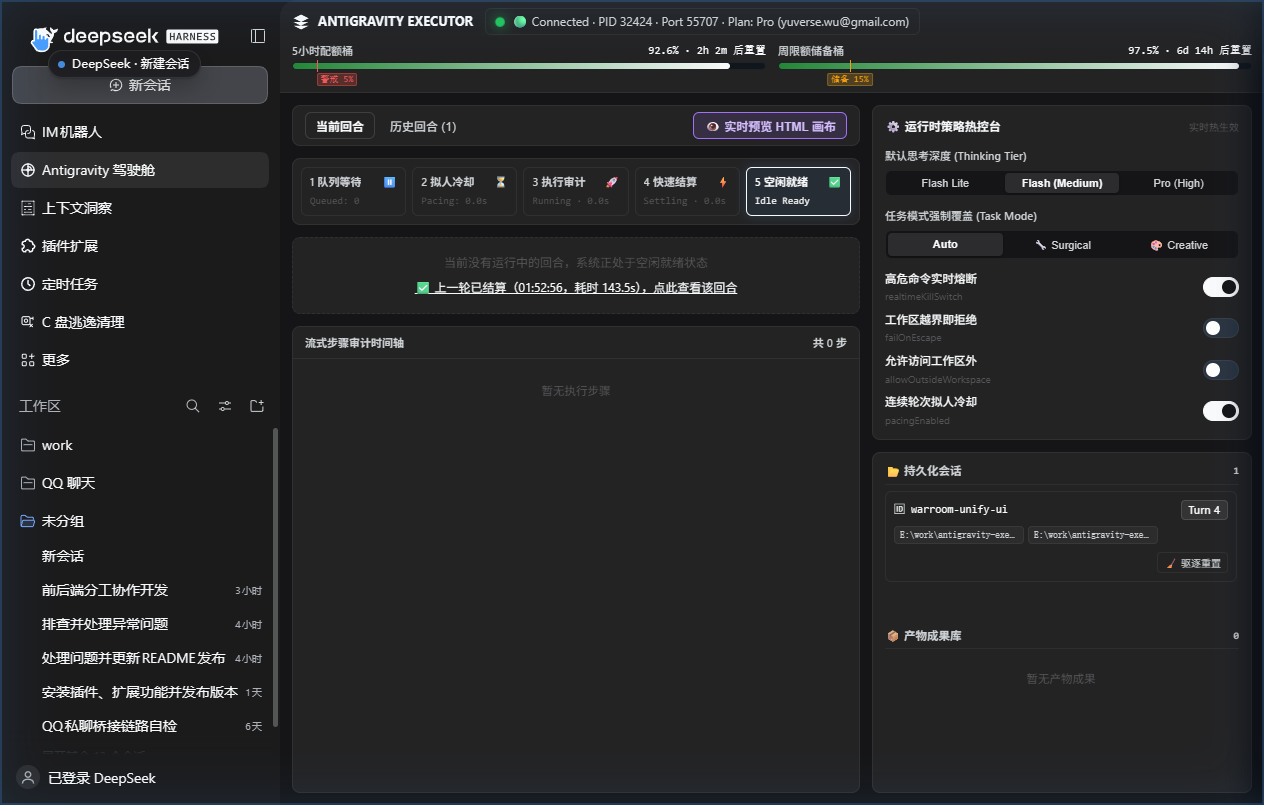
The same dashboard as a panel in the dsh centre column.
The same dashboard over loopback — http://127.0.0.1:18420:
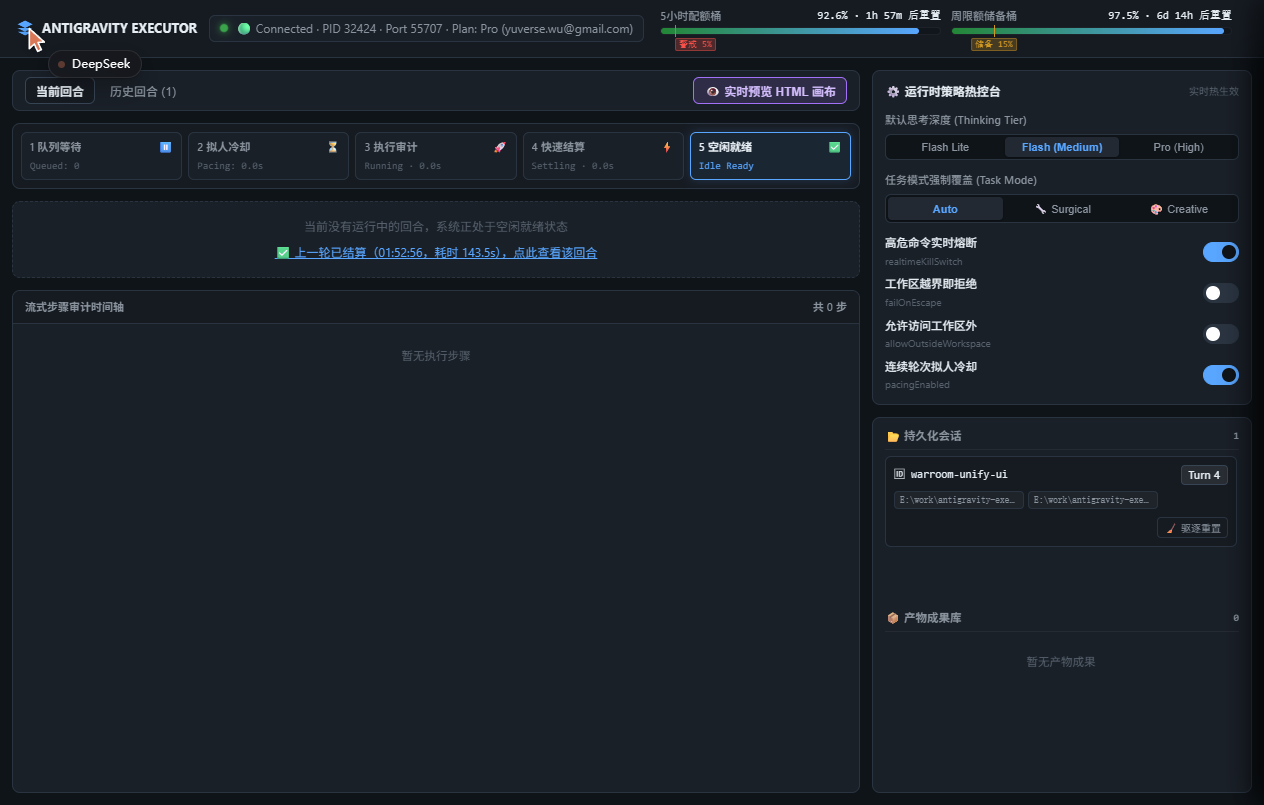
The identical page in a normal browser tab, with the dsh window closed.
What it shows
| Region | What it shows |
|---|---|
| Telemetry bar | Bridge liveness (PID/port/plan/email) and two quota gauges — the 5h window with a red warning tick at proMinFraction, and the weekly window with an amber reserve tick at weeklyProMinFraction that steps down to the 5h floor inside the last weeklyReserveHours (🔓 最后24h储备已释放). A pulsing banner appears whenever low-quota protection downgrades pro → flash. |
| Lifecycle stepper | The five phases — queued → pacing → running → settling → idle — with live second counters. The skip-cooldown button appears only while pacing, and the red abort button only while running. |
| Step timeline | Every tool call as it happens: index, tool, summary, duration and an audit verdict pill — 🟢 Clean, 🟡 Hanging (48s / 60s), 🟠 Escape, or a fully red 🔴 Blocked Destructive row annotated ⚡ 已触发 80ms 硬件熔断. |
| Virtual CWD tracker | The auditor's live working directory; it turns orange-red the moment a cd leaves the workspace. |
| History replayer | The last recentTurnsLimit (10) settled turns, kept in memory specifically so opening the page after a fast turn still shows the steps, report head and git diff --stat. |
| Policy hot controls | Thinking tier, task-mode override, and four switches (realtimeKillSwitch, failOnEscape, allowOutsideWorkspace, pacingEnabled) that take effect on the next turn without a restart. |
| Sessions / artifacts / preview | Per-session turn counts with a ⚠️ 长会话高消耗 badge, one-click eviction, walkthrough.md / implementation_plan.md / task.md in a Markdown drawer, and a drag-resizable HTML/3D preview pane that auto-refreshes on turn:settled — so you can watch a Three.js scene fill in pass by pass. |
How it is built
lib/telemetry.mjs— an in-process bus holding one snapshot (bridge, quota, lifecycle, active turn + steps, a ring buffer of settled turns, sessions, artifacts, runtime config). The executor publishes to it; nothing in the executor knows HTTP. With no browser connected the snapshot still updates but nothing is serialized, which is what keeps fast settlement intact.lib/ui-server.mjs— zero-dependencynode:httpbound to127.0.0.1only. REST for snapshot/control/artifacts,text/event-streamfor live pushes with a 15s heartbeat, and a path-traversal guard on the preview route that compares againstworkspace + sep(soC:\work-evilis correctly outsideC:\work). Mutating routes additionally reject a request whoseOrigin/Hostis not loopback.ui/index.html— the single dashboard implementation: the page the listener serves at/.lib/proxy.mjs— a same-origin prefix (/antigravity-executor) inside dsh's own web server. The GUI and the dashboard are different origins, so the panel could not fetch the listener directly; the proxy streams straight through instead, and the standalone surface keeps refusing foreignOriginheaders unchanged. The in-panel view is the listener's own page, reached through this prefix.client.js— the sidebar entry and the panel shell. It contributes one icon + label to the sidebar's global panel list (idantigravity-warroom, label 「Antigravity 驾驶舱」); clicking it puts the dashboard in the centre column. The panel itself is the page above, embedded — it never re-implements the dashboard.
HMR: the port comes back
A dsh reload re-runs apply() while the old listener still holds 18420.
server.close() alone does not free it — it waits for live connections, and
an open SSE stream never ends. Teardown is therefore: end every SSE response →
closeAllConnections() → close(). If the port is genuinely held by something
else, the server steps forward to the next free one and reports the real address
in check_environment rather than failing.
Ports and exposure
The listener binds a loopback literal and nothing else — a non-loopback host
is a hard validation failure, not a silent downgrade, because anyone on the
network could otherwise abort turns and widen the workspace policy. Setting
enabled: false binds no socket at all.
ui:
  enabled: true          # false binds no socket at all
  host: 127.0.0.1        # loopback only; anything else is a hard validation failure
  port: 18420            # steps forward when taken
  recentTurnsLimit: 10   # ring-buffer depth for the history replayer
Configuration: thinking level, workspace policy, settlement and safety
Every tunable lives in the bundle patch, so it survives upgrades and applies
immediately on profiles with HMR enabled. Edit the config block of
id: antigravity-executor in your profile's cordis.patch.yml (or the copy
shipped in this package's cordis.patch.yml):
- insert:
    - id: antigravity-executor
      name: 'antigravity-executor'
      config:
        thinkingLevel: medium        # minimal | low | medium | high | extra_high
        allowOverride: true          # let a call pass thinking_level
        followSessionWorkspace: true # workspace_dir optional, follows the session cwd
        allowOutsideWorkspace: false # refuse a workspace outside the session cwd
        audit: true                  # classify every tool call against the workspace
        failOnEscape: false          # true = reject the result when the audit finds an escape
        maxSeconds: 900

        # Adaptive task-mode persona (auto = decide per call from task_spec)
        taskMode: auto               # auto | surgical | creative

        # Turn settlement (REQ-01)
        pollIntervalSeconds: 2       # scan cadence while the turn runs
        fastSettleSeconds: 2         # confirmation window after the server reports IDLE
        quietWindowSeconds: 45       # fallback only, when the long poll is unavailable

        # Anti-truncation (REQ-02)
        useFullTranscript: true      # prefer transcript_full.jsonl

        # Quota guard (REQ-03)
        quotaFallback:
          enabled: true
          proMinFraction: 0.05       # downgrade pro -> flash below 5% remaining (5h window)
          weeklyProMinFraction: 0.15 # higher reserve for the weekly window
          weeklyGuard: true
          weeklyReserveHours: 24     # skip the weekly guard once the reset is this close
          cacheTtlSeconds: 180       # reuse a quota read this long (0 = off)

        # Safety, persistence, artifacts (REQ-04/06/07)
        realtimeKillSwitch: true     # destructive commands always cut, regardless of failOnEscape
        persistSessions: true        # dead mappings are evicted automatically
        includeBrainArtifacts: true
        maxArtifactInlineChars: 4000 # longer .md files inline a head + their absolute path
        maxArtifactHeadChars: 2000
        longSessionTurns: 8          # suggest a fresh session_id past this many turns
        hangingCommandWarnSeconds: 45    # warn about dev servers / watch processes after this long
        hangingCommandTimeoutSeconds: 60 # then cut the turn (0 = warn only)
        includeGitSummary: true      # inline git status / diff --stat at settlement

        # Human-like pacing — delays only the start of the NEXT turn
        pacing:
          enabled: true
          minGapSeconds: 15
          jitterMinSeconds: 6
          jitterMaxSeconds: 15
Every key is optional and defaults are restated above, so an existing profile keeps loading unchanged.
thinkingLevel is the selector: set it once and every delegation uses that
tier. It defaults to medium (flash). flash_lite produces noticeably
sloppier code — for example stray commas in signatures — so raise it to high
when correctness matters more than latency, and use low only for trivial
edits.
taskMode defaults to auto, which picks the persona from the task text for
every call; pin it to surgical or creative to stop the detection, or change
it per call with the task_mode argument. check_environment reports which of
the three is in force.
Turn settlement
A turn ends on the Language Server's own RPC state, not on a fixed quiet window,
so a completed delegation returns within a few seconds. WaitForConversationFullyIdle
is a real long poll: it blocks while the agent is busy and returns in ~34 ms once
the cascade is idle. Settlement then confirms CASCADE_RUN_STATUS_IDLE plus the
trajectory's terminationReason, and requires a tool-call-free planner message
plus a short fastSettleSeconds window so the brief gap between two tool rounds
is not mistaken for the end.
Two traps this deliberately handles:
- "Last step is a PLANNER_RESPONSE" is not a completion test. A background
run_commandemits a planner message first and reports completion later via aSYSTEM_MESSAGE, so completion is decided by the cascade status. - The brain log lags the server. A finished turn can still show only its
USER_INPUTon disk while the RPC already has the final steps, so the settlement read merges the RPC view over the file.
quietWindowSeconds remains only as the fallback used when the long poll is
unavailable (method missing, or a non-timeout transport failure).
Quota-aware fallback
check_environment reports the account plan and, per tier and per window
(5-hour / weekly), the remaining fraction and reset countdown:
quota        : plan=Pro ([email protected])
  buckets:
    Gemini Models / gemini-5h (5h): 99%, resets in 4h 23m
    Gemini Models / gemini-weekly (weekly): 98%, resets in 1d 5h
With quotaFallback.enabled, a pro delegation whose remaining fraction is
below proMinFraction runs on flash instead, and the report says so
(downgraded: pro -> flash (low quota)). The weekly window carries its own,
higher reserve: inside the last weeklyReserveHours before a reset the 15 %
reserve is released, but the 5 % floor still holds
(pro -> flash (weekly quota floor)) — a drained week costs days, a drained 5h
window costs hours. Quota reads are cached for cacheTtlSeconds and abandoned
near the guard threshold; check_environment always reads live.
When the tier cannot be identified the plugin keeps the requested tier rather than guessing — a parse failure must not silently downgrade a task.
Hanging commands and dead sessions
A command that will never exit is cut, not merely noted: when no new step
appears for hangingCommandTimeoutSeconds the turn is aborted with
Aborted after 60s: hanging/interactive command detected (…), instead of
burning the whole maxSeconds budget. Dev servers and watch processes are
forbidden by the preamble and the bundled skill; hangingCommandWarnSeconds
emits the earlier warning.
A persisted session_id → conversation_id mapping can outlive its
conversation. The first dead turn evicts it, opens a fresh conversation, and
prepends a context recovery banner (last touched files plus the previous
task head) so the executor is not asked to continue from nothing; the result
then carries session_evicted_and_recreated: true. Each session also carries a
turn count, and past longSessionTurns the result suggests starting a fresh
session_id.
Pacing
pacing.minGapSeconds never slows down a turn you are waiting for. The result
still comes back as fast as the RPC reports IDLE. What the pacer does is top up
the gap before the next delegation when the previous one ended moments ago,
with a jittered delay so the gaps are not metronome-regular. It is a mitigation
for one specific signature (zero-think-time re-dispatch against a real
signed-in account), not a guarantee of looking organic.
Workspace: follows the session, audited afterwards
delegate_coding_task defaults its workspace to the current dsh session's
working directory, read from the session header. Omit workspace_dir and the
executor works where the conversation works. Passing a path outside that
directory is refused unless allowOutsideWorkspace: true, so a typo in a task
spec cannot aim the executor at C:\Windows.
This is a soft sandbox, not kernel-enforced containment. Antigravity's
agentapi offers no workspace parameter: a conversation created through it
carries workspaces: [] and enforcedWorkspaceValidation: false in its own
metadata, so the executor's filesystem reach is decided by the model's
cooperation. What this plugin adds is an auditor: it reads the transcript,
classifies each read_file / run_command against the workspace, and appends a
verdict to the report:
--- workspace audit (soft sandbox) ---
workspace    : C:\projects\demo
activity     : 1 command(s), 0 read(s), 0 write-shaped command(s)
verdict      : CLEAN - no out-of-workspace access detected in the transcript
It flags three families of finding: writes outside the workspace, a
Set-Location that leaves it, and destructive commands (format, diskpart,
recursive deletes, wildcard deletes, reg delete, remote-script piping, and the
PowerShell alias spellings of all of the above). Writes to **/.git/hooks/**
and **/.git/config count as destructive rather than as in-workspace activity:
a hook — or a core.hooksPath / core.fsmonitor value — written there executes
as you the next time git runs. Reads of Antigravity's own guide files are listed
separately as benign context rather than violations.
The auditor is stateful: it is fed one step at a time while the turn runs, so
push() can return blocked and the turn can be cancelled mid-flight. It also
tracks a virtual working directory across the turn, so cd ../.. in one
step makes ../../secret.txt in the next resolve to the path it really touches,
and it expands PowerShell/Bash aliases (sl, ri, pushd) and environment
variables ($env:USERPROFILE, $env:TEMP, ~) before classifying.
The kill switch
realtimeKillSwitch and failOnEscape are not the same kind of switch.
failOnEscape answers "should an out-of-workspace escape fail this turn?" —
one legitimate answer is false, because the executor sometimes reads a
reference file outside the project. The breaker must not be gated on it, or a
shipped failOnEscape: false would leave it disarmed, and a reg delete or a
Remove-Item -Recurse -Force would be reported afterwards rather than
stopped. The verdict is therefore split:
const verdict = auditor.push(step)
verdict.blockedDestructive  // reg delete, diskpart, rd /s /q, ri -Recurse, …  -> cut on realtimeKillSwitch alone
verdict.blockedEscape       // cd-outside, write-outside                     -> still needs failOnEscape
classifyFinding(kind) is the exported rule behind those two flags.
Keep realtimeKillSwitch: true (the default) to turn a destructive command
finding into an immediate cancellation; add failOnEscape: true as well if you
want plain workspace escapes (cd-outside, write-outside) to interrupt the
turn too. This is a real interrupt, not a post-hoc verdict: measured,
CancelCascadeInvocation moves the cascade to IDLE / USER_CANCELED within
~80 ms.
It is still an auditor, not a sandbox. See the limitations section.
Bundled skill: supervisor-workflow
The package ships a workflow skill that turns the calling model into a planner/supervisor and the executor into the only writer:
- the model may read the codebase with its own tools, but must not edit
business source itself — every change goes through
delegate_coding_task - dispatches must carry absolute paths plus the
Set-Location/ PowerShell preamble, or the executor wastes a minute running commands in Antigravity's install directory - the supervisor must verify independently after every delegation: read the diff, run the tests, and never accept the executor's self-report as a result
- three consecutive failed review rounds is a hard stop that hands the decision back to the human
The skill registers itself through ctx.skills, so it appears exactly where the
plugin is enabled and disappears when the bundle is toggled off. Its body lives
at skills/supervisor-workflow/SKILL.md and ships with the package — the
workflow and the tools it drives cannot drift apart across upgrades.
You do not need to install or configure anything extra; invoke it by name if your harness supports skill invocation, or simply tell the model to follow it.
How it works
The plugin talks to Antigravity through three channels:
language_server.exe agentapi— start a conversation, send a message.execFilepasses argv without a shell, so multi-line prompts and embedded quotes survive intact.~/.gemini/antigravity/brain/<conversation-id>/.system_generated/logs/transcript_full.jsonl— the untruncated turn log, used for the report and the audit.- The Language Server's own ConnectRPC surface (
POST /exa.language_server_pb.LanguageServerService/<Method>) —WaitForConversationFullyIdlefor settlement,GetCascadeTrajectory/GetAllCascadeTrajectoriesfor state,GetUserStatus/RetrieveUserQuotaSummaryfor quota,GetCascadeTrajectoryStepsas the untruncated transcript fallback, andCancelCascadeInvocationfor the kill switch. Every call carriesX-Codeium-Csrf-TokenandConnect-Protocol-Version: 1.
Discovery is platform-specific: Windows enumerates language_server*.exe via
Get-CimInstance Win32_Process and reads ports from netstat -ano; macOS/Linux
use ps -ax -o pid=,command= and lsof -nP -iTCP -sTCP:LISTEN (falling back to
ss -tlnp). The CSRF token comes from the process command line. Results are
cached and revalidated with a cheap probe, and a cached identity is dropped
automatically on ECONNREFUSED / 401 / 403, so restarting the desktop app does
not require restarting dsh.
A turn settles when the server reports CASCADE_RUN_STATUS_IDLE with a terminal
terminationReason and a tool-call-free planner message exists and a
short confirmation window passes with no new step.
Override the Language Server path with AGY_LANGUAGE_SERVER if Antigravity is
installed somewhere unusual.
The dashboard half
The console ships in the same package as two rows of the composed config, and
they must be enabled and disabled together — the client half has nothing to talk
to without the host half. lib/index.js is the host row: the tools, the
telemetry bus, and the node:http listener on the loopback port. client.js is
the client row: it contributes an icon and label to the sidebar's global panel
list and, when clicked, puts the dashboard in the centre column.
ui/index.html is the dashboard itself — the single implementation, served at
/ by lib/ui-server.mjs and reached from inside the GUI through the
same-origin /antigravity-executor prefix in lib/proxy.mjs. The panel embeds
that page rather than re-rendering the state, so the two surfaces cannot drift
apart.
Install
This is a dsh bundle plugin, installed with dsh plugin … add. Pick whichever
form matches how dsh is installed on your machine.
From npm (recommended)
dsh plugin --profile <profile> add antigravity-executor
Replace <profile> with your profile name — web for a plain dsh web
install, or tauri for the desktop app. The command forwards add to pnpm in
the profile directory and appends the package to dsh.profile.bundles.
If dsh is not on your PATH, call the launcher directly from the dsh
installation directory:
# Desktop app install
node node_modules/@deepseek-ai/dsh/lib/bin.js plugin --profile tauri add antigravity-executor

# Or via npx
npx -y @deepseek-ai/dsh plugin --profile web add antigravity-executor
From a local checkout
Useful when hacking on the plugin itself — a link: dependency points at your
working copy, so edits take effect without reinstalling:
git clone https://github.com/wuyu1327083461/antigravity-executor.git
dsh plugin --profile <profile> add "link:$(pwd)/antigravity-executor"
On Windows PowerShell:
git clone https://github.com/wuyu1327083461/antigravity-executor.git
dsh plugin --profile tauri add "link:F:/path/to/antigravity-executor"
Verify and enable
# The row should appear in the composed config
dsh --profile <profile> --dump-config   # look for `id: antigravity-executor`
Then enable it in the dsh Web UI: Plugins → Installed plugins → Antigravity
Executor. Toggling it off unregisters the tools; nothing is spawned either
way, so there is no process to kill. The switch writes
disabled: true|false for id: antigravity-executor into the profile's
cordis.patch.yml and takes effect immediately on profiles with HMR enabled.
Uninstall
dsh plugin --profile <profile> remove antigravity-executor
That drops the dependency and the bundle entry. The plugin keeps no state
outside its own directory (sessions.json lives there and is gitignored).
Requirements
- Antigravity desktop app running and signed in (minimised is fine — it must not be quit). No API key is involved.
- Node.js ≥ 22.19.0 (whatever dsh itself needs)
Known limitations
There is no kernel-enforced filesystem sandbox. agentapi creates
conversations with workspaces: [] and enforcedWorkspaceValidation: false,
so "only touch this directory" is a prompt-level guard plus an auditor, not
containment. The plugin injects a preamble into every dispatched task (absolute
paths, the per-platform working-directory prefix, shell syntax notes) and then
verifies what actually happened, cancelling mid-flight when configured to do so,
but a determined executor is not physically stopped.
run_command executes in PowerShell on Windows and a POSIX shell elsewhere,
and its default working directory is the Antigravity install directory, not your
project — which is why the Set-Location / cd prefix in the preamble is
mandatory rather than decorative.
Because of the above, always review the diff and run the verification yourself after a delegation. The tool returns an audited tool-call trace and a workspace verdict to make that easy, and the model's self-report should be treated as a claim, not a result.
Region restrictions are the backend's, not the plugin's. Antigravity's
service can answer FAILED_PRECONDITION (code 400): User location is not supported for the API use. The plugin surfaces that text verbatim and fails
within a few seconds instead of burning the whole maxSeconds budget, but it
cannot route around it.
A turn the server reports as finished but the disk log has not yet flushed is read through RPC. That is the settlement path; the final report still prefers the on-disk transcript, which carries the complete historical turn.
The dashboard needs the host's web server to appear in-app. The sidebar panel
is the loopback page reached through the host's same-origin proxy, so a profile
without a webServer service has no carrier for it — only
http://127.0.0.1:18420 is available there, and that is the same page. With
ui.enabled: false no socket is bound at all and neither surface exists; the
tools keep working either way, because the executor never depends on the
listener (with no browser connected the snapshot is updated but not serialized).
Development
npm test                      # node --test lib/*.test.js
node --test lib/turn.test.js  # one module
Tests never touch Antigravity: the RPC client, transcript reader and clock are
injectable, so every settlement path (rpc-idle, quiet-window fallback, kill
switch, timeout, executor-error) is exercised deterministically. CONTRACT.md
records the module interfaces and the measured RPC facts the implementation
depends on.
License
MIT. See the warning at the top: the licence covers this code, not your compliance with anyone else's terms.
简体中文
English · 简体中文
把编码任务从 DeepSeek Harness(dsh) 委派给 Google Antigravity 桌面端, 复用你已经登录的 Antigravity 账号额度。
这是一个 dsh bundle 插件。它在 ctx.tools 上注册三个工具,全部在进程内运行
——没有 MCP 服务、没有旁路进程、没有外部依赖、不需要 API Key。每次委派都可以在
War Room 驾驶舱里实时观看:dsh 内的侧边栏面板,或浏览器里的
http://127.0.0.1:18420。
[!WARNING] 本插件可能违反 Google Antigravity 的服务条款。
它通过本地
agentapi接口驱动 Antigravity Language Server,复用桌面端已登录 的 OAuth 会话。Google 的 Antigravity 服务条款 明确写明:你不得滥用、损害、干扰或破坏本服务,包括但不限于将本服务与并非由我们提供的 产品结合使用。使用第三方软件、工具或服务访问本服务(例如用 OpenClaw 搭配 Antigravity OAuth)即违反本协议,可能导致你的 Antigravity 和/或 Gemini CLI 账号被暂停或终止。
使用本插件的一切后果由你自行承担,包括 Google 账号被暂停或终止。若需要合规 路径,请改用 Antigravity SDK 配合 Gemini API Key 或 Vertex AI。
工具
| 工具 | 用途 |
|---|---|
delegate_coding_task |
把编码任务交给 Antigravity;返回它的报告、经审计的工具调用轨迹、工作区审计结论,以及它产出的 brain 产物 |
check_environment |
诊断桥接状态:桌面端、端口、模型档位、默认档位、工作区策略、账号实时额度与重置倒计时、git worktree 预检、可用性(不产生模型调用) |
list_conversations |
列出本插件发起过的会话线程(已落盘,重启后仍可见) |
delegate_coding_task
| 参数 | 必填 | 含义 |
|---|---|---|
task_spec |
是 | 目标文件、所需逻辑、边界条件、接口契约、验收标准 |
workspace_dir |
否 | 执行器可触碰的绝对路径。省略则使用当前 dsh 会话的工作目录(推荐)。位于该目录之外的路径会被拒绝,除非配置里设了 allowOutsideWorkspace: true。 |
task_mode |
否 | surgical | creative。正常使用请省略——当配置里 taskMode 保持 auto 时,插件会按 task_spec 自动判定:3D/WebGL/Canvas/着色器/游戏/落地页/UI 类任务取 creative,其余取 surgical。传入只是覆盖自动判定。 |
thinking_level |
否 | 单次覆盖:minimal / low → flash_lite,medium → flash,high / extra_high → pro。省略则用配置默认档位;当 allowOverride: false 时该参数被完全忽略。额度不足时可能被自动从 pro 降级到 flash。 |
session_id |
否 | 功能线程的稳定标签;复用同一个值即可在返工轮次里延续同一会话 |
max_seconds |
否 | 本次委派的墙钟预算(默认取配置值 900) |
每份结果里也带 git 快照:结算时在本地跑 git status --porcelain 与
git diff --stat 并内联进报告;当执行器声称改了文件而工作区干净时,会附上
[Notice: Git working tree shows no modified or untracked files.]。委派之间由进程内
先进先出队列串行化,所以同一条回复里的两次调用不会同时动工作区。
自适应任务模式
两套人格,同一份 prompt。硬性约束(绝对路径、工作区围栏、禁止常驻进程)共用, 不同的只是范围规则与追加内容。
creative 会把这套规范发给执行器:
[CREATIVE & VISUAL DENSITY MODE]
- Do NOT build a minimal MVP or use bare single-primitive placeholders (e.g. plain colored boxes as furniture, shelves, or buildings).
- Maximize visual richness and code completeness: build composite multi-part geometries, use InstancedMesh for repeating props/products, generate procedural CanvasTextures for signage/labels/tiles, and configure layered lighting (ambient + directional/spot lights with shadows, emissive materials, and post-processing where applicable).
- Prioritize visual polish, material realism, and interactive details over code brevity.
判定是对 task_spec 做关键词匹配(three.js、webgl、canvas、3d、shader、pbr、
orbitcontrols、landing page、ui design、game、animation,以及 三维、3D场景、
便利店、着色器、粒子、动画、小游戏、界面设计、视觉效果)。
「帮我修个 Bug」→ surgical,一轮快返;「帮我做个 HTML 3D 便利店场景」→ creative,
带上密度规范,并在仅第 1 轮追加下面这段门禁:
[Supervisor Creative Gate — Pass 1 Completed]
This is Pass 1 of a creative/visual task. Before accepting, inspect the code for visual density:
1. Are objects built from composite geometries and procedural textures (CanvasTexture / PBR materials), or just bare placeholder primitives?
2. Are interior props, lighting atmosphere, and interactive controls fully fleshed out?
If the scene is skeletal or under-detailed, DO NOT finish — immediately call `delegate_coding_task` again with the SAME `session_id` and `task_mode: "creative"` to execute Pass 2 (detail & prop expansion).
门禁每个会话只发一次是刻意设计:第 2 轮还发,就等于逼主模型无限续轮, 而每多一轮都要携带更长的历史,烧的是同一个共享配额池。
War Room 驾驶舱
一次委派本来是个黑盒:唯一的输出就是末尾那份报告,所以一个 9 分钟的回合和一个 8 秒的回合,从 dsh 会话里看完全一样。War Room 是一个实时控制台,既看正在跑的回合, 也看刚刚结算的那些——五阶段状态机、流式审计时间轴、双窗口配额,以及决定下一轮怎么跑的 那些开关。
只有一个驾驶舱,两种打开方式:
- dsh 内——侧边栏上的一个面板图标,点开就在中央栏打开驾驶舱,和你的对话并排。
- 任意浏览器——
http://127.0.0.1:18420,dsh 窗口关掉也能用。地址同时会出现在check_environment的报告里。
两个入口是同一个页面:面板通过同源代理嵌入回环监听器提供的那张页面,所以只有
一套渲染逻辑、一套区域划分,两边不会长得不一样。该页面直接消费宿主的
--dsw-alias-* 主题 token,因此面板与独立页面一致,并跟随明暗主题切换。
dsh 内的驾驶舱——侧边栏图标选中,中央面板:
同一个驾驶舱,作为面板开在 dsh 中央栏。
同一个驾驶舱,走回环地址——http://127.0.0.1:18420:
完全相同的页面,在普通浏览器标签页里打开,dsh 窗口已关闭。
能看到什么
| 区域 | 内容 |
|---|---|
| 遥测条 | 桥接状态(PID/端口/套餐/邮箱)与两根配额条:5h 桶在 proMinFraction 处有红色警戒刻度;周限额桶在 weeklyProMinFraction 处有黄色储备刻度,并在最后 weeklyReserveHours 内退守到 5h 底线(🔓 最后24h储备已释放)。一旦低额度保护把 pro 降级为 flash,右上角常驻闪烁徽章。 |
| 五阶段状态机 | 队列等待 → 拟人冷却 → 执行审计 → 快速结算 → 空闲就绪,带实时读秒。跳过冷却按钮只在 pacing 阶段出现,红色中断按钮只在 running 阶段出现。 |
| 步骤时间轴 | 每次工具调用实时入列:序号、工具、摘要、耗时,以及审计判定徽章 —— 🟢 Clean、🟡 Hanging (48s / 60s)、🟠 Escape,或整行标红的 🔴 Blocked Destructive(附 ⚡ 已触发 80ms 硬件熔断)。 |
| 虚拟工作目录追踪 | 审计器算出的当前目录;一旦 cd 跳出工作区,立刻变橙红。 |
| 历史回合回溯 | 内存中保留最近 recentTurnsLimit(10)个已结算回合。这正是为了做到「快结算之后打开页面仍能看到刚才发生了什么」——步骤流、报告摘要与 git diff --stat 都在。 |
| 策略热控台 | 思考档位、任务模式覆盖(auto / surgical / creative),以及四个开关(realtimeKillSwitch、failOnEscape、allowOutsideWorkspace、pacingEnabled),下一轮即生效,无需重启。 |
| 会话 / 产物 / 预览 | 每个会话的轮次计数与 ⚠️ 长会话高消耗 徽章、一键驱逐、walkthrough.md / implementation_plan.md / task.md 的 Markdown 抽屉,以及可拖拽宽度的 HTML/3D 预览分屏——turn:settled 时自动刷新,于是 Three.js 场景可以一轮一轮看着它丰满起来。 |
实现要点
lib/telemetry.mjs:进程内事件总线,维护一份完整快照(桥接、配额、 生命周期、当前回合及其步骤、已结算回合环形缓冲、会话、产物、运行时配置)。 执行器只负责往总线上 emit,完全不知道 HTTP 的存在。没有任何浏览器连接时, 快照照常更新但一个字节都不序列化 —— 这正是极速结算不被拖慢的原因。lib/ui-server.mjs:零依赖node:http,只绑127.0.0.1。REST 提供快照/ 控制/产物,text/event-stream做实时推送(15 秒心跳)。预览路由带路径穿越 防护:用workspace + sep比对,所以C:\work-evil会被正确判定为C:\work之外。写操作另外校验Origin/Host,非回环一律拒绝。ui/index.html:驾驶舱的唯一实现,也就是监听器在/上提供的那张页面。lib/proxy.mjs:在 dsh 自己的 Web 服务上注册同源前缀 (/antigravity-executor)。GUI 与驾驶舱是不同 origin,面板无法直接访问监听器; 这里用直通代理,独立页面的写操作接口仍然照旧拒绝外部Origin。面板里看到的 就是监听器自己的那张页面,只是经由这个前缀抵达。client.js:向侧边栏的全局面板列表贡献一个图标与标签(idantigravity-warroom,标签「Antigravity 驾驶舱」),点击把驾驶舱放进中央栏; 面板内容就是上面那张页面,不再另写一套渲染。
HMR:端口是真的会被释放
dsh 热重载会在旧监听仍占着 18420 时重新执行 apply()。光调 server.close()
不会释放端口——它要等活跃连接结束,而一条 SSE 流永远不会自己结束。所以
销毁顺序是:先结束所有 SSE 响应 → closeAllConnections() → close()。如果端口
确实被别的进程占着,服务器会自动顺延到下一个空闲端口,并在 check_environment
里报告真实地址,而不是直接失败。
监听范围与暴露面
监听器只绑回环地址字面量,别的值一律是硬校验失败而不是静默降级——否则同一网段里
任何人都能中断回合、放宽工作区策略。enabled: false 则完全不起任何监听。
ui:
  enabled: true          # false 则完全不起监听
  host: 127.0.0.1        # 仅允许回环地址;其它值会被校验直接拒绝
  port: 18420            # 被占用时自动顺延
  recentTurnsLimit: 10   # 历史回合环形缓冲深度
配置:思考档位、工作区策略、结算与安全
所有可调项都写在 bundle patch 里,因此能跨升级保留,并在开启 HMR 的 profile 上
即时生效。编辑 profile 的 cordis.patch.yml 中 id: antigravity-executor 的
config 块(或本包自带的 cordis.patch.yml):
- insert:
    - id: antigravity-executor
      name: 'antigravity-executor'
      config:
        thinkingLevel: medium        # minimal | low | medium | high | extra_high
        allowOverride: true          # 允许单次调用传 thinking_level
        followSessionWorkspace: true # workspace_dir 可省略,跟随会话 cwd
        allowOutsideWorkspace: false # 拒绝会话工作区之外的 workspace
        audit: true                  # 把每次工具调用对照工作区分类
        failOnEscape: false          # true = 审计发现越界即判定结果不可采纳
        maxSeconds: 900

        # 自适应任务模式人格(auto = 每次调用按 task_spec 判定)
        taskMode: auto               # auto | surgical | creative

        # 回合结算 (REQ-01)
        pollIntervalSeconds: 2       # 回合运行期间的扫描节奏
        fastSettleSeconds: 2         # 服务端报 IDLE 后的确认窗口
        quietWindowSeconds: 45       # 仅作兜底,长轮询不可用时才用

        # 反截断 (REQ-02)
        useFullTranscript: true      # 优先 transcript_full.jsonl

        # 额度保护 (REQ-03)
        quotaFallback:
          enabled: true
          proMinFraction: 0.05       # 5h 窗口:pro 剩余低于 5% 时降级 flash
          weeklyProMinFraction: 0.15 # 周限额用更高水位单独保护
          weeklyGuard: true
          weeklyReserveHours: 24     # 距重置不足这么多小时则不启用周保护
          cacheTtlSeconds: 180       # 配额缓存秒数(0 = 关闭)

        # 安全、持久化、产物 (REQ-04/06/07)
        realtimeKillSwitch: true     # 破坏性命令无条件熔断,与 failOnEscape 无关
        persistSessions: true        # 失效映射会自动剔除
        includeBrainArtifacts: true
        maxArtifactInlineChars: 4000 # 更长的 .md 只内联开头 + 绝对路径
        maxArtifactHeadChars: 2000
        longSessionTurns: 8          # 超过这么多轮提示换新 session_id
        hangingCommandWarnSeconds: 45    # dev server / watch 持续这么久后告警
        hangingCommandTimeoutSeconds: 60 # 之后直接掐断本轮(0 = 只告警)
        includeGitSummary: true      # 结算时内联 git status / diff --stat

        # 拟人冷却 —— 只延迟「下一轮」的开始
        pacing:
          enabled: true
          minGapSeconds: 15
          jitterMinSeconds: 6
          jitterMaxSeconds: 15
每个键都可选,默认值已在上方重述,因此现有的 profile 可原样加载。
thinkingLevel 是选择器:设一次,之后每次委派都用该档位,默认 medium
(flash)。flash_lite 产出的代码明显更潦草(例如函数签名里冒出多余逗号),
所以正确性优先于延迟时把它调到 high,而 low 只用于琐碎改动。
taskMode 默认 auto,即每次调用都按任务文本判定人格;改成 surgical 或
creative 则固定下来,也可以在单次调用里用 task_mode 参数覆盖。
check_environment 会报告当前生效的是哪一种。
回合结算
回合依据 Language Server 自身的 RPC 状态结束,而不是固定静默窗口,所以一个已经
完成的委派会在几秒内返回。WaitForConversationFullyIdle 是真正的长轮询:agent 忙时
它阻塞,cascade 一空闲它约 34 毫秒就返回。结算随后确认 CASCADE_RUN_STATUS_IDLE
与该轨迹的 terminationReason,并要求存在一条不带工具调用的 planner 消息,外加一个
短暂的 fastSettleSeconds 确认窗口,避免把两轮工具之间的间隙误判成结束。
这里刻意处理了两个坑:
- 「最后一步是 PLANNER_RESPONSE」不是结束判据。 后台
run_command会先发一条 planner 消息,稍后再通过SYSTEM_MESSAGE回报完成,所以结束与否由 cascade 状态决定。 - brain 日志滞后于服务端。 一个已经结束的回合,磁盘上可能只有
USER_INPUT, 而 RPC 已经有最终步骤,因此结算读取会用 RPC 视图覆盖磁盘视图。
quietWindowSeconds 仅作为长轮询不可用时(方法缺失,或非超时的传输失败)的兜底。
额度感知降级
check_environment 会报告账号套餐,并按档位、按窗口(5 小时 / 每周)给出剩余比例
与重置倒计时:
quota        : plan=Pro ([email protected])
  buckets:
    Gemini Models / gemini-5h (5h): 99%, resets in 4h 23m
    Gemini Models / gemini-weekly (weekly): 98%, resets in 1d 5h
开启 quotaFallback.enabled 后,若一次 pro 委派的剩余比例低于
proMinFraction,会自动改用 flash 执行,并在报告里注明
(downgraded: pro -> flash (low quota))。周限额桶有自己更高的储备线:在距重置
不足 weeklyReserveHours 时会放开 15% 储备,但 5% 底线仍然守住
(pro -> flash (weekly quota floor))——周限额用光要等几天,5h 桶只需几小时。
配额读取会缓存 cacheTtlSeconds,逼近警戒线时自动放弃缓存;check_environment
始终实时读取。
当档位无法识别时,插件保持你请求的档位而不是猜一个 —— 解析失败绝不能变成静默降级。
常驻命令与失效会话
永远不会退出的命令会被掐断,而不只是记录:当 hangingCommandTimeoutSeconds
内没有出现新步骤,本轮会以
Aborted after 60s: hanging/interactive command detected (…) 中止,而不是烧完整个
maxSeconds 预算。dev server 与 watch 进程被前置说明和内置技能双重禁止;
hangingCommandWarnSeconds 负责更早的那次告警。
持久化的 session_id → conversation_id 映射可能活得比会话还久。首次 dead turn
会剔除它、开一个新会话,并注入上下文恢复头(上一轮触碰的文件 + 任务摘要),
免得让执行器在空白上下文里硬猜;结果里会带
session_evicted_and_recreated: true。每个会话还会记录轮次,超过
longSessionTurns 后会提示换一个新的 session_id。
拟人冷却
pacing.minGapSeconds 绝不会让你正在等的这一轮变慢——结果依然在 RPC 报 IDLE 的
瞬间返回。冷却做的是:当上一轮刚刚结束就立刻又收到委派时,补足间隔,并叠加随机抖动,
避免间隔过于规整。它是针对单一特征(对真实登录账号的「零思考时间」连发)的缓解
手段,不是「伪装成人类」的保证。
工作区:跟随会话,事后审计
delegate_coding_task 默认把工作区设为当前 dsh 会话的工作目录(从会话头读取)。
省略 workspace_dir,执行器就在对话所在的地方干活。位于该目录之外的路径会被
拒绝,除非 allowOutsideWorkspace: true,这样一个任务规格里的笔误就不会把执行器
指向 C:\Windows。
这是软沙箱,不是内核级隔离。 Antigravity 的 agentapi 不提供工作区参数:通过
它创建的会话在自己的元数据里就写着 workspaces: [] 和
enforcedWorkspaceValidation: false,所以执行器能碰什么由模型是否配合决定。本插件
补上的是一个审计器:它读取 transcript,把每次 read_file / run_command 对照
工作区分类,并把结论附在报告末尾:
--- workspace audit (soft sandbox) ---
workspace    : C:\projects\demo
activity     : 1 command(s), 0 read(s), 0 write-shaped command(s)
verdict      : CLEAN - no out-of-workspace access detected in the transcript
它标记三类发现:在工作区之外写入、把工作目录切到工作区之外、以及破坏性命令
(format、diskpart、递归删除、通配删除、reg delete、远程脚本管道,以及上述
命令的 PowerShell 别名写法)。写 **/.git/hooks/** 与 **/.git/config 归入
破坏性而不是工作区内的普通活动:写进那里的 hook,或 core.hooksPath /
core.fsmonitor 值,会在你下一次运行 git 时以你的身份执行。读取 Antigravity 自身的
指南文件会单独列为无害上下文,而不是违规。
审计器是有状态的:回合运行期间它按步骤被逐步喂入,因此 push() 能返回
blocked,让回合在途中被取消。它还会在整轮内跟踪虚拟工作目录,所以某一步的
cd ../.. 会让下一步的 ../../secret.txt 解析成它真正触碰的路径;同时会先展开
PowerShell/Bash 别名(sl、ri、pushd)与环境变量($env:USERPROFILE、
$env:TEMP、~)再判定。
熔断开关
realtimeKillSwitch 和 failOnEscape 不是同一类开关。failOnEscape 回答的是
「越界逃逸要不要判本轮失败」——答 false 完全合理,因为执行器偶尔需要读项目外
的参考文件。但熔断器不能拴在同一个标志上,否则出厂即 failOnEscape: false 就等于
让它从未武装:一条 reg delete 或 Remove-Item -Recurse -Force 只会被事后报告,
永远不会被当场拦下。所以结论拆成两个粒度:
const verdict = auditor.push(step)
verdict.blockedDestructive  // reg delete、diskpart、rd /s /q、ri -Recurse …  -> 只看 realtimeKillSwitch
verdict.blockedEscape       // cd-outside、write-outside                    -> 仍需 failOnEscape
classifyFinding(kind) 就是这两个标志背后的导出规则。
保持 realtimeKillSwitch: true(默认值),命中高危破坏性命令就会立即取消;
如果还想让普通越界(cd-outside、write-outside)也中断回合,再额外设
failOnEscape: true。这是真正的中断,不是事后判定:实测
CancelCascadeInvocation 约 80 毫秒内把 cascade 置为 IDLE / USER_CANCELED。
它仍然只是审计器,不是沙箱。见下文限制说明。
内置技能:supervisor-workflow
本包附带一个工作流技能,把调用方模型变成总策划/验收官,把执行器变成唯一的 写入者:
- 模型可以用自己的工具读代码库,但不得亲自编辑业务源码 —— 所有改动都走
delegate_coding_task - 派单必须带绝对路径与
Set-Location/ PowerShell 前置,否则执行器会把一分钟浪费 在 Antigravity 的安装目录里跑命令 - 每次委派后必须独立验收:读 diff、跑测试,绝不把执行器的自述当结果
- 连续三轮验收失败是硬性停止点,把决定权交回人类
该技能通过 ctx.skills 注册,因此只在插件启用的地方出现,bundle 关掉就消失。它的
正文放在 skills/supervisor-workflow/SKILL.md 并随包发布 —— 工作流与它驱动的工具
不会在升级中走散。
你无需额外安装或配置;如果你的 harness 支持技能调用,按名字调用即可,或者直接让 模型照着做。
工作原理
插件通过三条通道与 Antigravity 通信:
language_server.exe agentapi—— 创建会话、发送消息。execFile不经过 shell 传递 argv,所以多行 prompt 与内嵌引号都能原样保留。~/.gemini/antigravity/brain/<conversation-id>/.system_generated/logs/transcript_full.jsonl—— 未截断的回合日志,用于报告与审计。- Language Server 自身的 ConnectRPC 接口
(
POST /exa.language_server_pb.LanguageServerService/<Method>)——WaitForConversationFullyIdle用于结算,GetCascadeTrajectory/GetAllCascadeTrajectories用于状态,GetUserStatus/RetrieveUserQuotaSummary用于额度,GetCascadeTrajectorySteps作为未截断 transcript 的兜底,CancelCascadeInvocation用于熔断。每次调用都带X-Codeium-Csrf-Token与Connect-Protocol-Version: 1。
服务发现按平台区分:Windows 用 Get-CimInstance Win32_Process 枚举
language_server*.exe,再用 netstat -ano 读端口;macOS/Linux 用
ps -ax -o pid=,command= 与 lsof -nP -iTCP -sTCP:LISTEN(退化到 ss -tlnp)。
CSRF 令牌从进程命令行解析。结果会缓存并用廉价探针复验,缓存身份在遇到
ECONNREFUSED / 401 / 403 时自动丢弃,因此重启桌面端不需要重启 dsh。
当服务端报告 CASCADE_RUN_STATUS_IDLE 且带终态 terminationReason、并且存在
不带工具调用的 planner 消息、并且一个短暂确认窗口内没有新步骤时,回合才算结束。
如果 Antigravity 装在非常规位置,可用 AGY_LANGUAGE_SERVER 覆盖 Language Server
路径。
驾驶舱这一半
控制台与工具在同一个包里,由组合配置的两行构成,必须一起启用、一起关闭——没有
Host 那一半,Client 那一半没有可对话的对象。lib/index.js 是 Host 行:三个工具、
遥测总线,以及回环端口上的 node:http 监听器。client.js 是 Client 行:向侧边栏的
全局面板列表贡献一个图标与标签,点击把驾驶舱放进中央栏。ui/index.html 就是驾驶舱
本身——唯一的一份实现,由 lib/ui-server.mjs 在 / 上提供,应用内则经由
lib/proxy.mjs 的同源前缀 /antigravity-executor 抵达。面板是嵌入那张页面,
而不是把状态重新渲染一遍,所以两个入口不会长得不一样。
安装
这是一个 dsh bundle 插件,用 dsh plugin … add 安装。按你机器上 dsh 的安装方式
选一种。
从 npm 安装(推荐)
dsh plugin --profile <profile> add antigravity-executor
把 <profile> 换成你的 profile 名 —— 普通 dsh web 安装是 web,桌面端是
tauri。该命令会把 add 转发给 profile 目录里的 pnpm,并把包追加进
dsh.profile.bundles。
如果 dsh 不在 PATH 上,从 dsh 安装目录直接调启动器:
# 桌面端安装
node node_modules/@deepseek-ai/dsh/lib/bin.js plugin --profile tauri add antigravity-executor

# 或用 npx
npx -y @deepseek-ai/dsh plugin --profile web add antigravity-executor
从本地检出安装
改造插件本身时很有用 —— link: 依赖指向你的工作副本,改完不用重装即可生效:
git clone https://github.com/wuyu1327083461/antigravity-executor.git
dsh plugin --profile <profile> add "link:$(pwd)/antigravity-executor"
Windows PowerShell:
git clone https://github.com/wuyu1327083461/antigravity-executor.git
dsh plugin --profile tauri add "link:F:/path/to/antigravity-executor"
验证并启用
# 组合后的配置里应能看到这一行
dsh --profile <profile> --dump-config   # 找 `id: antigravity-executor`
然后在 dsh Web UI 里启用它:插件 → 已安装插件 → Antigravity Executor。关掉它
会注销这些工具;两种情况下都不会拉起任何进程,因此没有东西需要 kill。该开关会把
disabled: true|false 写进 profile 的 cordis.patch.yml 里
id: antigravity-executor 这一行,并在开启 HMR 的 profile 上立即生效。
卸载
dsh plugin --profile <profile> remove antigravity-executor
这会移除依赖与 bundle 条目。插件不在自己目录之外保留任何状态(sessions.json 就在
那里,且已被 gitignore)。
环境要求
- Antigravity 桌面端正在运行且已登录(最小化即可 —— 但不能退出)。不涉及任何 API Key。
- Node.js ≥ 22.19.0(与 dsh 自身的需求一致)
已知限制
没有内核级的文件系统沙箱。 agentapi 创建的会话带有 workspaces: [] 与
enforcedWorkspaceValidation: false,所以「只碰这个目录」是提示词级约束加一个
审计器,而不是隔离。插件会在每次派发的任务里注入前置说明(绝对路径、按平台的工作
目录前缀、shell 语法提示),然后核验实际发生了什么,并在配置允许时中途取消,但
铁了心的执行器依然不会被物理拦住。
run_command 在 Windows 上执行于 PowerShell,其他平台是 POSIX shell,其默认
工作目录是 Antigravity 安装目录而非你的项目 —— 这就是前置说明里 Set-Location /
cd 前缀是必需的而非装饰的原因。
基于以上原因,每次委派后务必自己复核 diff 并跑验证。工具会返回经审计的工具调用 轨迹与工作区结论来降低这件事的成本,而模型的自述应当被视为一种主张,而非结果。
区域限制属于后端,不属于插件。 Antigravity 服务可能返回
FAILED_PRECONDITION (code 400): User location is not supported for the API use.
插件会原样透出这段文本并在几秒内失败,而不是把整个 maxSeconds 预算耗光,但它无法
绕过该限制。
服务端已报结束、但磁盘日志尚未落盘的回合,会通过 RPC 读取。 那是结算路径;最终 报告仍优先使用磁盘 transcript,因为它承载完整的历史回合。
驾驶舱要显示在应用内,需要宿主的 Web 服务在场。 侧边栏面板就是那张回环页面,
经由宿主的同源代理抵达,所以没有 webServer 服务的 profile 没有它的载体——那里只有
http://127.0.0.1:18420 可用,而那就是同一张页面。设 ui.enabled: false 则完全不起
监听,两个入口都不存在;两种情况下工具都照常工作,因为执行器从不依赖监听器(没有
浏览器连接时快照照常更新,只是不做序列化)。
开发
npm test                      # node --test lib/*.test.js
node --test lib/turn.test.js  # 单个模块
测试从不触碰 Antigravity:RPC 客户端、transcript 读取器与时钟均可注入,因此每条
结算路径(rpc-idle、静默窗口兜底、熔断、超时、执行器错误)都能确定性地被覆盖。
CONTRACT.md 记录了模块接口与本实现所依赖的实测 RPC 事实。
许可证
MIT。请一并阅读顶部的警告:许可证覆盖的是这份代码,而不是你对他人条款的遵守。