dsh-context-taxonomy
Verified@artificialnotimbecile/dsh-context-taxonomy · v0.1.0 · MIT · Web UI
Logical-call context taxonomy for the DeepSeek Harness Web profile
Install
dsh plugin add @artificialnotimbecile/dsh-context-taxonomy Confirm the layer applied with dsh --profile default --dump-config — see the install guide.
Source
Tags
Creators
Readme
@artificialnotimbecile/dsh-context-taxonomy
See how DeepSeek Harness assembles each ordinary agent call: the complete system prompt, conversation history, current prompt, tool definitions, model options, token composition, cache usage, and logical reasoning evidence.
This read-only Web-profile plugin is designed for learning Harness architecture and debugging agent behavior. It captures the provider-neutral GenerateOptions values that reach this plugin's public llm/stream listener and presents them as an explorable Context Taxonomy beside the conversation. Use it to study prompt construction, compare presets, audit which tools the model could call, diagnose context growth, and understand retries without reading a Session log by hand.
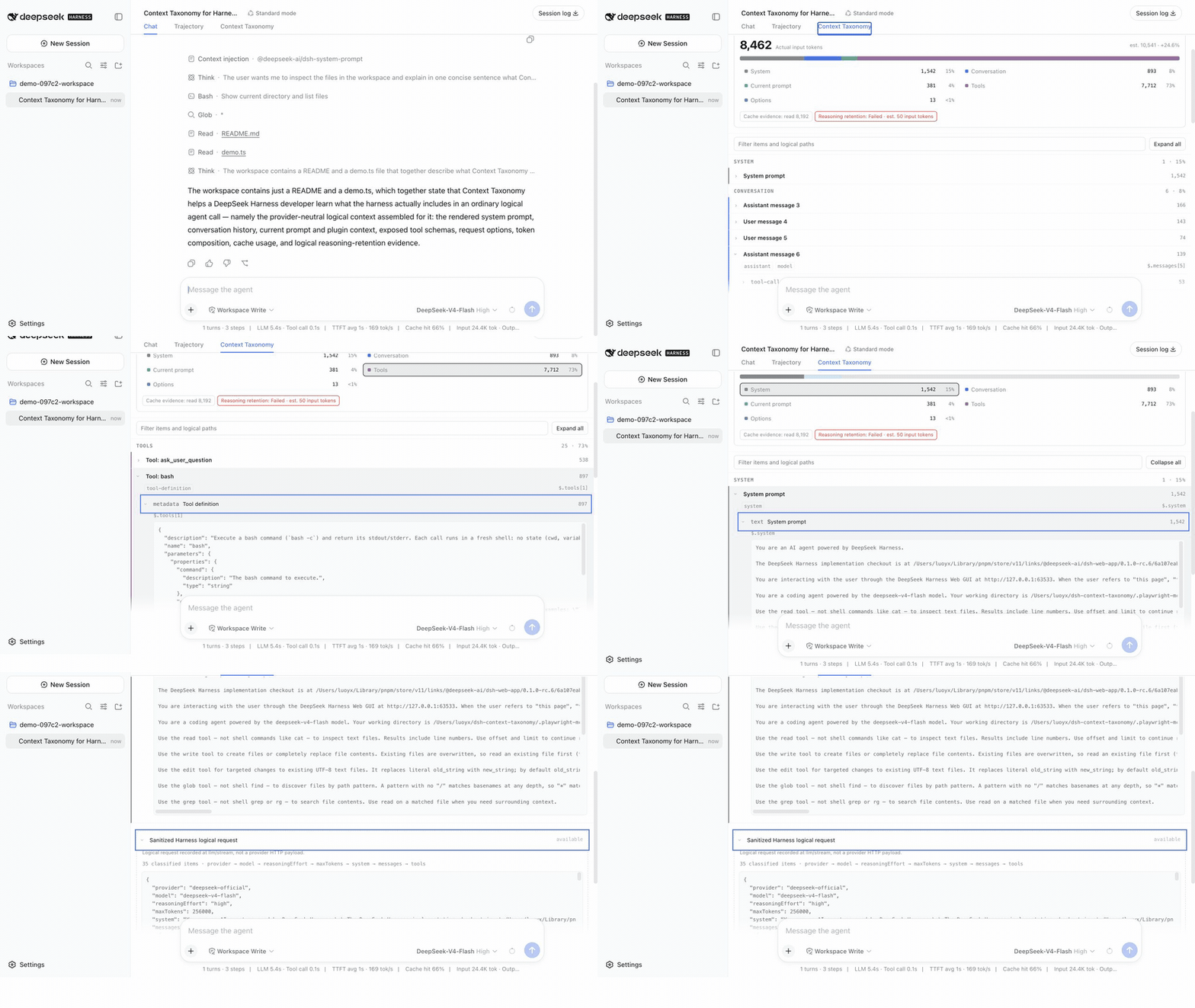
Recorded from a real DeepSeek-V4-Flash run on the official Harness 0.1.0-rc.6 Web profile—not a mock or fixture.
It does not capture a provider HTTP body, headers, endpoint, transport attempt, or delivery status. Calls that fail before LLM dispatch or are intercepted by an earlier waterfall listener are not visible.
Install
The package targets DeepSeek Harness 0.1.0-rc.6 exactly.
npx @deepseek-ai/[email protected] plugin --profile web add @artificialnotimbecile/[email protected]
For local development, pack the repository and install the resulting tarball:
pnpm install --ignore-scripts
pnpm run build
pnpm run test
pnpm --filter @artificialnotimbecile/dsh-context-taxonomy pack --pack-destination "$PWD"
npx @deepseek-ai/[email protected] plugin --profile web add ./artificialnotimbecile-dsh-context-taxonomy-0.1.0.tgz
A pinned Git source install can target the workspace subdirectory:
npx @deepseek-ai/[email protected] plugin --profile web add \
  'github:ArtificialNotImbecile/dsh-context-taxonomy#v0.1.0&path:packages/dsh-context-taxonomy'
This runs the package's prepare build. The first attempt stops safely and prints the exact codeload URL + commit + workspace-path key pnpm 11 requires under allowBuilds in the Web profile's pnpm-workspace.yaml; review the pinned source, add that exact key, then repeat the command. A package-name-only entry is insufficient for Git dependencies. The precompiled npm package is the normal installation path.
The bundle is Web-only because it uses the Web profile's storage-domain, API Gateway, client-module, and conversation-view services.
Open a Session and select the Context Taxonomy conversation tab. New ordinary agent-loop calls are followed automatically; selecting an older call pins the view until Jump to latest is used.
Configuration
The bundle patch supplies these explicit defaults:
| Field | Default | Meaning |
|---|---|---|
root |
$DSH_HOME/context-taxonomy |
Absolute private sidecar directory. |
captureContent |
sanitized |
Store sanitized logical JSON; structure-only stores summaries only. |
retentionDays |
30 |
Maximum settled-capture age. |
maxCapturesPerSession |
200 |
Maximum settled rows per Session lifecycle. |
maxStoredBytes |
536870912 |
Global compressed-blob budget. |
maxCaptureBytes |
16777216 |
Maximum sanitized bytes for one blob. Larger calls keep a summary with omitted-size-limit. |
maxPendingCaptures |
64 |
Background capture admission cap. Full queues omit new captures without changing the model stream. |
extraRedactKeyPatterns |
[] |
Additional case-insensitive Unicode regular expressions for object keys. |
The logical-request and RPC schemas use formatVersion: 1, taxonomyVersion: 1, and source: "dsh-logical-call". Captures are fenced by Session id, creation time, and working directory so a reused id cannot read an older lifecycle's sidecar.
Privacy and retention
Installation is the opt-in. The default bundle stores sanitized logical JSON locally for 30 days, up to 200 captures per Session lifecycle, 512 MiB globally, and 16 MiB per capture. The private data directory uses mode 0700; gzip blobs use 0600. Built-in secret-key, bearer token, credential query, data URL, and large-base64 redaction cannot be disabled. The plugin does not provide at-rest encryption or a delete Remote in v1.
The UI labels provider-reported usage as actual and category composition as estimated. A cache usage field only records what the downstream usage chunk disclosed; it does not identify which section hit a provider cache. The DeepSeek reasoning check evaluates logical messages only and is not evidence about serialized provider content.
License
MIT