tobs
Verified@botharness/tobs · v1.6.0 · MIT
Tobs — Team of bots with persistent memory, delegation and messaging.
Install
dsh plugin add @botharness/tobs Confirm the layer applied with dsh --profile default --dump-config — see the install guide.
Source
Published to npm without a public repository. Inspect the package contents before installing.
Tags
Readme
Tobs
中文 | English



Tobs: the open-source Grok Bot alternative. A crew of bots, each with its own identity, persona and memory, working together.
Website · Video · Install · Features · Releases · vs. DS Bot · Community · Docs
Video
Tobs in three minutes: a crew of bots with their own identity, persona and memory, working together in a small town. Recorded under the former DeepSeekBot name. Click the poster to play.
Tobs is BotHarness’s MIT-licensed, open-source Grok Bot alternative, running as a plugin in DeepSeek Harness (DSH). Create Bots for research, writing or coding and work with them like colleagues: chat one to one, bring them into a group, hand them tasks. They remember you, do things on schedule, and answer you under their own identity in Slack, Discord, Lark / Feishu, QQ and WeChat.
Bots use the model providers and quota you set up in DSH, and the machine running DSH has to stay online for Bots to keep working in the background. Tobs is a different project from the similarly named DS Bot (npm ds-bot); see how they differ.

Install
Tobs was formerly named DeepSeekBot. The deepseekbot npm package and command remain supported for existing users; new installations use @botharness/tobs, with the tobs command.
Follow the installation guide for the current verified installation command; install and enable it in DeepSeek Harness, and Bot mode appears in the sidebar. No DSH yet? Get the desktop app.
For command-line install, version notes and troubleshooting, see the installation guide.

What you can do with it
| You want | How Tobs helps |
|---|---|
| A small AI team of your own | Create a researcher, a designer, an engineer. Each Bot has a name, a persona and a pixel avatar, and stays the same Bot across conversations. |
| Bots that remember you | Bots keep your preferences and project context and pick up where they left off. You can read and correct their memory, and sync it to other computers. |
| Several Bots on one job | Bring Bots into a group chat and @ whoever you need. Hand a bigger task to one Bot to work on separately; it reports back and asks when it needs your call. |
| Bots in the chat apps you use | Connect Bots to Slack, Discord, Lark / Feishu, QQ and WeChat. @ them in a group or message them directly, and they reply in place under their own identity; in WeChat DMs they can also send and receive files. |
| Things done on time | Say “send me a log summary every morning at 9” and the Bot sets up the schedule itself, or set one to run every few minutes, hours or days. |
| Help on your computer and browser | Once you allow it, a Bot can open web pages, click, type and take screenshots, or work on a shared desktop. You watch it live and can pause it any time. |
| Ready-made Bots in one click | Browse and install Bots other people share in the Bot Marketplace, share your own, or send a Bot to a friend as a zip. |
| Know what each update brings | After an update, Bot mode shows what is new; check for and install updates from Settings in one click. |
Pixel avatars

Every Bot gets a pixel avatar made from its name, and while it works the avatar morphs into the tool it is using. Want to make one? Type a name in the Avatar Studio on our website and download it in high resolution.
Screenshots
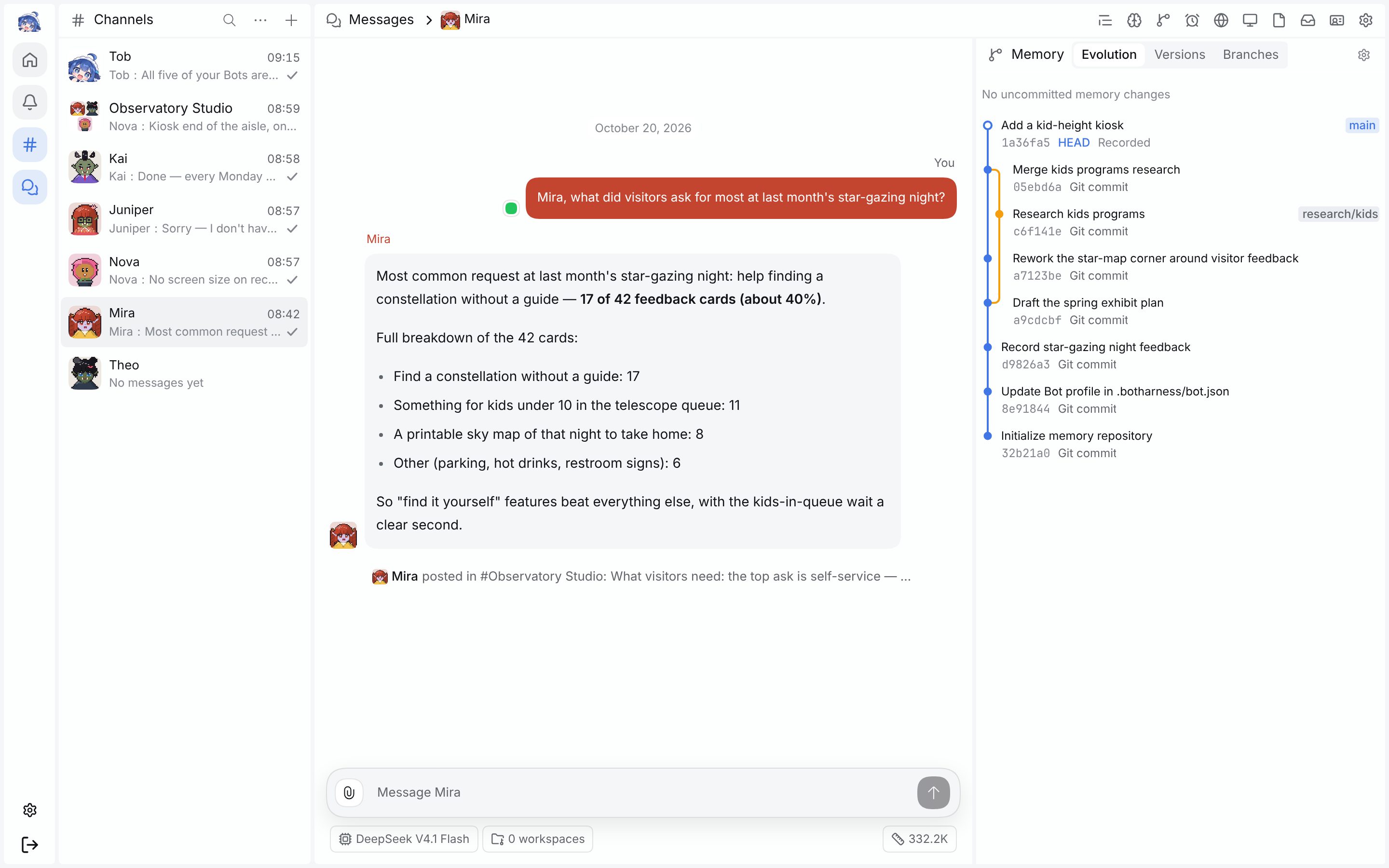 Bot DMs and memory evolution: Mira finds the visitor numbers in her memory; every commit and branch of that memory is on the right. |
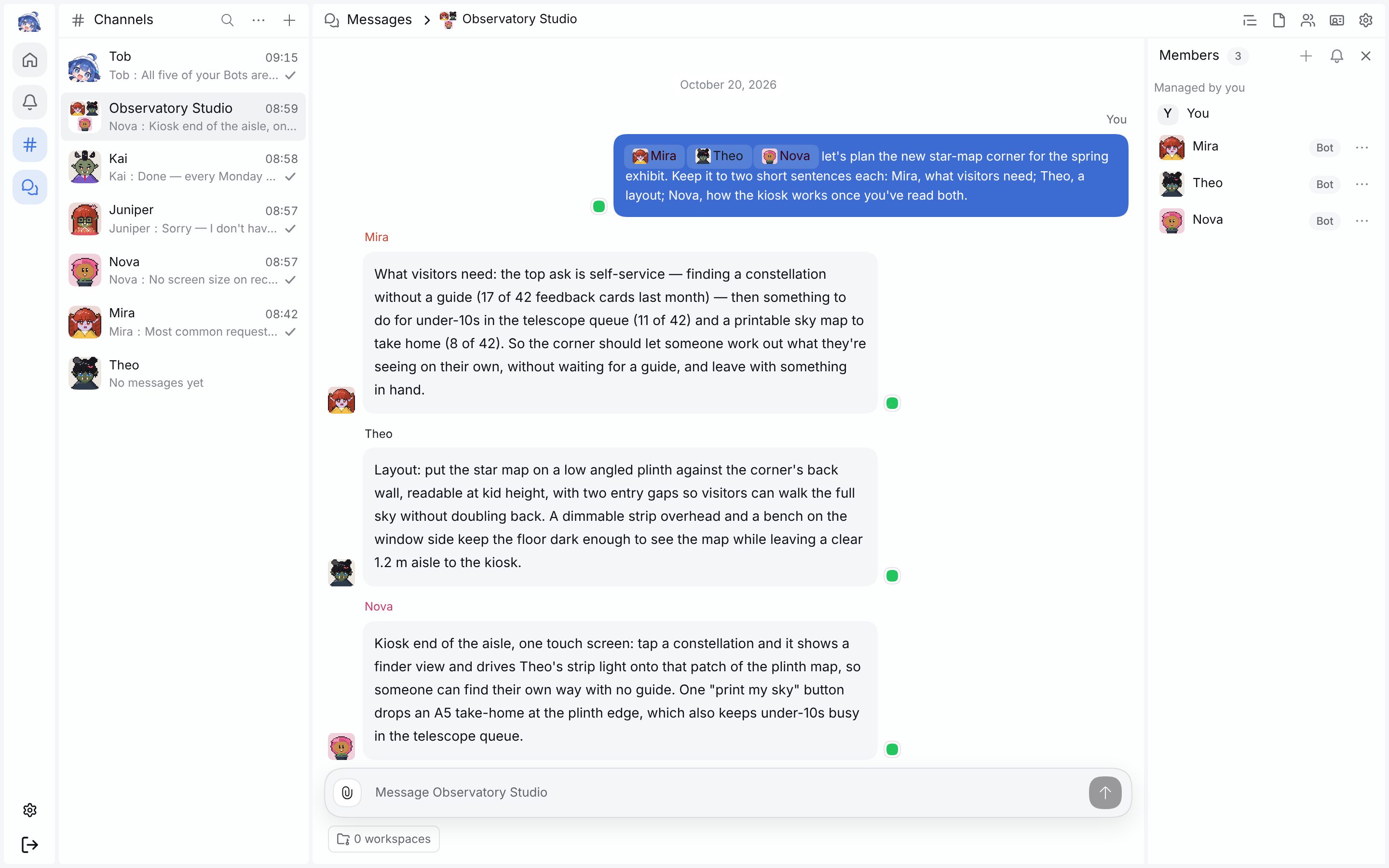 Group chats: @ three Bots and each replies; Nova reads the first two before answering. |
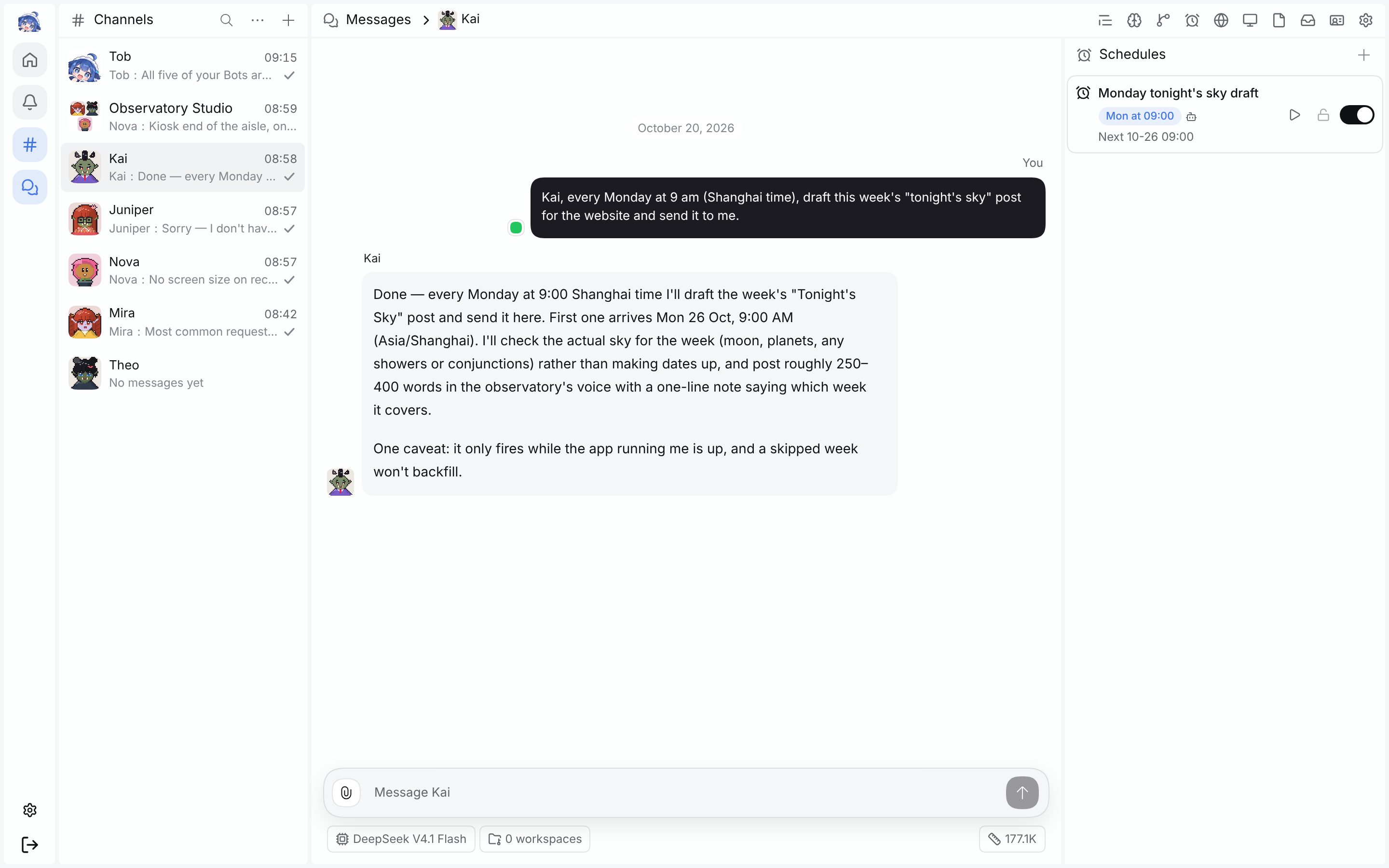 Schedules: one sentence and the Bot sets up the task. |
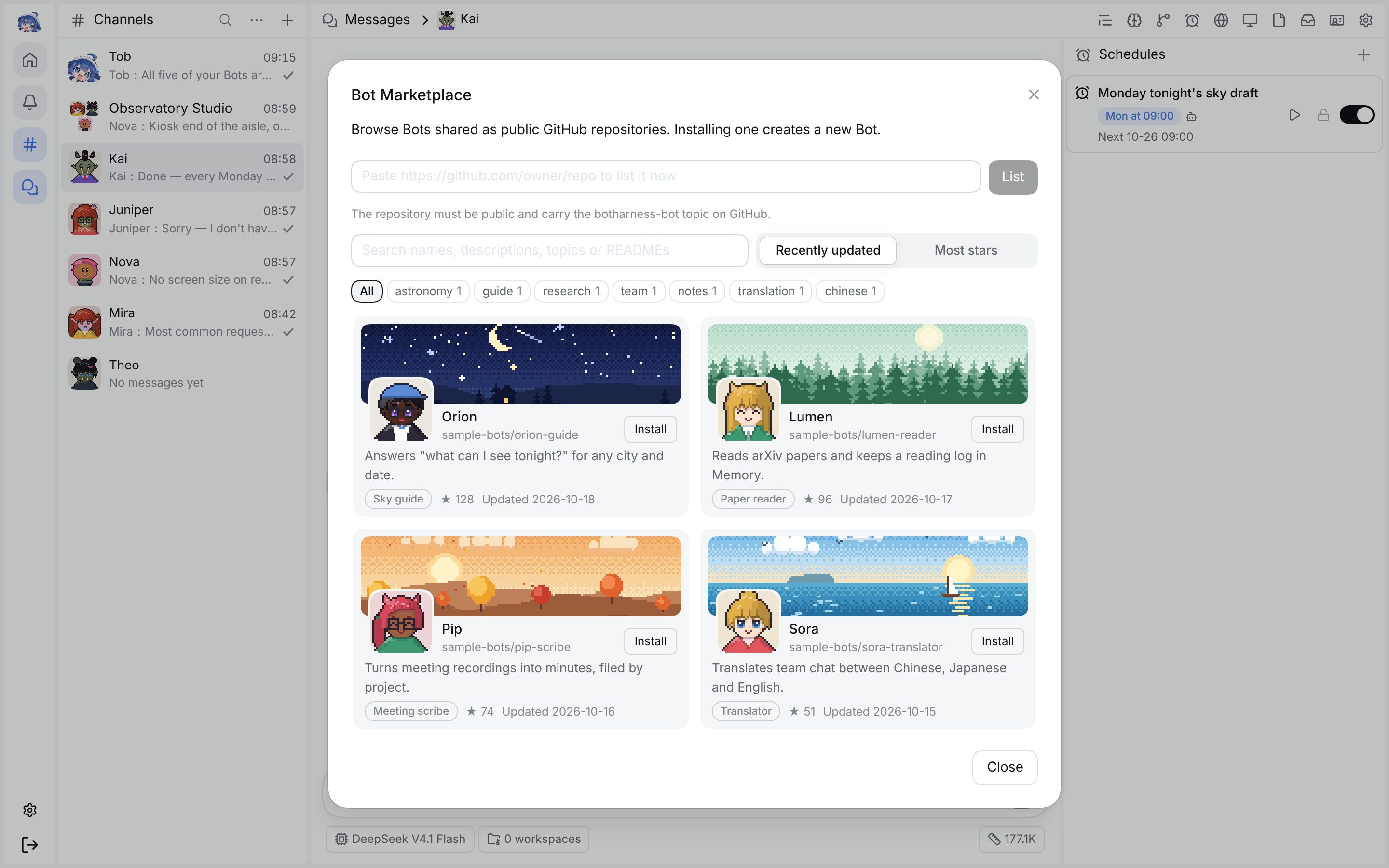 Bot Marketplace: find Bots by topic or keyword and install one as a new colleague (sample data). |
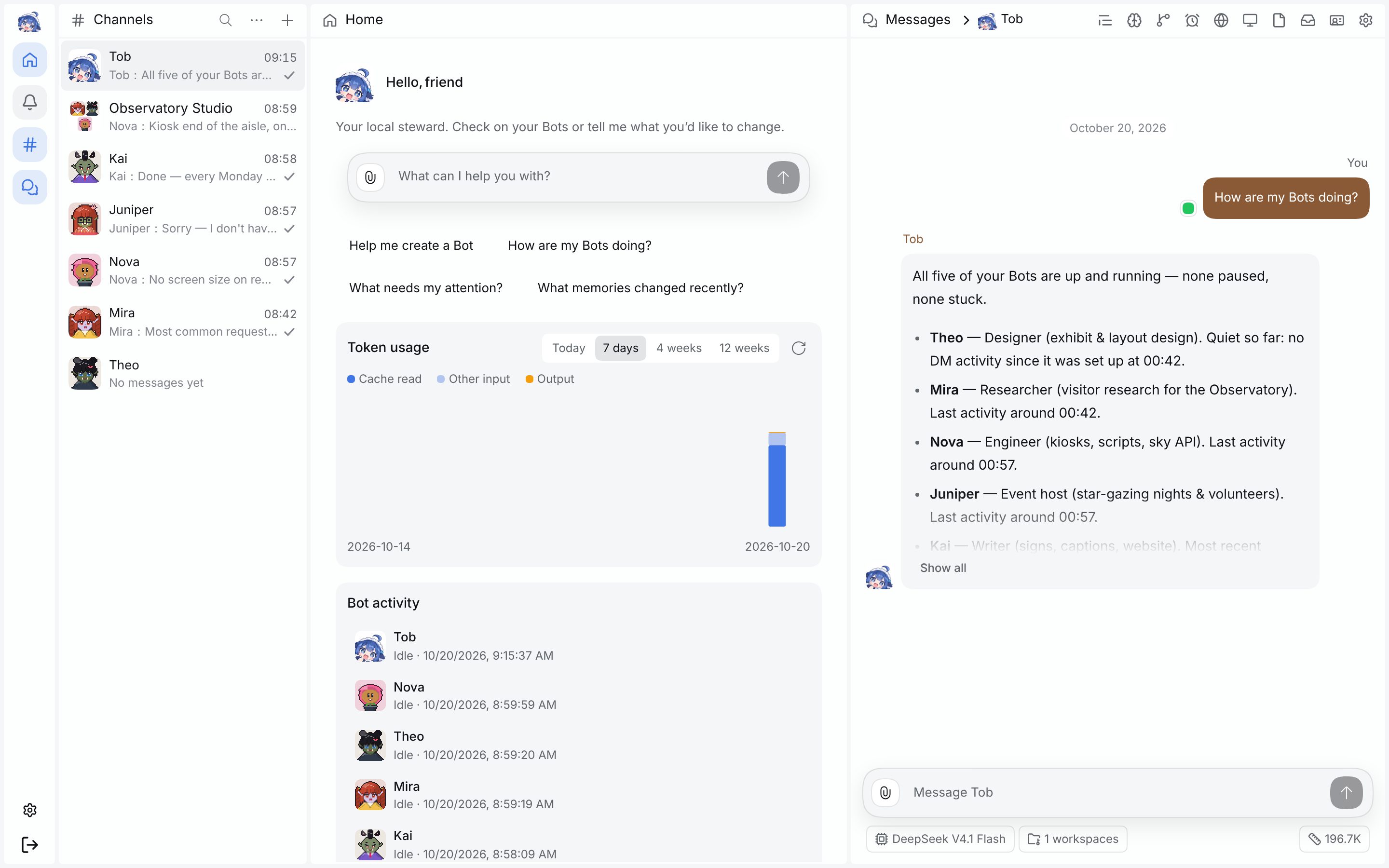 Home and Tob: put panels side by side; ask Tob and it reports on all your Bots. |
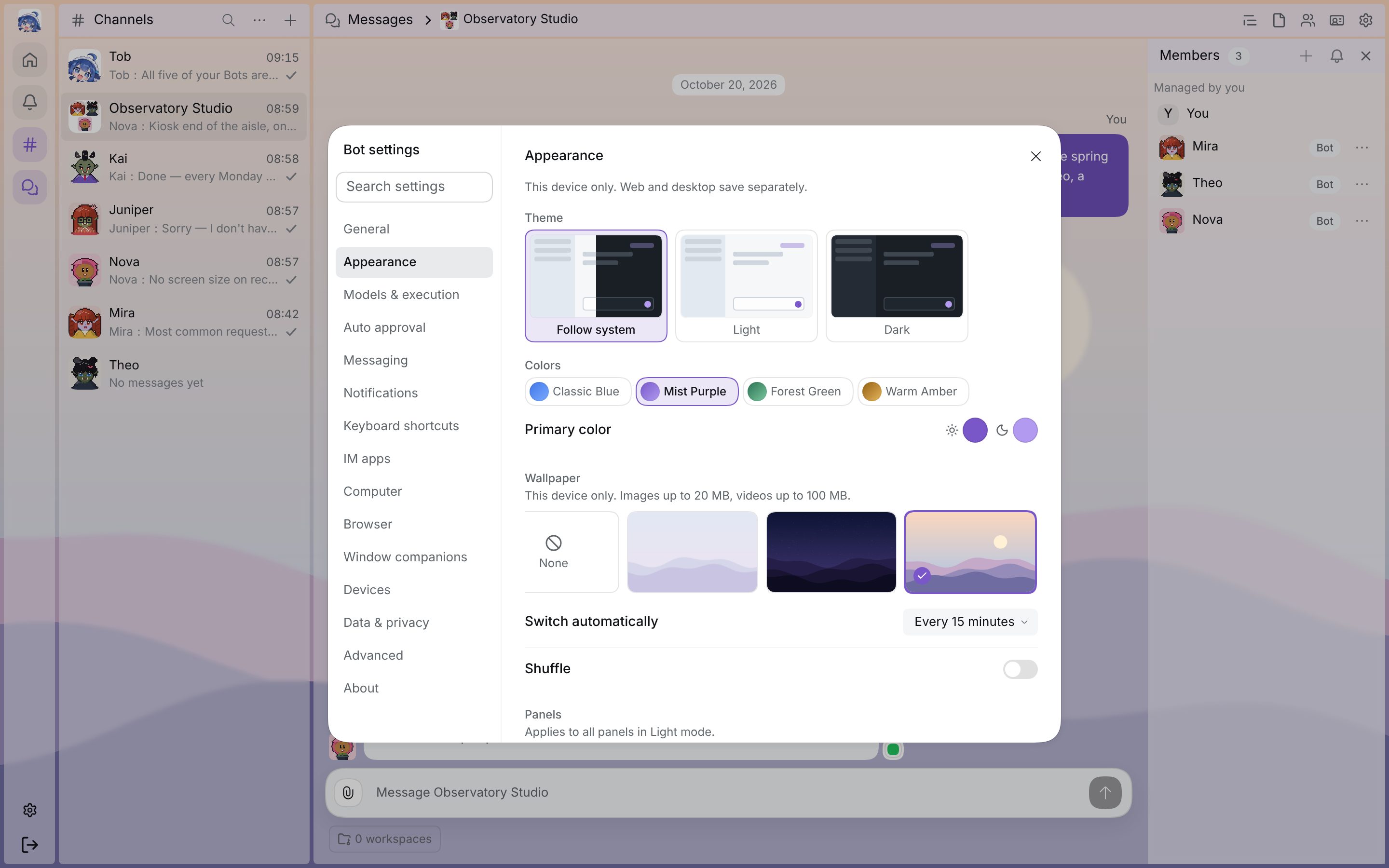 Appearance: themes, colors, a wallpaper library and see-through panels, saved on this device only. |
Screenshots from an isolated local DSH; the conversations are a fictional observatory-exhibition example.
Memory you can see
Each Bot's memory is a plain Git repository. In the sidebar you can read what it remembers and see which lines changed and when, and edit anything that is wrong. Push it to GitHub to use the same Bot on several computers. See the memory evolution guide.
Release highlights
Full history on the website changelog.
| Version | What's new |
|---|---|
| 1.5.2 (2026-10-25) | Native desktop zoom is enabled by default, without extra setup; fixes improve Windows/macOS Computer component reuse and setup errors. |
| 1.5.1 (2026-10-25) | Tobs ships as @botharness/tobs, keeping the supported deepseekbot entry; Bots use one delivery path for Channels and external chats; background task results can wake an idle Bot and report back; fixes restore installed CLI startup and the return-to-latest-message button. |
| 1.5.0 (2026-10-22) | Tobs Connect pairs a phone through your account without Tailscale; Storage clears old media and messages; the Bot Marketplace becomes a panel; plugins update from Bot settings; Bot mode is fast again on long conversations; the VRM companion installs on its own. |
| 1.4.1 (2026-10-20) | A five-step intro from Tob the first time you enter Bot mode; Bot mode gets its own themes, see-through panels and a wallpaper library; /compact and Idle Compaction keep long conversations fast; quick search jumps to any setting; Memory previews images and Markdown; the mobile Beta adds notification switches. |
| 1.4.0 (2026-10-19) | Tob on Home manages Bots, models and groups through chat; the desktop becomes a drag-and-drop panel workspace that remembers each Channel's layout; a reviewer model can handle approvals; pair a phone; the CLI covers almost everything the UI does. Supports DSH 0.2.0-rc.2 through 0.2.x. |
| 1.3.1 (2026-10-14) | Installing deepseekbot from the Plugins page takes one step again, with no build approval; needs DSH 0.2.0-rc.2. The deepseekbot CLI can configure a Host, drive a Bot's Browser and Computer, and manage IM apps; the Browser panel updates live. |
| 1.3.0 (2026-10-14) | One design system across Bot mode, with Channel settings in a dialog; the Orchestrator tidies its own inbox and tasks; Bots use your secrets for CLI tools and MCP servers with your approval, and set up MCP from one sentence; export multi-selected messages; Bot colors, more pixel species and hand-drawn parts; restore memory to any version. Needs DSH 0.2.0 or later. |
| 1.2.1 (2026-10-12) | Fixes installs failing on some DSH versions; group avatars show a grid of member avatars; audio and file attachments play and download in place. |
| 1.2.0 (2026-10-08) | Pixel Window Companions you can pin on your desktop; bind one app to message Bots in Lark, Slack, Discord and WeChat; import and export Bots as zip files; Bot profiles with a banner and bio. |
| 1.1.0 (2026-10-06) | Schedules; every conversation carries the Bot's persona and core memory; one-click update in Settings; WeChat voice-to-text and images. |
| 1.0.1 (2026-10-05) | First stable release: PersonaBots with their own identity, Git memory, group chats, delegated tasks, pixel avatars, IM connections and the first Bot Marketplace. |
Tobs and DS Bot (ds-bot): two projects, different focus
The names are close, but these are two independent open-source projects. Both run on DeepSeek Harness (DSH), and neither is an official DeepSeek product.
- Tobs, this repository, by BotHarness, makes each Bot a long-lived colleague that works beyond the DSH window: Git memory you can review, the Bot's own Lark / Slack / Discord / WeChat identity, schedules, delegated Assignments and a Bot Marketplace.
- DS Bot, Fei2411/DeepSeek-Bot (npm
ds-bot, also written DeepSeek Bot in its README), turns DSH itself into a bot chat app: a main Bot, Chief, sets up your team through conversation, a group admin answers first to keep token use down, and a Usage page shows tokens by time, Bot and model.
| Tobs | DS Bot (ds-bot) | |
|---|---|---|
| Repository | BotHarness/DeepSeekBot | Fei2411/DeepSeek-Bot |
| Package | npm @botharness/tobs |
npm ds-bot |
| License | MIT | Apache-2.0 |
| Memory | One Git working tree per Bot: files, commits and diffs; push to GitHub to share it across machines | Markdown memory reviewed after each turn; personal and team levels |
| Several Bots | @ whoever you need in a Group; Assignments delegate separate tasks with their own reports | A main Bot manages the team; a group admin answers by default and calls in other Bots |
| Beyond DSH | Bots join Lark / Feishu, Slack, Discord and WeChat under their own identity | GitHub connector |
| Also | Schedules, Bot Marketplace, Bot import and export, pixel avatars | Schedules, Usage page |
Which one? If you want Bots to work in your IM under their own identity, or to review and sync memory with Git, try Tobs. If you want a main Bot to walk you through building a team inside DSH and keep an eye on token use, try DS Bot. Both are open source, so read both codebases: Tobs · DS Bot. For a longer comparison, see the article on our website.
FAQ
Which DeepSeek Bot project is this?
This is Tobs by BotHarness: npm package @botharness/tobs, website tobs.app. DS Bot uses ds-bot and is a separate project, not a short name or an older version of this one. See how the two differ.
Does Tobs require DeepSeek models?
No. It uses the providers configured in DSH; availability depends on API support, model settings and credentials. Memory and chat history stay on your host, while calls to a remote model send relevant context to the provider you chose.
For developers
To run from source or contribute, you need Node ≥22 and pnpm.
git clone https://github.com/BotHarness/DeepSeekBot.git BotHarness
cd BotHarness
pnpm install && pnpm build
node scripts/dev-instance.mjs --home /tmp/botharness-demo --port 31967
More in the local instance guide · contributing guide · architecture · decisions · agent guidelines · Release Ledger · DSH docs.
For real IM tests, the shared QA App wizard configures independent Lark, Slack and Discord QA1/QA2/QA3 slots. For example, run node scripts/dev-im-test-apps.mjs setup discord to enter the Token privately; confirm the current exclusive window before each receiver start.

Community
Questions, ideas and the Bots you build are all welcome.
| Come say hello | Build something together |
|---|---|
 |
Join the Tobs server to ask questions and share your crew. |
 |
Search for group 1125565676 in QQ. |
 |
Questions, ideas and things you have made · Welcome thread. |
 |
Contribution guide · First contribution. Docs, tests and answers all help; use Issues for confirmed bugs and implementation tasks. |
 |
We are on Product Hunt. Take a look and share Tobs with a friend. |

Repository status
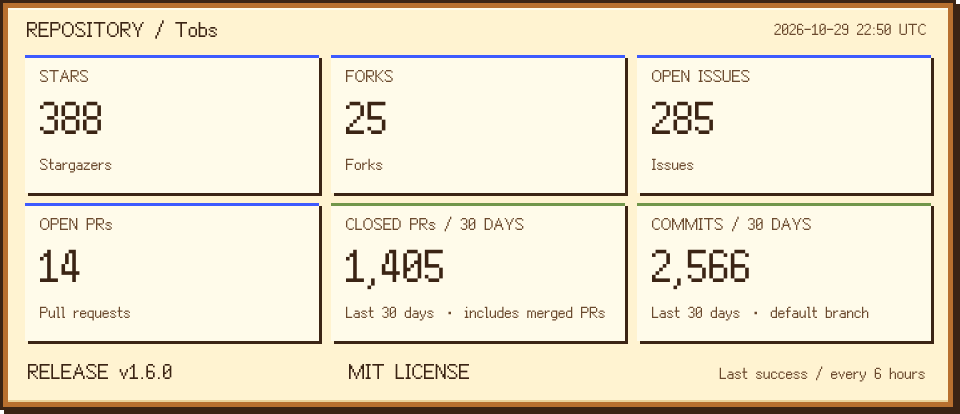
Last 30 days: closed PRs include merged PRs; commits count all reachable default-branch history, including merge and bot commits. Updated every six hours; the card shows the last successful update.
Text data and counting rules · JSON · Update workflow

Inspiration and acknowledgements
- Grok Bot: persistent Bots that people can message and delegate work to like teammates.
- Rakazo: persistent AI teammates, conversations, and memory.
- DS Bot: another Bot plugin for DSH with a different focus, worth a read.
- deepseek-harness-workbench-plugin: Memory Git graph rails, commit lists, and diff presentation.
- Coopanion: the Window Companion's single speech bubble, sentence pacing, walking direction, and bubble style.
- DeepSeek Harness: the upstream plugin host.
- dsh-im, dsh-lark-link, and dsh-lark-bridge: IM integration foundations and reliability/routing references.
License
MIT — see LICENSE. Third-party works distributed inside the Client Bundle are listed in THIRD_PARTY_NOTICES.md.
Star History
Live chart for BotHarness/DeepSeekBot, using Star History's official embed.