clawock-dsh
Verifiedclawock-dsh · v0.4.1 · MIT · Web UI
Investment decision skill, trade-to-plan views, and a background task panel for DeepSeek Harness (dsh).
Install
dsh plugin add clawock-dsh Confirm the layer applied with dsh --profile default --dump-config — see the install guide.
Source
- github/kcnyu/clawock 21 0
Tags
Creators
Readme
clawock-dsh



AI argues. Code settles. The losses stay on the page.
The clawock investment-decision workflow, as a DeepSeek Harness plugin. A skill package that makes the agent walk four steps — read the request, research and argue both sides, write the decision, then let Python validate and settle it — plus a Decision Mind tab that renders every real fill as an expandable decision trace inside the DSH web GUI.
The fourth step is the one that matters: the model never touches settlement. Prices, FX, P&L and the scorecard are computed by code the agent cannot write to, so a wrong call shows up as a loss on a public page instead of as a better-sounding paragraph.
- Live proof — a real Hong Kong + US brokerage account, run this way every trading day: https://kcnyu.github.io/clawock/
- Evidence, wins and losses both — https://kcnyu.github.io/clawock/#reflect
- Source and issues — https://github.com/KCNyu/clawock
dsh plugin --profile web add clawock-dsh
Installation needs one more step on rc.6 and later (skill discovery), covered in the installation section below. On a host that runs clawock's agent-dispatch, the sidebar panel is also a view and control plane for that host's task queue: see Dispatch queue, which is in English and Chinese. The rest of this README is in Chinese.
DeepSeek Harness 的投资决策工作流插件:agent 走完 「读请求 → 研究 + 正反辩论 → 写决策 → Python 校验结算」四步, web GUI 多一个 Decision Mind tab 把每笔成交的决策轨迹钉在页面上。
第四步是核心:模型永远不能给自己打分——价格、风控、账本、战绩全部由 Python 独立结算,agent 写不到那段代码,下错单显示为一笔公开页上的亏损, 而不是一段更好听的文字。
前提
agent 所在环境需要 Python ≥ 3.11,并且:
python -m pip install clawock
安装
三步,缺一不可(rc.6 及以后 DSH 只扫项目根与用户根、不扫 node_modules, 所以 skill 必须手动放一步到可发现的位置):
# 1. 装插件本体
dsh plugin --profile web add clawock-dsh

# 2. 把 skill 放到 DSH 可发现的位置(任选其一,不选这步 agent 不会带这个 skill)
cp -r ~/.dsh/profiles/web/node_modules/clawock-dsh/skills/investment-decision ~/.dsh/skills/
# 或项目级:
cp -r ~/.dsh/profiles/web/node_modules/clawock-dsh/skills/investment-decision <project>/.agents/skills/

# 3. 重启 web profile
重启后 skill 即出现在 agent 的 skill 目录。
快速开始
装完直接问:
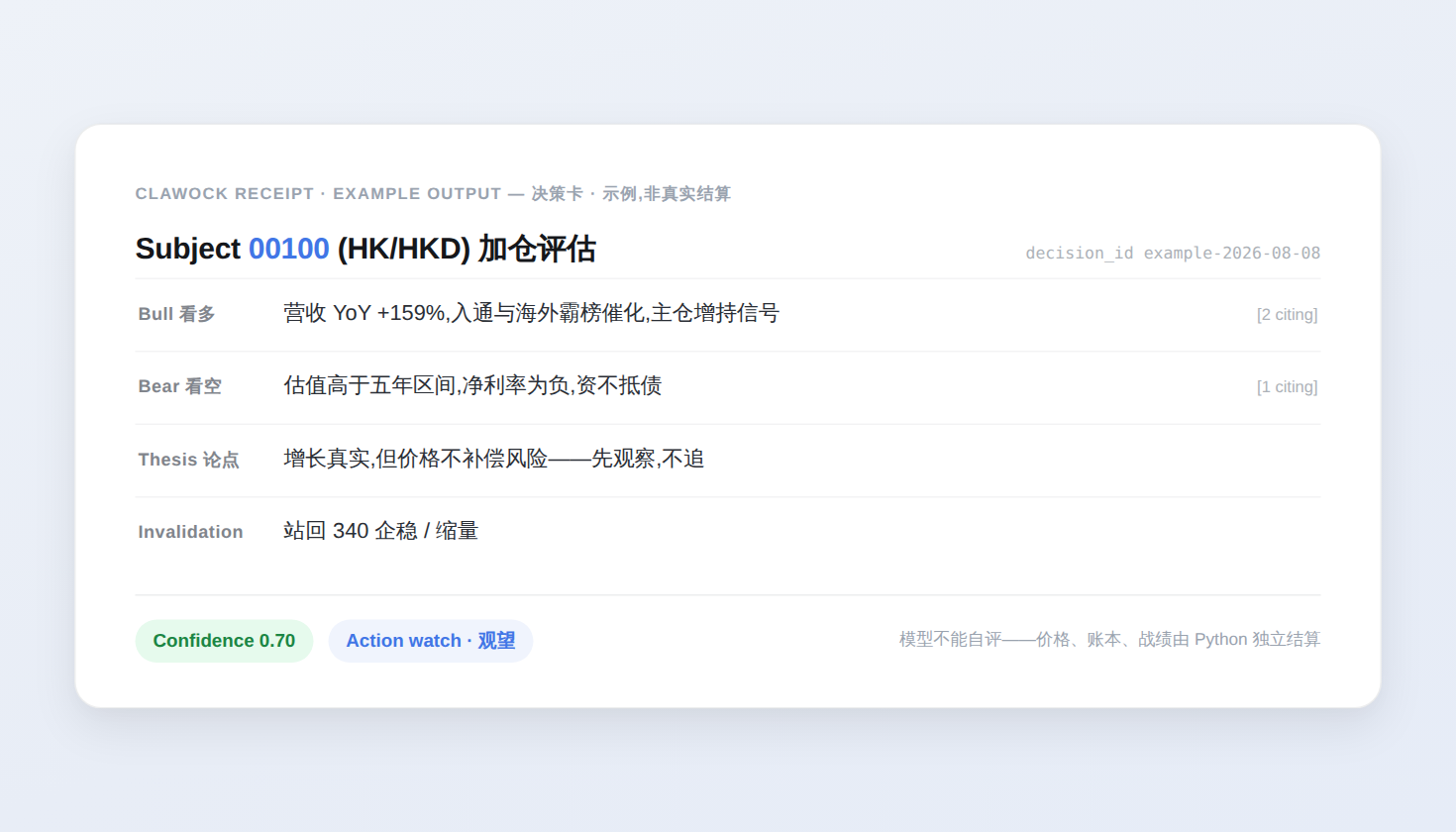
你:帮我分析一下 0700.HK 能不能加点仓
agent 走完四步,给你一张决策卡——bull / bear / thesis / confidence / action / run_id,判定和结算是 Python 算的,不是模型说的:
你得到什么
一个会辩论、不会自评的 agent
- 主动收集正反双方证据——发布时 Python 强制至少一条 opposing 论据, 熊方必须是真反驳,不是稻草人;
- 有界行动:动作、数量、触发条件写进
decision.json,由 Python 校验; - 情绪状态自认,non-calm 才会出现在面板里。
一个只读的 Decision Mind tab
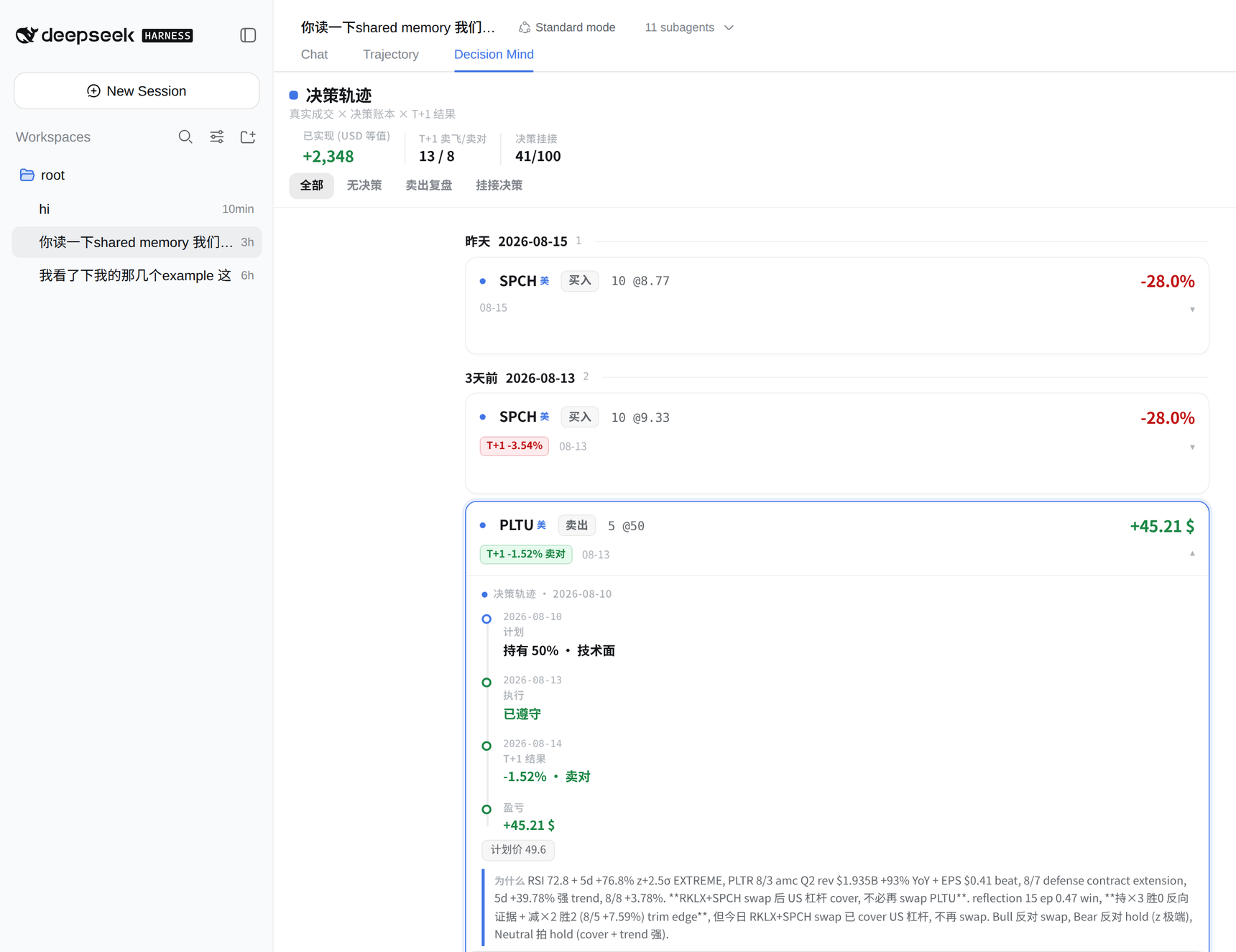
装完后 web GUI 的会话视图多一个 Decision Mind tab。它只做一件事: 每一笔真实成交,都是一条可以点开的决策轨迹。
- 账本式分组:一天一组,行内 = 日期 · 标的 · 动作 · 数量@价 · T+1 判定 · 与计划反向标记 · 盈亏焦点数字,同组对齐、竖着扫就是比同一件事;
- T+1 判定用官方逐日收盘(
memory/bars/),绝不读实时快照;未判出就 显式写「T+1 未判」,不假装没这回事; - 点开一条轨迹:当时的计划 → 真实成交(与计划同向/反向)→ T+1 收盘 → 本笔已实现 / 该持仓当前浮动——两个量永不共用一个「盈亏」标签;
- 没有当日计划的成交显式标注——不假装有判断。
面板是只读 Remote,不改任何文件;结算仍归 clawock 自己的机制。
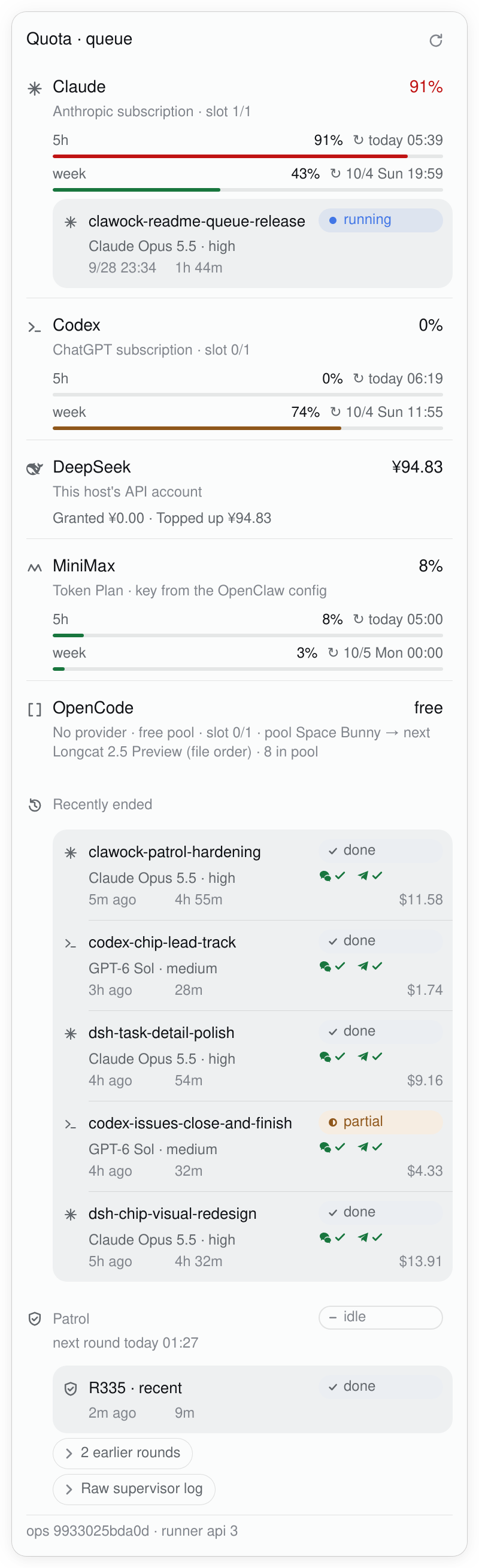
侧边栏左下角的 provider 面板(额度 · 队列)
web GUI 左侧栏底部、Settings 正上方常驻一个 cell(provider-balance,2026-09-27 起
余额与派发队列合成一个,原先上方的 dispatch-queue 已退休),不跟随当前会话。折叠态每个
来源一行,只放四样:字形 · 名字 · 额度读数(已使用 % / 余额 / 免费池写「免费」)· 一枚状态
芯片。芯片只说这一队最需要看的一件事——等额度 > 排队 > 其他等待 > 运行,带数量;闲着或没有
队列的 provider 不画芯片。五行共用一套列(subgrid),读数与芯片上下对齐。重置时刻、plan、
key 来源、池内位置不常驻:它们在面板里该来源的分组上,也仍在这一行的读屏文本与 title 里。
(2026-09-28 之前最后一列是 ▶ ≡ ⏸ 形状+数字,是 260px 塞不下时钟与计数时的权宜,已撤掉。)顺序只写在
src/providers.ts 的 join 表(有 agent 的 claude、codex、dsh、opencode 在前),其余 provider 按
BALANCE_PROVIDERS 表序;新增 provider 仍只改那张表。侧栏收起(56px rail)时只剩一枚图标:
有窗口到阈值或有任务在睡额度 → 琥珀方角标,读数失败 → 红色空心环,否则不带角标。
点任意一行在 cell 正上方弹出面板并落在该来源的分组:组头就是折叠态那一行(同一字形、名字、
读数,14px 粗体,不再带芯片),其下一行灰字说明 plan · 槽位 · 池,然后是额度(每窗口一行读数 + 发丝进度条 + 重置;
DeepSeek 是钱,显示赠金 / 充值拆分,不画条),最后是它喂的那条队列——放在从名字那条边开始的内嵌底板
上(状态芯片是短词——运行中 / 排队 #2 / 等额度…,完整原因与 runner 的「等到」、窗口重置两个时刻在芯片的
title 与详情层)。额度在面板上、任务在底板上,两级不混。点任务进详情层:槽位、模型与 effort、尝试 /
停滞、实际生效的 deadline 与重试预算、花费(按 API 价估算,非实际扣费)、通知回执,以及
「任务书」(在 dsh 自带的右侧文件预览里打开 prompt.md 与各条追加,只读)和既有的写操作
(全部经 ops/host/task_queue_ops.py)。取数失败的 provider 保留上一次好读数并写明读数时间;
没有派发器的主机只显示 provider 行。
挂载点是 DSH 公开的 sidebar.footer.action(侧栏底部 Settings 旁的动作座位),
弹出层照抄宿主自己同座位的 Cordis 面板:固定定位锚在这一行上方、点外面/Esc 关闭。
(第一版曾用 keyed main 中间面板,点一下整栏对话就被换成一张几乎空白的页,
体感是「被切走」,已改掉。)插件在 DSH 0.1.5-rc.1 起(有 ctx.layout.selectPanel)
的宿主上挂到侧栏;更早的宿主退回会话标题行右侧 utilities 座位的毛玻璃芯片
(行为同上)。它不是 Decision Mind 的一部分:账户状态是应用级 chrome,
不是交易语义。配额读数一律是已使用 %(kcn:「剩余」不直观;头条数字
与进度条同用这套档位配色):
| Provider | 口径 | 读数 |
|---|---|---|
| DeepSeek | 官方 GET /user/balance(凭据缝 → 环境变量) |
余额 ¥(CNY 行优先,金额口径不变),面板见赠金/充值拆分 |
| MiniMax | 官方 GET /v1/token_plan/remains(Token Plan 配额窗口) |
窗口已使用 %(上游报剩余则取补;general 桶;固定 5 小时 + 周窗口,重置时刻取 API 的 end_time);key 解析链=凭据缝 → env → openclaw 网关配置(~/.openclaw/openclaw.json 的 models.providers.minimax.apiKey) |
| Claude | 订阅制额度:OAuth GET /api/oauth/usage(anthropic-beta: oauth-2025-04-20),token 读自 ~/.claude/.credentials.json |
会话窗口已使用 %(utilization 本来就是用量,直读不再取补)+ 本周已使用;面板附各窗口重置时间 |
| Codex | ChatGPT 订阅额度:本机 Codex CLI 的官方 codex app-server(JSON-RPC account/rateLimits/read),鉴权归 CLI 自己 |
5h 窗口已使用 % + 本周已使用;后端报额度受限时附「当前额度受限」 |
- OpenCode Zen 无公开余额接口(上游 issue 还开着),不做假装有数的行;
- 某家未配置 = 面板里诚实的一行「未配置」,不隐藏也不报错;
- 低额红点:DeepSeek ≤¥20、MiniMax/Claude/Codex 已使用 ≥80%(即剩余 ≤20%);
*LowPct配置字段保持「剩余水位」原义不动,已有配置值无需改,只是展示 方向翻转了;进度条与头条数字按同一档位变色(60% 黄 / 80% 红),圆点仍是 provider 状态灯(绿正常/黄过期/红异常),两者正交;档位只染色不减信息 (kcn 反馈 #908):进红档后面板行的每窗读数、进度条、重置时间与头条的 副读数、↻ 全部保留,水位警示句只是并排多讲一句,不顶掉任何字段; - 刷新失败保留最近一次快照并标注 stale(黄点);瞬时 429 不抹掉真数字;
Claude 行的「请求过于频繁,请稍后再试」就是
/api/oauth/usage被问得太勤的 429(本机的派发通知quota.mjs也读这个端点),额度读不到不代表任务异常, 不要据此判断派发任务卡死; - Claude 的 OAuth token 归 Claude Code 所有,本插件只读不刷新——访问令牌 到期(几小时没跑过 claude)时面板写明「不是登录失效,下次运行 claude 自动续期」; 只有登录文件里没有 refresh token 才提示重新登录;
- 宿主侧每 provider TTL 缓存、并发合并:DeepSeek/MiniMax/Claude 60s,Codex 跟
codexRefreshMs(默认 5 分钟——每次读额度要拉起一个 app-server 进程); 手动 ↻ 强制拉新,不走缓存; - 每个 provider 最近一次读成功的读数另存一份在
~/.cache/clawock-dsh/balance-<provider>.json(只有读数,没有凭据;CLAWOCK_DSH_STATE_DIR可改目录)。dsh gateway 与 OpenClaw 的/dispatch-list是两个进程,都读写这一份:刚重启、还没读成功过的进程第一次就读失败时 (夜里没人跑 claude,访问令牌到期),照样显示上次读数并标明「刷新失败,显示 … 的读数」, 而不是一个「—」; - 客户端按「读数有没有印在屏幕上」定节奏:侧栏展开(折叠行印着数)或面板打开时
静默轮询 ≥60s;收成 56px 窄栏时只剩一枚阈值徽标,改为 15 分钟核一次
(
BALANCE_BADGE_MS)。打开面板/展开侧栏的那一刻立即读一次(手上的答案不足 一个轮询周期时不重复读),所以看到的数最多旧一个宿主 TTL。隐藏的标签页不轮询。
可选配置(profile 的 cordis.patch.yml 行内,改后重启 dsh 生效):
balanceBaseUrl / balanceThreshold / balanceRefreshMs /
minimaxBaseUrl / minimaxKeyRef / minimaxLowPct / minimaxOpenclawConfigPath /
claudeCredentialsPath / claudeUsageUrl / claudeLowPct /
codexCommand(Codex CLI 路径,默认 ~/.local/bin/codex)/ codexLowPct /
codexRefreshMs(Codex 轮询与缓存周期,默认 300000)。
三个文件类默认值(minimaxOpenclawConfigPath / claudeCredentialsPath /
codexCommand)都挂在当前用户的家目录下(homedir()),不是写死的
/root/...——本包发布在 npm 上,绝对家目录会把一台机器的布局当成所有人的
默认值;换 uid 跑也会读错账号。profile 行里可以逐个覆盖。
面板里的派发队列
装了 agent-dispatch 的主机上(~/logs/agent-dispatch 存在),队列就在上面那个 provider 面板里,
挂在喂它的那一行 agent 下面(2026-09-27 起不再单独占一行;这套控制面本身见下方
派发队列)。运行槽按 agent 分(limits.env 的
MAX_RUNNING_<AGENT>),所以不写 n/总数。
点开是宿主菜单材质的面板(--dsw-specific-menu + --dsw-menu-backdrop-filter,
--dsw-elevation-prominent,12px 圆角,44px 头),按执行器分组——每个 agent 一把锁,
所以每组就是一条独立的队列,顺序只在组内。
一套行栅格(2026-09-28 重做;src/client.ts 的 ROW_KINDS / FACT_ORDER / FACT_CELL,
列宽只写在 styles.module.css 的 --tq-grid,spec 钉住):面板里每一行都是同五轨,其中三轨定宽,
所以同一种信息在任何行都落在同一条竖线上——
| lead 14px | when 72px | took 80px | rest 1fr | aside 80px | |
|---|---|---|---|---|---|
| 第 1 行 | 字形 | 名字 ──────── | 一枚状态芯片,或组头的读数 | ||
| 第 2 行 | 模型(+ 回退标记)──── | 通知回执 / 尝试·卡死 | |||
| 第 3 行 | 时刻 | 用时 | 估算费用(右对齐) |
没有的值留空格,不挪位;组头(来源、分节)的第 2 行是一句灰字说明而不是事实。窄于 380px 的手机 三条定宽轨各收一档。
常驻芯片最多一枚(RESIDENT_CHIPS = 1,spec 对每一行计数):只有状态是芯片;时刻、用时、费用、
模型是固定格里的字,回执与回退是标记。放不进这三行格子的——执行判决与任务报告分开的两个轴、尝试预算、
首次排队、巡检标记、会话——不换行、不加省略号,一律在点开的详情层。
状态角色(STATE_ROLES):每个角色 = 宿主角色色 + 底(实底/描边/虚线)+ 字形 + 短词,暗色主题与
转灰度下仍可分:
| 角色 | 底 · 字形 | 用在 |
|---|---|---|
| 运行 run | 蓝实底 · 实心点 | 占着槽在跑 |
| 排队 queue | 蓝描边 · 空心环 | 等本 agent 的锁或运行槽 |
| 睡额度 sleep | 琥珀实底 · 月牙 | 等额度窗口重置 |
| 其他等待 wait | 琥珀描边 · 沙漏 | 等内存、重试退避、启动中;巡检让路 |
| 完成 done | 中性底 · 勾 | 执行完成且模型报完成(不用绿:它靠模型自报) |
| 未完成 partial | 琥珀实底 · 半圆 | 部分完成、受阻、额度中止、让路取消 |
| 失败 fail | 红实底 · 叉 | 执行失败、超时(自报完成也是失败,title 写两轴) |
| 停 off | 中性描边 · 横线 | 已取消、未启动、巡检等下一轮 |
| 未知 unknown | 虚线 · 问号 | 没有可判的记录(无报告) |
| 回退 fallback | 琥珀描边 · 回转箭头 | 模型行上的标记:实际跑的不是请求的模型 |
通知回执(最近结束的第 2 行 aside):每个通道一个标记 = 通道字形 + ✓/✕/?,只读 result.env
的 NOTIFIED / NOTIFY_FAILED(runner 按 openclaw message send 的返回写):绿 ✓ = 该通道有送达回执,
红 ✕ = 回执写失败,灰 ? = 任务要了这个通道但没有回执(旧 runner 或那条腿没跑),不因为任务完成就推断
送达。在跑的任务行不画回执(结束通知还没发;等额度通知的回执在详情层)。runner 不会补发通知,
所以没有「补发」状态;回退角色只用于模型回退。
组头下的说明、额度、底板与折叠控件都从名字那条边(--tq-main-inset)开始,整块面板的右缘只有一条
(组头读数、窗口进度条、底板里的芯片与费用同一右缘)。节奏:组头上下 6px、底板行上下 8px,首行 20px,
其后每行 16px、行间 2px;来源组之间发丝线,分节(最近结束、巡检)只靠留白分开。
- 组头:槽位
槽 1/1(满了且组内有人排队变琥珀字);锁被组外的任务占着、或该 agent 额度用尽 (「额度用尽,23:20 恢复(x 触发)」)时各一行说明;闲着的组只有组头,不再写「没有任务」; - 行:持锁的在前,其后按
task_queue_ops.py的真实拿锁顺序(芯片排队 #2,title 是等 claude 锁 · 第 2 位)。模型是完整模型名Claude Opus 5.5 · high(排队的显示将要用的, 在跑的显示实际MODEL_USED,不一致时带回退标记)。没发布RUNNER_API=2的任务不在排队顺序里: 列表行不加标记,点开详情写「无 RUNNER_API 2:不在排队顺序里,不能调整顺序或模型」;上移按钮叠在 该行空着的 lead 轨上,不挤占行宽; - 「最近结束」与「巡检轮次」是同一种行:一枚状态芯片把 runner 的执行判决与模型最终报告折成最需要看的
那一个角色(见上表),芯片 title 与详情层照旧把两个轴分开写(执行完成 · 任务:部分完成;执行失败 ·
任务:自报完成)。首次排队不常驻,在详情层;详情层的首次排队
waitMs是 host 从QUEUED_AT到run.log第一条got run slot派生的可选字段;旧 host、旧 runner 或截断的日志没有该字段时显示 「排队耗时未记录」,绝不把总用时冒充等待。 - 巡检轮次的第二行是这一轮经提报闸送出了什么(
rounds.tsv结果列的第三段,patrol.sh写):单独开的 issue 带分级(P1 #2240)、进周期汇总的条数(汇总 +2)、作为同根因补充挂到已有 issue 的条数(补充 1);有 P0 时用警示色。 一条都没提的轮次没有这一行;这段只在 client 解析,host 原样透传结果列。 - 巡检历史按内容分组,只折叠长列表(
src/panel.ts的FLAT_ROUNDS/RESIDENT_ROUNDS,spec 钉住): 四轮以内直接平铺;五轮起保留最新一轮,所有更早轮次按时间放在同一个展开区。 成功、失败、让路都是巡检历史,不会按结果或固定数量再拆成连续折叠段。host 已按taskQueueRecent截断结束任务,每条结束任务仍常驻。raw supervisor log 不展示:组头已有阶段、等待与让路信息, 轮次已有结果和可点击的提报证据,原始进程输出不提供任务结论。任务详情的收尾摘要、最新事件和完整日志入口保留。 折叠控件保留按压与焦点环、触屏 44px 热区,打开不做高度动画。 - 巡检分节头的状态芯片是当前阶段;其下一句说明写下一轮时刻、在跑哪一轮(轮次 · 轴、已跑、模型)或为什么让路——
让路原因只认 supervisor 真写得出的那几种(
ops/host/patrol.sh与ops/host/agent-dispatch/resource-pressure.sh):手工任务在等锁/槽 →「让手工任务先行」并带上 那个任务的 id;本 agent 的运行槽都被占 →「等空闲运行槽」;内存余量/压力 →「内存不足,暂缓」; 读不到内存 →「读不到内存,暂缓」;宽限收尾期间另有「收尾后让路」。它不作为可操作的手工任务 列表重复一遍,轮次的真实 agent task 仍留在运行中队列。 - 面板底部保留 ops 入口版本;与仓库那份不一致时变红并给装机命令。旧版 ops
list不需新增字段,现有降级和 skew 提示保持原样。
执行器的 14px 单色图形是插件自绘的功能符号:Claude Code 是星芒、Codex 是终端提示符、
OpenCode 是括号;MiniMax 与未知 provider 分别是波形和圆环。它们不声称是厂商商标。
DeepSeek 的鲸鱼沿用宿主 dsh-client-ui-primitives 的 FishLogo path,是唯一复用的品牌图形。
可调序的排队行右侧有「↑」;点行推入详情层(‹ 返回;Esc 先退回列表)。详情层只放列表放不下的东西,
按 client.ts 的 DETAIL_SECTIONS 从上往下读,没内容的分区不画:
- 状态:执行器字形 · 名称 · 和列表那一行同一枚状态芯片(同一列),下一行是完整状态句 (等哪把锁、第几位、runner 何时醒、等的是哪个窗口的重置;已结束则是执行判决 · 任务报告两个轴)
- 结果摘要(已结束):先说发生了什么,再说怎么跑的
- 查看:任务书(在 dsh 自带的右侧文件预览里打开
prompt.md与各条追加,只读)、日志尾部—— 填底、无描边的安静样式,打开的内容就在这一行下面展开 - 运行设置:模型 · 排队位置 · 截止 · 重试 · 额度续跑,每行一个事实,能改的控件就在同一行右侧
(列表放状态芯片的那一列):换模型(选项来自 ops 入口
choices,下一次尝试生效)、置顶 / 上移 / 下移、 截止 +2h、重试 +1、续跑 +1。预算类第一次点只「武装」(胶囊变成角色底色、字变「确认」),代价写在这一行 正下方,第二次才写入 - 额度:执行者与槽、额度来源(订阅 / 余额 / 免费池);在跑的任务还有窗口读数与重置时刻(与列表 同一个窗口组件)、免费池位置、额度用尽提示
- 时间:排队 · 首次排队 · 开始 · 已运行 / 用时 · 续跑时刻 · 结束
- 用量:尝试(没有重试预算时)· 判卡死 · 花费(按 API 价估算,非实际扣费)· tokens(总数一行、拆分一行)
- 通知:每个渠道一行,列表同款回执标记加文字
- 结束任务:体面收尾(排队一条收尾指令)、取消(红字,原地二次确认,先说清代价:排队中无损失;
在跑的丢本轮进度,并给出
--resume会话);已结束且有会话时这里是「重试」 - 原始记录(默认折叠,与列表同一个折叠控件):runner 最近一行日志原文、Runner api、会话 id、任务 ID
控件一律是 26px 胶囊(与折叠控件同高),焦点环画在胶囊外,按下缩放,触屏热区 44px;
只读是填底、写操作是描边、结束类是红字。写操作的回执在详情层底部常驻的一条里(role=status),
不管读者滚到哪里都看得见。详情层不加动效(面板 15s 刷新一次)。
所有写操作都走 host 的 queueAction(action, id, arg) → 版本化入口 task_queue_ops.py
(--source ui,逐任务串行、写审计行)。插件自己只只读地跑 systemctl list-units / is-active
与 journalctl -u clawock-patrol -n 12(随队列读取),从不 systemctl stop/restart、不 flock、不改任务目录。
宿主侧对同一操作的连点合并为一次(2s 内重复直接返回上一次结果)。新 host 半边没装时
(只换了 client)面板只读。契约见 docs/architecture/task-queue.md。
队列与历史来自本机文件加 systemctl/journalctl;新增覆盖区的 open issue 数另用只读 gh 标签查询(最多缓存五分钟);宿主侧 5s 缓存、客户端
15s 轮询。没有派发目录的主机上这一行不出现。可选配置 dispatchLogDir /
dispatchLimitsPath / patrolStateDir / taskQueueRefreshMs / taskQueueRecent / taskQueueOpsPath。
宿主把侧栏底部动作排成一行(.footerActions 横向 flex),而且 list slot 的每一项
都包在一个 display:contents 的 [data-slot] 容器里——本行是那格的孙子。
样式表用 :has(> [data-slot] > .tqf) 越过这层容器把那一格改成竖排,任务行才
叠在余额上方、各占一整行;不支持 :has() 的浏览器上两行并排,功能不变。
Dispatch queue
The second thing this package does, separate from investment decisions: on a host that runs clawock's agent-dispatch, the sidebar panel also shows that host's task queue and lets you steer it. 与投资决策无关的第二项能力:在跑着 clawock agent-dispatch 的主机上,侧栏面板同时是 这台机器派发队列的视图和操作台。English first, 中文在后,内容相同。
English
What it is. agent-dispatch runs headless Claude Code, Codex and OpenCode tasks, each in its own transient systemd unit, so a task outlives the chat, terminal or dsh session that started it. The chip is one view of a control plane with three parties:
| Party | Where | Role |
|---|---|---|
| dsh chip | this package: src/taskqueue.ts (host half), src/client.ts |
reads the queue; sends every write through the ops entry. Its own commands are read-only: systemctl list-units / is-active and journalctl -u clawock-patrol -n 12 on each queue read. It never stops or restarts a unit, never takes flock and never edits a task directory |
| ops entry | ops/host/task_queue_ops.py, installed to /root/tools/agent-dispatch/ |
the only code that writes to a task on the UI's behalf, and the only place the queue order is decided. Every write appends one line to the task's audit.log: who (source=ui|cli), what changed, and the entry's ops_version (the sha256 of the file). The chip compares the installed ops_version with the repository's copy and turns red when they differ: merged but not installed |
| runner | ops/host/agent-dispatch/ (run-agent.sh, dispatch.sh), installed to /root/tools/agent-dispatch/ |
runs one task: waits for its agent's lock in queue order, takes a run slot, runs attempts, sleeps through quota limits, applies appends and budget changes, writes result.env, sends the notification |
The whole contract, including every field the chip reads, is
docs/architecture/task-queue.md.
What you can do. The ops entry's actions (task_queue_ops.py [--json] [--source ui|cli] <action>).
The chip calls them through its host half; the same entry works from a shell.
| Action | What it does | In the chip |
|---|---|---|
list |
per agent: lock holder, queue in real order, quota hint, tasks it cannot order | the panel itself |
head <agent> |
the task that takes the agent's lock next (asked by the runner on every poll) | — |
cancel <id> |
stop a task; says what was lost (queued: nothing, sleeping: session kept, running: the current step) and how to resume |
yes |
priority <id> <n|top|up|down|reset> |
reorder a waiting task within its agent's queue | yes |
model <id> … / choices <id> |
model and effort of the next attempt / what is allowed for this task, from each agent's own source | yes |
retry <id> |
continue an ended (not ok/DONE) task's session as a new task |
yes |
append <id> [--queue] |
add an instruction to a live task, same session | only --queue with a fixed wrap-up text |
log <id> / result <id> |
end of run.log, latest final report, both redacted |
log |
usage <id> |
tokens and their API-price estimate | yes |
brief <id> |
prompt.md and every append, read-only, capped |
yes |
deadline / attempts / resumes <id> … |
the task's deadline, retry budget, quota-resume budget | yes |
Exit codes: 0 ok · 2 usage (bad id or value) · 3 refused (task ended, or the action is not
allowed for this task now) · 4 unknown or pruned task · 5 host failure (systemctl, a write) ·
6 busy (another write to the same task is in flight). With --json every answer, failures
included, is one object.
append on a running task stops the current step within seconds and resumes the same
session with the new instruction. Nothing is cancelled and the context is kept. --queue
waits until the current attempt ends instead. Before the task starts, an append joins its
prompt. An ended task is continued with retry.
Queue order and fairness. Each agent has its own lock, so each agent has its own queue,
and each agent has its own run slots (MAX_RUNNING_<AGENT> in the host's limits.env). A
claude task never waits for a codex task. Within one queue:
patrol-*rounds always go last, whatever their priority;- a manual task that has waited
QUEUE_FAIR_WAIT_SEC(default 4 h) is protected: it goes before every unprotected task, and nothing can be placed in front of it any more. A task can only be overtaken during its first hours, so priority cannot starve anyone; - then priority, then queue time.
A task that hits a quota limit releases its agent lock while it sleeps, so others of that
agent can run. It keeps its session lock, and at the reset it rejoins the queue with its
original QUEUED_AT, so it does not lose its place.
Budgets. deadline, attempts and resumes are written to the task's override.env and
read by the runner at every lock poll and before every attempt. A waiting task picks them up
within seconds. A running task keeps the time cap its current attempt started with: the change
applies from the next attempt. Only runners that publish RUNNER_API=3 accept them. Nothing
is restarted.
Accounting. usage reads each CLI's own session record, never a guess: claude's transcript
(deduplicated by API message id, because claude repeats a message's usage on every content
block), codex's rollout token_count events (cumulative per process), and opencode's database.
The amount is the tokens at API list prices
(model_prices.json).
It is an estimate, not a bill: claude and codex run on subscriptions here. claude is priced from
Anthropic's API table, codex's gpt-* models from OpenAI's API pricing page (standard tier; URL and
date in the file). A model without a price keeps its tokens and shows no amount.
Notifications. When a task ends, and when it starts a quota wait, the runner sends one
message per channel in the task's list (weixin, telegram, both by default), each once and
in parallel, through openclaw message send. Delivery is best-effort. A failed channel does
not change the task, is not retried and raises no alarm. It shows up as
notify: send failed (<channel>) in run.log, in NOTIFIED / NOTIFY_FAILED / NOTIFY_AT
in result.env, and as a red receipt icon in the chip. A missing notification only means
nobody was told; read result.env before assuming the task failed. As of 2026-09-28:
Telegram delivers. Its misses on 09-26/27 were 30-second notices running past their limit,
because openclaw message send takes 13–25 s just to start on this host. The quota-wait notice
has had 60 s since clawock#2057. A cancel notice keeps 30 s, the most the unit's stop budget
leaves, so a cancel can still go unannounced on a busy host. WeChat has a known token problem:
its per-conversation token lapses, and every WeChat send fails until it is renewed. It failed
from 09-26 until the evening of 09-27, has delivered since, and can lapse again. It is not
fixed.
Honest boundaries.
- There is no sandbox. The runner runs as root in an unconfined systemd unit: claude with
--dangerously-skip-permissions, codex with--dangerously-bypass-approvals-and-sandbox. That is this dedicated host's choice, not a recommendation. - The chip appears only when
~/logs/agent-dispatchexists. A host without the dispatcher sees the provider rows and nothing else. - The runner is a host tool, not part of this npm package. It hard-codes
/rootpaths and is installed as a separate step from a clawock checkout. Create/root/tools/agent-dispatch/with alimits.env(MAX_RUNNING_CLAUDE,MAX_RUNNING_CODEX,MAX_RUNNING_OPENCODE,MAX_RUNNING_DSH,PATROL_MIN_AVAILABLE_KB,PATROL_MAX_MEMORY_FULL_AVG60,QUEUE_FAIR_WAIT_SEC) and, if you want notifications, anotify.env. Then runops/host/install_task_queue_ops.shandops/host/install_agent_dispatch.sh. Both keep a.before-updatecopy, verify withcmp, and take--checkand--rollback.
中文:派发队列
它是什么。 agent-dispatch 把 Claude Code / Codex / OpenCode 任务以无头方式跑在各自的 systemd 临时 unit 里,发起它的聊天、终端或 dsh 会话关掉了任务照样跑。芯片只是这个控制面的一个视图, 控制面由三方组成:
| 一方 | 在哪 | 职责 |
|---|---|---|
| dsh 芯片 | 本包 src/taskqueue.ts(host 半边)、src/client.ts |
读队列;所有写操作都交给 ops 入口。它自己跑的命令都是只读的:每次读队列跑 systemctl list-units / is-active 与 journalctl -u clawock-patrol -n 12;从不停/重启 unit、不 flock、不改任务目录 |
| ops 入口 | ops/host/task_queue_ops.py,装到 /root/tools/agent-dispatch/ |
代表 UI 写任务的唯一入口,也是队列顺序唯一的决定处。每次写都在任务的 audit.log 追加一行:谁(source=ui|cli)、改了什么、执行它的 ops_version(文件 sha256)。芯片把已装的 ops_version 与仓库那份比对,不一致变红——已合并、未装机 |
| runner | ops/host/agent-dispatch/(run-agent.sh、dispatch.sh),装到 /root/tools/agent-dispatch/ |
跑一个任务:按队列顺序等本 agent 的锁、拿运行槽、逐次尝试、额度用尽时睡到重置、投递追加指令与预算改动、写 result.env、发通知 |
完整契约(含芯片读的每个字段)在
docs/architecture/task-queue.md。
能做什么。 ops 入口的动作(task_queue_ops.py [--json] [--source ui|cli] <action>),芯片经
host 半边调用,shell 里也能直接用:
| 动作 | 做什么 | 芯片里有 |
|---|---|---|
list |
每个 agent:持锁者、真实顺序的队列、额度提示、排不了序的任务 | 面板本身 |
head <agent> |
下一个拿该 agent 锁的任务(runner 每次轮询都问它) | — |
cancel <id> |
停任务,并说清丢了什么(queued 无损失、sleeping 会话保留、running 丢当前这步)和怎么续 |
有 |
priority <id> <n|top|up|down|reset> |
在本 agent 队列里给排队中的任务调序 | 有 |
model <id> … / choices <id> |
下一次尝试的模型与 effort / 此任务允许的取值(来自各 agent 自己的来源) | 有 |
retry <id> |
已结束(非 ok/DONE)的任务以新任务续跑原会话 |
有 |
append <id> [--queue] |
给活任务追加指令,同一会话 | 只有 --queue + 固定的收尾指令 |
log <id> / result <id> |
run.log 尾部、最新最终报告,均脱敏 |
log |
usage <id> |
token 用量与按 API 价的估算 | 有 |
brief <id> |
prompt.md 与每条追加,只读、有上限 |
有 |
deadline / attempts / resumes <id> … |
任务的截止时间、重试预算、额度续跑预算 | 有 |
退出码:0 成功 · 2 用法错(id 或取值不对)· 3 拒绝(任务已结束,或此刻不允许这个动作)·
4 任务不存在或已清理 · 5 主机侧失败(systemctl、写文件)· 6 忙(同一任务的另一次写正在进行)。
加 --json 时每个回答(含失败)都是一个 JSON 对象。
对运行中任务的 append:几秒内停掉当前这一步,同一会话带着新指令继续——不取消、不丢上下文;
--queue 则等当前这次尝试结束再投递。任务开始前追加的内容并入 prompt;已结束的任务用 retry 续。
队列顺序与公平。 每个 agent 一把锁,所以每个 agent 一条独立队列;运行槽也按 agent 分
(主机 limits.env 的 MAX_RUNNING_<AGENT>),claude 任务永远不会等 codex 任务。同一条队列内:
patrol-*巡检轮次永远排最后,优先级无效;- 手动任务等满
QUEUE_FAIR_WAIT_SEC(默认 4 小时)进入保护位:排在所有未受保护的任务前面, 之后谁也插不到它前面——只有头几个小时能被插队,优先级饿不死任何人; - 其余按优先级,再按入队时间。
额度用尽的任务睡觉时释放 agent 锁,同 agent 的其他任务可以先跑;它保留会话锁,到重置时刻
带着原来的 QUEUED_AT 重新入队,不丢位置。
预算。 deadline / attempts / resumes 写进任务的 override.env,runner 每次锁轮询与每次
尝试前重读。排队或睡眠中的任务几秒内生效;运行中的任务当前这次尝试保持开始时的时限,改动从
下一次尝试起生效。只有发布 RUNNER_API=3 的 runner 接受。不重启任何东西。
账。 usage 读各 CLI 自己的会话记录,不猜:claude 的 transcript(按 API message id 去重——
claude 会在每个 content block 行上重复同一条消息的 usage)、codex rollout 里的 token_count
事件(每进程累计)、opencode 的数据库。金额是这些 token 按 API 标价
(model_prices.json)
算出的估算,不是账单——claude 与 codex 在本机走订阅。claude 按 Anthropic API 价目,codex 的 gpt-*
按 OpenAI API 定价页(标准档;来源 URL 与取价日期写在文件里)。没有价格的模型只显示 token,不显示金额。
通知。 任务结束、以及开始等额度时,runner 向任务通知列表里的每个通道(weixin、telegram,
默认两条都发)经 openclaw message send 并行各发一次。投递是尽力而为:某条失败不改变任务状态、
不重试、不告警,只体现在 run.log 的 notify: send failed (<通道>)、result.env 的
NOTIFIED / NOTIFY_FAILED / NOTIFY_AT,以及芯片里红色的回执图标。没收到推送只说明没人被
告知,先看 result.env,别据此认定任务失败。截至 2026-09-28:Telegram 正常送达;09-26/27 的几次
失败都是 30 秒时限的通知超时——本机上 openclaw message send 光启动就要 13–25 秒。等额度通知自
clawock#2057 起改为 60 秒;取消通知仍是 30 秒(unit 停止预算只剩这么多),主机忙时取消可能没推送。
微信是已知的 token 问题,没有修:每个会话的 token 会失效,失效期间每条微信都失败——09-26 到
09-27 晚上一直失败,之后恢复,可能再次失效。
诚实的边界。
- 没有沙箱。runner 以 root 在不受限的 systemd unit 里跑,claude 带
--dangerously-skip-permissions,codex 带--dangerously-bypass-approvals-and-sandbox—— 这是这台专用主机的选择,不是推荐。 - 芯片只在
~/logs/agent-dispatch存在时出现;没有派发器的主机只看到 provider 行。 - runner 是宿主工具,不在这个 npm 包里。它写死了
/root路径,要从 clawock 仓库单独装一步: 先建/root/tools/agent-dispatch/,放一份limits.env(MAX_RUNNING_CLAUDE、MAX_RUNNING_CODEX、MAX_RUNNING_OPENCODE、MAX_RUNNING_DSH、PATROL_MIN_AVAILABLE_KB、PATROL_MAX_MEMORY_FULL_AVG60、QUEUE_FAIR_WAIT_SEC),要通知的话再放一份notify.env;然后跑ops/host/install_task_queue_ops.sh与ops/host/install_agent_dispatch.sh。两者都留.before-update、用cmp校验,并支持--check/--rollback。
Patrol: one entry, one page · 巡检:一个入口,一个详情页
The patrol section in the panel is one entry: shield, 巡检, the live phase (等下一轮), the
coverage conclusion on the right (无未决 / N 个 area 有未决 / 未决数未知), chevron, and a 4px
static outcome strip of the last eight rounds inside the same button (no counts, no second
target; the row is 54px tall, still ≥44px). There is no separate head, round list or coverage link
in the panel. The row opens the patrol page in the existing detail layer — back bar, focus return,
Escape, no new navigation. The page opens with a 2×2 KPI grid (latest round, open areas, open
lenses, rounds), then the live head and next-round caption, the 6px outcome strip (one segment per
round, newest first, 35% chart tint, counts in words), every round the host sends (at most eight)
in one well, and then the coverage tables: open issues by area (neutral magnitude bars, amber count badges, the none-open
line behind a green check) and rounds by lens (the open/failed lenses first under "needs a
look", then the rest by last run; a 6px status dot, a neutral runs bar against the busiest lens,
and an open badge — amber when positive, quiet at zero, dashed when unknown). The two one-line
caveats and the provenance footer close the page. The strip draws once when the page mounts; the
page itself is immediate; prefers-reduced-motion shows the final strip; no number is tweened.
The raw supervisor log's fold inside a task detail is the only fold left. No supervisor state,
dispatch behavior or patrol files are changed.
巡检在面板里只有一个入口:盾牌、巡检、实况阶段(等下一轮)、右边覆盖结论(无未决 /
N 个 area 有未决 / 未决数未知)和 chevron,入口按钮内还有一条4px 静态结果条(最近 8 轮、无计数、
不是第二个点击目标;整行 54px,仍 ≥44px)。面板里不再有单独的巡检头、轮次列表或覆盖链接。点开进入现有
detail layer 的巡检页——返回条、焦点返回、Escape,不新造导航。页首是 2×2 KPI 看板(最近一轮、未决
area、未决 lens、轮次),然后才是实况头与下一轮说明、6px 结果条(一轮一段、从新到旧、35% chart tint、
计数用文字)、host 发来的每一轮(最多 8 轮)一条列表,然后是覆盖两张表:未决问题 · 按 area(中性数量条、amber 计数徽章、无未决行前绿勾)和 轮次 · 按 lens
(有未决/上一轮失败先放「需要看一眼」,其余按上次运行;6px 状态点、相对最忙 lens 的中性记录条、未决徽章
有未决 amber、零安静灰、未知虚线)。两句短 caveat 和 provenance footer 收尾。结果条在页面挂载时画一次;
页面本身立即切换;prefers-reduced-motion 下显示最终条;不补间数字。任务详情里 raw supervisor log 的
折叠是唯一剩下的折叠。不写巡检文件、不改 supervisor 状态或派发行为。
In chat: /dispatch-list (OpenClaw) · 聊天里看:/dispatch-list
The same panel, as one Markdown chat message (a title, a bold line per provider, two section headings, flat lists whose rows lead with their state; no tables, nested lists or HTML; every patrol round the host sent, and no coverage tables): this package is also an OpenClaw plugin
(openclaw.plugin.json, entry lib/chat.js). Add the installed package directory to
OpenClaw's plugins.load.paths and restart the gateway; then /dispatch-list in WeChat or
Telegram (whose menu spells it /dispatch_list) answers with every provider's allowance
(window bars ▓░ with their resets), each agent's live tasks, what just ended with its receipts
and cost, patrol and the ops footer. /dispatch-list refresh bypasses the balance caches. It
reads the same services the gateway does (src/desk.ts) and prints the same view model the
sidebar draws (src/panel.ts → src/text.ts), so the reply cannot say something the panel
does not; the spec compares the two row by row. Read-only: steering stays on the chip. Keys
come from the gateway config's env block (e.g. DEEPSEEK_API_KEY), then the environment.
A stats tile is the closing summary at the bottom of the panel: after patrol, before the ops
footer (the footer is provenance metadata and stays last). It is not beside recently ended; the
queue is the opening view, the seven-day retrospective is the close. Task count, tokens, API
estimate and a completion bar at a glance; tapping it opens a chart layer with the same back bar
as a task detail. The layer starts with the daily token chart: seven stacked provider bars
on one left axis, no total line and no right axis — the stack's full height is the day total by
construction. The seven days are all labelled; a quiet day is a real 0; a provider-day with
unrecorded tokens keeps that fact in the segment's title and the chart's aria (no visible
+? caption); the live count stays in the stats card and the completion rows.
Provider categories use the brand hues at one muted category band — Claude orange, dsh blue (the
DeepSeek brand blue hue, not the semantic running token; the whale's currentColor is set to the
same token), Codex green-teal, OpenCode violet —
tinted 90% over the panel. They are not semantic state colours: the completion bars below keep
their blue/amber/red meanings and words, and the chart legend names every provider. The card and the chart are one lazy read: they appear through
taskStats when the panel opens, never on the queue's 15s poll. The numbers are
task_queue_ops.py summary's frozen result.env values, never a session reread, so a task
continuing the same session is not counted twice; the window is the last seven days, patrol
excluded, and live tasks are outside tokens/cost. The per-day buckets are built in the same
summary pass; an older ops entry without them still shows the card and the existing tables, just
no daily chart. The chat counterpart is /dispatch-stats (the same numbers, without
the queue or allowances): a five-column table — Agent / done-ended / partial / unfinished / token ·
API estimate — with no trailing prose; the title carries the total and live count.
/dispatch-stats 30d, /dispatch-stats all, /dispatch-stats 2026-10-01, add patrol to include
patrol rounds, and plain for the bar fallback where a client shows the pipes. The data still
distinguishes live tasks (outside tokens/cost), an unrecorded token count (unknown, never 0; its
cell reads —), an unpriced model (no amount), and the cost as an API estimate rather than
subscription quota.
同一块面板的 Markdown 版(一个标题、每个 provider 一行粗体、两个分节标题、状态打头的平铺列表;不用表格、嵌套列表或 HTML;宿主给的巡检轮次全部列出,不带覆盖表):本包同时是 OpenClaw 插件。把已安装的包目录加进 OpenClaw 的
plugins.load.paths 并重启 gateway,在微信/Telegram 里发 /dispatch-list(Telegram 菜单里写作
/dispatch_list)就回一条消息:各 provider 额度(窗口用 ▓░ 条和重置时刻)、各 agent 的进行中任务、
最近结束(含送达回执与费用)、巡检和 ops 页脚;/dispatch-list refresh 绕过余额缓存。取数与 dsh
网关同一套服务(src/desk.ts),渲染的是侧栏同一个视图模型(src/panel.ts → src/text.ts),
spec 逐行比对两者。只读,调度仍在芯片上操作。
统计卡片是面板的收尾,放在巡检之后、ops 页脚之前(页脚是来源元数据,永远最后),不再挨着
「最近结束」:队列是打开时的主视图,近 7 天的回顾是收尾。任务数、token、API 估价和一条完成条
一眼可见;点开是图表层(返回条与任务详情同一套)。图表层开头是每日 token 图:7 天、每天一根
provider 堆叠柱,只有左轴,没有总计折线/右轴;柱子的总高度就是当天总计。7 天全部标出,没有任务的
一天是真实的 0;某 provider 当天有未记录 token 时,事实只放在该段的 title 和无障碍说明里,不再有可见的
+? 或「柱和线」caption;进行中的数量在 stats 卡片和完成条里。provider 用品牌色(Claude 橙、dsh 蓝、
Codex 绿、OpenCode 紫)压到同一低饱和明度带、90% tint;它们不是语义状态色,下面的完成条仍用蓝/琥珀/红
并带文字,图表图例逐家点名。卡片和图走同一次 taskStats 懒读,只在面板打开时读,不跟队列的 15 秒轮询;
数字是 task_queue_ops.py summary 在任务结束时冻结进 result.env 的值,从不重读 session,所以续跑
同一 session 的任务不会被重复计数;默认近 7 天、巡检不计,进行中的任务不计 token/费用。按天桶和聚合在
同一次 summary 里生成;旧 ops entry 没有按天数据时,卡片和原有表格仍显示,只是没有每日图。
聊天里对应 /dispatch-stats
(同一组数字,不含队列与额度):五列表格(Agent / 完成-已结束 / 部分 / 未完成 / token · API 估价),
没有尾部说明;标题带总数和进行中数。/dispatch-stats 30d、/dispatch-stats all、
/dispatch-stats 2026-10-01,加 patrol 才含巡检,plain 是显示管道符的客户端的条形降级。
数据本身仍区分:进行中的任务不计入 token 与费用;没有记录的 token 是未知、不是 0(整格未知时
显示 —);无价目的模型不估算金额;费用是 API 目录价估算,不是订阅额度消耗。
语言
插件不自己写死文案:整个 bundle 只注册一个 ctx.locale 命名空间(clawock),
三处 slot 注册都声明 locale: clawock,文案由宿主的 locale 服务在 zh / en
之间切换(浏览器端只带这两种)。两本字典的 key 集合由测试断言一致——某一边漏一条
就会在该语言下渲染成 key 本身。
跨版本兼容是设计的一部分:两端独立部署(客户端 bundle 换掉下次刷新即生效,
宿主改动要重启 dsh),所以宿主侧格式化的内容一律双写——配额窗口同时下发
label/resetAt(宿主语言)与 durationMins/resetAtMs(结构化),T+1 判定同时
下发 verdict(宿主文本)与 verdictKind(稳定码)。客户端优先用结构化字段按当前
语言渲染,字段缺失时原样透传宿主文本;计数一律走稳定码,绝不匹配显示文案。
provider 自己的错误详情(message)保持原文,不做翻译。
它不做什么
- 不改文件。面板只读;账本写入、发布只走
clawock run/ brief 管线。 - 不替代 clawock。skill 只把「什么时候跑、产出什么」讲给 agent 听, agent 调用的仍是同一套 CLI 与文件契约。
- 不发明判定。没有 bar 就没有 T+1;
execution.status只渲染为 「账本自评」小标签,成交与计划同向/反向另有独立判定。
验证装好了
重启后在会话里问「你现在带哪些 skill?」,应能看到 investment-decision;
或直接让 agent 执行 clawock run prepare,看它是否打印 request_file。
FAQ
skill 没出现?
DSH 只扫 ~/.dsh/skills/ 和 <project>/.agents/skills/ 两个根,不扫
node_modules——回到安装那一节检查 cp 那一步。
Decision Mind 是空白的?
面板读的是 clawock workspace(CLAWOCK_WORKSPACE)里的真实成交与决策
记录;workspace 还没有数据时 tab 是空的,不是装坏了。
面板和公开 dashboard 是什么关系?
同一个「决策轨迹」数据契约,两套渲染:插件是运行期读 workspace 的
TypeScript,网页是构建期算好塞进 dashboard.json 的 Python。两边的
规则常量与判词由测试钉住,不会漂移。
维护者
cd examples/dsh/packages/clawock-dsh
npm install --include=dev && npm run build   # 生成的 lib/ 提交入库,CI 断言零漂移
npm publish                                   # 发布当前版本
把当前 checkout 装进 self-hosted DSH(开发/自部署):
ops/host/install_dsh_plugin.sh --restart。README 截图一条命令:
node site/tools/shoot_dsh_plugin.js + clawock validate-sidecar screenshots;
派发队列那张:node site/tools/shoot_dsh_queue.js(WebKit,整块面板不裁切,面板背后的会话列表先隐藏;
未装机的分支可加 BUNDLE=examples/dsh/packages/clawock-dsh/lib/client.js 预览同一 host 半边上的新 client);
决策卡示例图:node site/tools/shoot_decision_card.js。