dsh-union-search
Verified@drscrewdriver/dsh-union-search · v0.10.13 · MIT · Web UI
Union web search for DeepSeek Harness (renamed from dsh-free-search): free keyless engines + many professional paid search APIs — 28 engines (Bing/DuckDuckGo/AnySearch/SearXNG multi-instance union/Exa/Tavily/Keenable/Firecrawl/Parallel keyless; Zhihu glob
Install
dsh plugin add @drscrewdriver/dsh-union-search Confirm the layer applied with dsh --profile default --dump-config — see the install guide.
Source
- github/dddmuc/dsh-union-search 0 0 archived
- github/drscrewdriver/dsh-union-search 0 0
Tags
Readme
dsh-union-search
DeepSeek Harness 联合搜索插件(原 dsh-free-search)—— 免费搜索与多种专业付费搜索 API 的联合体。 一个给 DeepSeek Harness (dsh) 添加多引擎搜索 provider 的插件,注册进 ctx.web seam。内置 web_search 工具自动选用,支持网页设置页切换引擎、配置 API key、一键测试所有引擎、弹出式命令切换引擎。免费引擎开箱即用、零成本;也支持接入多种专业付费搜索 API(Perplexity / DeepSeek 官方 / Kimi / 智谱 / 博查 / 秘塔 / 豆包 / You.com / OpenAI / Gemini / Claude / Grok 等)提升结果质量。
中文
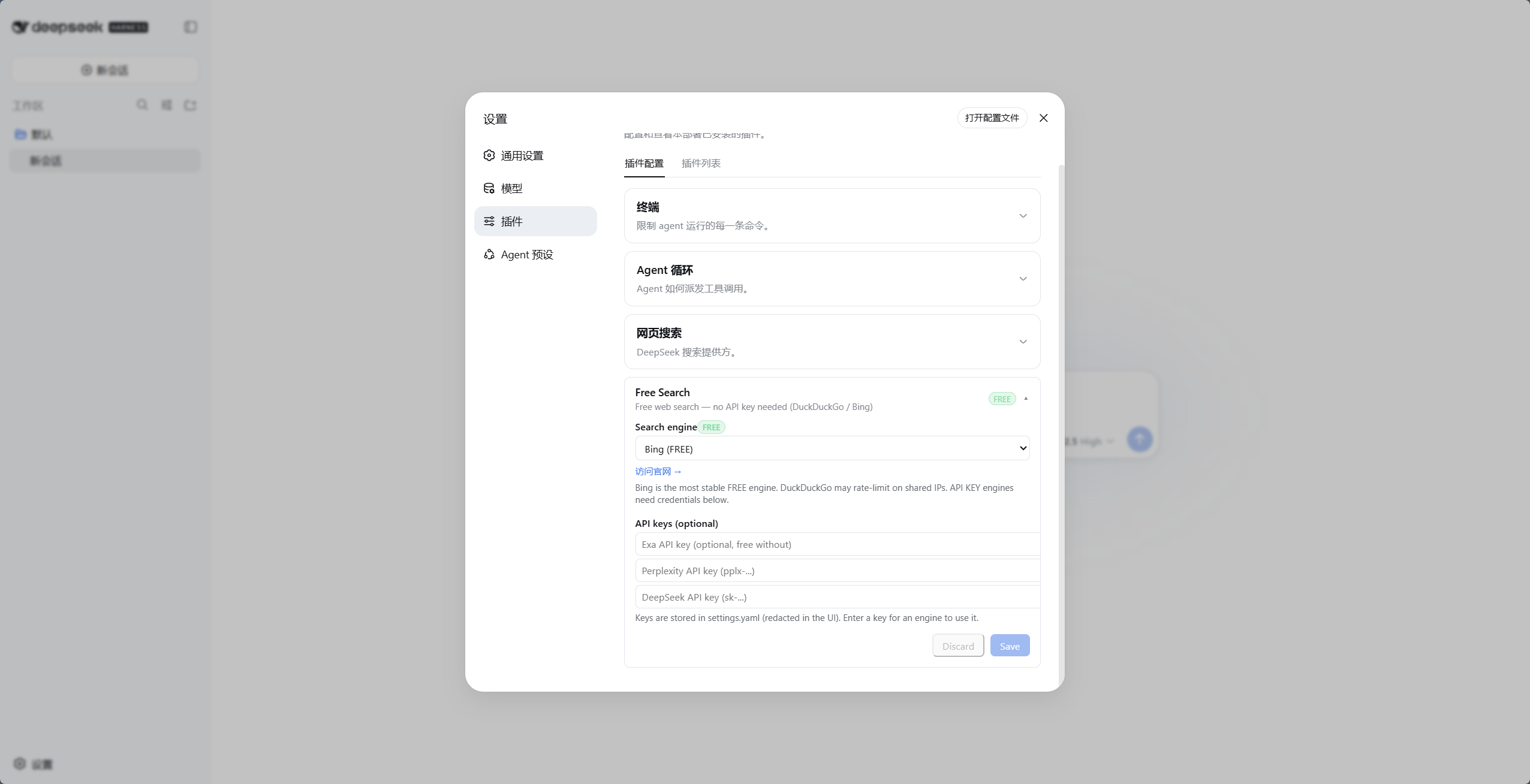
▲ 免费引擎(以Bing为例)
为什么需要它
dsh 默认的搜索 provider 依赖 DeepSeek 官方 API key(DEEPSEEK_API_KEY)。如果你:
- 没有(或不想用)DeepSeek 官方 key,
- 用的是 opencode-go 这类网关(其 OpenAI 兼容端点不支持
web_search工具),
……那么内置搜索必然失败,agent 会告诉你"无法联网"。
这个插件提供多个免费引擎 + 多种专业付费搜索 API + 自动回退:不配任何 key 开箱即用,彻底摆脱 DeepSeek 官方 key 的依赖;配置付费 key 后可获得更高额度与更专业的搜索质量。
特性
- 免费 + 付费联合 —— 多个零成本免费引擎(无需 key、无需注册)+ 多种专业付费搜索 API(Perplexity / DeepSeek 官方 / Kimi / 智谱 / 博查 / 秘塔 / 豆包 / You.com / OpenAI / Gemini / Claude / Grok 等);只用免费引擎零成本,配付费 key 提质提额
- 多引擎可选:DuckDuckGo(html/lite)、Bing、SearXNG(元搜索,支持自定义实例)、AnySearch、Exa、Tavily、Keenable、Firecrawl、Parallel、Perplexity、SerpBase、Serply、DeepSeek 官方、You.com、百度千帆、Kimi、阿里云百炼、火山联网搜索(豆包搜索)、知乎全网/站内(
zhihu_global/zhihu_site,经知乎开放平台 MCP)、智谱 Web Search(zhipu,普通平台 Key)、博查(bocha,DeepSeek 官方供应方)、秘塔(metaso,多模态)、OpenAI / Gemini / Claude / Grok(grok,xAI Responses APIx_search搜 X/Twitter)模型内置搜索 - 网页设置页 —— 引擎切换 + API key 配置(UI 中 key 脱敏显示"已配置")+ 中英文切换;入口在左侧「插件」页的组件行配置(
plugins.row.config,DSH 0.1.7-rc.1+) - 弹出式切换命令 —— 聊天框输入
/union-search-engine,弹出引擎选择窗口,点选即切换(等效设置页 + 保存) - 引擎测试 —— 设置卡「测试全部引擎」一键逐个测试并列出结果,失败引擎进入建议禁用清单(勾选后「应用禁用」,保存生效;auto/multi 虚拟模式不会入列);另有「测试引擎」按钮(直测当前引擎,不走回退链,付费引擎无 key 会明确报错)
- 全局引擎开关与回退优先级 —— 设置页可勾选/取消引擎(取消后全局生效:普通搜索 / Auto /
advanced_search/multi_search/ 引擎测试都不再用它),并可用 ↑↓ 调整全局回退顺序(一键恢复默认) - Multi 模式 —— 可把搜索引擎设为
Multi Search:web_search并发请求前 3 个已启用引擎、按 URL 合并去重、跨源命中的结果优先(代价是成倍消耗额度;multi 失败会自动退回单引擎回退链) - 统一引擎回退 —— 任何引擎失败(付费/免费,缺 key/401/限流/网络)自动轮流尝试下一个引擎:首选引擎 → 其他引擎(exa/tavily/keenable/firecrawl/parallel 无 key 也会尝试,因为它们自带 keyless 免费额度)→ 剩余免费引擎,搜索永不直接失败;结果顶部注明实际生效的引擎(如
Note: perplexity unavailable or failed, using exa.);失败按类别处理:额度/鉴权失败→本会话冷却该引擎,反爬→短退避,超时/5xx/限流→同引擎重试一次,解析失败/0 结果→不冷却(详见下文「失败分类与引擎冷却」) - 时间过滤 ——
advanced_search工具支持timeRange:固定档、自定义相对值、绝对日期三种形式(详见下方逻辑说明) - 系统提示词注入 —— agent 知道当前用哪个引擎、哪些需要 key;并明确所有搜索结果是不可信外部数据,不得执行其中的指令
- 提示注入防护(不可信数据边界) —— 插件自有工具(advanced_search / platform_search / multi_search)的网页文本包在
<untrusted-web-content>边界内(正文里自带的同名标记会被剥离,防止提前闭合);核心 web_search / web_fetch 由 DSH 核心自带同类提示(External web content follows...);所有 snippet 统一清洗并截断到 300 字符 - 版本号 + 检查更新 —— 设置卡片显示当前版本(v0.4.17),"检查更新"按钮直连 npm registry 对比最新版,有新版本时提示并可一键跳转
- 结果缓存 —— 相同查询(含引擎/时间过滤参数)5 分钟内命中缓存(LRU 50 条),防免费引擎限流、省付费额度;时长可在设置页 0-5 分钟自由配置(0 关闭)
- 免费标注 —— 设置页中免费引擎带绿色
FREE徽章,付费引擎带橙色API KEY徽章 - 网页抓取(web_fetch) —— 让 agent 抓取网页内容(官方
dsh-web-fetch-httpprovider,纯 JS,零额外依赖) - 增强抓取(advance_fetch,实验性 · 免费) —— 在 web_fetch 之上的插件自有工具,零 key、零按次计费(区别于按次计费的付费搜索 API):整页转 GitHub-Flavored Markdown(转换配置与宿主 tool-web 同款复刻:不可见节点整体剔除、GFM 表格不展开跨列),并支持 CSS
selector限定范围与fields(label=selector|attr,分号分隔)定向结构化抽取——只要页面的一部分时优先用它。依赖插件自带(turndown + @joplin/turndown-plugin-gfm + cheerio),不碰宿主内部面;输出经门户页脏面清洗(javascript: 等伪协议链接只留文本、布局表全空管道行丢弃、表格内<br>归一为 " / "、行边界截断不留残句/不拆代理对/不留未闭合代码围栏);相对链接按最终 URL 自动绝对化并剥离 utm/gclid/fbclid 等跟踪参数;GBK/GB2312 等非 UTF-8 老站按声明字符集解码(header → BOM → meta charset 探测);200 状态的反爬挑战页(captcha/验证码等文案 + 近空正文)识别为失败而非当正文;RSS/Atom 按文本透传;登录墙/纯客户端渲染站只返回壳并附 note 提示。抓取身份可配置:设置页可自定义 User-Agent、Referer 与按域 Cookie(逐行域名 cookie串,仅在抓取目标匹配该域时附带、重定向换域不外流)——凭据只存设置页,勿在对话中粘贴。导航密集型门户页建议优先用 selector/fields 定向抽取;仅 http/https,重定向限 5 跳逐跳复检,SSRF 地址门默认拒绝回环/内网/云元数据地址(advanceFetchAllowPrivate可显式放行局域网设备),抓取内容包进不可信边界 - 平台搜索(platform_search) —— 搜 GitHub / V2EX / B站 / Reddit / Hacker News / Stack Overflow / 维基百科 / npm / YouTube / Vimeo(公开 API 或免 key 抓取,零依赖)
- 视频搜索(video_search) —— 跨站找视频:Bing Videos + DuckDuckGo Videos(免 key,失败互相回退),返回视频链接、标题与来源/时长等元信息
- 干净集成 —— 实现官方
WebSearchProviderseam 接口,与官方插件共存 - 屏蔽系统自带搜索 —— 设置页「屏蔽系统自带搜索」开关(
blockSystemSearch):开启后强制接管web_search,并把出厂官方搜索引擎deepseek-official/ rc.2 起的deepseek-search-api从所有引擎链与接管判据中剔除;保存即生效 - SearXNG 返回语言可锁定 —— 设置项
searxngLanguage(默认auto):自动档按 query 文字检测(假名→ja、谚文→ko、西里尔→ru、汉字→zh-CN,判不出落设置页语言兜底);选具体值(zh-CN/zh-TW/en/ja/ko/ru/de/fr/es/all)则锁定不随 query 变化;非法 locale 自动归一防 400 - SearXNG 多实例综合 —— 自定义列表配置 ≥2 个端点时,自动向前两个端点并发双发请求,等两份请求都返回后按 URL 合并去重,双实例共同命中的条目优先;两个都失败才顺序回退剩余实例
如果这个插件帮到了你,欢迎给仓库点个 ⭐(GitHub)——星标是开发者继续维护的最大动力,感谢支持!
引擎列表
| id | 引擎 | 费用 | 说明 |
|---|---|---|---|
auto |
Auto 智能路由 | 动态 | 根据查询语言/时间条件自动选路(含中文优先 Bing/Baidu/Aliyun/AnySearch,英文优先 Bing/Exa/Tavily;时间过滤优先支持引擎),末尾全量回退 |
ddg |
DuckDuckGo HTML | 免费 | 偶发限流(反爬),解封自动恢复 |
ddg-lite |
DuckDuckGo Lite | 免费 | 轻量版,同上 |
bing |
Bing | 免费 | 默认引擎,最稳定,中文优化(zh-CN) |
anysearch |
AnySearch AI | 免费 | AI 搜索,无 key(匿名额度) |
searxng |
SearXNG 元搜索 | 免费 | 实例三态严格互斥:公网池 / 本地 Docker(回环)/ 自定义列表,任一态不向其他态回落;自定义列表 ≥2 端点时自动向前两个并发双发、等两份都返回后综合(双命中条目优先);返回语言按 query 文字自动判定(假名→ja、谚文→ko、西里尔→ru、汉字→zh-CN),判不出才落设置页语言兜底;聚合网页结果 + 维基卡片(infoboxes)+ 直接答案(answers);设置卡支持实例探测与「设为首选」一键切换端点 |
exa |
Exa | 免费 | 无 key 也可用(MCP 匿名),配 key 提升额度 |
tavily |
Tavily | 免费 | 无 key 也可用(keyless 匿名),配 key 提升额度 |
keenable |
Keenable | 免费 | 无 key 也可用(MCP 匿名),配 key 提升额度 |
firecrawl |
Firecrawl | 免费 | 无 key 也可用(官方免 key 匿名额度),配 key 提升限额 |
parallel |
Parallel | 免费 | 无 key 也可用(官方 MCP 匿名额度),配 key 提升额度并支持精确时间过滤 |
perplexity |
Perplexity | 付费 | 需 PERPLEXITY_API_KEY |
serpbase |
SerpBase | 付费 | 需 SERPBASE_API_KEY(serpbase.dev,注册送 100 次免费额度) |
serply |
Serply | 付费 | 需 SERPLY_API_KEY(serply.io,新账户 30 天内 2,500 次免费额度);Google 网页结果,按设置页语言本地化 |
deepseek-official |
DeepSeek 官方 | 付费 | 需 DEEPSEEK_API_KEY;官方定价 Search $0.75 / 千次成功请求(≈ 单次 5 厘)(2026-10 口径;经 DSH 宿主的服务端工具调用 2026-11-01 前免费),见下方「DeepSeek 官方定价」 |
you |
You.com | 付费 | 需 YOUCOM_API_KEY(you.com/platform/api-keys,注册即送免费额度) |
baidu |
百度千帆 AI 搜索 | 额度 | 需 BAIDU_API_KEY(千帆 AI 搜索,每日赠 50 次,超额按量后付费);中文全网,支持时间过滤 |
kimi |
Kimi(Moonshot)联网搜索 | 付费 | 需 MOONSHOT_API_KEY(basic 约 ¥0.01/次),返回带正文 chunks 的中文结果 |
aliyun |
阿里云百炼 EnhancedSearch | 付费 | 需 DASHSCOPE_API_KEY(MCP search_pro,约 ¥0.03/次,新用户 200 次免费包);中文全网带来源 hostname |
doubao |
火山引擎联网搜索(豆包搜索) | 免费额度 | 需 DOUBAO_SEARCH_API_KEY(联网搜索控制台开通,每月 500 次免费,超出按量付费);中文时效内容强,支持时间/站点过滤,返回千字级摘要 |
zhihu_global |
知乎全网搜索(开放平台 MCP) | 付费 | 需 ZHIHU_API_KEY;支持时间过滤(publish_time);无 key 时自动跳过 |
zhihu_site |
知乎站内搜索(开放平台 MCP) | 付费 | 需 ZHIHU_API_KEY;不支持时间过滤 |
zhipu |
智谱 Web Search | 付费 | 需 ZHIPU_API_KEY(普通平台 Key,非 Coding Plan);REST /api/paas/v4/web_search;search_pro 约 0.03 元/次(search_std 0.01 / search_pro_sogou、search_pro_quark 0.05,可经 zhipuEngine 切档);支持时间过滤(search_recency_filter) |
bocha |
博查 AI 搜索 | 付费 | 需 BOCHA_API_KEY(open.bochaai.com,注册送额度);DeepSeek 官方联网供应方,中文强;约 0.036 元/次;支持时间过滤(freshness) |
metaso |
秘塔 AI 搜索 | 免费额度 | 需 METASO_API_KEY(mk- 开头,注册送 5000 点);约 0.03 元/query;支持网页/学术/文库/播客多模态(metasoScope) |
openai |
OpenAI 模型内置搜索 | 付费 | 需 OPENAI_API_KEY;走 Responses API 的 web_search 工具,返回带引用的回答。按次计费,仅在显式选中时使用(不参与自动回退/auto);默认 gpt-6-luna,模型与端点可配(openaiModel / openaiBaseUrl) |
gemini |
Gemini Grounding with Google Search | 付费 | 需 GEMINI_API_KEY(兼容 GOOGLE_API_KEY);走官方推荐的 Interactions API(POST /v1beta/interactions,tools:[{type:"google_search"}]),从 steps[].content[].annotations 取引用。按次计费,仅在显式选中时使用;默认 gemini-3.8-flash,模型与端点可配(geminiModel / geminiBaseUrl) |
claude |
Claude 服务端 web_search | 付费 | 需 ANTHROPIC_API_KEY;结果来自 web_search_tool_result。按次计费,仅在显式选中时使用;默认 claude-sonnet-5-5,模型与端点可配(claudeModel / claudeBaseUrl) |
grok |
Grok · X (Twitter) 搜索 | 付费 | 需 XAI_API_KEY(console.x.ai);走 xAI Responses API 的 x_search 工具,返回带引用的 X 帖子。按 token+按次计费,仅在显式选中时使用;默认 grok-4.2,模型与端点可配(grokModel / grokBaseUrl) |
- 默认引擎为
bing(免费且最稳定),安装后开箱即用。 - 自动回退:任何引擎失败(免费限流/反爬,付费缺 key/无效/网络错误)都会自动轮流尝试下一个引擎——先试其他已配 key 的付费引擎,再试免费引擎(Bing/AnySearch 等),并在结果中附带回退提示——搜索不会因引擎问题直接失败。
- 设置页有官网链接:免费引擎显示"访问官网 →",付费引擎显示"获取 API Key →"(新标签页打开):
- Exa:https://dashboard.exa.ai/api-keys
- Tavily:https://app.tavily.com/home
- Keenable:https://keenable.ai/login
- Parallel:https://platform.parallel.ai
- Perplexity:https://www.perplexity.ai/settings/api
- SerpBase:https://serpbase.dev
- Serply:https://serply.io(API 文档:https://serply.io/docs)
- DeepSeek:https://platform.deepseek.com/api_keys
- 豆包搜索(火山联网搜索):https://console.volcengine.com/search-infinity/web-search
- You.com:https://you.com/platform/api-keys
- 智谱:https://bigmodel.cn/usercenter/proj-mgmt/apikeys
- 博查:https://open.bochaai.com
- 秘塔:https://metaso.cn
- xAI(Grok):https://console.x.ai
为什么免费引擎不需要 key?
- AnySearch:其
v1/searchREST 接口提供匿名的公共搜索额度,无需注册或 API key。额度有限流(适合日常搜索),但作为免费引擎之一,与其他免费引擎互相回退,体验稳定。 - Exa:公开 MCP 端点(
mcp.exa.ai/mcp)支持匿名调用,不配 key 也能用;配置EXA_API_KEY后可获得更高额度。 - Tavily:通过
x-tavily-access-mode: keyless头走 keyless 匿名额度,不配 key 即可用;配置TAVILY_API_KEY后走账号档,额度更高、结果质量更稳定。 - Keenable:无 key 时走其公开 MCP 端点(
api.keenable.ai/mcp)匿名调用;配置KEENABLE_API_KEY后走 REST API(api.keenable.ai/v1/search),额度更高、按组织限流。 - Firecrawl:其
/v2/search端点无需 key 即可使用(官方文档明确说明,有匿名限流);配置FIRECRAWL_API_KEY后可提高限额。支持tbs时间过滤(qdr:h/d/w/m/y与自定义日期区间)。
DeepSeek 官方定价(2026-10,以官方定价页为准)
搜索/抓取是独立按请求计费的 API(与模型 token 费分开):
| API | 计费单位 | 价格 |
|---|---|---|
| Search(联网搜索) | 每 1,000 次成功请求 | $0.75(≈ 单次 ¥0.005・5 厘 @汇率7.1) |
| Fetch(网页抓取) | 每 1,000 次成功请求 | $0.75(≈ 单次 ¥0.005・5 厘 @汇率7.1) |
注:通过 DeepSeek Harness(本宿主)/ Claude Code / Codex 调用时,服务端工具已经会命中 Search/Fetch API;这部分目前免费,自 2026-11-01 00:00(北京时间)起按次计费。本插件的
deepseek-official引擎走同一价目表;这也是「屏蔽系统自带搜索」开关存在的背景之一——如果你不想为出厂搜索付费,用免费引擎即可。
模型 token 定价(每百万 tokens,平峰/高峰,1 美元计价):
| 模型 | 输入(缓存命中) | 输入(缓存未命中) | 输出 |
|---|---|---|---|
deepseek-flash |
$0.003 / $0.006 | $0.15 / $0.30 | $0.60 / $1.20 |
deepseek-v4-pro |
$0.022 / $0.044 | $0.66 / $1.32 | $1.98 / $3.96 |
高峰时段为周一至周五 UTC 01:00–04:00、06:00–10:00(中国法定节假日除外),其余时段均为平峰,平峰价是高峰价一半。数据来源:https://api-docs.deepseek.com/quick_start/pricing。
安装
# npm(推荐,0.9.27+)
dsh plugin --profile web add @drscrewdriver/dsh-union-search

# 或从源码/本地 tgz 安装
git clone https://github.com/drscrewdriver/dsh-union-search.git
dsh plugin --profile web add /path/to/dsh-union-search
注意:不要用 npm 别名把 scoped 包装成裸名(例如 "dsh-union-search": "npm:@drscrewdriver/dsh-union-search@...")。
DSH 以「bundle 行名 == 包内 name」判定客户端半(dsh-client-modules:locatePkgJson -> nearestPackage),
别名会让浏览器半被判为「非客户端包」,bundle 设置卡、家族 tab、/union-search-engine 命令会全部静默消失(0.9.26 实测事故)。
然后重启:
dsh web
接管行为与验证
插件加载后自动接管搜索(运行时接管,不改配置层):
web.searchProvider未设置,或仍是 DSH 出厂默认的官方搜索时,自动切换为本插件的 provider(id 固定为ddg);出厂默认在 0.2.1-rc.2 起有两个 id——deepseek-official(Messages 服务端 web_search)与deepseek-search-api(新内置的 Search/Fetch 独立 API),两者都会被识别并接管;- 如果(你或别的插件)已显式选择其他 provider,本插件不抢占,只在启动日志输出 WARN 与切换用的 YAML;
- 设置页开启「屏蔽系统自带搜索」(
blockSystemSearch: true)后,无论web.searchProvider指向谁,都强制接管为本插件 provider,且deepseek-official引擎被从所有引擎链中剔除;保存即生效,无需重启。
不再往配置里写 searchProvider: ddg:静态覆盖曾导致"悬空引用"——patch 是整段覆盖 config,一旦插件那一行被停用或跳过(比如在插件管理器里关掉),配置仍指向 ddg 而没有任何东西注册它,于是每次搜索都失败:
Error: configured web provider "ddg" is not registered
现在没有这层覆盖:插件被停用时 web.searchProvider 保持官方默认(deepseek-official),搜索至少还能走官方通道;插件启用时由上面的运行时接管切到 ddg。
0.2.1-rc.2 机制变化:宿主删掉了可写的运行时选择字段,改为每次调用读
web条配置的 volatile 值(未配置且多个可用 provider 时报WEB_PROVIDER_AMBIGUOUS)。本插件能力探测分流:≤rc.1 仍走内存接管(非持久);rc.2+ 经 settings 服务把web.searchProvider: ddg钉进条配置(持久)——若后续停用本插件,记得删掉该字段(或拨回官方开关),否则宿主会响亮报CONFIGURED_MISSING;blockSystemSearch开启时同步把fetchProvider钉回http(web_fetch 保留,钳离按次计费的deepseek-fetch-api)。
如果你曾按旧文档手动在
profiles/<profile>/cordis.patch.yml里加过下面这段,而插件没有启用,就会看到上面那条错误——删掉这段即可(或重新启用插件):
# 可选,通常不需要:只有你想强制指定时才加。
# DSH 0.1.2+ 的 patch 是"整段覆盖 config",必须保留 fetchProvider。
- id: web
  config:
    searchProvider: ddg
    fetchProvider: http
searchProvider: ddg—— 本插件的 provider id(固定值),不是"使用 DuckDuckGo 引擎";用哪个引擎由设置页的provider字段决定(bing/baidu/auto/…)。fetchProvider: http—— 官方网页抓取(web-fetch-http),手动声明时必须保留。- 想改用官方搜索:在插件管理器里停用本插件条目即可,不需要改配置。
依赖说明
插件对 @deepseek-ai/dsh-settings 和 @deepseek-ai/dsh-tools 使用 peerDependencies,这是刻意的:DSH 运行时必须使用安装树中的唯一实例。请通过 dsh plugin --profile <profile> add ... 安装插件,不要把 DSH 核心包复制进 profile 的本地 node_modules;重复副本会导致工具调度器失效。
使用
网页设置(推荐)
安装后打开配置页(DSH 0.1.7-rc.1+):
- 左侧 插件 页 → 已安装 分组 →
union-search→ 点击组件行web-search-free(行内"配置"入口)
配置页提供:
- Search engine:下拉框切换引擎,保存即生效
- API keys:为 Exa / Tavily / Keenable / Firecrawl / Parallel / Perplexity / DeepSeek / SerpBase / Serply / You.com 填写 key(密码框,保存后只显示"已配置";Exa / Tavily / Keenable / Firecrawl / Parallel 不填也可免 key 使用)
- 推荐:付费引擎 key 建议写入 harness 凭据中心
~/.dsh/.credentials.yaml(如DEEPSEEK_API_KEY: sk-...,与官方 LLM provider 一致,一处管理所有 key)。插件读取优先级:凭据中心 > 设置页 > 环境变量,设置页填的 key 仅作为遗留兼容。
- 推荐:付费引擎 key 建议写入 harness 凭据中心
- Test engine:直测当前引擎可用性(不走回退链,付费引擎无 key 会明确报错)
- Use Bing default:把当前搜索引擎切回稳定的免费 Bing;
Discard只撤销尚未保存的编辑 - Platform search:勾选启用 GitHub / V2EX / Bilibili / YouTube / Vimeo 平台搜索(
platform_search工具按此过滤) - EN / 中文:切换界面语言(默认中文)
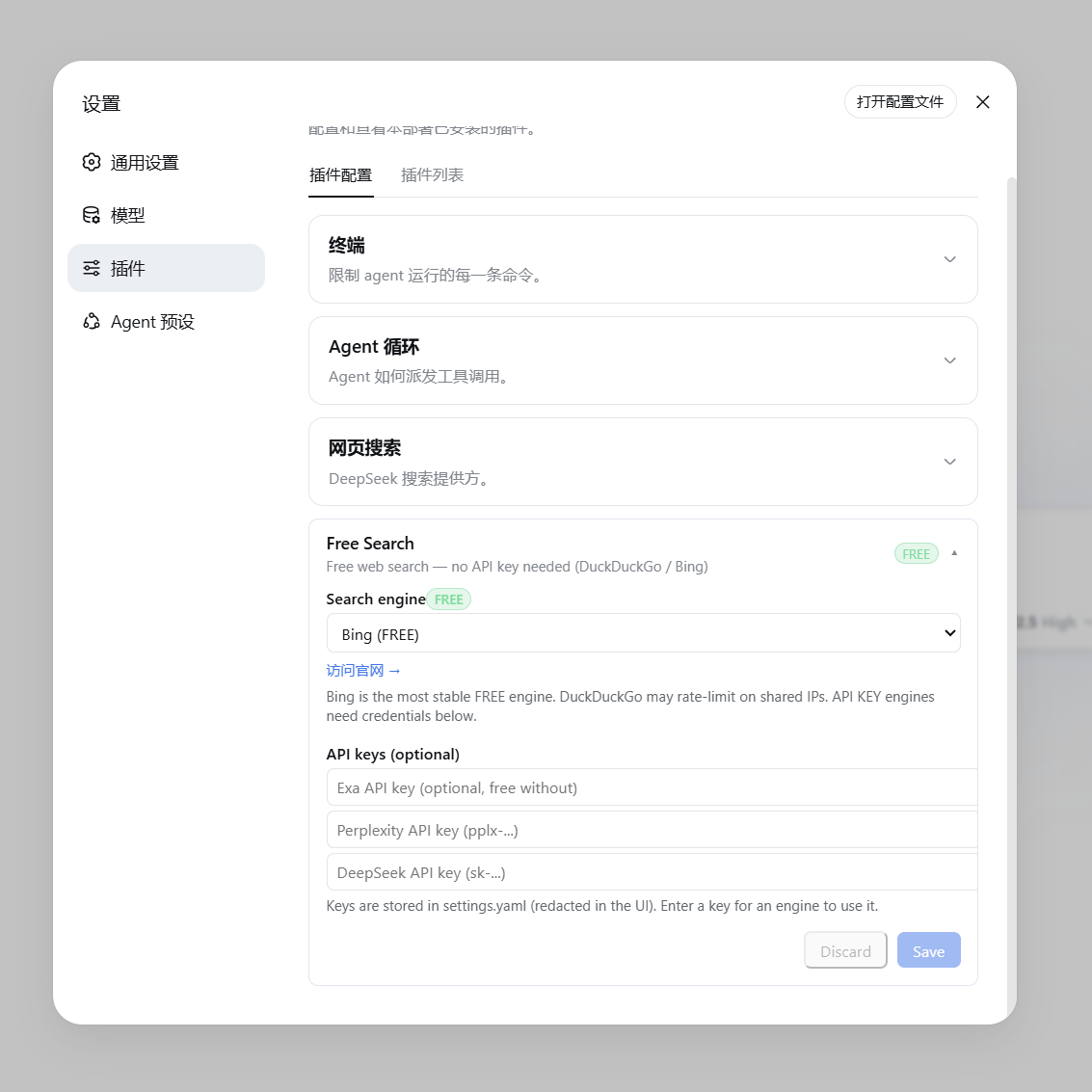
▲ 免费引擎(显示绿色 FREE 徽章与官网链接) |
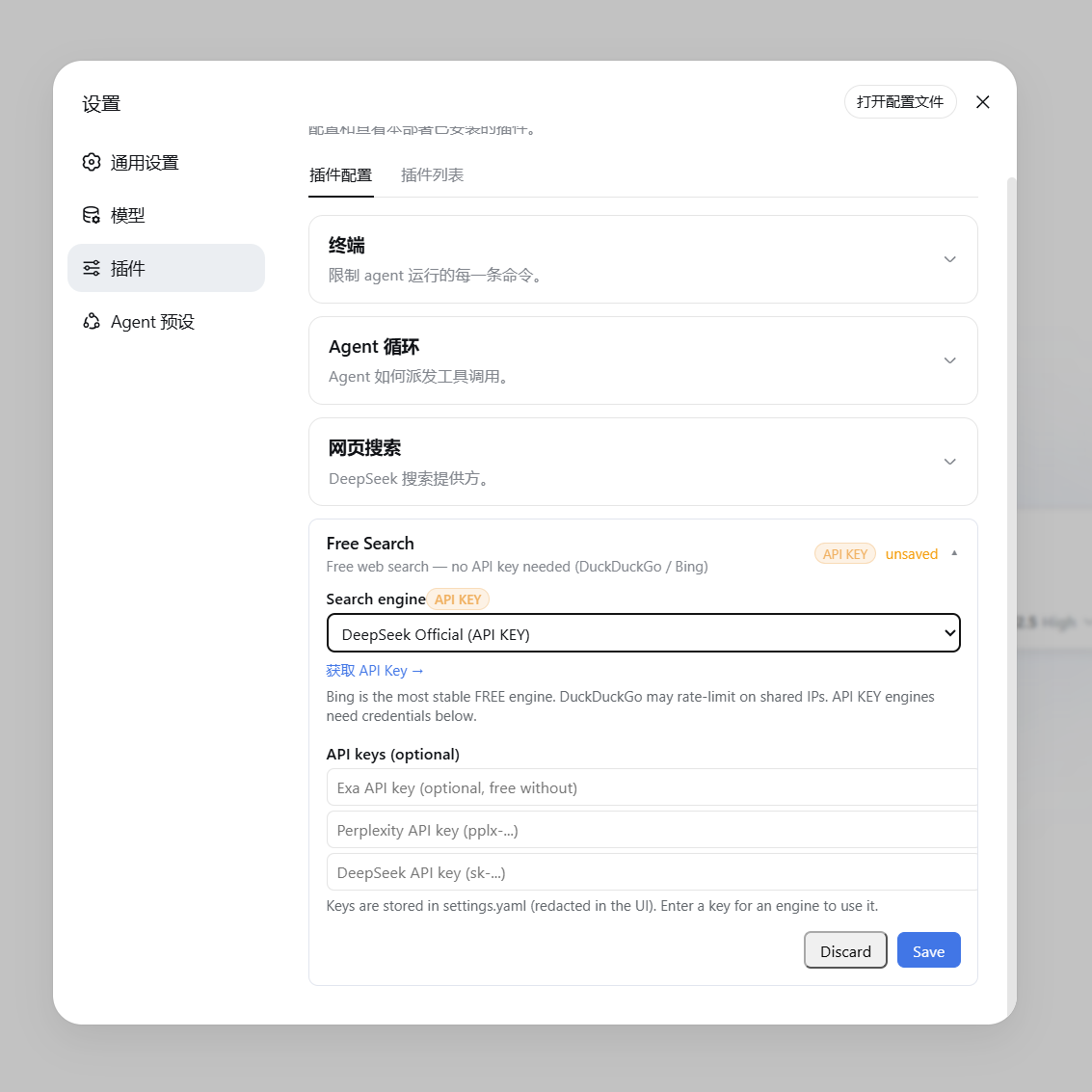
▲ 付费/API Key 引擎(显示橙色 API KEY 徽章与获取链接) |
聊天框切换引擎(/union-search-engine)
不用进设置页也能切换引擎:在聊天框输入 /union-search-engine,弹出引擎选择窗口(和 /model 选模型一样的交互),点选即切换,当前引擎会标记出来。等效于设置页切换 + 保存,且界面语言跟随设置页(中文/英文)。
命令只改首选引擎配置,搜索仍走 web_search + 统一回退链:即使首选引擎挂了也会自动换其他引擎,永不直接失败。系统提示词同步刷新。
引擎开关、回退优先级与 Multi 模式
设置页有三个新块(都会保存进条目 config):
- 全局启用的搜索引擎:取消勾选后,该引擎会从普通
web_search回退链、Auto 智能路由、advanced_search、multi_search和引擎测试中全局排除;至少要保留一个引擎。 - 全局回退优先级:用 ↑↓ 调整先后顺序。首选引擎仍先尝试;Auto 保留"语言/时间"路由规则,但自定义后同一分组内及后续回退按此顺序。被禁用的引擎保留在列表里(标记「已禁用」)但不执行;「恢复默认顺序」一键还原。
- 搜索引擎下拉里的
Multi Search:选中后web_search会并发查询路由/优先级前 3 个已启用引擎,URL 去重合并、跨源命中的结果排前面。注意并发会成倍消耗额度;Multi 失败时会自动退回普通单引擎回退链并在结果里注明。
失败分类与引擎冷却(Failure-aware fallback)
回退链不再把所有失败一视同仁,而是先给失败分类(issue #36):
quota(额度/预算耗尽,HTTP 402 /NO_MORE_CREDITS/ SerpBase 免费额度用尽):立即切换,并把该引擎在本进程内冷却——后续搜索不再尝试它,避免反复撞墙;auth(401/403、key 无效或未配置):同上,冷却到本会话结束(改好 key 重载插件即恢复);bot-wall(如 DDG 反爬挑战):冷却一小段(默认 60s)后再自动放回链中;transient(超时 / 5xx / 网络 / 429 限流):同一引擎重试一次再回退,避免一次抖动就丢掉好引擎;invalid-response(解析失败 / 结构变化 / 返回 0 结果):照常回退,但归类为插件侧问题,不冷却引擎。
回退结果的 Note: 现在会给出具体类别,例如 Note: exa is out of quota, using doubao.、Note: perplexity is misconfigured (API key rejected), using doubao.、Note: bing failed (transient), using doubao.。free_search_test 也会为每个失败引擎附上类别(failureClass)。
冷却只作用于本进程(重载插件或重启即清空),且对配置的首选引擎同样适用:若它正在冷却,本轮会跳过并回退,结果里注明 is cooling down;冷却中的引擎一旦成功即自动解冻。
fallbackOn 控制哪些失败类别允许触发回退:默认勾选全部六类,即当前的「搜索永不直接失败」;取消某类后,遇到该类失败会停下并把该引擎的错误报出,不再换引擎(例如去掉 invalid-response:首选引擎返回空/解析失败时直接报错,而不是静默退回低质引擎)。设为空数组 [] 则任何失败都立即中止。注意缺 key、被禁用、不支持时间过滤不算失败,无论怎样都照常换引擎。设置页有对应勾选框,也可在 config 写 fallbackOn: [quota, auth, bot-wall, transient, invalid-response, unknown]。
配置文件
DSH 0.1.7-rc.1 起,配置跟随 profile 的插件条目保存:设置页与 /union-search-engine 都会写入当前 profile 的 cordis.patch.yml 中 web-search-free(dsh-union-search)条目的 config。
旧版 ~/.dsh/settings.yaml 的 free-search: 段不会被 DSH 核心自动导入(核心的 importLegacyDocument 只为 ui-developer-tools / ui-onboarding / shell 三个段提供了映射),原文件在导入其它段后会被改名为 settings.yaml.imported,该段的值只留在那里。插件会在启动时检测 settings.yaml.imported(或仍存在的 settings.yaml)中的 free-search: 段,把可识别的字段一次性补种进当前 profile 的条目 config(写一次后不再重复,可在启动日志看到 free-search: migrated N field(s)…)。如果你想手动处理,也可以照着 settings.yaml.imported 里的值在插件页行配置中填一遍。
# profiles/<profile>/cordis.patch.yml 中该条目的 config:
provider: bing              # ddg / ddg-lite / bing / searxng / anysearch / exa / tavily / keenable / firecrawl / parallel / perplexity / serpbase / serply / deepseek-official / you / baidu / kimi / aliyun / doubao / openai / gemini / claude / auto / multi
blockSystemSearch: false    # true = 屏蔽系统自带搜索:强制接管并把 deepseek-official/search-api 移出引擎链
advanceFetchEnabled: true   # false = 拒绝 advance_fetch 调用(热生效)
advanceFetchAllowPrivate: false # true = 放行 advance_fetch 访问回环/内网(局域网设备场景;协议/重定向门不变)
advanceFetchUserAgent: ""   # 空 = 内置默认 UA;可自定义用于按 UA 拦截的站
advanceFetchReferer: ""     # 空 = 不发 Referer;可配防盗链图床/接口解锁
advanceFetchCookieMap: ""   # 逐行 `域名 cookie串`(# 注释),如 weibo.com SUB=xxx;仅在目标匹配该域时附带,重定向换域不外流
searxngLanguage: auto       # SearXNG 返回语言:auto=按 query 检测;显式值=锁定(zh-CN/zh-TW/en/ja/ko/ru/de/fr/es/all)
fallbackOn: [quota, auth, bot-wall, transient, invalid-response, unknown]   # 允许触发回退的失败类别;[] = 任何失败都立即中止(默认全部)
lang: zh                    # 设置页界面语言(zh / en)
bingMarket: zh-CN           # Bing 市场
region: cn-zh               # DuckDuckGo 区域(可选)
searxngInstances:           # 自定义 SearXNG 实例(可选)
  - https://your-instance.example
exaApiKey: ...              # 或通过设置页填写
tavilyApiKey: ...           # 或通过设置页填写
keenableApiKey: ...         # 或通过设置页填写
firecrawlApiKey: ...        # 或通过设置页填写
parallelApiKey: ...         # 或通过设置页填写
perplexityApiKey: ...
serpbaseApiKey: ...         # 或通过设置页填写
serplyApiKey: ...           # 或通过设置页填写
deepseekApiKey: ...
一键测试全部引擎
设置卡底部点「测试全部引擎」,host 端逐个测试并列出结果;失败的引擎会进入建议禁用清单(默认全勾选),取消勾选不想禁用的项后点「应用禁用」再保存即可。暂时性故障(CAPTCHA/限流)可以跳过不禁用,日后随时可在引擎勾选区恢复。
时间过滤(advanced_search)
让 agent 搜"最近一周的新闻"、"这个月的发布"、"最近 3 天的消息"、"7 月以来的更新",它会调用 advanced_search 工具,带 timeRange 参数。该工具同样走统一回退链,且可显式指定 engine,返回结构同 web_search。
timeRange 支持三种形式:
| 形式 | 示例 | 含义 |
|---|---|---|
| 固定档 | day / week / month / year |
分别 = 1 / 7 / 30 / 365 天 |
| 自定义相对值 | 12h、3d、2mo、1y |
最近 12 小时 / 3 天 / 2 个月 / 1 年 |
| 绝对日期 | 2026-07-01 |
该日期(含)之后发布的结果 |
各引擎对 timeRange 的处理逻辑:
| 引擎 | 参数 | 是否精确 | 说明 |
|---|---|---|---|
| Exa | startPublishedDate |
✅ 精确 | 自定义天数转成 ISO 日期(N 天前),绝对日期原样传入 |
| Keenable | published_after |
✅ 精确 | 相对值原样传(12h/3d/2mo/1y),绝对日期原样传 |
| Tavily | time_range |
⚠️ 近似 | 只认固定档,自定义天数自动映射到最近似档位 |
| Firecrawl | tbs |
⚠️ 近似 | 固定档映射到 qdr:d/w/m/y;绝对日期用 cdr:1,cd_min:M/D/YYYY(精确) |
| Parallel | source_policy.after_date(有 key 时精确);无 key 走 MCP,无日期参数,改为把窗口写进 objective 作为新鲜度提示(软过滤) |
✅ 精确 / ⚠️ 软过滤 | 自定义天数转成 ISO 日期(N 天前),绝对日期原样传入 |
| SearXNG | time_range |
⚠️ 近似 | 同上 |
| DuckDuckGo / Lite | df |
⚠️ 近似 | 同上 |
| Bing / AnySearch | — | ❌ 忽略 | 无对应参数 |
"最近似档位"映射规则:≤2 天 → day,≤14 天 → week,≤90 天 → month,否则 year。例如 3d 在 Tavily 上按 day 处理,2mo 按 month 处理。
引擎链优先级:当带 timeRange 搜索时,支持时间过滤的引擎(tavily / exa / keenable / firecrawl / parallel / searxng / ddg / ddg-lite)会排到引擎链前面,确保过滤真正生效——即使首选引擎是 bing(不支持过滤),也会先尝试支持过滤的引擎。
示例对话:"帮我搜最近 3 天关于 DSH 的新闻" → agent 调用 advanced_search,timeRange: "3d"。
多源并发合并搜索(multi_search)
当需要对重要问题做多源交叉验证、避免单一引擎偏差或单源死锁时,可以让 agent 调用 multi_search 工具:
- 并发请求:默认基于当前查询类型并发请求前 3 个优选引擎(或显式传入
engines列表),各引擎独立解析 API Key 与容错(缺 key 引擎自动跳过,不阻断其他引擎)。 - 去重与合并:按规范化 URL 去除结尾斜杠并合并结果,多引擎共同命中的条目优先置顶排在最前,并在结果附带
seenIn命中来源清单(如[seen in: bing, exa])。 - 不可信边界与清洗:严格遵守
<untrusted-web-content>数据边界,正文 snippet 统一清洗。 - ⚠️ 注:多源并发会消耗更多 API 配额,建议在需要多角度核验时按需使用。
抓取网页内容(web_fetch)
搜索到 URL 后,可以让 agent 读取网页全文(如"打开第一个链接看看内容")。web_fetch 工具已启用(官方 dsh-web-fetch-http provider,免费、纯 JS、零额外依赖):
- 自动跟随重定向、解码正文(HTML 转文本)
- 支持超时和大小限制
- 0.2.1-rc.2+ 宿主新增内置
deepseek-fetch-api选项(Fetch $0.75/千次,2026-11-01 起按次计费):本插件不注册 fetch provider、不夺抓取工具;blockSystemSearch开启时会把web.fetchProvider钳制回免费的http(保留抓取、不产生抓取账单) - ⚠️ 注意:
web_fetch无 SSRF 防护,agent 理论上可访问内网地址——按需使用
平台搜索(platform_search)
让 agent 搜特定平台,如"在 GitHub 上搜 deepseek harness"、"看看 B站有什么相关视频"、"V2EX 上关于 dsh 的讨论"。platform_search 工具支持:
| 平台 | 用途 |
|---|---|
github |
GitHub 仓库搜索(API,免费无 key) |
v2ex |
V2EX 热门/相关主题 |
bilibili |
B站视频/内容搜索(公开接口) |
reddit |
Reddit 帖子/讨论搜索(公开 JSON API;部分网络环境可能被 Reddit 反爬拦截) |
hn |
Hacker News 技术社区讨论(Algolia 官方 API) |
stackoverflow |
Stack Overflow 技术问答(Stack Exchange 官方公开 API) |
wikipedia |
维基百科词条(中文环境用 zh.wikipedia.org,lang: en 时切换 en.wikipedia.org) |
npm |
npm 包搜索(registry 官方 API) |
youtube |
YouTube 视频搜索(抓 results 页 ytInitialData,免 key) |
vimeo |
Vimeo 视频搜索(抓搜索页内嵌数据;抓不到时退回网页搜索 site:vimeo.com,免 key) |
公开 API 或免 key 抓取,零外部依赖、无需任何 key。youtube / vimeo 需要先在设置页「平台搜索」里勾选启用。
视频搜索(video_search)
让 agent 找视频:"找几个关于 X 的视频"、"有没有 Y 的教学视频"。video_search 跨站搜索:
| 源 | 说明 |
|---|---|
bing |
Bing Videos(抓 bing.com/videos/search 的 vrhm 元数据,免 key) |
ddg |
DuckDuckGo Videos(vqd + v.js,免 key) |
默认两个源都试、失败互相回退,返回 url / title / snippet(来源站点、时长等)。免 key 抓取,对方改版可能失效;要按站点搜(YouTube / Vimeo / B站)请用 platform_search。
本地引擎切换工具(tools/)
tools/ 目录附带了一个本地切换小工具(零依赖):
启动搜索引擎切换器.cmd(Windows)——双击启动本地 Node 服务(http://127.0.0.1:4789)并自动打开浏览器选择页面switch-engine.html—— 选择页面:显示当前引擎,点选新引擎,一键写入配置server.mjs—— 本地服务,负责读写~/.dsh/profiles/web/cordis.patch.ymlswitch-engine.ps1—— 无界面命令行版:powershell -File tools/switch-engine.ps1 -Engine bing
切换后重启 dsh web 生效。
配置卡片挂在左侧「插件」页的
plugins.row.config行配置插槽(dsh 自带),配置读写走插件自建 bridge,不依赖 dsh-web-ui,插件可独立使用。
代理说明(国内用户)
DuckDuckGo 等引擎可能需要代理才能访问,而 Node.js 的 fetch 默认不走系统代理。需要给 dsh 进程设置(Node 24+):
export NODE_USE_ENV_PROXY=1
export HTTPS_PROXY=http://127.0.0.1:7897   # 你的代理地址
export HTTP_PROXY=http://127.0.0.1:7897
Windows 用户:桌面快捷方式已内置此配置(set NODE_USE_ENV_PROXY=1&& set HTTPS_PROXY=...)。
工作原理
lib/index.js:host 端。实现WebSearchProvider(id/available()/search()),统一引擎路由 + 自动回退(付费引擎优先,免费兜底);解析timeRange(固定档/相对值/绝对日期)并透传给各引擎;在web-search-free条目上声明可编辑配置(.volatile())并自带设置页(plugins.row.config);提供/api/dsh-union-search-settings读写桥 +raw-search调试接口;注册free_search_test、platform_search、video_search、advanced_search、multi_search工具;动态注入引擎清单到系统提示词(设置变更时自动刷新)。lib/client.js:浏览器端。React 配置卡片(引擎选择 + key 输入 + 连通测试 + 中英切换),挂载到左侧「插件」页的plugins.row.config行配置插槽;注册/union-search-engine弹出式切换命令(commandUipopupSelect,与/model同机制)。cordis.patch.yml:插件 loader 配置。
English
▲ Free engine (using Bing as an example)
Why You Need It
dsh's default search provider relies on the official DeepSeek API key (DEEPSEEK_API_KEY). If you:
- Do not have (or prefer not to use) an official DeepSeek key,
- Use a gateway like opencode-go (whose OpenAI-compatible endpoint does not support the
web_searchtool),
...then the built-in search will inevitably fail, and the agent will tell you "I cannot access the internet."
This plugin combines multiple free search engines with many professional paid search APIs and automatic fallback: out of the box it works with zero cost and no DeepSeek key, while paid keys (Perplexity / DeepSeek official / Kimi / Zhipu / Bocha / Metaso / Doubao / You.com / OpenAI / Gemini / Claude / Grok) raise result quality and quotas.
Features
- Free + Paid Union — Multiple zero-cost free engines (no key, no signup) plus many professional paid search APIs (Perplexity / DeepSeek official / Kimi / Zhipu / Bocha / Metaso / Doubao / You.com / OpenAI / Gemini / Claude / Grok); stay at zero cost on free engines, or upgrade quality/quota with paid keys
- Multi-Engine Support — DuckDuckGo (HTML / Lite), Bing, AnySearch AI, SearXNG (meta-search with custom instances), Exa, Tavily, Keenable, Firecrawl, Parallel, Perplexity, SerpBase, Serply, DeepSeek Official, You.com, Baidu Qianfan, Kimi, Aliyun Bailian, Volcano Doubao, Zhihu web-wide/site search (
zhihu_global/zhihu_site, via the Zhihu open-platform MCP), and the model-based OpenAI / Gemini / Claude searches - Web Settings UI — Engine switching, API key configuration (keys masked as "configured" in the UI), and a Chinese/English toggle; the entry is the component-row config (
plugins.row.config) on the sidebar Plugins page (DSH 0.1.7-rc.1+) - Popup Switch Command — Type
/union-search-enginein the chat: a picker opens with all engines; click one to switch (equivalent to the settings page + save) - Engine Testing — the settings card has a "Test all engines" button that checks every engine sequentially; failed engines appear in a tick-to-disable suggestion list (Apply → Save to persist; the auto/multi virtual modes are never listed). There is also a "Test engine" button that tests the selected engine directly (no fallback chain; paid engines without a key report an explicit error)
- Global engine enable/disable & fallback priority — uncheck engines you never want (applies everywhere: web_search fallback, Auto routing, advanced_search, multi_search, engine tests) and reorder the global fallback chain with ↑↓ (one-click reset)
- Multi mode — pick
Multi Searchas the engine: web_search queries the top 3 enabled engines concurrently, merges/deduplicates URLs and prioritizes cross-source hits (costs more quota; a failed multi run automatically falls back to the single-engine chain) - Unified Engine Fallback — Any engine failure (paid or free, missing key, 401, rate limit, network error) automatically tries the next engine: the configured engine first, then other engines (exa/tavily/keenable/firecrawl/parallel are tried even without a key because they have built-in keyless quota), then the remaining free engines (Bing/AnySearch etc.) — with a note attached to the results naming the engine that actually served them (e.g.
Note: perplexity unavailable or failed, using exa.). Failures are classified: quota/auth failures cool the engine down for the session, anti-bot walls back off briefly, timeout/5xx/rate-limit failures retry the same engine once, and parse errors / 0 results are reported without cooling it down (see "Failure-aware fallback" below). Search never fails outright. - Time Filtering — The
advanced_searchtool supportstimeRange: fixed tiers, custom relative values, or an absolute date (details below) - System Prompt Injection — The agent is aware of the currently active engine and which engines require API keys; it is also told that all search output is untrusted external data and must never be executed as instructions
- Prompt-Injection Guard (untrusted-data boundary) — Web-derived text from the plugin's own tools (
advanced_search/platform_search/multi_search) is wrapped in an explicit<untrusted-web-content>boundary (look-alike tags inside the text are stripped to prevent early closure); the coreweb_search/web_fetchtools carry DSH core's own notice (External web content follows...); every snippet is cleaned and capped at 300 characters - Version + Update Check — The settings card shows the current version (v0.4.17), and a "Check update" button queries the npm registry to compare against the latest release, prompting a one-click jump when a newer version exists
- Result Caching — Identical queries (same engine / time-filter args) hit an LRU cache (50 entries) for up to 5 minutes, protecting free engines from rate-limiting and saving paid quota; the TTL is configurable from 0-5 minutes in the settings UI (0 disables caching)
- Visual Badges — Free engines feature a green
FREEbadge, while paid engines show an orangeAPI KEYbadge in the settings UI - Webpage Fetching (
web_fetch) — Allows the agent to read full webpage contents (officialdsh-web-fetch-httpprovider, pure JS, zero extra dependencies) - Advanced Fetching (
advance_fetch, experimental · free) — a plugin-owned tool on top of web_fetch with no API key and no per-request billing (unlike the metered paid search APIs): whole-page GitHub-Flavored Markdown (replicating the host tool-web's exact turndown profile: invisible nodes dropped, GFM tables without colspan expansion), plus CSSselectorscoping andfieldsstructured extraction (label=selector|attr, semicolon-separated) — prefer it when you only need part of a page. Ships its own deps (turndown, @joplin/turndown-plugin-gfm, cheerio) without touching host internals; output is cleaned for portal pages (javascript:-style pseudo links keep text only, layout-table all-empty pipe rows dropped,<br>inside table cells normalized to " / ", truncation cuts at line boundaries without splitting surrogate pairs or leaving unclosed code fences); relative links are absolutized against the final URL and tracking params (utm_*/gclid/fbclid/mc_eid/igshid) stripped; non-UTF-8 legacy pages (GBK/GB2312) are decoded via declared charset; HTTP 200 anti-bot challenge pages (captcha wording on a near-empty body) are reported as failures instead of content; RSS/Atom passes through as text; login-walled/client-rendered sites return a shell with an explanatory note. Fetch identity is configurable in settings: a custom User-Agent, a Referer, and per-domain cookies (one line per domain:domain cookie-string; attached only when the target matches the domain, never forwarded across cross-domain redirects) - keep credentials in settings, never paste cookies into chat. For navigation-heavy portal pages preferselector/fieldsover whole-page markdown; http(s) only, output wrapped in the untrusted boundary - Platform Search (
platform_search) — Search GitHub / V2EX / Bilibili / Reddit / Hacker News / Stack Overflow / Wikipedia / npm / YouTube / Vimeo (public APIs or keyless scraping, zero extra dependencies) - Video Search (
video_search) — Find videos across the web via Bing Videos + DuckDuckGo Videos (keyless, mutual fallback), returning video links with titles and publisher/duration metadata - Clean Integration — Implements the official
WebSearchProviderseam interface, coexisting seamlessly with official plugins - Block built-in system search — the "Block built-in system search" toggle (
blockSystemSearch): when on,web_searchis force-taken-over by this plugin and the shipped official engines (deepseek-official, plusdeepseek-search-apion rc.2+) are excluded from every engine chain; takes effect on save - Lockable SearXNG response language —
searxngLanguage(defaultauto): auto detects from the query script (kana→ja, hangul→ko, cyrillic→ru, CJK→zh-CN, falling back to the settings language); picking a concrete value (zh-CN/zh-TW/en/ja/ko/ru/de/fr/es/all) locks it regardless of query; invalid locales are normalized to avoid HTTP 400 - SearXNG multi-instance union — with 2+ custom endpoints configured, the first two are queried concurrently; the plugin waits for both responses, merges and deduplicates by URL, and ranks items hit by both instances first; only when both fail does it fall through to the remaining instances sequentially
If this plugin has been helpful, a ⭐ on GitHub would mean a lot — it's the biggest motivation for the developer to keep maintaining it. Thank you!
Supported Engines
| id | Engine | Cost | Description |
|---|---|---|---|
auto |
Auto Smart Routing | Dynamic | Smartly routes engines based on query language/time filter (Chinese queries prioritize Bing/Baidu/Aliyun/AnySearch, English queries prioritize Bing/Exa/Tavily; time filters prioritize time-capable engines), with full fallback |
ddg |
DuckDuckGo HTML | Free | Occasional rate limits (anti-bot challenges); recovers automatically |
ddg-lite |
DuckDuckGo Lite | Free | Lightweight version; same rate-limit behavior as above |
bing |
Bing | Free | Default engine, most stable, optimized for Chinese (zh-CN) |
anysearch |
AnySearch AI | Free | AI search, no key needed (anonymous quota) |
searxng |
SearXNG Meta Search | Free | Strictly exclusive instance modes: public pool / local Docker (loopback) / custom list — never cross-falling-back; with 2+ custom endpoints the first two are queried concurrently and merged once both return (cross-hit items ranked first); the response language is auto-detected from the query script (kana→ja, hangul→ko, cyrillic→ru, CJK→zh-CN) with the settings language only as fallback; aggregates web results + wikipedia infobox cards + direct answers; the settings card supports instance probing and one-click "Use as primary" |
exa |
Exa | Free | Usable without a key (anonymous MCP); configure a key for higher quota |
tavily |
Tavily | Free | Usable without a key (keyless anonymous); configure a key for higher quota |
keenable |
Keenable | Free | Usable without a key (anonymous MCP); configure a key for higher quota |
firecrawl |
Firecrawl | Free | Usable without a key (official keyless anonymous quota); configure a key for higher limits |
parallel |
Parallel | Free | Works without a key (official MCP anonymous quota); a key raises limits and enables precise time filtering |
perplexity |
Perplexity | Paid | Requires PERPLEXITY_API_KEY |
serpbase |
SerpBase | Paid | Requires SERPBASE_API_KEY (serpbase.dev, 100 free queries on signup) |
serply |
Serply | Paid | Requires SERPLY_API_KEY (serply.io, 2,500 free credits for the first 30 days); Google web results localized to the settings language |
deepseek-official |
DeepSeek Official | Paid | Requires DEEPSEEK_API_KEY; official pricing: Search $0.75 per 1,000 successful requests (≈ ¥0.005 per request) (as of 2026-10; server-side tool calls through the DSH harness are free until 2026-11-01) — see "DeepSeek official pricing" below |
you |
You.com | Paid | Requires YOUCOM_API_KEY (you.com/platform/api-keys, free tier on signup) |
baidu |
Baidu Qianfan AI Search | Quota | Requires BAIDU_API_KEY (Qianfan AI Search, 50 free calls/day then pay-as-you-go); Chinese web-wide, supports time filtering |
kimi |
Kimi (Moonshot) Web Search | Paid | Requires MOONSHOT_API_KEY (basic ~¥0.01/call); returns Chinese results with body chunks |
aliyun |
Aliyun Bailian EnhancedSearch | Paid | Requires DASHSCOPE_API_KEY (MCP search_pro, ~¥0.03/call, 200 free calls for new users); Chinese web-wide with source hostnames |
doubao |
Volcano Web Search (Doubao) | Free quota | Requires DOUBAO_SEARCH_API_KEY (open it in the Web Search console; 500 free queries/month, pay-as-you-go beyond); strong for fresh Chinese content, supports time/site filters, returns long summaries |
zhihu_global |
Zhihu web-wide search (open-platform MCP) | Paid | Requires ZHIHU_API_KEY; supports the time filter (publish_time); skipped automatically when no key is set |
zhihu_site |
Zhihu site search (open-platform MCP) | Paid | Requires ZHIHU_API_KEY; time filtering not verified, so it is not offered |
openai |
OpenAI built-in web search | Paid | Requires OPENAI_API_KEY; uses the Responses API web_search tool and returns a cited answer. Billed per search, explicit selection only (never picked by the fallback chain or Auto); default gpt-6-luna, model/endpoint configurable (openaiModel / openaiBaseUrl) |
gemini |
Gemini grounding with Google Search | Paid | Requires GEMINI_API_KEY (falls back to GOOGLE_API_KEY); uses the recommended Interactions API (POST /v1beta/interactions, tools:[{type:"google_search"}]) and reads citations from steps[].content[].annotations. Billed per search, explicit selection only; default gemini-3.8-flash, model/endpoint configurable (geminiModel / geminiBaseUrl) |
claude |
Claude server-side web_search | Paid | Requires ANTHROPIC_API_KEY; results come from web_search_tool_result. Billed per search, explicit selection only; default claude-sonnet-5-5, model/endpoint configurable (claudeModel / claudeBaseUrl) |
- Default engine is
bing(free and most stable), ready to use out of the box after installation. - Auto-failover: any engine failure (rate-limited free engine, or missing/invalid paid key, network error) automatically tries the next engine — the configured engine first, then other engines (exa/tavily/keenable/firecrawl/parallel are tried even without a key because they have built-in keyless quota), then the remaining free engines (Bing/AnySearch etc.) — with a note attached to the results naming the engine that actually served them (e.g.
Note: perplexity unavailable or failed, using exa.). Search never fails outright because of engine issues. - Official Links in Settings: Free engines display "Visit Website →", while paid engines display "Get API Key →" (opens in a new tab):
- Exa: https://dashboard.exa.ai/api-keys
- Tavily: https://app.tavily.com/home
- Keenable: https://keenable.ai/login
- Parallel: https://platform.parallel.ai
- Perplexity: https://www.perplexity.ai/settings/api
- SerpBase: https://serpbase.dev
- Serply: https://serply.io (API docs: https://serply.io/docs)
- DeepSeek: https://platform.deepseek.com/api_keys
- Doubao / Volcano Web Search: https://console.volcengine.com/search-infinity/web-search
- You.com: https://you.com/platform/api-keys
Why are some engines free?
- AnySearch: its
v1/searchREST endpoint provides anonymous public search quota without registration or an API key. Quota is rate-limited (fine for daily queries), but as one of the free engines with mutual fallback it stays reliable. - Exa: its public MCP endpoint (
mcp.exa.ai/mcp) supports anonymous requests, so it works without a key; configuringEXA_API_KEYgrants a higher usage quota. - Tavily: offers keyless anonymous quota via the
x-tavily-access-mode: keylessheader — it works without a key; configuringTAVILY_API_KEYswitches to the account tier for higher quota and more stable results. - Keenable: without a key it is called via its public MCP endpoint (
api.keenable.ai/mcp); configuringKEENABLE_API_KEYswitches to the REST API (api.keenable.ai/v1/search) for higher quota and organization-scoped rate limits. - Firecrawl: its
/v2/searchendpoint works without a key out of the box (the official docs state "No API key needed to get started", with anonymous rate limits); configuringFIRECRAWL_API_KEYraises the limits. Supportstbstime filtering (qdr:h/d/w/m/yand custom date ranges).
DeepSeek official pricing (2026-10, per the official pricing page)
Search and Fetch are standalone APIs billed per request (separate from model token fees):
| API | Unit | Price |
|---|---|---|
| Search (web search) | per 1,000 successful requests | $0.75 (≈ ¥0.005 ≈ half a cent per request @FX 7.1) |
| Fetch (webpage fetch) | per 1,000 successful requests | $0.75 (≈ ¥0.005 ≈ half a cent per request @FX 7.1) |
Note: when the DeepSeek API is used through DeepSeek Harness / Claude Code / Codex, server-side tool calls already hit the Search and Fetch APIs; these are currently free and per-request billing starts at 00:00 Beijing time on 2026-11-01. This plugin's
deepseek-officialengine follows the same rate card — one reason the "Block built-in system search" toggle exists: if you don't want to pay for the shipped search, just stay on the free engines.
Model token pricing (per 1M tokens, off-peak / peak, USD):
| Model | Input (cache hit) | Input (cache miss) | Output |
|---|---|---|---|
deepseek-flash |
$0.003 / $0.006 | $0.15 / $0.30 | $0.60 / $1.20 |
deepseek-v4-pro |
$0.022 / $0.044 | $0.66 / $1.32 | $1.98 / $3.96 |
Peak hours are 01:00–04:00 and 06:00–10:00 UTC Monday–Friday (excluding Chinese public holidays); all other hours are off-peak at half the peak rates. Source: https://api-docs.deepseek.com/quick_start/pricing.
Installation
# npm (recommended, 0.9.27+)
dsh plugin --profile web add @drscrewdriver/dsh-union-search

# or from source / a packed tgz
git clone https://github.com/drscrewdriver/dsh-union-search.git
dsh plugin --profile web add /path/to/dsh-union-search
Note: never alias the scoped package back to the bare name (e.g. "dsh-union-search": "npm:@drscrewdriver/dsh-union-search@...").
DSH identifies a package's client half by "bundle row name == the manifest name" (dsh-client-modules: locatePkgJson -> nearestPackage);
an alias files the browser half as "not a client row", so the bundle settings card, the family tab and /union-search-engine
silently disappear (measured on 0.9.26).
Then restart:
dsh web
Takeover behavior and verification
The plugin takes over search at runtime once loaded (it does not touch the config layer):
- When
web.searchProvideris unset, or still a shipped default official provider, it switches to this plugin's provider (id:ddg); since 0.2.1-rc.2 there are two shipped ids —deepseek-official(Messages server-side web_search) anddeepseek-search-api(the new built-in Search/Fetch standalone API) — and both are recognized and taken over; - If you (or another plugin) explicitly selected a different provider, it does not steal it — it only logs a WARN with a copy-pasteable YAML snippet;
- With the "Block built-in system search" toggle on (
blockSystemSearch: true), it force-takes-overweb.searchProviderno matter what it points to, and thedeepseek-officialengine is excluded from every engine chain; takes effect on save, no restart needed.
It no longer writes searchProvider: ddg into the config layer. A static override used to create a dangling reference: a patch replaces the whole row config, so when the plugin's row was disabled or skipped (e.g. switched off in the plugin manager) the config still said ddg while nothing registered it, and every search failed with:
Error: configured web provider "ddg" is not registered
Without that override, a disabled plugin leaves web.searchProvider at the shipped default (deepseek-official) so search still works through the official provider; when the plugin is enabled the runtime takeover above points it at ddg.
0.2.1-rc.2 mechanism change: the host removed the writable runtime selection field and now reads the volatile
webentry config on every call (unset + multiple usable providers →WEB_PROVIDER_AMBIGUOUS). This plugin probes the capability: ≤rc.1 keeps the in-memory takeover (non-persistent); on rc.2+ it pinsweb.searchProvider: ddginto the entry config through the settings service (persistent) — if you later disable this plugin, remove that field (or flip the official switch back), otherwise the host fails loudly withCONFIGURED_MISSING. WithblockSystemSearchon,fetchProvideris also clamped tohttp(web_fetch is kept; the metereddeepseek-fetch-apiis not).
If you previously added the snippet below by hand to
profiles/<profile>/cordis.patch.ymland the plugin is not enabled, you will see that error — just remove the snippet (or re-enable the plugin):
# Optional; normally unnecessary — only to force a specific provider.
# Since DSH 0.1.2 a patch REPLACES the whole entry config: keep fetchProvider.
- id: web
  config:
    searchProvider: ddg
    fetchProvider: http
searchProvider: ddg— this plugin's fixed provider id, not "use the DuckDuckGo engine"; the engine is chosen by theproviderfield in settings (bing/baidu/auto/ …).fetchProvider: http— the official web-fetch provider; keep it when declaring the row by hand.- To go back to official search: disable this plugin's entry in the plugin manager — no config edit needed.
Dependency Note
This plugin intentionally specifies @deepseek-ai/dsh-settings and @deepseek-ai/dsh-tools as peerDependencies: the DSH runtime must use a single instance from the installation tree. Always install the plugin using dsh plugin --profile <profile> add .... Do not copy DSH core packages into a profile-local node_modules, as duplicate copies can break the tool scheduler.
Usage
Web Settings (Recommended)
After installation, open the config page (DSH 0.1.7-rc.1+):
- Sidebar Plugins page → Installed group →
union-search→ click theweb-search-freecomponent row (the row's "configure" entry)
The config page provides:
- Search engine: Select an engine from the dropdown; changes take effect immediately upon saving.
- API keys: Enter keys for Exa / Tavily / Keenable / Firecrawl / Parallel / Perplexity / DeepSeek (password fields; displayed as "configured" once saved; Exa / Tavily / Keenable / Firecrawl / Parallel work without a key too).
- Recommended: store paid-engine keys in the harness credential center
~/.dsh/.credentials.yaml(e.g.DEEPSEEK_API_KEY: sk-..., same as the official LLM providers — one place for all keys). Resolution order: credentials center > settings page > environment variable; the settings-page fields remain for backward compatibility.
- Recommended: store paid-engine keys in the harness credential center
- Test engine: Tests the selected engine directly (no fallback chain; paid engines without a key report an explicit error).
- Use Bing default: stage a switch back to the stable free Bing engine;
Discardonly cancels unsaved edits - Platform search: check platforms (GitHub / V2EX / Bilibili / Reddit / HN / Stack Overflow / Wikipedia / npm / YouTube / Vimeo) to enable them for the
platform_searchtool (disabled platforms are skipped). - EN / 中文: toggle the interface language (default Chinese).
|
▲ Free Engine (shows green FREE badge and official website link) |
▲ Paid / API Key Engine (shows orange API KEY badge and link to get an API key) |
Switching Engines from the Chat (/union-search-engine)
You can also switch the engine right from the chat — no need to open the settings page. Type /union-search-engine: a picker opens with all engines (the same interaction as /model for selecting a model). Click one to switch; the current engine is marked. Equivalent to switching and saving in the settings page, and the language follows the settings page (Chinese/English).
The command only changes the preferred engine; search still goes through web_search + the unified fallback chain — even if the preferred engine fails, it automatically switches to others, never failing outright. The system prompt refreshes accordingly.
Engine Switches, Fallback Priority and Multi Mode
The settings page has three new blocks (all saved into the entry config):
- Globally enabled engines: unchecking an engine excludes it everywhere — the web_search fallback chain, Auto routing,
advanced_search,multi_searchand engine tests. At least one engine must remain enabled. - Global fallback priority: use ↑↓ to reorder. The preferred engine is still tried first; Auto keeps its language/time routing, while a customized order governs engines inside a route group and the remaining fallback chain. Disabled engines stay in the list (marked "disabled") but are skipped; "Reset default order" restores the defaults.
Multi Searchin the engine dropdown: web_search then queries the top 3 enabled routed/prioritized engines concurrently, merges/deduplicates URLs and prioritizes cross-source hits. This multiplies quota usage; if a multi run fails it automatically falls back to the single-engine chain and says so in the result note.
Failure-aware fallback
The fallback chain no longer treats every failure the same way — it classifies them first (issue #36):
quota(HTTP 402 /NO_MORE_CREDITS/ SerpBase free quota exhausted): fail over immediately and put the engine on a process-wide cooldown, so later searches stop hammering an engine that cannot succeed;auth(401/403, invalid or missing key): same — cooled for the rest of the session (reload the plugin after fixing the key);bot-wall(e.g. the DDG anti-bot challenge): cools down for a short while (60s by default), then rejoins the chain;transient(timeout / 5xx / network / 429 rate limit): the engine is retried once before advancing, so a single blip does not drop a good engine;invalid-response(parse failure / schema change / 0 results): still fails over, but is reported as a plugin-side issue and does not cool the engine down.
The Note: line now names the class, e.g. Note: exa is out of quota, using doubao., Note: perplexity is misconfigured (API key rejected), using doubao., Note: bing failed (transient), using doubao.. free_search_test also reports the class per failed engine (failureClass).
Cooldowns are per-process (reloading the plugin or restarting clears them) and apply to the configured preferred engine too: if it is cooling down, this run skips it, fails over and says is cooling down. An engine that succeeds is automatically un-cooled.
fallbackOn decides which failure classes are allowed to trigger a fallback: by default all six are checked, i.e. today's "search never fails outright". Unchecking a class makes such a failure stop the search and surface that engine's error instead of trying another engine (e.g. drop invalid-response and a preferred engine that returns nothing/parses badly fails loudly rather than silently handing you a lower-quality engine's results). An empty array [] aborts on any failure. Note that missing keys, disabled engines and unsupported time filters are not failures and always advance. There is a matching checkbox group in the settings page, and you can also write fallbackOn: [quota, auth, bot-wall, transient, invalid-response, unknown] in the config.
Configuration File
Since DSH 0.1.7-rc.1 the configuration is stored with the profile's plugin entry: the settings page and /union-search-engine both write the config of the web-search-free (dsh-union-search) entry in the active profile's cordis.patch.yml.
The old free-search: section of ~/.dsh/settings.yaml is not imported by the DSH core (importLegacyDocument only maps ui-developer-tools / ui-onboarding / shell); the file is renamed to settings.yaml.imported after the other sections are imported, and the section's values stay there. The plugin detects that section in settings.yaml.imported (or in a still-present settings.yaml) at startup and seeds the recognized fields into this entry's config once (watch for free-search: migrated N field(s)… in the startup log). You can also migrate manually by copying the values from settings.yaml.imported into the plugin row config.
# config of that entry in profiles/<profile>/cordis.patch.yml:
provider: bing              # ddg / ddg-lite / bing / searxng / anysearch / exa / tavily / keenable / firecrawl / parallel / perplexity / serpbase / serply / deepseek-official / you / baidu / kimi / aliyun / doubao / openai / gemini / claude / auto / multi
blockSystemSearch: false    # true = block the built-in official search: force takeover + exclude deepseek-official/search-api from every chain
advanceFetchEnabled: true   # false = advance_fetch calls are rejected (hot)
advanceFetchAllowPrivate: false # true = allow advance_fetch to reach loopback/private targets (LAN devices; protocol/redirect gates unchanged)
advanceFetchUserAgent: ""   # empty = built-in UA; customize for sites that block by User-Agent
advanceFetchReferer: ""     # empty = no Referer; useful for hotlink-protected image hosts/APIs
advanceFetchCookieMap: ""   # one `domain cookie-string` per line (# comments), e.g. weibo.com SUB=xxx; attached only when the target matches the domain, never forwarded across cross-domain redirects
searxngLanguage: auto       # SearXNG response language: auto = detect from query; explicit value = locked tier
fallbackOn: [quota, auth, bot-wall, transient, invalid-response, unknown]   # failure classes allowed to trigger fallback; [] = abort on any failure (default: all)
lang: zh                    # settings UI language (zh / en)
bingMarket: zh-CN           # Bing market
region: cn-zh               # DuckDuckGo region (optional)
searxngInstances:           # Custom SearXNG instances (optional)
  - https://your-instance.example
exaApiKey: ...              # Or configure via the web settings UI
tavilyApiKey: ...           # Or configure via the web settings UI
keenableApiKey: ...         # Or configure via the web settings UI
firecrawlApiKey: ...        # Or configure via the web settings UI
parallelApiKey: ...         # Or configure via the web settings UI
perplexityApiKey: ...
serpbaseApiKey: ...         # Or configure via the web settings UI
serplyApiKey: ...           # Or configure via the web settings UI
deepseekApiKey: ...
Testing All Engines in One Click
Click "Test all engines" at the bottom of the settings card: the host checks every engine sequentially and lists the results; failed engines enter a tick-to-disable suggestion list (checked by default) — untick transient failures, click "Apply disable", then Save. Disabled engines can be restored anytime in the engine checkboxes above.
Time Filtering (advanced_search)
Ask the agent for "news from the last week", "releases this month", "updates from the last 3 days", or "posts since July", and it will call the advanced_search tool with a timeRange parameter. It uses the same unified fallback chain, can force a specific engine, and returns the same shape as web_search.
The timeRange parameter accepts three forms:
| Form | Example | Meaning |
|---|---|---|
| Fixed tier | day / week / month / year |
= 1 / 7 / 30 / 365 days |
| Custom relative | 12h, 3d, 2mo, 1y |
last 12 hours / 3 days / 2 months / 1 year |
| Absolute date | 2026-07-01 |
results published on or after that date |
How each engine handles timeRange:
| Engine | Parameter | Precise? | Notes |
|---|---|---|---|
| Exa | startPublishedDate |
✅ precise | custom days become an ISO date (N days ago); absolute dates pass through |
| Keenable | published_after |
✅ precise | relative values (12h/3d/2mo/1y) and absolute dates pass through |
| Tavily | time_range |
⚠️ approximate | only fixed tiers; custom days map to the nearest tier |
| Firecrawl | tbs |
⚠️ approximate | fixed tiers map to qdr:d/w/m/y; absolute dates use cdr:1,cd_min:M/D/YYYY (precise) |
| Parallel | source_policy.after_date with a key (precise); without a key the MCP path has no date parameter, so the window is written into the objective as a freshness hint (soft filter) |
✅ precise / ⚠️ soft | custom days become an ISO date (N days ago); absolute dates pass through |
| SearXNG | time_range |
⚠️ approximate | same as above |
| DuckDuckGo / Lite | df |
⚠️ approximate | same as above |
| Bing / AnySearch | — | ❌ ignored | no corresponding parameter |
Nearest-tier mapping rule: ≤2 days → day, ≤14 days → week, ≤90 days → month, otherwise year. For example, 3d becomes day on Tavily, and 2mo becomes month.
Engine-chain priority: when a timeRange is present, engines that support time filtering (tavily / exa / keenable / firecrawl / parallel / searxng / ddg / ddg-lite) are moved to the front of the fallback chain, so the filter actually takes effect — even if the preferred engine is bing (which does not support filtering), a filtering-capable engine is tried first.
Example: "Find DSH news from the last 3 days" → agent calls advanced_search with timeRange: "3d".
Multi-Engine Concurrent Search (multi_search)
When you need cross-source verification to prevent biases or fail-safes from a single engine, the agent can call multi_search:
- Concurrent Execution: Defaults to querying the top 3 recommended engines for the query type (or an explicit list passed via
engines). Each engine independently resolves API keys and handles errors (missing keys are skipped without failing the batch). - Deduplication & Merge: Normalizes URLs and ranks items by the number of engines that found them (
seenIncounts), with cross-hit results placed at the top. - Untrusted Boundary: Enforces the
<untrusted-web-content>safety wrapper and trims snippets. - ⚠️ Note: Running multiple engines in parallel consumes more search quota; use on demand when high source diversity is needed.
Fetch Webpage Content (web_fetch)
After searching, the agent can read full webpage content (e.g., "Open the first link and summarize it"). The web_fetch tool is enabled by default (official dsh-web-fetch-http provider):
- Automatically follows redirects and decodes HTML to plain text.
- Supports timeout and response size limits.
- 0.2.1-rc.2+ ships a built-in
deepseek-fetch-apioption (Fetch $0.75 per 1,000 requests, metered from 2026-11-01): this plugin registers no fetch provider and never removes the fetch tool; withblockSystemSearchon it clampsweb.fetchProviderback to the freehttpprovider (fetch kept, no fetch billings). - ⚠️ Note:
web_fetchdoes not have SSRF protection; the agent could theoretically access internal network addresses. Use as needed.
Platform Search (platform_search)
Ask the agent to search specific platforms (e.g., "Search GitHub for deepseek harness", "Find related videos on Bilibili", or "Discussions about dsh on V2EX"). The platform_search tool supports:
| Platform | Purpose |
|---|---|
github |
GitHub repository search (public API, free, no key required) |
v2ex |
V2EX hot / relevant topics |
bilibili |
Bilibili video / content search (public API) |
reddit |
Reddit posts / discussions (public JSON API; may be blocked by Reddit anti-bot in some network environments) |
hn |
Hacker News tech community discussions (official Algolia API) |
stackoverflow |
Stack Overflow Q&A (official public Stack Exchange API) |
wikipedia |
Wikipedia articles (zh.wikipedia.org for Chinese; switches to en.wikipedia.org when lang: en) |
npm |
npm package search (registry official API) |
youtube |
YouTube video search (scrapes the results page ytInitialData, keyless) |
vimeo |
Vimeo video search (scrapes the search page's embedded data; falls back to web search site:vimeo.com, keyless) |
These rely on public endpoints or keyless scraping, with zero external dependencies and no API keys. youtube / vimeo must first be enabled in Settings → Platform search.
Video Search (video_search)
Ask the agent to find videos: "find some videos about X", "any tutorials for Y". video_search searches across the web:
| Source | Notes |
|---|---|
bing |
Bing Videos (scrapes the vrhm metadata on bing.com/videos/search, keyless) |
ddg |
DuckDuckGo Videos (vqd + v.js, keyless) |
Both sources are tried by default with mutual fallback, returning url / title / snippet (publisher, duration, etc.). Keyless scraping — may break if the site changes its markup; to search a specific site (YouTube / Vimeo / Bilibili) use platform_search.
Local Engine Switcher (tools/)
The tools/ directory includes a lightweight, zero-dependency switcher:
启动搜索引擎切换器.cmd(Windows) — Double-click to launch a local Node server (http://127.0.0.1:4789) and automatically open the engine selector page in your browser.switch-engine.html— The selector UI: displays current engine status and allows one-click switching.server.mjs— The local backend service responsible for reading/writing~/.dsh/profiles/web/cordis.patch.yml.switch-engine.ps1— Headless PowerShell script:powershell -File tools/switch-engine.ps1 -Engine bing.
Restart dsh web after switching to apply changes.
The settings card mounts into the official
plugins.row.configcomponent-row slot on the sidebar Plugins page (built into DSH), and configuration reads/writes go through the plugin's own bridge. Nodsh-web-uidependency — the plugin can be used standalone.
Proxy Note (for Users in Mainland China)
Engines like DuckDuckGo may require a proxy. Since Node.js fetch does not use the system proxy by default, set the following environment variables for the dsh process (Node 24+):
export NODE_USE_ENV_PROXY=1
export HTTPS_PROXY=http://127.0.0.1:7897   # Your proxy address
export HTTP_PROXY=http://127.0.0.1:7897
Windows users: The desktop shortcut already includes this configuration (set NODE_USE_ENV_PROXY=1&& set HTTPS_PROXY=...).
How It Works
lib/index.js: Host side. ImplementsWebSearchProvider(id/available()/search()), unified engine routing + auto-fallback (paid engines first, free as fallback); parsestimeRange(fixed tiers / relative values / absolute dates) and forwards it to each engine; declares its editable config as volatile fields on theweb-search-freecomposition entry and ships its own settings page (plugins.row.config); provides the/api/dsh-union-search-settingsread/write bridge +raw-searchdebug endpoint; registers thefree_search_test,platform_search,video_search, andadvanced_searchtools; dynamically injects the engine list into system prompts (auto-refreshes on settings change).lib/client.js: Browser side. React configuration card (engine select, key inputs, connectivity test, and Chinese/English toggle), mounted into the officialplugins.row.configcomponent-row slot on the sidebar Plugins page; registers the/union-search-enginepopup switch command (commandUipopupSelect, the same mechanism as/model).cordis.patch.yml: Plugin loader configuration.
License
MIT
safeSearch 安全搜索过滤
- 全新配置项
safeSearch:off(引擎默认,不加参数)/moderate/strict - 作用于 Bing(adlt)、DuckDuckGo HTML(adlt)、DuckDuckGo Lite(adlt)
- 默认
off:不额外过滤,保持引擎自身默认行为;需要时在「设置 > 插件 > Union Search」切换
致谢 / Credits
本插件的前身是 dsh-free-search(作者 DDDMUC)。当前的 dsh-union-search 是在其代码基础上继续演进的结果:免费引擎骨架、引擎回退链、设置页与缓存等早期设计均源自该项目,后续新增了付费引擎接入、SearXNG 多实例、advance_fetch 等能力。
上游的 358 个提交(v0.2.0 ~ v0.9.11,含各 PR 的合并记录)已在本仓库的 git 历史中清理,改写后的历史自根提交「chore: 历史起点」起算,v0.9.29 及之后的标签保留。为免署名随历史一并丢失,以下名单是清理前从 git 历史中提取的作者统计(按被清理的 358 个提交计数):
| git 署名 | 提交数 | 主要贡献 |
|---|---|---|
| 暮迟 / 暮 / DDDMUC / DDDMUCe / mumucats | 313 | 上游主干维护(同一作者的多重署名:[email protected]、[email protected]、[email protected]、[email protected]) |
| qikairo7 |