dsh-aiignore
Verifieddsh-aiignore · v0.23.0 · Apache-2.0 · Web UI
See what a conversation feeds the model, what your rules keep out, and what one click would change.
Install
dsh plugin add dsh-aiignore Confirm the layer applied with dsh --profile default --dump-config — see the install guide.
Source
Tags
Creators
Readme
dsh-aiignore — context noise guard for DeepSeek Harness
A Host plugin that checks a workspace when a session opens it and tells the agent which files would waste its context — build output, lockfiles, logs, huge files.
The scan is the same one the ai-context-doctor
CLI runs; this package only decides when to run it and how to phrase the
result for the model. Everything is local: no network, no API key, no upload.
What the agent sees
When a workspace scores below the threshold, the agent receives one short note before it starts reading files:
[ai-context-doctor] This workspace scores 29/100 for context health: 71% of 1.7 MB in 24 files is likely noise.
Biggest offenders: dist/ (400.0 KB, generated build output), package-lock.json (400.0 KB, lockfile).
Suggested .aiignore: dist/, package-lock.json, *.log.
Do not read those files unless the task needs them; ask before opening large generated files.
Clean workspaces get no message at all — a plugin that speaks on every session becomes noise itself.
The panel
The bundle also ships a browser half. A folder button sits beside the add-files button in the composer; clicking it opens the right sidebar on the AIignore tab, and expands the sidebar if it was collapsed. On a Host without sidebar services the same button opens the panel as a floating card instead, so one plugin covers both.
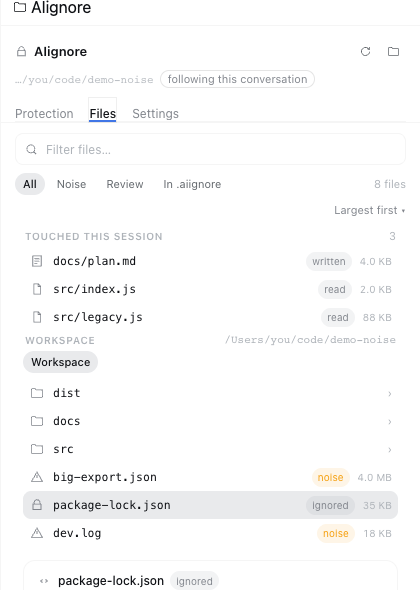
Three tabs inside:
Chat — the conversation in front of you, and the tab the panel opens on. Its title sits in the header; the tab shows the turns, the files it read, and how its tokens split across assistant / tool / user / injected context. A conversation is the thing you are actually in, so it gets the first tab.
Files — opens on the files this session touched (what the agent read and what it wrote), then lets you browse the whole workspace a directory at a time. Search, filter by verdict — and when a filter has nothing in it, the panel says which filter that was instead of looking empty.
Score — two labelled numbers and the arithmetic behind them:
what it counts This conversation what this chat actually read Still reaches the model what is left after your .aiignorerules and your strengthBelow them: one bar per noise category (what it cost, out of the weight it could cost) with how the score is computed folded away behind a summary you can open, and Optimize from this conversation as a primary button that names the rules it is about to write before you press it — then reports the score before and after plus how many of those reads the new rules now block. Undo puts the file back byte for byte.
At the bottom sits the note for the agent, and it no longer asks you to imagine what it does: three one-click sentences, then a preview of exactly the text the agent will read before your next message.
The strength is part of the score, not a separate page. Five buttons from Off to Strict, each already scored against your workspace before you commit to one, so the difference between Balanced and Strict is a number you read instead of a slider you drag. There is no slider any more: two ways to say the same thing was one too many. Each notch says what it stops and what that costs; the Host stores it in
.aiignore.policy.json; the read guard and the scan share the same predicate, so saving a notch re-scans and the number moves.
Following the conversation, not a folder
The panel asks the Host who the current conversation is, and the Host reads the
session store: <DSH_HOME>/sessions/*/session-*/session.v4.jsonl.zstd is an
append-only zstd file whose first frame is a JSON header carrying the
session id and its cwd. The most recently written log is the conversation in
front of you, and its header names the folder — no guessing from directory
names, and no dependency on the workspace index ever having been told about that
session. The header names the workspace; the guard, the score and the file list
then all speak about that one folder.
The folder button keeps a menu: follow this conversation (the default), pick another folder…, or stop pinning — so a choice made once is a choice you can take back. Every workspace this app has been used in is also listed on the Context across your workspaces page in the left rail, scored with the same rules.
One click, with a way back
Optimize this workspace appends the scanner's suggestion to .aiignore,
keeping the lines already there, then reports the score before and after. The
previous file is held in memory for the session, so Undo puts it back byte
for byte — and if optimize created the file, undo removes it.
Two decisions per file, available from the tree, the session list and the report:
- Read once (the report calls it Read it anyway) pre-approves a path for the rest of the Host run, including one the session has not tried yet. Reloading the Harness forgets it — a temporary override should stay temporary.
- Never read it appends the path to the workspace's
.aiignore. That is the durable direction, because the file is the record: it survives restarts, shows up in review, and you can delete the line yourself.
One workspace can hold many conversations, so the panel never averages them:
the Chat tab's picker lists the conversations this app knows, marks the one
currently open, and every number above it is that conversation's. There is no
separate "follow" entry in the picker — the folder button already means
follow, and two controls for one state is one control too many. When the session
store cannot answer, the panel falls back to the directory the slot hands it
(?cwd=), then to the agent and session registries, then to whatever was
scanned last. Only an absolute path to an existing directory is accepted.
The aggregate view lives in the left rail, under New Session: Context across
your workspaces scans every folder this app has been used in, ranks them
worst-first by the score your rules leave behind, and can act without opening
any of them — Scan again refreshes, Apply rules writes that folder's
suggestions, Open the panel jumps to the conversation view. It is served by
GET /aiignore/overview and cached for five minutes.
Styling comes from the Host's design tokens (--dsw-*) with fallbacks, so the
panel follows light and dark themes instead of shipping its own palette. Every
control is reachable with Tab, and empty, loading and error states are real
screens rather than blank space.
The panel talks to the Host half over nineteen same-origin routes
(GET /aiignore/report, GET /aiignore/tree?dir=, GET /aiignore/overview,
GET /aiignore/sessions, GET /aiignore/workspaces, GET /aiignore/levels,
GET /aiignore/debug,
GET/POST /aiignore/notes, GET/POST /aiignore/policy,
GET /aiignore/upload?digest=, POST /aiignore/scan,
POST /aiignore/client-report, POST /aiignore/optimize,
POST /aiignore/optimize/undo, POST /aiignore/allow,
POST /aiignore/ignore, POST /aiignore/unignore). The upload route serves a thumbnail and refuses
anything that is not a 64-hex digest inside the attachment store; the unignore
route removes exactly one rule line and refuses symlinks and directories. They
answer for the most recently scanned workspace and set no-store; the only one
that returns file bytes is the upload thumbnail, and it only ever returns an
image the user already handed to this session. The Host half installs them through ctx.inject(['webServer']),
so a profile without a web server still gets the read guard — it just has no panel.
There is no authentication beyond a same-origin check: like every
ctx.webServer route, this one inherits the loopback bind of the Harness and
must not be exposed to a network.

Looking at the panel without a Harness
dev/preview.html renders the real panel against the Host's real design tokens
with mock data: both themes, four scenarios (noisy, healthy, freshly opened,
request failing), and ?nosidebar=1 to see the floating-card fallback. Open the
file in a browser; no build, no server. It is a development page and is not part
of the published package.
Install
Through the Plugin Manager:
- From npm — install
dsh-aiignore. - From a checkout — install the
plugin/directory of this repository.
Installing a local directory links it, so re-check the files directly: files
does not filter a linked directory.
From the plugin market
Harness has no central store: the Discover tab lists whatever indexes the user adds. This repository publishes one at
https://raw.githubusercontent.com/WJDdidi-1/ai-context-doctor/main/market/index.json
To use it:
- Open Plugins in the Web sidebar.
- Beside Experimental plugins, open More and switch on Custom plugin markets. The Plugins page then gains an Installed / Discover split.
- In Discover, add the index URL above.
- Install dsh-aiignore from the result.
The Harness checks the declared engines.dsh range before installing and
refuses the plugin if the running version falls outside it.
Configure
Values go in the plugin's config row in cordis.patch.yml:
- insert:
    - id: ai-context-doctor
      name: 'dsh-aiignore'
      config:
        healthThreshold: 80
        maxFiles: 20000
        maxBytes: 268435456
| key | default | meaning |
|---|---|---|
healthThreshold |
80 |
Inject only when the workspace scores below this. 100 disables the notice without uninstalling. |
maxFiles |
20000 |
Stop scanning after this many files. |
maxBytes |
268435456 |
Stop scanning after this many bytes (256 MiB). |
readPolicy |
deny |
deny refuses read calls on the noisy files below; off only warns at session start. |
The caps exist because the scan is a synchronous directory walk: without them, opening a huge monorepo would stall the Host.
The guard also refuses anything the workspace's own .aiignore lists, including
files the size heuristic considers clean. A hand-written rule beats the
heuristic, and editing the file takes effect on the next read.
What it refuses to read
With readPolicy: deny, the plugin installs a tool guard that refuses read
calls on the same files the notice names:
| refused | why |
|---|---|
dist/, build/, coverage/, .next/, .turbo/ |
generated output; the source is what matters |
package-lock.json, pnpm-lock.yaml, yarn.lock |
thousands of lines of resolved versions |
*.log |
local run output, usually stale |
| files over 1 MiB | a single read can consume the whole budget |
The refusal is a message, not a silent failure: it names the file, its size and
the tokens the read would have cost, so the agent can tell the user instead of
retrying. Templates like .env.example and scripts with deploy in the path
are never blocked — they are small, and a wrong guess there loses real
information.
Every refusal is recorded per workspace (getSkippedReads) so the UI half can
list what this session did not open.
Limits
- The notice fires once per workspace per Host run; changing the directory in a session does not re-trigger it.
- The score is a size heuristic; token figures are a range from the measured 3.08–4.32 bytes-per-token ratio, not an exact count.
bash,grepand other tools that can read a file indirectly are not intercepted: the guard only sees thereadtool..gitignoreis ignored on purpose: the point is what the agent would read, not what git tracks.- The panel follows the conversation whose log was written last. Switching to a conversation you have not touched since this Host run started moves it only after that conversation writes something, so it can lag one click behind.
- Switching the interface language takes effect the next time the panel opens; the open panel does not re-render.
License
Apache-2.0. See LICENSE at the repository root and NOTICE beside this file:
the plugin contains no third-party source, and its only runtime dependency is
ai-context-doctor from the same repository.