dsh-artifacts-felix
Verifieddsh-artifacts-felix · v0.1.0 · MIT · Web UI
Claude-style Artifacts for DeepSeek Harness: the agent writes web pages, React apps, SVG, Mermaid diagrams, Markdown documents and code into a versioned, live-rendered side panel.
Install
dsh plugin add dsh-artifacts-felix Confirm the layer applied with dsh --profile default --dump-config — see the install guide.
Source
Tags
Readme
dsh-artifacts — 给 DeepSeek Harness 的 Artifacts
English | 中文
npm 安装包 · 下载 Release · 反馈问题
npm 发布名为 dsh-artifacts-felix,内部插件 ID 保留为 dsh-artifacts。npm 上不带后缀的 dsh-artifacts 属于另一位发布者。
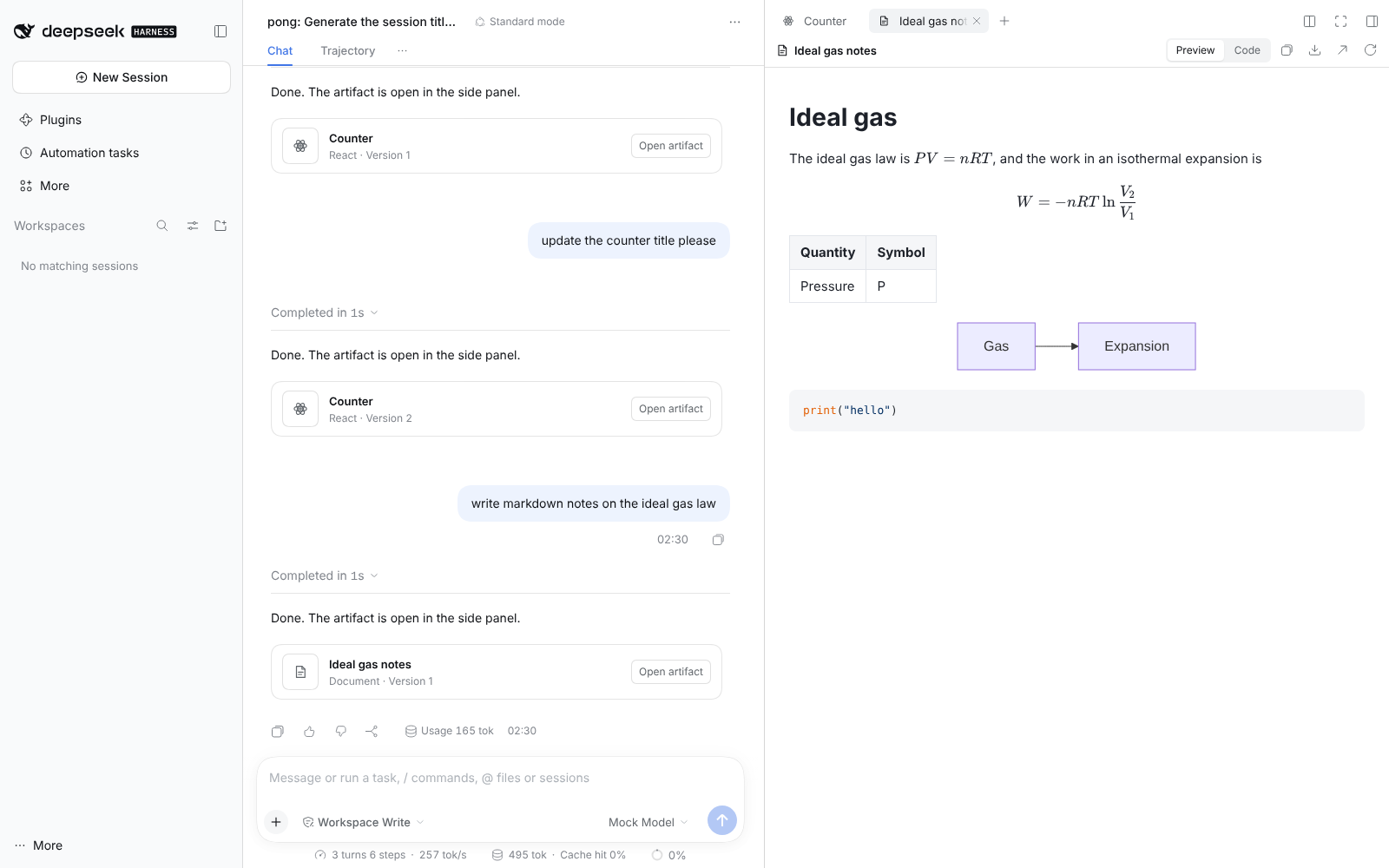
让 DeepSeek Harness(dsh)拥有和 Claude Artifacts 同样的能力:智能体把网页、React 交互应用、SVG、Mermaid 图、Markdown 文档和代码写进一个带版本、实时渲染的侧边栏面板,用户可以切换版本、看源码、复制、下载、在新标签页打开,Artifact 里的代码还能持久化存储数据、调用模型。
这是一个标准的 dsh 插件包(Cordis bundle + 浏览器端 client 模块),只通过 dsh 公开的扩展点接入,不修改 dsh 任何源码。
功能对照
| Claude Artifacts | dsh-artifacts |
|---|---|
artifacts 工具:create / update / rewrite |
artifact 工具:create / update(old_str→new_str,必须唯一匹配)/ rewrite;兼容 Claude 的 MIME 类型名(application/vnd.ant.react 等) |
| 类型:HTML、React、SVG、Mermaid、Markdown、代码 | 同样六种:html react svg mermaid markdown code |
| React:Tailwind、lucide-react、recharts、shadcn/ui 等 | Babel 实时编译 JSX/TSX;Tailwind;任意 npm 包按名导入(经 esm.sh);内置常用 shadcn/ui 组件的兼容实现(@/components/ui/*) |
| Markdown | GFM 表格、KaTeX 数学公式($…$、$$…$$)、文中 ```mermaid 代码块、代码高亮 |
| 侧边面板实时预览 | 右侧栏标签页,沙箱 iframe(不透明源,无 allow-same-origin) |
| 版本历史 | 每次调用生成新版本,面板里 ◀ ▶ 切换,"最新"一键回到最新;智能体更新后自动跳到新版本 |
| 预览 / 代码切换、复制、下载 | 预览 / 代码、复制源码、下载源文件或独立 HTML 页面 |
| 发布 / 在新窗口打开 | 在新浏览器标签页打开(带 Content-Security-Policy: sandbox 的独立页面) |
window.storage 持久化存储 |
同名同语义的 API:get/set/delete/list(key, shared?),按 Artifact 持久化,跨版本、跨刷新 |
window.claude.complete() |
同名 API(别名 window.dsh.complete),由 dsh 的默认模型回答;有速率限制,可在配置里关闭 |
| "Try fixing" | 预览报错时出现错误栏,"让智能体修复"会把错误发回当前会话 |
| 对话里的 Artifact 卡片 | 工具调用行实时显示"正在编写… N 字符";回合结束后在回复下方列出本回合的 Artifact 卡片,点击即在侧栏打开 |
| — | 侧栏引导页里的 Artifacts 列表页,列出本会话所有 Artifact |
安装
需要 dsh 0.2.x(在 0.2.1-rc.3 上测试),Node ≥ 24.9,PATH 里有 pnpm。
# 从 npm 安装到 web profile
dsh plugin --profile web add [email protected]

# 或从 Release 下载 tarball 后安装
dsh plugin --profile web add ./dsh-artifacts-felix-0.1.0.tgz

# 或者从源码目录链接安装(开发时用,改完 npm run build 后重启 dsh 生效)
dsh plugin --profile web add /path/to/dsh-artifacts

dsh web
安装后无需其它配置:模型会在工具列表里看到 artifact,比如直接说"做一个可交互的太阳系模拟"或"把这份实验数据画成图表"。
卸载:dsh plugin --profile web remove dsh-artifacts-felix。升级到同版本号的新 tarball 时,pnpm 会沿用缓存,请先 remove 再 add。源码链接安装前需先运行 npm ci && npm run build。
随附源码文档记录了
dsh web(浏览器 Web UI)的端到端测试;桌面版(Electron)未实测,桌面版里不显示"在新标签页打开"按钮。本次发布准备验证构建、类型检查、单元测试和打包内容,没有重新进行完整的 dsh 界面测试。
配置
在 profile 的 cordis.patch.yml($DSH_HOME/profiles/web/cordis.patch.yml)里重写这一行即可(patch 会整体替换 config,只写需要改的字段,其余用默认值):
- id: dsh-artifacts
  name: dsh-artifacts-felix
  config:
    cdn:
      npm: https://fastly.jsdelivr.net/npm     # 国内可换成可用的 jsDelivr 镜像
      esm: https://esm.sh
    ai:
      maxCallsPerMinute: 10
| 字段 | 默认值 | 说明 |
|---|---|---|
dataDir |
$DSH_HOME/artifacts(即 ~/.dsh/artifacts) |
Artifact 存储目录 |
maxBytes |
2 MiB | 单个版本的最大字节数 |
autoOpen |
true |
智能体写完后自动在侧栏打开 |
cdn.npm |
https://cdn.jsdelivr.net/npm |
jsDelivr 兼容的 npm 文件 CDN(Babel、marked、KaTeX、highlight.js、mermaid) |
cdn.esm |
https://esm.sh |
esm.sh 兼容的 ES 模块 CDN(React 和 React Artifact 里导入的 npm 包) |
cdn.tailwind |
https://cdn.tailwindcss.com |
Tailwind Play CDN 脚本 |
ai.enabled |
true |
是否允许 Artifact 调用 window.claude.complete |
ai.provider / ai.model |
dsh 默认模型 | 指定 Artifact 调用所用的模型 |
ai.maxTokens |
4096 | 单次回答的输出上限 |
ai.maxCallsPerMinute |
20 | 每个 Artifact 每分钟调用上限 |
storage.maxValueBytes |
5 MiB | window.storage 单个值上限(同 Claude) |
storage.maxTotalBytes |
20 MiB | 每个 Artifact 的存储总量上限 |
工作原理
模型 ──artifact 工具──▶ Host 插件(Node)
                          ├─ 内容寻址存储:blobs/<sha256>.json,同内容只存一份
                          ├─ 会话索引:sessions/<sessionId>.json(id → 版本列表)
                          ├─ 会话日志:tool/result.meta + plugin:dsh-artifacts/version 记录
                          └─ 鉴权路由(挂在 dsh Connection 的 /api 上,复用其 Cookie 鉴权与 Host/Origin 检查)
                               artifacts.list / read / view / storage / complete
浏览器 client 模块 ──────────▶ 右侧栏 artifact 标签页(沙箱 iframe + postMessage 桥)
                               对话中的工具卡片、回合结尾卡片、Artifacts 列表页
- 会话日志是事实来源:索引文件丢失(或 fork 出来的会话还没有索引)时,会从会话日志重建版本历史——运行中的会话直接读内存,已关闭的会话经
sessionQuery读取存储的日志,不会把会话唤醒。 - 每个版本还作为可忽略的插件记录写进会话日志,所以在 PTC(代码调用工具)模式下也能在回合结尾显示卡片。
- 预览文档由同一个构建器生成(侧栏、独立页面、下载的 HTML 一致),开头注入桥接脚本,提供
window.storage、window.claude.complete,并把运行错误回报给面板。
安全模型
- 预览 iframe 是
sandbox="allow-scripts …"、没有allow-same-origin,Artifact 代码处于不透明源,拿不到 dsh 页面、Cookie 或/api。 - 存储和 AI 调用只能经父页面转发,父页面只认当前标签页那个 iframe 的消息,并按标签页绑定的 Artifact 限定作用域;iframe 无法指定别的 Artifact。
- "在新标签页打开"的独立页面带
Content-Security-Policy: sandbox …,同样是不透明源。 - 所有路由都在 dsh Connection 的鉴权之后,未登录请求返回 401(已测试)。
- Artifact 由模型生成,可能受提示注入影响:它能做的只是在沙箱里运行、读写自己的存储、发起受限速的纯文本模型调用。
限制
- 预览需要联网从 CDN 加载 Babel、React、mermaid 等库(与 Claude 一样)。国内网络可改
cdn配置指向可用镜像或自建镜像。 - Tailwind 用的是 Play CDN(运行时生成样式),与 Claude 的预编译样式不完全一致;任意值类(如
h-[600px])可用但不推荐。 - shadcn/ui 只内置了常用组件的简化实现(Card、Button、Input、Tabs、Select、Dialog、Table、Accordion 等)。
- 没有公开分享链接(dsh 是本地服务);可以下载独立 HTML 分享。
window.storage的shared只是另一个命名空间——dsh 是单用户的。- dsh 仍是开发者预览版,插件 API 可能变化;本插件依赖的接口:
ctx.tools、ctx.connection.fetch、ctx.sidebarRightTabs、ctx.slots(sidebar.right.pane.tab、tool.call.toolview、conversation.chat.turnTail)、ctx.uiConversation.events、appendPluginRecord(缺失时自动跳过)。
开发
npm ci
npm run build       # esbuild → lib/index.js(Host)+ lib/client.js(dsh client-module 格式)
npm run typecheck
npm test            # 28 个单元测试:存储、工具、路由、文档生成、回合折叠、索引重建
npm pack            # 生成 dsh-artifacts-felix-<version>.tgz
源码结构:
src/index.ts              Host 插件入口与配置
src/host/store.ts         内容寻址存储、会话索引、从日志重建、window.storage 存储
src/host/tool.ts          artifact 工具(描述、命令、版本)
src/host/routes.ts        鉴权路由
src/host/ai.ts            window.claude.complete 的模型调用
src/host/records.ts       会话日志插件记录
src/shared/document.ts    六种类型的预览文档构建器 + 桥接脚本
src/shared/shadcn-shim.ts shadcn/ui 兼容组件
src/client/*              侧栏标签页、工具卡片、回合卡片、列表页、样式与文案
MIT License.