dsh-burn
Verifieddsh-burn · v0.1.4 · MIT · Web UI
Per-session token spend, peak/off-peak pricing, and account balance for the DeepSeek Harness web UI.
Install
dsh plugin add dsh-burn Confirm the layer applied with dsh --profile default --dump-config — see the install guide.
Source
Tags
Creators
Readme
dsh-burn
DeepSeek Harness Web UI 的 token 花费、峰谷计价与账户余额插件。
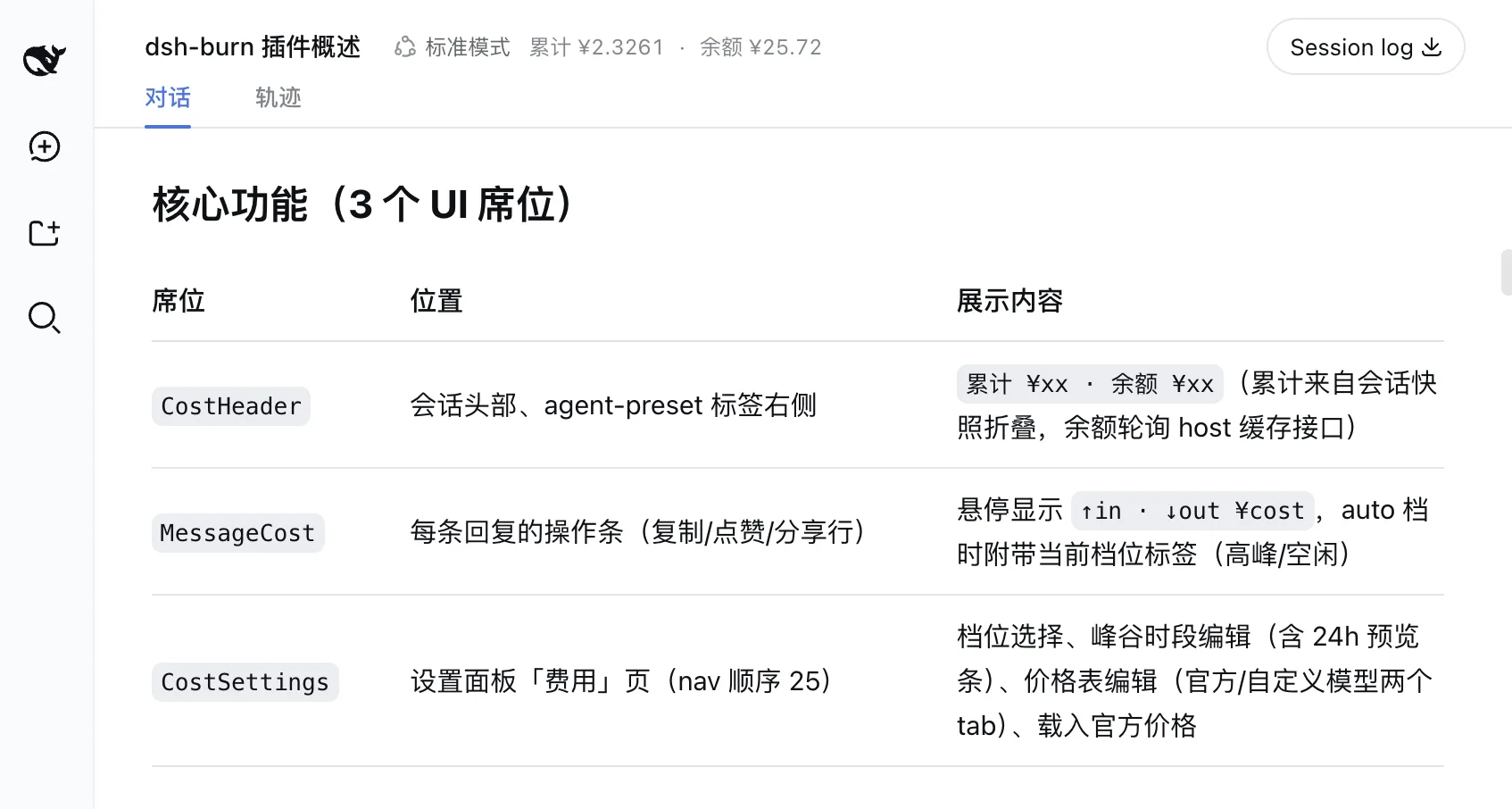
功能
- 悬停查看每条回复消耗——已完成的模型回复在操作区(复制/点赞/分享)显示
↑输入 · ↓输出 ¥花费,按该回复自身生成时间所在计费档位与当前价格簿计价。 - 会话标题栏显示累计花费与账户余额——
累计 ¥xx · 余额 ¥xx位于标题栏 Standard mode 徽章右侧。累计金额从会话快照实时 fold(回复一落地即更新,历史金额不随当前时刻漂移);余额轮询 DeepSeek/user/balanceAPI(宿主侧缓存 60 秒)。 - 设置面板(费用)——编辑各模型价格、选择计价档位(自动/高峰/空闲/均值)、一键载入 DeepSeek 官方价格、自定义峰谷时段。切换档位即时生效。
计价遵循 DeepSeek 计费规则:每条回复按其生成时刻所在档位计费——工作日高峰为北京时间 09:00–12:00 与 14:00–18:00,其余为空闲(半价);周末全天空闲价(2026-08-23 规则)。auto(默认)与 average 都按实际逐条档位计价(即时间加权均值);peak / offPeak 可固定查看单档价格。时段可自定义。价格默认使用内置官方表,零配置即可用。
安装
需要 DeepSeek Harness 0.1.0-rc.7+。本插件是 bundle 形态:dsh plugin add 即自动挂载,无需手动改 patch。
从 GitHub 安装
dsh plugin --profile web add github:yishan/dsh-burn
dsh web   # 重启 web 服务使 profile 生效
从 npm 安装(发布后)
dsh plugin --profile web add dsh-burn
dsh web
从本地目录安装
dsh plugin --profile web add /path/to/dsh-burn
dsh web
卸载
dsh plugin --profile web remove dsh-burn
dsh web
配置
默认零配置:启动时自动回填内置官方价格表(deepseek-v4-flash / deepseek-v4-pro),一切可在 设置 → 费用 中实时编辑(持久化到按 profile 隔离的设置文件——<profileDir>/plugins/dsh-burn/settings.json,由 Loader 的 baseUrl 推导——重启后覆盖 profile 配置)。旧全局 $DSH_HOME/plugins/dsh-burn/settings.json 会在首次启动时迁移一次;也可在 profile patch 里用 settingsPath 显式指定位置。
余额显示需要从 DEEPSEEK_API_KEY 解析出 DeepSeek API key。
高级:用 profile patch 覆盖
在 profile patch 中以 id: dsh-burn 为目标,可覆盖 bundle 行的配置(价格、计价档位、峰谷时段、余额接口):
# $DSH_HOME/profiles/web/cordis.patch.yml
- id: dsh-burn
  config:
    displayMode: auto          # auto | peak | offPeak | average
    tierSchedule: default      # default | custom
    customWindows: []          # [{ start: 540, end: 720, tier: 'peak' }, ...]
    defaultTier: offPeak       # 未被 customWindows 覆盖的分钟使用的档位
    prices:
      deepseek-v4-flash:
        peak:    { input: 3.0, cacheRead: 0.1,  cacheWrite: 3.0, output: 9.0 }
        offPeak: { input: 1.5, cacheRead: 0.05, cacheWrite: 1.5, output: 4.5 }
      deepseek-v4-pro:
        peak:    { input: 9.0, cacheRead: 0.3,  cacheWrite: 9.0, output: 27.0 }
        offPeak: { input: 4.5, cacheRead: 0.15, cacheWrite: 4.5, output: 13.5 }
    defaultPrice:
      peak:    { input: 3.0, cacheRead: 0.1,  cacheWrite: 3.0, output: 9.0 }
      offPeak: { input: 1.5, cacheRead: 0.05, cacheWrite: 1.5, output: 4.5 }
    apiKeyEnv: DEEPSEEK_API_KEY   # 余额接口的凭证引用
    balanceRefreshMs: 60000
    balanceBaseURL: 'https://api.deepseek.com'
    # settingsPath: /abs/path/to/settings.json   # 可选:覆盖 profile 隔离的默认位置
价格为每百万 token 的人民币单价。不单独计费 cache 写入的提供方,cacheWrite 按未缓存输入价填写。
工作原理
- 宿主(
src/index.ts、src/projection.ts):CostMeter服务把会话日志 fold 成按模型、按计费档位的 token 分桶(cost会话投影——每条消息按其自身时间戳所在档位入桶),提供GET/POST /api/cost/settings,并通过凭证 seam 代理GET /api/cost/balance(无 key 返回 401、上游失败 502、60 秒缓存 + 并发去重)。投影的totalCost在读取时用当前价格簿 × 当前档位实时计算,价格/档位变更对整段历史即时生效,无需重放。 - 客户端(
src/client/):三个插槽席位——conversation.session.header.actions(累计花费 + 余额,位于标题栏代理预设标签右侧)、conversation.chat.assistant-actions(单条消耗,按该条自身时间计价)、settings.section(费用页)。token 分桶在渲染时按当前价格簿重新计价,因此档位/价格变更即时生效,无需重启。会话折叠是增量的(追加 O(Δ)、单条 O(1) 索引查找)。 - 运行时设置持久化到按 profile 隔离的设置文件(见「配置」),启动时覆盖 profile 配置;价格簿中缺失的模型会从官方价格表自动回填。
POST /api/cost/settings会拒绝未知 key、非法值、重叠时段(400)与超大 body(413),并在persisted字段上报磁盘写入结果,UI 据此提示保存失败。
开发
pnpm install
pnpm run typecheck   # tsc --noEmit
pnpm run test        # vitest(计价逻辑)
pnpm run build       # esbuild:lib/index.js(宿主)+ lib/client.js(浏览器)
客户端 bundle 是注册在 window.__ModuleLoader__ 上的 classic-script 插件,只能 import 平台模块表(见 build.mjs)。
许可证
MIT