dsh-excalidraw
Verifieddsh-excalidraw · v0.1.1 · MIT · Web UI
Live Excalidraw architecture scenes rendered in DSH (sidebar tab or native conversation view), refreshed from Excalidraw+ over MCP.
Install
dsh plugin add dsh-excalidraw Confirm the layer applied with dsh --profile default --dump-config — see the install guide.
Source
Tags
Creators
Readme
dsh-excalidraw
Show live Excalidraw architecture scenes in the DSH sidebar.
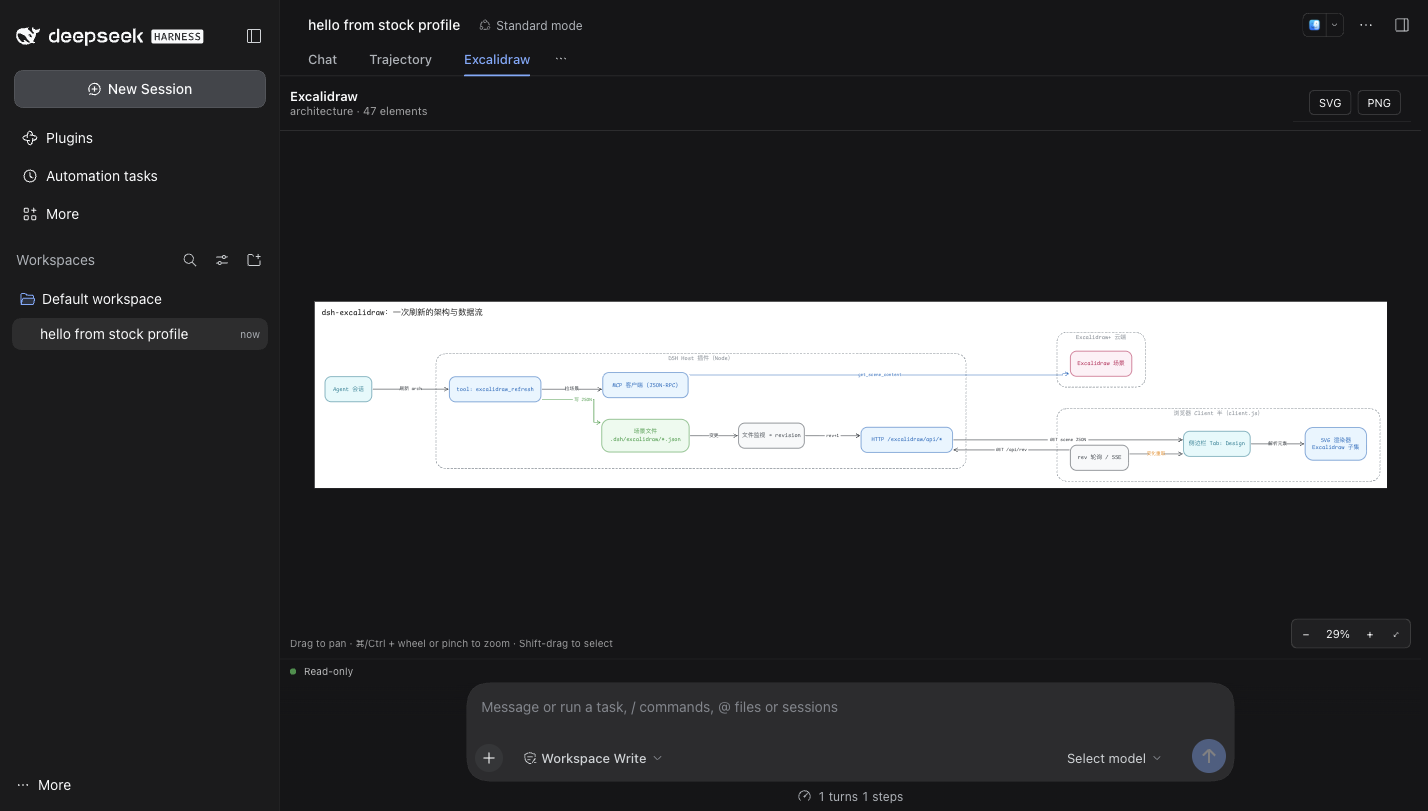
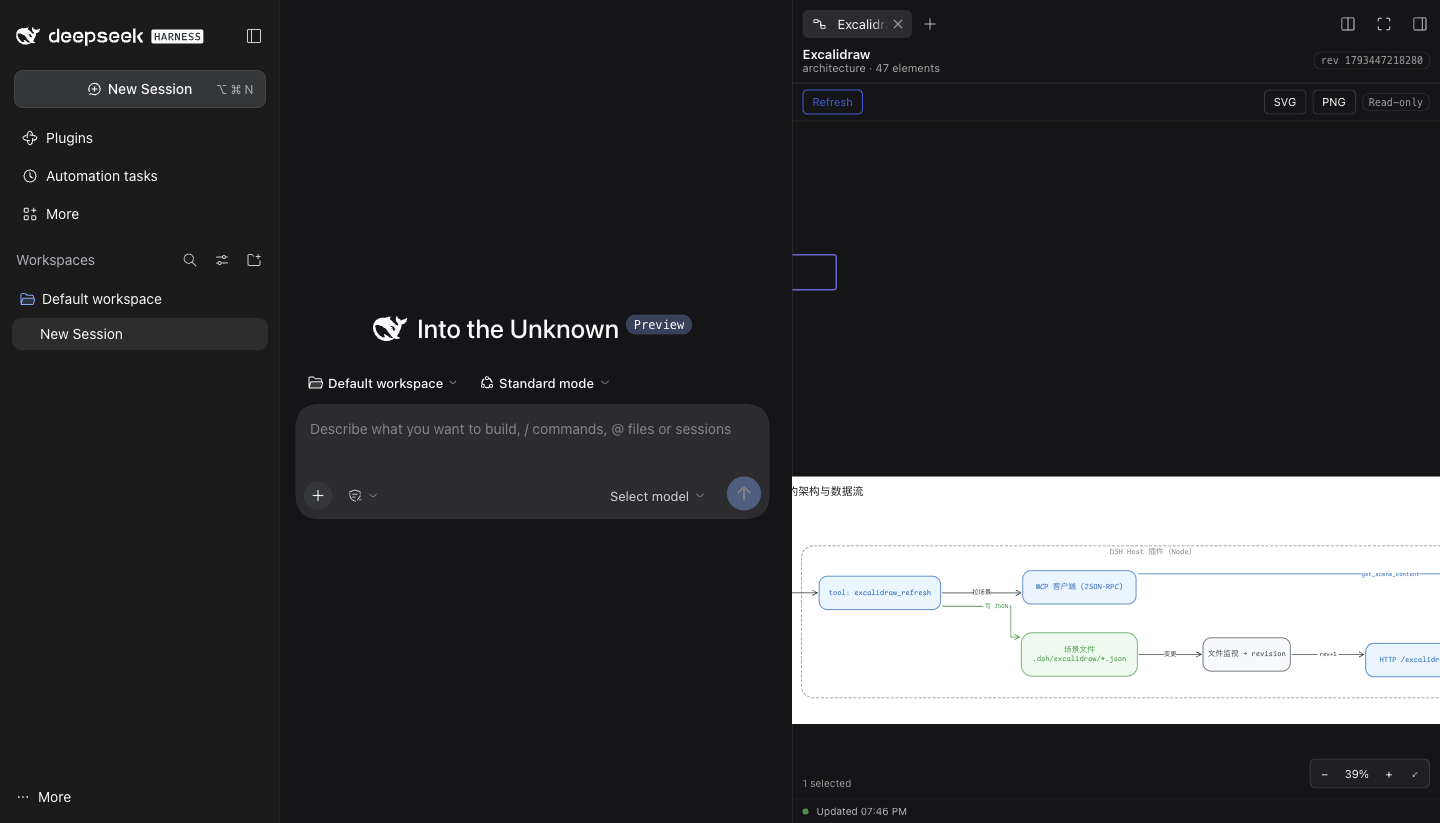
Ask the agent to draw or refresh the code architecture in Excalidraw; dsh-excalidraw pulls the scene through the Excalidraw+ MCP server, stores it in the workspace, and the Excalidraw sidebar tab re-renders it — no page refresh, no screenshots.
agent ──▶ tool: excalidraw_refresh ──▶ Excalidraw+ MCP (get_scene_content)
                                         │
                                         ▼
                       <cwd>/.dsh/excalidraw/<slug>.excalidraw
                                         │  (revision bump + focus pointer)
                                         ▼
  sidebar tab «Excalidraw» ◀── /excalidraw/api/* ◀── host HTTP routes
Design drawn in Excalidraw before a line of code: architecture · sidebar wireframe
Preview
The Excalidraw view on a stock DSH, beside Chat and Trajectory:
The same scene as the Excalidraw tab in dsh-better-sidebar:
Install
# from a directory that holds this package
dsh plugin --profile desktop add "$PWD"
# then restart DSH so the Host row and the client bundle load
The version here is a plain ESM bundle: no build step is needed at install time
(client.js is committed). npm run build rebuilds it, however, so a checkout edited
in src/ must be rebuilt before installing.
When this repository lives inside LayerFS (as it does in tokenaissance), export it
to a real host directory first — dsh plugin add needs a filesystem path:
# from a session bound to the LayerFS project
layerfs fs read main /dsh-excalidraw/...  # or mount a Workspace and copy the tree out
dsh plugin --profile desktop add /path/to/exported/dsh-excalidraw
Two ways in. Local import works with no account at all: point
excalidraw_import at a .excalidraw/.json file in the workspace, or hand it
an inline Excalidraw JSON document, and the view renders it. Excalidraw+ refresh
needs an account and a token (below).
Refresh prerequisite: an Excalidraw+ MCP token. Pulling a scene from Excalidraw+
(excalidraw_refresh, the tab's Refresh button) needs an Excalidraw+ account and
its MCP bearer token — set mcpToken on the plugin row, or EXCALIDRAW_MCP_TOKEN,
or keep the Authorization: Bearer … header your profile already has for the
excalidraw MCP server; when empty, the tool fails at the MCP endpoint. Without a
token the viewer still works read-only for what is already local: the
.excalidraw file viewer opens any scene file, and the Excalidraw view renders
scenes already present in <workspace>/.dsh/excalidraw/.
Requirements: DSH 0.2.1-rc.1+ (the Excalidraw view renders on DSH's own
conversation.view slot, so no third-party sidebar is required). With
dsh-better-sidebar 0.28+ you
additionally get the right-sidebar tab, the .excalidraw file viewer, the file
icon and the auto-open focus watcher.
Interactions (preview only)
The scene view is a read-only viewer, but its navigation follows Excalidraw's:
| Gesture | Effect |
|---|---|
| drag (or middle-drag) | pan |
| wheel / two-finger scroll | pan (shift: horizontal) |
| ⌘/Ctrl + wheel, or pinch | zoom at the cursor |
| click | select the topmost element under the cursor |
| Shift + click | add/remove that element from the selection |
| Shift + drag | marquee-select everything the rectangle touches |
| ⌘/Ctrl + A | select every element · Esc clears |
| double-click | fit the scene (on an element: zoom to that element) |
+ / - / 0 |
zoom in / out / back to 100% |
Shift+1 or Home |
fit to the window |
Shift+2 |
zoom to the selection |
| arrow keys | pan by 40 px |
The zoom control in the bottom-right shows the current percentage and offers fit / 100%. Selection is drawn as an outline and never changes the scene: there is no editing, moving or resizing.
Use
- Ask the agent to refresh the architecture, e.g.
“把代码架构刷新到 Excalidraw,然后侧边栏给我看”.
The agent calls
excalidraw_refreshwith the Excalidraw+ scene id. - The host pulls
get_scene_content, writes<cwd>/.dsh/excalidraw/architecture.excalidraw, bumps the revision and leaves afocuspointer for the calling session. - The Excalidraw tab opens (or refocuses) and renders the scene as SVG. Later
refreshes re-render in place; the tab polls
/excalidraw/api/revwhile it is visible, so nothing else is needed.
Extras that come with the same sidebar service:
- any
.excalidrawfile opens in the sidebar as a diagram (read-only) instead of raw JSON; legacy.excalidraw.jsonscenes stay readable through the Excalidraw tab (better-sidebar only sniffs content for files with a head, so those keep opening in the JSON preview); - the file tree shows the diagram glyph for those files;
- the tab's own Refresh button re-pulls the last stored scene.
Tools
| Tool | Arguments | Effect |
|---|---|---|
excalidraw_refresh |
{ sceneId?, name?, slug? } |
pull a scene from Excalidraw+ into the workspace store; returns { ok, slug, file, sceneId, elements, revision, opened } |
excalidraw_import |
{ path?, scene?, name?, slug? } |
store a scene that already exists locally — a .excalidraw/.json file inside the workspace, or an inline Excalidraw JSON document — no Excalidraw+ account or token |
excalidraw_open |
{ slug? } |
focus the Excalidraw tab for an already-stored scene |
excalidraw_export |
{ slug?, format? } |
write the scene as <scenesDir>/<slug>.svg (PNG comes from the tab's button, which rasterises in the browser) |
The tab has no plugin-local settings: auto-open follows the host's autoOpen, and
the poll interval is the host's pollIntervalMs (delivered to the client in
/rev).
Fonts
The plugin ships the Excalidraw web fonts it can redistribute — Comic Shanns
(MIT), Virgil (SIL OFL) and Lilita One (SIL OFL) — and serves them from the
package, so a scene's hand-drawn text renders the way Excalidraw draws it without
any third-party request. Excalifont (Excalidraw's own default) is not
included because it carries no licence grant; scenes that use it fall back to the
browser's font stack. See fonts/README.md and docs/FIDELITY.md.
Configuration (cordis row config)
| key | default | meaning |
|---|---|---|
mcpUrl |
https://api.excalidraw.com/api/v1/mcp |
Excalidraw+ MCP endpoint |
mcpToken |
'' |
bearer token; when empty it falls back to EXCALIDRAW_MCP_TOKEN, then to the profile's own mcp-excalidraw row |
scenesDir |
.dsh/excalidraw |
scene directory, relative to the session workspace |
extraFontsDir |
'' |
optional directory of user-supplied fonts (fonts.json + files); served to the tab and used by exports — the legal way to add Excalifont |
pollIntervalMs |
1500 |
client revision-poll interval (500–10000) |
autoOpen |
true |
open/focus the tab after a refresh |
maxSceneBytes |
4194304 |
refuse larger scene files |
How it is built
- Host half (
index.js+lib/): a cordis plugin that registers seven HTTP routes plus the/excalidraw/fonts/prefix, three model tools, and a per-workspace scene store with atomic writes and a monotonic revision. Zero runtime dependencies; the Excalidraw MCP client is plainfetch+ JSON-RPC over streamable HTTP. - Client half (
client.js, generated fromsrc/client.mjs+src/renderer.mjs+src/fonts-data.mjsbyscripts/build-client.mjs): onewindow.__ModuleLoader__.loadmodule that mounts the scene view on two surfaces — DSH's nativeconversation.viewslot (an Excalidraw view beside Chat/Trajectory, so a stock DSH works) and, when present, the dsh-better-sidebar tab with its file viewer and file icon. - Renderer (
src/renderer.mjs): pure, deterministic Excalidraw→SVG for the element subset the diagram tools emit; no@excalidraw/*dependency.
Read docs/DESIGN.md for the design, docs/CONTRACT.md for the normative wire contract, and docs/HOST-NOTES.md / docs/CLIENT-NOTES.md / docs/RENDERER-NOTES.md for per-half implementation notes.
No Excalidraw+ account?
agent ── excalidraw_import { path: "docs/flow.excalidraw" } ──▶ <cwd>/.dsh/excalidraw/flow.excalidraw
agent ── excalidraw_import { scene: { type: "excalidraw", elements: [...] } } ──▶ same store
Either form stores the scene locally and shows it in the Excalidraw view; the
file viewer opens .excalidraw files directly as well. Only excalidraw_refresh
(the pull from Excalidraw+) requires the token.
Publish / install from elsewhere
- Any DSH: Settings → Plugins → Add plugin accepts a local directory, a
.tgz, or a Git URL; the CLI equivalent isdsh plugin --profile desktop add <source>. - npm:
npm publish --access public, then install by name (dsh plugin --profile desktop add dsh-excalidraw). - Community catalog: one YAML entry in
awesome-dsh-plugin
(
data/plugins/<owner>__<repo>.yml); the market and Plugins → Discover pick it up after merge.
See docs/PUBLISHING.md for the exact commands, the catalog entry, and the pre-announcement checks.
Tests
npm test        # node --test test/ (212 tests, zero deps) — it does NOT rebuild:
                # a stale client.js fails the build-signature test on purpose
npm run build   # regenerate src/fonts-data.mjs and client.js
node scripts/render-scene.mjs test/fixtures/design-scene.json /tmp/design.svg
The renderer is checked against the Excalidraw-rendered reference of the same scene (ink coverage and aspect ratio), the store and MCP client have unit tests, the host routes are exercised handler-by-handler, and the client module is loaded through a stubbed module loader.
Limits (v1)
Read-only: editing stays in Excalidraw (the viewer pans, zooms, selects and
marquees, but never writes the scene back). roughness/hachure are rendered clean;
image elements render only from a data:image/…;base64, URL already in the
scene's files; nothing is fetched from the network. Excalidraw's fonts are not
shipped, so family 5 (Excalifont) renders with the shipped Virgil fallback,
which is what Excalidraw's own stack does; families 2/3/4/6 fall back to the
browser stack. Comic Shanns (8), Virgil (1) and Lilita One (7) ship.