dsh-plugin-fly-skins
Verified@dsh-fly/dsh-plugin-fly-skins · v0.1.4 · MIT · Web UI
DSH Fly skins: the four Fly palettes (solid / glass / volume / neon) as a standalone DSH bundle + client plugin — token layer, chrome rules, Settings row
Install
dsh plugin add @dsh-fly/dsh-plugin-fly-skins Confirm the layer applied with dsh --profile default --dump-config — see the install guide.
Source
Tags
Creators
Readme
@dsh-fly/dsh-plugin-fly-skins
Fly 的四套配色,作为一个标准的 DSH 皮肤插件。
DeepSeek Harness Web UI 的皮肤插件:ctx.theme.overrideTokens() 覆写官方 token 表 +
一份作用域化的 FLY_CSS(重画官方 UI 的 chrome 表面)+ 官方「设置 → 通用」里的一行。
| 配色 | id | 风格 |
|---|---|---|
| 实心 | solid |
不透明面板,边界清晰(默认) |
| 玻璃 | glass |
半透明磨砂 + 发丝描边 |
| 玻璃2 | volume |
玻璃体块 + 状态发光 + 文字上板 |
| 霓虹 | neon |
场景光场 + 边缘外溢发光 + 文字上板 |
每套都有明暗两半,选择持久化在 profile 的 patch 层(字段 skin)。
四套配色(真机截图)
会话里任务列表(todo)正在跑时的样子 —— 顶部是任务摘要行(可展开成整条步骤链), 底部那块发光蓝的卡片就是任务列表本身(已完成 / 进行中 / 待处理三种状态都在):
| 实心 Solid | 玻璃 Glass |
|---|---|
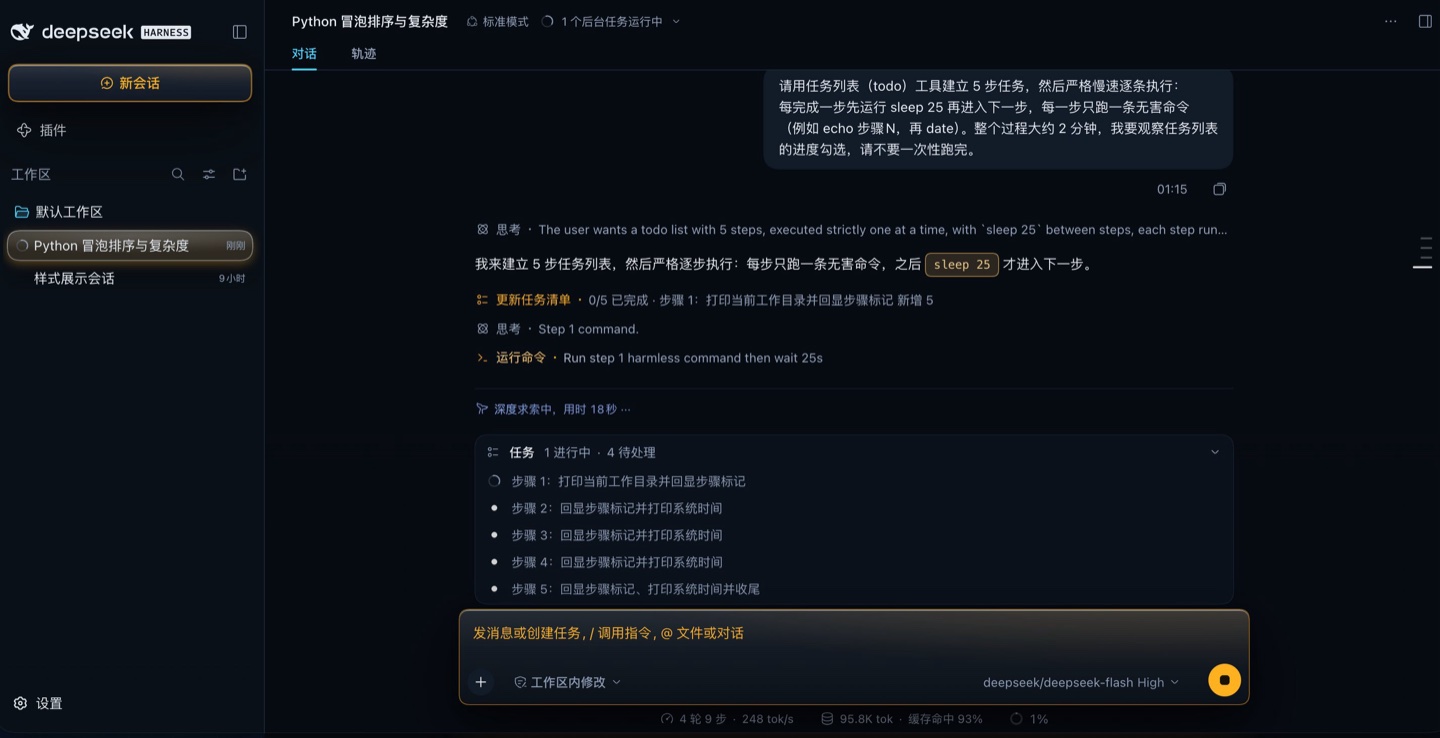 |
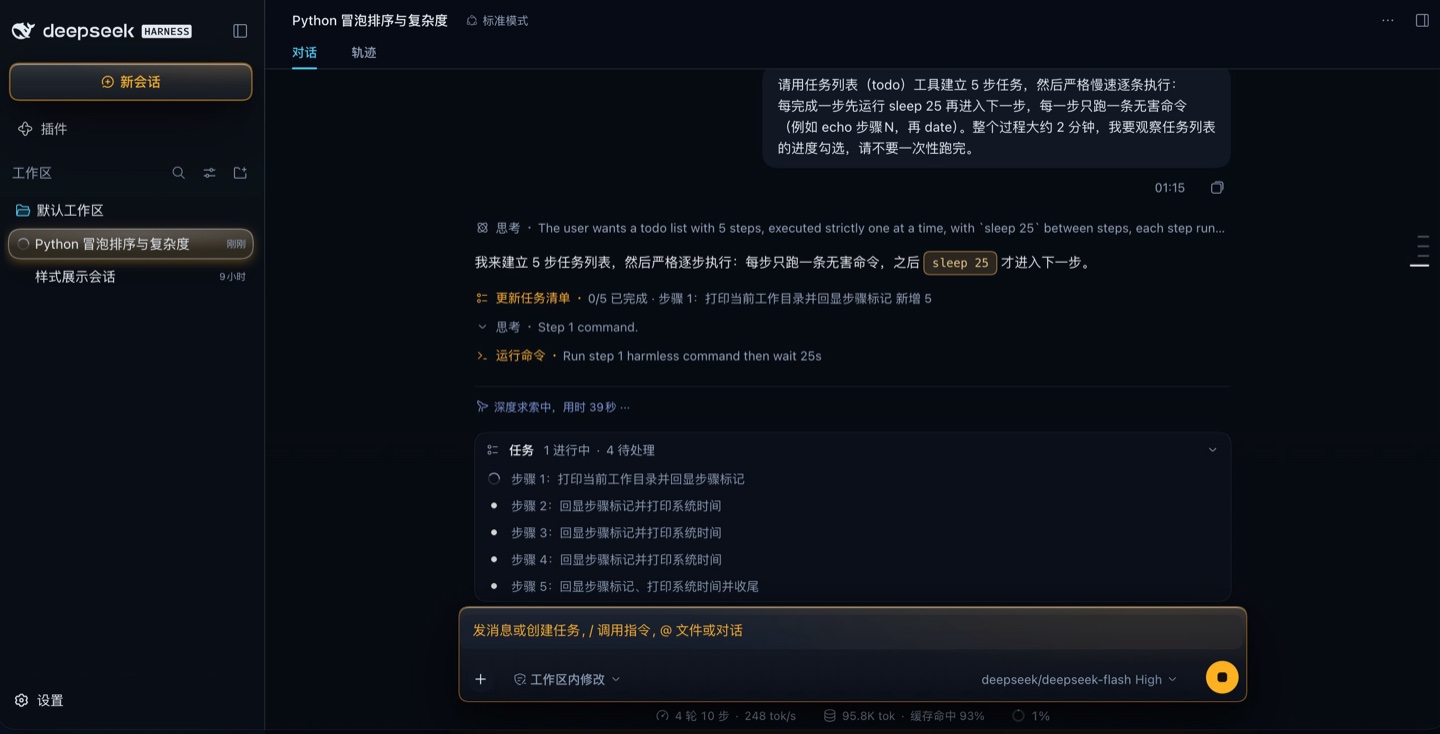 |
| 玻璃2 Volume | 霓虹 Neon |
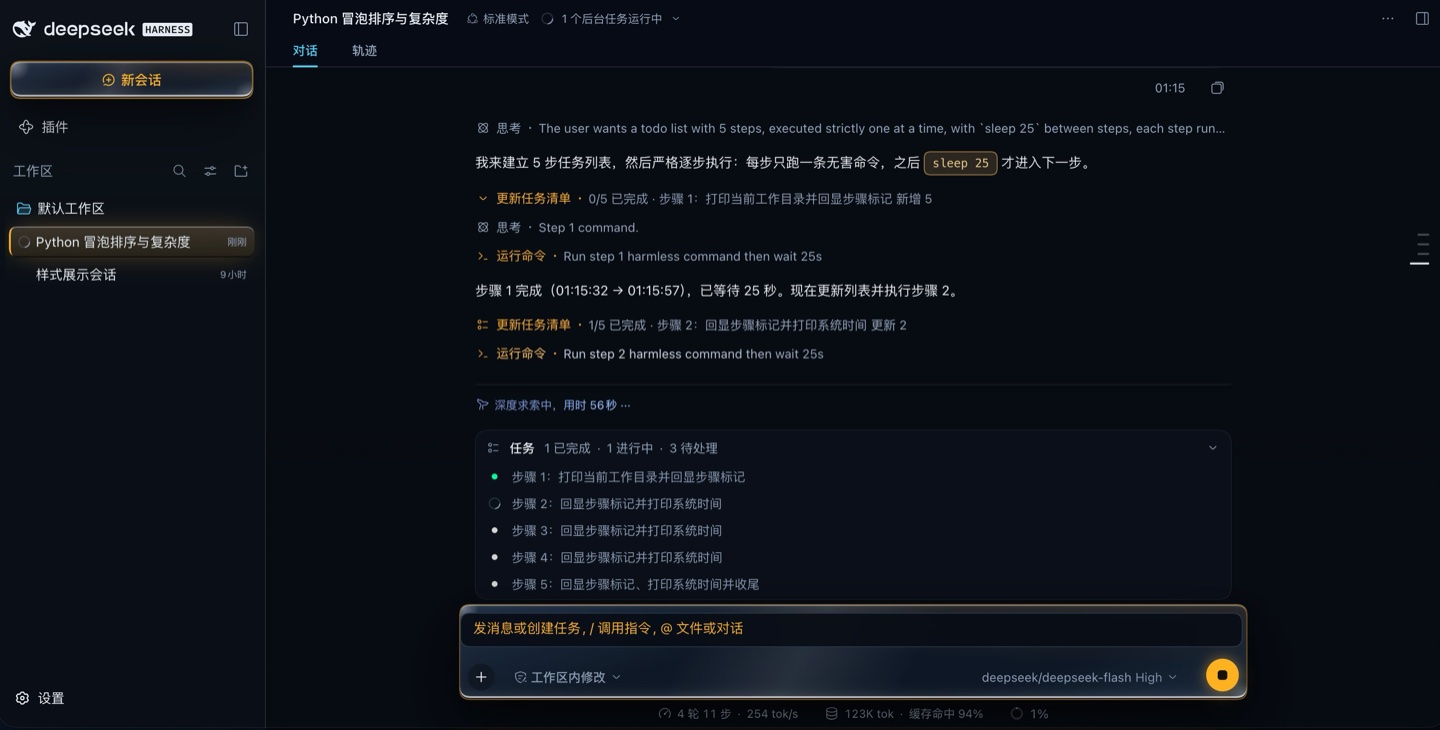 |
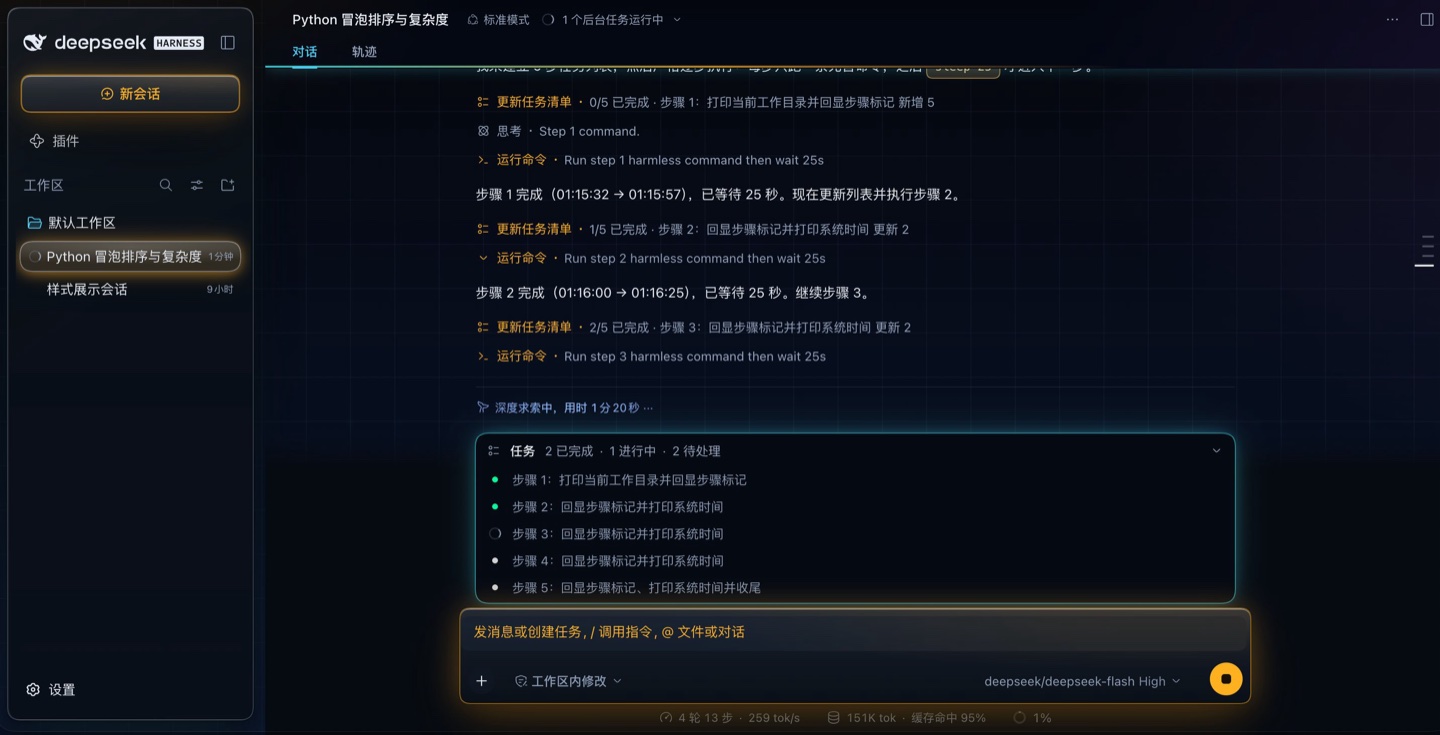 |
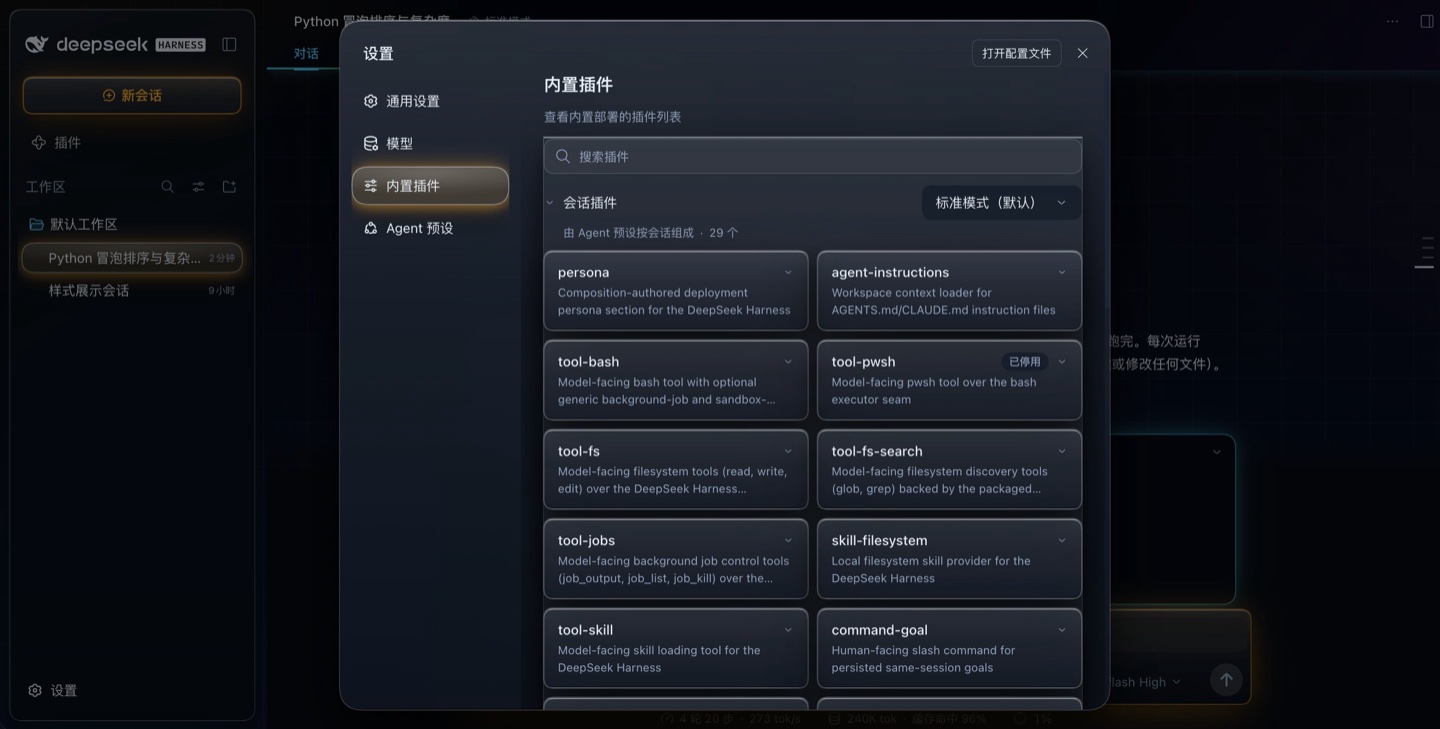
设置弹窗(霓虹配色,暗色 / 浅色两半):
| 暗色 | 浅色 |
|---|---|
 |
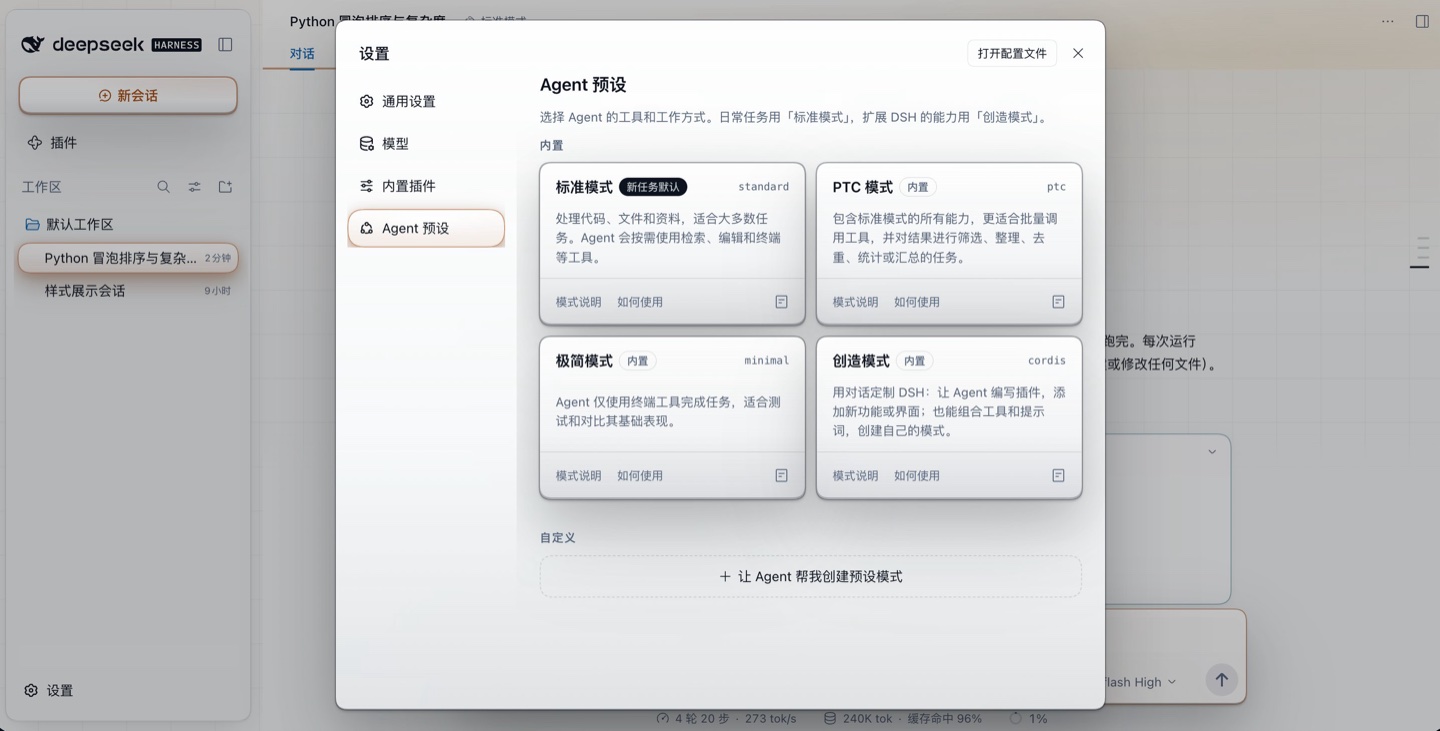 |
全部是官方 UI 里跑着本包时的实拍(真引擎 + 真浏览器,1440 宽 @DPR 2)。
安装
dsh plugin --profile=<profile> add @dsh-fly/dsh-plugin-fly-skins        # npm registry
dsh plugin --profile=<profile> add ./dsh-fly-dsh-plugin-fly-skins-0.1.0.tgz  # tarball
npm 12 起这三条路的代价不一样(2026-07 的 breaking change:allowScripts 默认 off、
--allow-git 与 --allow-remote 默认 none):
- npm registry(上面的第一条)✓ 不需要任何放行,是社区首选;
- 本地 tarball / 本地目录 ✓ 不受影响;
- git 仓库、远端 tarball URL ✗ 需要显式放行:
--allow-git/--allow-remote, 或把它们写进package.json的脚本白名单(npm approve-scripts --allow-scripts-pending)。
(本包自身没有 preinstall / install / postinstall 脚本 ✓,所以 allowScripts 默认关闭
不影响安装 ✓。)
在 Harness Web 的侧栏 → Plugins 页里也能装(同一个 plugin_manager)。装完重启
(引擎把客户端包缓存在进程内,刷新页面不够)。
包声明 dsh.bundle + dsh.client:host 半边贡献一个 Loader 行与开机引导(__FLY_SKINS__
全局 + head script),client 半边贡献 token 覆写层、样式表与设置行。
运行环境与版本
| 项 | 值 | 说明 |
|---|---|---|
| Harness 引擎 | @deepseek-ai/[email protected] |
本包在这个版本上验收:dsh-fly 的 25 组门禁里 unit skins 与 verify shell(702 条断言)跑的就是它。引擎不在依赖里 —— loader 在运行时供给 |
| Node | ≥ 20 | 见 engines.node |
@deepseek-ai/schemastery |
^3.18.4(peer) |
host 半边用它声明配置 schema;在公开 npm 上(实测 3.18.4),dsh plugin add 会装它 |
@deepseek-ai/dsh-client-* |
由 loader 供给 | 客户端半边的平台模块(locale / settings / theme / ui-primitives)不进依赖;类型面在 src/client/platform.d.ts 里自己声明 |
本包单跑 pnpm run verify 不需要引擎:它的测试自带契约夹具(manifest、loader 行、host 半边、
构建产物指纹)。只有"皮肤在真窗口里画出来了吗"那一层要在 dsh-fly 里对着真引擎量 —— 上游改名或大版本
升级时,那边的 probe:upstream 会先把候选引擎装到仓库外、跑满门禁再出红表(见其 docs/upstream-tracking.md)。
两个契约
开机标记。 皮肤在 <html> 上写 data-fly-palette="<id>"(documentElement.dataset.flyPalette),
时间点有两个:host 半边的 head script(首帧就不闪,冷启动也带对配色)与 client 半边的 apply()。
工作台插件(dsh-plugin-fly-shell)的样式挂在这个标记上 —— 所以两者可以独立安装:
装工作台不装皮肤 = 官方观感 + 工作台照常;装皮肤不装工作台 = 官方 UI 换成 Fly 配色。
服务面。 client 半边 ctx.provide('flySkins', { tokens, palettes, palette() }):
tokens:本包覆写的那批 token(名字 →{ dark, light })。消费者用它列出"皮肤改了哪些 token",不要自己去遍历document.body.style(那样会顺带列出上游自己的 token)。palettes:四套配色的{ id, label, hint }(只读)。palette():当前配色 id。
宿主行(dsh-plugin-fly-shell)按可选服务读它(ctx.get('flySkins'),不 inject):
皮肤没装时它照常渲染,只是卡片改说「皮肤由 @dsh-fly/dsh-plugin-fly-skins 提供」。别把这条读法改成
inject:那会让"只装工作台"的 profile 直接挂不上。
开发
pnpm install
pnpm run verify     # build + typecheck + test —— 提交前请让它全绿
改 src/client/** 必须重新构建(lib/client.js 是提交进仓库的构建产物,也是打包链真正装的
那份字节);tests/freshness.spec.mjs 拿 bundle banner 里的内容指纹与当前 src/ 对账,忘了构建
会直接红,而不是让"改了没反应"混过去。改完记得在真机上重启 harness 再看界面。
在真机上试装(用一个 scratch profile,别动你在用的那个):
dsh plugin --profile=<你的测试 profile> add /绝对路径/dsh-plugin-fly-skins
目录
index.js                  host 半边:Config{skin}(volatile)+ 开机引导(全局 + head script)
cordis.patch.yml          Loader 行(- insert: [{id: fly-skins, name: '@dsh-fly/dsh-plugin-fly-skins'}])
src/client/tokens.ts      四套配色的 token 表 + paletteOverrides()
src/client/styles.ts      FLY_CSS:重画官方 UI 的 chrome 配方(按 data-fly-palette 作用域)
src/client/index.tsx      client 半边:覆写层、样式表、设置行、flySkins 服务
src/client/platform.d.ts  loader 供给的平台模块的类型面(不 vendor 上游类型包)
scripts/build-client.mjs  构建浏览器半边(vite → factory 形式 CJS)
scripts/lib/client-src-hash.mjs  `src/` 内容指纹(构建写、测试读,一份实现)
tests/contract.spec.mjs   契约(manifest/loader/host 半边/构建产物/归属/对比度)
tests/panel.spec.mjs      设置行的渲染与写回
tests/freshness.spec.mjs  陈旧守卫(bundle 是否用当前 src/ 构建)
lib/client.js             构建产物(`pnpm run build`,提交进仓库)
改这个包时
- 钩子只认局部类名 /
data-*([class$='_X']、[data-tool]…),写死 hash 名是 bug; 上游改名时断言必须大声红,禁止"命中 0 就跳过"。 - 注释里不许出现反引号:
styles.ts的 CSS 在模板字符串里,一个反引号就让构建静默失败 (验证于是读到旧皮肤)。改完先看构建退出码。 - 只画官方 UI,不碰工作台:
.fly-*与data-fly-shell是dsh-plugin-fly-shell的标记, 本包的tests/contract.spec.mjs有一条反向断言盯着。 - 只读 token 的断言会假绿:token 解析对 ≠ 那层真的被画出来。改视觉要量合成像素
(端到端那一组同时装两个包,见
dsh-fly仓库的packages/dsh-plugin-fly-shell/scripts/verify-shell.mjs)。
这个包怎么被 dsh-fly 用
本包不属于 dsh-fly 那个仓库的 packages/(它住在这里,就是这个仓库存在的理由:改动以 PR 的
单位进来)。dsh-fly 通过它自己的 plugins.lock.json 认这个仓库:
// dsh-fly/plugins.lock.json
{ "plugins": { "@dsh-fly/dsh-plugin-fly-skins": { "repo": "…", "version": "0.1.0", "path": "dsh-plugin-fly-skins", "sha": "…" } } }
| 那边做的事 | 走什么 |
|---|---|
| 找到本包 | $FLY_PLUGINS_DIR,缺省 <dsh-fly 仓库的上一级>/dsh-plugins —— 所以把本仓库 clone 到那儿,或设那个环境变量 |
| 构建客户端半边 | pnpm build:clients 会连着本包一起重出(用同一份 builder),产出的 lib/client.js 提交在这个仓库里 |
| 跑本包的门禁 | unit skins 组:dsh-fly 的 25 组门禁里那一组跑的就是本包的 tests/ |
| 打包 | 桌面版把本包一起打进 fly-packages/(DMG 里不缺它) |
| 解析依赖 | 本仓库要自己 pnpm install 过:dsh plugin add 在 profile 里建的是软链,Node 从真实路径解析 |
两条你会踩到的规矩:
- 改版本号要同步锁:
package.json的version一动,dsh-fly那边plugins.lock.json的对应值要一起改,否则它的门禁开跑前就退 4(带着本仓库的路径)。提交本身不用锁(锁里的 sha 只要是这个仓库 HEAD 的祖先就行 —— "领先锁"是 co-develop 的常态,那边会如实报出来)。 - 共享的构建件不许各自改:
scripts/build-client.mjs与scripts/lib/client-src-hash.mjs在这两个仓库里必须逐字节相同(那边有一条断言盯着)。要动它们就两个仓库一起动, 否则会出现"本包按自己的口径构建、那边的守卫按自己的口径比"—— 症状是门禁全绿而屏幕上是旧皮肤。
发布(维护者)
pnpm run verify        # 先绿(构建 + tsc + 全部测试)
npm login --registry=https://registry.npmjs.org/    # 首次;CI 里用 NPM_TOKEN
npm publish            # publishConfig 已把 registry 钉在公开 npm 上
publishConfig.registry是必须的:本机与公司环境的 npm 默认 registry 可能是内网镜像, 少了它npm publish会朝镜像发 —— 发不出去还算好,真发出去了更糟。- 包名带 scope:
@dsh-fly/dsh-plugin-fly-skins,scope 由 npm 组织dsh-fly拥有 (发布前先在 npm 上建好这个 org)。package.json里已有"publishConfig": {"access": "public"}。 - 为什么要 scope(2026-10-08 决定):granular token 的 "Select packages" 只能挑已存在的包,
所以"一个 token 覆盖将来才建的兄弟插件"只能靠
--scopes dsh-fly授权 —— 而 scope 授权的前提 是包名真的在 scope 下。npm 不允许给已发布的包改名,所以这个决定必须在第一次发布之前做。 - 第一次发布别用"限定到具体包"的 granular token:那孩子只能选包,而全新包恰恰还不存在。
用
npm login(或All packages的 granular / classic Automation token)先把名字占下来; 存在之后再收紧到--packages @dsh-fly/dsh-plugin-fly-skins或--scopes dsh-fly交给 CI。 - 版本号一动,同步
dsh-fly的plugins.lock.json(那边门禁开跑前会核对,对不上直接退 4)。 - 发完拿 scratch profile 验一次真实安装:
dsh plugin --profile=<测试 profile> add @dsh-fly/dsh-plugin-fly-skins。
发布出去以后,社区有三条消费路径,按需要选:npm registry(dsh plugin add @dsh-fly/dsh-plugin-fly-skins)、
tarball(npm pack 出来的 .tgz,离线/内网可用;本地文件不受 npm 12 的 allow-remote 影响 ✓)、
兄弟仓(clone 到 dsh-fly 上一级的
dsh-plugins/,那边按 plugins.lock.json 解析 —— dsh-fly 自己走的就是这条)。
许可证与来源
MIT。本项目按 CONTRIBUTING.md 接受 PR —— 那里的三条规矩与 "怎么证明你改对了"是评审会看的清单。
第一版内容从 dsh-fly monorepo 的 packages/dsh-plugin-fly-skins 拆出(该仓库 20698e8 时
它成为一个独立包);scripts/build-client.mjs 与 scripts/lib/client-src-hash.mjs 是那份仓库里
同名文件的逐字节副本,两份由 monorepo 的断言盯着不许漂移。