dsh-home-hosted
Verifieddsh-home-hosted · v0.3.3 · MIT · Web UI
DeepSeek Harness (dsh) plugin: start your dsh web server automatically at boot, and manage home-hosted's panel and servers from inside dsh.
Install
dsh plugin add dsh-home-hosted Confirm the layer applied with dsh --profile default --dump-config — see the install guide.
Source
Tags
Creators
Readme
📌 dsh-home-hosted
Your whole home stack, up after every reboot — your dsh web server included.
A DeepSeek Harness plugin for home-hosted, the panel that supervises your services. Declare the servers once; this page manages the panel, the boot entry and the entries. Nothing is installed or started until you say so.



🚀 Quick start · 🎛️ What the plugin does · 🤖 Agent tools · 🧩 Depth
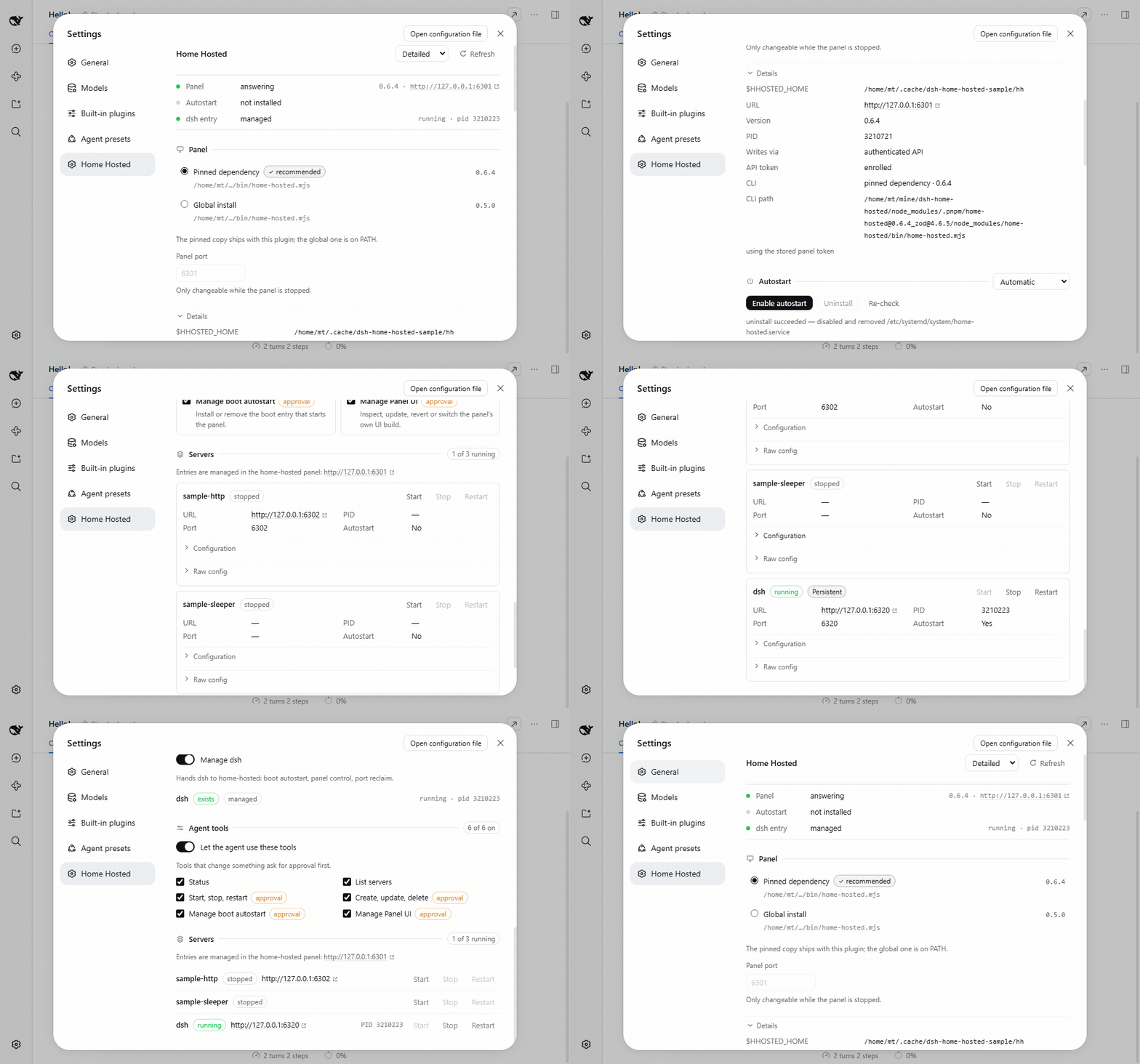
The Detailed style, then the same sections in Compact — both switchable from the page header.
🚀 Quick start
dsh plugin --profile web add dsh-home-hosted
Open Settings → Home Hosted, turn on Manage dsh, and enable autostart.
Reboot once; dsh comes back without you touching anything.
🤔 Why
A panel restart shouldn't kill a prompt mid-flight, and a reboot shouldn't cost you an SSH session.
                 reboot
                   │
                   ▼
  OS boot entry ──▶ home-hosted panel ──▶ ┌─────────────┐
  systemd ·                    │          │ dsh web ✓   │
   launchd ·                   │          └─────────────┘
    XDG · Run key              │
                               ├────────▶ ┌─────────────┐
                               │          │ docker      │
                               │          │ compose     │
                               │          └─────────────┘
                               │
                               └────────▶ ┌─────────────┐
                                          │ postgres    │
                                          │ :5432       │
                                          └─────────────┘
dsh is one entry in the panel, not the whole product. The panel is the supervisor: it starts
each entry, watches it, restarts what dies and reclaims its port. Add your compose stack, your
database, your bot — manage them from the page, or hand the entry ids to an agent.
A plugin cannot run at boot, so this one writes the OS entry while dsh runs and the OS takes over.
One managed entry (dsh) is kept alive under home-hosted's nanny, so a panel restart leaves it
running.
🎛️ What the plugin does
| 🚀 Boot autostart | Installs, verifies and removes the OS entry. Opt in per machine. |
| 🛡️ Survives a panel restart | The managed entry runs under home-hosted's nanny, so restarting the panel leaves it running. |
| 📦 Ships its own panel | The pinned home-hosted is a dependency, so boot runs the version this plugin is tested against. |
| 🖥️ Server control | Add, edit, start, stop and restart entries — written through the panel's API, so nothing restarts behind your back. |
| 🧭 Token warnings that mean something | A missing or refused API token is called out on the page, with one click to mint a working one. |
| 🤖 Agent tools | On by default, session permissions still gate every write. |
🤖 Agent tools
| Tool | Does |
|---|---|
home_hosted_status |
Panel, boot entry and managed-entry state |
home_hosted_servers_list |
Every supervised server |
home_hosted_servers_lifecycle |
start · stop · restart |
home_hosted_servers_edit |
create · update · delete |
home_hosted_autostart_manage |
install · uninstall |
home_hosted_ui_manage |
status · update · revert · switch the panel's own UI |
A tool that changes something asks for approval only when the session is not already Full access. A refused token is re-enrolled on the spot and the tool retries — see automatic regeneration below.
🧩 Depth
Boot autostart, per platform
| Platform | Mechanism | Starts |
|---|---|---|
| Linux | systemd-user, systemd-system, XDG autostart |
login, or boot with a system unit / loginctl enable-linger |
| macOS | launchd-agent, launchd-daemon |
login, or boot with the daemon (one-time sudo) |
| Windows | Run key, Task Scheduler | login |
When the process cannot elevate, the page prints the exact commands instead — including the
launchd-daemon that starts a Mac before login.
Which home-hosted runs
The pinned dependency by default; the page can switch to a global install, or install the pinned
range globally for you. Boot entries run a small stable launcher the plugin writes, so a
node_modules path that moves never breaks boot.
dsh from a local clone
A dsh you cloned and built yourself is supported: the managed entry starts a stable launcher that
re-finds your build at boot, so a rebuild, a moved checkout or a fresh profile does not strand it.
Falls back to whatever dsh is on PATH, and fails with the reason when it finds neither.
Managed entry and port policy
One entry (dsh), one toggle: the panel keeps it alive, restarts it and reclaims its port. A
detached restart is recognised on macOS and Linux (follow); Windows cannot prove identity through
a .cmd shim, so it uses onPortConflict: kill — needing home-hosted 0.6.0+, and the plugin
refuses that write against an older panel rather than producing a config it cannot parse.
API tokens and automatic regeneration
The plugin needs its own home-hosted API token to read and write the panel. home-hosted keeps only
the token's hash, so a token it did not mint can never be recovered — <stateDir>/panel-token is
0600, never rendered or logged, and Regenerate token enrols a new one that replaces it.
A missing or refused token is called out on the page with that button, including when the panel is not answering at all — a token problem is often why it cannot be reached. Regenerate token automatically (Agent tools section, on by default) does the same thing when a panel call is refused: the tool re-enrols and retries once instead of failing. Turn it off to be asked instead of having a working token silently replaced.
Operator config
The Cordis row config is for operator overrides only:
- id: dsh-home-hosted
  name: 'dsh-home-hosted'
  config:
    stateDir: /custom/state/dir        # default: $DSH_HOME/dsh-home-hosted
    homeHostedCommand: /usr/bin/home-hosted
    defaultEntryId: dsh
Everything a person toggles lives in <stateDir>/settings.json.
Development
pnpm install
pnpm typecheck && pnpm test && pnpm build
Node 24+, pnpm. The same commands CI runs.
MIT · npm · releases · issues · built on home-hosted