dsh-llm-qwen-local
Verifieddsh-llm-qwen-local · v0.4.1 · MIT · Web UI
DeepSeek Harness LLM adapter plugin for locally deployed Qwen models behind a vLLM OpenAI-compatible endpoint: per-model multimodal switch, fully configurable reasoning efforts, and a web settings page (client plugin) for editing the deployment from the f
Install
dsh plugin add dsh-llm-qwen-local Confirm the layer applied with dsh --profile default --dump-config — see the install guide.
Source
Creators
Readme
dsh-llm-qwen-local
English | 简体中文
用于本地部署的 Qwen 模型(如 Qwen3.8-27B)的 DeepSeek Harness LLM 适配器插件,由 vLLM 以其 OpenAI 兼容的 /v1/chat/completions 端点提供服务。
v0.4.1 · 精确兼容目标:DSH
0.1.2-rc.1· MIT · 社区维护,非 DeepSeek 或 Qwen 官方产品。
✨ v0.4.1 —— 设置页修复;移除
maxRequestImageBytes路由上限
- 推理档位 id(以及模型 id)输入时不再失焦——列表行改用稳定的行标识作 React key,敲键时不再重挂载整行。
- 字段标签缩短、统一——长说明移入输入框占位符;模型卡片各列宽度对齐。
maxRequestImageBytes(单请求图像字节总量上限)整体移除——配置、schema 与设置页都不再有它。每张图像按 per-image 预算(imageMaxPixels/imageMaxBytes不变)投影后内联;请求过大时由后端 LLM 服务按其自身输入上限拒绝。已有settings.yaml里残留的值被静默忽略,无需迁移。- "从端点发现模型"现在使用 API Key 输入框中当前的 key 探测——刚填入的 key 无需先点保存即可生效。
- 允许清空模型列表——
models不再要求至少一条:清空并保存后路由保持挂载但休眠(无可选模型),之后可"从端点发现模型"或手动添加重新填充。
✨ v0.4.0 新特性 —— 零运行时
@deepseek-ai依赖发布的插件在运行时不再依赖任何
@deepseek-ai包 —— 无schemastery、dsh-llm、dsh-settings、dsh-attachment、dsh-launch-environment、cordis。唯一的运行时依赖是 MIT 许可的eventsource-parser与 Node.js 内建模块。为什么: 插件现在把用到的每一个 DSH 接缝(适配器契约、失败快照、brand 标识、API key / attribution / launch-env 助手、settings 命名空间的
Config表面)都复刻为src/harness/下的小型本地模块,外加src/config.ts中冻结的、手工拥有的配置表面。插件无需导入定义这些接缝的包,即可对宿主上的活服务加载 —— 与参考实现dsh-llm-ollama相同的依赖姿态。什么不变: 对外插件行为完全一致 —— provider 路由
qwen-local、settings 命名空间llm-qwen-local、设置页、模型发现、wire 方言均不变。DSH 兼容目标仍为0.1.2-rc.1。@deepseek-ai各包保留为仅开发期的类型固定(其import type引用在构建中被擦除),因此现有安装方式照旧可用。升级: 直接替换 ——
dsh plugin --profile web add [email protected](或使用你的固定快照 tag)。无需任何配置变更。
dsh plugin --profile web add dsh-llm-qwen-local
两个部署相关的一等公民配置项:
- 按模型的多模态开关(
multimodal: true/false)——声明该部署是否带视觉能力提供服务。 - 完全可配置的推理档位(reasoning efforts)——所有可选档位、其显示名、
reasoning_effort的 wire 拼写、默认档位,以及off在 wire 上的表达方式,全部来自配置,可匹配你的 vLLM 构建接受的任意词汇表。
- id: llm-qwen-local
  name: dsh-llm-qwen-local
  config:
    baseURL: http://127.0.0.1:8000/v1
    models:
      - id: qwen3.8
        name: Qwen3.8 (local)
        multimodal: true
        reasoning:
          efforts:
            - { id: off, wire: none }
            - { id: low, wire: low }
            - { id: medium, wire: medium }
            - { id: xhigh, wire: xhigh }
          defaultEffort: xhigh
文档
| 英文 | 中文 | |
|---|---|---|
| 安装与使用 | (此 README) | (此 README) |
| 配置参考——每个字段 | docs/configuration.md | docs/configuration.zh.md |
| 设计思路——Wire 方言、模型参数、框架兼容、错误路径、完整限制清单 | docs/design.md | docs/design.zh.md |
环境要求
- 已安装
dsh(CLI)0.1.2-rc.1 或更新版本,以及一个以 OpenAI 兼容 API 服务你的 Qwen 模型的 vLLM 实例。 - 带全局
fetch的 Node.js(18+)。 - 组合中挂载了
@deepseek-ai/dsh-attachment的 profile——标准的web与headlessprofile 都经由dsh-base挂载了它。
支持的 DSH 版本
| DSH 版本 | 状态 |
|---|---|
| 0.1.2-rc.1 及更新 | ✅ 支持——本插件构建与测试所针对的版本。 |
| 0.1.1-rc.2 及更早 | ⛔ 不支持——web 应用启动失败(见下)。 |
本插件的设置页通过 DSH 0.1.2 的 "remote-namespace" 客户端模型(ctx.remote.settings / ctx.remote.credentials / ctx.remote.llm)与宿主通信。这些 typed 命名空间是宿主提供的服务,仅在 DSH 0.1.2 及以上存在——更早的版本(如 0.1.1-rc.2)提供的是旧的共享 api/connection 客户端,设置页找不到这些服务。
在不受支持的 DSH 上安装本插件时,web 应用会在启动时中止,报错如下:
web boot: 1 entry did not activate
dsh-llm-qwen-local: pending (waiting for services: remote.credentials, remote.llm, remote.settings)
这是 DSH < 0.1.2 上的预期表现——本插件与该版本不兼容。解决办法: 把 dsh 升级到 0.1.2-rc.1 或更新版本;或在旧版本上移除本插件:
dsh plugin --profile web remove dsh-llm-qwen-local
必需的 vLLM 服务参数(按官方 vLLM 配方):--reasoning-parser qwen3 实际上是强制的——没有它整个推理块会落进 message.content——工具调用还需 --enable-auto-tool-choice --tool-call-parser qwen3_coder,以及 --max-model-len 262144(或更高)。
安装
# 从 npm 安装(推荐——预构建,安装时无需构建):
dsh plugin --profile web add dsh-llm-qwen-local

# 从 git 安装(prepare 脚本会在安装时自动构建 lib/):
dsh plugin --profile web add github:starefinger/dsh-llm-qwen-local

# 或从本地 checkout 安装(同样在安装时运行 prepare 构建):
dsh plugin --profile web add ./path/to/qwen3.8-LLM-plugin

# 或从打包好的 tarball 安装(预构建,安装时无需构建):
dsh plugin --profile web add ./dsh-llm-qwen-local-0.4.1.tgz

# 验证贡献的层,然后启动:
dsh --profile web --dump-config
dsh --profile web
版本锁定安装(tag)
每个兼容性快照都会以它对应的 dsh 版本号打 tag。0.3.1 及之后的快照使用 dsh-<dsh版本号>-plugin-<插件版本号> 格式(dsh 版本在前,插件版本作后缀);更早的快照使用不带后缀的 dsh-<dsh版本号> 格式。同一个 dsh 版本可能存在多个 tag——请使用插件版本号后缀最大的那个:它是支持你的 dsh 的最新快照。 要安装某个特定快照,在 git URL 后追加 #<tag>——pnpm 会把 tag 解析到精确的 commit,安装结果可复现,且与 main 分支当前的状态无关:
# 安装 dsh 0.1.2-rc.1 的最新快照(插件 0.4.0):
dsh plugin --profile web add "git+https://github.com/starefinger/dsh-llm-qwen-local.git#dsh-0.1.2-rc.1-plugin-0.4.0"
选择与你 dsh 版本匹配的 tag(dsh --version 查看)——同一个 dsh 版本有多个 tag 时,取插件版本号后缀最大的。升级 dsh 后,先移除再用新版本的 tag 重新安装:
dsh plugin --profile web remove dsh-llm-qwen-local
dsh plugin --profile web add "git+https://github.com/starefinger/dsh-llm-qwen-local.git#dsh-<新dsh版本号>-plugin-<插件版本号>"
tag 是不可变的快照:已发布 tag 的修复会以新 tag 发布(同一 dsh 版本下插件版本号后缀更大的新 tag),绝不移动已有 tag 的指向。
git 与本地路径安装会在安装时运行包的 prepare 脚本(→ pnpm build)来生成 lib/。pnpm v10 默认拦截依赖包的构建脚本:如果首次安装因 "blocked build scripts" 报错,把 pnpm 打印出的那个 key 原样加到 profile 的 pnpm-workspace.yaml 的 allowBuilds 下,再重跑同一条 dsh plugin add 即可。tarball 安装是预构建的,永远不需要这一步。
快速上手
1. 在设置页配置
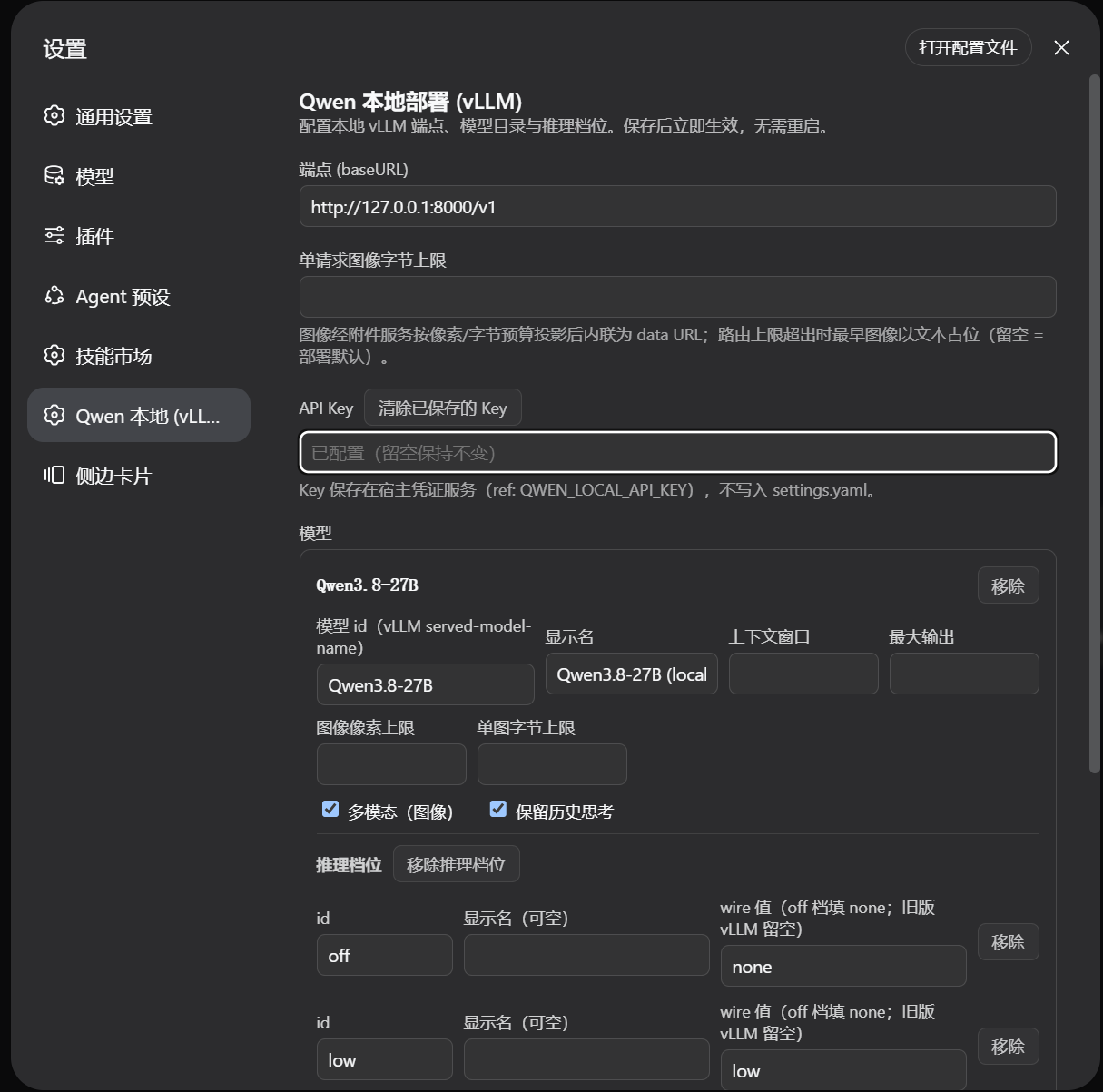
bundle 的 cordis.patch.yml 会插入一行基线 llm-qwen-local(模型 qwen3.8,多模态 true,off/low/medium/xhigh 档位,默认 xhigh)。打开 设置 → Qwen 本地 (vLLM) 页面编辑:端点、可选 API Key(存入宿主凭据服务,绝不写入 settings.yaml)、以及每个模型一张卡片——id、显示名、上下文窗口、输出上限、图像预算、多模态开关、历史思考保留、推理档位表:
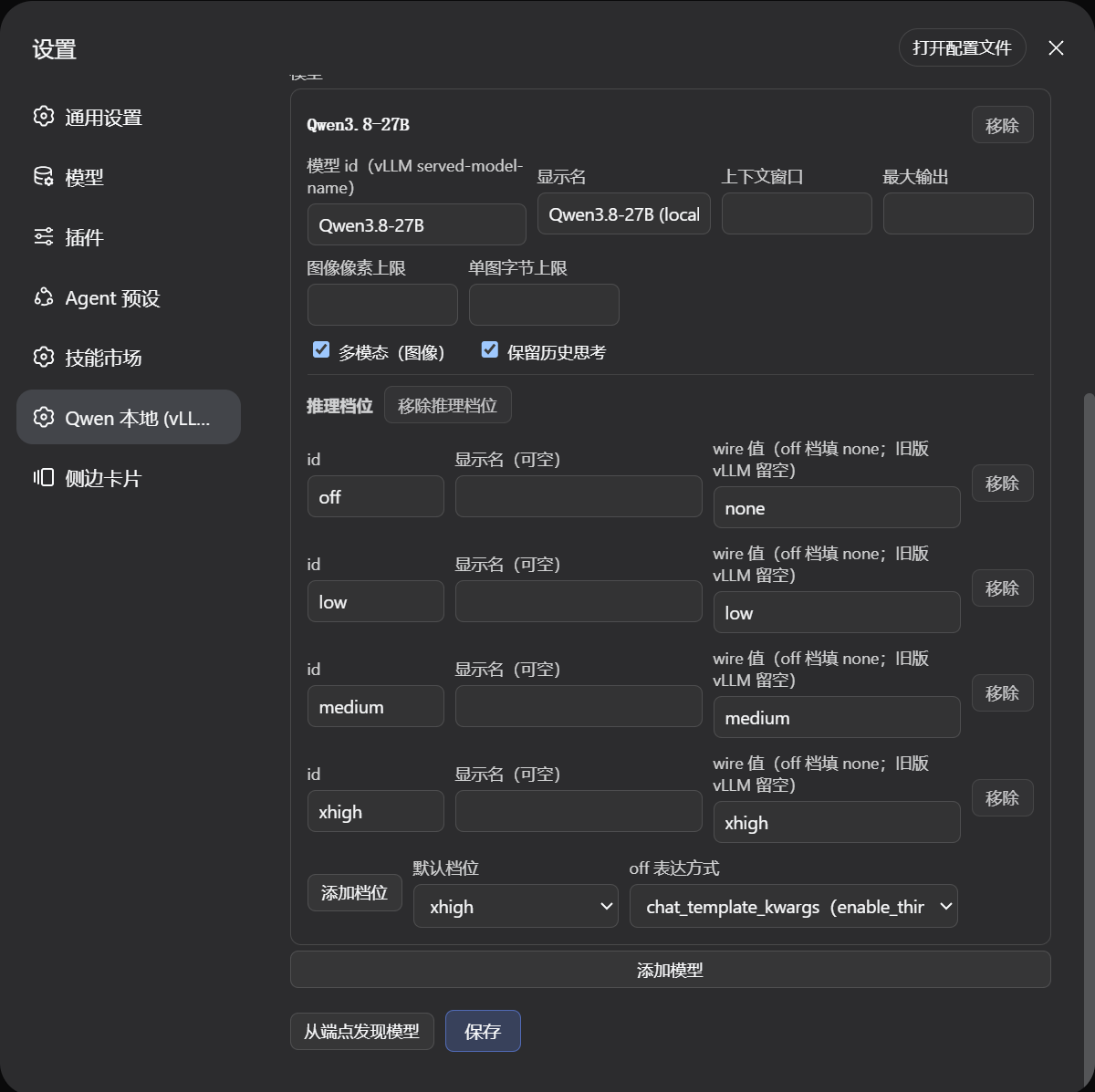
- 从端点发现模型会探测
{baseURL}/models并合并发现的 id。 - 保存后即时生效——适配器按请求重新解析,保存的变更在下次模型调用时即到达,无需重启。
- 偏好配置文件?在你的 profile 的
cordis.patch.yml中按id: llm-qwen-local覆盖该行——patch 会替换目标行的整个config(不做深度合并),所以保留的每个键都要重新写一遍。
2. 选择模型
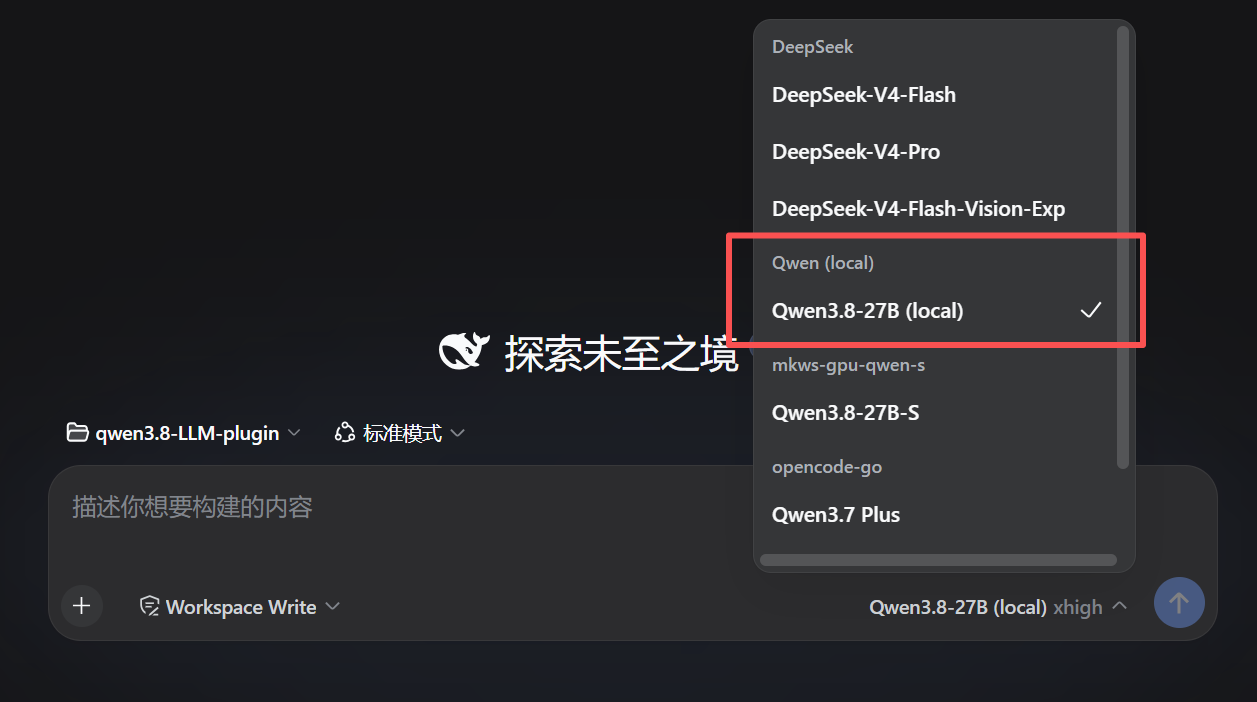
在 Web UI 的模型选择器中,基线 qwen3.8 条目出现在 Qwen (local) 提供商分组下:
3. 按请求切换推理档位
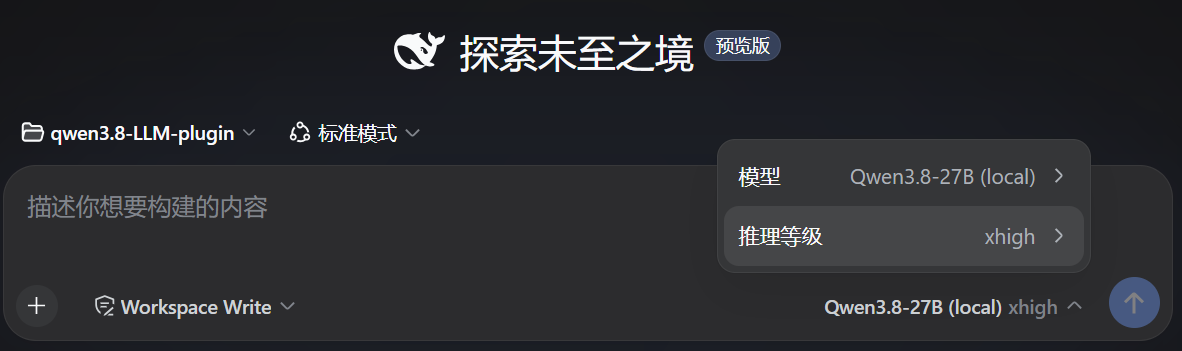
点击输入框底部(模型名 + 档位,如 Qwen3.8-27B (local) xhigh)可切换会话模型或按请求选择推理等级(你配置中声明的档位,如 off / low / medium / xhigh):
配置概览
所有字段都是可选的;其余由 schema 默认值填充。
| 字段 | 默认值 | 含义 |
|---|---|---|
baseURL |
http://127.0.0.1:8000/v1 |
端点基址;自动追加 /chat/completions。 |
apiKeyEnv |
—(不发送认证头) | 持有可选 bearer token 的环境变量名,每请求读取。 |
models |
[] |
模型条目(见下)。空列表 = 路由挂载但休眠(无可选模型)。 |
defaultContextWindow |
262144 |
模型没有精确值时使用的上下文容量。 |
maxTokens |
32768 |
每请求输出上限的兜底值。 |
无路由级图像总量上限:每张图像按 per-image 预算投影后内联,请求过大由后端 LLM 服务自行拒绝。
模型条目:id(必填)、name、contextWindow、maxTokens、multimodal(视觉开关——Qwen3.8-27B 设 true)、preserveThinking、imageMaxPixels、imageMaxBytes,以及 reasoning(缺省 = 该模型不暴露可选档位)。
逐字段的完整参考、多模态开关注解(高报/低报的代价)与推理档位细节:docs/configuration.zh.md · English。
主要限制
- 模态声明不受校验——纯文本端点上设
multimodal: true会在图像消息持久化后于回合中途失败;视觉端点上设multimodal: false则是静默的(图像变为文本占位符)。 - 工具结果内的图像搭乘后续用户消息——vLLM wire 的
role: 'tool'内容为纯文本,所以多模态模型的工具结果含图时,图像被拆分到紧随其后的role: 'user'多模态消息。 - 不支持视频输入,不支持 DashScope / 通义云——harness 没有视频内容块,且适配器只面向本地 OpenAI 兼容服务。
完整限制清单(思考回放形状、投影注意事项、推迟事项)与本插件不声称什么:docs/design.zh.md · English。
开发
pnpm install
pnpm build     # tsc → lib/ + 客户端 bundle
pnpm typecheck
pnpm test      # vitest: 序列化、翻译、对 mock vLLM 的 e2e
测试针对脚本化的进程内 vLLM(SSE)mock 运行——不需要真实模型或端点。
零运行时 harness 依赖
发布的插件不依赖任何 @deepseek-ai 运行时包(无 schemastery、dsh-llm、dsh-settings、dsh-attachment、dsh-launch-environment、cordis)。唯一的运行时依赖是 MIT 许可的 eventsource-parser 与 Node.js 内建模块。插件用到的 DSH 接缝——LlmAdapter 契约、LlmError 失败快照、brand 标识函数、API key 校验、attribution 头、launch-environment 读取、内容/图片助手、以及 settings 命名空间的 Config 表面——都以 src/harness/ 下的小型本地模块和 src/config.ts 中冻结的、手工拥有的配置表面复现,因此插件无需导入定义这些接缝的包,即可对宿主上的活服务加载。
@deepseek-ai 各包保留为开发期依赖:它们固定类型层面的契约(import type 导入在构建中被擦除),并让测试套件能启动真实的 LlmRuntime。若宿主改变了某个接缝的运行时形状,需同步更新对应的本地模块——tests/boot.test.ts 回归用真实的 Cordis 加载期校验器驱动冻结的 Config,以捕获在插件加载时被校验的那个接缝上的漂移。
Config 形状变更后重新生成冻结的 settings envelope:node scripts/extract-envelope.mjs --check(将冻结常量与 scripts/envelope-source.ts 中的参考 schema 对比;在重构前的树上运行普通模式以重新捕获)。
许可
本仓库以 MIT 许可发布。
插件的运行时依赖仅有 MIT 许可的(eventsource-parser,以及 Node.js 内建模块);不依赖任何 @deepseek-ai 运行时包。开发工具链中包含 TypeScript(Apache-2.0)及其他 MIT 许可工具,@deepseek-ai 各包作为仅开发期的类型固定保留可用。本仓库未打包(vendor)任何 DeepSeek Harness 或 Qwen 源码。Qwen3.8-27B 模型权重与 DSH 产品各自受其上游条款约束;本插件为社区项目,非 DeepSeek 或 Qwen/阿里巴巴官方产品。