dsh-mcp-autoload
Verifieddsh-mcp-autoload · v0.5.2 · MIT · Web UI
Auto-discovers project-level MCP servers declared in .agents/mcp.json, mounts them per agent session, and shows a session MCP inventory panel in the Web UI.
Install
dsh plugin add dsh-mcp-autoload Confirm the layer applied with dsh --profile default --dump-config — see the install guide.
Source
Tags
Creators
Readme
dsh-mcp-autoload
为 DeepSeek Harness(DSH)自动发现项目级 MCP 服务器。
在项目根目录(向上最近的含 .git 标记的祖先目录)放置 .agents/mcp.json。
工作目录位于该项目内的每个 DSH agent 会话都会自动挂载声明的服务器;会话结束即断开连接。
其他项目的服务器不会泄漏进来。
English | 中文
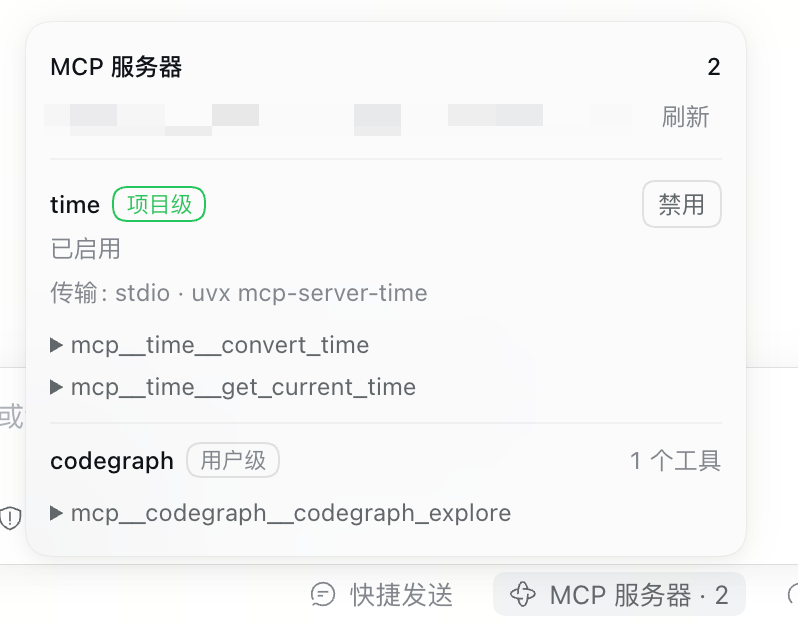
上图是会话内的 MCP 清单。time 来自项目的 .agents/mcp.json(标记为「项目级」);codegraph 来自 profile 配置(标记为「用户级」)。
安装
需要 DSH >=0.2.1-0 <0.3.0 与 Node.js ^22.19.0 || >=24.0.0。dsh plugin 会把参数转发给
profile 目录里的 pnpm。
dsh plugin --profile web add dsh-mcp-autoload
包内声明了 dsh.bundle.patch,CLI 的 bundle 协调会自动把它登记进 profile 的
dsh.profile.bundles。装完重启 dsh web(host 半在启动时加载),再硬刷新浏览器
(Cmd/Ctrl+Shift+R)。
从本地克隆开发安装(依赖记为 link:):
dsh plugin --profile web add /绝对路径/dsh-mcp-autoload
更新:dsh plugin --profile web add dsh-mcp-autoload@latest;卸载:
dsh plugin --profile web remove dsh-mcp-autoload。
最精简示例
{
  "mcpServers": {
    "playwright": {
      "command": "npx",
      "args": ["@playwright/mcp@latest"]
    }
  }
}
完整示例
四个条目覆盖全部字段和两种开关写法:
{
  "mcpServers": {
    "playwright": {
      "type": "stdio",
      "command": "npx",
      "args": ["@playwright/mcp@latest"],
      "env": { "PLAYWRIGHT_BROWSERS_PATH": "~/.cache/ms-playwright" }
    },
    "postgres_local": {
      "type": "http",
      "url": "http://localhost:3000/mcp",
      "headers": { "Authorization": "Bearer local-dev-token" }
    },
    "experimental_server": {
      "enabled": false,
      "command": "uvx",
      "args": ["some-experimental-mcp@latest"]
    },
    "legacy_server": {
      "disabled": true,
      "url": "http://old-mcp.internal/mcp"
    }
  }
}
字段参考
| 字段 | 传输 | 说明 |
|---|---|---|
command |
stdio | 可执行文件:裸名(npx、uvx,走 PATH 解析)或绝对路径。stdio 必填 |
args |
stdio | 可选字符串数组,直接传给命令,无 shell 插值 |
env |
stdio | 可选字符串映射,合并到 scrubbed 子进程环境之上;显式写出的条目能在清洗后存活 |
url |
Streamable HTTP | 绝对 http(s):// URL。HTTP 必填 |
headers |
Streamable HTTP | 可选字符串映射,附加请求头 |
type |
— | 可选;接受 stdio 和 http。sse 会被拒绝并记一条日志 |
disabled / enabled |
— | 可选;disabled: true 或 enabled: false 静默跳过该条目(兼容 Claude Code 和 Codex 两种写法);弹窗启用时移除这两个字段,禁用时写入 disabled: true |
传输判定:有 url 的条目走 Streamable HTTP;否则有 command 的挂 stdio 子进程,其工作目录为会话 cwd。两者都没有的条目记错误日志后跳过。
服务器名。匹配 [A-Za-z0-9_-]{1,32} 的名字原样直通(postgres_local、experimental_server 保持不变)。其他名字——中文、空格、超长——规范化为确定性 slug(与 DSH ACP 桥同款算法),例如 我的服务器 → server_<hash>。
工具名。每个 server 的工具按 mcp__<serverName>__<rawToolName> 注册到该会话,例如 mcp__playwright__browser_navigate。
行为
- 会话级作用域。每个 server 挂载在 agent 的 Cordis scope 内:工具只对该会话生效,连接在 agent 释放时关闭。不同项目的两个会话可以独立复用同一 server 名。
- 启动。挂载发生在 agent 创建期间并等待初始连接完成,因此首个回合即可使用工具。各 server 并行连接;一个慢或坏的 server 不会阻塞其他 server(
failOnStartupError固定为 false)。连接失败的 server 记错误日志后跳过,其余照常工作。 - 会话内管理。弹窗可启用/禁用项目级 MCP(浏览器二次确认)。写入时对 manifest 加锁、先备份(只保留最近 5 份)再原子替换;manifest 是符号链接时跟随链接写入真实文件,链接本身保留。禁用后立即卸载其工具;重新启用若挂载失败,配置会回滚到改动前的状态并报出错误,避免文件与实际生效状态不一致。用户级 MCP 仅展示,不提供开关。
- 无外部热重载。manifest 在每次会话启动(含 resume)时读取一次;手工修改配置后需开启新会话才能生效。
- 插件配置(patch 行内):
- id: mcp-autoload
  name: dsh-mcp-autoload
  config:
    configPath: .agents/mcp.json   # 绝对路径,或相对项目根的路径
    projectRootMarkers: ['.git']   # 标记项目根的目录条目
安全
.agents/mcp.json 条目在会话启动时被执行。包含此文件的克隆仓库能在你的机器上运行任意 command——信任级别等同于 npm postinstall 脚本。只在你信任的项目中添加此文件,克隆他人项目时请先审查。
兼容性
Peer 包(@deepseek-ai/cordis、@deepseek-ai/schemastery、@deepseek-ai/dsh-mcp-client)由 DSH 安装提供;bundle 声明它们仅用于版本检查。要求 DSH >= 0.2.1-0 < 0.3.0。
开发
全 ESM、无构建步骤:源码即发布产物。npm test 跑 node --test,npm pack --dry-run 必须包含全部运行时文件。开发约定见 AGENTS.md,发版与列表收录流程见 PUBLISHING.md。