dsh-model-picker-control
Verifieddsh-model-picker-control · v0.4.2 · MIT · Web UI
Model picker control for DSH: rename, regroup, sort, hide and badge models across providers, with cross-provider partitions, plus suffix capsules.
Install
dsh plugin add dsh-model-picker-control Confirm the layer applied with dsh --profile default --dump-config — see the install guide.
Source
Tags
Creators
Readme
dsh-model-picker-control
Model picker control for DSH — rename, regroup, sort, hide and badge every model in one place.
cross-provider partitions · rename models & groups · drag-to-reorder · hide a provider or a single model · suffix capsules · model folders with quota failover · one-click restore




dsh plugin add dsh-model-picker-control


Why
DSH ships a good model picker, but the display is fixed: providers come in a hard-coded order, model names are whatever the catalog says, and there is no way to put two models from different providers side by side. If you route some models through an account provider and others through a partner provider, the list you actually want never exists.
This plugin gives you one settings page — sitting next to the built-in Models page — that owns the display of the picker, without patching a single third-party plugin. Hide the models you never touch, rename the rest into something you can recognise at a glance, drag the groups into the order you think in, and merge models from different providers into a partition such as Free or Experimental.
Features
| Rename anything | Model display names, provider group names, and a short suffix capsule per model. |
| Cross-provider partitions | Create a partition and drop models into it from any provider — they render as one group. |
| Drag to reorder | Reorder provider groups and partitions with a handle (or focus it and press ↑ ↓). |
| Hide, don't delete | Hide a single model with the eye button; the eye on a provider card hides or shows all of its models at once. Nothing is removed from the catalog. |
| In-group order | Catalog order, by model name, or manual (drag in the preview). Per group or globally. |
| Suffix capsules | A host-native pill after the name — blue, dark red, cyan, any custom color or a holographic border — that sits beside the host's own 1017 tag. The text may be empty (a color-only chip). Per section, Capsule color paints every model in it at once, and Clear empty capsules removes the text-less ones. |
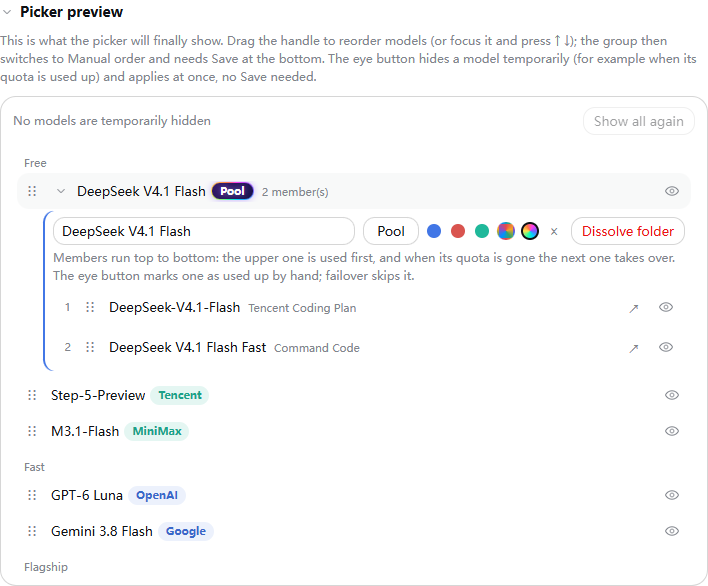
| Model folders | In the preview card, drag a row onto the middle of another row of the same group to merge them into a folder (a "family"). The folder takes one row in the picker, can carry a capsule, and its members run top to bottom: when a request fails with an exhausted quota, rate limit or auth error, the next member takes over and the request is resent as a normal model switch; the failed member rests until local midnight. Members you hid by hand, or that are hidden or outside the folder's group, are skipped. The folder offers the reasoning levels of its top member; after an automatic switch the highest level of the new member is used. Standalone, no other plugin needed. |
| Preview & temporary hide | A live preview card shows the picker as it will render: drag models into order, expand folders, and use the eye button to hide exhausted models for now (saved at once, no Save needed). |
| Draft & save | Every edit stays local until you press Save; leaving the page with changes asks first. |
| Restore | One click clears the plugin's settings; the host default returns. |
Screenshots
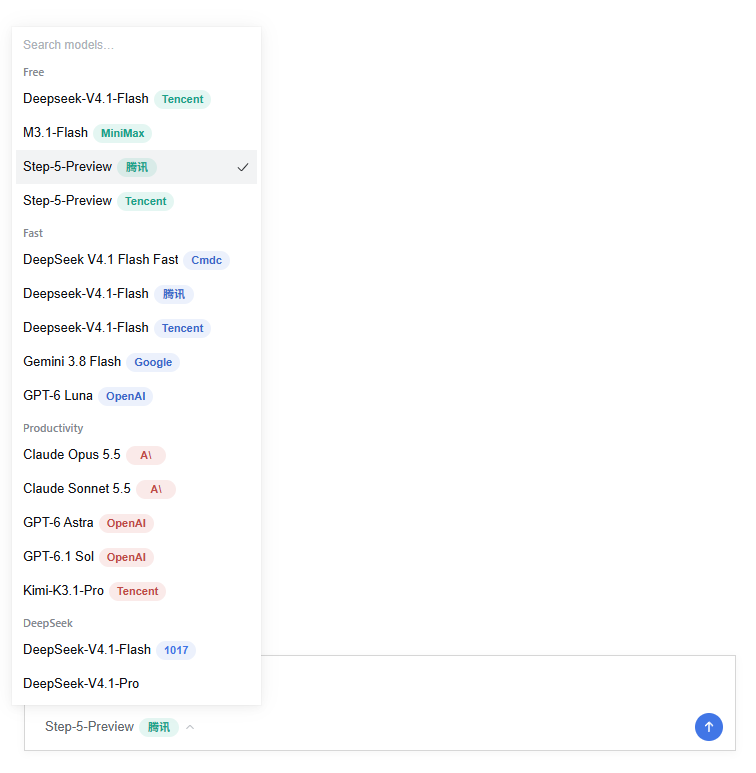
The screenshots are rendered from this plugin's real build with sample data (the host UI is simulated, the plugin code is not). The picker shows cross-provider Free, Fast and Flagship partitions, a suffix capsule on most names in every tone (blue, red, cyan, custom color, holographic), a color-only capsule, and a model folder (DeepSeek V4.1 Flash, tagged Pool) that stands for several models and relays between them when one runs out of quota.
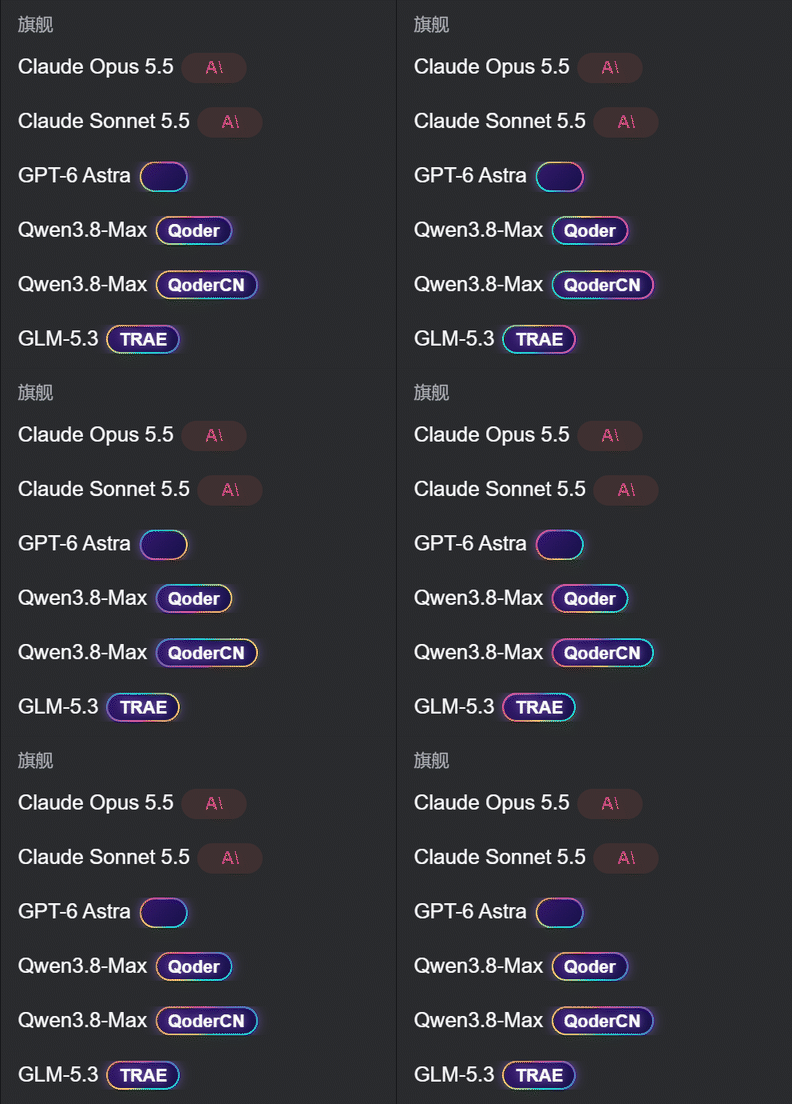
The holographic capsule has a slowly rotating rainbow border (one shared animation, off under prefers-reduced-motion):
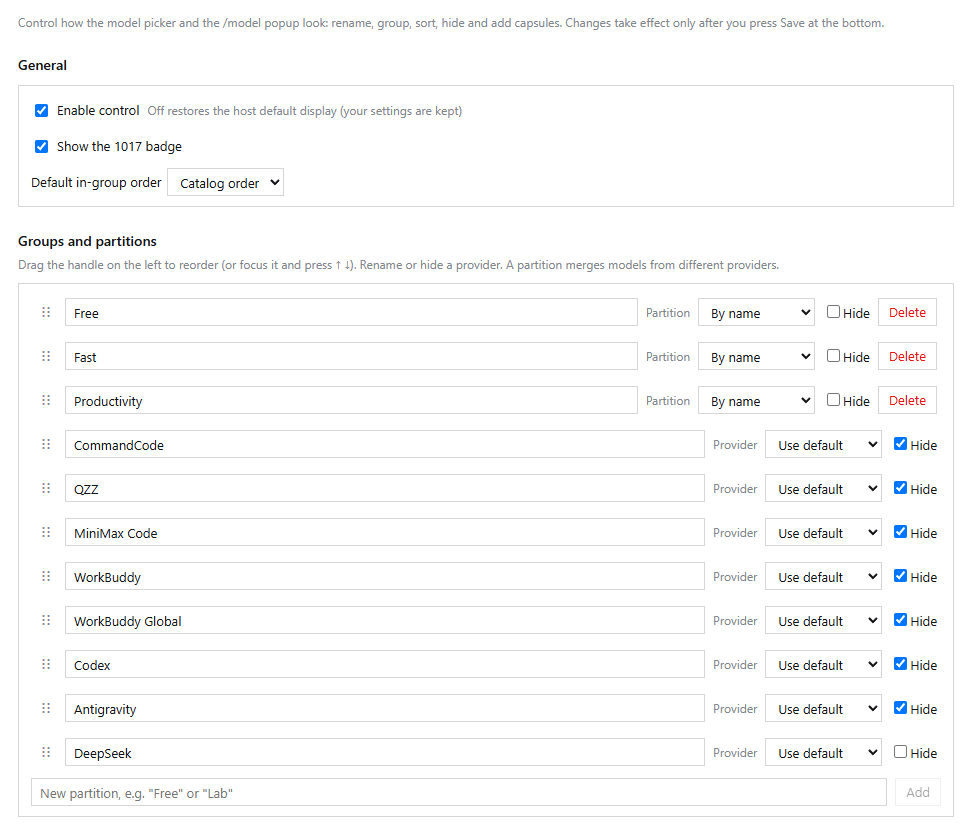
Settings → Groups & partitions — drag the groups into your own order, rename or hide a provider, and create a partition that pulls models in from any provider:
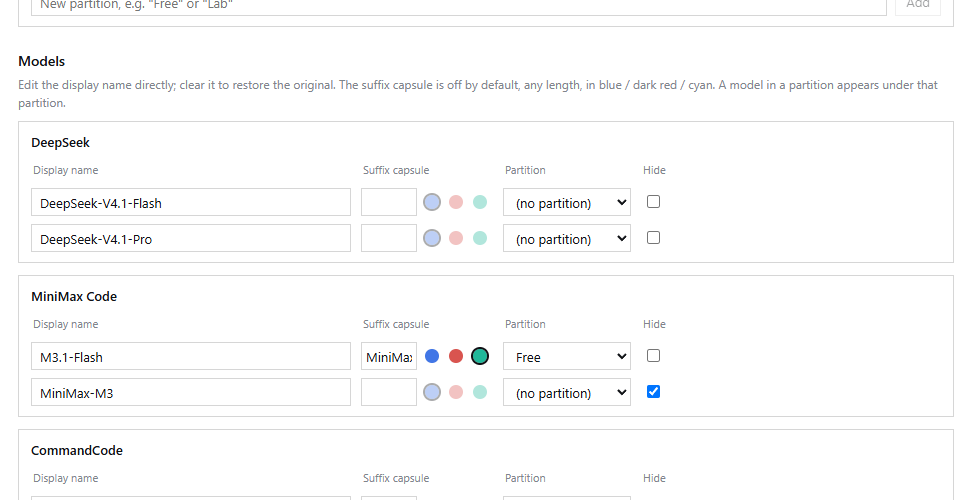
Settings → Models — rename a model, type a suffix capsule and pick its tone, drop it into a partition, or hide it. Nothing is written until you press Save:
Settings → Picker preview — the picker as it will render. Drag a row to reorder it, drop it on the middle of another row to merge both into a folder, and use the eye button to hide an exhausted model for now (applied at once, no Save needed):
Install
dsh plugin add dsh-model-picker-control
Then restart DSH. Open Settings — a new page, Model picker (模型选择器), appears next to the built-in Models page.
Prefer a local build?
git clone https://github.com/qzz19970504/dsh-model-picker-control.git
cd dsh-model-picker-control
npm install
npm test
npm pack                          # produces dsh-model-picker-control-<version>.tgz
dsh plugin add ./dsh-model-picker-control-<version>.tgz
Quickstart
- Open Settings → Model picker.
- Under Groups and partitions, press New partition and name it, for example,
Free. - In the Models table, pick
Freein the partition dropdown of the models you want there — from any provider. - Drag the groups into the order you like, hide what you don't use, and give the important ones a suffix capsule such as
NEWorcheap. To color a whole partition at once, use Capsule color on its row. - Optional: in the preview card, drag one model onto the middle of another in the same group to make a folder that fails over from top to bottom.
- Press Save, then open the model picker in the composer. It matches immediately; no restart needed.
Configuration
Everything is stored under this plugin's own row in your profile config (config.picker), written through the host settings service:
- id: model-picker-control
  name: 'dsh-model-picker-control'
  config:
    picker:
      version: 1
      enabled: true          # false = restore the host display, keep the settings
      sectionOrder: [p:free, deepseek-official, workbuddy]
      providers:
        deepseek-account: { name: DeepSeek Account, hidden: false }
      models:
        deepseek-official/deepseek-pro: { name: DeepSeek-V4.1-Pro, suffix: { text: cheap, tone: red }, partition: p:free }
        workbuddy/step-5-preview: { suffix: { text: NEW, tone: cyan }, partition: p:free, hidden: false }
      partitions:
        - { id: p:free, name: Free }
      sort: { default: name, bySection: { workbuddy: catalog } }
      order: { p:free: [deepseek-official/deepseek-pro] }   # used when the sort is manual
      tempHidden: []                                          # the eye button in the preview
      badges: { show1017: true }
| Key | Type | Notes |
|---|---|---|
enabled |
boolean | false restores the host's own picker but keeps your edits. |
sectionOrder |
string[] | Section ids: a provider id, or p:<partition id>. |
providers[id].name |
string | Group heading. Empty = the catalog name. |
providers[id].hidden |
boolean | Hide the whole provider. |
models["provider/model"].name |
string | Display name. Empty = the catalog name. |
models["provider/model"].suffix |
{text, tone, color?} |
tone is blue, red, cyan, custom (needs color, #rrggbb, default #ffffff) or holo. Up to 20 characters; text may be empty for a color-only chip. |
models["provider/model"].partition |
string | p:<id> to move it into a partition. |
models["provider/model"].hidden |
boolean | Hide this single model. |
partitions[] |
{id, name} |
A partition merges models from different providers. |
sort.default |
catalog | name | manual |
In-group order. |
sort.bySection |
map | Per-section override. |
order |
map | Per-section list of provider/model keys, used by the manual order. |
tempHidden |
string[] | Models hidden with the preview eye button; folder failover skips them too. |
badges.show1017 |
boolean | Show or hide the host's 1017 tag next to a model. |
families[] |
{id, name, section, suffix?, members: [{provider, model}]} |
Ordered members, top first. Failover codes: QUOTA, ACCOUNT_QUOTA, RATE_LIMIT, AUTH. |
How it works
composer ──► slot conversation.input.model   (single, session scope)
                 │
                 ├─ host  @deepseek-ai/dsh-client-ui-model-selection   priority  0
                 └─ this  dsh-model-picker-control                     priority -1   ← wins, host seat goes inactive
                        │
                        │  ctx.modelDirectories.directoryFor(sessionId)
                        ▼
                 catalog groups ──┐
                 your config ─────┴──►  src/pipeline.js  ──►  sections (order, names, hidden, partitions)
                                                              │
                                             ┌────────────────┴────────────────┐
                                             ▼                                 ▼
                                   picker menu + trigger              /model popup rows
                                             │                                 │
                                             └────────► directory.select() ◄───┘
- The picker seat
conversation.input.modelis a single, session-scoped slot. The plugin registers it at priority-1, which shadows the host seat at priority0; disabling the plugin brings the host seat straight back. Selecting, reasoning effort, search, keyboard navigation, the pending state and the “not available in subagent sessions” behaviour are all ported from the host picker and use the host's ownmodeltranslations. - The
/modelpopup builds its rows through the same pipeline, so names, groups, order and hidden models match the picker. Row ids stayprovider/model, so the host's own select handler is still what switches models. - The model list itself is never modified. The plugin reads
ctx.modelDirectories.directoryFor(sessionId)and renders a section list derived from the catalog plus your config; choosing a model still goes throughdirectory.select(). - Hiding only changes what is displayed. A saved selection that becomes invisible is left untouched — the trigger falls back to “Select model” and you can pick another one.
- Writes are revision-checked by the settings service, rolled back on failure, and only ever touch this plugin's row — the rest of
cordis.patch.ymlis never rewritten. - Folder failover runs in the plugin's host half. It listens to
agent/request-error; forQUOTA,ACCOUNT_QUOTA,RATE_LIMITandAUTHit parks the failing member until local midnight, switches the session with the host's ownselectModel(so the usual "model changed" notice is added) and returns{kind: "retry"}so the request is resent. Cooldowns live in memory and reset when DSH restarts, or with the Restore now button on an exhausted member. - The page is available in Chinese and English, following the GUI language.
FAQ
Does this patch other plugins? No. It only registers slots and wraps the host's /model contribution in memory, and restores it on dispose.
I hid the model I was using. Your saved selection is kept; the trigger shows “Select model” and the picker offers whatever is still visible.
Where are the settings? In your DSH profile config, under the plugin's row: config.picker. Restore all defaults clears them.
Can I keep the 1017 tag and add my own capsule? Yes, they coexist — the tag and the capsule are separate slots.
Does it work in subagent sessions? The picker behaves as the host does there: it is shown as unavailable, matching host behaviour.
Development
npm install
npm run build   # concatenates src/ into lib/client.js (no bundler required)
npm test        # pure pipeline tests (node:test)
npm pack
The source is plain ESM + h() calls — src/pipeline.js is pure data transformation and is what the tests cover; src/client/ holds the slot code.