dsh-notice-card
Verifieddsh-notice-card · v0.1.7 · MIT
DeepSeek Harness 桌面通知卡插件:一轮任务结束、等你审批、等你回答时,在屏幕右下角弹出一张不抢焦点的卡片。A DSH host plugin that shows a focus-free notice card in the bottom-right corner when a turn ends or DSH is waiting on a tool approval or a question.
Install
dsh plugin add dsh-notice-card Confirm the layer applied with dsh --profile default --dump-config — see the install guide.
Source
Tags
Creators
Readme
Notice Card
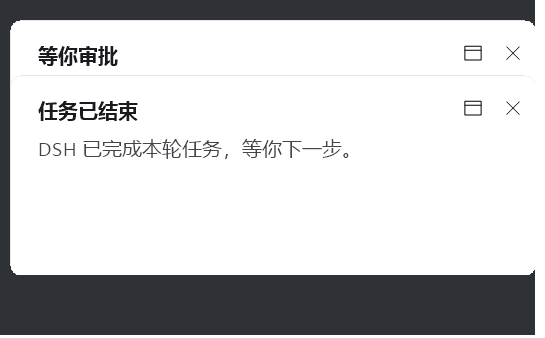
给 DeepSeek Harness 的一张桌面通知卡:一轮任务跑完、等你审批工具调用、等你回答问题时,屏幕右下角滑出一张卡片,不抢焦点、不打断你正在做的事。
多张卡自动叠成一摞,最先出现的那张完整显示在最前面,后来的卡依次往上垫、只露出标题条。
遇到问题或有建议? Issues —— 卡片不弹、动画卡顿、位置不对、想要新功能,都发在那里。
每个版本改了什么? Releases —— 每版更新内容中英文都写在那里,装之前可以先看。

- 纯 Windows 桌面绘制(WinForms + GDI+),不依赖 Windows 通知中心,也不用打开系统通知权限
WS_EX_NOACTIVATE+TopMost:盖在所有窗口之上,但永不夺走焦点,你想打字就打- 独占全屏的游戏在跑时先让路 2 秒,之后照常弹出,绝不丢提示;无边框全屏视频、F11 浏览器不触发让路
- 卡片是独立进程,DSH 忙的时候也照弹;进程崩了也不影响 DSH 本身
- 零网络、零遥测:插件不发任何请求,只在本地起一个进程画窗口
环境要求
| 项目 | 要求 |
|---|---|
| 平台 | Windows(os: win32) |
| DSH | >= 0.1.0-rc.1 |
| Node | >= 20(只给宿主加载插件用) |
| 运行时 | .NET Framework 4.x(系统自带;csc.exe 编译一次,不需要 PowerShell 7) |
卡片的绘制逻辑是一段 C#(
lib/card.cs)。第一次弹卡时插件调用系统自带的csc.exe把它编译成一个 exe,缓存到%LOCALAPPDATA%\dsh-notice-card\card-<版本哈希>.exe。仓库不含任何预编译产物,也不下载任何东西。
安装
插件是纯 Host 插件(dsh.bundle.patch),有四种装法,按你的 DSH 形态选一种。
方式一:从 npm 装(不用 clone,推荐)
npm i [email protected]
在装它的目录里能拿到 node_modules/dsh-notice-card/,然后在你的 profile 的 cordis.patch.yml 末尾追加:
- insert:
    - id: notice-card
      name: C:/path/to/node_modules/dsh-notice-card/lib/index.mjs
      config: {}
把 C:/path/to 换成你执行 npm i 的目录,路径用正斜杠。
包一旦发布到 registry 就是长期可装的,装的人不需要账号也不需要令牌。作者的发布令牌只在推新版本时用得上,跟别人安装无关。
方式二:手动挂载(clone 源码,适合要改代码)
git clone --branch v0.1.7 https://github.com/Maple-Yoli/dsh-notice-card.git
打开你的 profile 目录下的 cordis.patch.yml(默认在 %USERPROFILE%\.dsh\profiles\<profile>\cordis.patch.yml),在末尾追加:
- insert:
    - id: notice-card
      name: C:/path/to/dsh-notice-card/lib/index.mjs
      config: {}
把 C:/path/to/dsh-notice-card 换成你实际的克隆路径,路径用正斜杠。
DSH 支持补丁热重载:新增的 id 会被立即加载,不用重启。如果没反应,完全退出 DSH 再开一次。
方式三:官方桌面端(Electron 应用)
官方桌面端的 desktop profile 由应用自己独占,命令行 dsh plugin --profile desktop add 会被拒绝。请走应用内的 设置 → 插件,用仓库地址安装:
Maple-Yoli/dsh-notice-card
安装完成后插件作为 bundle 自动挂载,无需手工改 patch。
方式四:dsh web / 自建 profile
这些 profile 允许命令行装插件:
dsh plugin --profile web add [email protected]
也可以用 GitHub 源(不走 npm):
dsh plugin --profile web add github:Maple-Yoli/dsh-notice-card#v0.1.7
reconcilePlugins 会读到你包里的 dsh.bundle.patch,自动把它加进 profile 的 dsh.profile.bundles,补丁随之生效。
不要同时用两种方式挂载,否则同一个插件会被加载两次、每件事弹两张卡。
配置
在 patch 的 config: 里传,例如只关掉「任务结束」的提示:
- insert:
    - id: notice-card
      name: C:/path/to/dsh-notice-card/lib/index.mjs
      config:
        onTurnEnd: false
        seconds: 20
| 键 | 默认值 | 说明 |
|---|---|---|
onTurnEnd |
true |
一轮任务结束时弹卡 |
onApproval |
true |
DSH 等你审批工具调用时弹卡 |
onQuestion |
true |
DSH 等你回答问题(ask_user_question)时弹卡 |
seconds |
10 |
任务结束卡的存活秒数;审批/提问卡不看这个值,不自动消失 |
turnEndTitle |
任务已结束 |
任务结束卡的标题 |
turnEndBody |
DSH 已完成本轮任务,等你下一步。 |
任务结束卡的正文 |
approvalTitle |
等你审批 |
审批卡的标题 |
approvalBody |
工具:{tool}{reason} |
审批卡的正文模板,{tool} 为工具名,{reason} 为审批理由 |
questionTitle |
等你回答 |
提问卡的标题 |
questionBody |
问题:{question} |
提问卡的正文模板,{question} 为问题文本 |
processName |
自动推断 | 点卡片右上角窗口图标时聚焦的进程名 |
appPath |
自动推断 | 该进程不在时启动的可执行文件路径 |
processName 与 appPath 默认从宿主进程推出来:桌面端下是 DeepSeek Harness 和它的 exe 路径。如果你用别的壳跑 DSH,改成对应值即可;两个都留空则窗口图标只关卡片、不聚焦。
行为说明
- 不抢焦点:卡片创建时带
WS_EX_NOACTIVATE,并会把焦点还给原来那个窗口。你可以一直打字、一直全屏放视频。 - 独占全屏时绕开:只有真正的独占模式(D3D 全屏游戏、演示模式)才需要绕开——在那上面画普通顶层窗口会逼 Windows 切换显示模式,屏幕黑一下再回来(约 0.7 秒)。这种时候卡片先等 2 秒:游戏正好在关、或你 alt-tab 出来,它就正常弹出;2 秒后还独占就照画不误,宁可闪一下也不丢提示。无边框全屏播放器、F11 浏览器属于 QUNS_BUSY,合成器还在跑,卡片直接盖上去,不会黑屏。
- 点了才关:点卡片右上角的
✕立即收起;点窗口图标则把 DSH 窗口调到前台。任务结束卡不点的话,seconds秒后淡出。 - 审批卡不会自己消失:审批/提问的卡没有任何超时。请求答完只是第一步——卡片还要看到 DSH 真正被切到前台过,两个条件都满足才淡出。这样「请求被后台答掉了、但你一眼没看见」时卡片会留在屏幕上,不会让对话卡在那儿没人管。请求在没开后门前被答完的路子确实存在:回合被中止、审批策略是
never自动拒、或者 ACP/远程客户端替你答了。最少显示 1.2 秒,避免秒闪。 - 压在最上层:卡片进程自己声明
HWND_TOPMOST,跟其他置顶窗口抢顶时可能被挤到后面,属正常现象。
卸载
- 把
cordis.patch.yml里那段- insert:删掉(方式一/二/四),或在 设置 → 插件 里卸载(方式三) - 删掉缓存:
%LOCALAPPDATA%\dsh-notice-card\ - 方式一可以连带删掉
node_modules/dsh-notice-card,方式二可以连带删掉克隆目录
工作原理
一轮结束        → agent/turn-stopping  → 写一个请求文件 ┐
等你审批        → approval/request (prepend)             ├→ WinForms 无边框窗口,GDI+ 手绘
等你回答        → user-questions/request (prepend)       ┘
审批与提问这两个监听器只是旁听:它们用 { prepend: true } 挂在瀑布流最前面,弹完卡立刻 return next() 把请求交回给原本的应答方(应用内的审批面板)。插件永远不代替你回答,也永远不阻塞请求——notify() 全程包在 try/catch 里,弹卡失败只会静默吞掉。
一卡一进程
每张卡都是一个独立的 card-<哈希>.exe 进程,没有常驻助手、没有共享队列、没有请求文件。卡片上屏约 60ms(PowerShell 版本约 650ms,慢在解释器解析与 Add-Type),崩了只崩它自己,下一张从干净的进程重新开始。
exe 只在 card.cs 变化时重编译(哈希进文件名),所以平时弹卡不付编译的代价。编译产物缓存在 %LOCALAPPDATA%\dsh-notice-card\,卸载时整个删掉即可。
卡片自己退出:seconds 到点、被点掉、所属请求被答掉,或宿主 DSH 进程消失。
card.cs 也能单独跑
& "$env:LOCALAPPDATA\dsh-notice-card\card-<哈希>.exe" --title "标题" --body "正文" --seconds 8
常见问题
卡片不弹?
- 先确认卡片本身没问题:上面的命令行直接跑一次,能弹就是插件没挂上
- 插件没挂上:确认
cordis.patch.yml里name:指向的路径确实存在,且是lib/index.mjs - 改了 patch 但没反应:DSH 的补丁热重载只对新增的
id生效;改一个已存在的id的内容不会重载,完全退出 DSH 再开 - 每次只弹一张、后来的不弹:检查是不是同时用两种方式挂载了两次
中文变成乱码?
lib/card.cs 是 UTF-8 无 BOM 源码,按字面量编译;乱码通常是编辑器把它按 GBK 读又按 UTF-8 存回去,把中文压坏了。用 VS Code 或「UTF-8 without BOM」重新打开即可。
想改卡片的样式?
lib/card.cs 里是全部绘制逻辑(颜色、字号、圆角、动画时长、叠放间距都在文件顶部的常量与 Card 类里)。改完不用重新装插件:card.cs 的哈希变了会自动重编译,DSH 下次弹卡就是新样式。
隐私
- 不发任何网络请求,不写任何统计
- 不收集你的路径、用户名、会话内容
- 与 DSH 的唯一交互就是上面那三个事件,卡片上显示的只有事件自带的工具名/问题文本
- 卡片的 C# 编译产物缓存在
%LOCALAPPDATA%\dsh-notice-card\,卸载时删掉即可
反馈
遇到问题或有建议,请到 Issues —— 卡片不弹、动画卡顿、位置不对、想要新功能,都发在那里。
提问时附上:Windows 版本、DSH 版本、卡片类型(任务结束 / 审批 / 提问)、复现步骤。带截图或录屏最好。
插件不发任何请求,也没有内置反馈入口。作者看不到你的使用情况,只能靠你主动说。
License
English
A focus-free notice card for DeepSeek Harness on Windows. It slides into the bottom-right corner when a turn finishes, when DSH is waiting for a tool approval, or when it is waiting for an answer to a question. Cards stack, oldest one front and fully visible.
Pure host plugin: agent/turn-stopping, approval/request and user-questions/request → a detached C# executable compiled on first use draws a borderless WinForms window with GDI+. No notification-center permission, no network, no telemetry. The approval/question listeners only observe and delegate with next() — the built-in UI still answers.
Cards stay out of the way while a game holds the display in true exclusive fullscreen (D3D or presentation mode), because drawing one there forces the display mode to switch and the screen blinks black. Such a card waits at most two seconds and is then drawn anyway — a blink beats a lost notice. Borderless fullscreen videos and F11 browsers report QUNS_BUSY, where the compositor is still running, so cards cover them directly. A turn-end card lives for seconds and then leaves on its own, with a three-second backstop past that. An approval or question card has no timeout at all: it needs both the request answered and DSH to have been in front of you while the card was up, because a request can be settled with nobody at the desk — a stopped turn, an auto-deny policy, a remote front end. Expiring unseen is exactly the notice that leaves a conversation waiting, so it does not expire.
Requires Windows, Node >= 20, and the .NET Framework that ships with Windows (csc.exe compiles the card once on first use; PowerShell 7 is not needed). Install with npm i [email protected] and add an insert to your profile's cordis.patch.yml pointing name: at the absolute path of node_modules/dsh-notice-card/lib/index.mjs (or clone the repo at tag v0.1.7 and point at lib/index.mjs); on the official Electron desktop app, install it from Settings → Plugins instead. See the Chinese section above for the full config table.
Found a bug or have a suggestion? Open an issue at github.com/Maple-Yoli/dsh-notice-card/issues. Include your Windows version, DSH version, card type (turn end / approval / question) and the steps to reproduce. The plugin sends no requests and has no built-in feedback channel, so issues are the only way to reach the author.