dsh-oh-my-claude
Verifieddsh-oh-my-claude · v1.4.0 · MIT · Web UI
Claude Code CLI as an LLM provider for dsh (DeepSeek Harness): live model list, per-session resume, approval relay, images, a memory/rewind/changes panel, and workspaces on remote SSH boxes
Install
dsh plugin add dsh-oh-my-claude Confirm the layer applied with dsh --profile default --dump-config — see the install guide.
Source
Tags
Creators
Readme
 Oh My Claude
English | 中文
Claude Code, native inside dsh
Drive your logged-in Claude Code CLI as a first-class dsh provider: no API key, no extra services, no runtime dependencies.






Built with AI assistance, and open to more. Contributions from AI coding agents are welcome; start with CONTRIBUTING.md.
Claude Code CLI as an LLM provider for dsh. Every request drives claude -p with stream-json in and out, so it uses whatever login, hooks, CLAUDE.md files, MCP servers and rate limits Claude Code already has. No API key needed. The plugin speaks the CLI's own protocol (the one the Agent SDK wraps) directly, so it has no runtime dependencies.
Tour
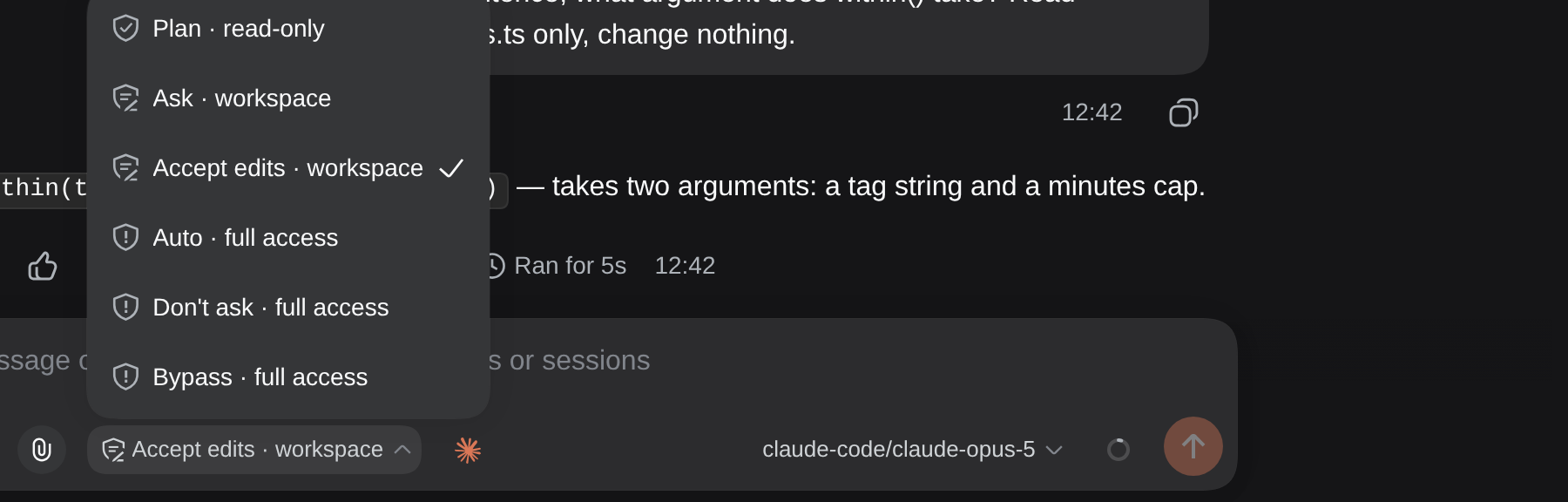
The shield is dsh's own control. In a Claude session its rows become Claude's six permission modes, each labelled with the dsh access level it sets underneath.
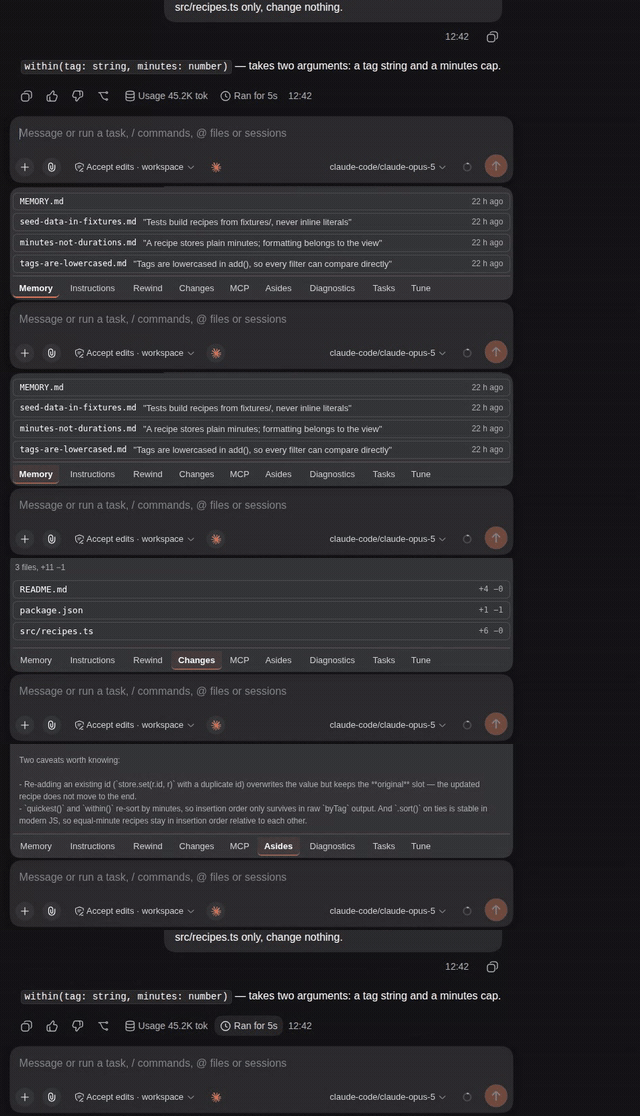
One ✻ button beside the composer opens the whole plugin: Memory, Instructions, Skills, Rewind, Changes, MCP, Asides, Diagnostics, Tasks and Tune, plus a Restore tab while the session is still blank.
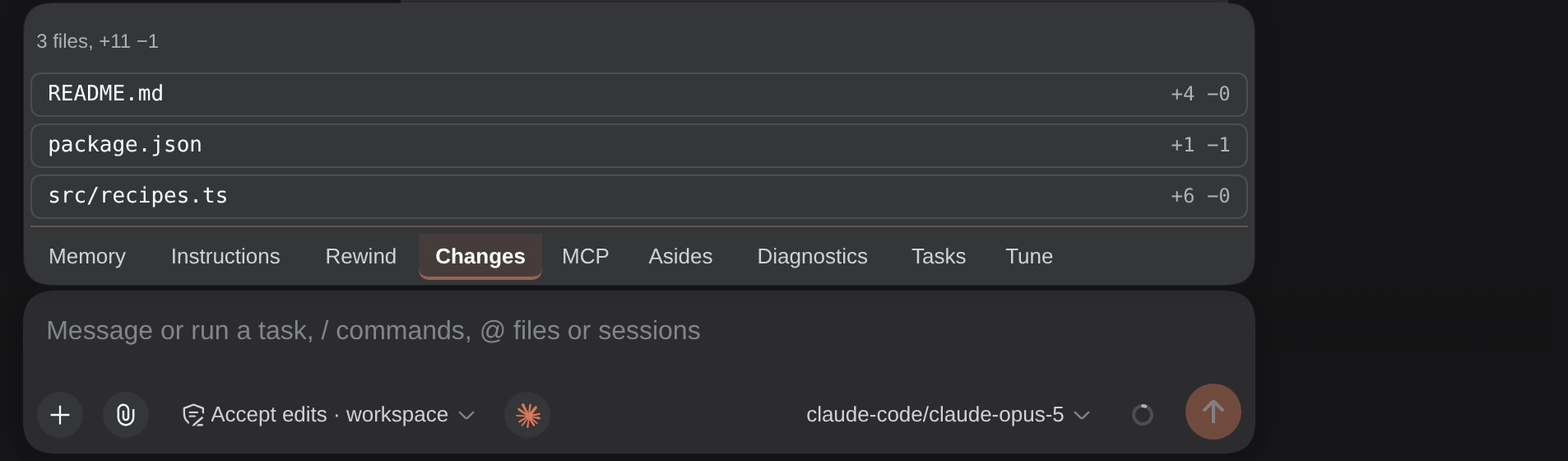
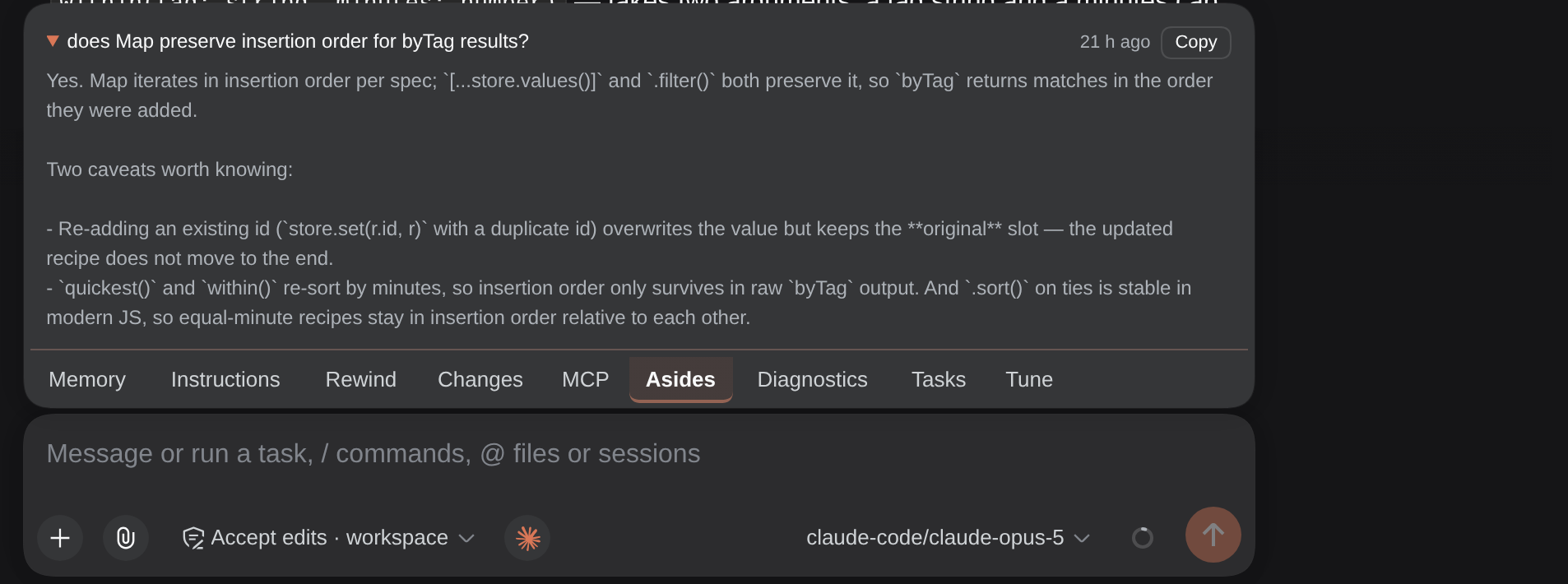
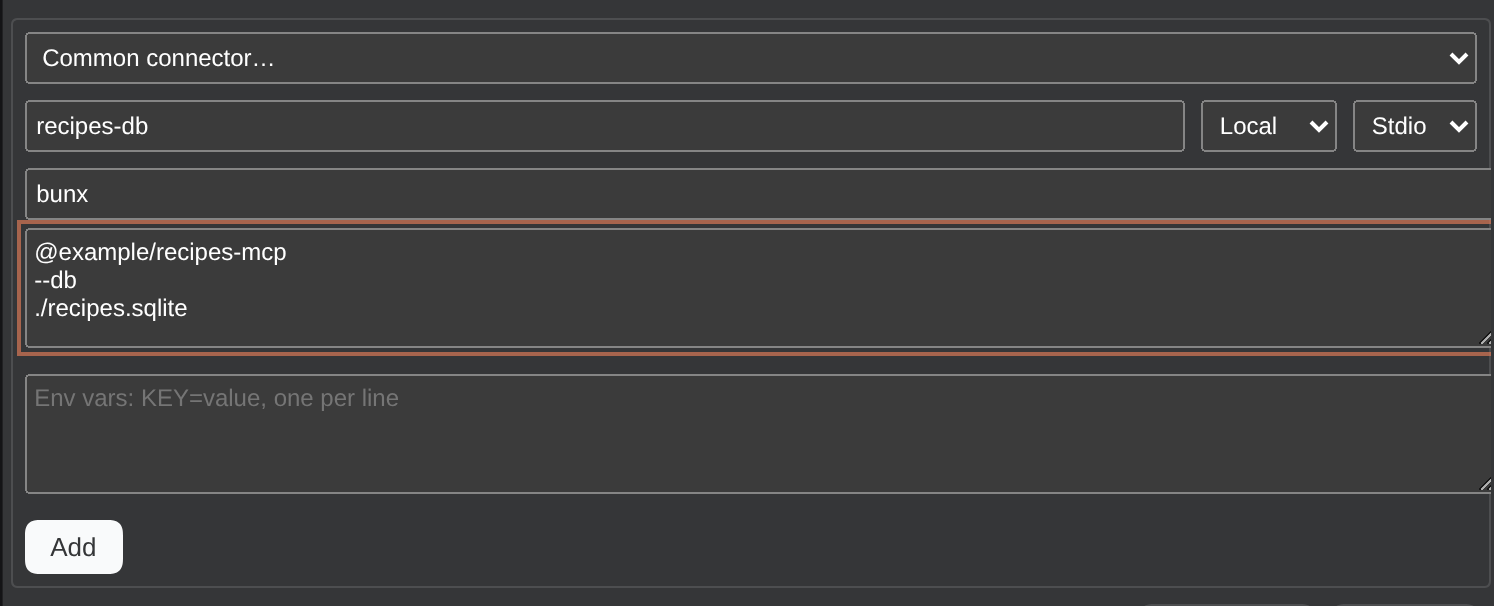

Cost and cached token count, two figures dsh cannot compute, join dsh's footer stats row. The pill turns orange once a session passes the spend line you set. The dollar figures are what the turns would cost at API rates; on a Claude subscription you are not billed them.
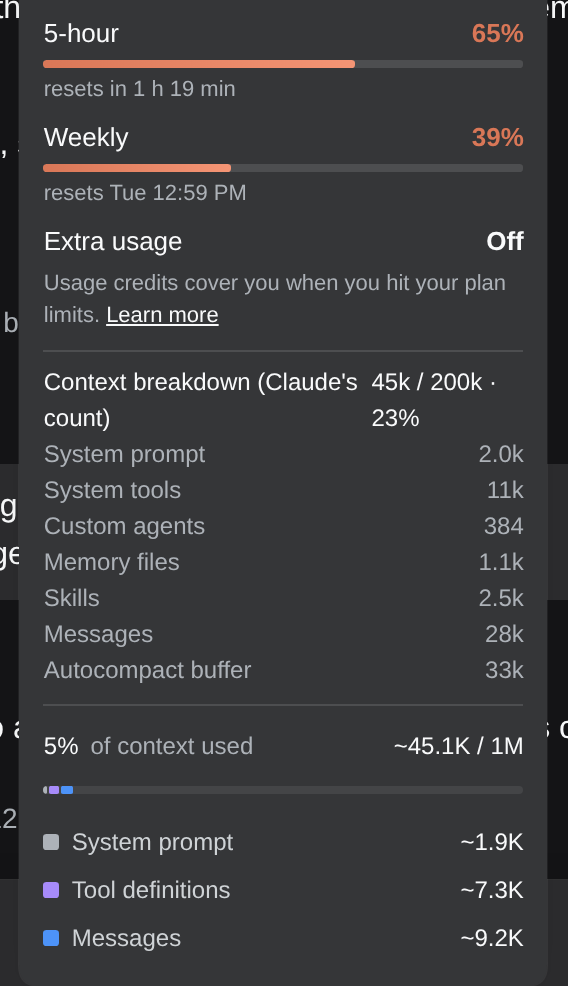
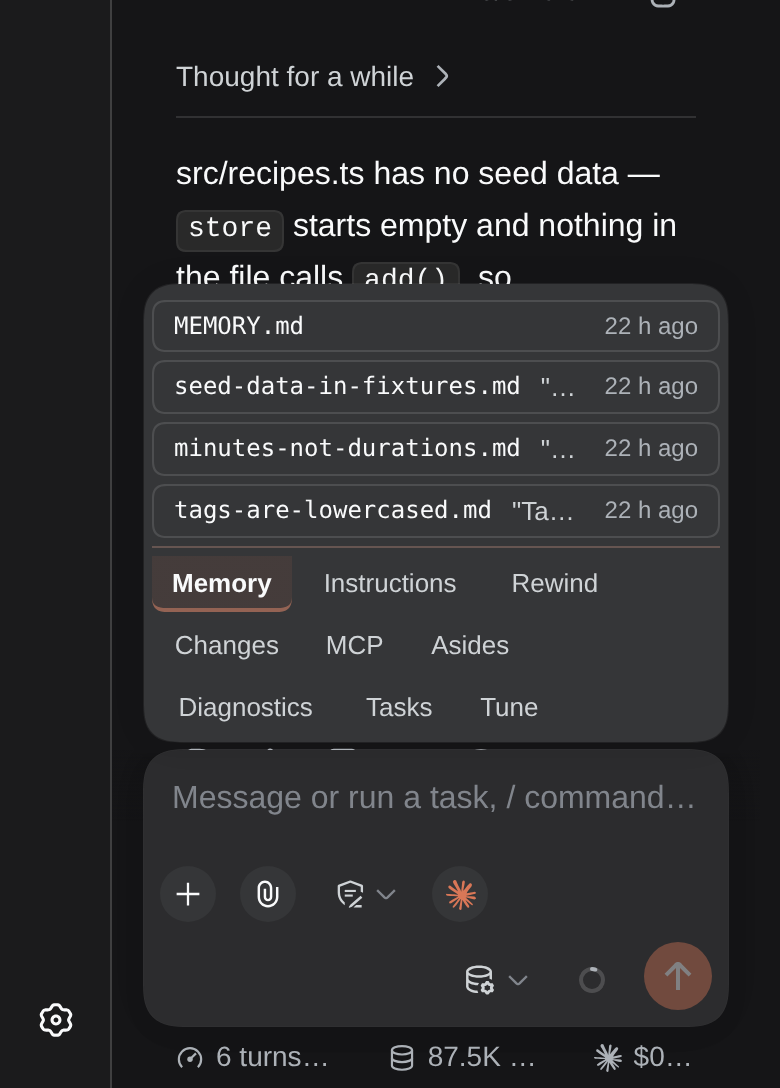
Plan usage and the CLI's own context breakdown live in dsh's context ring popover. On a phone the panel becomes a sheet.
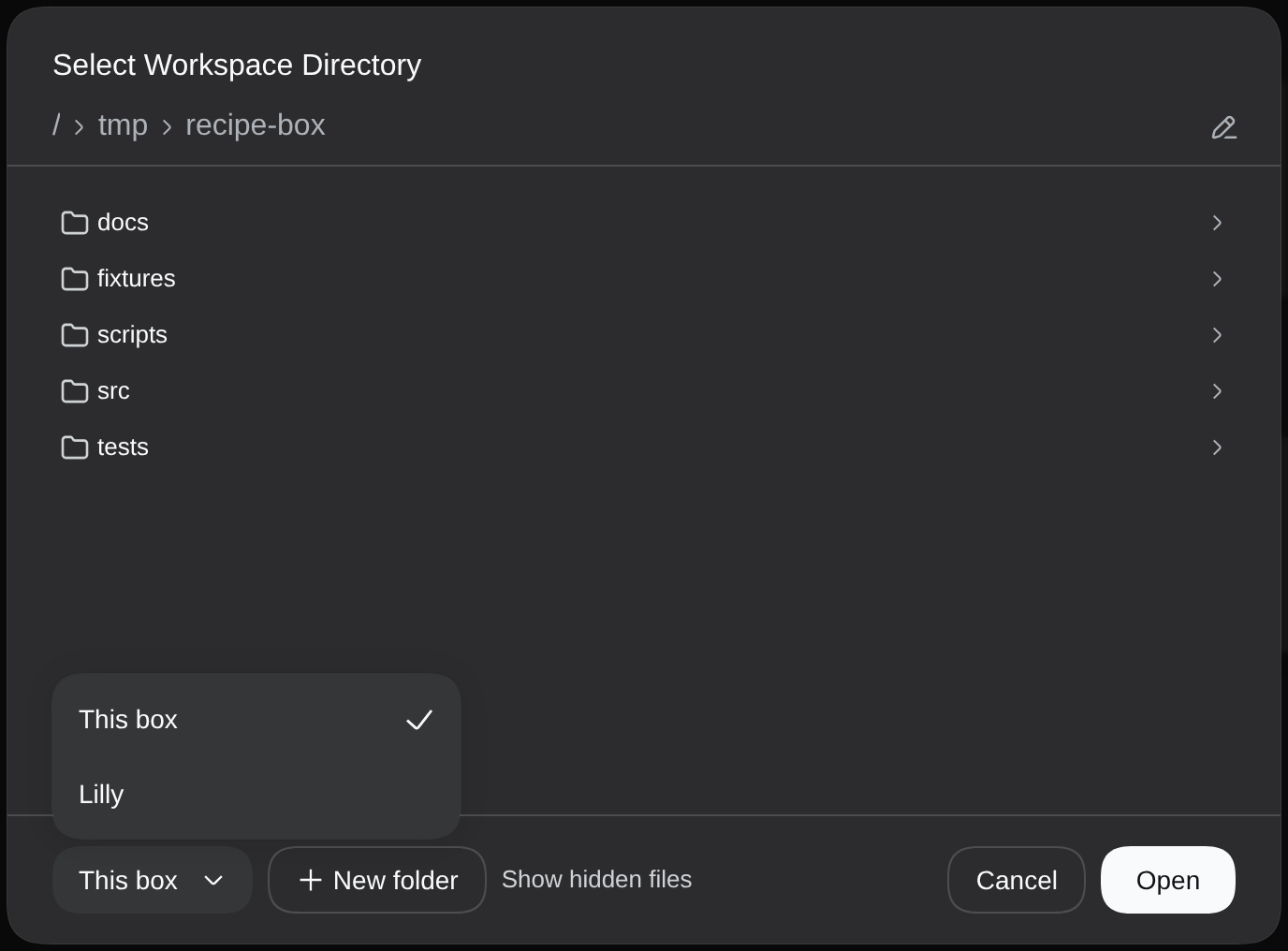
Once an SSH box is saved, dsh's own Add workspace dialog gains a box dropdown: a folder on that box becomes a workspace here, and the session in it runs Claude Code there.
Shots by tools/playwright/tour.ts.
Install
You need the Claude Code CLI on PATH and logged in (claude --version works, claude opens without asking you to sign in), and dsh 0.1.5-rc.1 or newer. Nothing else: no API key, no Node build step.
dsh plugin --profile web add dsh-oh-my-claude                        # from npm
dsh plugin --profile web add github:lcestou/dsh-oh-my-claude         # or straight from the repository
systemctl --user restart dsh-web.service   # or restart `dsh web` however you run it
The package declares a dsh bundle, so dsh plugin add registers it in the profile by itself. After the restart, "Oh My Claude" appears in the model picker with the models your login can use. Pick one and chat.
The plugin speaks English and Chinese and follows dsh's own language setting (Settings → General → Language), switching as soon as you change it.
If the picker lists it as Oh My Claude (not logged in), run claude auth login in a terminal on the box that runs dsh, or press Log in under Settings → Oh My Claude → Boxes.
DSH Desktop (macOS and Windows) installs and updates plugins from its own Plugins page, not the dsh plugin command: add dsh-oh-my-claude there and restart when it asks. The plugin looks for claude in the usual install folders, since an app started from the Dock does not see your shell's PATH. On Windows it runs Claude as a plain child of dsh, so restarting the app ends a running turn, and the parts that need a Unix shell (Log in from Settings, SSH boxes) are not available. The server half has been run under Electron on Linux the way Desktop runs it; a real Mac or Windows install has not been tried yet.
When a newer version is on npm, an orange pill with the version number appears in Settings and on the panel's Runtime line; a click copies the update command. Details, and the repairs the plugin makes on its own after a dsh upgrade, are under Plugin updates.
Optional, in ~/.dsh/settings.yaml:
agent-default-model:            # make Claude Code the default for new sessions
  provider: claude-code
  model: claude-fable-5-1
subagent-model-selection:       # let dsh subagents run on Claude Code too
  enabled: true
  allowedModels:
    - provider: claude-code
      model: claude-haiku-4-5
Working on the plugin itself? Start at docs/developing.md.
Compatibility
dsh ships prereleases only and moves client APIs between them, so every release of the plugin records the dsh line it was written for and the dsh it was driven on. "Runs on" is the range the code carries branches for; "tested on" is the dsh installed on the box when the release was cut. The update pill reads the floor off the registry and never offers a release to a box whose dsh is below it.
| Plugin | Runs on dsh | Tested on dsh | npm tag |
|---|---|---|---|
| 1.4.0 | 0.1.5-rc.1 through 0.1.7-rc.2 | 0.1.7-rc.2 | latest, dsh-0.1.7 |
| 1.3.1 | 0.1.5-rc.1 through 0.1.6-alpha.2 | 0.1.6-alpha.2 | dsh-0.1.6 |
| 1.2.1 | 0.1.5-rc.1 through 0.1.6-alpha.2 | 0.1.6-alpha.2 | dsh-0.1.5 |
What you get
- Any Claude model your login can use, in dsh's own picker. Models
- Every dsh session resumes its Claude Code session, tool history included, and a terminal
claude /resumesees the same one. Sessions - Restart dsh without killing a running Claude turn. Restarts
- dsh's access shield sets Claude's six permission modes per session. Permission mode
- Claude's permission prompts, questions and plan reviews become dsh dialogs. Approvals
- One spark button opens Memory, Rewind, Changes, MCP and seven more tabs, all reachable from the keyboard. The panel
- Cost and cached tokens in dsh's footer, with a spend line that turns the pill orange. Cost pill
- Plan usage (5-hour, weekly, extra usage) in dsh's context ring, which turns amber near a limit and red at one, with a notice above the composer. Only limits the session's model counts against, graded by Anthropic, so a new model needs no update. Plan usage
- Restore or import any past Claude transcript, from dsh or from a terminal, and search inside them for what was said. Session browser
- Claude's slash commands and skills show up in dsh's slash menu as
/claude-<name>. Command bridge - Claude gets dsh's subagents, jobs, goals and web search over MCP. dsh tools over MCP
- Edit CLAUDE.md, settings.json and MCP servers from the panel, on this box or a remote one, and sign in to an MCP server that needs it. Instructions, settings.json editor, MCP
- Run Claude on another box over SSH, or mount several accounts. Remote boxes and accounts
- Report a problem with a redacted box report, copied or filed as an issue. Report a problem
- All the orange is a switch, per group, any colour. Claude look
- Pick what dsh adds to your prompts, with the size of each block on the label. dsh context
- A card offers each new Claude Code release for the box a session runs on, and installs it from dsh; a headless
claude -pnever updates itself. Channel, auto-install and history per box sit under the switch in Settings. Claude Code updates - What the last five versions changed, read from the plugin's own changelog, in Settings. Changelog
- Every skill the CLI can reach, grouped by scope, with add, edit and remove for your own and the project's. What each costs, from the CLI's own
/skill-doctor, is a table you can sort, beside what else drives your usage: the MCP servers behind the most requests, and how the work was shaped. Skills - A mark on the browser tab and an optional desktop notice when a session you are not looking at finishes, or stops to ask you something. Session notices
- dsh's own goal and every earlier goal of the session, beside Claude Code's goal and its scheduled tasks. Tasks
- Edit or remove a message you steered in while Claude works, or all of them as one, until Claude reads it. Nothing goes out while you edit. Send now stops Claude and sends one as the next turn. Steering
- Claude's working line (spinner, verb, figures) repeats above the composer once the turn's own header has scrolled off screen, so a long run of tool cards never hides what Claude is doing. A switch in Settings turns it off. Turn status
- Select text in a reply to quote it into your message, or to ask Claude about it as a side question that leaves the conversation alone; leave the question blank and Claude explains the passage. A quote in your own message reads like one in Claude's replies, indented with the accent bar. Asides
- A finished turn keeps a closing line where the working verb was, the way the terminal ends one:
✻ Crunched for 27s · done 3:21 AM. A turn you stopped readsInterrupted · What should Claude do instead?. Turn status - On dsh 0.1.7, Claude's tool calls show as dsh's own tool cards, the way every other provider's do, with the text streaming between them. Inline text is a switch away in Settings. Tool rows
- A new session in a workspace opens on the Claude box and model that workspace last ran. Remember model per workspace
Defaults you never have to touch, such as secret redaction in tool results and surviving the CLI's own updates, are on How it works.
Configure
Settings come in two kinds. The switches under Settings → Oh My Claude and in the panel's Tune tab apply at once and are kept on the box, so every browser sees the same ones. The keys below are install-time: they go as config: on the bundle row in the profile's cordis.patch.yml and take effect when dsh next loads the plugin, which a dsh restart does. dsh's own Plugins page lists the plugin with an on/off switch but has no form for these keys. Three keys people change first:
permissionMode: dsh      # follow the session's shield (default), or pin one of the CLI's six modes
spawn: keeper            # Claude outlives a dsh restart (default); node or dsh for a plain child
sshHost: ""              # "[user@]host" drives a claude on another machine over ssh
Every key, with its default, is in docs/configuration.md.
Remote boxes and accounts
Mount the plugin twice with different configDir values for two logins. List other boxes running dsh and this plugin under Settings → Oh My Claude → Boxes and jump between them. Or give a box a name and user@host and drive the claude there over SSH, with nothing on the far side but the CLI; Tailscale and WireGuard peers appear as hosts to pick from. All of it is on docs/remote.md.
What it touches
- Runs the
claudebinary you already have, on this box or on one you add over SSH. - Reads Claude Code's login (
~/.claude/.credentials.json, orANTHROPIC_API_KEYwhen set) to fetch the model list and your plan usage. That token goes only toapi.anthropic.com. - Writes its own state under
~/.local/state/dsh-oh-my-claude/; login tokens for SSH boxes are files only you can read. CLAUDE.md, settings.json and MCP servers change only when you edit them from the panel. - Listens on a Unix socket for the keeper that holds Claude across a dsh restart. No TCP port: its HTTP routes live inside dsh's own server.
- Calls out to
api.anthropic.com(models, plan usage),status.anthropic.com,downloads.claude.ai(the CLI's release pointer),registry.npmjs.org(plugin update check) andapi.github.com(the repo's star count). SSH goes only to boxes you add.
Not covered
- dsh's shell and file tools are not proxied (except
bashfor background jobs); Claude Code uses its own, under its own permission mode. - Claude Code sessions are not deleted when dsh sessions are.
Bugs and feedback
Found a bug, or something that reads wrong? Open an issue at github.com/lcestou/dsh-oh-my-claude/issues with the dsh and Claude Code versions (dsh --version, claude --version) and what you expected to see. Settings → Oh My Claude → Report a problem writes that report for you.
License
MIT.
Claude, Claude Code and the Claude spark mark are trademarks of Anthropic, PBC. This project is an independent dsh plugin that drives the Claude Code CLI you already have; it is not made, endorsed or supported by Anthropic. The spark is drawn here only to say which sessions and controls belong to Claude Code, in the way the CLI itself draws it.