dsh-plugin-container
Verifieddsh-plugin-container · v0.5.0 · MIT · Web UI
DSH sidebar container panel for macOS Docker runtimes and Apple container
Install
dsh plugin add dsh-plugin-container Confirm the layer applied with dsh --profile default --dump-config — see the install guide.
Source
Tags
Creators
Readme
DSH 容器
English | 简体中文
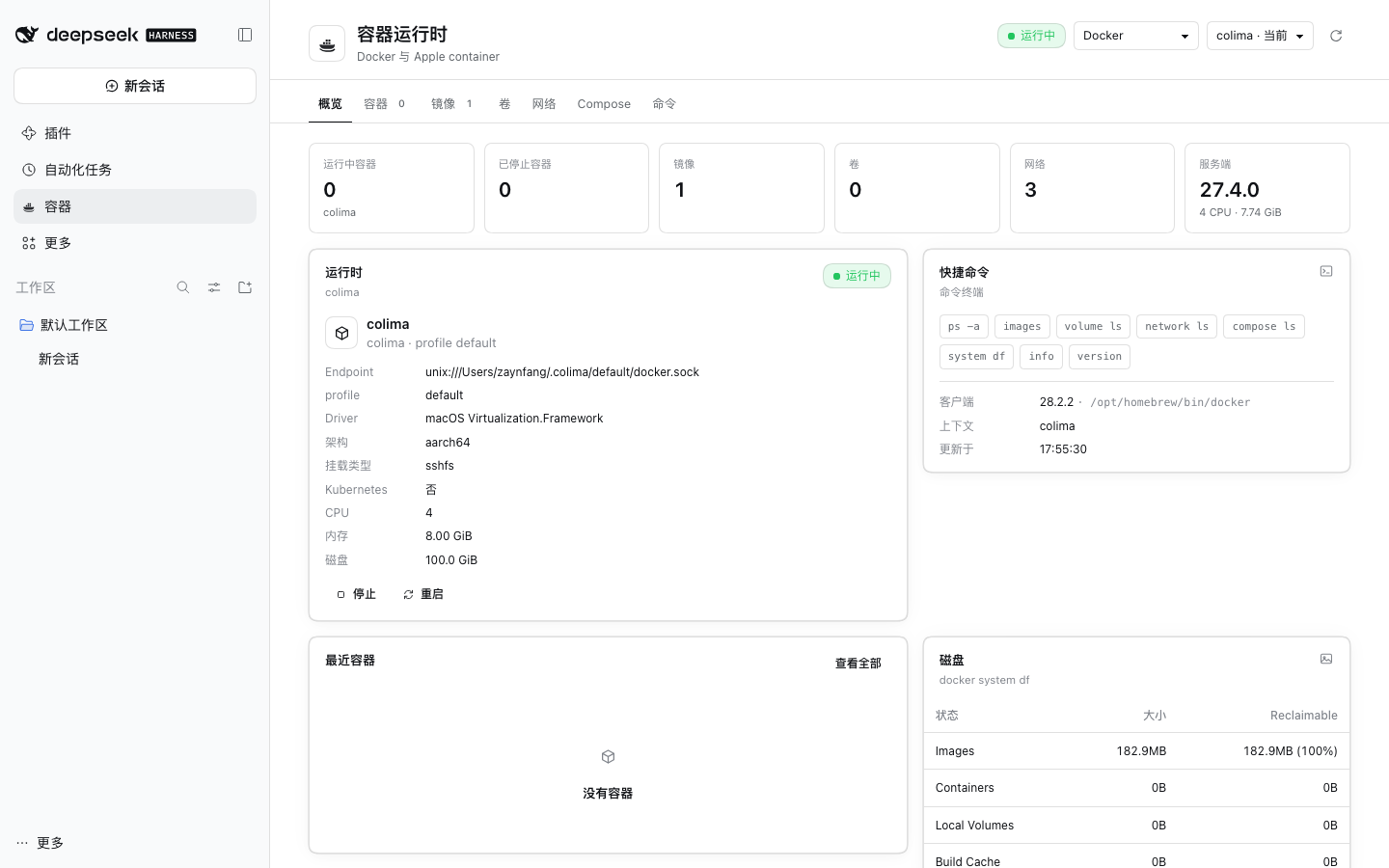
DSH 左栏容器面板:管理 macOS 上的 Docker(colima / Docker Desktop / OrbStack / remote context)和 Apple container。
功能
- Docker / Apple container 双 provider,运行时状态、上下文切换
- 容器、镜像、卷、网络、Compose、命令
- 容器启动/停止/重启/删除,镜像 pull/push/build/inspect/delete
- 拉取镜像:可选指定架构(
linux/amd64/linux/arm64),也可以直接粘贴docker pull nginx整条命令 - 构建镜像:用文件夹选择器选择项目目录,表单会实时检查目录、识别 Dockerfile、推荐镜像名,并预览将执行的命令
- 推送镜像:选择目标名,如
用户名/app:tag或ghcr.io/用户名/app:tag;名字不同时会先打标签,带登录提示,被仓库拒绝时给出明确说明 - 查看日志、inspect、实时 follow
- Attach:Docker
docker attach;Applecontainer exec - Exec:进入容器内部 shell(
docker exec -it <id> /bin/sh) - 镜像架构列(arm64/amd64)
- 只读 AI 工具:
container_status、container_list、container_inspect、container_logs - AI 诊断会新建独立会话,不污染当前对话
要求
- macOS
- DSH 0.2.x
- Docker CLI;或安装 Apple container
- 网络代理按本机环境配置
安装
GitHub: https://github.com/Zaynervewreck/dsh-plugin-container
dsh plugin --profile desktop add dsh-plugin-container
重启 DSH。安装器会自动写入 dsh.profile.bundles,不需要手改 cordis.patch.yml。
本地开发版:
node scripts/install-profile.mjs --home "$HOME/.dsh" --profile desktop
源码路径模式与 npm 包模式不要同时启用。
使用
- 左栏打开 容器
- 顶部切换 Docker / Apple container
- 容器行操作:
- 启动 / 停止 / 重启 / 删除
- 日志 / Follow / Inspect
- Attach:接管容器主进程
- Exec:在容器内开一个新 shell
- 问 AI / 诊断:新建独立 DSH 会话,调用只读容器工具
- 镜像 tab 可查看架构,或直接用镜像启动容器
安全
- 所有 Docker/Apple 命令以当前用户权限执行
- 无 shell 拼接;命令拆成 argv 直接 spawn
- 删除、stop、prune 等危险操作需要确认
- AI 工具只读,不提供 start/stop/rm/prune tool
- 日志和 inspect 被标记为不可信数据,不能作为指令执行
发布
发布由 GitHub Actions 完成,npm token 放在仓库 Secrets:
- GitHub 仓库 → Settings → Secrets and variables → Actions
- 新建
NPM_TOKEN,值为 npm Granular Access Token(需要 Bypass 2FA、Read and write) - 更新版本并打 tag:
npm version patch
git push --follow-tags
Release workflow 会校验 tag 与 package.json 版本一致,然后执行:
npm publish --access public --provenance
开发
npm install
npm run build     # src/client -> lib/client.js
npm test          # 53 tests
npm pack          # 发布前检查
@deepseek-ai/dsh-tools由宿主应用提供,不要加进dependencies/peerDependencies。否则安装插件时会在 profile 的node_modules里装一份旧版,盖住宿主自带的版本,导致tools服务缺失、DSH 启动失败。它只放在devDependencies。
主要结构:
index.js                 Host 入口
cordis.patch.yml         bundle 安装 patch
src/host/service.js      provider 路由 + Docker
src/host/images.js       镜像 push/build 校验
src/host/apple.js        Apple container
src/host/attach.js       Attach/Exec PTY
src/host/tools.js        只读 Agent Tools
src/client/              页面、tabs、i18n、styles