dsh-plugin-github-issues
Verifieddsh-plugin-github-issues · v0.7.1 · MIT · Web UI
Browse GitHub issues, milestones, labels, priority, and linked PR status inside DeepSeek Harness, and hand an issue to the agent by dragging it into the composer.
Install
dsh plugin add dsh-plugin-github-issues Confirm the layer applied with dsh --profile default --dump-config — see the install guide.
Source
Tags
Readme
dsh-plugin-github-issues
English | 中文


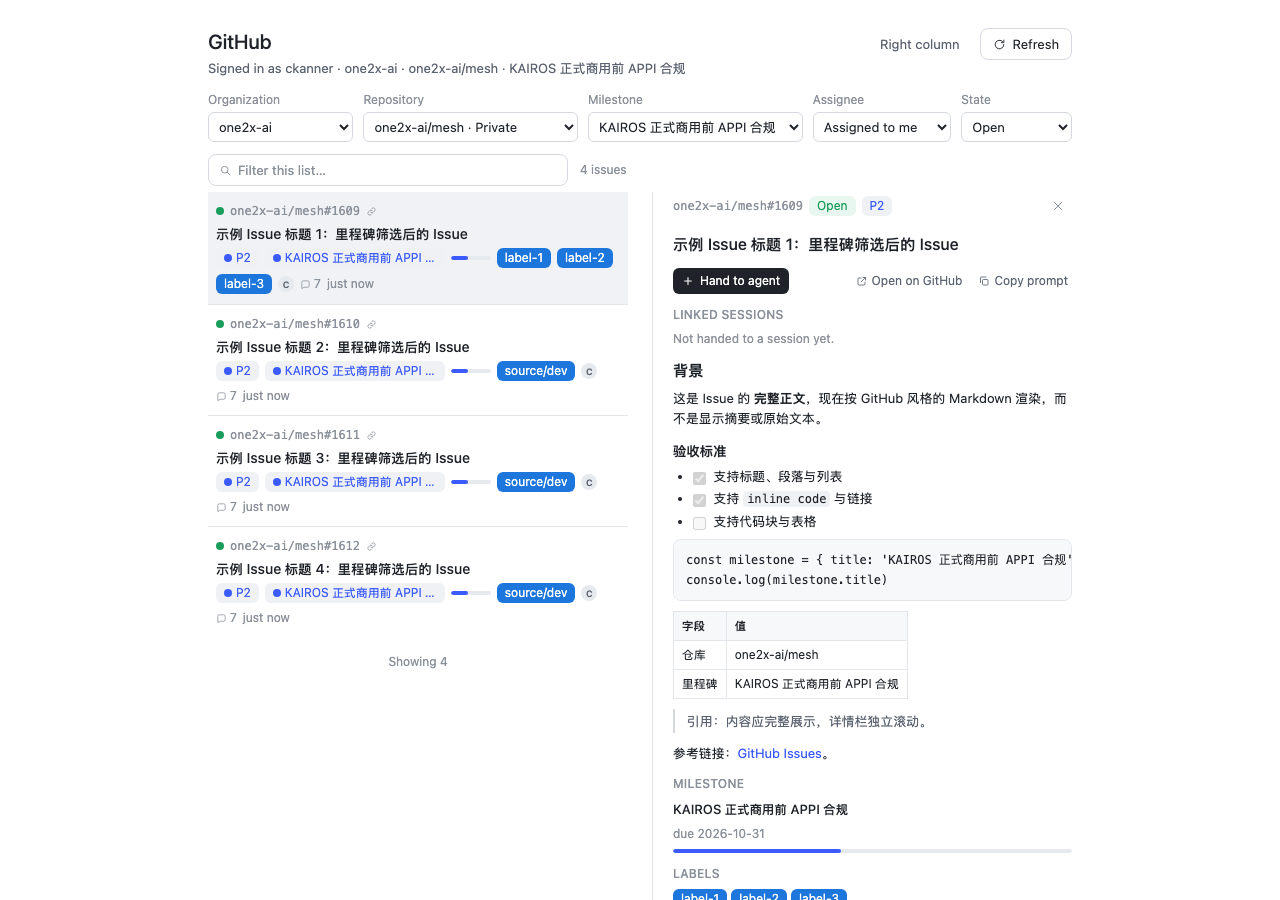
Adds a GitHub Issues work surface to DeepSeek Harness: browse issues from your repositories, read their details, and hand one to the agent. A handoff opens a new Session in the matching Workspace and stages the issue as an attachment-style card inside the composer; sending turns that card into the issue's task prompt. Handed-over issues show which Sessions own them, can be entered, and can be unlinked; one issue may be worked in several Sessions.
It is read-only: the plugin never writes to GitHub.
Install
From the npm registry (recommended — the package ships the built Host half and browser bundle):
dsh plugin --profile <name> add dsh-plugin-github-issues
Pin a version when you want reproducible profiles:
dsh plugin --profile <name> add [email protected]
Restart the harness afterwards: a profile is composed at startup. Remove it with:
dsh plugin --profile <name> remove dsh-plugin-github-issues
From a checkout (a linked install: rebuild and restart after edits):
npm install
npm run build
dsh plugin --profile <name> add /path/to/dsh-plugin-github-issues
Every release also carries a packed
tarball (dsh-plugin-github-issues.tgz), installable by path.
Requirements
- DSH Desktop with a Web GUI (developed and verified against
0.2.1-rc.3). - A
ghCLI logged in for the GitHub host you use:gh auth login. The token stays in the OS keychain and is never written into this package's config. - The panel is repository-scoped: pick an organization and a repository (a default is selected for you), then narrow by milestone, assignee and state.
What you get
| Surface | Where | What |
|---|---|---|
| GitHub panel | left rail icon → main panel | organization → repository → milestone → assignee → state cascade (remembered across restarts) in one fixed toolbar; a default organization/repository is selected for you, the milestone dropdown lists only that repository's milestones, and only the list scrolls (search stays above it, the detail pane scrolls independently with the full issue body rendered as sanitized GitHub-flavored Markdown, milestone progress, labels, priority, assignees, linked/mentioned PRs and checks) |
| Issues right column | right sidebar tab | the same filtered issue list beside the Conversation, for drag-and-drop handoff |
| Composer card | inside the input box | the staged issue: [GitHub] owner/repo#number ×. Type extra instructions or nothing; send converts the card into the issue prompt |
| Linked chip | composer dock under the input | the Session's linked issue: state dot (green open / red closed) + owner/repo#number; the dot refreshes from GitHub on panel refresh, every poll, window focus and whenever the issue appears in the list; click for a detail popover, remove to unlink |
| Handoff actions | issue detail | one-click enter Session (latest link), new Session for this issue, plus a linked-Session list with per-Session enter/unlink |
| GitHub settings | Settings → GitHub | gh auth status and scopes, handoff behavior, prompt template |
Use
- Click the GitHub icon in the left rail.
- Pick an organization and a repository (the first one is selected automatically), then a milestone, assignee and state. The selection is remembered in the profile's UI state (not in the plugin config).
- Click a row for the detail pane.
owner/repo#numberopens GitHub in the browser. - Hand an issue over:
- One-click in the detail: Hand to agent / New session for this issue opens a new Session in the matching Workspace with the issue staged inside the composer.
- Drag a row from the right-column Issues tab into the composer: it stages into the current Session.
- Type whatever context you want, then send. The card is converted into the issue's task prompt (the template from Settings) plus your text; the issue ↔ Session link is recorded at that moment.
- The linked chip appears under the composer. Reopen the issue later to enter that Session, start another one, or unlink it. Unlinking never deletes the Session.
- Open the right column from the panel header (Right column) or from the right sidebar's own add menu (page type Issues).
Which Session does a handoff use?
- If the issue is already linked: enter Session opens the most recent link; the linked-Session list lets you enter any of them.
- A new handoff picks a Workspace by this priority: the Workspace of the current Session → the Workspace of a Session already linked to the same repository → a Workspace whose directory/title matches the repository name → the Host's current/most-recent Workspace.
Prompt template
Settings → GitHub → Prompt template. Variables: {{repo}}, {{number}}, {{title}}, {{url}},
{{state}}, {{milestone}}, {{priority}}, {{assignees}}, {{labels}}, {{prs}}.
Privacy and tokens
- The token is resolved by the Host process from
ghand lives only in memory. It never reaches the page, the plugin config, or logs. - GitHub requests are made by the Host; the browser only receives view models.
- Persisted UI state is limited to filter preferences, the prompt template, and issue ↔ Session links,
stored at
$DSH_HOME/github-issues/state.json(mode0600). - The plugin is read-only toward GitHub.
Limitations
- Read-only: no comments, label/assignee/state writes.
- The list uses the repository's exact
issuesconnection, so state, assignee and milestone filters are applied by GitHub (and the total is authoritative); milestone filtering sends the milestone number throughfilterBy.milestoneNumber. - The detail body is the complete issue body, rendered with Markdown (headings, lists, code blocks, tables, links, images) and sanitized before display; it is not an excerpt and it is not capped to a small fixed-height box.
- Milestone choices come from the selected repository's full milestone list (open and closed).
- Priority falls back organization Issue Field →
P0–P4labels when no project field is present. - The list polls every 60–120 s while visible; use Refresh for an immediate update.
- The detail pane first asks for the body only and lazily loads cross-referenced PRs, so the slow timeline never blocks the pane.
- Converting the composer card into the prompt intercepts the native send button / Enter, which relies on the composer DOM of the verified DSH version; re-check after a DSH upgrade.
- Workspace matching for a new handoff is the heuristic priority above, not a fixed mapping.
Development
npm install
npm run typecheck      # Host + browser halves
npm test               # node --test (queries, VM mapping, prompt, state, workspace rules)
npm run test:render    # offline react-dom/server smoke of the panel, dock, sidebar, drop target
npm run build          # Host (tsc) + browser bundle (esbuild)
npm run verify:client  # loader contract + slot/Remote registration of the browser bundle
npm run verify:package # what npm publish would ship (host, client, bundle patch, locale, icon)
npm run check          # all of the above, in order
Releases
ci.yml runs on every push and pull request. release.yml runs on a v* tag (or by hand): it repeats
every CI check, publishes the new version to npm (a repository NPM_TOKEN secret, or npm trusted
publishing), and records a GitHub Release carrying dsh-plugin-github-issues.tgz. Maintainer notes:
docs/RELEASING.md.
License
MIT © Kanner