dsh-plugin-health
Verifieddsh-plugin-health · v0.3.2 · MIT · Web UI
Upgrade check and multi-host compatibility matrix for DeepSeek Harness (dsh) plugins, with an official format-1 market index builder, Windows/WSL install doctor, and a reusable GitHub Action that comments a compatibility matrix on every plugin PR.
Install
dsh plugin add dsh-plugin-health Confirm the layer applied with dsh --profile default --dump-config — see the install guide.
Source
Tags
Creators
Readme
dsh-plugin-health


DeepSeek Harness(dsh)插件的多宿主版本兼容矩阵、官方 format-1 市场索引生成器、 Windows/WSL 安装诊断/安全修复工具,以及 DSH 内的原生设置页 UI。
状态:
0.2.0。兼容判定完全对齐官方 DSH0.2.1-rc.2的规则,索引由官方发布的@deepseek-ai/dsh-plugin-market-index校验器验证。
线上官方 format-1 索引: https://easonmws.github.io/dsh-plugin-health/index.json
(300 个插件,每晚自动重建) · npm: npm install -g dsh-plugin-health ·
仓库: https://github.com/EasonMWS/dsh-plugin-health
有 UI,但只在你需要时出现
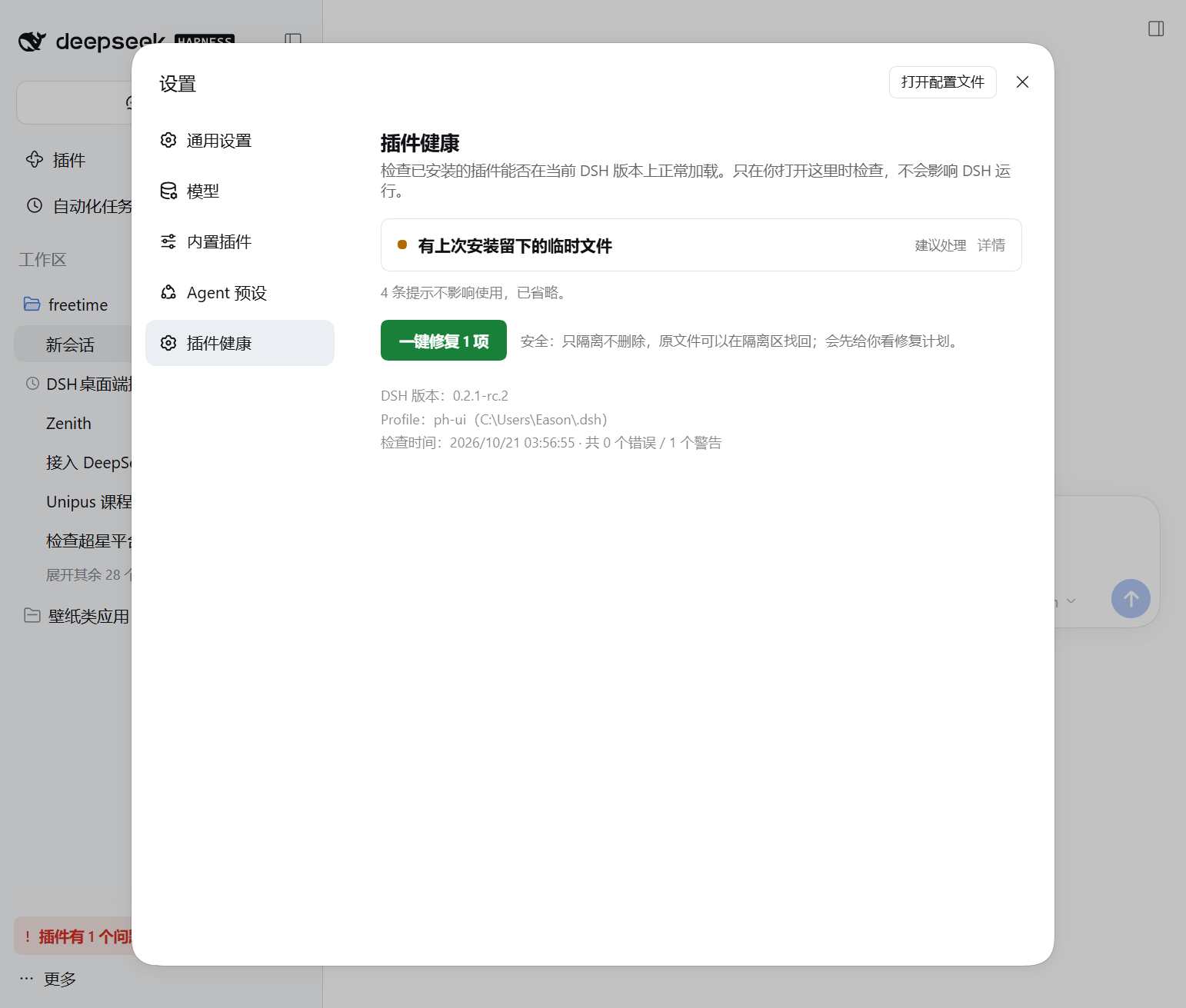
把它作为 bundle 装进 profile,DSH 设置里会多出一个原生分区 设置 → 插件健康:
dsh plugin --profile web add dsh-plugin-health
- 每条问题都用大白话解释,并给出「怎么做」,第一次用的人不用读文档也能处理;
- 一切正常时什么都不显示:没有徽章、没有横幅、没有侧栏条目;
- 真的有问题时,账号菜单上方会出现一个
插件有 N 个问题的小入口,点一下直接跳到设置分区; - host 半身只提供 loopback 只读快照,不会修改你的 profile。
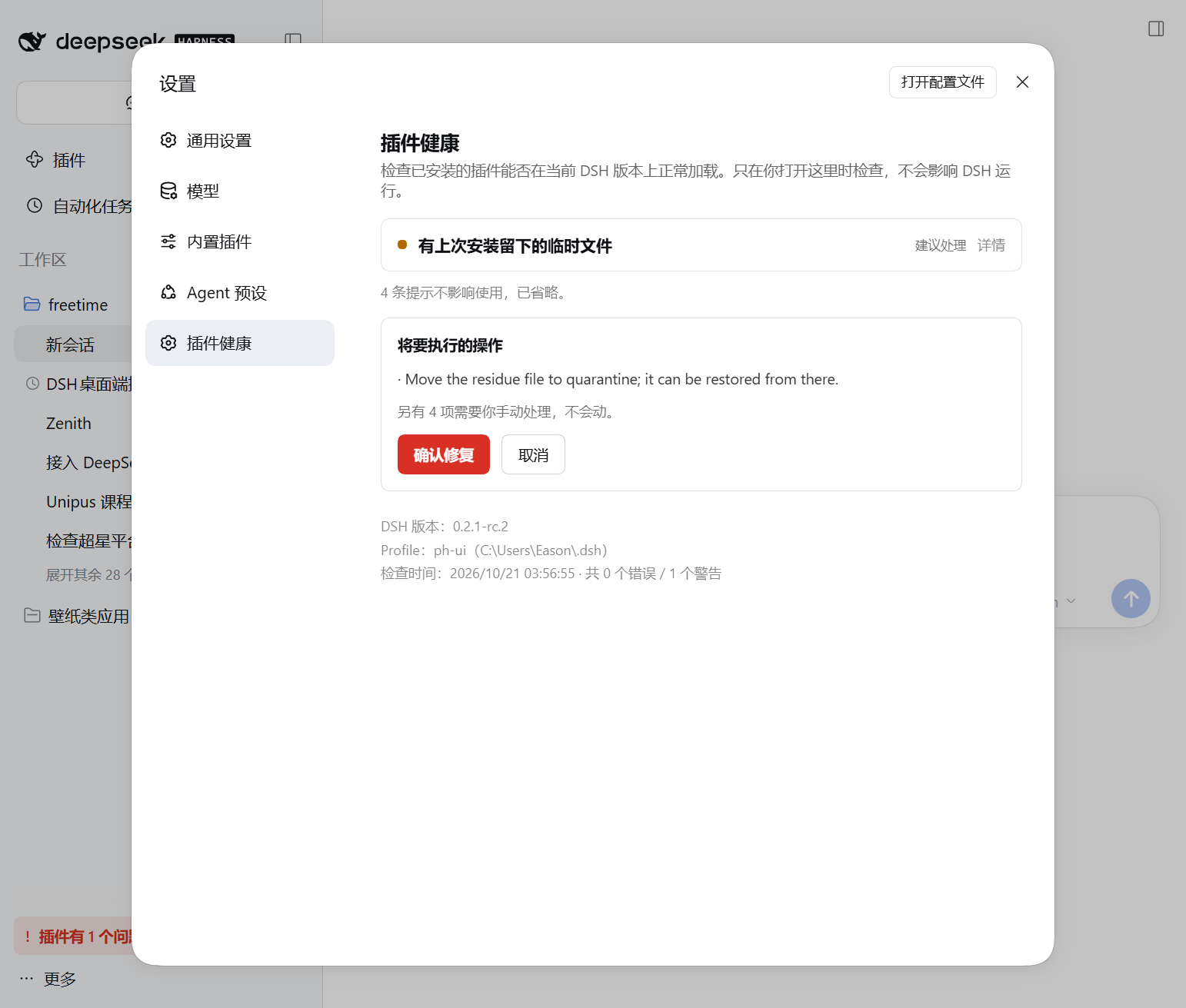
| 发现问题 + 一键修复 | 执行前先给你看修复计划 |
|---|---|
 |
 |
准备升级到 DSH 0.2.1?先跑一遍体检。
我们扫描了生态里下载量 Top 120 的插件,其中 3 个升级到
0.2.1-rc.2后会失效, 原因是它们把@deepseek-ai/*peer 精确锁死在旧版本(截至 2026-10-20,默认latest安装下还剩 2 个)。 完整报告:docs/upgrade-0.2.1.md。dsh-plugin-health matrix --plugins plugins.txt --versions 0.2.0-rc.2,0.2.1-rc.2
为什么做
DSH 没有官方插件市场索引;发行节奏约 2.1 天一个版本且带破坏性变更;官方插件管理器没有 版本选择/升级动作;Windows/WSL 安装失败会留下残缺目录和残留锁文件。现有 doctor/市场工具 只验证“本机当前安装的那一个 DSH 版本”,也不处理 Windows 文件锁和跨 profile 问题。
这个工具补三个缺口:
- 多宿主兼容矩阵:插件能不能在
0.1.7-rc.2/0.2.0-rc.2/0.2.1-alpha.4/0.2.1-rc.2上加载?使用官方语义精确判定(engines.dsh优先,否则检查@deepseek-ai/dsh*peers;预发布参与 range;workspace:映射到宿主版本)。 - 官方 format-1 市场索引:把社区目录变成内置 Discover 能直接吃的 JSON 索引,并用 DSH Host 同款解析器验证。
- Windows/WSL 安装诊断:默认只读;修复动作只隔离不删除,改 patch 保留用户注释。
安装
npm install -g dsh-plugin-health
# 或首发前本地运行:
git clone https://github.com/EasonMWS/dsh-plugin-health.git && cd dsh-plugin-health && npm ci
node bin/dsh-plugin-health.js --help
需要 Node.js 20+。
作为 DSH bundle 安装(可选)
这个包同时是一个可安装的 DSH bundle。装进 profile 后会提供一个只读的 plugin_health agent
工具,报告:声明但未安装的第三方 bundle、残缺的包目录、cordis.patch.yml 残留、代理/registry
配置、profile 差异,以及已装插件与当前 DSH 版本的不兼容。
dsh plugin --profile web add dsh-plugin-health
bundle 声明了 engines.dsh,不带 UI,自身不改变任何东西。
1. 兼容矩阵
dsh-plugin-health matrix \
  --plugins examples/plugins.txt \
  --versions latest,next,alpha,0.1.7-rc.2 \
  --out dsh-health-out/matrix \
  --fail-on any
--plugins:文件(一行一个,支持#注释)、逗号列表,或重复参数;每项是name、name@version,或本地插件目录。--versions:精确 SemVer,或@deepseek-ai/dsh的 npm dist-tag(latest/next/alpha)。- 输出:
matrix.json、matrix.md、静态 SVG 徽章(badges/)。 --fail-on any|none|<host>:直接用作 CI 门禁。
判定规则与官方 packages/boot/app-boot/src/plugin-compatibility.ts 一致:
| 插件声明 | 检查 |
|---|---|
engines.dsh |
只看这个 range,忽略 peers |
无 engines.dsh、有 peers |
所有 @deepseek-ai/dsh / @deepseek-ai/dsh-* peer range |
peer 为 workspace:^ / ~ / * |
视为当前宿主版本 |
| 宿主为预发布 | 参与 range 比较(includePrerelease: true) |
限制:矩阵是静态判定(manifest + 官方兼容规则),暂不启动每个宿主版本做挂载冒烟;这个 runtime smoke 在路线图里。只有 GitHub/tarball 源的插件可以先克隆到本地、用目录 spec 检查。
实跑示例(2026-10-17,7 个插件 × 4 个宿主版本)
dsh 0.1.7-rc.2: 6/7 compatible, 1 incompatible
dsh 0.2.0-rc.2: 5/7 compatible, 2 incompatible
dsh 0.2.1-alpha.4: 5/7 compatible, 2 incompatible
dsh 0.2.1-rc.2: 5/7 compatible, 2 incompatible
✗ [email protected]:四个宿主全不兼容(@deepseek-ai/dsh-subprocess-local 的 peer 上界过窄)
✗ [email protected]:从 0.2.0-rc.2 起不兼容(@deepseek-ai/dsh-tools peer)
第一条正好复现了 dsh-win32 issue #89(peer 上界过窄导致新宿主线被拒绝)的真实问题,而且 不需要安装任何东西。
GitHub Action:每个 PR 自动贴兼容矩阵
仓库内置可复用 workflow。把 examples/dsh-compat.yml 放进插件仓库的
.github/workflows/dsh-compat.yml,之后每个 PR 都会收到一条兼容矩阵评论 + job summary,并且
矩阵产物会自动上传为 artifact:
name: dsh plugin compatibility
on: pull_request
permissions:
  contents: read
  pull-requests: write
jobs:
  matrix:
    uses: EasonMWS/dsh-plugin-health/.github/workflows/[email protected]
    with:
      plugins: '.'
      versions: 'latest,next,alpha'
      comment: true
2. format-1 市场索引
dsh-plugin-health index \
  --catalog https://awesome-dsh-plugin.com/plugins.json \
  --host 0.2.1-rc.2 \
  --index-url https://easonmws.github.io/dsh-plugin-health/index.json \
  --matrix dsh-health-out/matrix/matrix.json \
  --limit 300 --out site
命令生成 site/index.json(format: 1)和 site/build-report.md,然后调用
@deepseek-ai/dsh-plugin-market-index(DSH Host 实际使用的解析器)做严格校验。把目录部署到
任意静态主机(GitHub Pages 即可,不能有重定向),再把 index.json 的 URL 填进
插件 → 自定义插件市场 → 发现 → 添加索引源。
索引特性:
- 市场与每个插件的标题/描述都带本地化(必须有
en,同时保留zh); - 分类来自社区目录,另有标签(
npm、compatible、incompatible、unchecked、capability risk)和排序键(下载量、Star、健康分); - 健康分是确定性公式:热度(log 下载 55 分 + log Star 25 分)加减兼容性与能力风险,0–100;
- 每个插件默认列 3 个版本(
--max-versions):dist-tag latest 优先,然后最高版本,带 npm 发布时间与engines.dsh。
当前范围:只收社区目录里有 npm 包的条目(2026-10 快照里 2,607 / 5,704);GitHub/tarball-only 条目会跳过并在报告里计数,git 源(commit 固定)在路线图里。
3. Windows/WSL 诊断与修复
dsh-plugin-health doctor --home C:\Users\me\.dsh --profile desktop --runtime 0.2.1-rc.2
dsh-plugin-health repair --home C:\Users\me\.dsh --profile desktop --apply --yes
检查项:profile 声明但未安装的第三方 bundle(DSH 安装自带的 @deepseek-ai/* 视为已提供)、
不可读/残缺的包目录、缺失的 profile 依赖、损坏或空的 cordis.patch.yml 条目、
.bak-* / .lock / .lock.takeover-* 残留、过大的插件管理器日志、配了代理但没设
NODE_USE_ENV_PROXY=1、WSL 与 Windows 长路径、按 --runtime 检查已装插件是否兼容、以及
desktop/web 等 profile 之间的插件集差异。
修复必须显式 --apply,默认 dry-run,且只隔离不删除:
- 文件和目录移到
<home>/.plugin-health/quarantine/<时间戳>/,repair-log.json记录每一步; cordis.patch.yml只做文本级删除(顶层- []条目),先备份,保留用户注释与格式。
路线图
- runtime smoke:每个宿主版本在隔离 profile 里安装并挂载插件;
- 支持 GitHub/tarball 目录条目的 commit-pinned git 源;
- 全目录矩阵 + 每晚构建并发布索引;
- DSH 内的插件面板(渲染矩阵与诊断结果);
- 可复用的 GitHub Action 与公开兼容性看板。
开发
npm ci
npm test
23 个单元测试覆盖官方兼容语义、format-1 构建(用官方解析器验证)以及基于 fixture home 的 诊断/修复流程,不依赖网络。
免责声明
DSH 插件以用户完整权限运行。健康分、兼容标签、目录收录都不是安全审计。第三方索引未签名, 只添加你信任的来源。
License
MIT