dsh-plugin-session-emoji
Verifieddsh-plugin-session-emoji · v0.1.0 · MIT · Web UI
Sidebar session emoji prefixes for the dsh web GUI: an externally attached emoji in front of every session title, set via a row context menu, persisted host-side under $DSH_HOME/storages.
Install
dsh plugin add dsh-plugin-session-emoji Confirm the layer applied with dsh --profile default --dump-config — see the install guide.
Source
Tags
Creators
Readme
🎯 dsh-plugin-session-emoji
给 dsh Web 侧栏的每个会话加一个「外挂 emoji」
像飞书云文档那样 —— emoji 挂在会话标题前面,但不属于标题文本。
重命名、搜索、导出、模型上下文,通通不受影响。
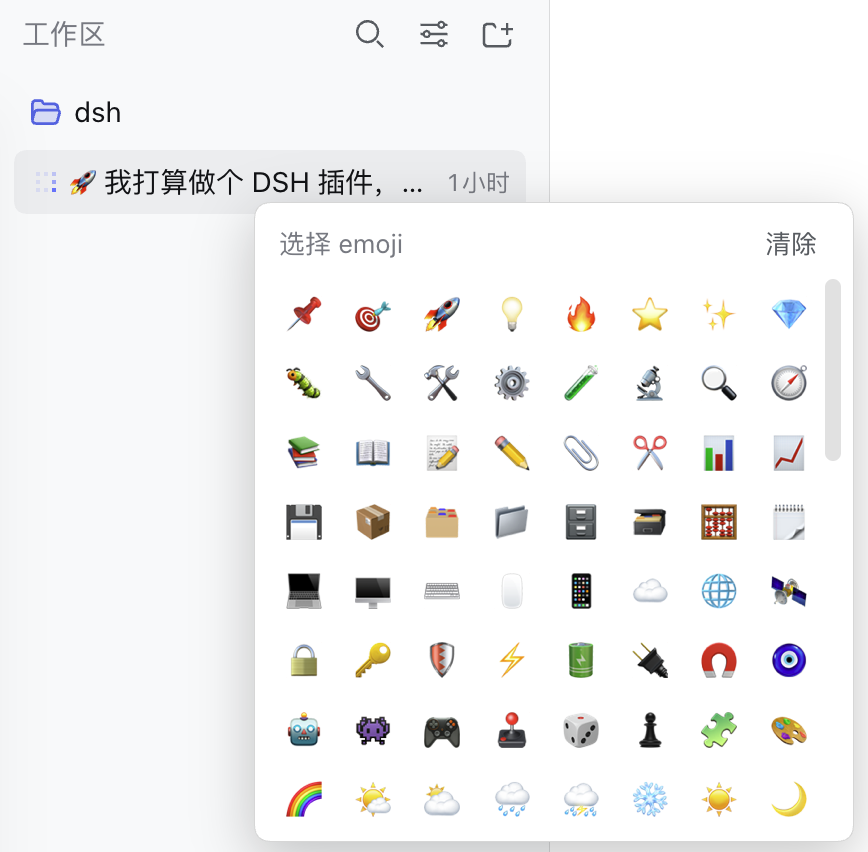
dsh Web 侧栏 · 会话行右键设置 · 主机侧持久化




✨ 特性
| 特性 | 说明 | |
|---|---|---|
| 🎨 | 外挂渲染 | emoji 通过 CSS ::before content: attr() 画在标题前,不修改会话标题本身,也不插入 React 管理的子节点 |
| 🖱️ | 右键设置 | 会话行右键 → 「设置 emoji…」打开选择器(192 个常用 emoji),「清除 emoji」一键移除 |
| 💾 | 主机侧持久化 | 映射存在 $DSH_HOME/storages/session-emoji.json,换浏览器、换设备都在 |
| 🔗 | 精准关联 | 通过 React fiber 从行组件 props 读取会话 id,标题重名也不会串 |
| 🔒 | 复用宿主安全模型 | API 路由挂在 dsh 统一认证通道上,自动享受 Host/Origin 围栏 + cookie 认证,插件零鉴权代码 |
| 📦 | 零依赖 | Host 半只用 Node 内置模块;Client 半自包含,无任何 npm 依赖 |
📦 安装
在 dsh
0.1.5-rc.2上开发验证。一条命令装完(包自带 bundle patch,自动挂进 profile 的 bundle 层),然后重启dsh web生效:
# 从 npm 安装
dsh plugin --profile web add dsh-plugin-session-emoji -w

# 或直接从 GitHub 安装(无需发 npm 版)
dsh plugin --profile web add git+https://github.com/cholf5/dsh-plugin-session-emoji.git -w
重启 dsh web 后刷新页面即可。看到「装了没变化」?——运行中的进程仍加载旧代码,必须重启。
命令末尾的 -w 是什么
profile 目录是一个 pnpm workspace,pnpm 9+ 向 workspace 根添加依赖需要 -w(--workspace-root)。没有它可能报 ERR_PNPM_ADDING_TO_ROOT。
手动安装(不用 dsh plugin 的场景)
把包放进 ~/.dsh/profiles/web/node_modules/(symlink 或 pnpm 均可),再往 ~/.dsh/profiles/web/cordis.patch.yml 手动加一行 insert:
- insert:
    - id: session-emoji
      name: dsh-plugin-session-emoji
patchReload: live 会热加载这行补丁,无需重启。仅推荐在调试时使用;正常流程走上面的 dsh plugin 即可。
更新 / 卸载
# 更新(git 安装时重新拉最新 commit)
dsh plugin --profile web update dsh-plugin-session-emoji -w

# 卸载(自动从 bundle 层移除)
dsh plugin --profile web remove dsh-plugin-session-emoji -w
本机开发
不用发版:把 profile 里的依赖换成指向本地仓库的软链,改完源码重启 dsh web 即用本地代码:
cd /path/to/dsh-plugin-session-emoji
dsh plugin --profile web add link:./ -w
🎮 使用
- 在侧栏会话行上右键 → 「设置 emoji…」
- 在选择器里点一个 emoji —— 立即生效并持久化
- 再次右键 → 「清除 emoji」移除
数据长这样(~/.dsh/storages/session-emoji.json):
{
	"session-efdd8b72-a1a0-4da3-bb6a-b3e2679f8a98": "🚀"
}
🛠️ 开发热更新循环
| 改动 | 生效方式 |
|---|---|
lib/client.js(浏览器半) |
保存即可 —— dsh-client-hmr 对 bundle 做 500ms stat 轮询,检测到变化后浏览器内热替换插件,无需刷新页面 |
lib/index.js(Host 半) |
重启 dsh web(Host 半代码随进程加载) |
本机开发用
link:./安装(见「本机开发」),直接编辑仓库源码即可,无需重新安装。git/npm 安装的包被 pnpm 复制进虚拟 store,改源码要重新add一次。
🔬 实现原理
单包双面插件(dsh 的 dual-face plugin 模式):
dsh-plugin-session-emoji/
├── cordis.patch.yml  ← bundle patch:dsh plugin add 时自动挂进组合树(一条命令的秘密)
├── lib/index.js      ← Host 半(Node):精确 Fetch 路由 + JSON 持久化
└── lib/client.js     ← Client 半(浏览器):行首渲染 + 右键菜单 + 选择器
package.json 里声明 "dsh": { "bundle": { "patch": "./cordis.patch.yml" } },dsh plugin --profile web add 装完包后会自动把包名追加进 profile 的 dsh.profile.bundles 层叠列表——这正是 dsh 内置 bundle(如 dsh-web-app)的同一机制,无需手动改任何配置文件。
Host 半 —— 通过 ctx.connection.fetch.register() 注册精确路由 GET/POST /api/session-emoji:
GET返回全量映射;POST校验输入后原子写盘(temp + rename,写队列串行化)- 存储文件与 workspace controller 同属
$DSH_HOME/storages/用户数据区
Client 半 —— 自包含 bundle,通过 package.json 的 dsh.client 声明进入浏览器 roster:
- 装饰:
MutationObserver监听行节点,在标题 span 上设置data-dsh-session-emoji属性,一段注入的 CSS 用::before content: attr(...)画出 emoji —— React 重渲染不会丢,因为我们从不碰它管理的子节点 - 定位:行元素
[role="treeitem"]→ React fiber 沿 return 链找到SessionNodeItem的props.node.id(GroupNode无id、搜索行是props.result,天然排除) - 交互:
contextmenu捕获监听 + 纯 DOM 弹层(菜单/选择器),样式跟随 dsh 主题 token(--dsw-alias-*)
🧯 卸载
dsh plugin --profile web remove dsh-plugin-session-emoji -w   # 自动从 bundle 层移除
# (可选)删除数据
rm ~/.dsh/storages/session-emoji.json
重启 dsh web 后彻底移除。
⚠️ 边界与已知限制
- 只作用于侧栏会话列表(分组视图 + 平铺视图);搜索结果行、顶栏标题按设计不渲染
- 行定位依赖 dsh 当前 UI 结构(
role="treeitem"+ fiber props 形状),dsh 大版本升级后可能需要小幅适配 - 删除/归档的会话在映射里留下无害的残留条目
English summary
A dual-face (Node + browser) plugin for the dsh web GUI that renders an externally attached emoji in front of every session title in the sidebar workspace browser — Feishu-docs style. The emoji is never part of the title text: it is drawn with CSS ::before content: attr() from a data attribute on the title span, so renames, search, export, and model context are untouched. Set or clear it from the row context menu; mappings persist host-side in $DSH_HOME/storages/session-emoji.json and are served over an exact route on dsh's shared authenticated /api channel.
📄 License
MIT © cholf5