dsh-plugin-subscriptions
Verifieddsh-plugin-subscriptions · v0.9.9 · MIT · Web UI
Use ChatGPT (Codex), Claude, Grok (X Premium), GitHub Copilot, and Google Antigravity subscriptions as DeepSeek Harness LLM providers, with OAuth login from the web Settings page
Install
dsh plugin add dsh-plugin-subscriptions Confirm the layer applied with dsh --profile default --dump-config — see the install guide.
Source
Tags
Creators
Readme
dsh-plugin-subscriptions 
English | 中文
把你的 ChatGPT(Codex)、Claude、Grok(X Premium)、GitHub Copilot 和 Google Antigravity 订阅当作 DeepSeek Harness 的 LLM provider 使用 —— 不需要 API key。Codex、Grok 和 Antigravity 通过 dsh web 界面 OAuth 登录(设置 → 订阅);Copilot 使用 GitHub OAuth 设备码流程;Claude 在存在 Claude Code 会话时直接导入凭据(macOS Keychain 或 ~/.claude/.credentials.json),否则回退到同样的浏览器 OAuth 流程,因此不要求安装 Claude Code CLI。Token 保存在 ~/.dsh/plugins/subscriptions/auth.json(权限 0600),过期自动刷新。
订阅与模型显示名
在 设置 → 订阅 → 管理 顶部修改订阅显示名,在 编辑模型列表 中修改模型显示名;使用同一组保存/取消按钮,留空或恢复默认后保存可恢复原名。名称按服务商和模型 ID 存储在原有 provider-settings.json,跨重启和目录刷新保留。名称为最多 80 字符的单行文本,仅改变显示,不改变 provider、模型 ID、推理参数或账号路由;现有账号别名可继续独立使用。
订阅显示名也用于原生模型选择器的服务商分组标题;清空显示名并保存后,分组恢复为服务商默认名称。
演示
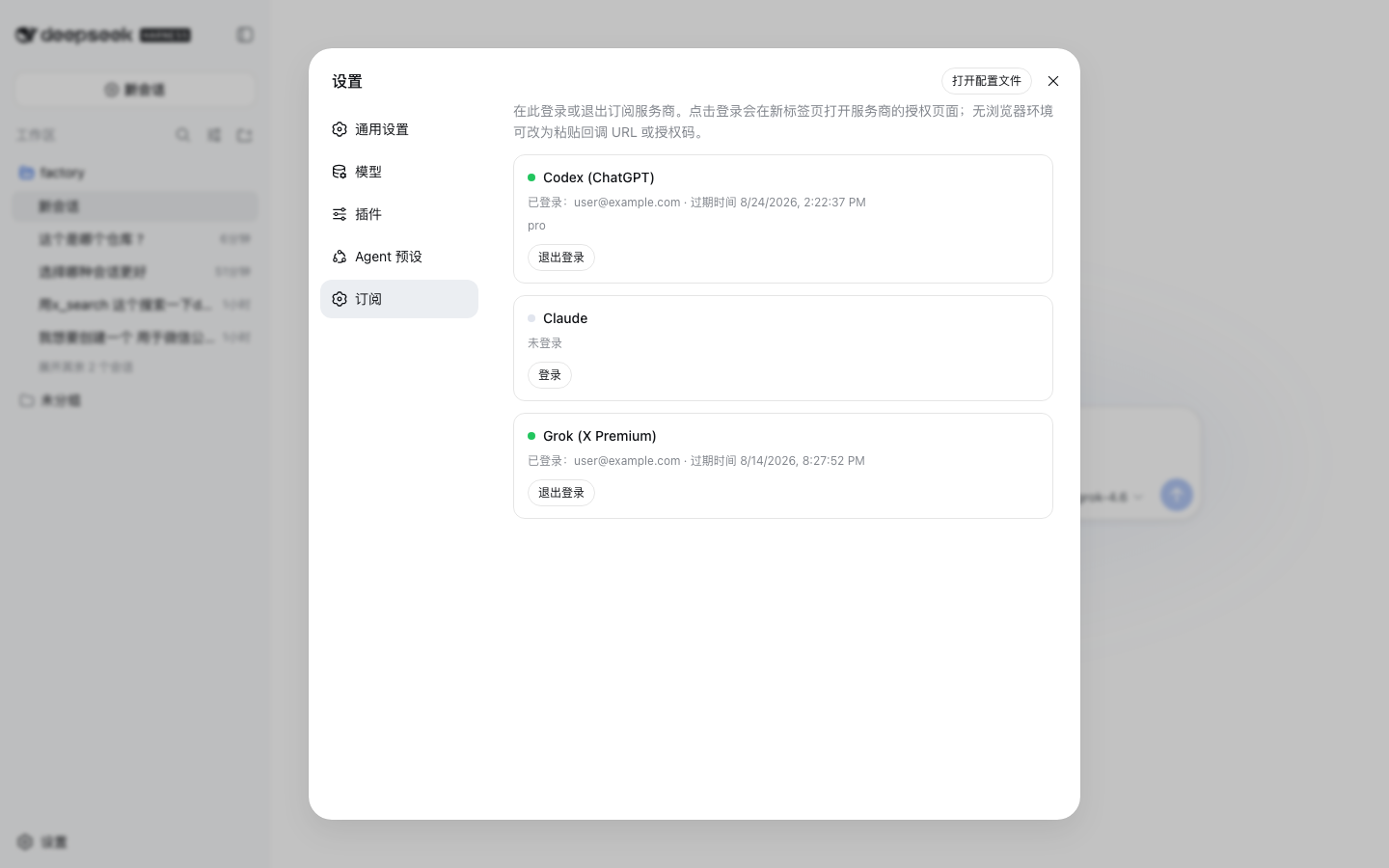
设置 → 订阅:每个 provider 的登录/退出,无需 API key。Claude 有 Claude Code 会话时导入凭据,否则和 Codex、Grok 一样走 OAuth(以下设置截图使用演示账号与目录数据):
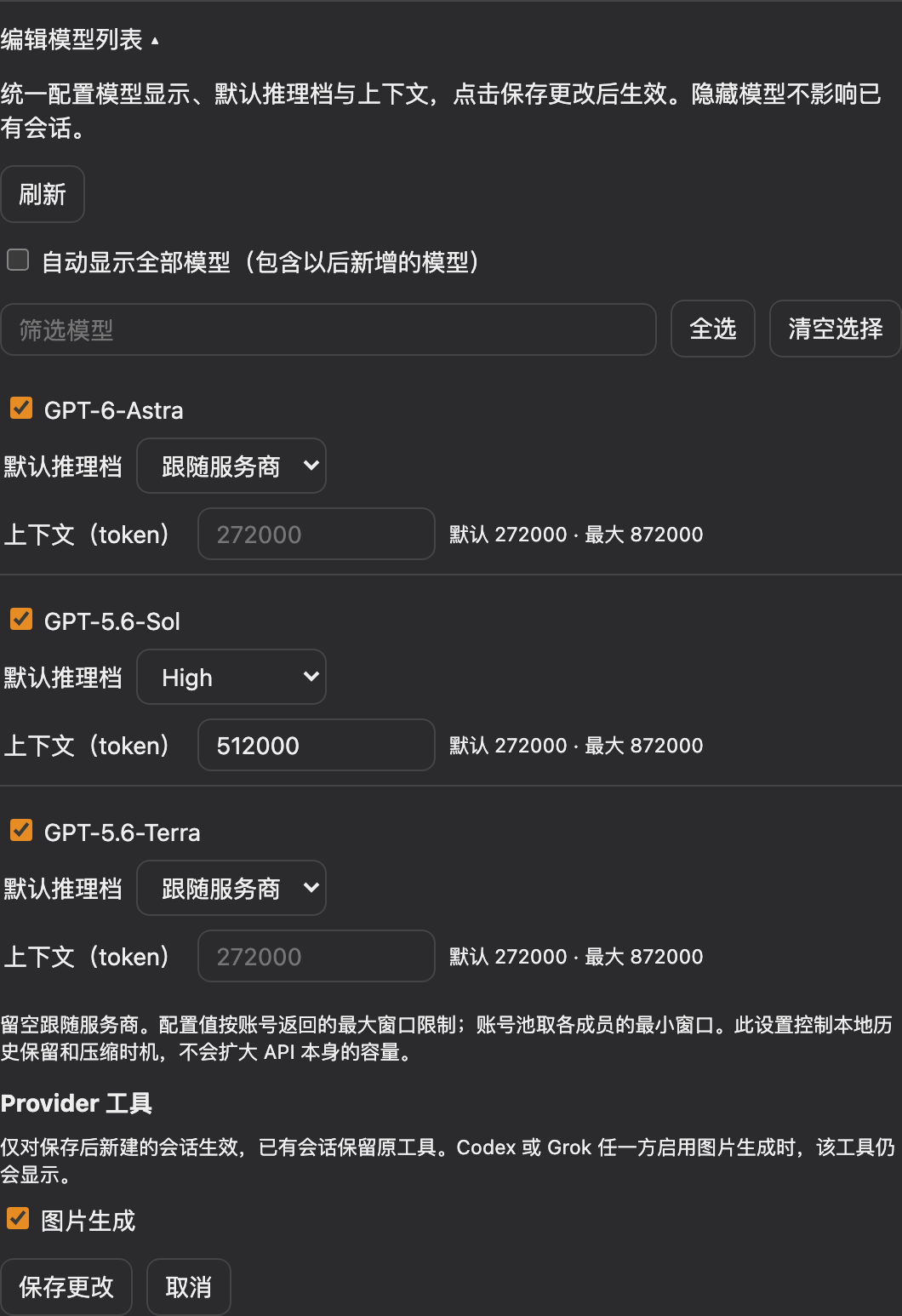
模型显示、默认推理档和上下文已合并到 编辑模型列表,统一保存或取消:
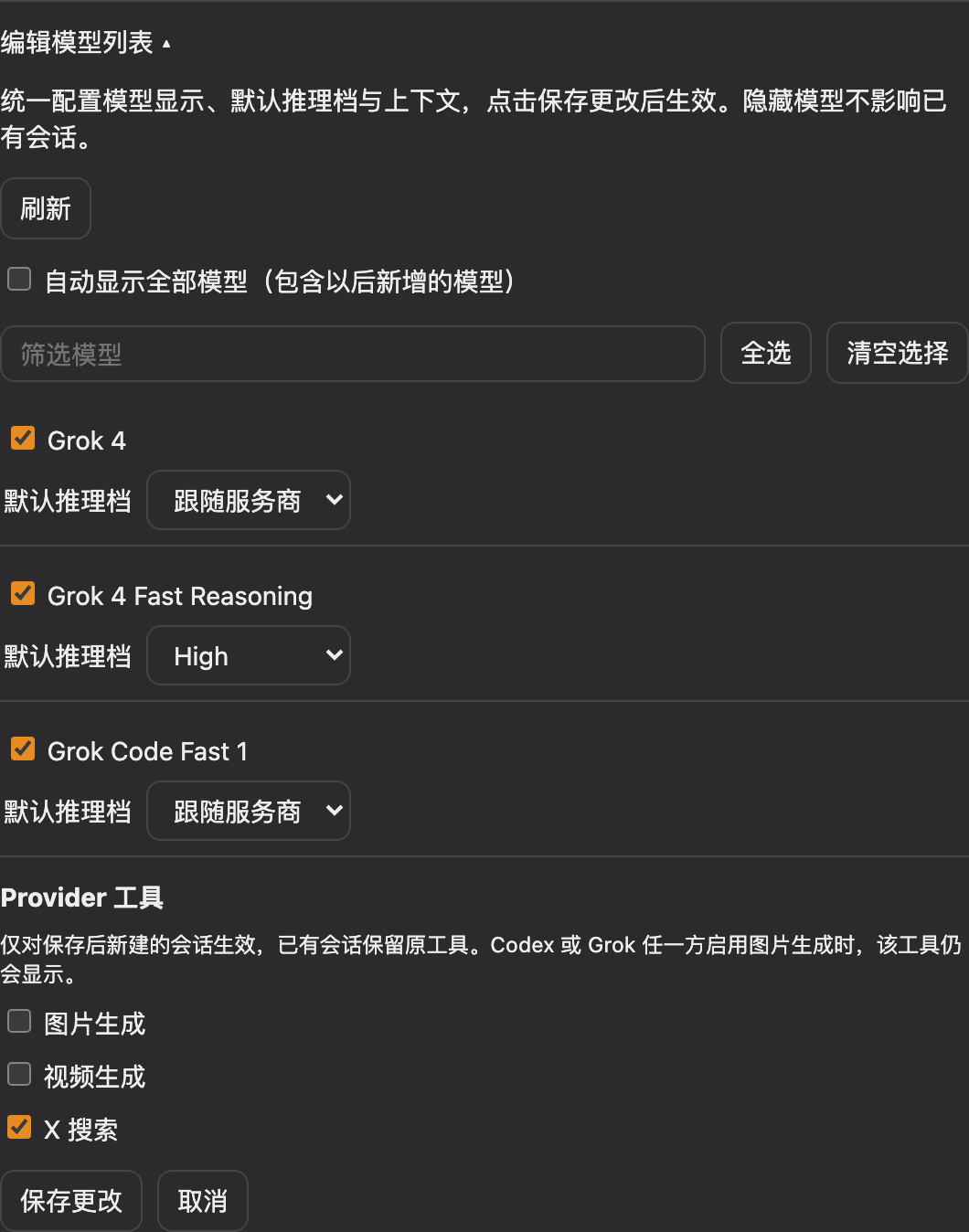
按 provider 配置图片生成、视频生成和 X 搜索,工具开关仅影响保存后新建的会话:
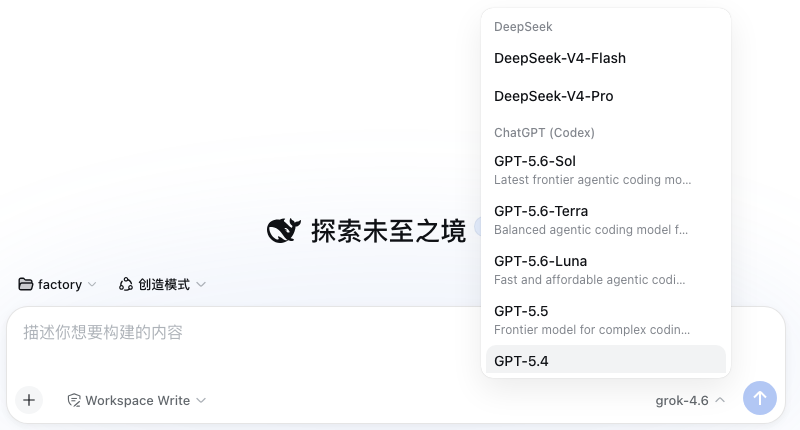
已登录的 provider 会带着实时模型目录进入会话模型选择器:
声明了推理等级的模型会在同一菜单里多出推理等级选择 —— Codex 系列模型、Grok 4.6 / 4.5,以及 Copilot 的推理模型(档位和默认值来自各 provider 的实时目录,不是硬编码列表;Copilot 的 capabilities.supports.reasoning_effort 数组会按协议映射为 chat completions 的 reasoning_effort 或 Responses 的 reasoning.effort)。同时声明两个 Copilot 端点的模型(gpt-5.4、gpt-5-mini)默认走 chat completions,但请求同时携带函数工具和推理等级时会自动改走 /responses —— Copilot 在 chat 线路上拒绝这种组合:
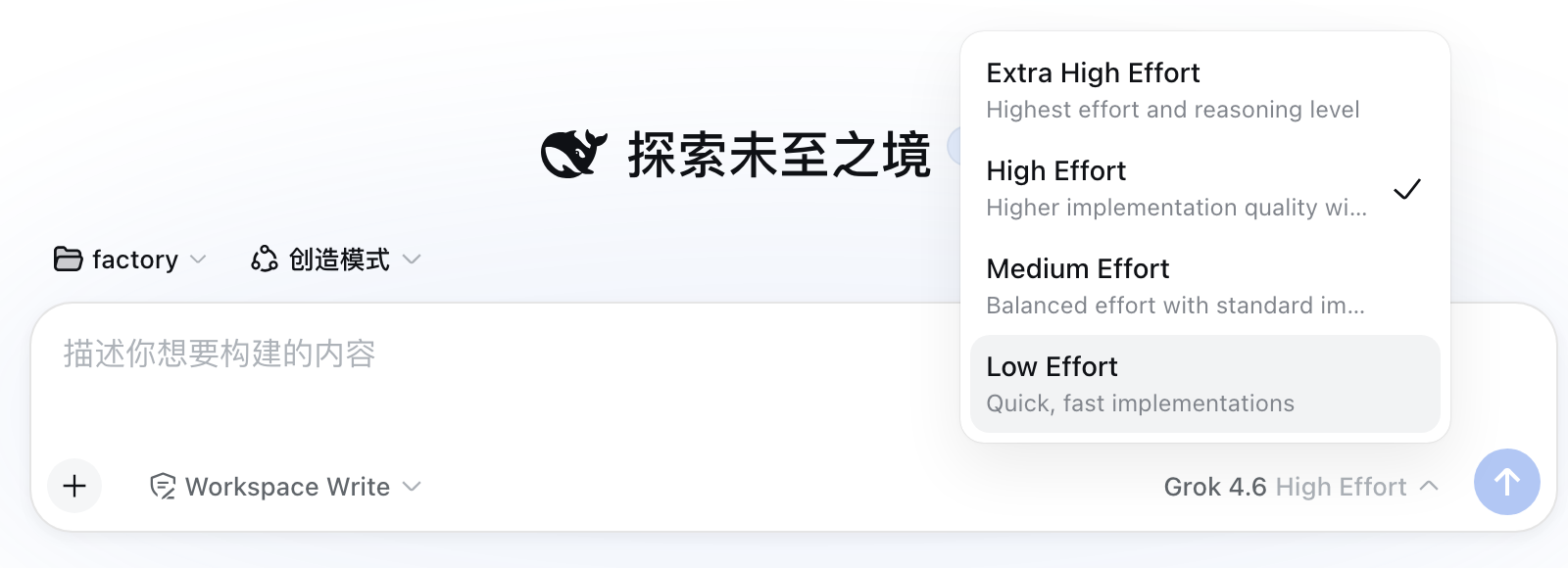
目录声明了 fast tier(即 codex CLI 的 fast 模式)的 Codex 模型,会在输入框工具行(模型选择器旁)多出一个速度开关 —— 标准 / 快速(service_tier: priority),按会话生效。/fast 斜杠命令提供同样的弹窗选择;当前模型不支持快速档时会提示原因。

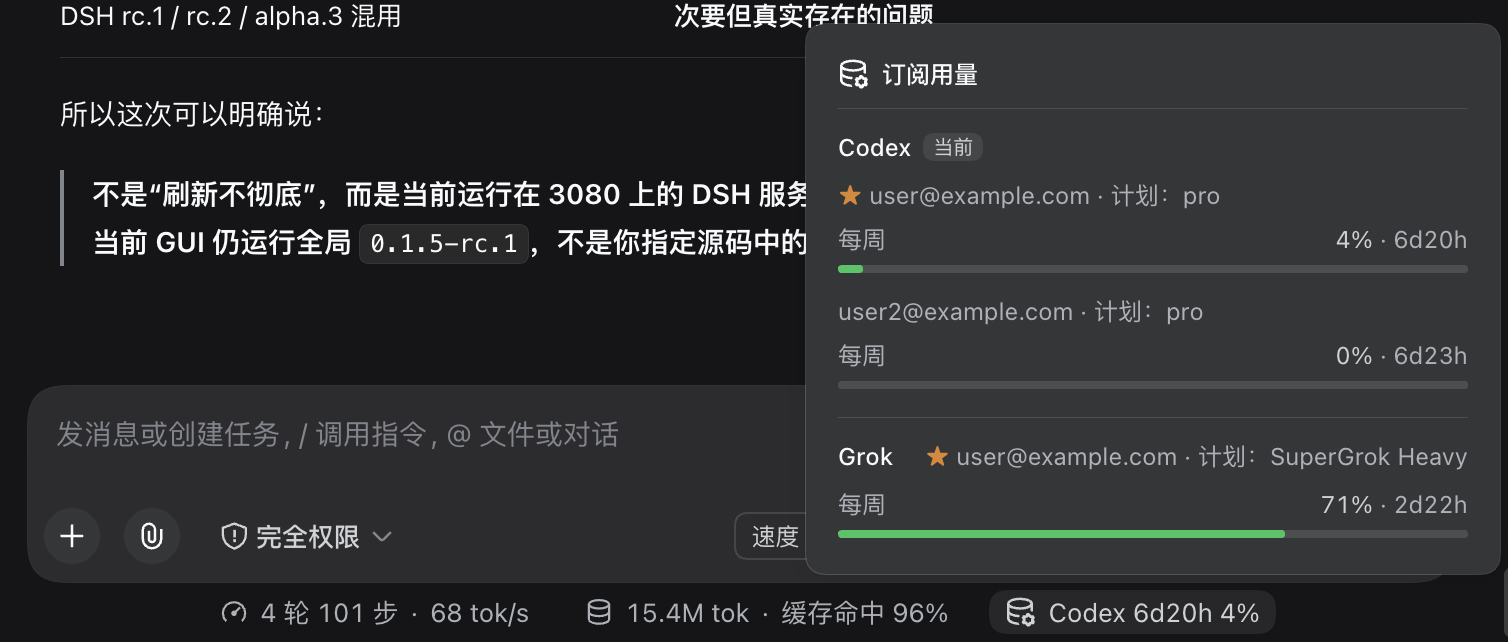
输入框下方的统计行会多出一个订阅用量胶囊,显示当前会话所选模型对应服务商的已用百分比和重置窗口(选 Codex 模型时显示 Codex,选 Grok 模型时显示 Grok,以此类推)。状态栏最多显示一家:切到非订阅模型时,保留当前会话视图中最近选择的订阅;没有记录则隐藏。最近模型记录不会跨页面刷新保存。点击可展开查看所有已登录服务商及其全部账号 —— 默认账号带星标,当前服务商排在最前。Antigravity 仅预览当前模型的额度窗口(每个账号最多两个),其余模型窗口默认折叠,仍可点击展开。
在 设置 → 订阅 → 状态栏额度显示 中可选择 仅显示当前/最近使用的一家(默认)或 不显示。显示偏好自动保存到当前浏览器,立即生效、刷新后保留,并在同源标签页之间同步;不影响设置页的额度详情、模型选择或账号路由。
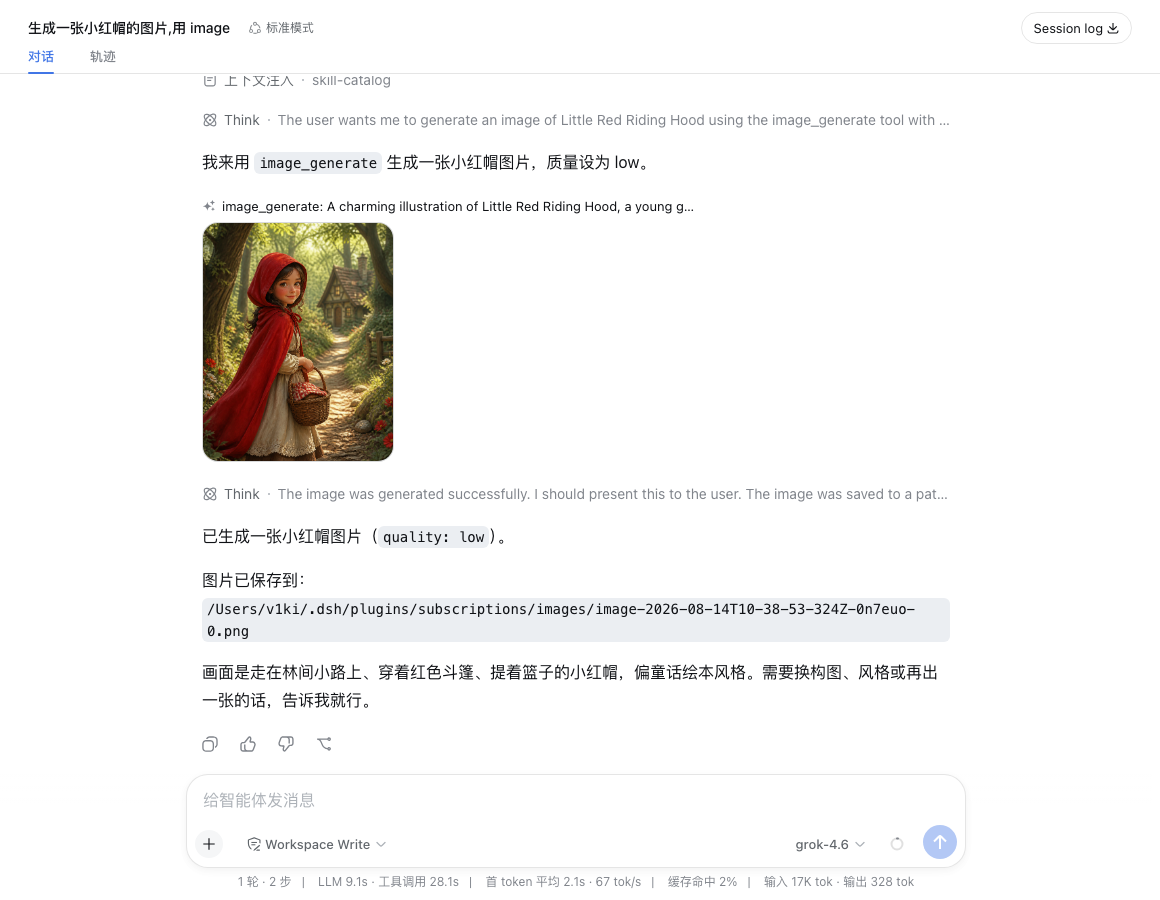
image_generate 工具生成的图片直接内联显示在对话里:
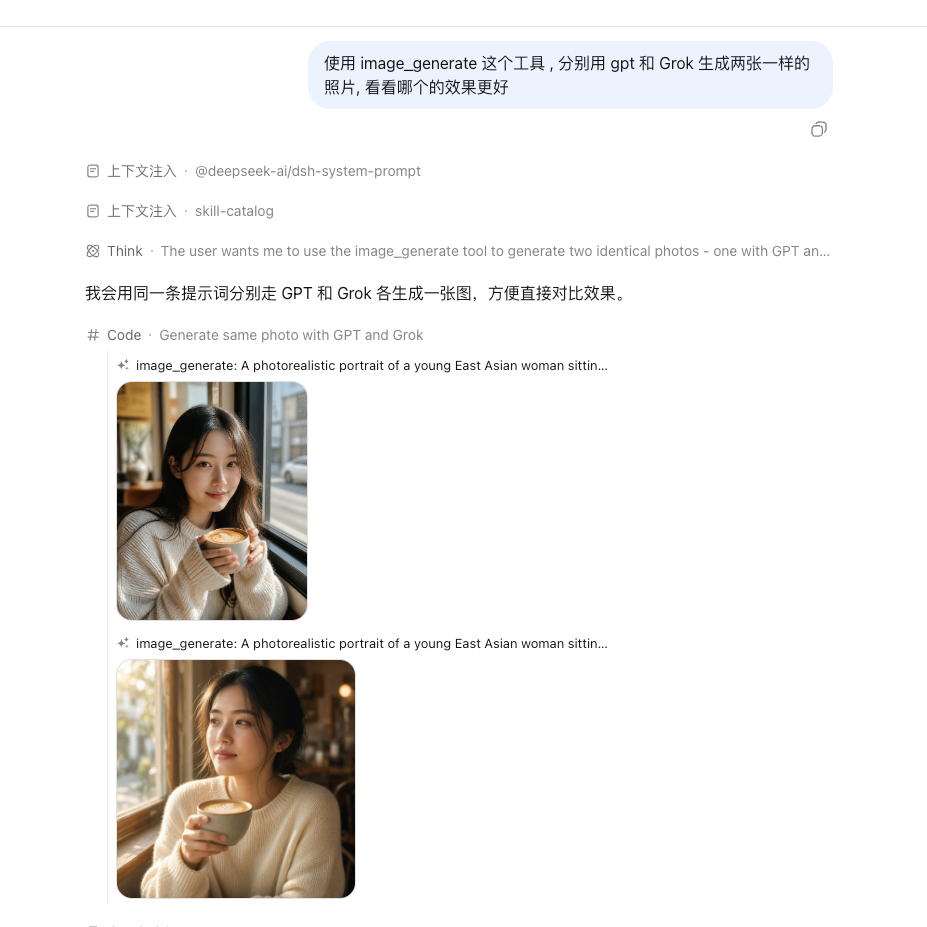
provider 参数可选择生图后端——同一条提示词分别走 GPT(gpt-image-2,上)和 Grok(grok-imagine-image-2.0,下):
video_generate 工具生成的视频直接内联播放:

Provider 一览
| 路由 | 订阅 | 模型 |
|---|---|---|
codex |
ChatGPT Plus/Pro | 从 chatgpt.com/backend-api/codex/models 实时获取 |
claude |
Claude Pro/Max | 订阅内所有可用模型(Opus、Sonnet、Haiku、Fable —— 静态目录,随插件更新) |
grok |
X Premium (xAI) | 从 api.x.ai/v1/models 实时获取(仅对话模型);推理等级来自 Grok CLI 目录(cli-chat-proxy.grok.com/v1/models) |
copilot |
GitHub Copilot | 从 api.githubcopilot.com/models 实时获取(两种 wire 的对话模型,含按模型的视觉标记与推理等级);登录使用 OAuth 设备码流程(在 github.com/login/device 输入页面显示的验证码) |
antigravity |
Google Antigravity | 从 Antigravity v1internal:fetchAvailableModels 实时获取;请求使用 generateContent / streamGenerateContent,支持文本、图片、流式推理与工具调用转换 |
只有已登录的 provider 才会出现在会话模型选择器里;登录/退出后列表自动刷新。支持视觉的模型会声明 ['text', 'image'] 输入模态,图片内容会被翻译成各 provider 的 wire 格式。
已登录的卡片还会显示订阅用量——按限额窗口(5 小时会话窗、每周窗,以及计划包含的按模型每周窗)展示已用百分比、进度条和重置时间,并带刷新按钮。Codex 用量来自 chatgpt.com/backend-api/wham/usage(同时报告计划类型),Claude 用量来自 api.anthropic.com/api/oauth/usage,Grok 用量来自 Grok Build CLI 代理的 cli-chat-proxy.grok.com/v1/billing(即 CLI /usage 面板的数据源,报告共享每周额度和订阅档位)。Antigravity 会在上游字段存在时从 loadCodeAssist 与 fetchAvailableModels 显示订阅档位、积分及按模型限额。Copilot 没有用量接口,其卡片不显示用量区块。
随 provider 启用自动注册的工具:
web_search搜索提供商(Codex)—— 通过 DSH 原生的web_search工具和引用界面使用 Codex 托管的网页搜索,复用默认 Codex 账号和插件的代理配置。它只是注册到宿主web能力位上的候选之一,不会独占:未挂载其他搜索提供商时 DSH 自动选中它,与其他提供商共存时由宿主自己的web.searchProvider配置决定优先级。在 Codex 的 Provider tools 里关闭 Web search 只会撤回本提供商,宿主的web_search工具仍归其余已注册的提供商使用。x_search(Grok)—— xAI 托管的 X 搜索,返回{ answer, citations }。image_generate(ChatGPT 或 Grok)—— 经 Codex 后端调用gpt-image-2,或经api.x.ai/v1/images/generations调用grok-imagine-image-2.0。provider参数指定首选提供方(gpt为默认值,可选grok);首选方未登录时自动回退到另一方。图片保存到~/.dsh/plugins/subscriptions/images/并返回路径。Grok 路径上size/quality参数会映射为 Grok 的aspect_ratio/quality。video_generate(Grok)—— 经api.x.ai/v1/videos调用grok-imagine-video-1.5(异步提交 + 轮询);MP4 保存到~/.dsh/plugins/subscriptions/videos/并返回路径,视频直接在对话里内联播放。支持时长(1–15 秒)、宽高比、分辨率,以及通过image_url做图生视频。
image_generate 也支持编辑:模型在需要修改或参考已有图片时传入可选的 referenceImages(1–5 张完整 DSH 附件引用),未传时继续文生图。参考图可以来自用户上传、read_image 的结果或之前生成的图片;本地文件需先调用 read_image,不能把文件路径当作引用。图片旁的引用文本和工具结构化结果可直接复用。引用顺序对应提示词中的图片顺序,编辑结果保存为新文件并可继续编辑,也可切换 GPT/Grok 使用同一参考图。
Codex 编辑走 /backend-api/codex/images/edits,Grok 编辑走 /v1/images/edits;沿用现有 provider 偏好、未登录回退及会话工具开关。空数组、重复或无效引用、超过附件限制会报错,不会降级为文生图;编辑需要 DSH 附件服务。
图片生成与编辑共用同 provider 的账号调度:首次优先默认账号,成功后在当前会话优先复用;收到明确的额度、认证或图片能力拒绝时尝试其余账号。401 最多刷新后重试一次。冷却状态仅用于图片请求,并读取服务商返回的重置时间;登录/退出会清理相关状态。网络中断、超时、5xx 和参数错误不会自动重发,避免重复出图。pool.enabled: false 或 pool.autoAccounts: false(兼容 autoFamilies)关闭图片自动账号池,恢复默认账号直连。图片调度不使用对话模型目录、对话用量评分、families 或 tiers。
安装
DSH 兼容性
0.9.7 版本新增对 DSH 0.2.0-rc.2 的支持,开发依赖已固定到该版本。适配请求态消息、独立工具结果、工具准备状态和已省略图片的文本占位,同时保留旧历史格式转换。不会自动放行其他 0.2 预发布版本。
当前版本支持已发布的 DSH 0.1.1-rc.2、0.1.2-alpha/rc、0.1.3-alpha、0.1.5-alpha/rc 和 0.1.7-rc 版本线,包括 0.1.5-rc.2 和 0.1.7-rc.2。peer 范围使用 0.1.5-alpha.1 作为锚点,按照 npm semver 规则也覆盖之后的 0.1.5-alpha、0.1.5-rc 和稳定版 0.1.5;0.1.7-rc.1 锚点同样覆盖之后的 0.1.7-rc 和稳定版 0.1.7。DSH 0.1.6-alpha 和 0.1.7-alpha 尚未单独验证,因此暂不纳入支持范围。
管理账号与 Pool 模型
在 设置 → 订阅 → 对应 provider → 管理 中编辑账号别名、自动 Pool 参与范围与独立账号模型入口。默认维持自动 Pool;独立入口固定使用一个账号,失效时不会回退到其他账号。此配置仅约束 LLM 路由,不改变图片、视频和搜索工具的账号策略。详见账号与模型管理。
刷新模型列表
模型选择器优先使用已保存的目录,包括非默认账号的目录;打开或切换已缓存模型时,不等待在线发现,也不会因此发起刷新。插件启动时检查目录,跳过五分钟内已更新的快照;本轮检查结束后,隔 60 分钟再检查。检查失败时保留已有目录,等待下一轮自动检查。没有任何目录缓存的账号,首次仍需等待在线发现。
在 设置 → 订阅 → 对应 provider → 编辑模型列表 中点击 刷新,可立即获取最新目录并更新会话模型选择器。后台刷新成功后也会通知选择器重新读取。这与订阅用量、凭据刷新是独立机制,后二者行为保持不变。如果显式配置了非空的 models.<provider>,仍使用指定列表,不进行在线发现。
Codex 的目录可见性受请求中的 client_version 影响。默认自动读取 npm 官方 @openai/codex 包公开元数据中的稳定版本,不安装 CLI,也不向 npm 发送订阅登录凭据。查询成功后在内存缓存六小时;失败后五分钟再试,保留上次成功版本,首次失败则回退到已验证的 0.153.4。查询最多等待 5 秒,多账号共用查询,忽略预发布版和低于当前已知版本的结果。插件加载时还会把 Node 的 Happy Eyeballs 单地址建连尝试超时提高到至少 1.5 秒(不会降低宿主已设的更大值),因为默认 250ms 在一次 TCP 握手就超过该值的高延迟链路上会让所有连接失败。手动刷新模型列表也会重新检查版本。显式配置 codexClientVersion: '0.153.4' 时优先使用该值,并关闭自动查询;更改配置后需重启 DSH。模型仍以账号实际权限为准,详见验证记录。
Claude 请求以 Claude Code 的身份发出,接口会按 Claude Code 版本放行新模型(例如 Opus 5.5 要求 2.1.280 或更新)。因此插件会读取 npm 官方 @anthropic-ai/claude-code 包公开元数据中的 latest 版本,缓存、超时和重试规则与 Codex 查询相同,也不会向 npm 发送订阅登录凭据。上报的版本不会低于本机安装的 claude CLI 或插件内置的兜底版本;npm 不可达时就使用这个下限。手动刷新模型列表也会重新检查版本。设置 → 订阅 里,Codex 和 Claude 名称旁会显示当前使用的版本号及来源:npm 最新、本机 CLI、内置版本或手动配置。如果显示的是内置版本,说明 npm 查询没有成功。
安装命令
本机已有 dsh CLI 时,从 npm 安装(预构建产物,无需构建授权):
dsh plugin --profile web add dsh-plugin-subscriptions
也可以从 GitHub 安装源码:
dsh plugin --profile web add github:V1ki/dsh-plugin-subscriptions
首次安装 pnpm 会要求允许该包的构建脚本(git 安装拉取的是源码而非构建产物);把打印出的包名加进 profile 的 pnpm-workspace.yaml:
allowBuilds:
  dsh-plugin-subscriptions: true
然后重新执行 add。该授权会在安装时执行包的代码,只授给你信任的来源。
本地检出安装:
git clone https://github.com/V1ki/dsh-plugin-subscriptions.git
cd dsh-plugin-subscriptions && pnpm install && pnpm build
dsh plugin --profile web add ./dsh-plugin-subscriptions
不装进 profile 的 headless 用法(先在 web 界面登录过 —— token 文件是共享的):
cp overlay.example.yml overlay.yml   # 然后把 name: 改成本检出的 lib/index.js 绝对路径
dsh --profile headless --patch <检出目录>/overlay.yml "你的任务"
更新
npm 安装的:
dsh plugin --profile web update --latest dsh-plugin-subscriptions
GitHub 安装的:重新执行一遍 add github:V1ki/dsh-plugin-subscriptions —— 会重新拉取源码并构建。link 的本地检出只需在检出目录里 git pull && pnpm build。
无论哪种方式,更新后都要重启 dsh web 才会加载新版本。
使用
dsh web,打开打印的 URL。- 设置 → 订阅:点对应 provider 的「连接」。若先运行过
claude并登录,Claude 会即时导入凭据;没有凭据时,Claude 也和其他 provider 一样在浏览器里授权。Codex、Grok 和 Antigravity 在打开的标签页里授权;Copilot 会显示 GitHub 设备码,需在github.com/login/device输入;无浏览器环境下可展开手动兜底,粘贴回调 URL 或授权码。 - 在任意会话里打开模型选择器(
/model),选择 ChatGPT (Codex) / Claude (Subscription) / Grok (Subscription) / GitHub Copilot / Google Antigravity 下的模型。
未登录时:该 provider 不出现在选择器里;直接请求会报 MISSING_CREDENTIAL 并提示去设置页登录,不影响其他功能。
多账号
每个 provider 可以登录多个账号:连上第一个之后,卡片会出现「添加账号」按钮(Claude 拆分为「浏览器授权」和「导入 Claude Code」两种)。账号按身份(邮箱/用户名)归档——重复登录同一账号是覆盖更新,不同账号才是新增。浏览器授权以浏览器当前登录的账号为准,要添加不同账号请先在浏览器切换账号,或用无痕窗口走手动授权码。★ 默认账号服务直连路由;池路由会使用所有账号。从 Claude Code 导入的 Claude 账号会与 CLI 的凭据存储保持同步;OAuth 添加的 Claude 账号独立刷新,多个账号不会互相覆盖 Keychain。
编辑模型列表、上下文与工具
在 设置 → 订阅 → 对应 provider → 编辑模型列表 中搜索并勾选要显示的模型,再点击 保存更改。默认自动显示全部模型;手动勾选、全选或清空后会保存明确的显示列表,以后发现的新模型不会自动加入。重新勾选「自动显示全部模型」即可恢复。隐藏仅影响模型选择器和默认推理档列表,已有会话仍可使用隐藏模型;编辑器始终保留完整目录,可随时恢复显示。刷新目录不会覆盖选择。对话框只有一组 保存更改 / 取消:保存会把模型列表与上方的账号设置一起提交,取消会同时丢弃两者并关闭对话框。
Codex 模型还可填写上下文 token 数,留空跟随服务商。插件读取每个账号的 context_window 与 max_context_window,实际使用 min(配置值, 账号最大值);未返回最大值时,保守地以上下文默认值为上限。账号池按实际成员分别解析并取最小窗口。这只调整 DSH 的本地上下文预算与压缩时机,不向 API 发送扩大容量的参数。更长的上下文可能增加响应延迟。
同一区块可开关 Codex 的图片生成,以及 Grok 的图片生成、视频生成和 X 搜索。工具策略只影响保存后新建的会话;已有会话及其重启后的恢复保留创建时的策略。图片生成是共享工具,只有 Codex 与 Grok 均关闭或未配置时才完全隐藏;调用时也不会回退到该会话已禁用的 provider。Claude 和 Copilot 当前没有本插件提供的独立工具开关。
设置和工具策略历史独立存于 ~/.dsh/plugins/subscriptions/provider-settings.json(权限 0600),不受模型目录刷新影响。原有非空 models.<provider> 配置仍决定基础目录;界面显示选择在该目录上生效。
编辑模型的默认推理档
默认推理档已合并进 编辑模型列表:每个支持推理档的模型在同一处配置显示、推理档和上下文,统一点击对话框底部的 保存更改 后生效。隐藏模型也可以设置推理档;没有推理档的模型不显示下拉框。选择「跟随服务商」清除覆盖,取消会恢复尚未保存的编辑。选项取自模型实时能力目录,账号池使用成员共同支持的档位;自定义池别名不提供无效的推理档覆盖。
原有推理档配置继续从 ~/.dsh/plugins/subscriptions/model-defaults.json(权限 0600)读取并保存。若保存中途失败,界面会保留未完成的草稿,明确提示已经保存的推理档,并可重试完成。
配置
- id: llm-subscriptions
  name: dsh-plugin-subscriptions
  config:
    providers: [codex, claude]        # 子集;默认五个全启用
    streamIdleTimeoutMs: 300000
    claudePromptCacheTtl: 5m           # Claude 提示缓存时长:5m(默认)或 1h
    rateLimit:
      wait: true                       # 等待限流窗口重开(默认开启)
      maxWaitMs: 21600000              # 单次等待上限;6 小时,足够覆盖 5 小时会话窗口
    models:                            # 覆盖实时发现/内置目录
      codex:
        - { id: gpt-5.6-sol, name: GPT-5.6 Sol, contextWindow: 272000, inputModalities: [text, image] }
      copilot:                         # 手工条目会关闭 Copilot 目录发现
        - { id: gpt-5.6-sol, wire: responses }   # 仅 copilot:强制指定上游协议
claudePromptCacheTtl 决定 Anthropic 在最近一次使用之后保留 Claude 对话缓存多久。默认 5m 发送的请求
与之前的版本完全一致。设为 1h 时,每个缓存断点(工具+系统提示前缀,以及对话中的三个标记)都会带上
ttl: "1h";它们刻意使用同一个值,因为 Anthropic 会拒绝排在 5 分钟断点之后的 1 小时断点。缓存读取
无论哪档价格相同;区别在于 1 小时档的写入按基础输入价的 2 倍定价,而不是 1.25 倍。
如果你经常在两条消息之间停顿 5–60 分钟且能复用前缀,1h 可能更划算;收益取决于工作负载,不能据此
保证订阅额度节省。如果经常在 5 分钟内复用缓存,更高的写入价格可能无法回本。Claude Code 自己在订阅下
对主对话默认请求 1 小时,见
Claude Code 的提示缓存说明。
在已有缓存的对话上修改该设置可能产生一次前缀重写:带对话尾部缓存点的测试中,5 分钟写入之后的第一个
1 小时请求重写了前缀,但只使用系统缓存点时可以命中。5 分钟请求可以读取 1 小时条目;用 1 小时标记读取
旧的 5 分钟条目不会升级其生命周期。压缩(compaction)和会话标题请求保留原有辅助请求行为,仍使用 5 分钟。子代理
(subagent)的请求没有插件可见的标记,因此与主对话一样遵循该设置。修改后需重启 DSH 生效,且只影响
Claude;Codex、Grok、Copilot 与 Antigravity 使用各自的缓存机制。
wire(仅 copilot 条目)把模型固定到 chat-completions 或 responses。不加该字段手工条目照常
工作——它存在的原因是:实时目录不认识的手工模型否则会默认走 /chat/completions,而
responses-only 系列(gpt-5.5/5.6 等)会拒绝该端点。固定为 chat-completions 也会退出上文所述
tools+effort 的自动改道。
Antigravity 已内置 pi-antigravity 使用的公开桌面 OAuth 客户端配置,无需额外配置客户端即可点击「登录」进入 Google 授权。使用自定义客户端时,可配置 antigravity.clientId 及其可选的 antigravity.clientSecret,或设置 ANTIGRAVITY_CLIENT_ID 及其可选的 ANTIGRAVITY_CLIENT_SECRET。优先级为插件配置、环境变量、内置默认值;ID 和 secret 按同一来源成对读取,自定义 ID 不会继承默认 secret,单独提供 secret 会报错。可选的 antigravity.baseURL、antigravity.userAgent 和 antigravity.onboard 分别控制 API 地址、客户端标识和账号初始化。此路由使用 Antigravity OAuth 与 v1internal 项目封装,独立于 Gemini CLI。
Antigravity 为 Gemini 使用 parametersJsonSchema,为 Claude/GPT-OSS 使用兼容的 parameters 子集;本地 schema 引用会先展开,不修改 DSH 工具注册表。无法解析、循环引用及无法表达的自定义工具联合类型会在发送前报错。已识别的模型系列会在模型设置中提供推理等级,并转换为对应的推理预算;文本、推理和工具调用签名仅回放给相同 provider/model。兼容映射参考 pi-antigravity,离线测试不代表账号资格或在线 API 验收通过。
未配置 antigravity.baseURL 时,生成请求及目录/项目查询先访问 daily;发生传输错误或 HTTP 404/502/503/504 时,在返回任何流内容前尝试 production。显式配置的地址保持固定。HTTP 400/401/403/429 和已取消请求不触发端点回退;账号初始化不会跨端点重复执行。
模型池
同一订阅下登录了两个及以上账号时,选择器显示该 provider 所有账号目录的并集(按模型 id 去重)。照常在 Claude 组选 claude-sonnet-5、在 ChatGPT 组选 gpt-5.4——不会多出一个池分组,也不会换 model id。
- 共有模型:至少两个账号的目录都列出的模型,在这些账号之间 failover(粘性、可按配额调度)。每个账号各自做一次目录发现,Plus 不会被拿去打 Pro 才有的模型。
- 单账号模型:只有一个账号目录里有的模型,请求就打到那个账号。即使它不是默认账号,选择器里也会出现。
- 显式账号列表(
families):覆盖某个目录模型的自动成员(仅同一 provider;跨 provider 的成员会被忽略)。可钉account,省略则用默认账号。account填status接口返回的稳定账号 key——Claude 是邮箱,Grok / Copilot / Antigravity 是登录名。Codex 的 key 同时包含 workspace 和用户(["<workspace-id>","user","<user-id>"]),因此 Codex 也可以直接填登录邮箱,或在该 workspace 只登录了一个用户时填 workspace ID;有歧义的引用不会解析到任何账号,以免打到别人的账号。 - 档位额外项(
tiers,可选):额外的选择器条目,failover 可以跨模型;出现在首个成员所在的 provider 分组。不会自动创建。
成员选择按会话粘性(prompt 缓存不失效),两种策略:priority(按顺序取第一个健康成员)和 quota_aware(默认——按"必需消耗速率 = 剩余配额 / 距重置时间"给成员打分,快重置且剩余多的窗口优先被用掉而不是浪费;粘性成员除非被挑战者以 switchMargin 倍分差击败否则不换)。任一用量窗口超过 95% 的成员会被硬门槛挡下;首个流式 chunk 之前的失败会记冷却并切换下一家(provider 给了 retry-after 就用它)——配额与认证类失败按整个账号冷却(配额是账号级的;Claude 的分模型窗口则只冷却出错成员),瞬时服务端失败只冷却出错成员。Copilot 没有用量接口,恒为 0 分,自然充当最后的保底。
- id: llm-subscriptions
  name: dsh-plugin-subscriptions
  config:
    pool:
      enabled: true                   # 默认开;需同一 provider ≥2 个账号
      strategy: quota_aware           # 或 priority
      switchMargin: 2                 # quota_aware 的滞后切换倍率
      autoAccounts: true              # 把该 provider 各账号自动池到每个目录模型
      families:                       # 某个目录模型的显式账号列表(同一 provider)
        claude-sonnet-5:
          - { provider: claude, model: claude-sonnet-5 }                   # 默认账号
          - { provider: claude, account: [email protected], model: claude-sonnet-5 }
      tiers:                          # 可选的额外选择器条目
        smart:
          - { provider: claude, model: claude-sonnet-5 }
          - { provider: codex, model: gpt-5.6-sol }
          - { provider: grok, model: grok-4.6 }
等待限流窗口
订阅套餐天然是按限流窗口计费的 —— 5 小时会话窗口、周窗口,部分套餐还有按模型的周窗口 —— 所以 429 并不是终点:窗口会在 provider 自己告知的时刻重开。每条路由从自己的 429 里读出这个时刻,把它变成该账号在模型池里的冷却时长(见上文「模型池」),而不是固定猜测的 5 分钟。
只有能指明「是哪个窗口拒绝了这次请求」的信号才会被读取:Anthropic 的 anthropic-ratelimit-unified-reset、Codex 在 usage_limit_reached 上给出的秒数、xAI 在错误体里给出的延迟,或通用的 retry-after。各分桶的滚动快照(anthropic-ratelimit-{requests,tokens,…}-reset、x-codex-*-reset-after-seconds、x-ratelimit-reset-*)每个响应上都有,说不出是哪个桶拒绝的 —— 其中最早的那个往往正是还有余量的桶 —— 所以只带这些的 429 会通过插件的告警回调打印出相关 header 与响应体开头,而不是照着猜测把本轮(或池冷却)挂起。
读取只发生在 429 上。其他失败仍走各自的短本地退避:同样这些 header 也会出现在瞬时 500 上,在那里照办等于为一次一秒就恢复的过载把本轮挂满整个窗口。
有模型池时,真正在做等待这件事的其实是账号 failover:某个账号 429 了就按它自己披露的重开时刻冷却下来,请求立刻切到同 provider 的下一个账号 —— 不等待,也不丢本轮对话。只有整个池(所有账号)都在冷却时,adapter 才会上报一个 RATE_LIMIT,携带池里最早的重开时刻作为应等待的时长。单账号(没配池,或该 provider 只登了一个号)时,同样的披露时刻会被直接上报。
真正执行这段等待的是 @deepseek-ai/dsh-llm-retry,五条路由的重试策略都是为它写的:把它加进编排,否则不会有任何等待,关闭的窗口仍旧直接让本轮失败(如果池里还有别的健康账号,会先 failover 过去)。Copilot 当前使用通用的 retry-after 信号;GitHub 未识别的限流 header 会通过插件告警回调暴露出来,后续再添加 provider 专用解析器。
- name: '@deepseek-ai/dsh-llm-retry'
- name: dsh-plugin-subscriptions
  config:
    rateLimit:
      wait: true            # 默认;false 恢复此前秒级的行为
      maxWaitMs: 21600000   # 6 小时 —— 留有余量地覆盖 5 小时会话窗口
重开时刻超过 maxWaitMs(比如几天后才重置的周窗口,或者整个池的冷却时间超过这个上限)会立即失败并带上重开时刻,而不是把会话挂上好几天。wait: false 则只保留本地退避。
五条路由共用 Claude Code 自己的重试形状:首次尝试之后重试 10 次,从 1 秒开始退避,带 20% 抖动,上限 60 秒。这些都是面向消费者的订阅端点,过载时按突发丢流量,而 dsh-llm 默认值(5 次重试,500 毫秒到 10 秒)约 15 秒就放弃,对这种场景偏短。没有给出重开时刻的 429 现在会本地重试约 17 分钟才让本轮失败 —— wait: false 下约 5 分钟,那时 60 秒上限才真正生效。
一个需要知道的取舍:延迟上限与这份本地退避共用,调高 maxWaitMs 同时也抬高了无关瞬时失败(TRANSPORT、SERVER、TIMEOUT)在有限重试预算耗尽前的退避时长 —— 第 10 次重试最长会从 60 秒上限变成 512 秒。
代理
DSH v0.1.3-alpha.1 新增宿主统一代理支持。建议在启动环境或 $DSH_HOME/.env 中配置 HTTP_PROXY / HTTPS_PROXY(或 ALL_PROXY)以及 NO_PROXY,重启 DSH,然后关闭插件代理。参见 DSH 网络代理指南。环境变量中的代理凭据会被子命令继承,与插件私有配置文件的凭据边界不同;不会自动删除或迁移已有设置。
插件代理作为可选覆盖设置保留,用于仍受支持的旧版 DSH 以及仅订阅请求使用独立代理的场景。所有订阅相关请求 —— token 交换、模型 API 流式调用、用量查询、模型目录发现,以及 x_search / image_generate / video_generate 工具 —— 都可以使用。在 设置 → 订阅 → 代理 → 配置… 中设置:勾选启用,填写代理地址(http://127.0.0.1:7890)、可选用户名/密码,以及可选的逗号分隔绕过列表(如 127.0.0.1、localhost、*.example.com)。关闭或绕过插件代理后使用 DSH 的全局 fetch 路由,不一定直连;要求直连时还应配置宿主的 NO_PROXY。密码保存在 ~/.dsh/plugins/subscriptions/proxy.json(权限 0600),不会回传给浏览器;「测试」按钮会用当前配置探测一次端点,显示 HTTP 状态码与耗时。
保存后立即对后续请求生效,无需重启。OAuth 授权页在浏览器中打开,走浏览器/系统自身的代理设置,不受此配置影响;不支持 socks 代理。
相关插件
本插件只提供模型路由,审批策略由其他插件负责:
dsh-plugin-auto-review—— 面向 DSH 工具审批的 provider 原生自动审查。它在本插件注册的codex/grok路由(或其他 DSH LLM adapter 的兼容路由)之上,通过ctx.llm.stream()复现 Codex Guardian 与 Grok 提权审查逻辑,不接触账号与凭据。安装:dsh plugin --profile web add dsh-plugin-auto-review。
开发
pnpm install   # 开发基线:已发布的 DSH 0.2.0-rc.2 依赖
pnpm build     # tsc(lib/)+ tsdown(lib/client.js 浏览器 bundle)
pnpm test      # 编译后跑 node --test 单测
prepare(git 安装时触发)执行 tsdown.prepare.config.ts:自包含打包两个面,所有 @deepseek-ai/* 依赖外部化 —— 运行时从 dsh 安装解析,保证不会引入第二份 cordis。
pnpm 的 package extension 为 Node 组件测试补齐已发布 UI primitives 的浏览器依赖;实际浏览器运行时仍由 DSH 提供这些库。
改了代码后 pnpm build 并重启 dsh web 生效。
发布
发布由 GitHub Actions(release.yml)完成,不在维护者本机执行。修改 package.json 的 version 并提交后,推送同名 tag:
git tag v0.9.8 && git push origin main v0.9.8
工作流会校验 tag 与 package.json 版本一致,用锁定的 lockfile 安装依赖,执行 pnpm build 和 pnpm test,通过 npm Trusted Publishing 发布并附带 provenance 证明,最后创建带自动生成说明的 GitHub release。预发布版本(如 0.10.0-rc.1)发布到 next dist-tag。仓库中不保存任何 npm token:npm 通过 OIDC 对工作流鉴权,npm 包页面上的 provenance 可以将每个发布的 tarball 追溯到构建它的具体 commit 和工作流运行。
目录结构
src/index.ts—— 插件入口:配置 schema、adapter 注册、登录态变更通告、RPC 接线src/auth/—— PKCE/JWT 工具、token 存储、OAuth 流程引擎(临时本地回调服务)、Claude Code 凭据读取器(Keychain/文件)、/subscriptions-authRPC 通道src/providers/—— 各 provider 的 OAuth 常量/换发/刷新 +LlmAdapter实现,多账号 token 管理(accounts.ts),模型池(pool.ts+pool-health.ts/pool-usage.ts/pool-family.ts),以及rate-limit.ts(限流重开时刻解析 + 重试策略)src/translate/—— dshMessage[]与 OpenAI Responses / Anthropic Messages 格式互转,SSE →StreamChunksrc/tools/——x_search、image_generate与video_generatesrc/client/—— 设置 → 订阅页面(浏览器面,中英文,跟随明暗主题)