dsh-plugin-whale-pet
Verifieddsh-plugin-whale-pet · v0.2.9 · SEE LICENSE IN LICENSE · Web UI
Your little whale buddy for work, wins, and well-earned naps.
Install
dsh plugin add dsh-plugin-whale-pet Confirm the layer applied with dsh --profile default --dump-config — see the install guide.
Source
Creators
Readme
Whale Companion
Your little whale buddy for work, wins, and well-earned naps.
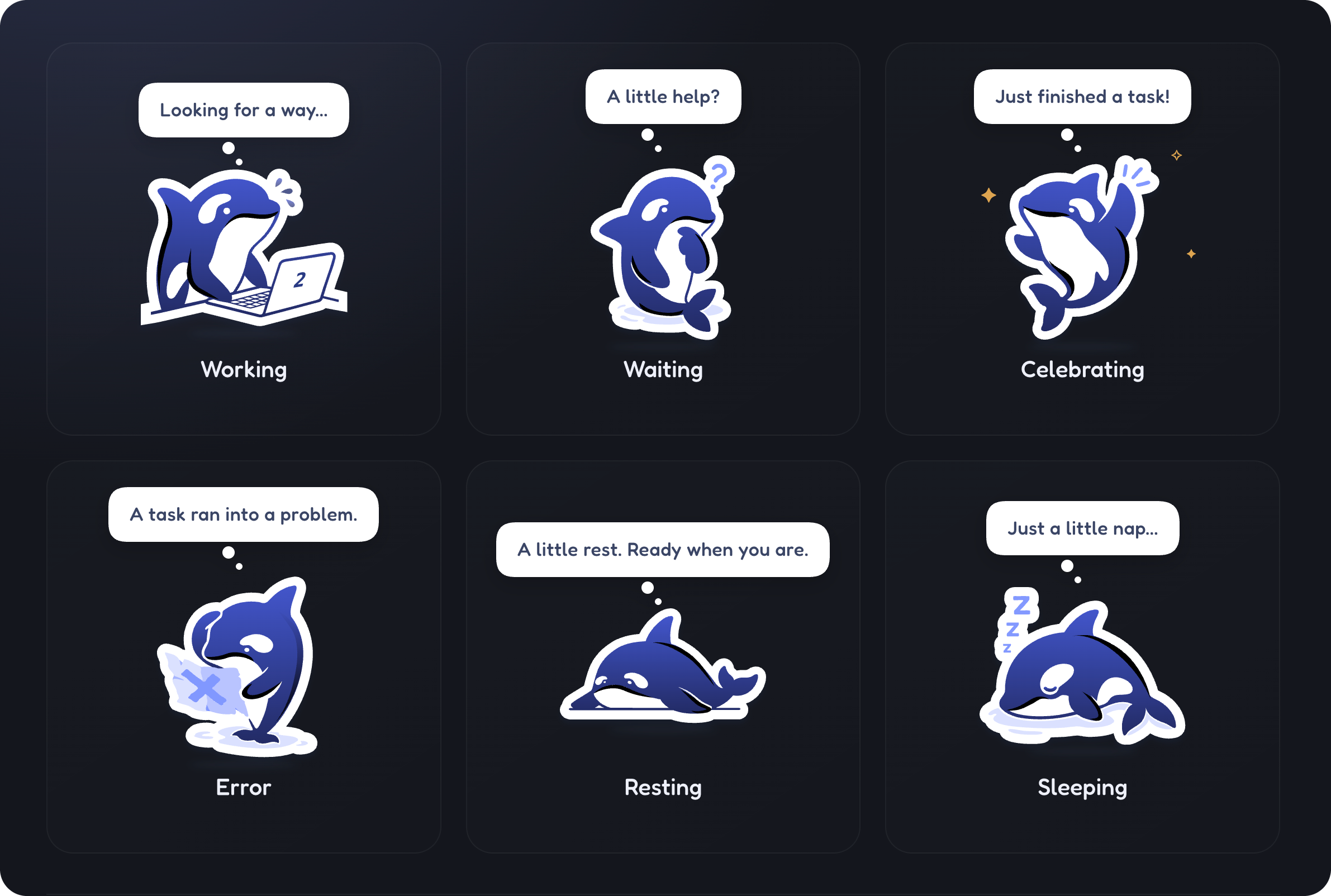
Character state overview. Whale stickers are original artwork by DeepSeek.
A little companion that lives inside your DeepSeek Harness (DSH) window—there while you work, wait, and rest.
一只住在 DSH 窗口里的小鲸鱼。陪你工作、等你决定,也陪你好好打个盹。
Version 0.2.9 adds the custom plugin icon while keeping the completion synchronization confirmed in 0.2.8. The complete working-state whale is embedded unmodified in assets/icon.svg. See the release notes and compatibility notes for verification scope.
Features
- Drag, resize, hide, and restore your whale inside the DSH window.
- Choose All sessions or Current session, with a working-session count for ordinary main sessions.
- Six character states: resting, working, waiting, celebrating, sleeping, and error.
- A custom icon in the DSH plugin manager, embedded from the original whale artwork without redrawing it.
- English and Chinese text, light and dark settings menus, and reduced-motion support.
- Separate normal completion from cancellation and failure; a falling working count or green unread indicator alone does not mean success.
This is an in-window plugin, not a separate operating-system desktop overlay.
Install
1. npm package
Package page: dsh-plugin-whale-pet on npm.
Enter the package name in DSH's plugin installation interface:
dsh-plugin-whale-pet
To pin this release, use [email protected]. The normal package name follows npm's latest channel; the old beta channel is not required.
2. GitHub
Enter this pinned version spec in DSH's plugin installation interface:
github:Yifffan/dsh-plugin-whale-pet#v0.2.9
The tagged source includes prebuilt plugin files; users do not need to build it themselves.
3. Download a local package
Download dsh-plugin-whale-pet-0.2.9.tgz
Download the tgz onto the machine running DSH and enter its absolute local path in DSH's plugin installation interface. The package is also attached to the GitHub release. GitHub's automatically generated “Source code” archives are not plugin tgz packages.
Upgrading from 0.2.6 or earlier? Read the upgrade notes first. Overrides for the old entry ID do not migrate automatically. Do not replace the plugin or restart DSH while tasks are running. This plugin never automatically edits your profile.
After an update that changes Host or client modules, wait for current tasks to finish, fully quit DSH, and reopen it. Closing a window may not quit the application.
Usage
- Click the whale to say hello; drag it to reposition.
- Right-click to change session scope, size, animation, and nap timing.
- Use the restore button to bring back a hidden whale.
- Global scope covers ordinary main sessions on the currently connected Host—not multiple devices or Hosts.
- Waiting for user input has higher display priority. Brief completion notices are not queued for later replay.
Compatibility and behavior
- Originally developed for DSH Desktop 0.1.6-alpha.2 on macOS arm64. DSH is still evolving; other version/platform combinations are not universally certified.
- The completion fix was checked against real DSH Gateway/Cordis modules, and the user confirmed celebration in the installed app. This does not claim exhaustive live testing of every concurrent-session, reconnect, cancellation or upgrade scenario.
- Since 0.2.7, the entry ID is
whale-pet; the module name remainsdsh-plugin-whale-pet. Older overrides require migration. - Completion uses live normal turn-end events. Intermediate assistant/tool messages, cancellation, disconnected history and work-count changes are not treated as successful completion.
- The offline preview simulates completion; it validates rendering, not delivery of live DSH events.
When reporting an issue, include DSH/plugin versions, session scope, and reproduction steps. Remove chat content, session identifiers, and other sensitive information.
Development and local preview
Use Node.js 22 or newer and the pnpm version pinned in the project manifest.
pnpm install --frozen-lockfile
pnpm run build
pnpm test
The build regenerates the bridge contract and client, then creates an offline preview. Open this generated local file in a browser; no web server is needed:
preview/index.html
The preview does not connect to DSH or call a model. Its generic chevron is independently drawn; the production interface uses DSH's public icon component.
# After a successful build and test run, create a local plugin package:
npm pack --ignore-scripts --pack-destination artifacts
The package declares no installation lifecycle hooks to build code, migrate profiles, or download a runtime. Building and testing are explicit development steps. Prebuilt files are committed for Git installation; rebuild after source changes and commit matching outputs. Automated regression tests are retained even though the temporary diagnostic menu and RPC have been removed.
Fonts are bundled, so ordinary builds do not download them. New Chinese bubble text requires a glyph-coverage check; the font-resubsetting tools are not included in this repository. See font sources and licenses.
Privacy and runtime boundaries
- Does not modify DSH itself, send model messages, add model inference calls, or act on approvals for you.
- Uses DSH's existing authenticated connection. No additional listening port, telemetry, or runtime font/CDN requests.
- The completion bridge projects only necessary session identity and turn-boundary metadata—not chat content.
- Preferences stay in client-local storage. No runtime diagnostic report, diagnostic counters or diagnostic query endpoint is included in this release.
- Tests use synthetic data. This repository contains no user profiles, session records, or extracted DSH implementation code.
Artwork and project notice
The whale stickers used by this plugin are original artwork by DeepSeek. All related rights belong to DeepSeek or the respective rights holders. The artwork is not covered by this project's MIT code license.
This is a personal project, not an official DeepSeek product. It does not represent DeepSeek's official views or endorsement.
This project has permission to use and distribute the artwork in this repository and its published plugin packages. That permission does not automatically extend to third parties extracting, modifying, or redistributing the artwork.
- Code: MIT License.
- Whale artwork: artwork permission notice, separate from the MIT code license.
- Fonts: SIL OFL 1.1 and source notices.
- Zod: its MIT copyright and license notice are preserved in the generated bridge files.
Permission to reuse the code is not permission to freely extract or redistribute the whale artwork.