dsh-simple-restart
Verifieddsh-simple-restart · v0.1.1 · MIT · Web UI
DeepSeek Harness plugin: restart the running `dsh web` process from a General settings row, without the market plugin.
Install
dsh plugin add dsh-simple-restart Confirm the layer applied with dsh --profile default --dump-config — see the install guide.
Source
Tags
Readme
dsh-simple-restart
English | 中文




一个 DeepSeek Harness 插件:在
设置 → 通用里增加一行——一个用与启动时相同的调用方式重启当前 dsh web
进程的按钮。
它存在的原因是:客户端产物的插件改动只有宿主重启后才生效,而从终端做这件事意味着 要重新找到那个终端。本包拥有自己的路由与重启逻辑,不依赖任何其他插件。
截图
「设置 → 通用」里的那一行。
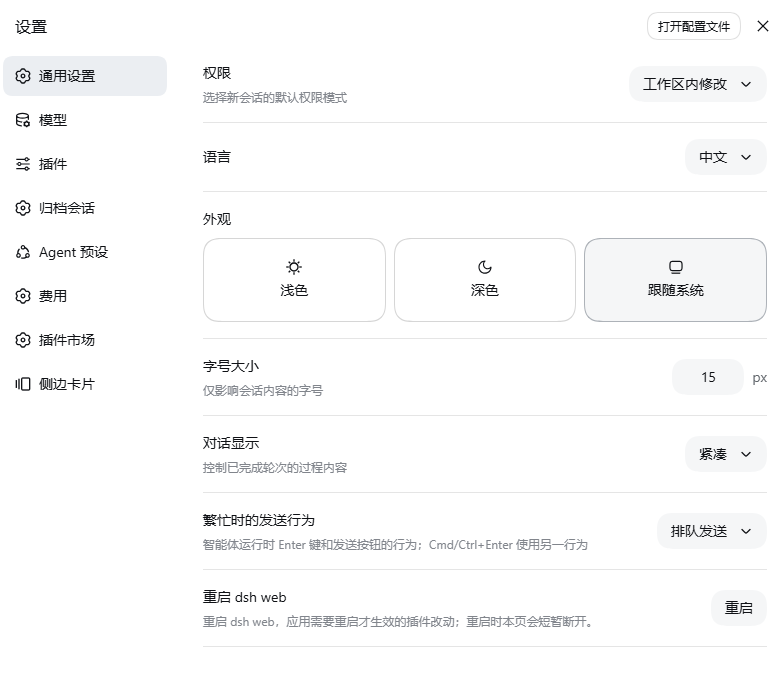
5 秒内第二次点击确认;提示行随后显示正在让位的宿主 pid 与 helper 的 pid。

它做什么
- 该行向本包自己的宿主路由请求重启(第二次点击确认;已武装状态 5 秒后过期)。
- 宿主检查自身的安全规则,然后拉起一个分离(detached)的 helper,并把确切的 启动调用交给他——可执行文件、argv、工作目录。
- helper 等待监听端口空闲,启动替代进程,然后用最多 20 秒确认它已绑定该端口。
- 宿主在交接 500ms 后退出。浏览器页面会短暂断开,并在新进程就绪后自行恢复。
如果交接之后出现任何问题,helper 会把诊断写入
$TMPDIR/dsh-simple-restart-<timestamp>.err.log(替代进程自身的 stdout/stderr 写到旁边的
.out.log)。否则,本该记录这个失败的进程恰恰就是刚刚退出的那个——这正是 helper
必须是一个独立程序、而不是宿主里的一个 setTimeout 的原因。
为什么必须有 helper
进程无法替换自身:它只能停止,而必须由别的东西在监听端口空闲之后启动继任者;
更早启动会以 EADDRINUSE 失败。因此重启是两个进程之间的握手,而第二个进程必须是
分离的——它要活过第一个。
“端口空闲”是通过连接端口来判断的,而不是绑定:一次试探性绑定恰恰会在替代进程 需要端口的那一刻占住它。
环境要求
| 要求 | 说明 |
|---|---|
| DSH,web profile | 路由由 webServer 提供;设置行是客户端侧的座位。 |
| 同源 loopback 调用方 | 路由拒绝其他一切来源(见下文)。 |
未被 systemd 监管——或设置 allowRestart: true |
systemd 默认的 KillMode=control-group 会把 helper 连同 unit 一起杀掉,那样的重启之后什么都不会剩下。 |
| 不处于调试器下 | 附着在本进程上的调试器无法跟随一次不带 exec 的重启。 |
安装
直接从 GitHub 安装——不必克隆(想固定版本就钉一个 tag):
dsh plugin --profile web add "github:yizhixiaokong/dsh-simple-restart"
# 钉版本:dsh plugin --profile web add "github:yizhixiaokong/dsh-simple-restart#v0.1.1"
从克隆安装(需要改代码时):
git clone https://github.com/yizhixiaokong/dsh-simple-restart.git
cd dsh-simple-restart
dsh plugin --profile web add "$PWD"
从 npm 安装:
dsh plugin --profile web add dsh-simple-restart
三种方式结果一致,也都不需要手工登记:dsh plugin 先跑 pnpm,再读取每个已安装依赖的
package.json——声明了 dsh.bundle 的包,其名字会被追加进
dsh.profile.bundles,由它挂载旁边的 cordis.patch.yml。
随后请先从终端重启一次 dsh web——客户端产物在启动时完成基线化,所以按钮要到
下一次启动后才会出现。此后这个按钮就能代劳了。
卸载:
dsh plugin --profile web remove dsh-simple-restart
使用
设置 → 通用 / General → 重启 dsh web:
- 第一次点击武装按钮(
确认重启?),5 秒内第二次点击即执行; - 提示行随后显示正在让位的宿主 pid、helper 的 pid,以及诊断日志路径;
- 替代进程开始监听后,页面会自行恢复连接。
配置
该行的 config 会传给宿主的 apply:
# 在 profile 的 cordis.patch.yml 中,本包贡献的那一行的 config
- insert:
    - id: simple-restart
      name: dsh-simple-restart
      config:
        allowRestart: true   # 即使检测到 systemd 监管也允许重启
| 键 | 类型 | 默认 | 含义 |
|---|---|---|---|
allowRestart |
boolean |
检测到 systemd 监管时为 false,否则为 true |
在已检测到监管的情况下是否允许重启。仅当确认该 unit 能承受时(KillMode=process,或有会重启该 unit 的监管者)才设置。 |
HTTP 接口
一条精确路由:POST /dsh-simple-restart/api/restart。在拉起任何进程之前即完成围栏校验:
| 检查 | 拒绝方式 |
|---|---|
| 方法不是 POST | 405,带 Allow: POST |
socket 对端不是 127.0.0.1、::1 或 ::ffff:127.0.0.1 |
403 |
携带任何转发头(forwarded、x-forwarded-for、x-real-ip) |
403 |
缺少 Origin,或 Origin 的 host 不等于 Host |
403 |
检测到 systemd 监管且 allowRestart 不为 true |
403 |
在 process.execArgv 中检测到调试器 |
403 |
| 已有重启排程 | 409 |
// 202 Accepted
{
  "ok": true,
  "pid": 12345,          // 正在让位的宿主
  "helperPid": 12350,    // 分离的 helper
  "logOut": "/tmp/dsh-simple-restart-2026-09-15T10-00-00.out.log",
  "logErr": "/tmp/dsh-simple-restart-2026-09-15T10-00-00.err.log"
}
失败返回 {"ok":false,"error":"…"},状态码见上表。
helper 以 node -e <program> 形式拉起,detached 且 stdio: "ignore",并调用
unref(),因此从它存在的那一刻起就不再属于本进程的生命周期。启动调用以数据
形式交给它({ file, args, cwd }),绝不通过重新执行一条 shell 命令行:当宿主是以
node …/bin.js 启动时,会复用绝对入口路径及其原始 execArgv/argv;否则退化为用
PATH 中的 dsh 可执行文件加原始参数。
限制与已知行为
- 分离,而非受管。 helper 一旦运行,本包就不再能控制它。用非常规包装方式启动的
进程(shell 函数、容器 entrypoint),重启会退化为用相同 argv 运行
dsh——这对dsh web是正确的,但不是对所有可能的包装方式都成立。 - 没有端口可等。 如果
Host中不含端口,helper 只等待 1.5 秒就启动替代进程。 - 环境变量按原样继承,包括当前工作目录。
- 诊断日志留在临时目录,不会被清理;它们很小,而能找到它们正是重点。
开发
lib/index.js        宿主部分——路由、守卫、启动描述、分离 helper
lib/client.js       客户端产物——一行“通用”设置
cordis.patch.yml    本包贡献的那一行宿主配置
scripts/smoke.mjs   离线检查(不需要 Harness,也不会真的重启)
npm test # node scripts/smoke.mjs
冒烟测试会用桩全局变量物化客户端产物,并把宿主部分应用到桩上下文。它从不重启任何 东西。 它检查客户端只填充一个设置座位、宿主只注册一条路由,且两半对路由路径的 认知一致——不一致在浏览器里的表现是这一行永远显示“请求失败”,而宿主日志一片空白。
仓库说明
版本 tag 与 package.json 保持一致——当前这棵树是 v0.1.1。
package.json、CHANGELOG.md、徽章以及上文安装命令中的 yizhixiaokong 占位符代表本仓库
将要推送到的 GitHub 账号,发布前请替换。本仓库的提交使用中性的
dsh-plugins <[email protected]> 身份,以免把个人邮箱带进公开历史;若希望署自己
的名字,可设置 git config user.name / user.email 后在推送前执行
git commit --amend --reset-author。
关于名字
本插件开发时的名字是 dsh-restart-button。这个名字已经不可用:它已被
jiqiu0709/dsh-restart-button
发布到 npm,并且还有多个 GitHub 仓库在用,因此本包以 dsh-simple-restart 发布。
改名同时消除了一处真实冲突——路由从其他重启插件也会注册的
/dsh-restart/api/restart 变为本包自己的 /dsh-simple-restart/api/restart。
进入插件市场
awesome-dsh-plugin
的插件列表由「一个插件一个 YAML 文件」生成,其 CI 会拿本仓库核对提交的形式。机械
层面的要求本仓库已经满足:package.json 中与 cordis.patch.yml 并列声明了
dsh.bundle;官方的 @deepseek-ai/* 包按规范声明为 peerDependencies;没有任何
需要安装的依赖,也没有构建步骤。
请注意本插件与该列表上已有条目重合的部分:其中数条都是在 GUI 内重启 dsh web。本
插件补充了两点它们未声明的能力——检测到 systemd 监管时拒绝重启(systemd 默认的
KillMode=control-group 会连 helper 一起杀掉),以及用连接而非绑定来判断端口
是否空闲,使替代进程不会与旧进程争抢端口。
仓库所有者的操作:
加上
dsh-plugintopic——gh repo edit yizhixiaokong/dsh-simple-restart --add-topic dsh-plugin;让仓库创建满 1 天(列表的 CI 会拒绝更年轻的仓库);
提一个 PR,只新增
data/plugins/yizhixiaokong__dsh-simple-restart.yml:url: https://github.com/yizhixiaokong/dsh-simple-restart name: yizhixiaokong/dsh-simple-restart category: dev description: en: 'Adds a restart row to Settings → General that relaunches dsh web with the same invocation through a detached helper, refuses under a detected systemd supervisor unless allowRestart is true, and tests whether the listening port is free by connecting to it rather than binding it.' zh: '在「设置 → 通用」增加一行重启按钮:用相同启动参数、经分离的 helper 重新拉起 dsh web;检测到 systemd 监管时默认拒绝(除非 allowRestart 为 true);判断端口是否空闲用连接探测而非绑定。'
市场详情页的截图条读取与 package.json 并列的 screenshots.json;本仓库声明的是
assets/01-settings-row.png 与 assets/02-confirm.png,按此顺序展示。
发布到 npm
npm login --registry=https://registry.npmjs.org   # 镜像既不能登录,也不能发布
npm publish --registry=https://registry.npmjs.org
npm publish --dry-run 只打印将要上传的内容而不上传;prepublishOnly 会先跑一遍
npm test。已发布包的 repository 字段指回本仓库——列表据此把 npm 包与条目关联,
随后展示的就是更短的 dsh plugin --profile web add dsh-simple-restart,而不是 GitHub 形式。