dsh-skill-mini-manager
Verifieddsh-skill-mini-manager · v2.0.4 · MIT · Web UI
Minimal skill manager for DSH Web: a Settings page beside Plugins that lists every installed skill with its summary, source and size, and removes any of them (recoverable trash). skill极简管理:与「插件」同级的一页,列出全部 skill 及简介并可逐个移除。
Install
dsh plugin add dsh-skill-mini-manager Confirm the layer applied with dsh --profile default --dump-config — see the install guide.
Source
Tags
Readme
dsh-skill-mini-manager · Skill Mini Manager
English | 中文
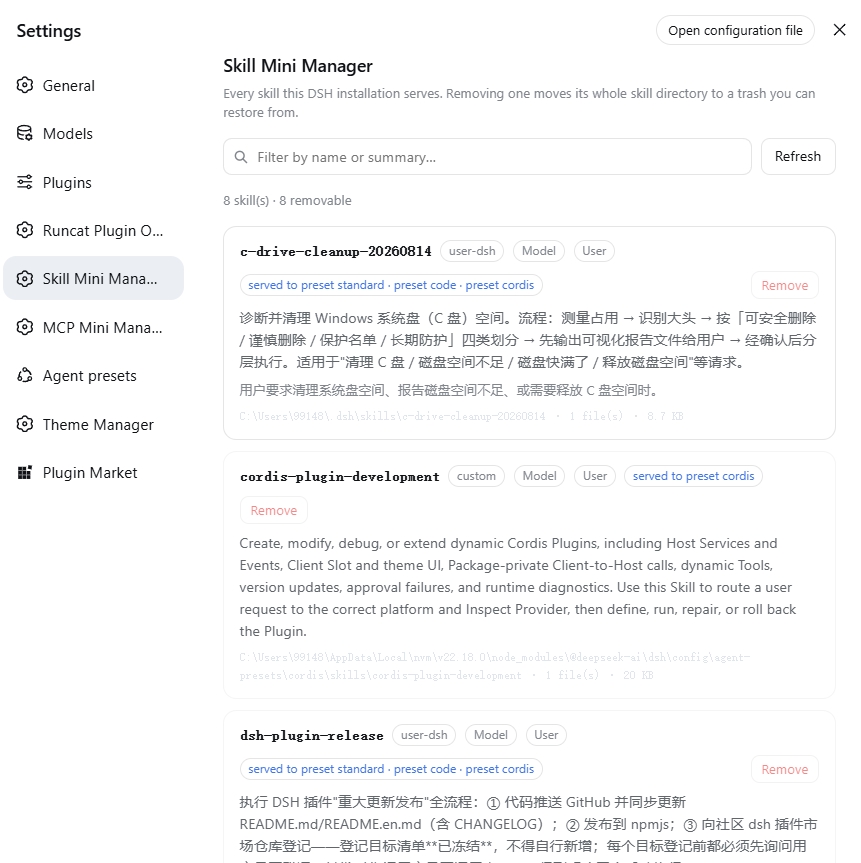
One skill manager page inside DSH Web Settings: it lists every skill the installation currently serves, shows each skill's own summary, and removes any of them.
- Plugin id:
dsh-skill-mini-manager - English name: Skill Mini Manager
- Chinese name: skill 极简管理
It sits at the same level as the built-in 插件 (Plugins) section — its own entry in the same tier of the Settings sidebar, not a tab inside Plugins.
Preview
What it shows
One row per skill:
| Field | Source |
|---|---|
| Name | the skill frontmatter's name |
| Summary | the skill frontmatter's description — the routing text the skill itself wrote, shown verbatim |
| When to use | the optional whenToUse |
| Source | user-dsh / user-agents / project-dsh / project-agents / custom / bundled |
| Invocable on | model / user (disable-model-invocation, user-invocable) |
| Footprint | the skill directory's absolute path, file count and byte total |
| Served to | which presets (or the global layer) hand this skill to an agent |
The top of the page carries a filter (name, summary or when-to-use), a refresh action and a count; the trash sits at the bottom.
Which layer a skill lives in (important)
The DSH skill registry is host + per-scope layered: deployment-level
providers register into the global layer, while each agent preset's own
skill-filesystem row registers into that preset's layer. The catch is that
dsh-web-app's patch disables the host skill-filesystem row ("presets own
local discovery"), so on a stock web profile the global layer is empty and
every user skill lives in a preset layer — reading the global layer alone yields
an empty catalog.
So this plugin reads every view: the global layer plus each preset in the roster, merged by name. A preset is read through the scope DSH provides for a host reader with no agent, and both API generations are supported:
- DSH 0.2 and later:
acquireScope(id), which returns a lease ({ key } & AsyncDisposable). It must be disposed once the scoped read is done, or that preset revision is retained in memory; this plugin releases it in afinally, including when the read throws. - DSH 0.1.x:
standingKeyFor(id), which returns the key directly and has nothing to release.
A preset that cannot be read is reported on the page rather than silently costing you rows.
Each skill therefore names the presets that serve it (e.g.
served to preset standard · preset code), and a skill from a preset-private
skills/ directory (such as the two the shipped cordis preset carries) names
only that preset. A name that resolves to different files in different
presets is listed but never offered for removal (ambiguous).
Everything comes from the host's live ctx.skills registry: every open or
refresh re-reads it with no caching, so the page shows what the model can load
right now.
How removal works
Remove opens a two-step confirm that names the exact path that will move. On confirmation the host:
- Moves the whole skill directory (or the single
.mdfile of a flat skill) to<DSH_HOME>/.skill-mini-manager/trash/<stamp>-<name>-<nonce>/payload, writing ameta.jsonbeside it that records the original path. - That location is outside every scanned skill root, so the filesystem provider's one-level discovery can never see it again — the skill leaves the model catalog immediately (the provider's own watcher invalidates).
- The trash at the bottom of the page lists removed skills, each with a Restore action that moves it back to its original path. Empty trash is the only irreversible verb in the plugin, and it confirms first too.
What cannot be removed
Refusals are enforced on the host; the page shows the reason instead of a button.
| Reason | Meaning |
|---|---|
bundled-source |
a DSH-bundled skill (DSH_BUNDLED_SKILL_DIR) — a distribution artifact, not user content |
runtime-provider |
registered by a plugin at runtime; it has no files |
system-owned |
inside the system-owned .system directory |
not-on-disk |
the definition carries no file path |
outside-skill-roots |
outside every known skill root |
unsupported-layout |
neither <name>/SKILL.md nor <name>.md |
missing |
the directory is there but SKILL.md is gone |
ambiguous |
the name resolves to different files in different preset layers; the page sends only a name, so there is no single target and it refuses to guess |
Plus two structural guarantees:
- The browser never sends a path. The page sends a skill name (
remove) or a trash entry id (restore/purge); the host re-derives the target from its own rules every time. A compromised page cannot make this plugin delete an arbitrary file. - The removal target is never a skill root itself. A bare
SKILL.mdsitting directly in a root is refused rather than taking the wholeskills/directory with it.
Host interface
The host half mounts four exact routes on webServer. All of them accept
same-origin requests only (an Origin that disagrees with Host is a 403):
| Method | Path | Effect |
|---|---|---|
GET |
/dsh-skill-mini-manager/api/catalog |
skills + trash + root status |
POST |
/dsh-skill-mini-manager/api/remove |
{"name":"<skill>"} |
POST |
/dsh-skill-mini-manager/api/restore |
{"id":"<trash entry>"} |
POST |
/dsh-skill-mini-manager/api/purge |
empty the trash |
Installing
This is a standard DSH bundle (it declares dsh.bundle.patch and dsh.client).
Pick any one of three routes; all three need one dsh web restart afterwards.
One thing to know up front: this plugin has no build step — the browser half
lib/client.js is a hand-written __ModuleLoader__ bundle that is committed to
the repository, and package.json declares no prepare script. So no route needs
a build first, and a GitHub-source install does not normally trigger a build approval.
| Route | Command | Best for | Needs | Updating |
|---|---|---|---|---|
| ① npm | dsh plugin --profile web add dsh-skill-mini-manager |
almost everyone: you just want to use it | nothing (the tarball carries every artifact) | dsh plugin --profile web up dsh-skill-mini-manager |
| ② GitHub source | dsh plugin --profile web add github:runcat-tommy/dsh-skill-mini-manager |
tracking the newest commit rather than a release | git on the machine; approve the build if DSH asks |
re-run the same command |
| ③ Local download | dsh plugin --profile web add <local dir> |
reading/editing the code, working offline, or no git installed | nothing (git clone or Download ZIP) |
git pull / download again |
In one line: prefer npm (one command, no git); use ② to track the newest commit;
use ③ to change the code or when git is not available.
① From npm (recommended)
dsh plugin --profile web add dsh-skill-mini-manager
The tarball carries every artifact, runs no install script, and needs no git — the
fewest preconditions of the three. Release history:
https://www.npmjs.com/package/dsh-skill-mini-manager.
② Straight from GitHub
dsh plugin --profile web add github:runcat-tommy/dsh-skill-mini-manager
For tracking the newest commit on main directly (npm carries releases, so the two
can differ in time). This needs git on the machine. The repository has no build
artifacts to generate and no prepare script, so a build approval is not normally
triggered; approve it if DSH asks. Updating means re-running the same command.
③ Download it locally
For reading or editing the code, working offline, or when git is not installed at
all. Either download method works:
# Option A: git clone (needs git)
git clone https://github.com/runcat-tommy/dsh-skill-mini-manager.git
dsh plugin --profile web add D:\path\to\dsh-skill-mini-manager
# Option B: no git required (Download ZIP)
1. Open https://github.com/runcat-tommy/dsh-skill-mini-manager
2. Code -> Download ZIP
3. Unzip, then:
   dsh plugin --profile web add D:\path\to\dsh-skill-mini-manager-main
⚠️ The Download ZIP folder keeps a -main suffix, so point add at the unzipped
directory — not at the .zip file itself.
Update with git pull (or a fresh download) and a restart — there is no
npm run build step to run, because the plugin has nothing to build.
dsh plugin is a forwarding shell around pnpm: it runs pnpm add inside the
profile directory, then realigns dsh.profile.bundles with what actually got
loaded. So you may also mount it by hand with pnpm add link:<path> — in that
case add the package name to dsh.profile.bundles yourself, because pnpm add
will not:
{
  "dsh": {
    "profile": {
      "bundles": ["@deepseek-ai/dsh-base", "@deepseek-ai/dsh-web-app", "dsh-skill-mini-manager"]
    }
  }
}
The restart is not optional
The host half mounts its routes at startup. A mere page refresh makes the page say so explicitly ("the plugin's host half did not answer") rather than rendering blank.
Inspect and uninstall:
dsh plugin --profile web list
dsh plugin --profile web remove dsh-skill-mini-manager
(Removing a skill is a different thing — this plugin never touches package dependencies.)
What ships
| File | Role |
|---|---|
lib/index.js |
host half: the four routes, the trash, every refusal rule |
lib/catalog.js |
the pure core: home/root resolution, planRemoval, trash-name validation |
lib/client.js |
browser half: a hand-written __ModuleLoader__ bundle registering the settings.section |
test/ |
70 tests: pure rules, host half over real temp directories (including the layered read), browser-half structure, release-artifact gates |
scripts/inspect-live-catalog.mjs |
read-only probe: run the catalog and removal planning over the skills actually installed here |
The browser half needs no build step: it requires only the react platform seed
and talks to its host half over same-origin fetch. All copy is registered
bilingually through the locale service and follows the DSH UI language.
Developing
node --test "test/*.test.mjs"          # all 70 tests
node scripts/inspect-live-catalog.mjs  # read-only check against the real installed skills
Model experience
None. This plugin registers no prompt, tool, message or provider request.
Its only model-visible effect is indirect: removing a skill makes the filesystem
provider drop it from the model catalog — which is exactly what removal means,
and the catalog itself is rendered by @deepseek-ai/dsh-tool-skill.
KV cache impact
A removal trips provider invalidation, so a catalog consumer appends a replacement catalog after the existing request history. Browsing this page adds no model tokens.
Known limitations and deferrals
- User-level skills only. The Settings panel has no workspace, so discovery
runs without a
cwd: project-level.dsh/skillsand.agents/skillsdo not appear. Managing project skills needs an entry point that carries a workspace. - The verdict is path shape, not the provider's own account. A custom root
whose directory is not literally named
skillsis refused asoutside-skill-roots— deliberately conservative, at the cost of such a deployment having to declare its roots. - Removal means "move away", not "uninstall". The plugin never touches
package.json, a registry, or plugin composition; it only moves a skill's own directory. - The trash is never cleaned up automatically. Emptying it is a user action.
- Every route recomputes the catalog. With very many skills each refresh re-reads every definition; "minimal" here means no cache, not skipping the read.