dsh-ssh-workspace
Verifieddsh-ssh-workspace · v0.2.8 · MIT · Web UI
Connect remote dsh web instances through SSH and browse them from the local dsh sidebar.
Install
dsh plugin add dsh-ssh-workspace Confirm the layer applied with dsh --profile default --dump-config — see the install guide.
Source
Tags
Creators
Readme
dsh-ssh-workspace
English
Use remote DeepSeek Harness (DSH) workspaces and sessions over SSH from one local DSH Web page. Local and remote workspaces share a sidebar; remote projects show a host marker, and remote sessions open in an isolated iframe.
Features
- Discover concrete SSH host aliases from
~/.ssh/config. - Connect through SSH tunnels without exposing the remote Web port to the public Internet.
- Open, create, search, rename, fork and archive sessions in a unified sidebar.
- Browse remote directories and add remote workspaces.
- Manage connections in Settings → Remote Desktop.
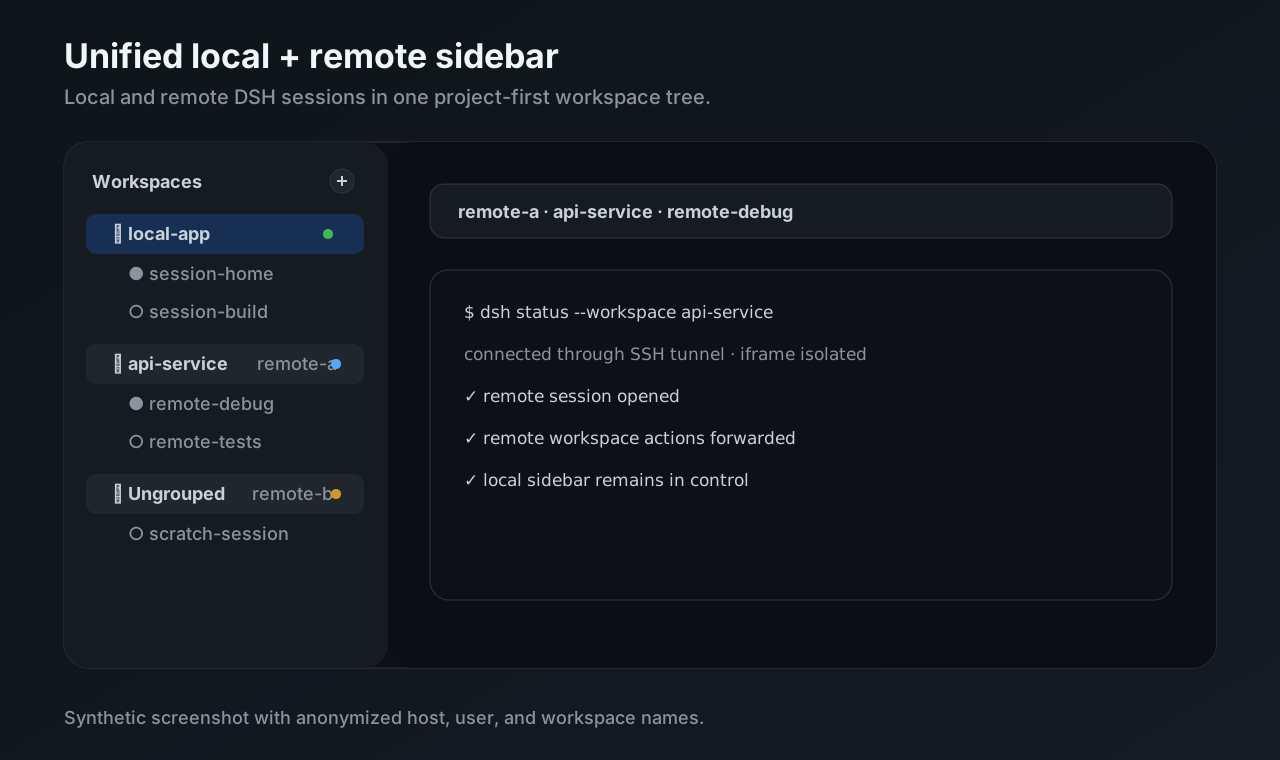
This illustration uses anonymized example data.
Requirements and compatibility
Plugin 0.2.x targets DSH 0.2.0-rc.2 and does not support DSH 0.1.x. Keep the local plugin and all remote companions on the same version, then restart the corresponding DSH processes after updating.
The local machine needs an SSH client. Each remote machine needs an SSH server and a working DSH installation. Confirm that ssh <host-alias> connects and that dsh is available in the remote SSH environment.
Install
On the local machine:
dsh plugin --profile web add dsh-ssh-workspace
On each remote machine:
dsh plugin --profile web add dsh-ssh-workspace-companion
If you use a custom DSH_HOME, use the same directory when installing and starting DSH. The remote profile path in local Remote Desktop settings must match the remote installation.
Connect
Add a concrete alias to the local
~/.ssh/config:Host my-server HostName server.example.com User your-userPrepare remote DSH and its companion. Bind the remote Web service to loopback:
dsh --profile web --host 127.0.0.1 --port 30800 --trusted-host 127.0.0.1:30800Restart local DSH Web, open Settings → Remote Desktop, select the host and connect.
Open remote workspaces or sessions in the unified sidebar.
The explicit Connect action attempts to install the companion over SSH and start remote DSH when needed. Automatic reconnection uses already prepared remote profiles.
Documentation and development
Edit packages/local/src/client/, then run npm run build and npm run check from the repository root. Published packages include generated lib/ files.
AI-assisted remote installation
Use the check/install/verify guide with your terminal-capable AI assistant. It includes a ready-to-copy prompt and pins remote DSH to your actual local runtime version and companion to your installed local plugin version. A reusable setup-remote skill is included in the repository.
简体中文
在一个本地 DeepSeek Harness(DSH)Web 页面中,通过 SSH 使用远程机器的工作区和会话。
本地与远程工作区显示在同一个侧栏中,远程项目带有主机标记。点击远程会话后,会在独立 iframe 中打开对应机器的 DSH 页面。
功能
- 从本机
~/.ssh/config发现 SSH 主机。 - 通过 SSH 隧道连接远程 DSH,无需把远程 Web 端口暴露到公网。
- 在统一侧栏中打开、创建、搜索、重命名、分叉和归档会话。
- 浏览远程目录并添加远程工作区。
- 在 Settings → Remote Desktop 中管理连接。
上图为使用匿名示例数据绘制的界面示意图。
兼容性与前提
插件 0.2.x 面向 DSH 0.2.0-rc.2,不支持 DSH 0.1.x。请让本地插件和所有远程 companion 使用相同版本,更新后重启对应的 DSH 进程。
本地机器需要 SSH 客户端;远程机器需要 SSH 服务和可运行的 DSH。先确认 ssh <主机别名> 可以连接,并且远程 SSH 环境能执行 dsh。
安装
在本地机器的 DSH Web profile 安装:
dsh plugin --profile web add dsh-ssh-workspace
在每台远程机器的 DSH Web profile 安装配套插件:
dsh plugin --profile web add dsh-ssh-workspace-companion
如果使用自定义 DSH_HOME,安装和启动时都要指定同一个目录;本地 Remote Desktop 设置中的远程 profile 路径也应与远程安装一致。
连接远程工作区
在本机
~/.ssh/config添加明确的主机别名,例如:Host my-server HostName server.example.com User your-user确认远程 DSH 和 companion 已准备好。远程 Web 服务应绑定 loopback,例如:
dsh --profile web --host 127.0.0.1 --port 30800 --trusted-host 127.0.0.1:30800重启本地 DSH Web,打开 Settings → Remote Desktop,选择主机并连接。
在统一侧栏中打开远程工作区或会话。
显式点击 Connect 时,插件会尝试通过 SSH 安装 companion,并在需要时启动远程 DSH。自动重连只使用已准备好的远程 profile。
文档与反馈
开发时修改仓库中的 packages/local/src/client/,再在仓库根目录执行 npm run build 和 npm run check。发布包包含生成后的 lib/ 文件。
AI 辅助远程安装
把 检查安装流程 中的提示词交给能操作终端的 AI,即可按本机实际 DSH 和插件版本准备远程机器、检查 profile 并验证连接。仓库也提供可安装的 setup-remote skill。