dsh-subagent-hub
Verifieddsh-subagent-hub · v0.11.2 · MIT · Web UI
Named roles, model route guards, native configuration, and request-model visibility for official DeepSeek Harness subagents.
Install
dsh plugin add dsh-subagent-hub Confirm the layer applied with dsh --profile default --dump-config — see the install guide.
Source
Tags
Creators
Readme




简体中文 · English
Subagent Hub
Roles, model selection context, and route boundaries for official DeepSeek Harness subagents. Give the main agent useful reviewer, tester, or research roles; manage allowed models in Settings; inspect the most recent model request from a child conversation.
Uses official subagent / subagent_fork dispatch, Agent Presets, and conversation UI. Keep your existing main-agent preset.
Install · Download a release · Configuration example · Changelog · Contribute
Features
| Feature | Behavior |
|---|---|
| Named roles | Register official hub-agent-<id> presets and dispatch with agent_preset |
| Model selection catalog | Provide configured routes, capabilities, purposes, and role instructions to the main agent |
| Route guard | Check the global child routes before subagent, fork, and Team creation; named roles can narrow that range further |
| Per-session concurrency | Limit child agents in each parent session, alongside DSH's global capacity |
| Native settings form | Edit models, roles, tags, and management options in Settings → Subagent Hub |
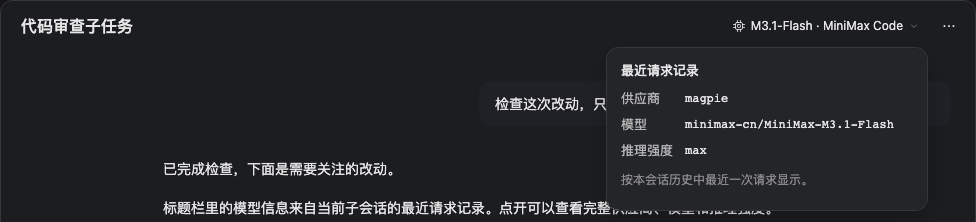
| Request model visibility | Read the latest provider/model from the child header; expand for full IDs and recorded reasoning effort |
Agent overview
Since 0.11.1, an optional Agent overview is available, off by default. Enable Show agent overview under Settings → Subagent Hub → General and save to show the header entry immediately. Turning it off leaves the official Agent Team UI available. It combines independent subagents and Team members with search, filters, sorting, native conversation navigation, shared tasks, dependencies, and write-scope warnings. Models, execution time, and token usage come from native projections. An inactive teammate is not a completed task; missing usage remains unknown.
Diagnostics replays committed tool results to show the latest 64 Hub guard rejections and the recorded total. Other tool failures are outside this history. Opening or refreshing the panel performs read-only projection refreshes with at most four concurrent reads; it starts no model requests.
Screenshots
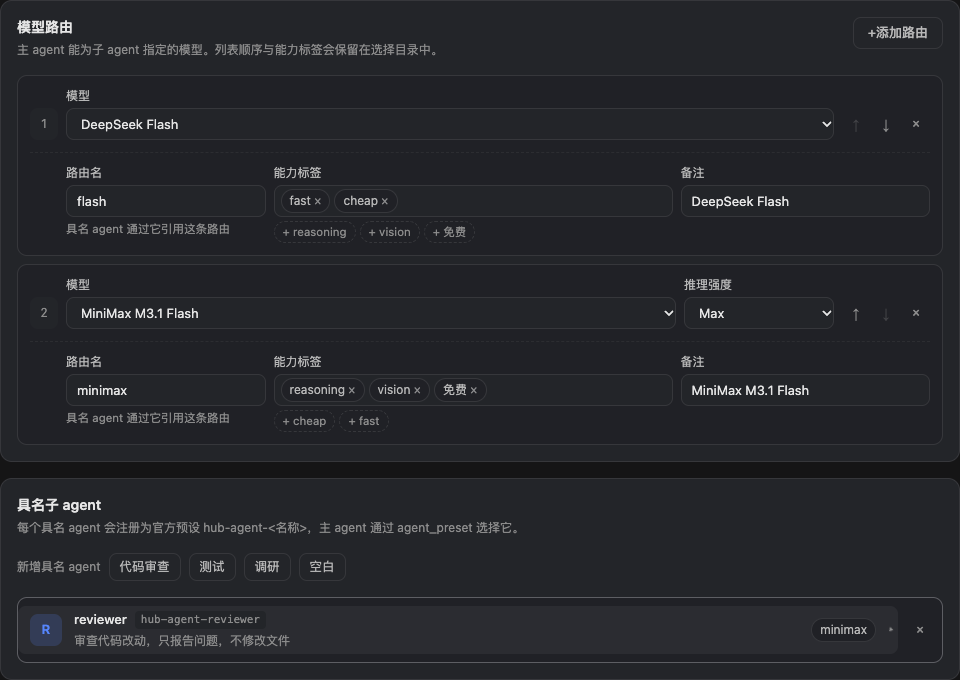
Models and named agents
The latest child request
Agent overview
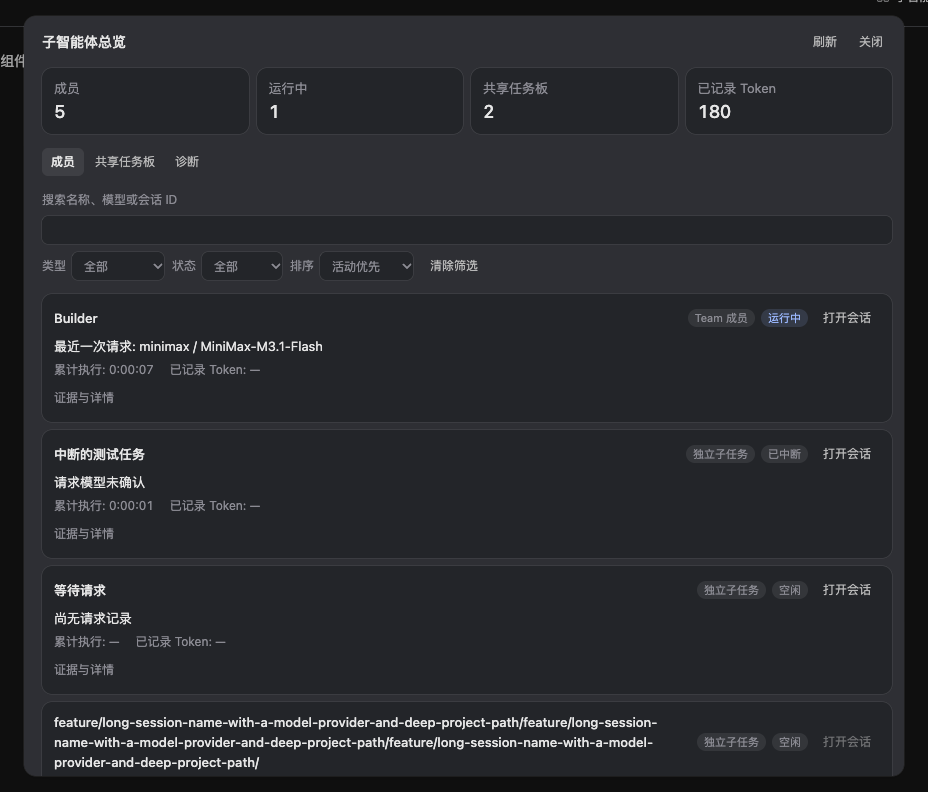
These are the actual plugin components rendered with demo data. They contain no user profile, private conversation, or credentials. See screenshot provenance for full-size and narrow views. The Hero was generated with dsh-image-gen.
Quick start
Tested with DSH Desktop 0.12.1 / @deepseek-ai/dsh 0.2.1-rc.2. Configure a working model provider in DSH first.
Download
dsh-subagent-hub-0.11.2.tgzfrom Releases.Install it from the target profile directory:
pnpm add /absolute/path/to/dsh-subagent-hub-0.11.2.tgzAppend
"dsh-subagent-hub"todsh.profile.bundlesin that profile's package manifest. Preserve existing bundles and restart DSH to load the plugin code.Open Settings → Subagent Hub, select models already available in your DSH, and add a role. Enable Manage the official delegation settings if you want Hub to synchronize the official allowlists. Save, then start a new conversation.
Git checkout installation, profile locations, upgrades, and removal are covered in the installation guide. The package is published as dsh-subagent-hub; fixed GitHub release archives are also available. The Team/inheritance guard requires 0.10.2 or newer.
Minimal configuration
The settings form and profile patch edit the same configuration. The provider/model below must already be available in your DSH:
- id: subagent-hub
  config:
    maxConcurrent: 4
    manageOfficialSettings: true
    routes:
      - id: flash
        provider: deepseek-official
        model: deepseek-flash
        tags: [fast, cheap]
    agents:
      - id: reviewer
        description: Reviews changes and reports concrete findings
        instructions: Read the diff, report actionable findings, and do not edit files.
        routes: [flash]
Try: “Use reviewer to review the current changes. Report concrete findings without editing files.”
The main agent selects a role based on the task and catalog. When the official tool exposes the parameter, agent_preset: hub-agent-reviewer selects this role. The route guard checks the delegation before dispatch.
Design intent: an expensive orchestrator, cheap workers
The point of this plugin is not to run more agents. It is to spend the expensive model only where it cannot be replaced. Most of the cost usually comes from the main agent reading files one by one and retrying; hand that work to cheap or free routes and keep the expensive model for understanding the request, splitting the work, reviewing the output, and integrating it.
Main agent (expensive, e.g. Claude Opus 5.5)
understand → split → delegate → review → integrate → deliver
                        │
        ┌───────────────┴───────────────┐
        ↓                               ↓
Worker A (free route)             Worker B (free route)
reads code / small edits          runs tests / gathers evidence
Three settings make this work:
- Tag the cheap routes. Mark free or low-cost models
tags: [free, fast]and state their purpose innote. This catalog is injected into the main agent's system prompt, which is how it picks a model. - Confine roles to cheap routes. List only cheap routes in a named agent's
routes. An out-of-range model is refused before dispatch, which saves money and stops a child from quietly using the expensive model. - Enable managed official settings, and configure at least one route. With
manageOfficialSettings: trueplus a non-emptyrouteslist, the plugin writesmodelSelectionSettingsonto the officialsubagenttool. Without it, that tool may not exposeprovider/model, the main agent can only inherit the parent model, and it cannot choose a cheap route at all.
- id: subagent-hub
  config:
    maxConcurrent: 4
    manageOfficialSettings: true
    routes:
      - id: cheap            # what children use
        provider: your-gateway
        model: free-model
        tags: [free, fast]
        note: Routine implementation, tests and evidence gathering
      - id: strong           # kept for the main session
        provider: your-gateway
        model: expensive-model
        tags: [reasoning]
    agents:
      - id: worker
        description: Implements a scoped change, runs the related tests, and reports the result
        instructions: Change only the files in scope, run the relevant tests, and report the changes, commands and evidence.
        routes: [cheap]
Then simply tell the main agent:
Handle the plan and the final review yourself; give the implementation and tests to hub-agent-worker.
maxConcurrent caps how many children run at once, which is the concurrency gate on what this pattern can spend; the official global parallel capacity still applies.
The one requirement: use subagent, not spawn_teammate. Team members in this runtime have no provider, model, or agent_preset input; fresh and fork both inherit the Lead model, so delegating through Team keeps the expensive model working. Only a subagent tool that exposes provider/model can move work onto a cheap route, and agent_preset with a named role is the same path.
What this saves is expensive-model tokens, not total cost, and it does not fit every task:
- Tags are your own vocabulary. The plugin verifies no price, estimates no cost, and implements no automatic fallback.
- Children still spend their own tokens and tool calls, and dispatch itself costs something; small tasks are not worth splitting.
- A child has its own context, so the task description must carry enough information; extra clarification rounds cost more than they save.
- Keep deep reasoning, architecture decisions, and the final review with the expensive model. Delegating them to a weaker model usually trades the saving back as rework.
Behavior to keep in mind
- Team context selects history. In the supported runtime, fresh and fork both inherit the Lead model and have no model-selection input. For a specific child model, use a
subagenttool whose actual schema exposes model selection. See Team model routing. - Global routes also guard inheritance. A nonempty
routeslist bounds all three creation tools; out-of-list or unconfirmed models are refused. An empty list retains native inheritance. Existing members and later request rewrites are outside this creation check. - Tags guide decisions. Tags such as
fast,reasoning, orfreeare maintained by you. Use a role'sroutesfor a hard route boundary. Tags do not verify pricing or implement automatic fallback. - The guard runs before dispatch. Model rewrites performed by other plugins during a later child request are outside this guard. Check those plugins when combining route policies.
- Fork follows official capabilities. The target fork provider does not support an independent
agent_preset; named roles usesubagent. - Managed settings are opt-in.
manageOfficialSettingsdefaults tofalse. Enabling it synchronizes official allowlists. Disabling it stops syncing and retains settings already written. - Existing conversations keep their tool schema. Saved configuration is live; use a new conversation for newly added roles or tool parameters. Plugin code upgrades require a DSH restart.
- Desktop model badges need 0.10.3 or newer. This fixes the required native list-slot registration field. A component demo is distinct from a reload of the current Desktop window; see the mounting fix record.
- The model badge shows request history.
lastUsedidentifies the latest request; a differentnextselection is shown separately. A ready empty history says “No request yet”; unavailable data says “Unconfirmed.” A request record does not establish success or billing, and forked history may include inherited requests. - The summary names the model; the details keep the ids. The header summary shows the catalog display name the configuration page uses (for example
Qwen3.8-Flash · Qoder CN), and falls back toprovider · id tailwhen the catalog does not list the route. The expanded details, and a planned route in the agent overview, always keep the exact provider and model id as evidence.
Development (repository checkout)
npm ci
npm run test:unit       # no model account required
npm run docs:check      # local documentation links, assets, and metadata
bash test.sh           # real DSH integration in a temporary DSH_HOME
npm run pack:check     # inspect the distributable archive
This release is verified by 145 unit tests and 33 real-runtime assertions. Integration uses scripted model streams and makes no external model calls. CI runs unit, documentation, and package checks. See the settings acceptance record and model badge acceptance record for scope and limitations. Team routing verification covers the new creation checks.
Issues and PRs are welcome. Read CONTRIBUTING, the design notes, and the release guide. The previous v0.3.0 architecture remains available at its tag.
MIT License · Maintained by ccsert