dsh-subscriptions
Verifieddsh-subscriptions · v0.1.3 · MIT · Web UI
Unified subscription providers and usage dashboard for DeepSeek Harness
Install
dsh plugin add dsh-subscriptions Confirm the layer applied with dsh --profile default --dump-config — see the install guide.
Source
Tags
Creators
Readme
DSH Subscriptions


Bring your AI subscriptions into DeepSeek Harness (DSH). One plugin adds their models to the native picker and puts account controls and reported quota in Settings → Subscriptions.
What it adds
- Six subscription model sources: Connect ChatGPT/Codex, Claude, Grok, GitHub Copilot, Google Antigravity, or Cursor and choose their models in DSH's picker. These routes use account sign-in, without provider API keys.
- Account and model control: Refresh catalogs and choose visible models. For Codex, Claude, Grok, Copilot, and Antigravity, manage multiple accounts and same-provider pools. Pools can use available quota to select an account and fail over before a reply starts. See account management.
- Quota while you work: See reported usage windows and reset times on provider cards and in an optional session-footer pill. The same view reads OpenCode Go and Kimi Code usage through keys already configured in Settings → Models. Their model routes remain built into DSH. GitHub Copilot has no usage endpoint.
- Provider tools: Use Codex web search, Grok X search, ChatGPT or Grok image generation and editing, and Grok video generation when the matching provider is enabled.
Screenshots
Captured against DSH 0.2.0-rc.2 in the web UI with a local stub serving frozen provider responses, so each image shows a product state rather than a real account. Identities in the images are fabricated, and the quota percentages, catalogs, and reset countdowns are sample data.
Subscriptions
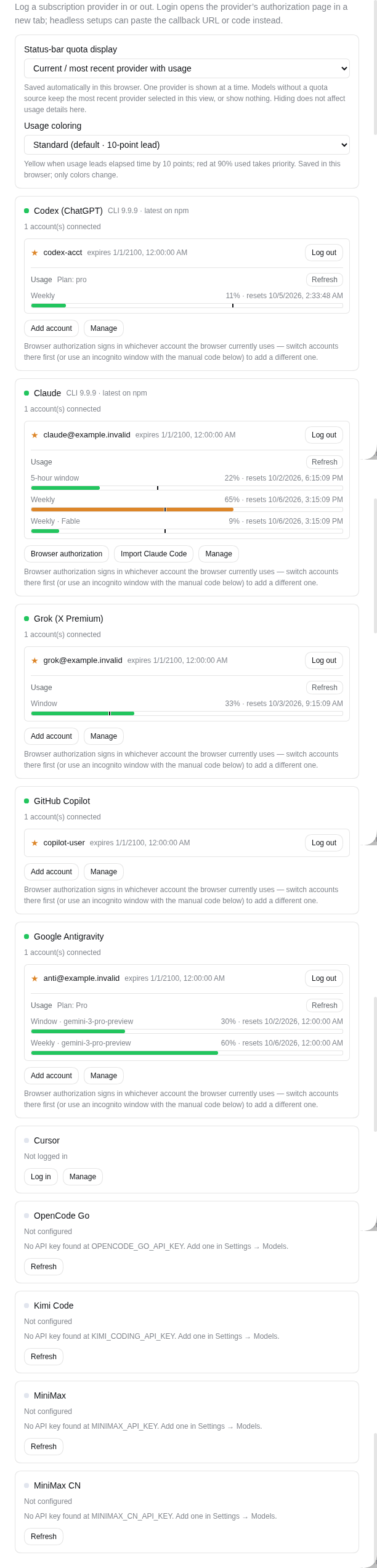
Per-provider quota windows, account controls, and the status-bar display preference live in Settings → Subscriptions.
Model selection
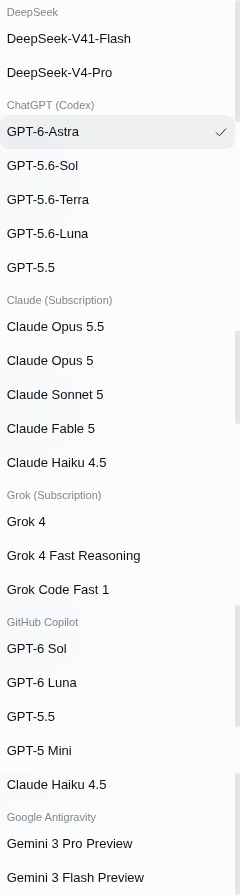
Logged-in providers join the session model picker with their live catalogs.
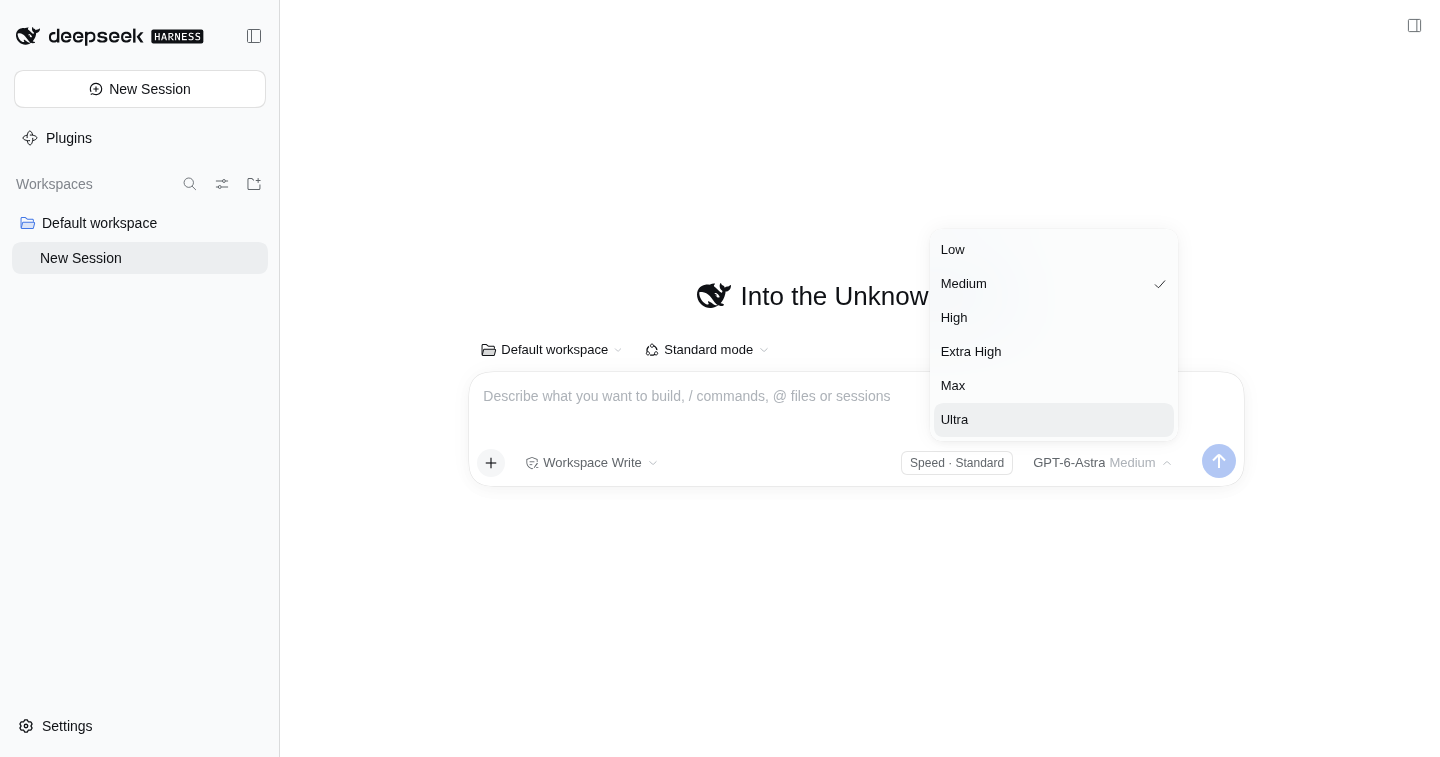
Models that advertise reasoning levels get an Effort selector in the same menu. Levels and defaults come from the provider's live catalog; without discovery Codex falls back to a built-in list, and a configured default overrides either.
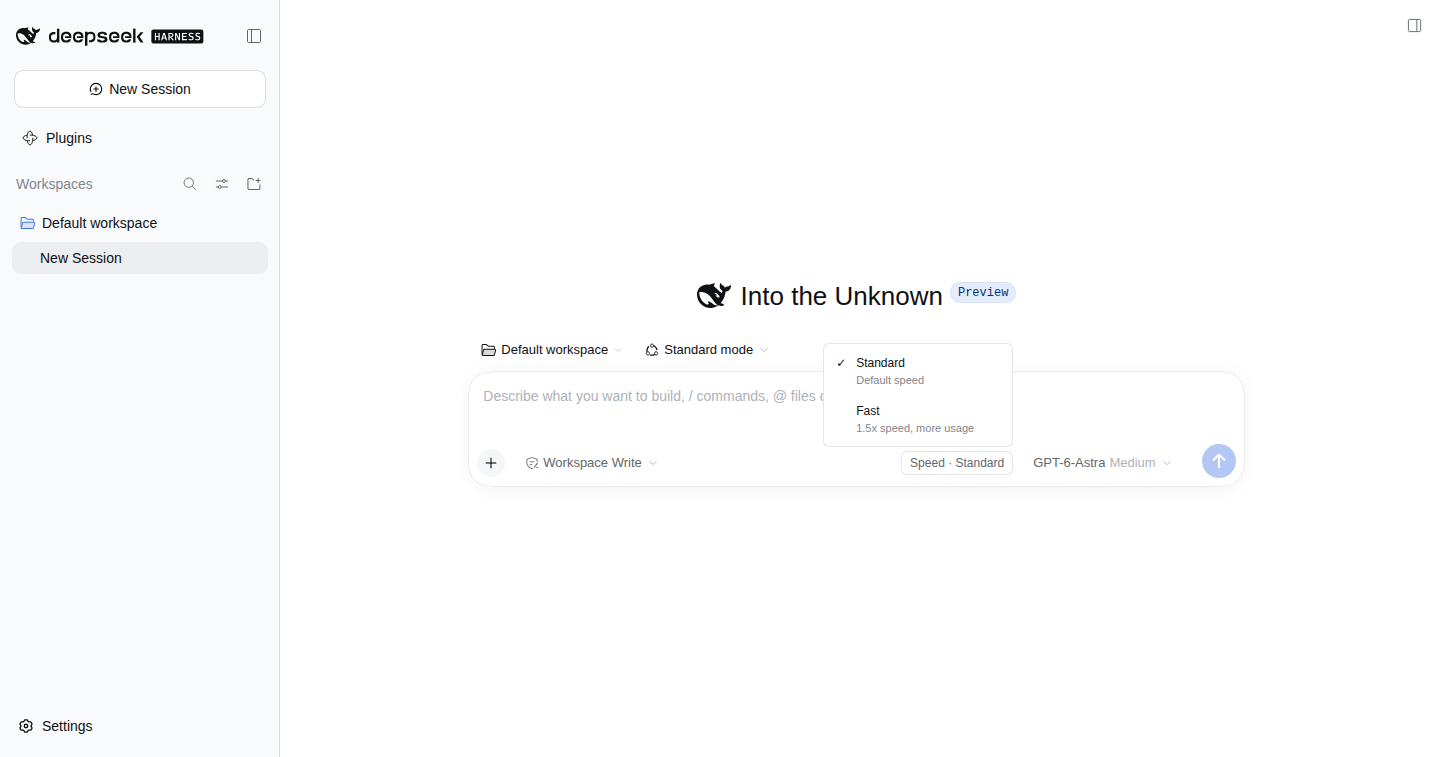
Codex models whose catalog advertises the fast tier get a Speed toggle in the composer's tool row: Standard or Fast, per session.
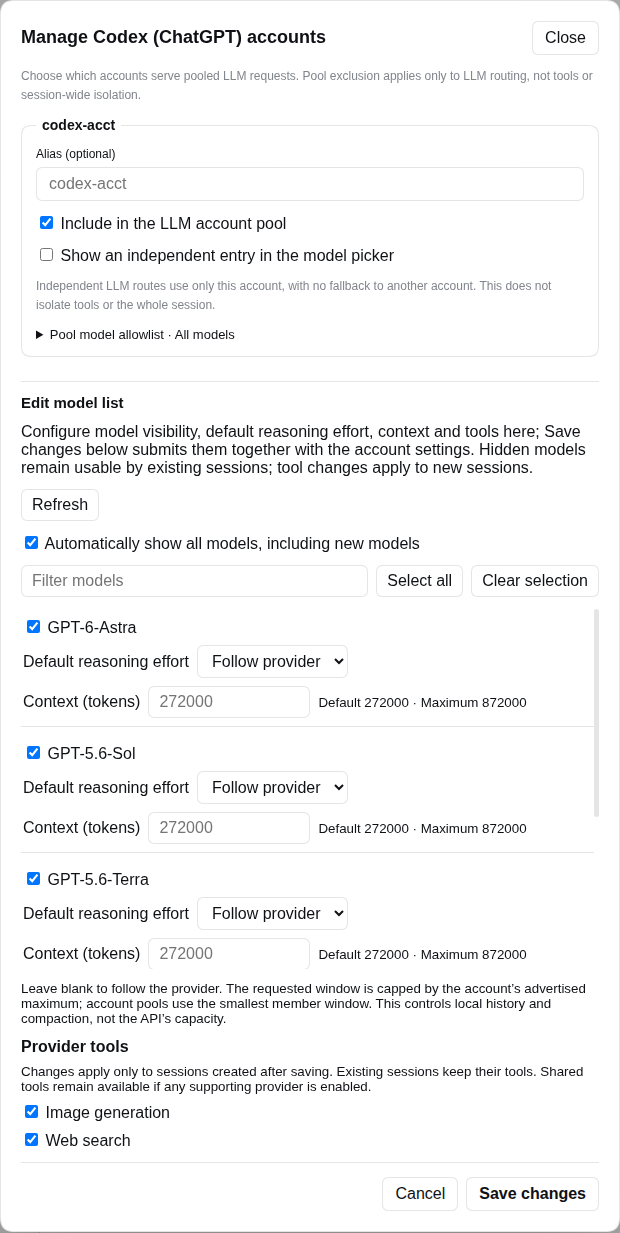
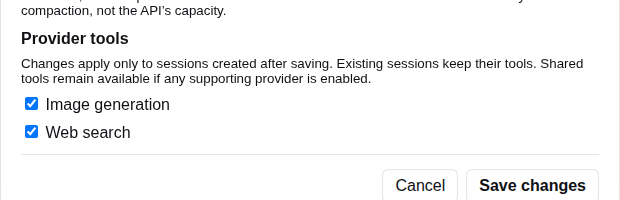
Settings → Subscriptions → provider → Manage edits account aliases, pool participation, model allowlists, and the per-model effort, context, and tool settings.
Quota while you work
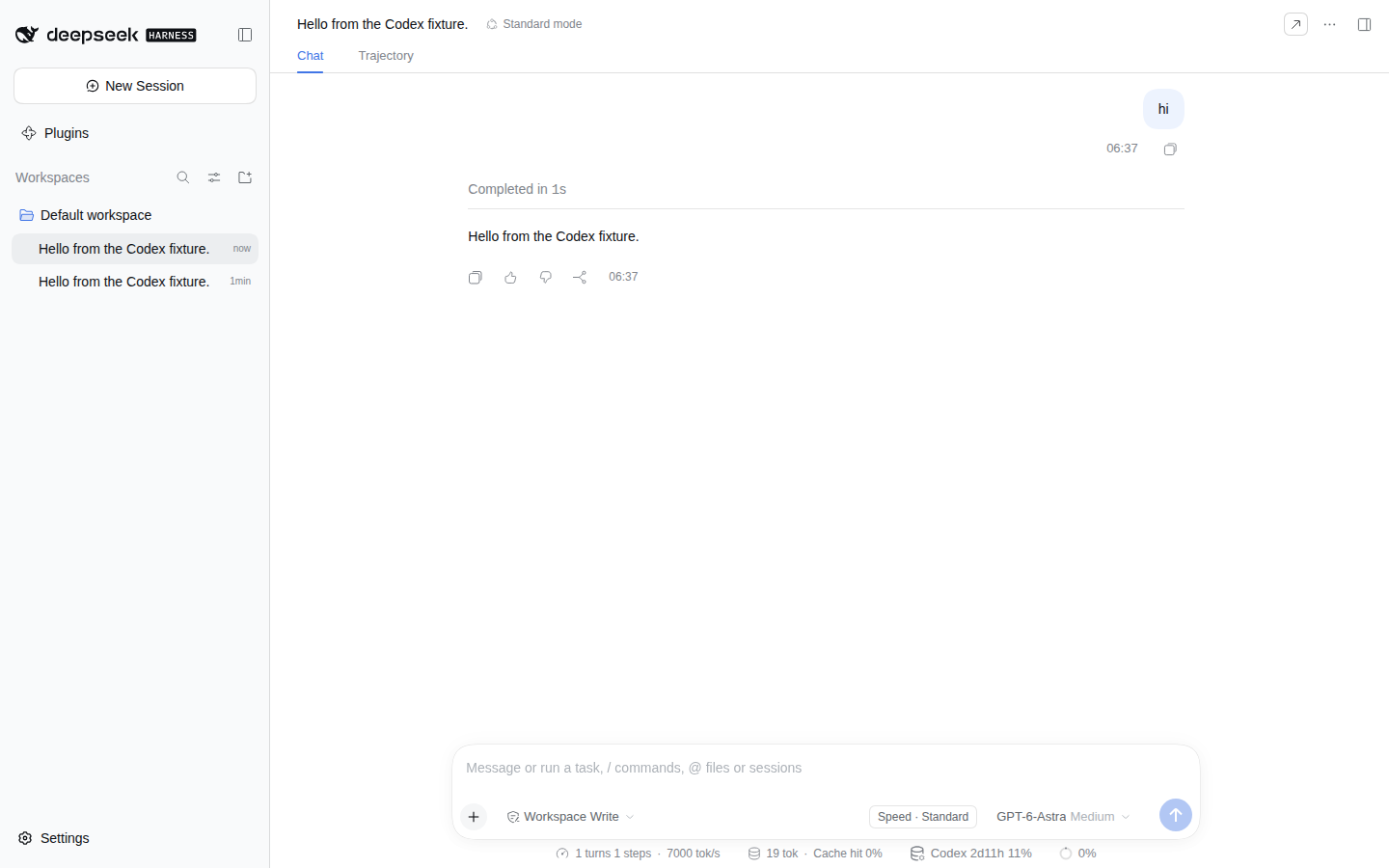
The composer's stats row gains a provider usage pill showing the used percentage and reset window for the provider of the session's current model. It shows at most one provider; switching to a non-subscription model keeps the most recent subscription selected in the mounted conversation view, or stays hidden if there is none. Always show instead rotates through the providers that report usage every 10 seconds while the current model has no quota source, so the pill never disappears.
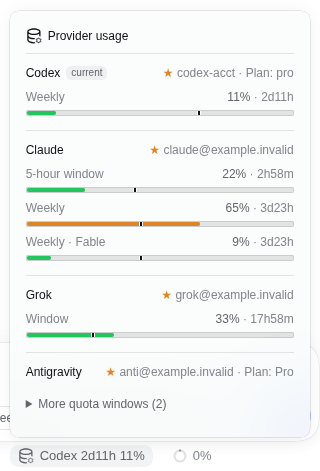
Click the pill to expand every provider and account that reports usage — the default account is starred, and the current provider is listed first. A provider with no usage endpoint, such as GitHub Copilot, has no row, and neither do accounts without a usage window. Antigravity previews only the current model's windows; the other model windows stay in a closed disclosure.
Quota bars include a dark elapsed-time cursor whenever the provider's timing places the window in time, including at 0% used and for stale or old readings. Compare the colored fill (quota used) with the cursor (time elapsed); hover for the percentages and reset countdown. Standard coloring turns the fill orange when a fresh reading leads elapsed time by 10 points, and Relaxed uses 15; 90% used turns it red and takes priority. Windows without known timing omit the cursor, and a stale or old reading keeps its cursor without a pace warning. Choose Standard, Relaxed, or Remaining colors in Settings → Subscriptions.
Install
Current source is tested with DSH 0.1.7-rc.2, 0.2.0-rc.1, and
0.2.0-rc.2. The package's peers admit >=0.1.7-rc.2 <0.3.0-0: untested
versions inside that range install but are unsupported, and versions
outside it need an explicit dsh plugin allow-version exemption.
dsh plugin add checks those ranges with includePrerelease semantics, so
the admitted set covers every host build from 0.1.7-rc.2 through the
whole 0.2.x line, prereleases included, and blocks the 0.3.0 line. See
docs/compatibility.md
for the support window and docs/testing.md for the test
layers. With dsh available, install the plugin into the web profile from
npm:
dsh plugin --profile web add dsh-subscriptions
Or from GitHub source:
dsh plugin --profile web add github:goodboys-ai/dsh-subscriptions
Git installs run this package's prepare script to build the host and browser
bundles. If a Git install stops with ERR_PNPM_GIT_DEP_PREPARE_NOT_ALLOWED
(DSH 0.1.7-rc.2 does this by default), add this package to the web
profile's pnpm-workspace.yaml (~/.dsh/profiles/web/ unless DSH_HOME is
set) and repeat the command:
allowBuilds:
  'dsh-subscriptions': true
(If a previous Git install used the old scoped name, replace its
allowBuilds key with the one above.)
Restart dsh web after installation. Open Settings → Subscriptions to
connect providers, manage accounts and model lists, and inspect available
quota. The session footer quota pill can be shown or hidden there for the
current browser. OpenCode Go and Kimi Code cards show usage when their API
keys are configured in Settings → Models.
To update an installation, run the same dsh plugin --profile web add command again and restart dsh web.
Without a version suffix, the npm command installs the latest dist-tag and
the GitHub command installs the current default branch at install time. Pin
a release by appending @<version> to the npm spec or the tag to the GitHub
spec (#vX.Y.Z); see the
release policy.
Verification and limits
CI builds, tests, and boots a packed tarball on all supported DSH versions;
it does not run the GitHub source install's prepare step. Offline
provider tests check recorded API responses, so a passing CI run cannot prove
that a provider still accepts live sign-in or model requests. See
testing for the checks and their limits.
- ChatGPT/Codex, Claude, Grok, GitHub Copilot, and Google Antigravity:
The port includes the tool-message and icon fixes tracked in
upstream issue #117.
A manual check in an isolated
0.1.7-rc.2web profile found the client bundle served and the auth and usage-status RPCs answering. Live sign-in and model requests on the supported DSH lines remain to be checked. - Cursor: Browser sign-in and live model discovery were verified in an
isolated
0.1.7-rc.2profile. A successful live model request remains to be verified. Its transport comes from orrinzeng/dsh-cursor-subscription and uses an undocumented Cursor protocol; see the source note. - OpenCode Go and Kimi Code: Live usage responses were verified. Their API keys stay on the DSH host; the browser receives configured status and quota windows, not the keys.
Cursor uses one connected account and a live model catalog. Its model
visibility selection persists under the DSH home directory, and automatic
display follows newly discovered models. It ships no fallback model list and
does not import the local cursor-agent credential cache. Individual usage
comes from Cursor dashboard endpoints; the documented Admin API covers team
usage.
The plugin follows DSH network settings. Its former proxy configuration and UI have been retired; an old plugin proxy config file is ignored.
Usage coloring
Settings → Subscriptions → Usage coloring offers one browser-local dropdown:
- Standard (default): yellow when used quota leads elapsed time by at least 10 percentage points.
- Relaxed: yellow at a lead of at least 15 points.
- Remaining quota only: no yellow pace warnings.
Every preset shows reported usage of 90% or more in red, before considering pace. For example, 40% used after 25% of a window is a 15-point lead, not a consumption forecast. Preferences apply to all meters, survive reloads and synchronize across tabs of the same origin. They change display only, never account routing or quota enforcement.
A vertical marker shows elapsed time only for an explicit valid start/end interval or a provider-verified fixed duration. A session/weekly label alone does not establish a fixed window; rolling or unknown intervals have no marker. Claude's recognized five-hour/seven-day buckets and Codex's reported quota durations supply fixed-window metadata. Unknown timing falls back to green below 90%, without a marker or yellow warning.
The marker depends on the window's timing alone, not on the reading: it stays at 0% used, for an invalid percentage, and when a refresh failed or the reading is more than five minutes old. Such a reading is not set against the current time, so it gets no yellow pace warning and its tooltip omits the ahead/behind comparison. It retains the last reported green/red color with an accessible stale label; refresh to confirm it. Once the reset time has passed the window has no position and the marker disappears. Invalid percentages show an unavailable state without a fabricated fill. Tooltips explain remaining quota, time progress and reset countdown where available. See the decision record and the cursor note for rationale and verification limits.
MiniMax subscription usage
Configure MINIMAX_API_KEY for the global service or
MINIMAX_CN_API_KEY for China, using DSH's standard model-key configuration.
The plugin reuses those credential references; no separate subscription ref is
required. Quota reads require subscription keys, not sk-api-* pay-as-you-go keys. The plugin reads the
region's /v1/token_plan/remains endpoint and displays finite per-model quotas
with API-provided start/end times. It does not add model routing or OAuth login.
Rows are labelled with the model name, and the plugin shows the windows the API
returns for each model. MiniMax documents a five-hour and a weekly window for
non-video models and only a weekly one for video. Standard (non-video) models
on time-based plans report an explicit remaining percentage beside zero counts,
and that percentage is enough for a row. Unlimited, boosted-above-100% and
unsupported quotas are omitted (a status-3 row also covers a model the plan
does not include); if none remain, the card reports unavailable rather than
inventing a percentage. Explicit remaining percentages take priority; older
responses follow the official CLI's remaining-count compatibility convention. No
live-account response was used in verification, so a missing model may still
come from the account or the plan rather than from this plugin.
Development
pnpm install --frozen-lockfile
pnpm build
pnpm test
See CONTRIBUTING.md for the PR workflow, test boundaries, and isolated DSH checks.
The tests and checks (unit and integration tests, the host-export and host contract checks, the boot smoke, and the host E2E) are documented in docs/testing.md; the DSH support window and release process in docs/compatibility.md.
The package is published to npm as dsh-subscriptions, starting with the first release under the new name (GitHub source installation remains supported). The cordis.patch.yml bundle entry and browser module ID use the same package name. Earlier releases were published as @goodboys-ai/dsh-subscription-hub; that name is deprecated and points here. If the old scoped package is installed, remove it before adding the new one — installing both registers the same adapters twice and breaks plugin load.
Origins
This project started from V1ki/dsh-plugin-subscriptions at 090d964 under its MIT license and now includes upstream 0.9.5 (75a8346). The upstream English and Chinese READMEs are kept in docs/upstream-README.md and docs/upstream-README.zh.md.