dsh-welcome
Verifieddsh-welcome · v1.0.1 · MIT
DSH(DeepSeek Harness)插件:向每个全新空会话自动发送欢迎消息,以正常助手轮次直接输出
Install
dsh plugin add dsh-welcome Confirm the layer applied with dsh --profile default --dump-config — see the install guide.
Source
Tags
Creators
Readme
dsh-welcome


DSH(DeepSeek Harness)插件:每个新建的空会话自动发一条欢迎消息「Hello,欢迎来到DSH」, 由助手以正常的助手气泡直接输出(不是带 plugin 标签的上下文注入)。
快速开始
面向使用者,三步完成。开发者请看本地开发。
1. 安装
dsh plugin --profile web add dsh-welcome
# 指定版本
dsh plugin --profile web add [email protected]
# 或 npx 形式
npx @deepseek-ai/dsh plugin --profile web add dsh-welcome
2. 配置(可选)
在 $DSH_HOME/profiles/web/cordis.patch.yml 里可覆盖欢迎语、provider/model
(行 id 为 welcome):
- id: welcome
  config:
    greeting: 'Hello,欢迎来到DSH'
    provider: 'deepseek-official'
    model: 'deepseek-v4-flash'
3. 验证
重启 dsh web(web profile 的 HMR 被禁用,新装/更新的插件必须重启才生效):
# 停掉正在运行的 dsh web(Ctrl+C),再重新启动
dsh web
# 未全局安装 dsh 时,用 npx 形式
npx @deepseek-ai/dsh web
然后在 web UI 新建一个会话:
- 对话顶部出现一条助手气泡「Hello,欢迎来到DSH」→ 安装成功;
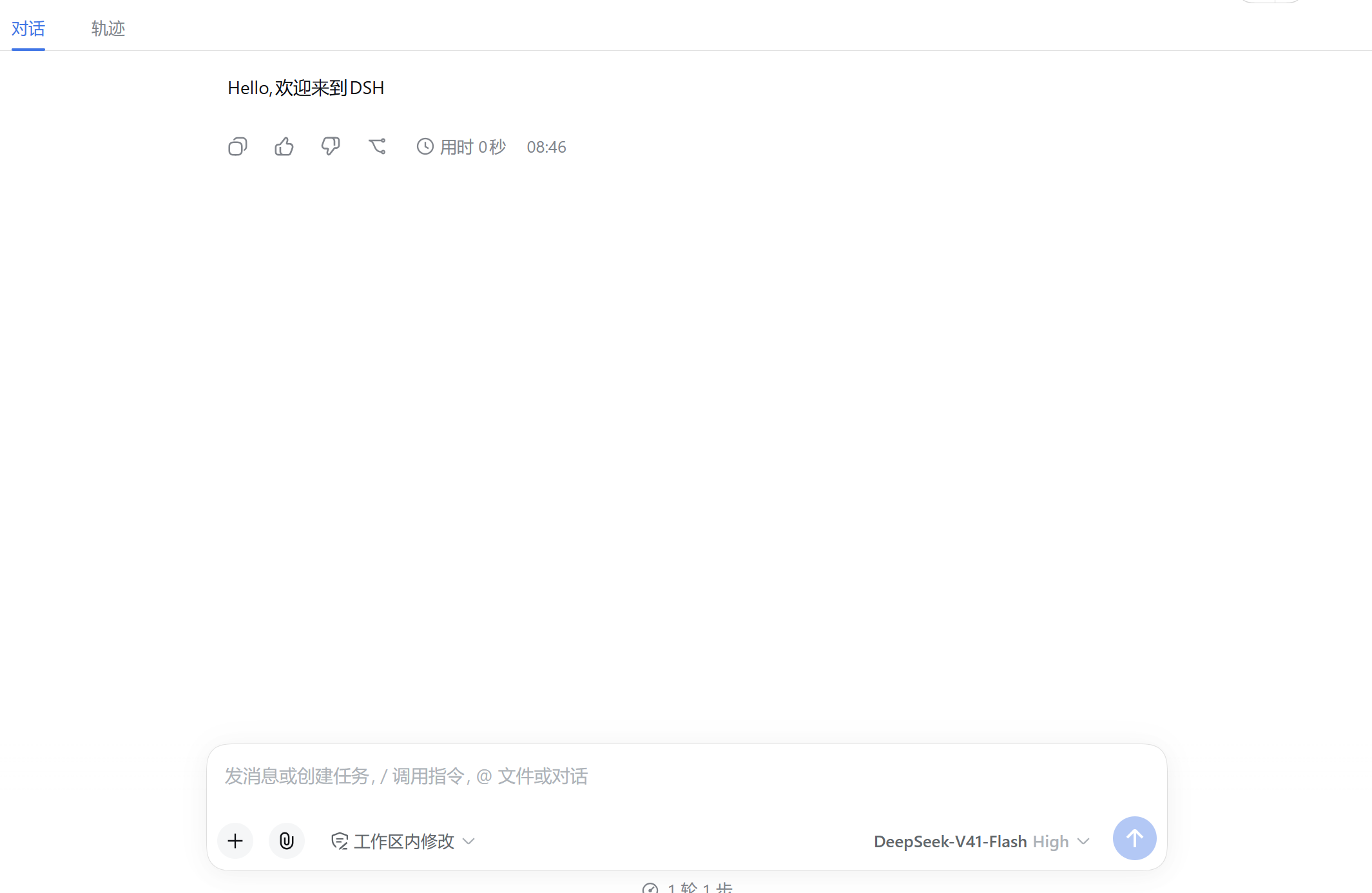
少数情况下(宿主已经为会话建好 agent loop 且其轮次游标形态不可预期时)插件不会 自己占轮次,而是把欢迎语顺延到宿主首次开轮再插进去 —— 此时气泡会随你的第一条 消息一起出现,并打印一条
greeting deferred until the host opens its first step告警。这是为了避免和宿主撞轮次号(撞号会让界面按轮次归组时丢掉第一次问答)。
目录结构
dsh-welcome/
├── package.json      # dsh.bundle.patch 声明 → dsh plugin 会自动把它加入 bundles 层
├── index.js          # Cordis 插件本体(name / inject / Config / apply)
├── cordis.patch.yml  # bundle patch:把自己的 Loader 行插入配置树
├── test.mjs          # 逻辑单元测试(node test.mjs)
└── README.assets/    # README 截图等静态资源
本地开发
从本地源码安装
面向两种情况:
1) 开发者本地改源码调试
2) npm 版本不满足需求,从 GitHub 下载源码安装。
下载完成并解压后执行下面命令
# 需要 pnpm 在 PATH 上(npm i -g pnpm)
dsh plugin --profile web add "file:D:\path\to\dsh-welcome"
# 未全局安装 dsh 时,用 npx 形式
npx @deepseek-ai/dsh plugin --profile web add "file:D:\path\to\dsh-welcome"
dsh plugin add 会:
1) pnpm 安装到 profile 的 node_modules;
2) 检测到包声明了 dsh.bundle.patch,自动把它追加到 dsh.profile.bundles 层列表。
改了源码怎么让 profile 更新
profile 用 nodeLinker: hoisted,node_modules/dsh-welcome 是安装时复制的
真实目录(不是软链);而 pnpm 对 file: 目录依赖在 lockfile 里只记
version: file:<路径>,不含版本号——重跑 add / install(含 --force)都是
空操作(Already up to date)。
可靠做法是先 remove 再 add(dsh plugin 是 pnpm 的薄转发器,remove
会把副本、依赖声明、bundles 条目一并清掉):
dsh plugin --profile web remove dsh-welcome
dsh plugin --profile web add "file:D:\path\to\dsh-welcome"
# 未全局安装 dsh 时,用 npx 形式
npx @deepseek-ai/dsh plugin --profile web remove dsh-welcome
npx @deepseek-ai/dsh plugin --profile web add "file:D:\path\to\dsh-welcome"
验证是否生效:
1、比对
node_modules\dsh-welcome\package.json的version与源码。2、重启
dsh web,新建会话看是否改变修改的内容。
License
MIT © axingde — 仓库:https://github.com/axingde/dsh-welcome