dsh-windows-c-cleanup
Verifieddsh-windows-c-cleanup · v1.0.5 · MIT · Web UI
DSH 插件:Windows 系统盘清理能力 —— 扫描 → 五级分级(可安全删除/谨慎删除/建议迁移/保护名单/长期防护)→ 用户确认 → 分层执行与迁移
Install
dsh plugin add dsh-windows-c-cleanup Confirm the layer applied with dsh --profile default --dump-config — see the install guide.
Source
Tags
Readme
dsh-windows-c-cleanup
English | 中文
Repository: https://github.com/runcat-tommy/dsh-windows-c-cleanup (npm: dsh-windows-c-cleanup)
A DeepSeek Harness (DSH) plugin that adds Windows system-drive (C:) cleanup as an auditable pipeline:
Scan → five-tier grading → visual report → user selection → tiered execution / migration to another drive
Why
A full C: drive is rarely caused by "junk files". It is usually caused by things that belong on another drive: package-manager caches, IDE indexes, on-device browser AI models, leftover installers, virtual disks.
Deleting those blindly is risky: rebuilding an IDE index takes hours, and removing a virtual disk destroys an entire Linux environment. This plugin instead:
- Measures before deleting — every candidate is sized against an externalized rule library, and a visual Markdown report is produced first;
- Grades into five tiers — each candidate carries a human-readable reason;
- Treats the protection list as a hard constraint — anything not in the rule library is treated as protected ("unknown means don't delete");
- Prefers migration over deletion — with a second drive present, caches are moved via junctions or app config so they never come back.
Five tiers
| Tier | Meaning | Execution policy |
|---|---|---|
| 🟢 Safe to delete | Caches, temp files, leftover installers — no data loss | Batch after a single confirmation |
| 🟡 Delete with care | Rebuildable but expensive (IDE indexes, on-device AI models, package repos), or admin-only (WinSxS via DISM) | Confirm per item |
| 🟠 Consider migrating | Moves to another drive transparently via junction or app config | Migrate + link + ledger, rollback supported |
| 🔴 Protected | User documents, credentials, chat data, virtual disks, IDE config, unknown paths | Never deleted automatically (hard constraint, not overridable by user rules) |
| 🔵 Long-term prevention | Config actions: cache redirection, Storage Sense, virtual-disk location audit | Do once, clean less forever |
Install
dsh plugin is a thin pnpm forwarder: it installs the package into the named profile and then registers it in dsh.profile.bundles based on the actual installed state (this package declares dsh.bundle.patch, so it joins the layer stack). Pick any of the three routes below — all of them require a DSH restart to take effect.
Option 1: install straight from GitHub
dsh plugin --profile web add github:runcat-tommy/dsh-windows-c-cleanup
- Best for: grabbing the newest commit on the repo when you already have git installed.
- Note:
lib/andclient/client.jsare build artifacts and are not committed (they are produced by thepreparescript), so this route runs a build and asks for your approval;dsh pluginprints the approval prompt. - Updating: run the same command again (pnpm re-fetches the latest commit of that git source).
Option 2: download from GitHub, then install from the local folder
# Step 1: get the code (git clone, or Code → Download ZIP and unzip)
git clone https://github.com/runcat-tommy/dsh-windows-c-cleanup.git D:\dsh-plugins\dsh-windows-c-cleanup

# Step 2: install from the local folder
dsh plugin --profile web add D:\dsh-plugins\dsh-windows-c-cleanup
- Best for: reading the code before installing, making your own changes, or when the network is unreliable (download the ZIP instead of using git).
- Note: a local folder is installed as a
link:, so your edits apply immediately — host-side changes need adsh webrestart; client-only UI changes neednpm run build:clientplus a page refresh. - Updating:
git pullin that folder, runnpm run build, then restartdsh web.
Option 3: install from npm (recommended)
dsh plugin --profile web add dsh-windows-c-cleanup

# pin a version when you want to
dsh plugin --profile web add [email protected]
- Best for: everyday use, and the least effort. The npm package already ships the build artifacts, so no local compiler, no git and no build approval are involved.
- Updating:
dsh plugin --profile web up dsh-windows-c-cleanup - Uninstalling (same for all three routes):
dsh plugin --profile web remove dsh-windows-c-cleanup - Listing what is installed:
dsh plugin --profile web list
Which route?
| Command | What it needs | What you get | Updating | |
|---|---|---|---|---|
| 1. Straight from GitHub | add github:runcat-tommy/dsh-windows-c-cleanup |
git installed; one build approval | the newest commit (built at install time) | run the same command again |
| 2. Download to a folder | add D:\dsh-plugins\dsh-windows-c-cleanup |
nothing (a ZIP works too) | the local folder (link:, edits apply at once) |
git pull + npm run build + restart |
| 3. npm | add dsh-windows-c-cleanup |
nothing | the published release (artifacts included) | up dsh-windows-c-cleanup |
In one line: npm is the least effort, GitHub-straight is the quickest (but needs a build approval), local-folder is the most flexible (edits show up immediately).
Compatible DSH versions
The plugin declares its host requirement in peerDependencies:
"@deepseek-ai/dsh-tools": "^0.1.0-rc.6 || ^0.1.1-rc.1 || ^0.2.0-rc.1 || ^0.2.1-alpha.1"
That covers the DSH prerelease lines from 0.1.0-rc.6 through 0.2.1-rc.2 (including 0.1.1-rc.x, 0.2.0-rc.x and 0.2.1-alpha/rc). Under strict semver a prerelease is only accepted when the range has a branch starting at a prerelease of the same major.minor.patch, which is why a bare * matches no prerelease at all. Host version tested: 0.2.1-rc.2 (npm run typecheck / build / smoke / m2 / m5 / market:check all pass).
Restart after installing
All three routes are the same here: the plugin is only loaded after DSH restarts.
dsh web
Then open any session — the "Disk cleanup" tab appears at the top of the conversation view.
For development you can skip installation and mount an overlay instead (on Windows the path must be a file:// URL):
node -e "const{pathToFileURL}=require('node:url');console.log(pathToFileURL(process.argv[1]).href)" "$PWD\src\index.ts"
dsh web --patch .\dev.cordis.yml
Usage
The plugin registers one tool, disk_cleanup:
| Parameter | Value | Description |
|---|---|---|
action |
scan | plan | apply | migrate | rollback | trash |
Required. scan/plan are read-only; apply/trash execute cleanup (M2); migrate/rollback move and restore data (M3) |
scope |
hotspots | full |
hotspots measures rule-library hotspots only (fast); full adds a whole-drive Top-N pass (default) |
reportPath |
path | Where the report is written; defaults to <cwd>/C盘清理报告-<timestamp>.md |
format |
markdown | json | both |
Report format; defaults to the defaultReportFormat config. json writes a machine-readable report (passing x.md also writes a sibling x.json) |
items |
paths | Concrete paths to clean (required for the caution tier: only per-item user-confirmed paths) |
grade |
safe | caution | migrate |
Select by tier: safe may be batched, caution must also pass items, migrate drives action=migrate |
mode |
permanent | trash |
trash moves items to the staging area for recovery (default); permanent deletes outright |
trashPath |
path | Staging root, must be on another drive (same-volume staging frees nothing); defaults to <largest non-system drive>:\to_delete |
migrationRoot |
path | Migration root; the ledger.jsonl ledger lives alongside it. Defaults to <largest non-system drive>:\dsh-cc-migrated |
historyPath |
path | Scan history (the trend data source). Defaults to <DSH_HOME>\windows-c-cleanup\history.jsonl, deliberately outside the caches being cleaned |
defaultReportFormat |
markdown |
Default report format: markdown / json / both |
schedule.enabled |
false |
Enable scheduled scans (off by default — it needs your explicit consent) |
schedule.intervalHours |
24 |
Scan interval in hours |
schedule.alertFreePercent |
10 |
Write an alert when free space drops below this percentage |
schedule.initialDelayMinutes |
1 |
First-run delay so startup I/O is not contended |
schedule.scope |
hotspots |
Scheduled scan scope (faster and lighter than full) |
dryRun |
boolean | Defaults to true: lists the actions without deleting anything; pass false only after the user confirms |
elevation |
none | dism | cleanmgr | dism+cleanmgr |
Whether to also run admin-level system cleanup (triggers UAC) |
targetDrive |
e.g. D: |
Migration target; defaults to the non-system drive with the most free space |
extraRulesFile |
path | Extra user rule file layered on top of the built-in library |
Example prompt:
Show me what is eating my C: drive
The tool returns drive info, reclaimable bytes per tier, the biggest top-N consumers, and a migration target suggestion — plus a Markdown report containing: summary → 🟥 biggest consumers → 🟢/🟡/🟠/🔴/🔵 tiers → execution results.
Cleanup panel (M5)
The plugin registers a conversation view tab in the Web GUI (conversation.view, an additive list slot — it never replaces or destroys any existing surface). Open any session, switch to "Disk cleanup", and go from "understand" to "select → preview → execute" without leaving the page.
Real screenshot (English UI, matching this document's language; the Chinese UI is in README.md):
| English UI |
|---|
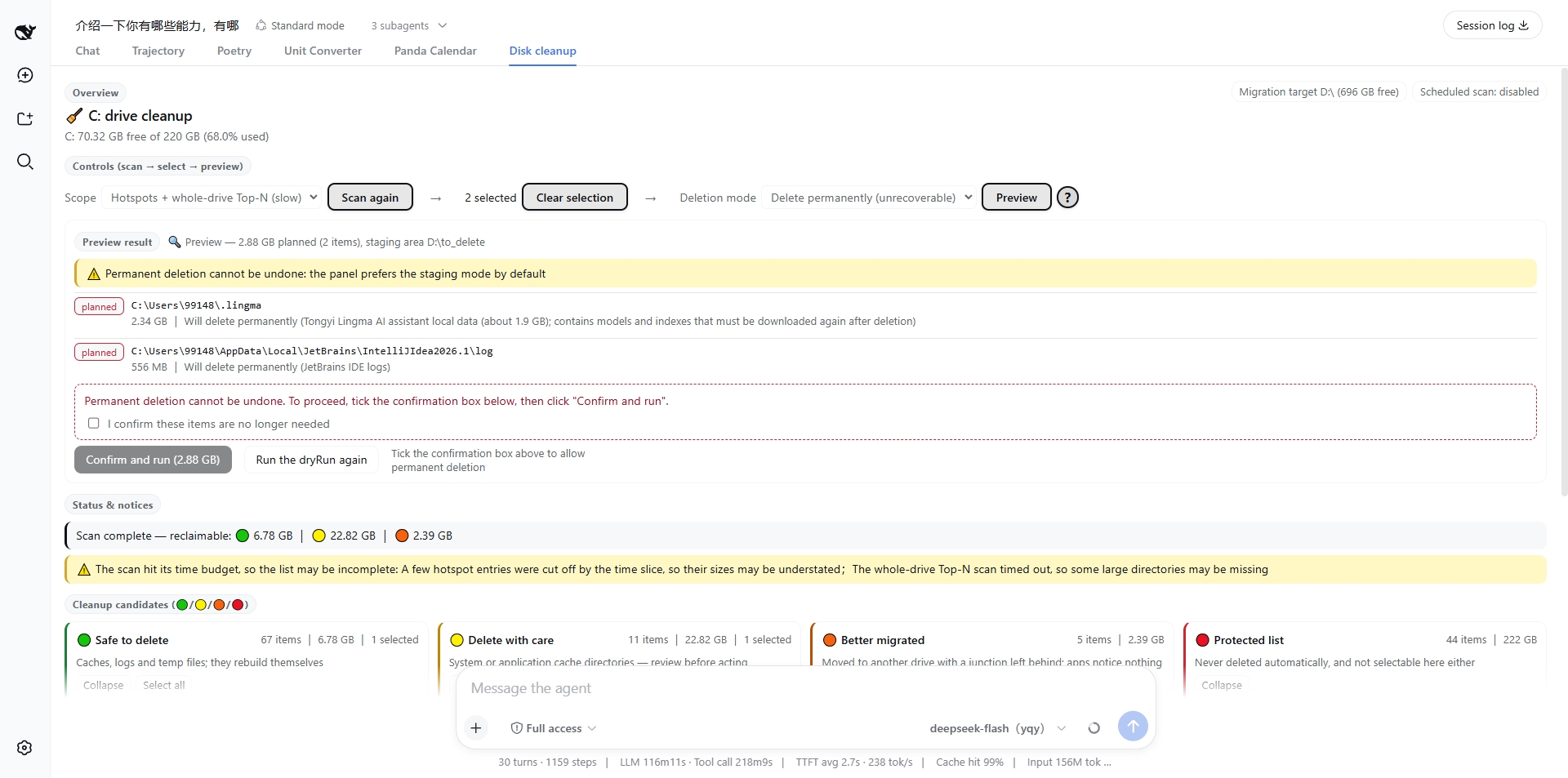 |
The panel is deliberately thin: it makes no judgement of its own. Tiering, the safety gate, measurement and freed-bytes accounting all reuse the existing host modules, and the panel's preview and real run call the same executeCleanup (only dryRun differs) — so what you preview is exactly what would happen.
Module map (every block carries its name as a label)
Top to bottom, each block has a small fixed-name label in its top-left corner (one set per language, guarded by checks 10.1–10.6). To point at a block, just use its name:
| Module | Where | What is inside |
|---|---|---|
| Overview | the header, top of the panel | drive free/total and used percentage; two chips on the right: migration target (letter + free space) and the scheduled-scan switch |
| Controls (scan → select → preview) | under the header | three tight groups with right-pointing arrows between them: ① Scope + Scan C: ② "n selected" + Clear selection ③ Delete mode + Preview + ?. There is no "Confirm and run" here — the run entry point lives only in "Preview result" |
| Preview result | directly under the controls (appears after clicking Preview) | what would happen to each item (move to staging / permanent delete / needs elevation / refused), the total that would be freed, and the refusal list; the panel's only "Confirm and run" button sits here, next to "Preview again (dry run)". The dynamic text beside the title is what this particular preview worked out |
| Status & notices | under the preview result | what is running now (⏳), the result notice of the last action, errors, and the warning shown when the scan hit its time budget |
| Cleanup candidates (🟢/🟡/🟠/🔴) | the four cards in the middle | Safe to delete / Delete with care / Better migrated / Protected list, each item with path, size and reason; protected entries cannot be selected |
| Long-term protections | under the cards (collapsible) | the 6 long-term measures where changing settings or habits beats repeated cleanup |
| Run progress | appears after clicking Confirm and run (under the cards) | job id and status, progress bar (from the host's per-item accounting), item-by-item detail, freed bytes, cancel button |
| Migration preview | appears after clicking a card's "Preview migration" | source → destination mapping, file count, whether the target drive has room, and app config you must change yourself; the migrate buttons sit at the bottom |
| Records & artifacts | the very bottom of the panel | absolute paths of the history ledger and the report directory (reports are written to disk and stay in Chinese) |
Two things are worth noting:
- "Preview result" is the only dynamic block that moved up to sit right under the controls (the other dynamic blocks stay below the candidate cards). So after clicking Preview, the result and its run button appear directly beneath the buttons you just clicked — no scrolling past four columns of cards; when there is no preview, that spot goes to "Status & notices", so a finished scan reports right under the controls too.
- There is exactly one run entry point: "Confirm and run" exists only inside "Preview result". The toolbar no longer offers one, so "run without previewing" has no entry point in the UI at all (the host-side
guardTargetsanddryRuncontract is unchanged and remains the real defence). Changing the selection or delete mode after a preview voids it, the whole block disappears and you preview again; with permanent deletion and no confirmation tick the button is disabled and the reason is written next to it (checks 8.1–8.9). - On request, the former "Trend" module (time since the previous scan, directories that grew back) was removed from the UI; the host still returns
state.trend, so it can be wired back whenever you want it.
The toolbar is laid out as three tight groups with a right-pointing arrow after the first two, left to right:
| Group | Controls | Purpose |
|---|---|---|
| ① Scan | Scope select + Scan C: |
Pick hotspots/full, then scan (shows "Rescan" once a scan exists) → |
| ② Selection | <n> selected + Clear selection |
Live count and one-click reset → |
| ③ Preview | Delete mode select + Preview + ? |
The ? help button sits right next to "Preview"; the run button is not here (see "Preview result") |
The arrows are purely decorative (aria-hidden, skipped by screen readers) and carry 12px of margin on each side on top of the group's 6px gap, so the flow reads clearly as "scan first → then select → finally preview".
Visual affordance (deliberately tuned, not the default look):
The three action buttons "Scan C:", "Clear selection" and "Preview" get a thick brand-coloured outline, a tinted fill, a drop shadow and semi-bold text while they are enabled, so they read as buttons at a glance. While disabled they keep the original flat look (pale background, grey border, translucent) — a button you cannot press must never be drawn as if you could;
"Confirm and run" (inside "Preview result") stays solid brand-coloured: solid means the final action, outlined means an ordinary clickable action, so the hierarchy never blurs;
The
?next to "Preview" is a 24px round button (2px brand outline, tinted fill, bold question mark, grows on hover). Opening it explains in place, in deliberately plain words: the first line is "Clicking Preview runs a dry run — nothing is deleted", then three bullet points (it really checks what may be deleted / it really counts permissions and space / it says what would happen to each item), and only then two caveats (the numbers are estimates, and locked files are invisible to a preview).Five-tier cards (🟢 safe / 🟡 caution / 🟠 migrate / 🔴 protected) with path, size and the reason for each verdict; protected entries cannot be selected;
Two-step execution: there is exactly one run entry point, inside "Preview result" — so a preview is a precondition, not a suggestion. Any change to the selection or mode voids the preview, the block disappears and you preview again. The only remaining gate is "permanent deletion without the confirmation tick", and the reason is written right next to the button (a tooltip on a disabled button never appears in most browsers, so a tooltip alone explains nothing) — decided by the pure
runGate()function, pinned by checks 8.1–8.9;Real progress from the host's per-item accounting callback (not parsed log text), with a working "cancel job";
Migration preview showing source → destination, file count and whether the target volume has room; app config changes are only suggested, never applied silently.
Switching to the chat view and back does not lose work in progress
The panel lives inside the conversation view, so switching away unmounts its component (and with it the local React state). Anything "currently happening" is therefore reclaimed from the host as the source of truth, never remembered locally:
| What you switched away from | The host's authoritative state | What you see on return |
|---|---|---|
| A running "Scan C:" | panelState().scan = {running, scope, startedAt} (the scan runs host-side, so unmounting changes nothing) |
The "Scanning C:" ⏳ comes right back, and the panel asks the host every 1.2 s |
| A scan that finished while you were away | The result in the host cache (scan-view) |
The candidate cards appear immediately, plus a "Scan complete" notice — no need to scan again |
| A real cleanup / migration in progress | panelState().runningJobIds |
The panel reattaches to the job by id, so the progress bar and per-item detail keep going |
The host also scans only one at a time: if you click "Scan" again after coming back, it joins the scan already running (saving a full disk walk and keeping two results from overwriting each other; checks 12.3–12.5).
One honest limitation: the selection and the preview are not preserved across unmounts (changing the selection or mode invalidates a preview anyway, so on return the flow is "select again → preview again"). The scan and runningJobIds fields are new in 0.5.1; an older host that has not been restarted (dsh web) lacks them, and the panel degrades to its previous behaviour without erroring (check 11.6).
Bilingual UI (Chinese / English)
Both the panel and the host text exist as two complete sets and follow the DSH locale automatically — there is no language switcher to click:
- UI strings live in the client dictionary (
client/src/i18n.ts, 120 keys per language, key sets identical). The tab label is a thunk, so switching the locale retitles the tab without re-registering anything; - Every panel call on the host RPC carries the current
locale, so host-generated text switches too: every rule reason, all 12 safety-gate refusal sentences, the executor's per-item planned actions, migration config hints, and the scheduler status. English strings live insrc/rules/default-rules.en.json, aligned with Chinese strictly by rule id (101 rules + 6 long-term actions, guarded by tests that check coverage and that no Han character leaks into the English file); - Switching the locale never makes you rescan (the
scan-viewendpoint): rule reasons and truncation warnings are strings the host rendered at scan time, so they would normally stay in the old language. The host therefore exposes "re-render the cached scan in the target language" (no disk access, no measurements — measured at 0 ms), and the panel calls it whenever the locale changes, re-running the preview and migration preview alongside it so the UI is never half-translated (a real screenshot exposed exactly this); - Notices store a key + params, not a rendered string (
Noticeinclient/src/panel.tsx): the text is produced at render time with the currentt, so "Scan complete…" / "Preview ready…" follow the locale instead of freezing in the language they were created in (the type also forbids passing a plain string); - Chinese is the default: the model tool path (
disk_cleanup) never passeslocale, so tool output is byte-for-byte what it always was; only the Web panel sendsen; - A missing English entry always falls back to the Chinese original — never to an empty string;
- Wiring has an ordering requirement: dictionaries must be registered before the framework renders a registration that declares
locale:, so the client plugin waits for the locale service withctx.inject(['locale']).dsh.client.injecttherefore lists@deepseek-ai/dsh-client-localetoo — that is a package-metadata change, so the first upgrade needs adsh webrestart; after that, text changes only need a page refresh.
Browser and host talk over the generic Connection RPC channel /dsh-c-cleanup (authority: loopback, local callers only) with endpoints state / scan / scan-view / preview / execute / migrate / progress / cancel / history and friends. The job table lives in host memory and is cleared on host restart.
The state endpoint is the panel's "remount entry point": besides drives and scheduler state it truthfully reports whether a scan is running right now (scan) and which jobs are running (runningJobIds) — that is how the panel reattaches its UI after you switch views and come back (see the previous section). The scan and the jobs themselves run host-side and are unaffected by the component unmounting.
What it takes to go live (platform mechanics, not a plugin choice):
| Change | What you must do |
|---|---|
Add/remove a plugin package, or change dsh.client fields |
Restart dsh web (package metadata verdicts are cached forever) |
Change only the contents of client/client.js |
Refresh the page (bundles are served no-cache; HMR is disabled in this profile) |
Configuration
Override the row in your profile's cordis.patch.yml (a patch replaces the whole config, it does not deep-merge):
- id: windows-c-cleanup
  name: 'dsh-windows-c-cleanup'
  config:
    reportDir: 'D:\reports'
    defaultScope: full
    hotspotTimeBudgetMs: 60000
    topTreeTimeBudgetMs: 45000
    topTreeMaxDepth: 3
    bigItemThresholdBytes: 2147483648
    allowProtectedOverride: false
    extraRulesFile: 'D:\my-rules.json'
| Option | Default | Description |
|---|---|---|
reportDir |
current working directory | Report output directory |
defaultScope |
full |
Default scan scope |
hotspotTimeBudgetMs |
70000 |
Hotspot time budget (truncates and flags partial) |
topTreeTimeBudgetMs |
70000 |
Whole-drive Top-N time budget (both scans run in parallel, so wall time tracks the larger one) |
topTreeMaxDepth |
3 |
Top-N traversal depth |
bigItemThresholdBytes |
2 GiB |
"Big item" threshold |
allowProtectedOverride |
false |
Whether user rules may override the protection list |
extraRulesFile |
none | Extra user rule file |
Rule library
The built-in library (100+ rules) lives in src/rules/default-rules.json. Every path is written with placeholders (%LOCALAPPDATA%, %APPDATA%, %USERPROFILE%, %WINDIR%, …) — no hardcoded user names, so it is portable across machines.
{
  "id": "npm-cache-local",
  "path": "%LOCALAPPDATA%\\npm-cache",
  "grade": "migrate",
  "reason": "npm package cache, often several GB; better migrated to another drive",
  "migrate": {
    "method": "app-config",
    "targetHint": "<other drive>:\\npm-cache",
    "configHint": "npm config set cache \"<target>\""
  }
}
Matching: a candidate hits a rule when it equals the rule path or sits beneath it; * matches a single path segment (e.g. %LOCALAPPDATA%\*-updater).
Priority: the most specific path wins; on ties protected wins; no match at all → treated as protected.
Custom rules use the same shape:
{ "rules": [{ "id": "my-cache", "path": "%LOCALAPPDATA%\\my-app\\cache", "grade": "safe", "reason": "self-built app cache" }] }
Attempts to override a overridable: false protected entry are rejected with a warning (unless allowProtectedOverride is explicitly enabled).
Safety
- Protection list as a hard constraint: user documents, desktop, downloads, SSH/cloud credentials,
.dshconfig, chat data (WeCom/Lark/WeChat), IDE config,pagefile.sys/hiberfil.sys/ virtual disks,Program Files,Windows— never deleted automatically. - Unknown means protected: paths absent from the rule library are never deleted.
- Tiered confirmation: the safe tier can be confirmed once; the caution tier is confirmed item by item; the protection tier has no execution entry point at all.
- Time budgets: a truncated scan is explicitly flagged as
partialin both the report and the tool result — never a silently incomplete verdict. - No link following: junctions and symlinks are never followed, avoiding double counting and recursion traps.
- Reversible migration: migrations use junctions or app config and are recorded in a ledger (
rollbackfrom M3).
Status (M1 + M2 + M3 + M4 + M5)
- Rule library (100+ rules, placeholder-based) + long-term prevention list
- Scanning: drive info, hotspot list, whole-drive Top-N, junction-safe measurement, time budgets
- Five-tier grading with "unknown means protected"
- Visual Markdown report
- DSH tool registration (
disk_cleanup, parameter/output schemas validated) - M2 Execution: deletion (batch for the safe tier, per-item for caution), staging area with ledger, UAC elevation (Windows\Temp / WinSxS / DISM / cleanmgr), execution report, dry run by default
- M3 Migration: junction moves (transparent to applications), JSONL ledger and
rollback, refusal and rollback on same-volume / existing-destination / insufficient-space / busy-source, app-config suggestions - M4 Polish: scan history with trend comparison, machine-readable JSON reports, scheduled scans with alerts (cleanmgr/DISM elevation already shipped in M2)
- M5 Client GUI panel:
conversation.viewfive-tier cards, selection, two-step execution (preview → confirm), per-item progress with cancel, migration preview - M6 Release: npm + community marketplace (GitHub done)
Known limitations (M1 + M2 + M3 + M4 + M5)
- Execution requires explicit authorization:
apply/trashdry-run by default; a real run should follow a scan the user has reviewed.migrate/rollbackstill returnnot-implemented(M3). - Admin-level cleanup depends on the UAC prompt: DSH's permission stack has no UAC primitive, so the plugin spawns the system prompt via
Start-Process -Verb RunAs(the script lands in%TEMP%\dsh-cc-elevated-*.ps1). If the user declines,Windows\Temp,SoftwareDistribution, and WinSxS cannot be cleaned and the result is explicitly marked as cancelled. - Files locked by running apps cannot be deleted: an open browser, IDE, or chat client locks its own caches; those items are reported as "partial" with the residual size. That is normal Windows behaviour, not a plugin failure.
- Whole-drive Top-N coverage is I/O bound: Node file operations go through the libuv thread pool (4 threads by default) and directory measurement cost is essentially driven by file count, so raising concurrency does not help. Within the 70-second budget, the hotspot rules reach 100% coverage on a 153 GB used drive, but the whole-drive Top-N pass covers only part of the tree (in practice it truncates after roughly 160 top/shallow-level directories).
Truncation is always flagged as
partialwith a reason in both the report and the tool result — never disguised as a complete verdict. RaisetopTreeTimeBudgetMsfor more coverage at the cost of waiting longer. Actionable findings come from the hotspot rules; Top-N is a safety net, so truncation does not affect the usability of the five-tier list. - Two released-space metrics: for small cleanups (tens of MB) the drive free-space delta can read 0 because other processes keep writing to the drive; the per-item measured total is authoritative there, and both are reported side by side.
- No interactive confirmation UI yet in the tool path: the model hands the report to the user, and the user's selection feeds the execution path. The M5 panel provides the interactive route (preview → confirm → progress).
- Panel availability is a platform matter: adding/removing a package or changing
dsh.clientrequires adsh webrestart (metadata verdicts are cached forever); changing only the bundle needs a page refresh (HMR is off in this profile). - The panel shares the tool's judgement but not its configuration surface: it can scan, preview, execute, migrate and roll back, while settings such as
schedule.enabledorreportDirstay incordis.yml— the panel reports state, it does not persist settings. - Panel jobs live in host memory: after a host restart the panel shows "job vanished with the host restart" and any running job stops (reports and the migration ledger already on disk are unaffected).
Development
npm install --legacy-peer-deps   # DSH type packages have peer conflicts; local install uses legacy resolution
npm run deps:link                 # link the host's own @deepseek-ai/* copies (see note below)
npm run typecheck                 # type check
npm run smoke                     # fast self-check: rule matching / drive info / budgeted measurement
npm run m2                        # isolated M2 execution tests (sandboxed under %TEMP%)
npm run m3                        # isolated M3 migration tests (sandbox + D:\dsh-cc-m3-test)
npm run m4                        # M4 history/trend/JSON/scheduling semantics (fake scans, seconds; includes one real hotspot scan)
npm run m4:live                   # M4 scheduled scan end to end (real scan, ~1 minute; history numbers checked against fs.statfs)
npm run m5                        # M5 panel host half: tiering, preview == execute, real staging area, real migration, cancel, RPC endpoints
npm run m5:client                 # M5 client bundle contract: replay the browser module load and really render the panel once (offline, seconds)
npm run m5:live                   # M5 live check: ask the running dsh web for its boot manifest and the served bundle (hash-compared with the local build)
npm run market:check              # Release health check: pins the hard requirements for automatic DSH marketplace collection (offline, seconds)
npx tsx tests/tool-run.ts full     # headless full scan producing a real report
npm run build                      # compile to lib/ and bundle client/client.js (publishable artifacts)
npm run build:client               # re-bundle the client half only (after editing client/src)
⚠️
@deepseek-ai/dsh-toolsand friends declare their runtime dependencies as peerDependencies.npm install --legacy-peer-depstherefore never installs them (tests die withERR_MODULE_NOT_FOUND: Cannot find package '@deepseek-ai/dsh-xxx'), and a plainnpm installprunes them away again.npm run deps:linkjunctions the host's own copies intonode_modules, so tests run against exactly the packages the host loads. It is idempotent; re-run it after any install. Always re-verifynpm run buildafter touching dependencies.
License
MIT