dsh-free-vision
Verified@freespace8/dsh-free-vision · v0.1.2 · MIT · Web UI
Local image understanding for the DeepSeek Harness: OCR, table-layout detection, and semantic description of textless images via macOS Vision, fully on-device (images never leave your Mac). 本地化识图,图片不出本机。
Install
dsh plugin add @freespace8/dsh-free-vision Confirm the layer applied with dsh --profile default --dump-config — see the install guide.
Source
Published to npm without a public repository. Inspect the package contents before installing.
Tags
Readme
@freespace8/dsh-free-vision


DeepSeek Harness 的本地化识图插件:用 macOS Vision 框架在本机理解图片(图片永不离开你的 Mac),并把能力暴露为 agent 可调用工具,适配无视觉能力的模型(如 DeepSeek v4 Flash)。
English · 简体中文
目录
功能
view_image— 无文字图片的语义理解:场景分类、人物/动物/人脸检测(九宫格方位)、二维码/条形码解码、构图焦点、美学评分;检测到文字时提示改用 OCR;ocr_image— 提取图片全部文字(阅读顺序,支持中英文);layout=true时输出表格结构与归一化坐标,适合长截图、文档照片、表格页面;- 粘贴图片 → 本地路径(Web GUI):在输入框 ⌘V 粘贴图片,自动保存到本地目录并把绝对路径插入草稿,模型可直接用该路径调用上面两个工具。
预览
对一张含中文、英文与表格的文档运行 ocr_image 的真实效果——完全本地处理:
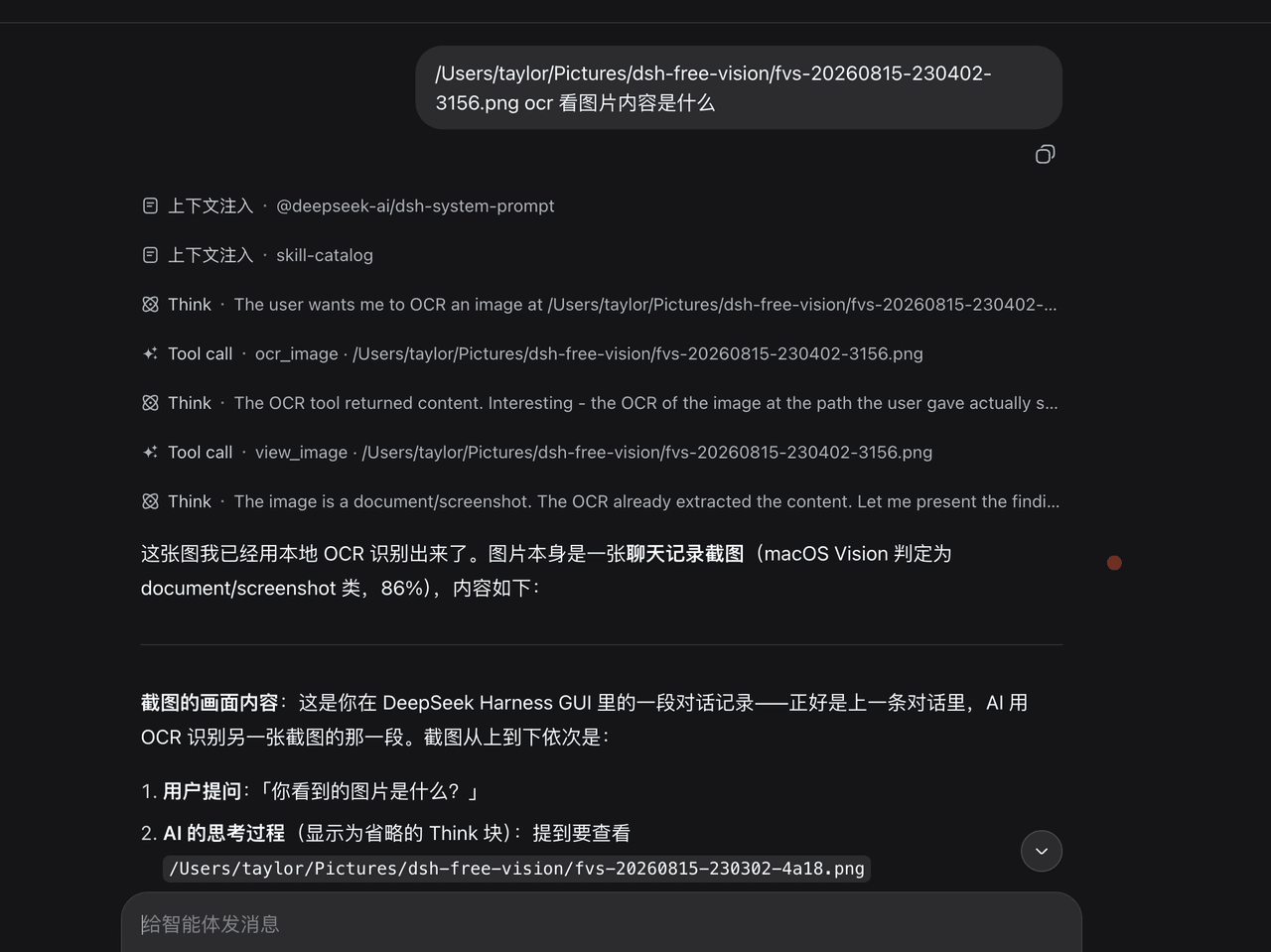
输入支持:http(s) 链接 / base64 / 本机绝对路径。安全边界:下载拒绝本机/内网地址(防 SSRF);上传仅接受 loopback、按字节大小限流、按魔数嗅探扩展名(不信任客户端文件名)。
前置条件
- DeepSeek Harness,带运行中的
webprofile; - macOS 11+ 与 Xcode Command Line Tools(
xcode-select --install)。首次调用 swift 需编译约 5~10s,之后有缓存。
安装
已发布到 npm,一条命令安装(目标 profile 为 web):
dsh plugin --profile web add @freespace8/dsh-free-vision
安装后重启 web profile(dsh plugin add 只改 manifest 与依赖,运行中的实例不热加载新 bundle)。卸载:
dsh plugin --profile web remove @freespace8/dsh-free-vision
配置
profile 的 cordis.patch.yml 里按 id 覆盖(整段替换 config):
- id: free-vision
  config:
    scriptPath: ""              # ocr.swift 绝对路径;留空使用插件内置脚本
    timeout: 120000             # swift 执行超时(毫秒),首次运行需编译请留足
    saveDir: ""                 # 粘贴图片保存目录;默认 ~/Pictures/dsh-free-vision
    maxImageSize: 20971520      # 粘贴图片大小上限(字节),默认 20MB
工作原理
- host 半体(
src/index.js+src/swift.js+src/upload.js):注册view_image/ocr_image两个工具(ctx.tools.register);图片输入归一化(本地路径 / http / base64) 后经ctx.subprocessspawnswift scripts/ocr.swift(进程组管理、有界输出、超时/取消终止); 另注册/plugins/dsh-free-vision/images上传路由(webServer 懒注册,headless 下自动跳过); - client 半体(
lib/client.js):注册conversation.input.rightslot 条目(渲染 null), 在输入框捕获图片粘贴,逐张 POST 上传路由,把返回的绝对路径追加进草稿(inputActions.setDraft)。
工具输出契约:output.schema = { type: 'string' },render 返回
[{ type: 'text', text }] blocks 数组(dsh-session 对 tool-result 块的硬要求)。
验证
npm run check # 产物门检查(语法、导出形状、exports/files、patch 行、client id、脚本存在)
真实生效验证(装进 profile 后):重启 web profile → 新开会话 → 在输入框粘贴一张含文字的截图 →
草稿里出现本地绝对路径 → 让模型调用 ocr_image(传该路径)→ 返回图片文字。
许可证
MIT,见 LICENSE。scripts/ocr.swift 及部分 host/client 逻辑衍生自
niyongsheng/free-vision-skill
(MIT,Copyright (c) 2026 Nico);上游版权声明与许可文本保留在 LICENSE 中。