dsh-inline-html-render
Verified@khorsheed/dsh-inline-html-render · v0.1.17 · MIT · Web UI
Render agent-authored ```dsh-card HTML as sandboxed interactive iframes inline in the conversation
Install
dsh plugin add @khorsheed/dsh-inline-html-render Confirm the layer applied with dsh --profile default --dump-config — see the install guide.
Source
Published to npm without a public repository. Inspect the package contents before installing.
Tags
Readme
@khorsheed/dsh-inline-html-render
English | 中文
让 agent 把「做出来给你看」变成真的:它写的小网页直接在对话里变成一张能点、能动的卡片。
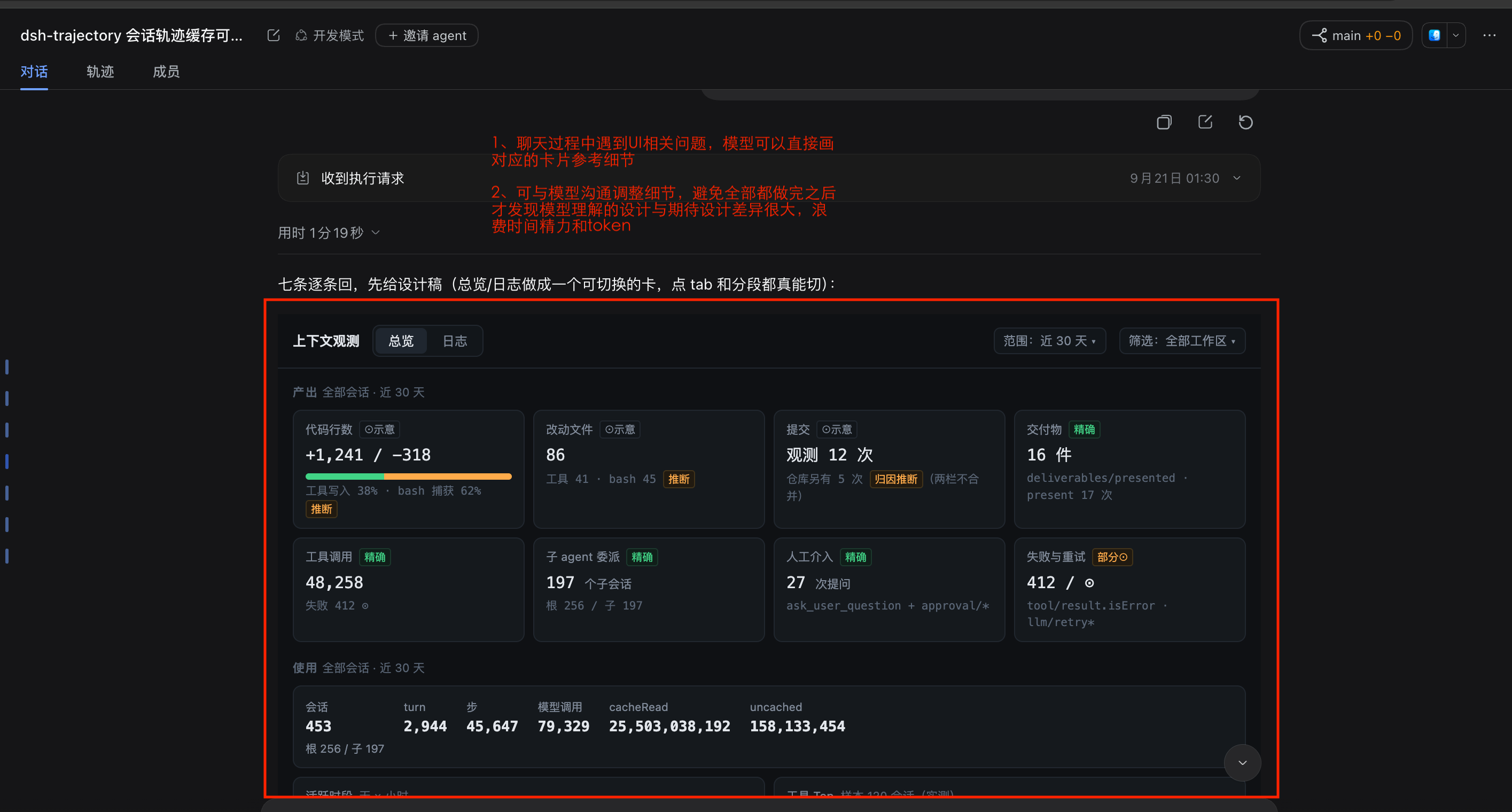
以前 agent 想让你看一个效果,只能贴一段代码让你自己想象,或者写个 HTML 文件等你去打开。装上内联卡片,你说一句「做个卡片看看」「对比几种配色给我看」,它就在回复中间画出一张卡片:按钮能点、标签能切、动画能动,就长在它说话的位置,看完接着往下聊。
能做什么
- 说要看,就画给你看:想看效果、做个小组件、对比几种方案时,agent 会自己决定画一张卡片,不用你教它怎么写。
- 卡片长在回复里:卡片就在段落之间,和前后文字连在一起,不占侧栏,也不是要另外打开的附件。
- 真的能点:悬停、点击、切标签、图表和动画都能用,不是一张截图。
- 3D 场景也能看:要看一个 3D 模型或场景,agent 可以写一个单文件的 3D 页面直接放进对话。
- 放心看:卡片关在沙箱里,碰不到你的页面和登录信息,也连不了网;卡片里的链接只能在新窗口或右侧栏浏览器里打开。
- 不装也不坏:没装这个插件时,同样的内容只显示成一段普通代码。
安装
在 DSH 的「插件 → 添加插件」里输入下面的包名,点安装:
@khorsheed/dsh-basic
内联卡片会跟着「基础体验」一起装好。装完在任何会话里对 agent 说「做个卡片给我看看」就能试。
已知限制
- 卡片不能联网,要加载网上资源的画面请改用文件预览打开。
- 对话重新渲染时卡片会重新加载,卡片里输入的内容、滚动位置不会保留。
- 卡片高度跟着内容走,但最高约 20000 像素。
Compatibility
需要 DSH 0.1.2-rc.1 或更新版本,已在 0.2.1-rc.1 上验证。
给开发者
- 卡片的写法协议(
```dsh-card代码块)、沙箱与能力桥、在页面上识别卡片的方式和实现原理,都在完整参考里;完整写法见随包 skillskills/inline-html-card与skills/3d-artifact。 - 入口:
src/index.ts(注册两个 skill)、src/client/renderer.ts(把代码块换成卡片)。也可以单独安装:dsh plugin --profile web add @khorsheed/dsh-inline-html-render。 - 隶属 dsh-plugins,问题与贡献请到该仓库;变更见 CHANGELOG.md。