dsh-ui-shortcuts
Verified@khorsheed/dsh-ui-shortcuts · v0.2.4 · MIT · Web UI
Optional web shortcuts plugin: fixed actions (pause the running turn, steer-send the draft) with user-chosen key bindings
Install
dsh plugin add @khorsheed/dsh-ui-shortcuts Confirm the layer applied with dsh --profile default --dump-config — see the install guide.
Source
Published to npm without a public repository. Inspect the package contents before installing.
Tags
Readme
@khorsheed/dsh-ui-shortcuts
English | 中文
Esc 喊停、Cmd+S 插队发草稿、Cmd+O 开新会话、Cmd+Shift+X 压上下文、鼠标中键开关右侧边栏——键位和鼠标键都能自己改。
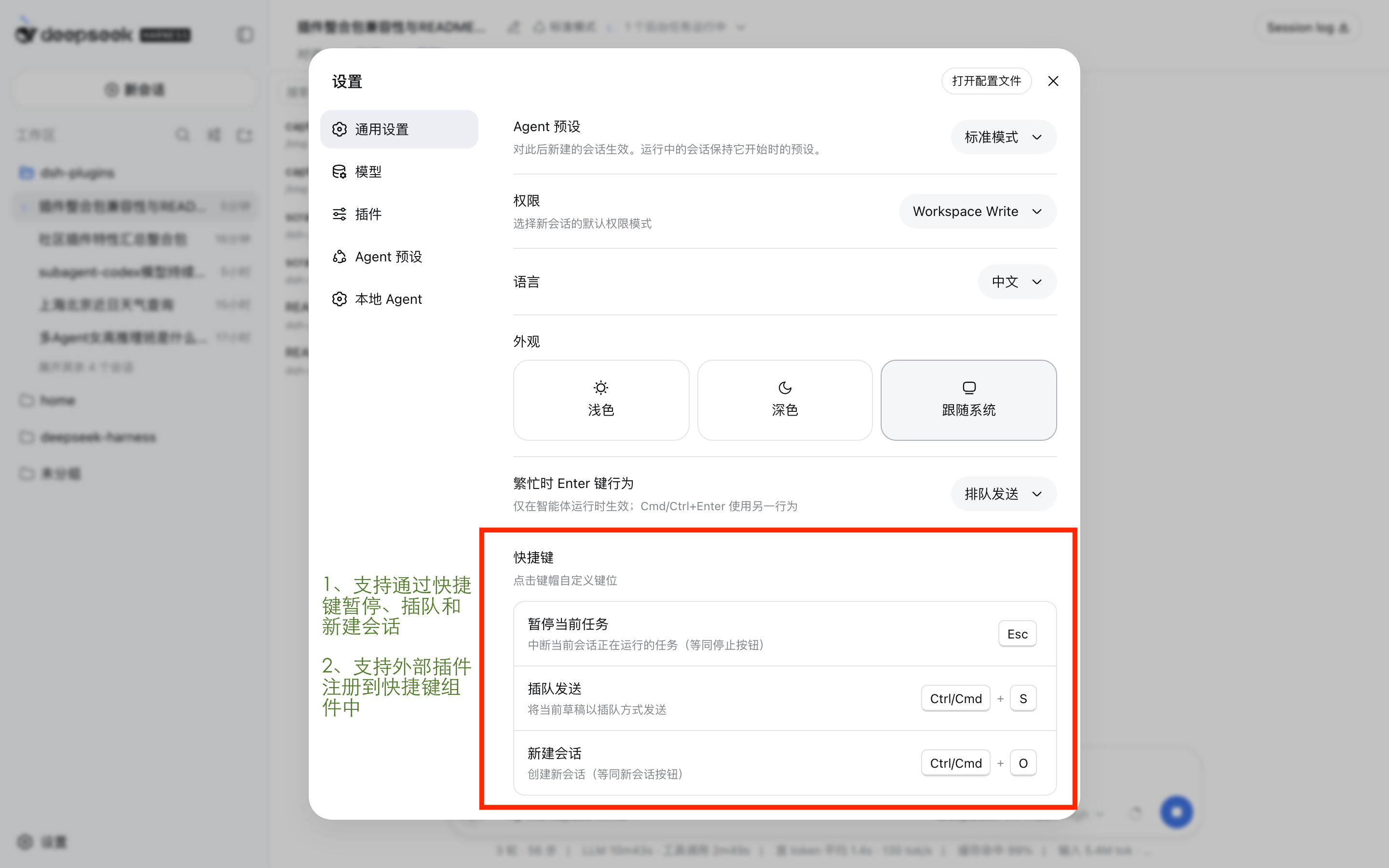
对话跑到一半想停,不用去找那个小小的停止按钮,Esc 就行;写好的草稿不想排队,Cmd/Ctrl+S 直接插队发出去;Cmd/Ctrl+O 随时开新会话;上下文快满了,Cmd/Ctrl+Shift+X 就地压一次;右栏(预览、文件、工具行打开的内容都落在那儿)看完了想收起来,鼠标中键一按即可(不合手就改绑回键盘组合键)。五个动作都不合手的话,到 设置 → 插件 → 快捷键 里点一下就能重新录制。这些快捷键调用的就是界面上按钮/命令本身的动作,不会给模型多发任何消息。
特性
- 暂停当前回合(
Esc)——等同于 composer 的 Stop 按钮,页面任意位置可用。 - 插队发送草稿(
Ctrl/Cmd+S)——以插队方式投递当前草稿;绑定时抑制浏览器保存手势。 - 新建会话(
Ctrl/Cmd+O)——侧边栏新会话按钮的同一入口;绑定时抑制浏览器的打开文件手势。 - 压缩上下文(
Ctrl/Cmd+Shift+X)——对当前会话执行宿主的/compact命令,与在 composer 里手敲/compact完全同一条路径(同样的流程节点、同样的忙碌报错、同样的matched语义)。 - 开关右侧边栏(鼠标中键)——调用 ui-sidebar-right 的公开服务
ctx.sidebarRight.toggleExpanded(),与右栏自身的展开/收起同一动作。默认给指针手势(开链接的那颗键顺手把右栏位置还回去),不合手可在设置里改绑键盘组合键。 - 键位/鼠标键可重绑——在 设置 → 插件 → 快捷键 中点击键位即可录制、解绑或恢复默认;除键盘外还能录鼠标中键与右键,偏好持久化在
$DSH_HOME/settings.yaml。
安装
不在默认 web bundle 中;一条命令完成安装并挂载(通过 dsh.bundle 自挂载):
dsh plugin --profile web add @khorsheed/dsh-ui-shortcuts      # 安装
dsh plugin --profile web remove @khorsheed/dsh-ui-shortcuts   # 卸载
Compatibility
npm 发布线(
@deepseek-ai/[email protected]):✅ 完整——基线迁移至 0.1.2-rc.1 API 面(单臂消费 0.1.2 API,0.1.1-rc.2 运行臂已退役),全量构建测试通过;minHost 前移至 0.1.2-rc.1,旧宿主请停留在旧发布线。源码线(deepseek-harness master):✅(verifiedHost: 0.1.7-rc.2)。按宿主线分两种形态:
- 0.1.5 ~ 0.1.7-rc.1(官方无快捷键服务):本包提供完整能力——自有注册表(
ctx.shortcuts)、设置里的快捷键卡片、键盘与鼠标键绑定,五个内置动作全量运行。 - 0.1.7-rc.2 起(官方自带快捷键系统
dsh-client-shortcuts):自有注册表、设置卡、鼠标键绑定全部下线(cordis 对重复的shortcuts服务名直接抛错),本包收缩为向官方目录贡献两条官方没有的命令——插队发送与压缩上下文;暂停、新建会话、右侧边栏开关由官方原生承载(Esc Esc /session.new/sidebar.right.toggle),改键由官方快捷键面板承接。
双路径经两基线构建测试 + rc.2 全量组合真实启动实证(2026-09-26)。
- 0.1.5 ~ 0.1.7-rc.1(官方无快捷键服务):本包提供完整能力——自有注册表(
版本线对照:0.2.0 起支持宿主 0.1.2-rc.1 及以后;宿主 0.1.0-rc.6 ~ 0.1.1-rc.2 的用户请停留在 0.1.x 发布线(末版 0.1.0)。
已知限制
- 无用户自定义动作——动作由插件通过
ctx.shortcuts贡献;任意的命令行或开关暂不提供(/compact与右栏开关是内置动作,不是通用命令台)。 - Ctrl/Cmd+S 仅草稿——空草稿不做事;整队列插队仍是 composer 的
Cmd/Ctrl+Enter手势。 - 鼠标只能绑中键与右键——主键(左键)刻意不可绑:一个全页左键动作会吃掉每一次普通点击。浏览器的后退/前进侧键也不可绑,引擎会先把它们交给历史导航,页面拿不到可靠事件。
- 出厂默认就是全局中键——右栏开关默认绑鼠标中键,意味着开箱即接管这些浏览器默认:中键的自动滚屏(Windows)与主选区粘贴(Linux),以及中键点链接不再打开新标签页(这条最容易被感知)。这是刻意的产品选择——右栏是"点出来的"面板,开链接的那颗键顺手把它收回去;触控板用户或不想让出这些手势的人,在 设置 → 插件 → 快捷键 里一次点击就能改回
Ctrl/Cmd+B之类的键盘组合键。 - rc.2+ 上没有鼠标键绑定——官方绑定协议只表达物理键盘键,中键/右键手势没有表示;官方路径下默认键位全部落在键盘组合上(插队发送在 web 上是
Ctrl/Cmd+Shift+S——官方网页策略不允许裸primary+Key,Linux 桌面/网页因窗口管理器占用不预置 compact 键位,可在官方快捷键面板自行绑定)。0.1.5 ~ 0.1.7-rc.1 不受影响。
实现原理
内部结构(点击展开)
本节描述的是本包的自有实现,适用于 0.1.5 ~ 0.1.7-rc.1;0.1.7-rc.2 起官方路径下这些部件不装载,仅剩「向官方目录注册两条命令」(见 Compatibility)。
src/index.ts(node 半边)——注册ui-shortcuts设置命名空间。src/client/(浏览器半边,/plugins/ui-shortcuts/client.js)——按键接线与 设置 → 插件 里的快捷键卡片。
行 id 用 khorsheed-ui-shortcuts,刻意与官方 @deepseek-ai/dsh-client-ui-shortcuts bundle 的 ui-shortcuts 行错开:loader 组配对同 id 行后层覆盖前层,同名会把官方面板整个顶替掉。错开后两者共存——官方面板承接目录与改键,本包贡献它缺的两条命令(见 Compatibility)。
动作全部走公开服务,从不触及 ui-conversation 内部:
| 动作 | 行为 |
|---|---|
| 暂停当前任务 | conversation.cancel()——与 composer 的 Stop 按钮同一操作。one-shot 子智能体不可停止(与 Stop 按钮的可见性一致)。 |
| 插队发送 | 对当前草稿调用 conversation.input.for(scope).submit('steer');空草稿保持静默无操作。 |
| 新建会话 | sessions.create() → sessions.open()——侧边栏 New-session 按钮的同一 create-then-open 入口;全局动作,不限定焦点。 |
| 压缩上下文 | 对当前会话调用公开的 ISession.command('/compact')——composer 斜杠菜单执行 /compact 的同一命令通道;忙碌等拒绝由宿主裁决,并渲染成与手敲命令相同的流程节点。 |
| 开关右侧边栏(默认鼠标中键) | ctx.sidebarRight.toggleExpanded()——ui-sidebar-right 的公开服务,与右栏自身的展开/收起同一动作。该服务是探测而非注入(ctx.reflect.get('sidebarRight')):没有右栏的组合里其余快捷键照常工作,只是这个动作静默不做事。门禁只要求「有右栏服务 + 屏幕上有当前会话」,写入口在挂载前的抛错另有兜底——刻意不去读服务自身的 active():从未打开过的右栏没有活动 tab,而那正是这个手势要展开的状态。 |
重绑:点击键位录制下一个组合键或鼠标键(Esc 取消,Delete/Backspace 解绑,Ctrl/Cmd 在所有平台都计为一个 primary 修饰键,中键/右键在录制状态下可直接按下绑定),或恢复默认。偏好持久化在 $DSH_HOME/settings.yaml 的 ui-shortcuts 小节。
鼠标键怎么显示:行内画一个鼠标俯视图(轮廓 + 左右键分割 + 滚轮),被绑定的那颗键填成主题强调色,旁边是本语言的「中键 / 右键」。这是游戏设置里设备示意图那一套,好处是不用让用户记编号方言(Source 的 MOUSE2 是右键、Ren'Py 的 2 是中键、DOM 的 1 才是中键,各说各话)。带修饰键时就是 Ctrl/Cmd + [鼠标图] 中键,键帽数量已经说明白。示意图是装饰性的(aria-hidden),可访问名来自旁边那个词——所以图标换成纯图形也不会丢名字。
Escape 分层:Escape 暂停是全局的,但让位于先消费该键的一方:已被消费的 keydown(defaultPrevented——composer 的斜杠菜单、popupSelect)、打开的弹层(模态框、菜单、设置面板)、以及 composer 之外的可编辑目标(行内重命名、搜索框)。其余任何位置——composer 文本框、侧边栏、会话列表——Escape 都会暂停运行中的回合。IME 组合输入与按住重复的按键不会触发任一动作。
鼠标分层与默认抑制:鼠标动作与键盘共用同一套分层。global 动作在 mousedown 上执行,并接管该键挂在下按事件上的浏览器默认(自动滚屏、主选区粘贴);紧接着还会接管那些「松开后才发生」的默认——链接的中键新标签页(auxclick)与右键系统菜单(contextmenu)——否则一次绑定会同时换来两个后果。yield 动作则在弹层打开或目标可编辑时让位;录制状态下全局分发整体停摆,包括鼠标。
给插件作者——通过 ctx.shortcuts 注册表贡献动作:
ctx.effect(() => ctx.shortcuts.registerAction({
  id: 'my-plugin.myAction',          // 唯一 id,惯例 <插件>.<动作>
  label: { ns: 'my-plugin', key: 'action.myAction' },
  description: { ns: 'my-plugin', key: 'action.myAction.desc' },
  defaultBinding: { kind: 'key', modifiers: ['primary', 'shift'], key: 'o' },
                                     // 或 { kind: 'mouse', modifiers: [], button: 1 }
                                     // button:DOM MouseEvent.button,1=中键、2=右键(主键不可绑)
  layering: 'global',                // 'global':capture 阶段,抑制浏览器默认
                                     // 'yield':bubble 阶段,让位于已消费事件/打开的弹层/可编辑目标
  available: () => true,             // 可选的分发时门禁
  run: () => { /* ... */ },
}), 'my-plugin: shortcut')
贡献项的文案留在贡献方自己的 locale 命名空间。id 重复会 loud 报错;多个动作共享同一手势时先注册者生效。用户可在 设置 → 插件 → 快捷键 重绑或解绑任何动作(键盘键位与鼠标键可互换)。无模型请求、无 KV cache 影响——这些动作调用的正是界面自身控件使用的公开动词。
开发
隶属 dsh-plugins monorepo(packages/ui-shortcuts)。问题与贡献请移步该仓库。
变更记录
见 CHANGELOG.md。