dsh-balance
Verified@nomxy/dsh-balance · v0.1.3 · MIT · Web UI
Compact DeepSeek balance + peak/off-peak chip in the sidebar name row. · 侧边栏名字旁的 DeepSeek 余额与峰谷小胶囊。
Install
dsh plugin add @nomxy/dsh-balance Confirm the layer applied with dsh --profile default --dump-config — see the install guide.
Source
Published to npm without a public repository. Inspect the package contents before installing.
Tags
Creators
Readme
dsh-balance
DeepSeek Harness 侧边栏余额胶囊:把 DeepSeek 官方账户余额 和 峰谷时段 做成一个 20px 高的小胶囊,贴在侧栏页脚「名字那一行」的右侧,不占一整块地方。
¥56.10 · 谷 1d9h
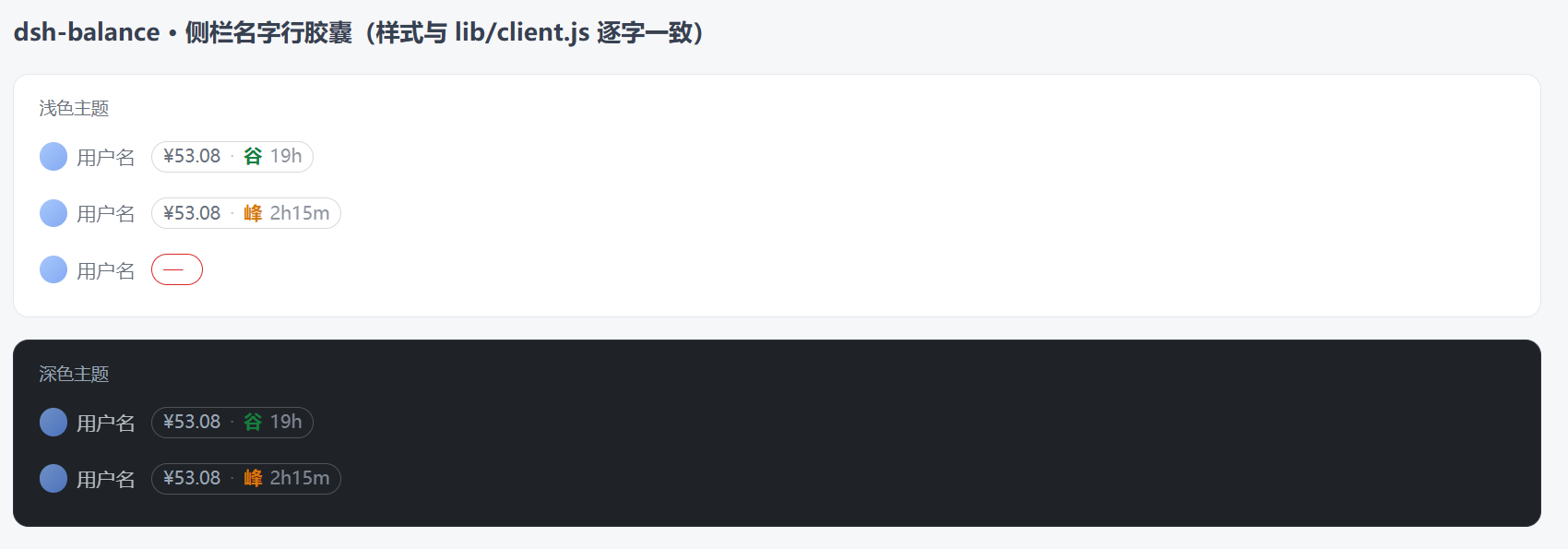
图中为按 lib/client.js 的样式渲染的外观预览(同一份 CSS,脱离 DSH 页面单独成像);实际位置在侧栏名字按钮右侧、连接指示灯左侧。
- 余额:来自 DeepSeek 官方
GET /user/balance,用 DSH 凭证服务里的DEEPSEEK_API_KEY(不出本机)。 - 峰谷:官方高峰/空闲时段实时判断,橙色「峰」/ 绿色「谷」,后面跟距下次切换的倒计时(
2d15h/5h47m/23m),每 15 秒刷新。 - 当前档位单价:鼠标悬停显示输入 / 输入缓存 / 输出单价(元 / 百万 tokens),以及余额是否可用。
- 交互:点击立即刷新;后台每 30 秒心跳一次;侧栏折叠成 36px 图标栏时自动隐藏,展开即回来。
- 失败可见:未配置 Key、余额接口超时或返回异常时胶囊显示
—,悬停能看到原因,不会编数字。
安装
从 npm 装(当前版本 0.1.3):
dsh plugin --profile <你的 profile> add @nomxy/[email protected]
装完刷新页面或重启 DSH 即生效。要求 DSH >= 0.2.1(需要 dsh.client + dsh.bundle 清单)。
常用配套命令:
# 看装了哪些版本
dsh plugin --profile <profile> list

# 升级到最新
dsh plugin --profile <profile> update @nomxy/dsh-balance

# 卸载
dsh plugin --profile <profile> remove @nomxy/dsh-balance
装完可以做一次自检(把端口换成你当前 GUI 的端口,可在 DSH 窗口标题或 dsh web 输出里看到):
curl -s http://127.0.0.1:<port>/api/dsh-balance
# {"ok":true,"balance":{"isAvailable":true,"total":53.08,"currency":"CNY"},
#  "peak":false,"next":{"peak":true,"at":...,"ms":...},
#  "tier":{"input":1,"cacheRead":0.02,"cacheWrite":0,"output":4,"model":"deepseek-flash","known":true}}
侧栏出现 ¥53.08 · 谷 19h 这样的胶囊即为成功。
峰谷说明
胶囊里的「峰 / 谷」用的是 DeepSeek 官方峰谷计费口径,逐条如下(实现见 lib/pricing.js):
| 项目 | 规则 |
|---|---|
| 高峰时段 | 北京时间 09:00–12:00、14:00–18:00(半开区间,12:00 整属于空闲) |
| 适用日 | 周一至周五;周末全天按空闲计价(调休上班的周末也算空闲) |
| 法定节假日 | 全天按空闲计价(HOLIDAY_RANGES 内置 2026 年及以前的中国法定节假日表) |
| 时区 | 判定固定按北京时间(UTC+8,无夏令时),与部署机器时区无关 |
| 倒计时 | 距下一次峰谷切换的时长:午休结束 12:00→14:00 显示 2h;周五 18:00 之后显示到下周一 09:00(如 2d15h) |
| 价格 | 悬停提示的单价按当前所处的峰谷档取(元 / 百万 tokens),缓存写官方暂不计费(0) |
两种颜色:峰=#d97706(橙)、谷=#15803d(绿);模型不在内置价格表里(例如第三方网关上的同名模型)时,胶囊只显示余额,不显示峰谷。
右键设置
右键点胶囊会弹出设置菜单,三组选项,点一下立即生效并记住(存在浏览器 localStorage 的 dsh-balance:prefs,字段为 size / position / form):
| 组 | 可选值 | 说明 |
|---|---|---|
| 大小 | 小 / 标准 / 大 | 高度 18 / 20 / 24px,字号 10.5 / 11.5 / 13px |
| 位置 | 名字右侧(默认)/ 名字左侧 / 行末 | 胶囊在名字行里的插入位置 |
| 形式 | 胶囊(默认)/ 纯文字 / 圆点 / 仅金额 | 纯文字去掉边框与底色;圆点把「峰 / 谷」换成同色圆点;仅金额只留 ¥余额,倒计时收进悬停提示 |
键盘等价入口:Tab 聚焦胶囊后按 Shift+F10 或菜单键 → 方向键选择 → Enter 确认;Esc 或点菜单外关闭。侧栏折叠成 36px 图标栏时胶囊照旧隐藏。
配置
无需配置。余额需要 DSH 里已经配好 DeepSeek 的 API Key:
- 凭证引用:
DEEPSEEK_API_KEY(与llm-deepseek同一引用); - 想换网关地址时可用环境变量
DEEPSEEK_BASE_URL(注意:指向第三方网关时 API Key 会发给该地址)。
隐私与安全
- 插件只做两件事:读凭证、请求官方余额接口。不收集、不上报,没有遥测。
- 宿主半只注册两条本机路由(
/api/dsh-balance、/api/dsh-balance/holidays),且只接受Host为回环地址或本监听地址的请求(与 DSH 自身/api栅栏同一口径);跨站标记与异源Origin一律拒绝。 - 上游错误原文不会透出到界面(上游异常消息里可能带凭据片段)。
已知限制
- 只支持 DeepSeek 官方平台余额;第三方路由上的同名模型不适用官方峰谷定价,此时只显示余额。
- 峰谷与节假日规则是内置表(
lib/pricing.js),官方调整规则或发布次年放假日历时需要更新版本。 - 胶囊是通过 DOM 挂载进侧栏名字行的(DSH 没有「名字后面」这个槽位),因此侧栏结构大改时需要跟着调整选择器
div[class*="triggerRow"]。
来源与致谢
宿主半(lib/index.js、lib/pricing.js:余额读取、峰谷与节假日规则、单价表)取自
@dougen/dsh-deepseek-usage(MIT),仅把插件 id 与路由改名,并去掉了对 @deepseek-ai/dsh-credentials 的运行时依赖(credentialRef 是编译期 brand,运行时为恒等函数)。
客户端半(lib/client.js)为本项目重写:不注册槽位,直接挂载紧凑胶囊。
本项目的代码、发布到 npm、以及向 awesome-dsh-plugin 提交的收录条目,均由作者本机运行的 DSH(DeepSeek Harness) 代理端到端完成,作者负责需求与授权。
License
MIT,见 LICENSE(包含上游 MIT 声明)。
English
A 20px balance chip for the DeepSeek Harness sidebar footer, sitting right of the name row: official DeepSeek balance plus the current peak/off-peak window with a countdown to the next switch, hover for the active model's unit prices, click to refresh. No telemetry; the host half only serves two loopback-only routes.
Peak/off-peak (official DeepSeek billing rules): peak = Beijing time 09:00–12:00 and 14:00–18:00 on weekdays only; everything else — weekends (even make-up workdays), Chinese public holidays, and the 12:00–14:00 lunch gap — is off-peak/idle. The countdown shows the time until the next switch (e.g. 2d15h from Friday 18:00 to Monday 09:00).
Install:
dsh plugin --profile <your-profile> add @nomxy/[email protected]
Requires DSH >= 0.2.1 (dsh.client + dsh.bundle present). Verify with curl -s http://127.0.0.1:<port>/api/dsh-balance.
Host half derived from @dougen/dsh-deepseek-usage (MIT). Code, the npm publish, and the awesome-dsh-plugin listing were all prepared end-to-end by DSH (DeepSeek Harness), the agent running on the author's own machine.