dsh-cockpit
Verified@rs-dsh/dsh-cockpit · v0.3.0 · MIT · Web UI
A durable task board for a DSH hub session: a tree of steps with free-form link fields, kept as a local JSON file that other processes can read.
Install
dsh plugin add @rs-dsh/dsh-cockpit Confirm the layer applied with dsh --profile default --dump-config — see the install guide.
Source
Published to npm without a public repository. Inspect the package contents before installing.
Tags
Readme
@rs-dsh/dsh-cockpit
A task board for a DeepSeek Harness hub, the session that coordinates the work of an effort across many pull requests. The board is a tree of steps, each linked to its issue and PR, kept as a local file that you and your scripts can read.
What you get
- Four board tools for the agent: open a board, read it, add steps and update them.
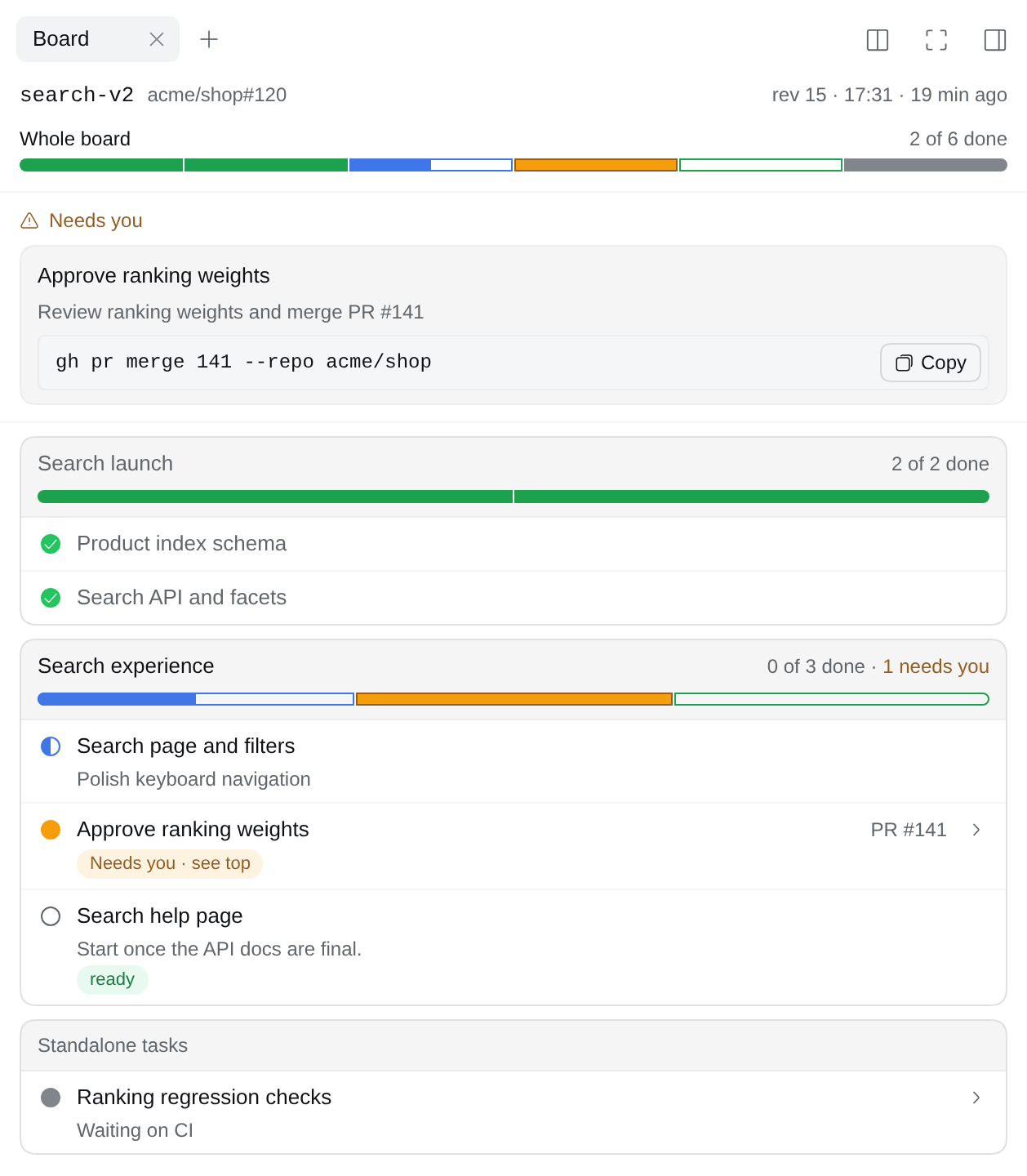
- The Board tab in the web GUI's right sidebar: whole-board progress, a "Needs you" list, separate sections for each top-level parent and its children, and a Standalone tasks section. Each parent has its own local progress. Each step shows its status mark, what is blocked or ready, and links to its PR and issue; hover a mark for its status and a title for the step id. It uses DSH's own icons and status marks, in the light and dark themes.
- A progress strip above the chat input: how far the board is, and what is blocked or needs you.
- A card per board tool call in the chat.
- A small reader for scripts, with no DSH needed.
The panel and the strip only show the board. They run no command and change nothing.
Install
dsh plugin --profile <name> add @rs-dsh/[email protected]
If npm is not an option, install from git, pinned to the release tag: dsh plugin --profile <name> add 'github:romany-saad/dsh-plugins#[email protected]&path:packages/dsh-cockpit'.
The Board tab, the strip and the chat cards need a profile with @deepseek-ai/dsh-web-app, such as web.
Configure
It works with no config. To change something, add a dsh-cockpit row to the profile's cordis.patch.yml, naming only what you change. Keep one such row: a row with the same id replaces the whole config, so put every setting you change in it. To link #12 and owner/repo#12 to GitHub:
- id: dsh-cockpit
  name: '@rs-dsh/dsh-cockpit'
  config:
    links:
      issue: 'https://github.com/{repo}/issues/{number}'
      pr: 'https://github.com/{repo}/pull/{number}'
For #12, {repo} comes from the board's parent ticket. Without links, only full URLs become links.
tools: { enabled: false }registers no board tools.route: { enabled: false }turns off the data the Board tab and the strip read; the tab then says the board is unavailable.
Drift
Drift is a step whose status no longer matches its work, such as a merged PR on a step that still says waiting. The plugin knows no tracker, so the check is a command you configure, drift: { command: '...', cwd: '...' }; it runs only when the agent asks for a drift check. What the command gets and must print is in the example and in DEVELOPING.md (linked below). In mode: report (the default) it only reports the differences, and the hub decides what to change; in mode: apply it sets the reported statuses itself. examples/board-drift-gh.sh is an example to copy: it reports steps whose PR gh says is merged.
Use
Ask the hub to keep a board for the effort, or let it use the tools on its own:
- Open a board with a key, such as
bosla-883, and optionally the parent ticket. The session stays bound to it, also after a resume. - Add steps, each with what it is and its issue or PR.
parentputs a step under another;dependsOnlists steps that come first, so a step shows as blocked until they are done or dropped. Both must name steps already on the board: the agent adds a step first, then links others to it. - Update a step as the work moves:
next,now,waiting,doneordropped, and a next action. - Needs you: a step with
waitingOn: ownershows in the "Needs you" list and on the strip, with its next action, and itsreadyCommandto copy when it has one.
The strip above the message box shows progress across the whole board: one segment per leaf step (a step with no children), including standalone top-level steps. Parents are not counted again, so a completed group cannot hide a waiting step elsewhere on the board. Done and dropped are counted separately. The Whole board bar at the top of the Board tab uses the same counts as the strip, and both put their segments in the order the sections are drawn. Below it, each top-level parent and its subtree occupy a separate bordered section; root steps without children appear under Standalone tasks. Each parent's local bar counts only its direct children, so its count can differ from the whole-board total. Above 24 leaf steps, the strip uses one continuous bar.

When a step needs you, the strip shows its next action. Copy command copies that step's readyCommand, and Board › opens the Board tab.

Each board tool call shows as a one-line card in the chat, under Called tools.

Reading a board from a script
import { readBoard, boardTree } from '@rs-dsh/dsh-cockpit/reader'
const board = await readBoard('bosla-883')
console.log(boardTree(board).tree)
listBoards() lists the keys. Boards are files in $DSH_HOME/data/dsh-cockpit/boards/ (by default ~/.dsh/data/dsh-cockpit/boards/).
Links
- Design and decisions: issue #1
- CHANGELOG
- Working on the plugin: DEVELOPING.md
- License: MIT