dsh-core
Verified@rs-dsh/dsh-core · v0.1.2 · MIT · Web UI
Shared UI layer for the rs-dsh DSH plugins: one selection toolbar, anchored cards and DSH's own components, so the plugins look like DSH and stay small.
Install
dsh plugin add @rs-dsh/dsh-core Confirm the layer applied with dsh --profile default --dump-config — see the install guide.
Source
Published to npm without a public repository. Inspect the package contents before installing.
Tags
Readme
@rs-dsh/dsh-core
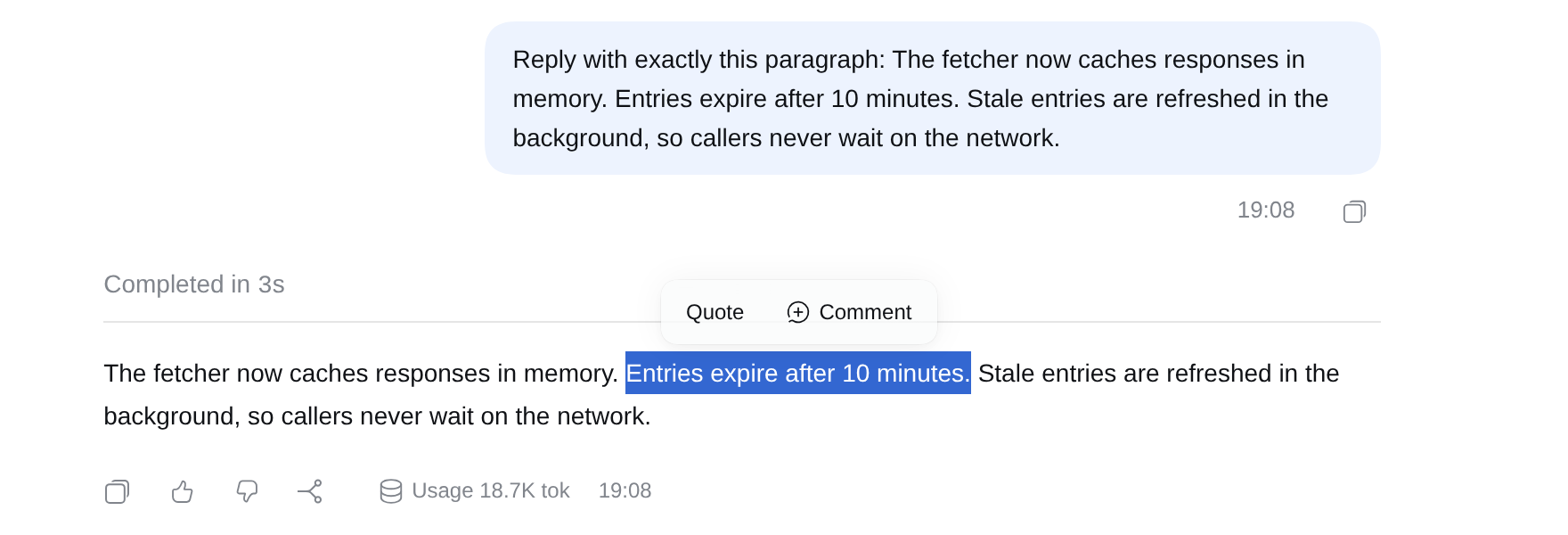
The shared base of the rs-dsh plugins for DeepSeek Harness. It gives them one selection toolbar, so their buttons share one box, and draws their boxes with DSH's own components. You don't install it yourself: dsh-threads and dsh-quote bring it with them.
Install
Install the plugins you want. Each one brings this package and adds it to the profile:
dsh plugin --profile <name> add @rs-dsh/[email protected] @rs-dsh/[email protected] @rs-dsh/[email protected]
Then reload the DSH web page. However many rs-dsh plugins you install, the core runs once.
Requirements
- DSH 0.2.1-rc.2 or later. It is tested with 0.2.1-rc.2.
- A profile with the web GUI (
@deepseek-ai/dsh-web-app), such asweb.
What you see
- One selection toolbar. Select text in a conversation and the actions of every installed rs-dsh plugin show in one box, such as Quote and Comment. An action only shows where it applies: for example, there's no Comment on tool output.
- Boxes that look like DSH. Buttons, text boxes, menus and replies are DSH's own components, so they follow DSH's theme and its updates. A box closes with Esc or a click outside it, and only one is open at a time.
Limits
- Web GUI only.
- Needs DSH's UI library. The core uses
@deepseek-ai/dsh-client-ui-primitives, which DSH's web app ships. If a DSH release drops it or renames a part the core uses, the rs-dsh plugins stop at start with a message saying so, until they're updated.
More
- CHANGELOG.md
- MIT License
- For maintainers, and for writing a plugin on the core: DEVELOPING.md