dsh-design-studio
Verified@sal7one/dsh-design-studio · v2.7.6 · MIT · Web UI
Persistent Design Studio plugin for DeepSeek Harness: the design_studio agent tool, a /design-studio live-preview route + JSON API, identity presets, an attributed 88-style design atlas, content-addressed edit history with undo/restore, OpenRouter vision
Install
dsh plugin add @sal7one/dsh-design-studio Confirm the layer applied with dsh --profile default --dump-config — see the install guide.
Source
Tags
Creators
Readme
@sal7one/dsh-design-studio
A DeepSeek Harness plugin that turns design mockups into a first-class AI workflow.
Live previews, an element picker, a real design agent, vision review, identity presets —
and a two-agent apply flow where DeepSeek edits and the design agent verifies.
Everything is backed by real files in the current workspace under
design-studio/, and the install is launch-persistent: install once, the
Design Studio tab is there on every launch.
Screenshots
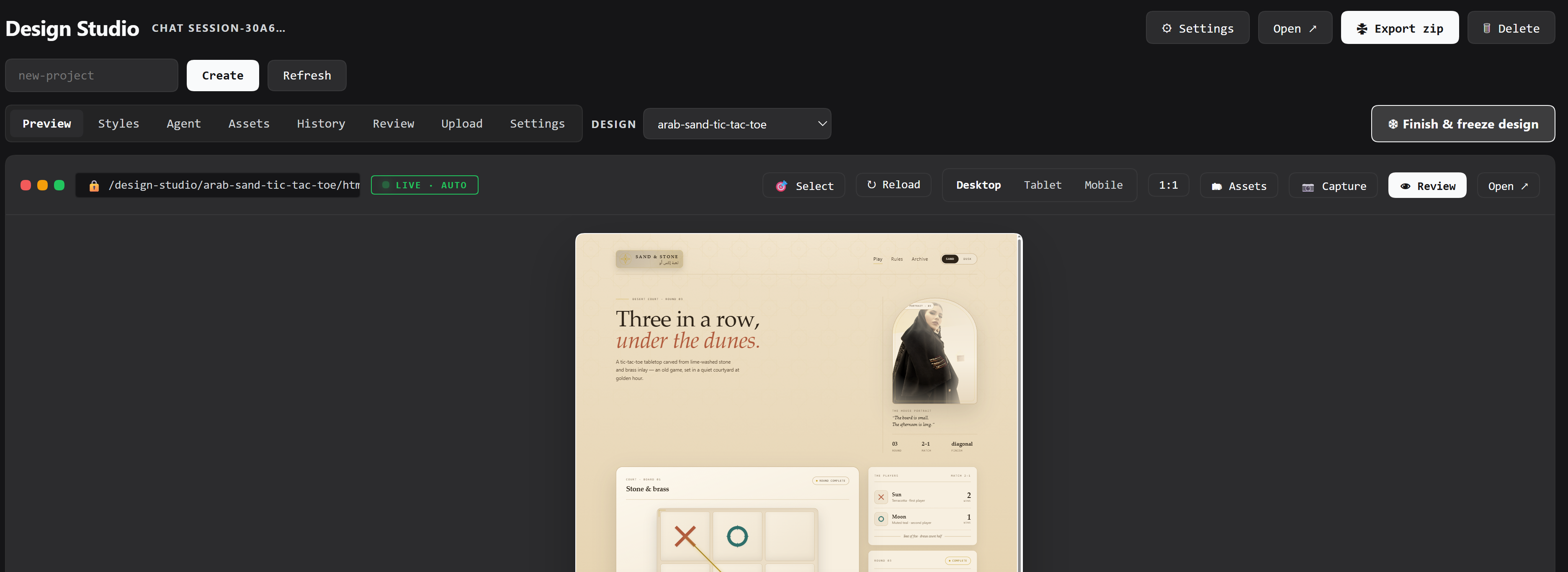
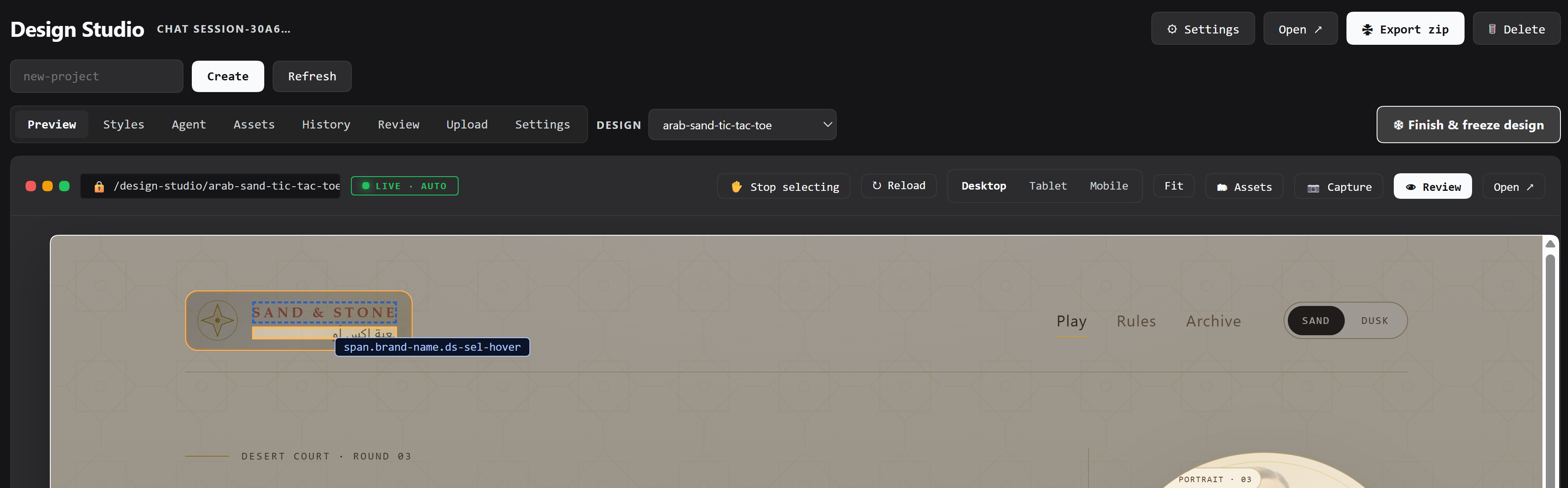
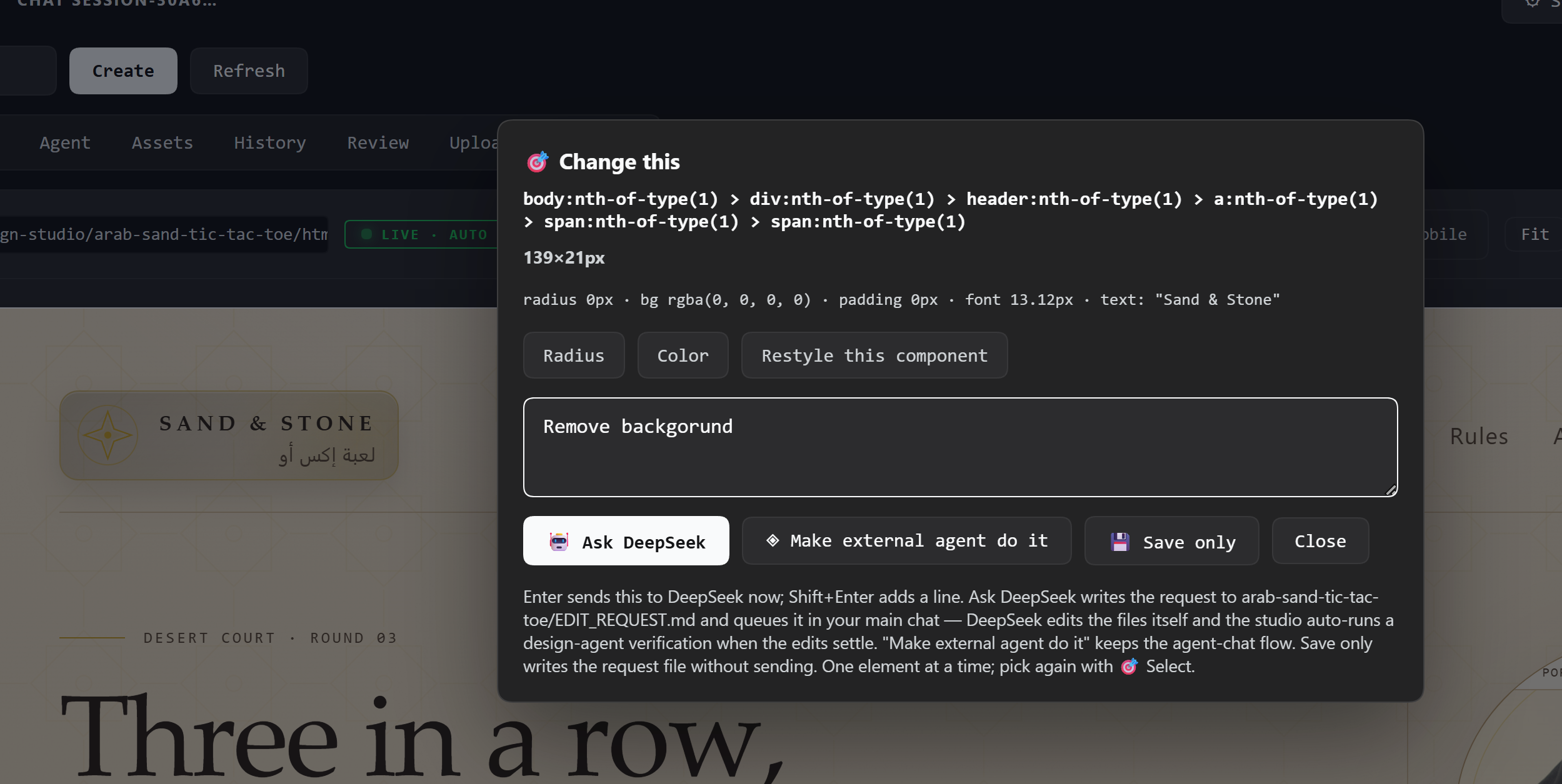
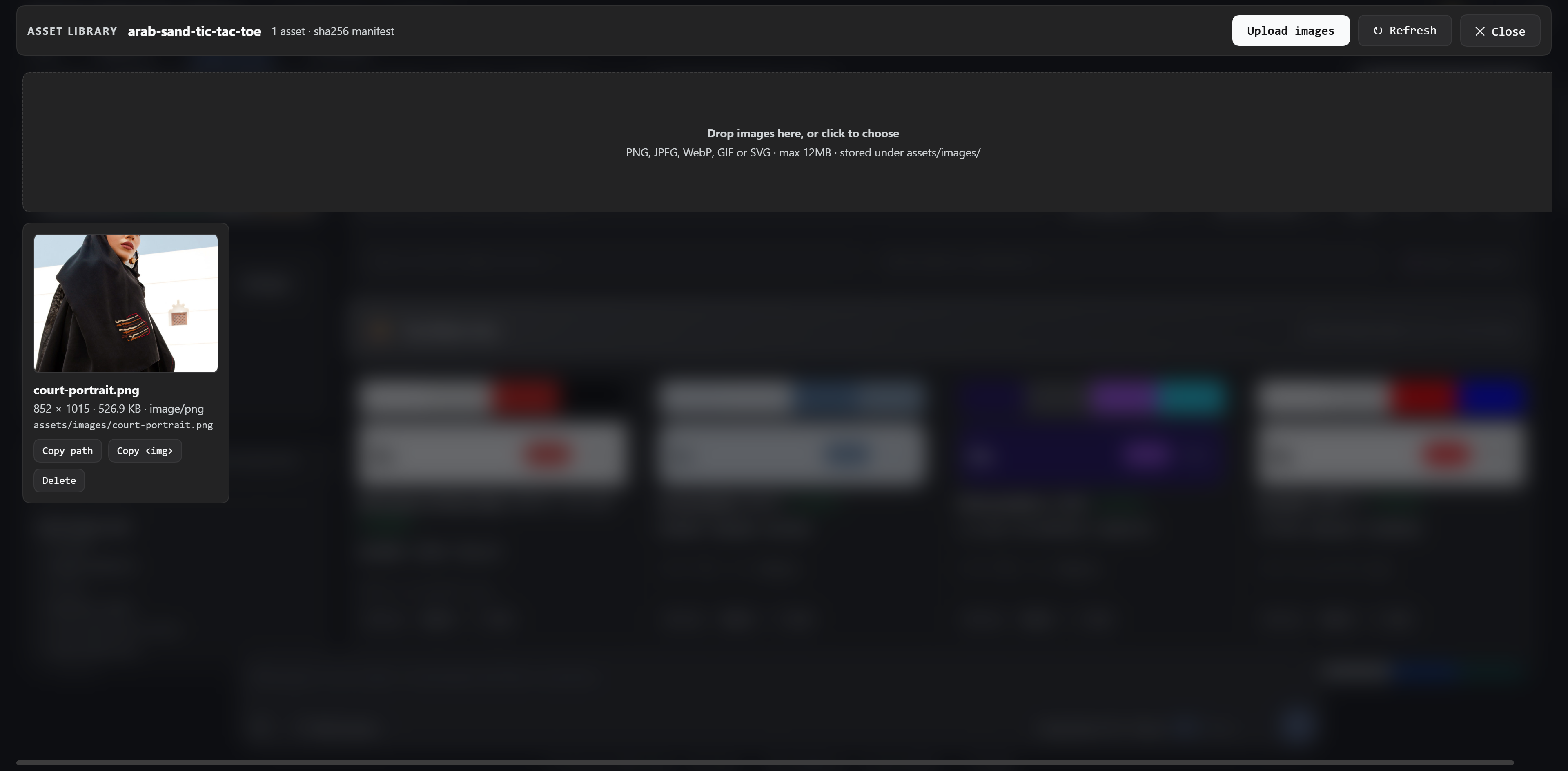
| Preview | Selection | Ask DeepSeek | Assets |
|---|---|---|---|
 |
 |
 |
 |
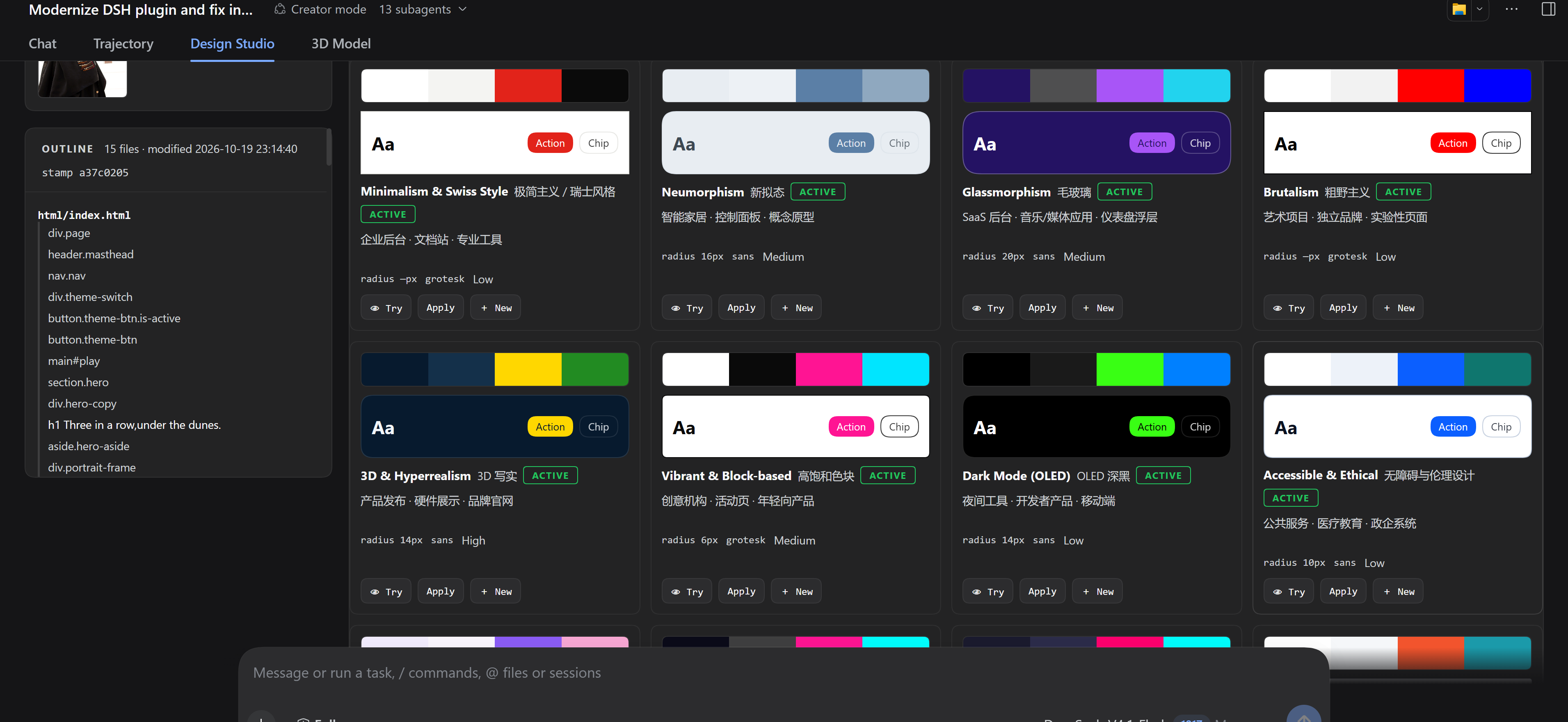
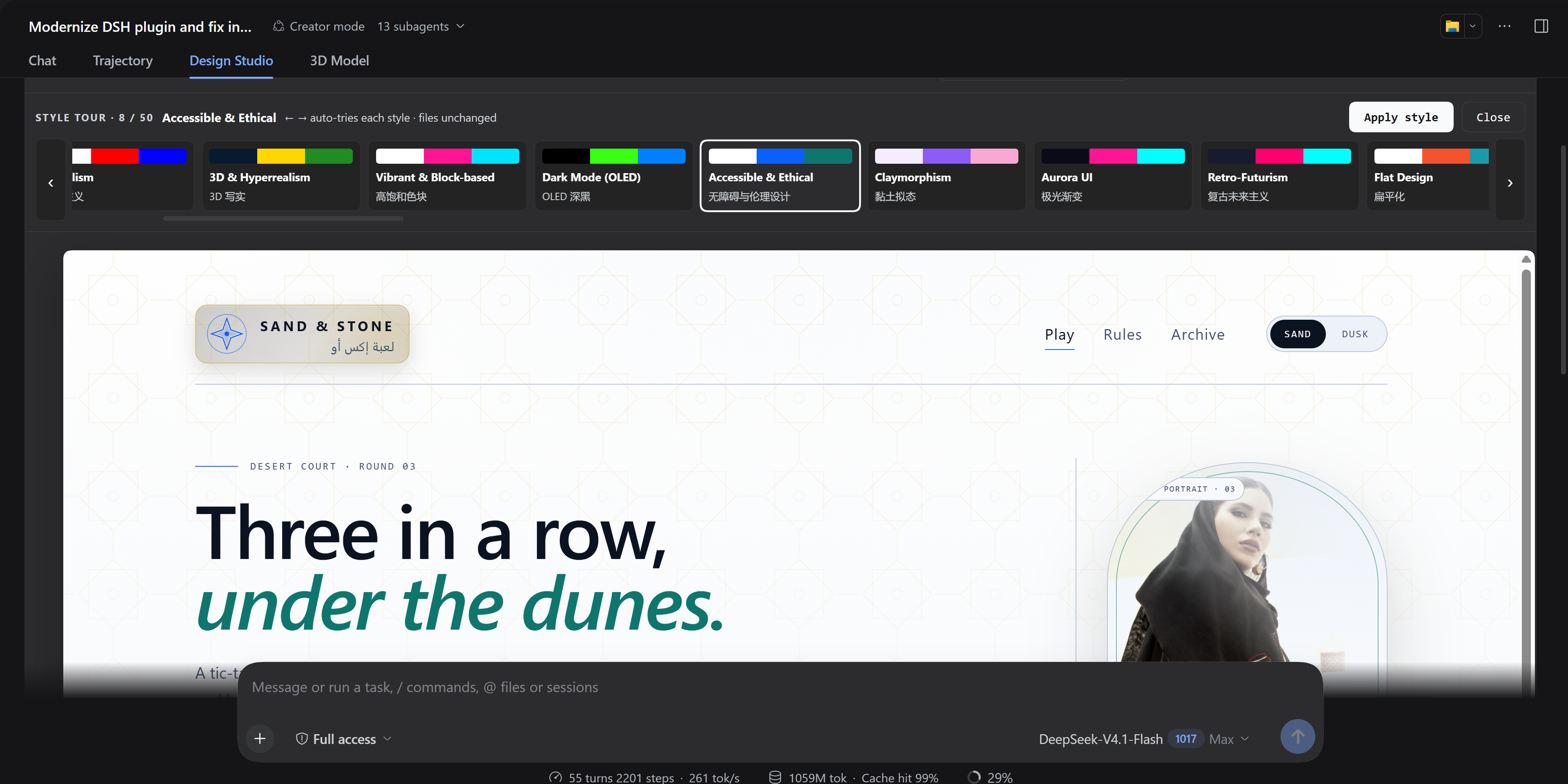
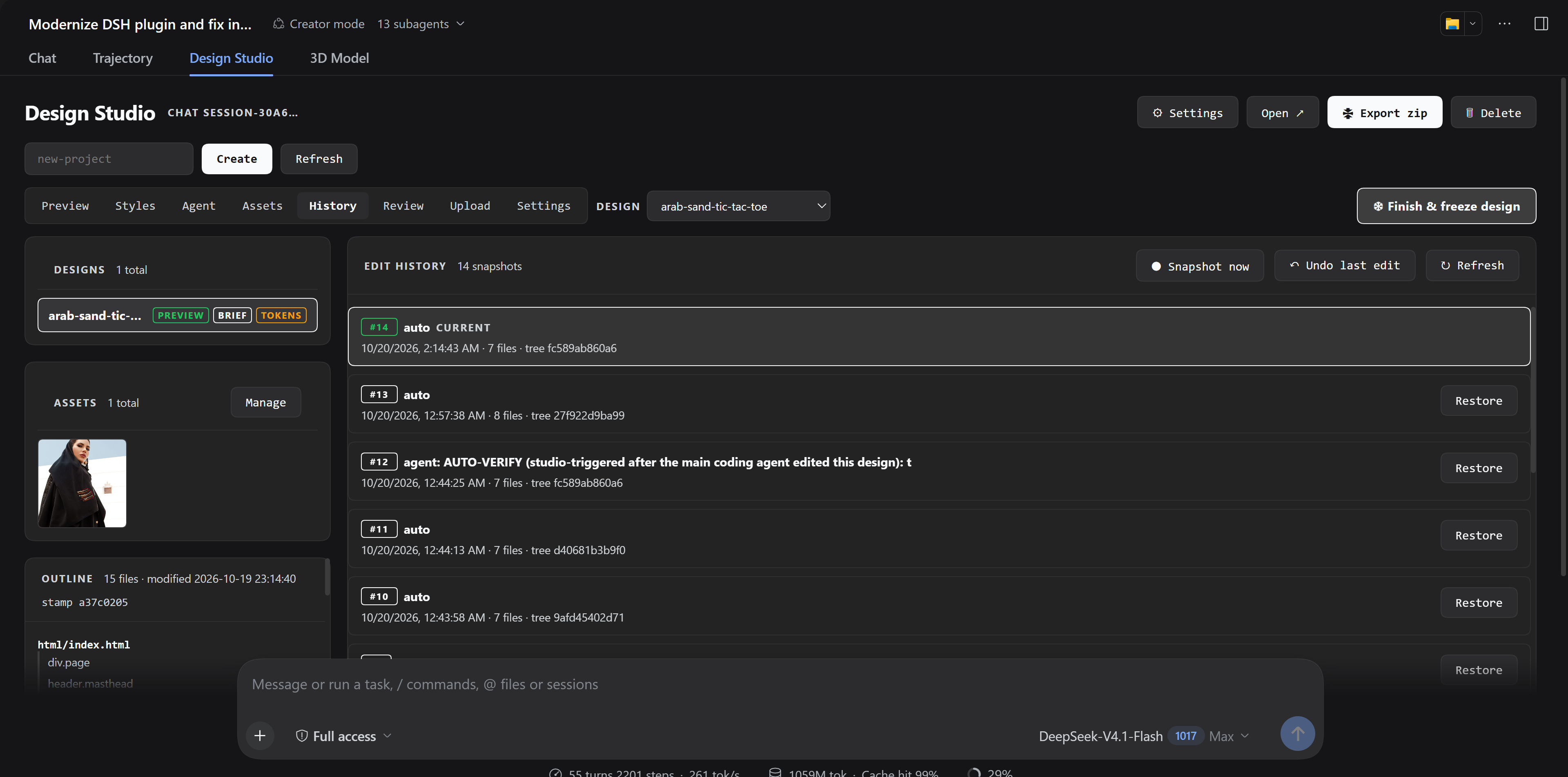
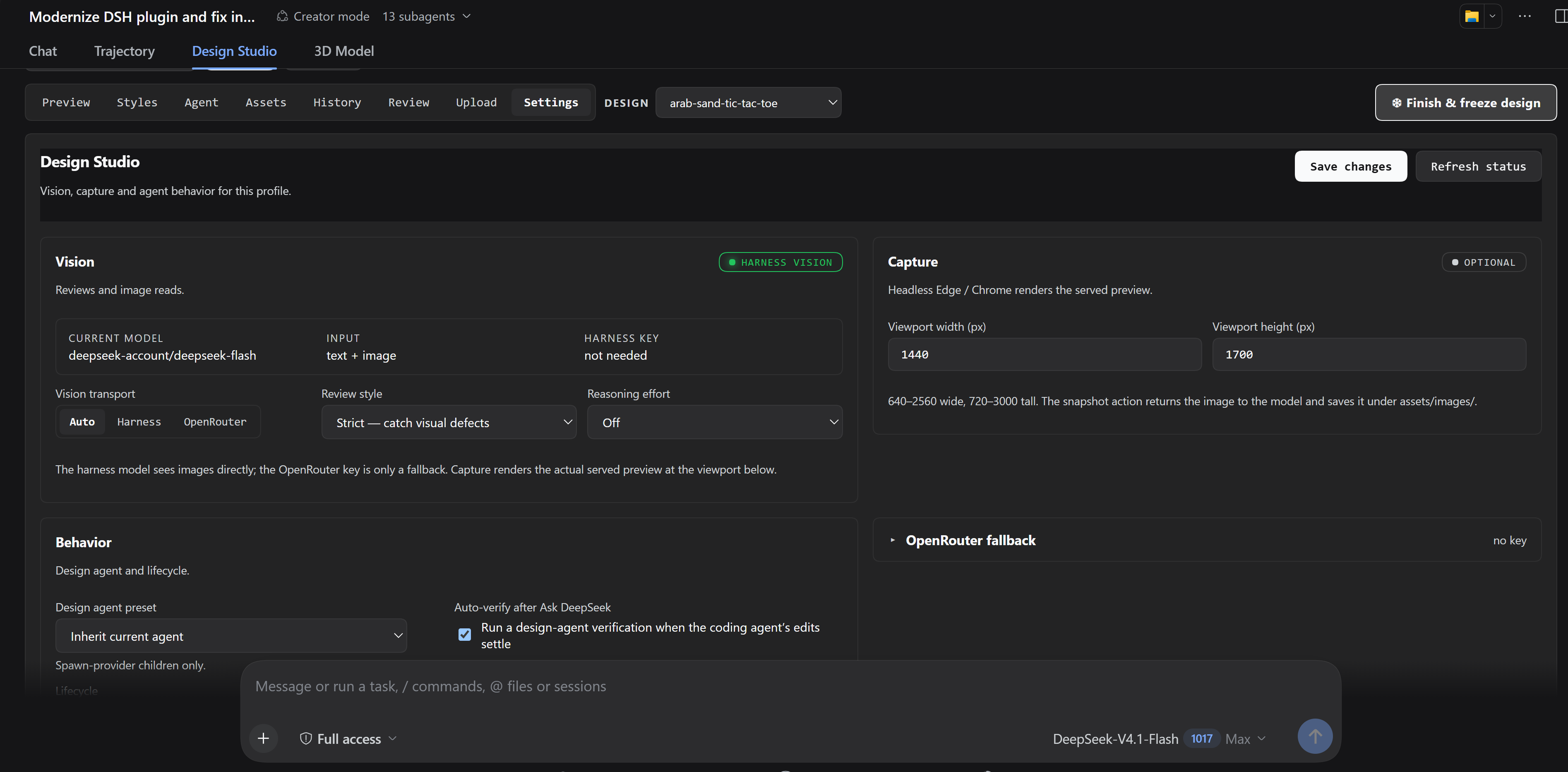
| Styles | Style tour | History | Settings |
 |
 |
 |
 |
Click any screenshot for the full-size image.
DSH-Design-Studio/
├── package.json          # dual-face manifest: dsh.bundle (host) + dsh.client (web UI)
├── cordis.patch.yml      # the composition layer this bundle contributes
├── README.md             # this file
├── CHANGELOG.md          # release notes (2.3 atlas, 2.2 history, 2.1 split/settings)
├── LICENSE               # MIT
├── THIRD_PARTY_NOTICES.md # style-atlas attribution and MIT notices
├── icon.svg              # plugin inventory artwork
├── locale/               # plugin inventory display metadata (en/zh)
├── repo-images/          # UI screenshots shown at the top of this README
├── lib/
│   ├── data/
│   │   └── style-atlas.json # attributed 88-style snapshot (no runtime dependency)
│   ├── index.js          # host orchestrator: design systems, agent, HTTP route + tool
│   ├── host/             # host domains
│   │   ├── constants.js  # shared limits, key reference, slug regex
│   │   ├── util.js       # pure helpers: zip writer, paths, base64, PNG size
│   │   ├── node-io.js    # Node helper seam, binary writes, delete, browser capture
│   │   ├── config.js     # config load/save, key info, harness vision detection
│   │   ├── vision.js     # harness + OpenRouter review, image descriptions
│   │   ├── preview.js    # headless preview snapshot
│   │   ├── presets.js    # identity preset CRUD + apply
│   │   ├── assets.js     # asset manifest, sha256 dedupe, upload/import/delete
│   │   ├── history.js    # content-addressed blobs, trees, snapshots + restore
│   │   └── styles.js     # style atlas apply/save/create + CSS token generation
│   ├── client.js         # GENERATED self-contained ModuleLoader bundle (shipped)
│   └── client/src/       # runtime, styles, labels, primitives, api, element-picker,
│                         #   scaled-preview, assets-modal, history, style-atlas,
│                         #   studio-view, settings, index
├── scripts/
│   ├── check.mjs         # dependency-free release/check script
│   └── bundle-client.mjs # source → lib/client.js; installs never run it
├── tests/                # host + client smoke tests (node --test)
└── examples/             # example design systems (html/css/js mockups + presets)
✨ Features
Core platform
- One command, persistent — a dual-face
dsh.bundle+dsh.clientpackage:dsh plugin addonce, and the tool, the preview route, the prompt section and the Design Studio tab are present on every launch. No install-time build step, no TypeScript, zero runtime dependencies (plain JavaScript); the client source split is bundled ahead of release into the committedlib/client.js. design_studioagent tool — your assistant (and any subagent) canlist / all / create / read / write / zip / reveal / delete / sweepdesign systems, manage business pages (page_list / page_create / page_rename / page_delete), manage assets (asset_list / asset_upload / asset_import / asset_delete), save and restore edit history (history / snapshot_save / snapshot_restore / snapshot_undo), apply/save/create styles (style_list / style_apply / style_save / style_create), manage identity presets, run vision reviews, chat with the design agent, read its history, and configure the studio — design files live in the workspacedesign-studio/<slug>/folder (legacy profile designs remain readable).- Live preview route —
/design-studio/<slug>/html/index.html, served by the harness web server. Inline Preview is the default open tab and sits in the same tab bar as Pages, Styles, Agent, Assets, History, Review, Upload and Settings — no modal, no top-right panel. It renders a centered device at a real Desktop (1440×1600), Tablet, or Mobile viewport; switching viewport resizes the whole device frame, and the surrounding area uses the panel background instead of a white strip. A Fit / 1:1 control (Fitdefault) scales the device to the available pane or shows actual size with scrolling. The open Studio polls the selected design's stamp every 1.5s and auto-reloads the Preview/outline/assets on external edits. - Large Studio workspace — a 300px library (Designs, Assets, Outline) and a wide
tabbed work area (Preview / Pages / Styles / Agent / Assets / History / Review / Upload / Settings). The
workspace bar's Design selector lists every design in the workspace (🔒 when
frozen) and switches preview, files, history, assets and styles without leaving Preview.
Settings and Preview tabs span the full workspace; the standalone Settings page uses a
two-column layout at wide widths. Open ↗ is a host action, not a link: it launches
the OS default browser (
rundll32/open/xdg-open), bypassing the DSH in-app browser. - Design-brief routing — a system-prompt section turns operator screen briefs into design systems automatically. The preview URL is derived from the live server origin.
Design systems
- Mockup-scoped files — every design system is
html/index.html,css/style.css,css/token.css,js/app.js(minimal presentation) plusdesign_prompts_forcoders.md(the brief the coding agent follows) andassets/images/for uploads. Mock data stays honest — empty/loading states, never fabricated live numbers. - Per-conversation ownership — each design system is bound to the conversation that created it; the tab shows only your chat's designs (unbound legacy systems are adopted on first list).
- Drop zones + asset library — drop images or code files onto the tab; images land
in
assets/images/and auto-select in the agent chat picker. The 🗂 Assets modal uploads by drop/picker, dedupes by sha256, records MIME/dimensions/bytes/alt inassets/assets.json, and offers thumbnails, a lightbox, copy-path/copy-<img>, and delete.asset_importcan pull an operator attachment path directly. Preview captures are excluded from the library. - Attributed style atlas — 88 styles plus their theme palettes and font moods adapted from
dsh-ui-ux-pro-max (MIT; see THIRD_PARTY_NOTICES.md).
The Styles tab is a gallery grid with a large Try them now action. That
opens a horizontal style tour over the current design: arrows or
←/→auto-try each style live, a scrollable strip jumps anywhere, and Apply/Revert are one action away. The tour sits above the preview and scrolls only its own strip. The gallery also offers filters/search, random-next, a pre-style snapshot with Undo apply, full-template New, and “Save current” into a reusable custom style. Auto snapshots follow AI edit batches and design-agent turns. - Content-addressed edit history — every design gets a snapshot tree under
_studio/history/<slug>/: sha256 blobs, sorted tree manifests, and parent-linked snapshots with a head cursor. Auto-capture runs after edits settle; the History tab offers manual checkpoints, undo-last-edit, and restore-to-snapshot. Restoring moves the head without deleting later snapshots, so earlier states stay restorable. - Cross-platform zip export + reveal + delete — a built-in store-only ZIP writer
(no
zipbinary), the OS file manager (open -R, Explorer,xdg-open), and recursive delete without a POSIX shell.
Design agent (real harness subagent)
- It does the work itself — the agent chat spawns a harness subagent through
ctx.subagents.startActivation(design-studio persona,delivery: 'caller',cwdset to the design system,maxDepth: 1— the child is depth 1, so it runs but cannot spawn grandchildren) that lists, reads and edits the design files across multiple tool calls per message, then summarizes file-level changes. - Live activity — its reads/edits stream into the chat as they happen, with inline errors, a persisted per-system history, and run timeouts.
- Vision, harness first — when the current harness model advertises image input
(reported by
action config→harnessVision), images explicitly selected in the picker (or mentioned by filename) are attached directly to the child prompt, so the design agent inspects the pixels itself. Only when the harness model cannot accept images does the plugin fall back to OpenRouter descriptions. - Design-cache discipline — on every turn (even a bare "ok") the agent verifies the freshness stamp, reports whether the design changed since its last turn, adopts the latest files as truth, and asks what you want when the request is vague.
🎯 Element picker + two-agent apply flow
Click 🎯 Select, click any element in the live preview, describe the change:
| Button | What happens |
|---|---|
| 🤖 Ask DeepSeek (default) | Saves EDIT_REQUEST.md, sends the request to your main chat through the retained Session binding (session.prompt(..., 'queue')). DeepSeek edits the files itself and invokes the design agent only when it needs a visual read. A live run banner tracks queued → working → finished in the tab, and the studio auto-runs a design-agent verification once the edits settle. |
| ◈ Make the design agent do it | The classic flow: the design agent applies the change itself and replies in its chat. |
| 💾 Save only | Just writes EDIT_REQUEST.md — apply later from either chat. |
- Design switcher — the workspace bar in every tab (including Preview) lists all designs and marks frozen ones with 🔒. Switching reloads that design's preview, files, history, assets, styles and freeze state. Studio-wide settings (vision, capture size, agent preset) remain global.
- Multiple pages per design — one design can hold several business pages,
shown together in the Pages artboard canvas and switchable from Preview.
Pages live at
pages/<id>.htmlwith sharedcss/token.cssand assets; a page has its owncss/pages/<id>.css,js/pages/<id>.jsand optionalcss/pages/<id>.tokens.css. Page-scoped style applies (Styles → This page) write the page token file; Entire design writes the globalcss/token.css. Sidebars, drawers, modals, tabs and filters are overlay states on the same page — not new pages. Use a fixed overlay layer with a blurred/inert backdrop. Add pages only for a new business screen/flow. Zip, freeze, history and delete cover every page automatically because they work on the whole design root.
Design freeze (design → implementation handoff)
- A large ❄ Finish & freeze design button marks a design system as the read-only source of truth. Freeze captures a final snapshot, refreshes the zip, and records an implementation target (defaults to the current project; the selector also lists other live chat projects, workspaces that already contain designs, and recent freeze targets, with a custom-path fallback) plus an optional handoff note.
- While frozen,
design_studiorejects write/style/asset/history-restore/delete and design-agent actions; read, snapshot, review, zip, and open still work.list/allreturnfrozenand the freeze record so every agent can see it. - The UI shows a Design frozen — implementation mode banner and disables edit controls. Only an explicit Thaw design confirmation re-enables edits.
- Agent guidance lives in AGENTS.md, skills/design-studio/SKILL.md, and the handbook: frozen means work in the implementation target, not the mockup.
- Built-in routing: the plugin injects this workflow into the DSH system prompt. Operators do not need to write “build the mockup only”, “when I say freeze…”, or “implement the frozen design” on every project. Approving with done / looks good / LGTM / freeze is enough; freeze defaults to the current project.
- Completion gate: when the design is ready, the agent asks one native question with three choices — Keep refining, Freeze only, or Freeze & implement — then acts on the answer. It asks once per completed revision, not after every tiny edit; after a refinement it asks again with the native tool instead of falling back to plain chat.
Freshness stamps (multi-agent safety)
- Every design change bumps a stamp
{hash, at}(fresh random hash + ISO time, latest-status only) — the plugin detects changes from any editor via the harnessfs/observedstream, plus synchronous bumps on its own write paths. Path comparisons are Windows-aware (the old code compared/prefixes only). - Agents compare their remembered hash with the current one: drift ("changed since your last turn") is surfaced in prompts and tool output, and the design agent records a per-turn design cache so the next turn can prove UNCHANGED/CHANGED.
Vision & preview
- 👁 Review — honest
GOOD | POORverdict + one-sentence notes against the brief. The plugin asksctx.llm.resolveModelInfowhether the current model accepts images; when it does, the review runs on the harness route with no OpenRouter key (transport: harness).visionTransportcan beauto(default),harness(no fallback), oropenrouter(always use the key). - 📷 Capture — a headless Edge/Chrome renders the actual served preview to a PNG
(
assets/images/preview-*.png) and returns it as an attached image. The model can see the rendered design directly instead of guessing from source. The same capture feedsreviewand the design agent. If no Chromium browser is installed, the action reports that honestly; the rest of the studio still works. - OpenRouter fallback — when the harness model does not accept images, reviews and
image descriptions use the configured OpenRouter models through Node's built-in
fetch(nocurl, no temp files). The key is a harness credential reference (OPENROUTER_API_KEY) and is never rendered or returned. - Identity presets — save palettes/typography/logos as presets;
preset_applywritescss/token.cssand copies logo assets.
Settings & data
- Settings → Design Studio — a vision-first layout: live harness model and
inputModalities, transport (auto/harness/openrouter), review style (strict/balanced/lenient), reasoning effort (includingautoandmax), capture viewport, design-agent preset, auto-verify, and lifecycle. The OpenRouter fallback + advanced request fields and the identity-preset editor are collapsed disclosures, so the page stays readable. - Settings → All designs — every design system across conversations, with zip/reveal/delete and an explicit orphan sweep.
- Everything survives restarts — designs live on disk in the workspace
design-studio/; presets, config, reviews and agent history stay in the profile.
Agent knowledge and skill
For agents working in this repo, Design Studio now has a repo-local handbook and skill. These are not installed into the DSH profile yet; they are source material for future distribution.
- docs/design-studio-handbook.md — workflows, file layout, style/history/vision behavior, quality checklist, and safety.
- skills/design-studio/SKILL.md — the working procedure for creating, editing, previewing, styling, snapshotting, and reviewing mockups.
- AGENTS.md — repository-level guidance for coding agents.
Quick start
Works with both harness distributions — the npm distribution
(npx @deepseek-ai/dsh web) and a Desktop/source checkout.
Install from npm (recommended; no git network dependency)
Once the package is published:
dsh plugin --profile desktop add @sal7one/dsh-design-studio
Or from the Web Plugins page (the bundle is publishable and declares
dsh.bundle.patch, dsh.manifestVersion: 1, engines.dsh, display metadata and
an icon). Restart the harness after installing if your profile has no HMR.
Install from git
dsh plugin --profile desktop add git+https://github.com/Sal7one/DSH-Design-Studio.git
The package has no prepare/build script, so pnpm has no build permission to
prompt for. It only needs GitHub to be reachable during the fetch/install.
Install from a local checkout
dsh plugin --profile desktop add "link:/absolute/path/to/DSH-Design-Studio"
On Windows, link:S:/projects/dsh/DSH-Design-Studio is the equivalent. Use an
absolute path: a bare relative path is read as a GitHub owner/repo shorthand.
Remove with the package name:
dsh plugin --profile desktop remove @sal7one/dsh-design-studio
The bundle row is enabled by default. To keep it installed but off, override it in
your profile's own cordis.patch.yml (profile layers apply after bundle layers and win
per row):
- id: dsh-design-studio
  disabled: true
Optional: an OpenRouter key is only needed as a fallback when the current harness
model does not advertise image input. Run design_studio → config; if
harnessVision.available is true, reviews and selected images use the harness model
directly. The key is stored via the credential seam and never shown again.
Plain-English setup (non-power users)
- Install Node.js (v22 or newer) from nodejs.org.
- Start the harness:
A browser window opens at the harness URL it prints (usually a loopback address such asnpx @deepseek-ai/dsh webhttp://127.0.0.1:<port>) — that's the harness Web UI. - Install this plugin:
dsh plugin --profile desktop add @sal7one/dsh-design-studio - Restart the harness (Ctrl+C, start again). The Design Studio tab now appears in every conversation, plus Settings → Design Studio / All designs.
- Design something. Create a design system, or just describe a screen to the
assistant — it routes briefs into the studio automatically. The live preview is
served at
<harness-origin>/design-studio/<name>/html/index.html(the exact origin is the one printed by the harness).
Workflows
Design → freeze → implement. Describe the mockup. The plugin's injected routing keeps the agent in design mode until the design is approved. When it thinks the design is ready it asks one native question: Keep refining, Freeze only, or Freeze & implement. Freeze defaults to the current project. “LGTM / looks good / done” freezes directly; “freeze and implement” does both without another confirmation.
Iterate with the design agent. Open the Design Studio tab → select your design → type a request in the agent chat ("make the status bar left-aligned", "use this image as the background"). It reads, edits and summarizes; the preview reloads.
Pick an element and let DeepSeek change it. 🎯 Select → click the element → type the change → Enter sends it to Ask DeepSeek (Shift+Enter adds a line; Save only writes the request without sending). The request appears in your main chat, DeepSeek edits, the tab banner tracks progress, and the design agent auto-verifies the result.
Give DeepSeek a visual job. Drop a palette image on the tab (it lands in
assets/images/), then in the main chat:
In the tic-tac-toe design, read the color palette from
assets/images/palette.pngand apply it tocss/token.css. Use the design agent for the visual read.
DeepSeek routes the visual work to the design agent (design_studio → agent), the
image is auto-attached and vision-described, and the result flows back into DeepSeek's
tool result.
Requirements
- Node ≥ 22 and a harness on the 0.2.x line (
engines.dsh:>=0.2.0-rc.2 <0.3.0; tested on0.2.1-rc.2) with the standard host services (fs,subprocess,webServer,llm,credentials,attachments,systemPrompt,tools, plus optionalagents/subagentsfor the design-agent chat). - The workspace
design-studio/folder is created automatically on first use; legacy profile designs remain readable. No symlink or manual setup is required. - For vision: a harness model that advertises image input (preferred; no extra key),
or an OpenRouter key under credential reference
OPENROUTER_API_KEYas the fallback. - For 📷 Capture: a local Microsoft Edge, Google Chrome, or Chromium install. It is optional; the rest of the studio works without it.
Storage and upgrades (2.7.0)
- New designs:
<workspace>/design-studio/<slug>/. These are ordinary workspace files and can be committed, reviewed and edited under the normal sandbox. They are visible in every conversation rooted at that workspace, not just the creating chat. - Pages: the first page is the existing
html/index.html. Additional pages arepages/<id>.htmlwithcss/pages/<id>.css,js/pages/<id>.jsandcss/pages/<id>.tokens.css;_studio/pages.jsonis the manifest. They share the design'scss/token.css,css/style.cssandassets/. ZIP/freeze/history and design delete operate on the whole design root, so all pages are included. - Profile:
temp_design_folder/still holds global config, presets, the slug registry, and legacy designs created before 2.7.0. - Legacy designs are not auto-migrated. They remain readable and editable from the Studio, but a workspace-only agent may not have filesystem access to the profile path. New work should use a new workspace design.
- Slug collisions: a slug is unique across the profile registry and legacy designs. Creating the same slug in another workspace is rejected. Use a unique slug, or migrate the legacy design deliberately.
- Preview resolves the design's registered root, so
/design-studio/<slug>/works for both workspace and legacy designs.
Security model
Design Studio is a local, operator-trusted tool.
- The HTTP API is loopback-only and unauthenticated. Do not expose the harness port to a network.
- The preview iframe is same-origin and deliberately unsandboxed so the element picker can inspect the design DOM. A mockup’s HTML/JS is therefore executable code with same-origin access; only open designs you trust.
asset_importaccepts local source paths. Treat the Studio API as equivalent to local file access.- Freeze is a tool/context guard, not an OS ACL. Direct file writes are outside its control.
- The workspace write fallback uses the Node write seam when the host fs policy denies a design path; it is restricted to the active design root.
Issue #1 — install/distribution failure (closed)
The original report tried:
dsh plugin --profile desktop add git+https://github.com/sal7one/dsh-design-studio.git
and failed at commit c08abef with git fetch exit 128 /
LibreSSL SSL_connect: SSL_ERROR_SYSCALL. Three separate layers were involved:
- The package was not publishable. That commit still had
"private": trueand was not on npm. This is fixed:privateis removed, the package is public, and it haspublishConfig,files,engines.dsh,dsh.manifestVersionand a tag-driven publish workflow. - The hub's registry search query is unsupported.
npm search repository:sal7one/dsh-design-studiodoes not search therepositoryfield in npm metadata, so it returns nothing even though@sal7one/dsh-design-studiois published. This is a hub-side bug; the workaround is to search/install by package name:npm search sal7oneordsh plugin --profile desktop add @sal7one/dsh-design-studio. - The git fetch itself hit a TLS/network failure to
github.com:443on that machine. The current package has nopreparescript and no install-time build, so a working GitHub connection needs noallowBuildspermission; npm install avoids git entirely.
The current repository is public, publishable and installable from npm. Verify
the published artifact with npm view @sal7one/dsh-design-studio version; the
npm package name is @sal7one/dsh-design-studio, not a repository-search hit.
The hub-side search bug still needs reporting to the hub; installing by package
name bypasses it.
⚠️ Compatibility notes — current harness contracts
This plugin was built and broken against a moving harness base. The traps that remain relevant:
- The design agent uses
startActivation, notstart. The current contract isctx.subagents.startActivation({ provider, label, request, signal, delivery }); the request carriesprompt,parent,cwd,signalandmaxDepth. The old.start(provider, { persona, … })call silently failed on 0.2.x. - A live session is a live Agent, and its id is
agent.id. The host-levelsessionsservice no longer exists; orphan detection readsctx.agents.list(). Tool handlers must readexec.agent.id, not the removedexec.agent.sessionId. - Client modules must inject real client packages and load immediately.
dsh.client.injectnow names@deepseek-ai/dsh-client-ui-conversation,…-ui-settings,…-ui-sessionand…-locale;immediately: truemakes the tab register at boot. The removed@deepseek-ai/dsh-client-runtimeentry is gone. conversation.viewhandssessionIdas a standard prop. The obsolete registrationinject: (sessionId) => ({ sessionId })face was removed; the view readsprops.sessionIddirectly.- Send to the main chat through
SessionFace.prompt. The scopedconversation.sendpath is gone; the tab usessessions.binding(id).session.prompt([{ type: 'text', text }], 'queue'). - No shell assumptions. The host builds shell semantics itself only where it still needs the subprocess seam (Node helper for binary writes/deletes, OS file manager for reveal). ZIP export is a built-in store-only writer. This is what makes the plugin work on Windows.
- Commit
lib/. A harness checkout's.gitignoreignoreslib/— a plugin committed inside one ships without its entry point. This repo lives at its own top level and ships plain JS, solib/index.jsis committed. - Hard-inject host services you register against.
apply()runs as soon as its injections resolve;webServer,systemPrompt,tools, etc. must be ininjectso the route/tool/section registration cannot be silently skipped. - Vision is route-dependent, not plugin-assumed. The studio asks
ctx.llm.resolveModelInfofor the current selection'sinputModalitiesand only then sendsImageBlocks.deepseek-account/deepseek-flashon this harness reports["text","image"], so reviews and selected images run on the harness with no OpenRouter key. A text-only route falls back to OpenRouter;visionTransport(auto|harness|openrouter) can force either path. - Preview capture is an optional local capability.
action snapshotresolves a local Edge/Chrome/Chromium and renders the actual served route with a temporary--user-data-dir; it returns an attached image block. No npm browser dependency is added, and a missing browser is reported instead of faked.
Development
The host is plain ESM under lib/host/; the client source is split under
lib/client/src/ and bundled into the committed lib/client.js (installs never run a
build). Regenerate the bundle after client edits:
npm run build:client
npm run check        # fails if lib/client.js is stale
npm test
npm pack --dry-run
The tests use a virtual fs and a fake host context, so they run without a live
harness. The client test loads lib/client.js through the module loader in a VM and
asserts the three slot registrations plus style cleanup.
Publishing
The package is publish-ready and has no install-time build step; lib/client.js is
committed in generated form:
npm publish --access public
Or push a version tag (v2.7.6); .github/workflows/publish.yml publishes to npm
using the NPM_TOKEN repository secret. .github/workflows/ci.yml runs the same
checks on pull requests and pushes.
Before tagging, verify the release smoke path:
npm run build:client && npm run check && npm test
npm pack --dry-run
npm packcontainslib/host/pages.js,scripts/,AGENTS.md, the handbook, and no tests, research, or localdesign-studio/data.- A throwaway design:
page_list→page_create→style_apply scope=page→zip→ inspect the zip forpages/<id>.html,_studio/pages.jsonand page CSS/JS →page_delete. - README screenshots use unique filenames and absolute raw URLs. The local
v2.7.6tag must matchpackage.json; the workflow rejects a mismatch.
Then PR one entry into awesome-deepseek-harness (alphabetical, one PR per change,
carry the #dsh-plugin topic for discovery).
License
MIT
The style-atlas data is adapted with attribution from dsh-ui-ux-pro-max (contributors) and its upstream ui-ux-pro-max-skill (Next Level Builder), both MIT. See THIRD_PARTY_NOTICES.md.
Changelog
2.7.6 — explicit style apply scope. Style preview and tour actions now expose Apply to this page and Apply to all pages buttons.
2.7.5 — sidebar-safe preview and multi-page canvases. Preview defaults to Fit with an explicit Fit / 1:1 control; wide 1:1 previews start at the left edge and scroll horizontally instead of disappearing under the open conversation sidebar. One design can now hold multiple business pages with a Pages canvas, page switcher and page-scoped style applies. Sidebars/modals stay in-page overlays.
2.7.4 — release-review hardening. Local API rejects cross-site writes, workspace write fallback is root-bound, vision brief overrides work, design switches reset the run banner, and the publish workflow checks tag/version. Freeze's project picker now lists other live chat projects and workspaces with designs. Screenshots now render on npm; the local security model is documented.
2.7.3 — design switcher. Preview now has a Design selector in the workspace bar for every visible design, with frozen badges; switching reloads that design's files, history, assets, styles and freeze state.
2.7.2 — workspace designs visible across chats. A design in
<workspace>/design-studio/appears in every conversation rooted at that workspace, not just the chat that created it. Legacy profile designs keep their old per-session behavior.2.7.1 — repeat the Design ready gate after refinement. Choose Keep refining, finish the next revision, and the native three-choice question returns. No plain-chat fallback while
ask_user_questionis available.2.7.0 — workspace-local designs. New designs live in the current workspace at
design-studio/<slug>/, readable by workspace-sandboxed agents. Profiletemp_design_folder/remains only for legacy designs, global config/presets and the slug registry.2.6.3 — design-ready question gate. When the design is done, the agent asks one native question with Keep refining / Freeze only / Freeze & implement, then acts on the choice. Asked once, not after every edit.
2.6.2 — built-in design→freeze→implementation routing. The plugin injects the workflow into the DSH system prompt: design phase is default, LGTM/done freezes, frozen means implement in the current project, and “freeze and implement” does both. No per-project boilerplate.
2.6.1 — project selector for freeze. Freeze defaults to the current conversation project; choose This project/Recent/Other path from a selector. No path typing required.
2.6.0 — design freeze. A large Finish & freeze design handoff marks the mockup read-only, records the implementation target, blocks Studio/AI writes, and switches the agent to implementation mode until an explicit Thaw.
2.5.0 — agent handbook + skill. Added a repo-local Design Studio handbook, a reusable
design-studioskill, andAGENTS.mdguidance. Not installed into the DSH profile yet.2.4.6 — assets top spacing. The full-screen Asset library starts below the OS/window controls, so Upload/Refresh/Close no longer overlap them.
2.4.5 — cancel delete. Arming Delete now shows a Cancel button, so the confirmation can be dismissed without switching tabs.
2.4.4 — tab row spacing. The workspace tab row now has breathing room above it instead of sitting flush against the Create row.
2.4.3 — vision warning. The selection editor warns when the active model has no image input and no OpenRouter fallback is configured, so you know that DeepSeek will edit from files only and cannot visually verify the result.
2.4.2 — Enter asks DeepSeek. In the selection editor, Enter now sends the change to Ask DeepSeek; Shift+Enter adds a line, and Save only remains an explicit “don’t send” action.
2.4.1 — run banner lifecycle. The Ask-DeepSeek banner now polls the session binding so a finished run clears on its own; unobserved pickups fall back to “watch the main chat” and finished/untracked banners auto-dismiss after 8s.
2.4.0 — style tour and safe applies. The Styles grid gets a large Try them now button that opens a horizontal style tour over the current design; arrow keys auto-try each style. The tour sits above the preview and has a Fit toggle that scales and centers the whole preview so the page does not scroll; the strip scrolls horizontally on its own. Random-next preview, one-click Undo apply backed by a pre-style snapshot, and auto snapshots after AI edit batches/agent turns.
2.3.0 — attributed style atlas. 88 design styles from dsh-ui-ux-pro-max (MIT) are vendored as normalized data, then exposed through a Styles tab: try a style live in the current design, apply tokens, create a new project from the full template, save the current
token.cssas a custom style, and shuffle fonts/palettes. No runtime dependency on the source repo.2.2.0 — content-addressed edit history. Every design now has a snapshot tree (
_studio/history/<slug>/) with sha256 blobs, sorted tree manifests, parent-linked snapshots and a head cursor. Auto-capture runs after edits settle; the History tab offers undo-last-edit and restore-to-snapshot.2.1.0 — settings redesign and file split. A vision-first Settings page (transport, review style, capture viewport, agent preset, auto-verify) and modular host/client sources:
lib/host/*andlib/client/src/*, with a zero-dependency bundler that emits the committedlib/client.js. Installs still need no build step.2.0.0 — modernized for DSH 0.2.x. The host now uses the current
ctx.subagents.startActivationcontract andAgent.id, the client uses the current slot registration and Sessionprompt()API, and the plugin no longer shells out tosh,curl,zip,base64orscreencapture. The buggy screenshot-capture feature and the unuseddynamic/prototype were removed. See CHANGELOG.md.