dsh-client-ui-schedule-tab
Verified@stolyarovmn/dsh-client-ui-schedule-tab · v0.5.1 · MIT · Web UI
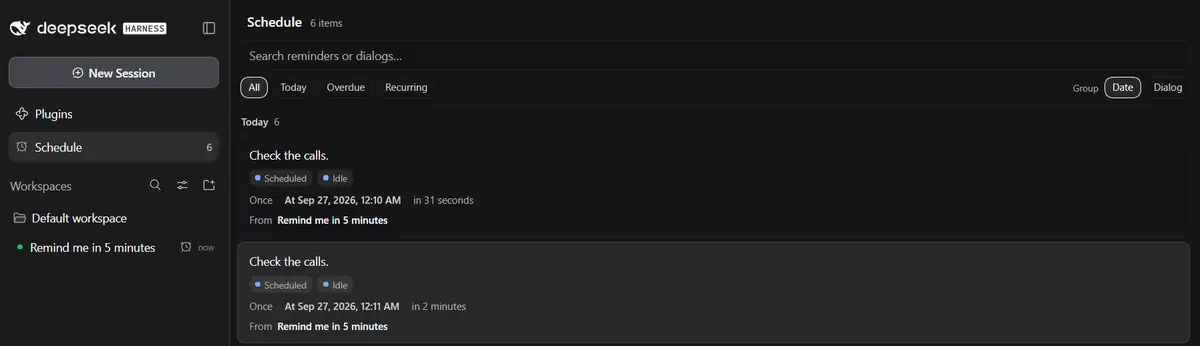
Global Schedule tab for DeepSeek Harness Web: view built-in scheduled reminders across all dialogs and open their source conversations.
Install
dsh plugin add @stolyarovmn/dsh-client-ui-schedule-tab Confirm the layer applied with dsh --profile default --dump-config — see the install guide.
Source
Tags
Creators
Readme
@stolyarovmn/dsh-client-ui-schedule-tab
A DeepSeek Harness Web plugin that adds a global Schedule tab. It lists scheduled reminders from all dialogs and opens the source dialog when a reminder is selected.
Screenshots
Schedule control center
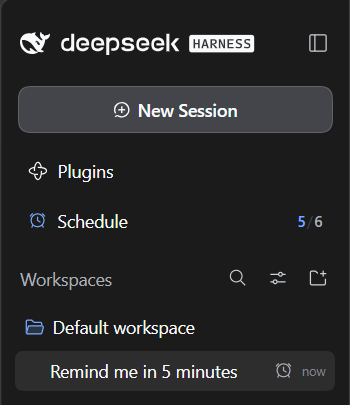
Sidebar notifications
Features
- Shows built-in Schedule reminders from all dialogs in one global tab.
- Searches by reminder text, reminder id, dialog name, or dialog id.
- Filters reminders by All, Today, Overdue, or Recurring.
- Groups the visible reminders by date or by source dialog.
- Orders overdue reminders first, then upcoming reminders by time.
- Shows Schedule state (Scheduled / Overdue), Session activity (Running / Idle), marks the current dialog when the client exposes it, and adds an explicit Recurring tag to repeating reminders.
- Turns the sidebar alarm icon into a notification indicator: new unseen reminders color the icon; unread overdue reminders get warning priority.
- Colors the built-in clock/alarm mark on the source Session row with the same unseen state, including the trailing alarm used by DSH 0.1.7-rc.1 and the newer leading Schedule mark; opening Schedule returns it to the native gray.
- Shows new/total in the expanded sidebar (for example
3/10); after opening Schedule, the same counter becomes just the current total. The total drops automatically when active reminders disappear, and no0is shown when there are no active reminders. - Keeps a notification dot instead of the number in the collapsed sidebar rail.
- Persists seen reminder ids in browser local storage so a reload does not make already viewed active reminders look new again.
- Includes overdue and recurring counts in the sidebar indicator tooltip so categories stay distinguishable without crowding the row.
- Labels the stored target as Next for recurring reminders and At for one-shot reminders.
- Opens the source dialog by mouse or keyboard.
- Supports both legacy
ids/byIdSession-list snapshots and the neweritemsshape without changing the Schedule data source. - Supports English and Chinese UI strings.
- Keeps reminder creation, editing, and cancellation in the built-in Schedule tools; the plugin does not create a second scheduler or a second reminder store.
Install
From GitHub:
dsh plugin --profile web add git+https://github.com/Stolyarovmn/dsh-schedule-tab.git
Pinned to this release:
dsh plugin --profile web add @stolyarovmn/[email protected]
For local development:
dsh plugin --profile web add file:C:\\path\\to\\dsh-schedule-tab
Restart dsh web after installation.
The package declares dsh.bundle.patch, so dsh plugin add activates the plugin without a manual profile patch. The package ships prebuilt lib/ files and has no install-time build scripts.
Usage
- Create a reminder in any dialog.
- Open the Schedule tab.
- Search, filter, or switch grouping between Date and Dialog.
- Select a reminder to open its source dialog.
Compatibility
Declared DSH peer range:
>=0.1.5-rc.3 <0.1.7-rc.2
CI runs installation smoke tests against:
0.1.5-rc.30.1.7-rc.1
The client supports both projection shapes used by those releases: legacy
SessionSummary.projectionValues.schedule and the 0.1.7
refreshProjections()/projectionsBySession API. Session navigation uses
uiWorkspace.openSession(), which is available in both releases.
Schedule service on DSH 0.1.5-rc.3 through 0.1.7-rc.1
Those DSH releases ship the Host Schedule service as opt-in, and their
Schedule implementation intentionally attaches only to root Agents created
after the Schedule plugin has loaded. Since 0.4.6, this bundle makes the
Web session-controller wait for a Host bootstrap. The bootstrap mounts
time-context and schedule first and only then releases Session creation,
so restored dialogs receive schedule_create, schedule_list and
schedule_delete after a full process restart.
The tab only displays real Schedule records. It does not treat background
bash/pwsh jobs as reminders. Since 0.4.7, the bundle adds model-facing
Schedule routing guidance and rejects the narrow background shell-timer pattern
(Start-Sleep ...; Write-Output ... / sleep ...; echo ...) when
schedule_create is available, so a model cannot silently substitute shell
jobs for reminders. A full dsh web process restart is required after
installing or upgrading; HMR cannot retrofit the legacy Schedule runtime into
an Agent that is already live.
Development
Run all repository tests:
npm run test:all
The test suite covers client behavior and bundle metadata. CI also verifies package contents and installs the plugin into an isolated DSH profile.
Discoverability
The repository uses the dsh-plugin package keyword and is intended to use the GitHub dsh-plugin topic. The package name for npm is @stolyarovmn/dsh-client-ui-schedule-tab.
Files
| File | Purpose |
|---|---|
package.json |
Package metadata and DSH manifests |
cordis.patch.yml |
Loader entry for the plugin |
lib/index.js |
Host entry point |
lib/client.js |
Schedule tab UI |
test/scenarios.test.js |
Client behavior tests |
test/bundle.test.js |
Bundle metadata validation |
.github/workflows/ci.yml |
Automated tests and DSH installation checks |
.github/workflows/publish.yml |
npm publishing workflow |
Publishing
npm publishing uses GitHub Actions trusted publishing from .github/workflows/publish.yml.
License
MIT