dsh-searchhub
Verified@wilson.liu.cn/dsh-searchhub · v1.0.2 · MIT · Web UI
Stop paying for your agent's web search. dsh-searchhub is a pluggable search hub for the DeepSeek Harness — swap in mainstream search providers behind ctx.web, with a beautifully polished native Settings card. Ships with Tavily (1,000 free credits/month)
Install
dsh plugin add @wilson.liu.cn/dsh-searchhub Confirm the layer applied with dsh --profile default --dump-config — see the install guide.
Source
Tags
Creators
Readme
🔍 dsh-searchhub
🇨🇳 中文说明(点击展开完整中文文档)
别再为 Agent 的联网搜索花钱了
dsh-searchhub 是给 DeepSeek Harness (DSH) 用的可插拔搜索中枢。它让你的 Agent 通过市面主流、即插即用的搜索服务商(挂在 DSH 的 web 能力接缝 ctx.web 后面)来联网搜索,而不用每次 web_search 都消耗付费的 DeepSeek 模型调用。
💸 不用再为搜索付费。 把内置的
web_search工具接到真正的搜索 API,把模型预算留给真正的思考。🧩 可插拔设计。 一个中枢,多家服务商。目前内置 Tavily;架构从一开始就为后续接入更多主流搜索引擎而设计——挑你喜欢的,随时替换。
🎁 免费起步。 Tavily 每月赠送 1000 个免费额度,无需信用卡即可开始,日常 Agent 检索完全够用。
✨ 做得精美。 不是一个干巴巴的配置开关——dsh-searchhub 自带手工打造的原生设置卡片:可折叠、带实时三态状态圆点、真正的显示/隐藏眼睛按钮、即时的密钥格式校验,以及一个可点击的取密钥链接。它看起来就像产品自带的功能,因为它就是照着这个标准做的。
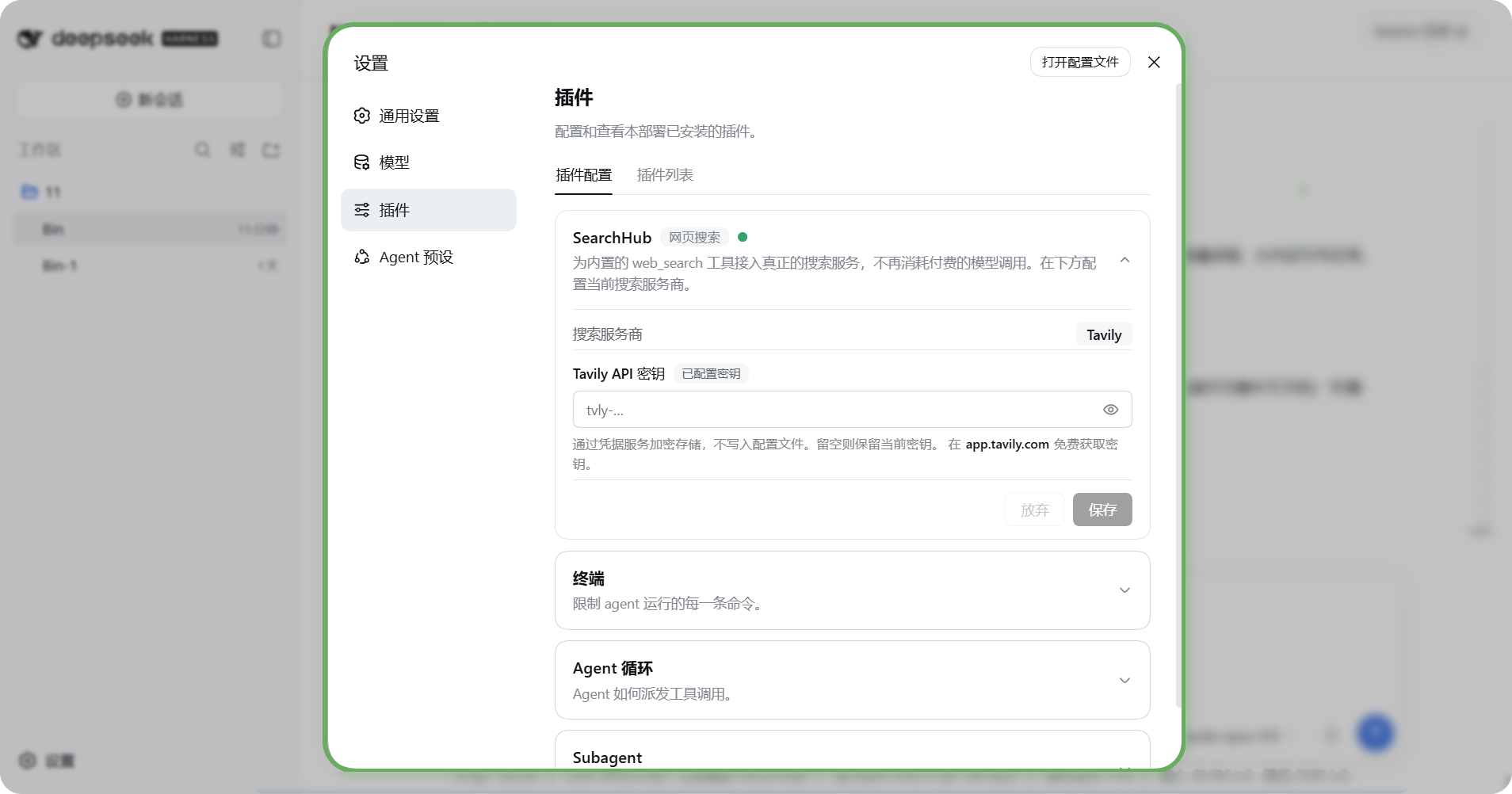
📸 原生设置卡片
这是它在 设置 → 插件 里自带的精美卡片——实时状态圆点、真正的显示/隐藏按钮、行内格式校验,看起来就像产品原生功能。界面语言切到中文时,卡片文案全中文(对比上方英文效果,绝不混杂):
✨ 功能亮点
- 🔌 可插拔搜索中枢 —— 干净的 provider 接缝,主流搜索引擎都能挂到
ctx.web后面。目前内置 Tavily,并预留扩展空间。 - 💰 零模型调用成本 —— 替换内置的
web-search-deepseekprovider,让web_search打到真正的搜索 API,而不是一次付费模型调用。 - 🎨 自带精美原生卡片 —— 在 设置 → 插件 → 插件配置 里作为独立、可折叠的卡片出现(端点、搜索深度、结果数、答案开关、API 密钥),带实时状态圆点、眼睛按钮、行内密钥格式校验。
- 🔐 密钥处理得当 —— API 密钥作为凭据引用存储(默认
TAVILY_API_KEY),从界面或环境变量录入,永远不必写进配置文件。 - ⚡ 一条命令安装 —— 以 dsh bundle 形式发布,
npx @wilson.liu.cn/dsh-searchhub install会用 npm(不需要 pnpm)装包并把本包写进dsh.profile.bundles,无需手改 profile 的 patch 文件。 - 🧭 结果归一化 —— 把 provider 结果映射成接缝已认识的
{ sources, truncated }结构。
🚀 安装
方式 A —— 从 npm 安装(推荐,不需要 pnpm)
npx @wilson.liu.cn/dsh-searchhub install --profile web
这条命令从 npm registry 下载本包(@wilson.liu.cn/dsh-searchhub)并自动完成「安装 + 激活」。想只用 npm 手动装,见下方方式 B。
从本仓库 checkout 直接装(开发本插件时用,不经过 npm):
node scripts/cli.mjs install
这一步会做三件事(就是 dsh plugin 的三步,但只用 npm):
$DSH_HOME/profiles/web不存在时,按 DSH 自己的模板初始化(package.json+cordis.patch.yml+pnpm-workspace.yaml);- 在该目录里用 npm 安装本插件;
- 把本包追加进 profile 的
dsh.profile.bundles层列表,于是它的cordis.patch.yml(把ctx.web切到 Tavily、禁用web-search-deepseek、注册本插件的宿主端 + 浏览器端)在下次启动时生效。
常用子命令:
npx @wilson.liu.cn/dsh-searchhub status               # 是否已安装 / 是否已激活 / 密钥是否配置
npx @wilson.liu.cn/dsh-searchhub install --dry-run    # 只打印计划,不做任何改动
npx @wilson.liu.cn/dsh-searchhub uninstall            # 卸载,并自动从 bundles 里摘掉
npx @wilson.liu.cn/dsh-searchhub install --spec github:Bin-top1/dsh-searchhub
npx @wilson.liu.cn/dsh-searchhub install --spec /path/to/dsh-searchhub   # 本地 checkout:自动打包成 tarball 再装
然后重启 web profile(dsh web 或 dsh --profile web),打开 设置 → 插件,在 SearchHub 卡片里填入密钥(或导出 TAVILY_API_KEY)。
为什么不用
dsh plugin add?dsh plugin是 pnpm 的转发器(内部spawnSync("pnpm", …)),机器上没有 pnpm 会直接失败。本安装器用你手上的 npm 完成同样的三步。为什么
--spec指向目录时先打包? npm 对本地目录会建软链接,而软链接包的@deepseek-ai/*依赖会从仓库真实路径解析——那里没有宿主提供的这些包(或只有一份重复的),插件会加载失败。先打包成 tarball 再把副本装进 profile,依赖就会从 profile 向上走到 DSH 安装自己的依赖闭包,不会出现重复实例。
方式 B —— 手动 npm 安装 + 一行 bundles
cd "$DSH_HOME/profiles/web"
npm install @wilson.liu.cn/dsh-searchhub
然后把包名加进该 profile 的 dsh.profile.bundles(DSH 就是靠这个列表装配插件层的):
"dsh": {
  "profile": {
    "bundles": ["@deepseek-ai/dsh-base", "@deepseek-ai/dsh-web-app", "@wilson.liu.cn/dsh-searchhub"]
  }
}
方式 C —— 直接用 dsh plugin(需要 pnpm 在 PATH 上)
dsh plugin --profile web add @wilson.liu.cn/dsh-searchhub
方式 D —— 纯手工 patch(不写 bundles 列表也能生效)
# $DSH_HOME/profiles/web/cordis.patch.yml
- id: web
  config:
    searchProvider: tavily
    fetchProvider: http
- id: web-search-deepseek
  disabled: true
- insert:
    - id: searchhub
      name: "@wilson.liu.cn/dsh-searchhub"
⚠️ 不要写
name: "file:///…/dsh-searchhub/lib/index.js"去直接引用仓库里的文件:插件加载时会从仓库真实路径去找宿主提供的@deepseek-ai/*包,实测会ERR_MODULE_NOT_FOUND。要用本地 checkout,请用方式 A 的--spec <checkout>(先打包再安装)。
⚙️ 配置项
| 键 | 类型 | 默认值 | 说明 |
|---|---|---|---|
apiKey |
secret 字符串 | - | 明文密钥(建议改用 apiKeyEnv)。 |
apiKeyEnv |
凭据引用 | TAVILY_API_KEY |
密钥存储所用的环境变量名。 |
baseURL |
字符串 | https://api.tavily.com |
Tavily API 基址;会追加 /search。 |
searchDepth |
basic | advanced |
basic |
越深消耗 Tavily 额度越多。 |
maxResults |
数字 (1-20) | 5 |
每次查询请求的结果数。 |
includeAnswer |
布尔 | false |
是否让 Tavily 附带生成式答案。 |
设置 API 密钥(三选一):1) 原生设置卡片——在 设置 → 插件 → 插件配置 的 SearchHub 卡片里粘贴密钥,经凭据服务加密存储;2) 环境变量——启动 DSH 前导出 TAVILY_API_KEY;3) 明文配置——直接设 apiKey(不推荐)。在 https://app.tavily.com/ 免费获取密钥与每月 1000 额度。
🌏 界面语言
设置卡片自带 英文 / 中文 两套完整文案,跟随 DSH 的界面语言自动切换——界面是中文就全中文、是英文就全英文,绝不中英混杂。
🛠️ 从源码构建
仓库已附带预构建的 lib/index.js(宿主端)与 lib/client.js(浏览器端),安装和使用都不需要构建:npm 只发布 lib/*.js、scripts/cli.mjs、cordis.patch.yml 与文档。
只有维护者需要跑构建(生成类型声明):
npm install     # 仅 typescript 与宿主类型包,都是 devDependencies
npm run build   # tsc -p tsconfig.json → lib/types/*.d.ts
npm test        # 安装器行为 + 打包不变量测试
宿主端类型源码在 src/types/,npm run build 产出 .d.ts(npm publish 前由 prepublishOnly 自动执行);浏览器端 lib/client.js 是唯一权威手写源,按 DSH 客户端模块扫描器所需的注册形式编写(React 与 JSX runtime 由宿主种子经 require 提供),无需打包器,也没有一份会漂移的 .ts 副本。
🗺️ 路线图
dsh-searchhub 是一个中枢,而不是绑死单一引擎的壳子。Tavily 只是第一个 provider;接缝刻意做得通用,因此更多主流搜索后端都能挂到同一张卡片、走同一套 ctx.web 契约接入。欢迎贡献新的 provider。
以下为英文完整文档。
Stop paying for your agent's web search.
dsh-searchhub is a pluggable search hub for the
DeepSeek Harness (DSH). It
lets your agent search the web through mainstream, drop-in search providers
behind the DSH web capability seam (ctx.web) — instead of burning paid
DeepSeek model turns on every web_search call.
💸 No more paying for search. Point the agent's built-in
web_searchtool at a real search API and keep your model spend for actual thinking.🧩 Pluggable by design. One hub, many providers. Today it ships with Tavily; the architecture is built to add more of the market's popular search engines over time — pick the one you like and swap it in.
🎁 Free to start. Tavily gives you 1,000 free credits every month — no credit card to get going. Plenty for everyday agent research.
✨ Beautifully polished. Unlike a bare config toggle, dsh-searchhub ships its own hand-crafted native Settings card — collapsible, with a live tri-state status dot, a real show/hide eye toggle, instant key-format validation, and a proper clickable link to grab your key. It looks like it belongs in the product, because it was built to.
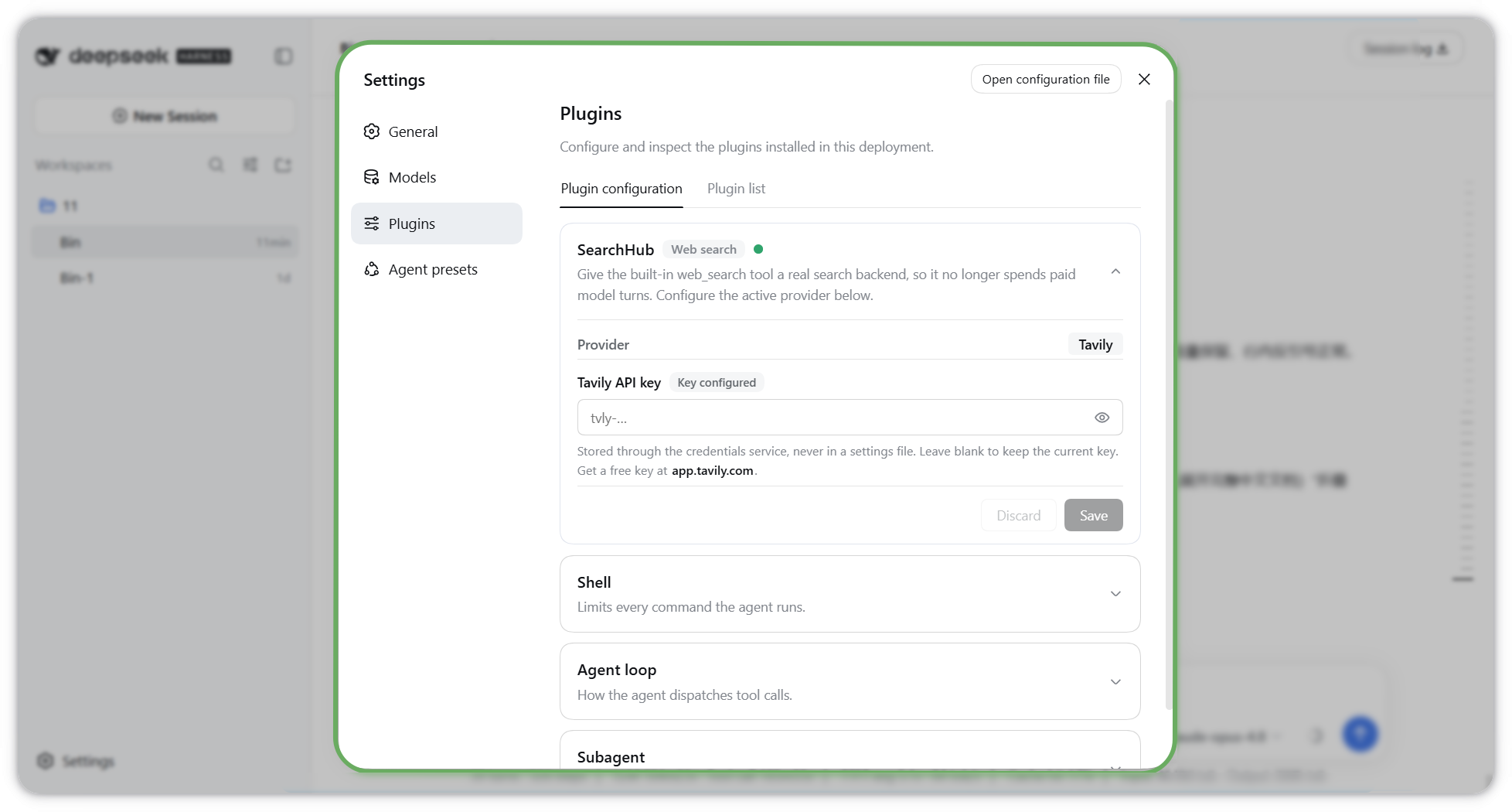
📸 The native Settings card
Its own polished card under Settings → Plugins, with a live status dot, a real show/hide toggle, and inline validation — it looks like it belongs in the product:
✨ Features
- 🔌 Pluggable search hub — a clean provider seam so mainstream search
engines can be swapped in behind
ctx.web. Tavily is included today, with room to grow. - 💰 Zero model-turn cost — replaces the built-in
web-search-deepseekprovider, soweb_searchhits a real search API, not a paid model turn. - 🎨 Its own polished native card — appears under Settings → Plugins → Plugin configuration as a dedicated, collapsible card (endpoint, search depth, max results, answer toggle, API key) with a live status dot, eye toggle, and inline key-format check.
- 🔐 Secrets done right — the API key lives as a credential reference
(
TAVILY_API_KEYby default), entered from the UI or the environment; it never has to sit in a config file. - ⚡ One-command install — ships as a dsh bundle, so
npx @wilson.liu.cn/dsh-searchhub installinstalls it with npm (no pnpm required) and appends it todsh.profile.bundles. No hand-editing profile patch files. - 🧭 Normalized results — maps provider results into the seam's
{ sources, truncated }shape the agent already understands.
🚀 Installation
Option A — install from npm (recommended, no pnpm needed)
npx @wilson.liu.cn/dsh-searchhub install --profile web
This downloads the package from the npm registry
(@wilson.liu.cn/dsh-searchhub)
and installs + activates it. To install with plain npm instead, see Option B.
From a checkout (when developing this plugin itself):
node scripts/cli.mjs install
It performs the same three steps dsh plugin performs, using the package
manager you actually have:
- initializes
$DSH_HOME/profiles/webwhen it does not exist yet, exactly like DSH's own template (package.json+cordis.patch.yml+pnpm-workspace.yaml); - installs this package into that directory with npm;
- appends the package to the profile's
dsh.profile.bundleslayer list, so itscordis.patch.yml(switchctx.webto Tavily, disableweb-search-deepseek, register this plugin's host + browser halves) applies on the next boot.
Other subcommands:
npx @wilson.liu.cn/dsh-searchhub status               # installed? activated? key configured?
npx @wilson.liu.cn/dsh-searchhub install --dry-run    # print the plan, change nothing
npx @wilson.liu.cn/dsh-searchhub uninstall            # remove it and drop its layer again
npx @wilson.liu.cn/dsh-searchhub install --spec github:Bin-top1/dsh-searchhub
npx @wilson.liu.cn/dsh-searchhub install --spec /path/to/dsh-searchhub   # checkout → packed first
Then restart the web profile (dsh web or dsh --profile web) and open
Settings → Plugins; set the API key in the SearchHub card (or export
TAVILY_API_KEY).
Why not
dsh plugin add?dsh pluginis a pnpm forwarder (spawnSync("pnpm", …)internally) and fails outright on a machine without pnpm. This installer performs the same three steps with npm.Why does a directory
--specget packed first? npm installs a local directory as a symlink, and a symlinked package resolves its@deepseek-ai/*imports from the checkout's real path — where the DSH peer packages are absent (or a duplicate copy lives). Packing the checkout into a tarball installs a real copy inside the profile, so those imports resolve through the profile's ownnode_moduleschain into the DSH installation closure.
Option B — manual npm install + one manifest line
cd "$DSH_HOME/profiles/web"
npm install @wilson.liu.cn/dsh-searchhub
Then add the package name to that profile's dsh.profile.bundles (the layer
list DSH composes plugins from):
"dsh": {
  "profile": {
    "bundles": ["@deepseek-ai/dsh-base", "@deepseek-ai/dsh-web-app", "@wilson.liu.cn/dsh-searchhub"]
  }
}
Option C — the dsh plugin forwarder (needs pnpm on PATH)
dsh plugin --profile web add @wilson.liu.cn/dsh-searchhub
Option D — hand-written patch layer (works without the bundles list)
# $DSH_HOME/profiles/web/cordis.patch.yml
- id: web
  config:
    searchProvider: tavily
    fetchProvider: http
- id: web-search-deepseek
  disabled: true
- insert:
    - id: searchhub
      name: "@wilson.liu.cn/dsh-searchhub"
⚠️ Do not point
name:at a file inside a checkout (file:///…/dsh-searchhub/lib/index.js): the plugin then resolves its host-provided@deepseek-ai/*imports from the checkout's real path and fails withERR_MODULE_NOT_FOUND(measured). For a local checkout use Option A's--spec <checkout>, which packs it first.
⚙️ Configuration
| Key | Type | Default | Description |
|---|---|---|---|
apiKey |
secret string | - | Literal key (prefer apiKeyEnv instead). |
apiKeyEnv |
credential ref | TAVILY_API_KEY |
Env-var name the key is stored under. |
baseURL |
string | https://api.tavily.com |
Tavily API base; /search is appended. |
searchDepth |
basic | advanced |
basic |
Deeper search costs more Tavily credits. |
maxResults |
number (1-20) | 5 |
Results requested per query. |
includeAnswer |
boolean | false |
Ask Tavily to include a generated answer. |
Setting the API key
Pick one:
- Native settings card — open the SearchHub card under
Settings → Plugins → Plugin configuration and paste the key into the API
key box. It is stored encrypted through the credentials service (under the
TAVILY_API_KEYreference by default). - Environment variable — export
TAVILY_API_KEY(or whateverapiKeyEnvyou set) before launching DSH. - Literal config — set
apiKeydirectly (discouraged; keeps a secret in a file).
Get a key — and your 1,000 free credits/month — at https://app.tavily.com/.
The native settings card (dual-face plugin)
The DSH web Plugin configuration surface does not auto-generate a card for an arbitrary plugin. A card appears only when both halves are present:
- Host half installs a settings section under a namespace (
searchhub) —lib/index.js. - Browser half registers a React card into the
settings.plugin.itemslot, keyed by that same namespace —lib/client.js.
This plugin ships both, so it gets its own polished card (not a borrowed
one). The browser half is declared to the DSH client-modules scanner via
package.json:
{
  "dsh": {
    "bundle": { "patch": "./cordis.patch.yml" },
    "client": { "platform": "web" }
  },
  "exports": {
    ".":        { "default": "./lib/index.js" },
    "./client": { "default": "./lib/client.js" }
  }
}
The scanner serves lib/client.js to the browser as a classic script whose only
top-level statement is a single window.__ModuleLoader__.load({ id, factory })
call. React and the JSX runtime are host-provided seed modules obtained
through the factory's synchronous require — the browser half never bundles its
own React. The card's secret input writes to the TAVILY_API_KEY credential
reference through ctx.remote.credentials.set(...), and the host half resolves
that same reference per search.
🗺️ Roadmap
dsh-searchhub is a hub, not a single-engine wrapper. Tavily is the first
provider; the seam is deliberately generic so more of the market's popular
search backends can be added behind the same card and the same ctx.web
contract. Contributions of new providers are welcome.
📦 Publishing (maintainers)
npm login
npm publish
The prebuilt lib/ runtimes and cordis.patch.yml are included via the files
allowlist, so consumers do not need a build step.
🛠️ Building from source
Nothing needs to be built to install or use this plugin: the repository ships
prebuilt lib/index.js (host half) and lib/client.js (browser half), and the
npm package contains only those, scripts/cli.mjs, cordis.patch.yml and the
docs.
Maintainers run the build for the published type declarations:
npm install     # devDependencies only: typescript + the host type packages
npm run build   # tsc -p tsconfig.json → lib/types/*.d.ts
npm test        # installer behaviour + packaging invariants
- Host half: typed sources live in
src/types/(index.ts,provider.ts) and compile to.d.tsdeclarations vianpm run build, whichprepublishOnlyruns before the tarball is built.lib/index.jsis the authoritative runtime. - Browser half:
lib/client.jsis the single authoritative, hand-authored source — read it directly. It is intentionally written in the exact factory-registration form the DSH client-modules scanner serves (React and the JSX runtime come from the host seed viarequire), so it needs no bundler and has no separate.tsmirror to drift out of sync.
📄 License
MIT © Bin