dsh-devtools
Verified@zhangzhian/dsh-devtools · v0.1.2 · MIT
DSH 开发工具:Git 面板 + 启动管理(清单包,组件各自成包)
Install
dsh plugin add @zhangzhian/dsh-devtools Confirm the layer applied with dsh --profile default --dump-config — see the install guide.
Source
Published to npm without a public repository. Inspect the package contents before installing.
Tags
Creators
Readme
English | 简体中文
@zhangzhian/dsh-devtools
DSH 的开发工具:右栏里的 Git 面板 和 启动管理。 只装这一个包 —— 两个组件会作为它的依赖自动装上。
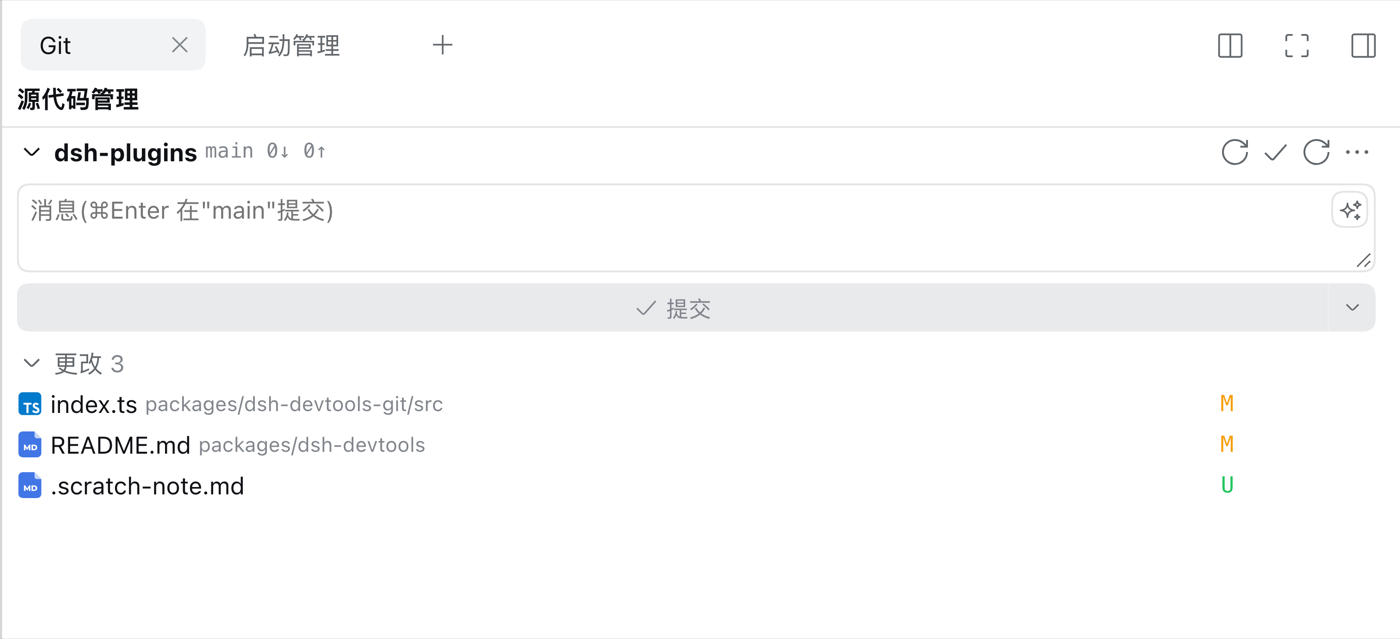
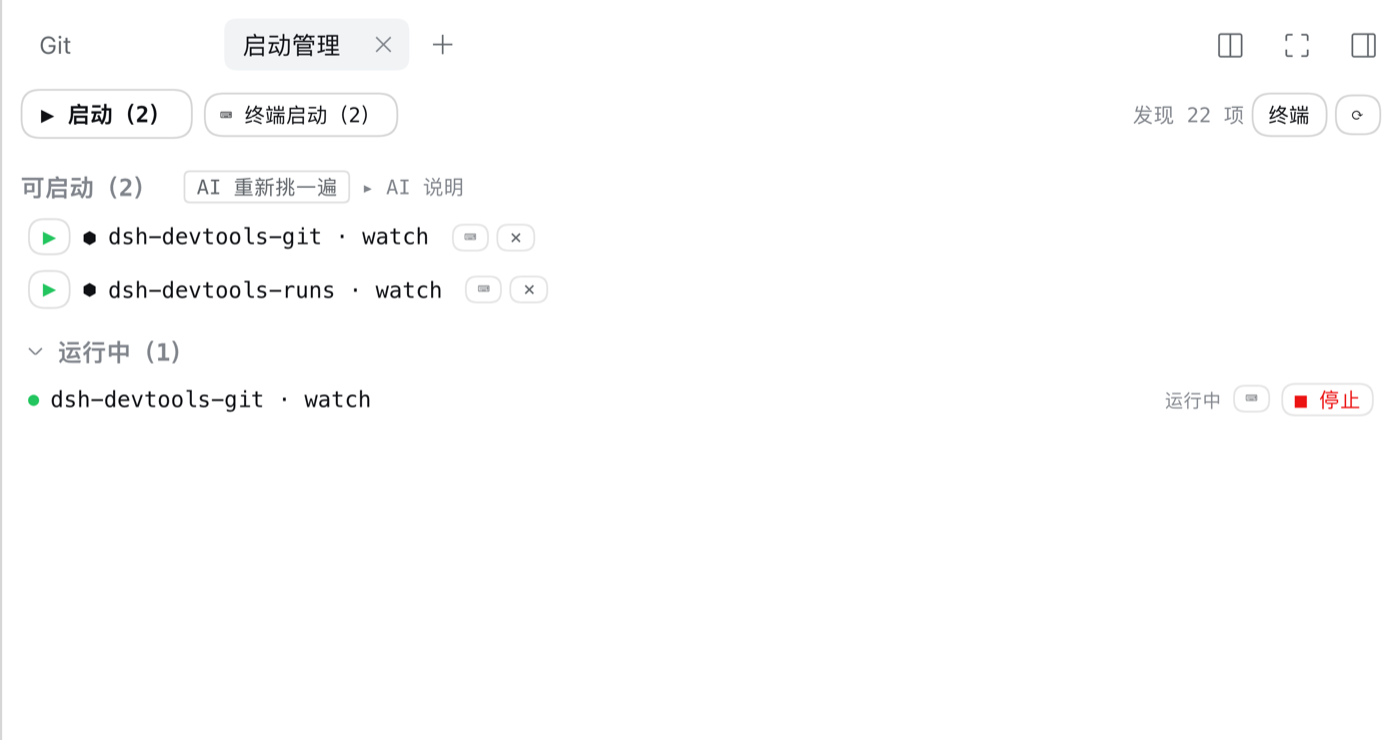
安装
dsh plugin --profile web add @zhangzhian/dsh-devtools
重启 dsh。插件页上会出现一张卡片「开发工具」,下面两个组件行可以各自开关。
提供什么
| 组件 | 干什么 |
|---|---|
@zhangzhian/dsh-devtools-git |
源代码管理面板:状态分组、diff、提交图;提交 / 推送 / 合并 / 变基 / 存储。也给 Agent 提供 git_* 工具。 |
@zhangzhian/dsh-devtools-runs |
启动管理:扫描可启动项、托管启动、看日志、端口快照。也给 Agent 提供 run_* 工具。 |
两个组件各给 Agent 提供工具(git_status / git_commit / run_list / run_start …),
人和 Agent 共用同一套。
装了本包之后,远程浏览器也能用「新增工作区」的目录选择。默认的
directory-picker-auto 只在启动时按 bind 地址采样一次:nginx 反代时 bind 仍是
127.0.0.1,它会去宿主屏幕上弹访达,远程点了没反应。本包把目录选择固定成浏览器内的
browse 交互,本地 / 局域网 / 公网表现一致。代价是本机也不再弹访达;想改回去,
在 profile 的 cordis.patch.yml 里按包内 picker.patch.yml 顶部的说明覆盖即可。
要求
- dsh
>= 0.2.0-rc.2。跨到0.3.x时平台会拒装,需要dsh plugin allow-version @zhangzhian/dsh-devtools@<版本> --dsh-version <dsh 版本> --accept-risk - 不需要额外装依赖:
@deepseek-ai/*由 dsh 安装本身提供(声明成 peer,不会重复安装)。
English
@zhangzhian/dsh-devtools
DSH devtools: a Git panel and start/run management in the right sidebar. Install this package only — the two components come in as its dependencies.
Install
dsh plugin --profile web add @zhangzhian/dsh-devtools
Restart dsh. The plugin page then shows one card, Developer tools, with two component rows you can switch on and off independently.
What it provides
| Component | What it does |
|---|---|
@zhangzhian/dsh-devtools-git |
Source-control panel: status groups, diffs, commit graph; commit / push / merge / rebase / stash. Also the git_* agent tools. |
@zhangzhian/dsh-devtools-runs |
Start management: scan runnable targets, launch under management, tail logs, port snapshots. Also the run_* agent tools. |
Both components expose agent tools (git_status / git_commit / run_list /
run_start …), shared by humans and the agent.
Installing this package also makes "Add workspace" directory picking work from a
remote browser. The stock directory-picker-auto samples the bind address once at
boot: behind an nginx reverse proxy the bind is still 127.0.0.1, so it opens Finder
on the host display and a remote click looks dead. This package pins picking to the
in-app browse interaction instead, identical on loopback, LAN, and a public domain.
The tradeoff: no more native Finder dialog locally either; to revert, override in
the profile's cordis.patch.yml as described at the top of the bundled
picker.patch.yml.
Requirements
- dsh
>= 0.2.0-rc.2. Crossing to0.3.xmakes the platform refuse the install; override withdsh plugin allow-version @zhangzhian/dsh-devtools@<version> --dsh-version <dsh version> --accept-risk - No extra dependencies to install:
@deepseek-ai/*is provided by the dsh installation itself (declared as peer dependencies, so it is never installed a second time).