dsh-agent-plugins-market
已验证dsh-agent-plugins-market · v0.9.1 · MIT · Web 界面
One-stop skills, subagent, MCP and LSP manager inside DeepSeek Harness (DSH), compatible with Claude Code, Codex, Cursor, Kimi and other agent plugin layouts.
安装
dsh plugin add dsh-agent-plugins-market 用 dsh --profile default --dump-config 确认 layer 已生效 —— 参见安装指南。
源码
标签
作者
说明文档
Agent Plugins
dsh-agent-plugins-market
A one-stop skills, subagent, MCP and LSP manager inside DeepSeek Harness (DSH), compatible with Claude Code, Codex, Cursor, Kimi and other agent plugin layouts.
Reuse supported content from Claude Code, Codex, Cursor, Kimi and other recognized layouts, and manage your own skills, commands, agent personas, MCP services and LSP servers in the DSH Web GUI.
If this plugin is useful to you, a ⭐ on GitHub is appreciated.
English | 简体中文 | Documentation | npm


Quick start · Everyday use · Compatibility · FAQ
Pages
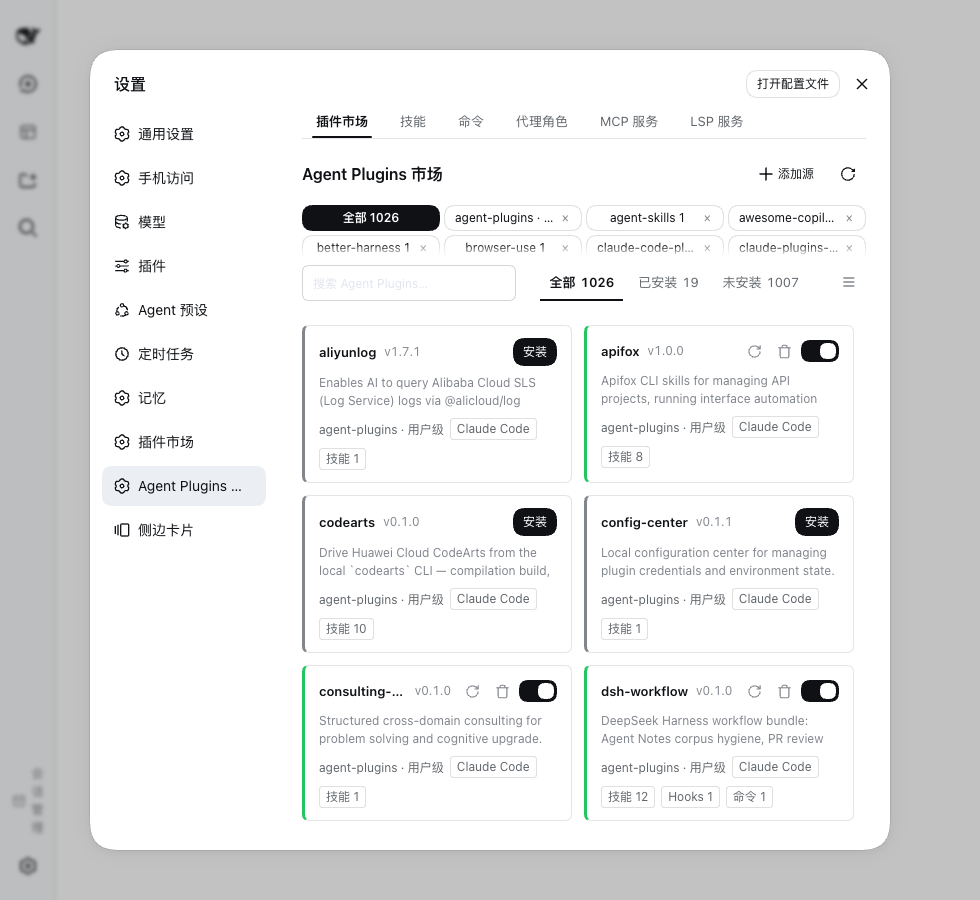 Market Add sources, preview suites, install and enable. |
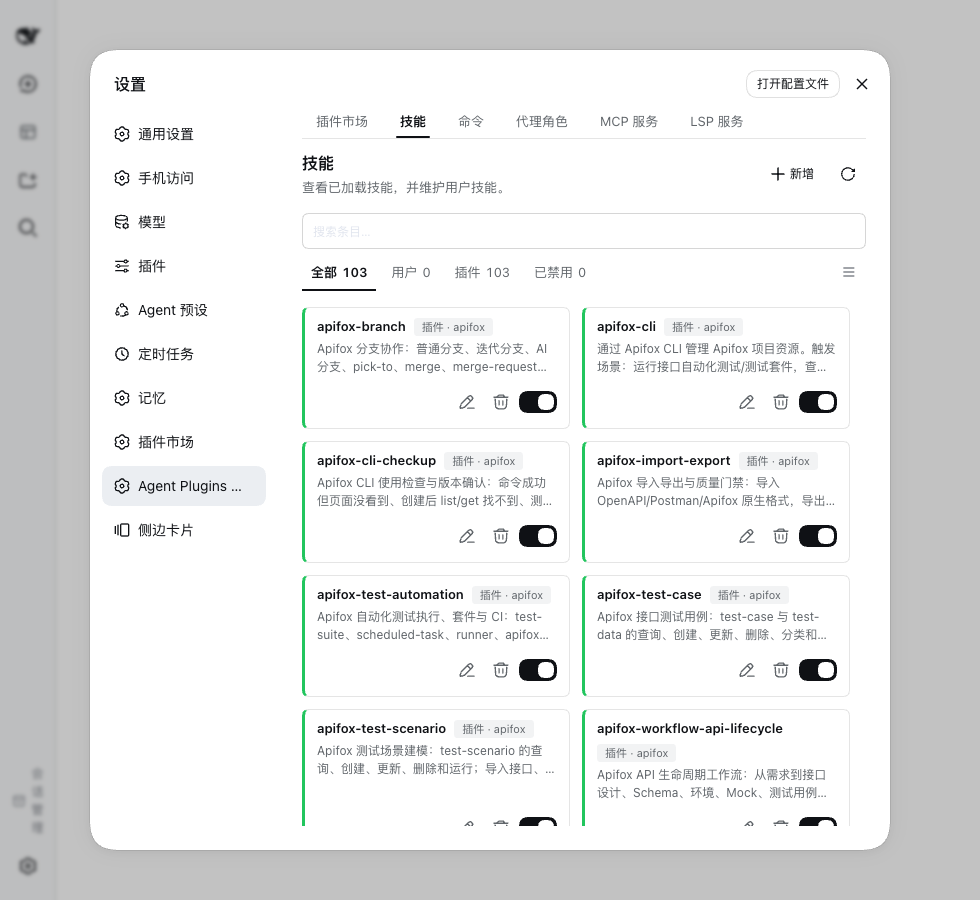 Skills Browse skills and author your own. |
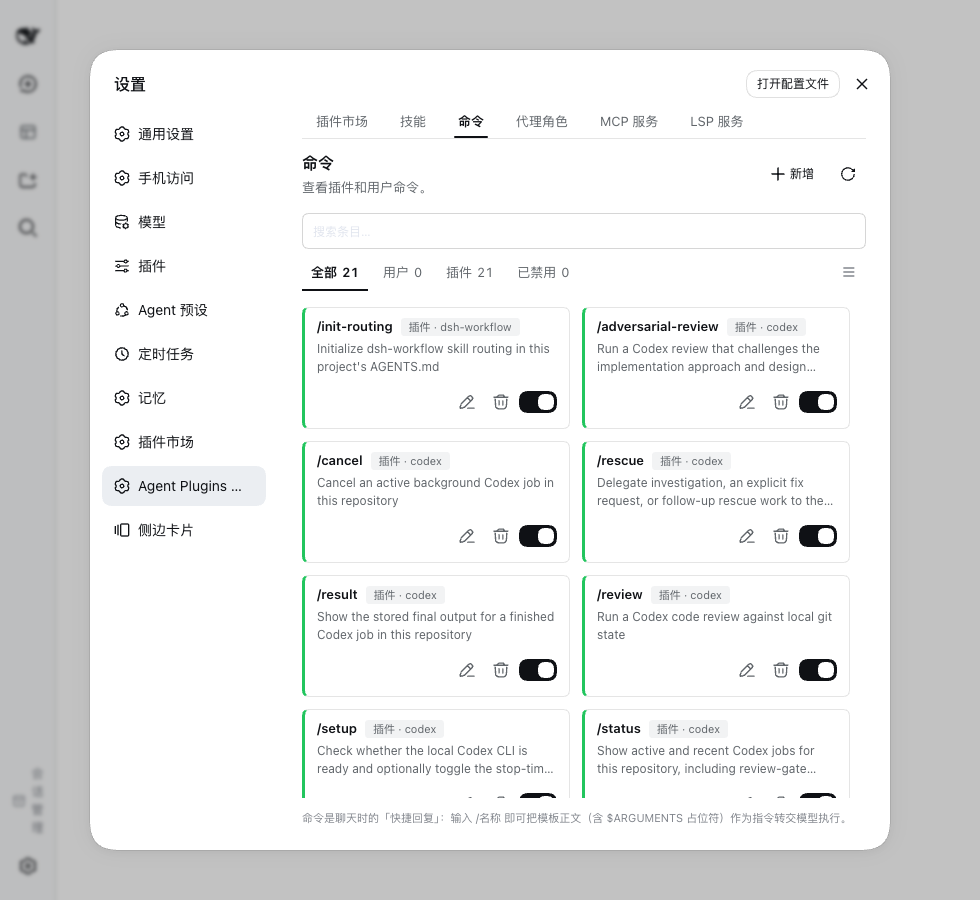 Commands Manage prompt templates invoked as /name. |
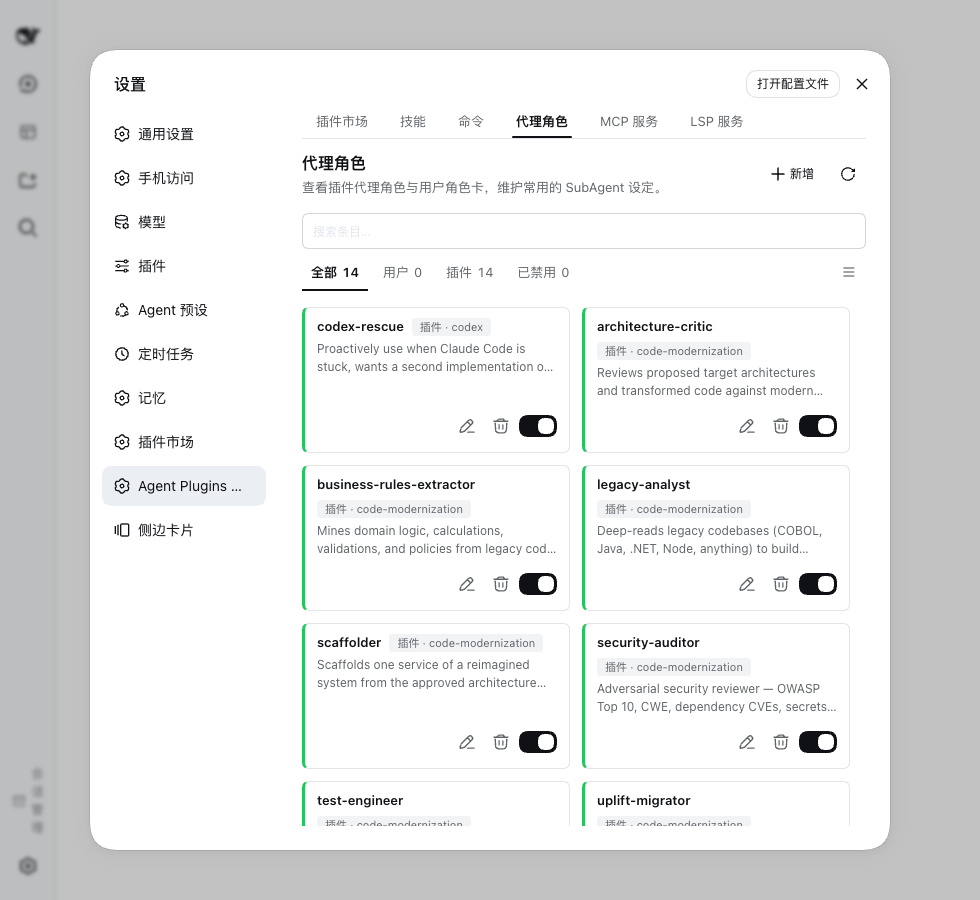 Agent personas Roles with an exact provider, model and effort. |
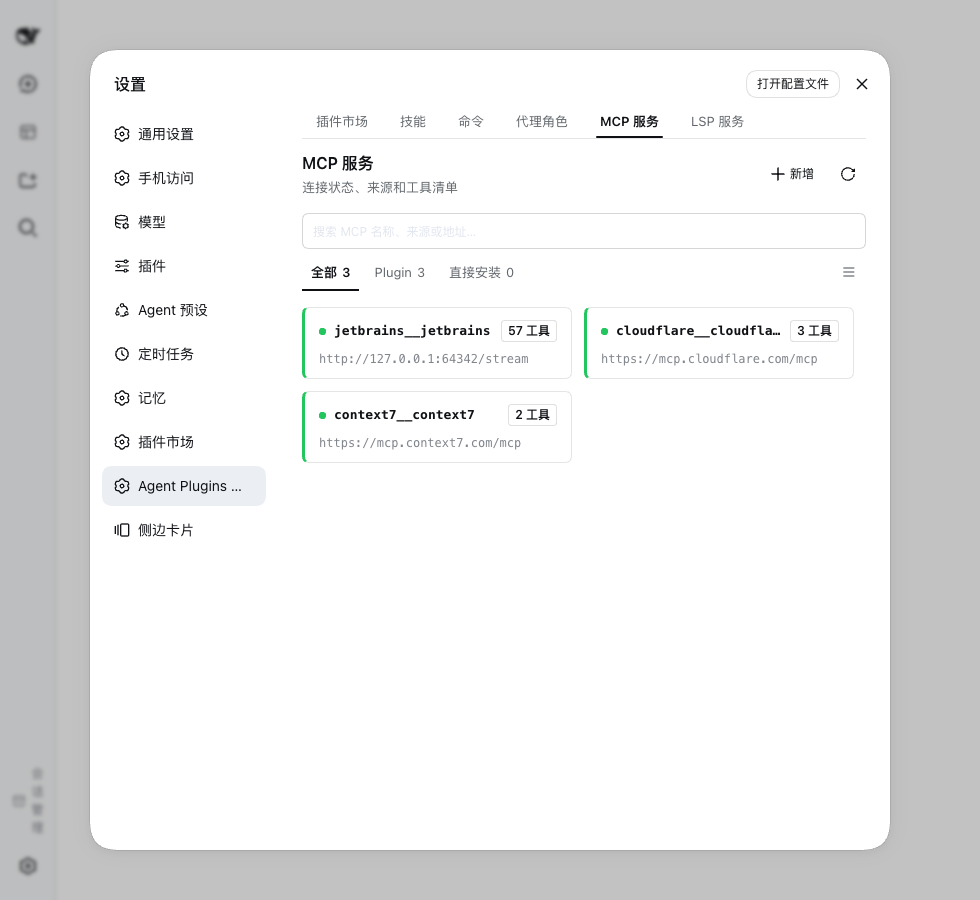 MCP services Credentials, authorization and connection status. |
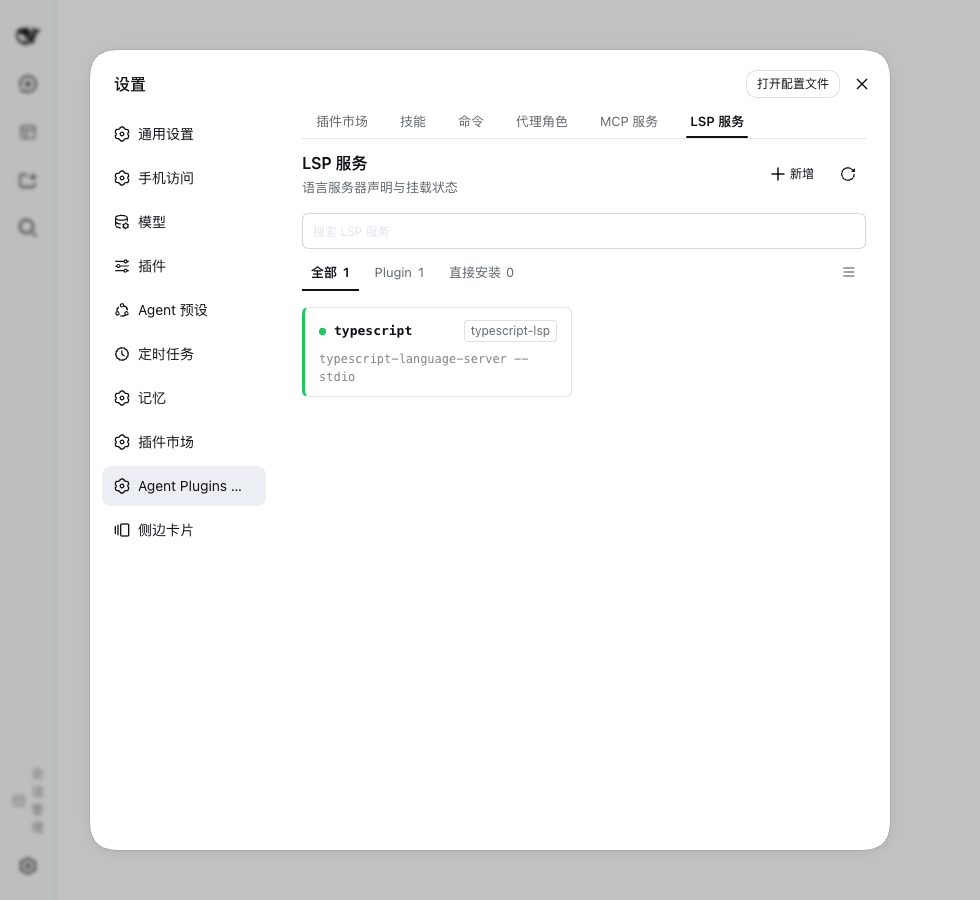 LSP servers Language server configuration and runtime status. |
What you can do
Enable the experimental Agent preset manager in plugin settings to show its composer entry. It is off by default and does not disable the session runtime. Session extension presets select skills, commands, roles, MCP and LSP capabilities through the Agent extension icon button to the right of Permissions. Each workspace owns a preset library and a default for new sessions. Selecting a preset while a session runtime is active takes effect on that session's next user request. Mid-turn steering and tools do not change. Once the selection commits, the open slash skill menu refreshes without another keystroke or page reload. Editing the selected or pending preset in the current session updates that session. Every other session keeps its own detached copy. Copy and paste a preset to another workspace to create an independent copy. Globally managed resources show their actual state without a session switch. Preset details do not change shared credentials or configuration. After a failed session selection, explicit recovery restores readiness and continues queued user input without another Send.
Ten suite layouts. Claude Code, Codex, Cursor, Kimi Code, ZCode, Qoder CLI, GitHub Copilot CLI, Universal
.plugin/, agent-plugins and manifest-less skill collections.Sources. Add a Git repository, a local directory or an archive (
.zip/.tar.gz/.tgz/.tar); adopt a checkout you cloned yourself; refresh on demand; delete a managed checkout when you remove its source.First-party source. The plugin presets one source record pointing at its own suite collection, so the market lists that repository on first run with no URL to paste. It is an ordinary Git source from there on — refresh it to fetch, then install and toggle its suites like any other.
Downloads that fit your network. Pick a download region — default
autofollows the interface language, or choose global / China mainland — and the plugin routesgithub.comclones through the matching mirror. A proxy and per-invocation tuning live in the host config.Runtime surfaces. Enabled suites inject into sessions: skills into the catalog and slash menu, commands as
/name, agent personas into the subagent catalog, MCP tools with anmcp__prefix, hooks onto host lifecycle events, and language servers through thelsptool.MCP. A built-in bridge runs stdio, Streamable HTTP with OAuth and legacy SSE without a host MCP client.
${VAR}references resolve from the host credential store or the launch environment; per-server overrides disable or patch a declaration without editing the source, set the tool-call and startup timeouts, and switch individual tools off; creation and editing share the same service form, including advanced timeout settings and a JSON view; an optional host-client compatibility mode is available. A suite's tools register asmcp__<suite>__<server>__<tool>; a server you declare yourself in~/.agents/mcp.jsonmounts under its own key,mcp__<server>__<tool>.LSP. Self-provisioned: installing the plugin is the whole setup, and the
lsptool mounts only while a language server is wanted. The server executable itself must be onPATH. Upgrading from a release that asked you to expose LSP from your profile? A profile that still carries that hand-added layer reports a seam conflict; the LSP panel names the file and removes the layer for you, keeping a backup.Agent personas and delegation. Role cards keep their instructions and exact provider/model/effort settings. Without Agent Teams, use
subagent_role; with Agent Teams, usespawn_teammate_roleto create a real Team member and manage it through native Team tools.Project dimension. Skills, agents, commands, MCP servers and hooks are read from the project's own directories with no install step.
Your own resources. Author skills, commands and agent personas as Markdown under
~/.agents/, then edit them or disable them without deleting the files.Background source updates. Optionally refresh every configured source on a timer; off by default.
Web workspace. Seven tabs: Market, Skills, Commands, Agent personas, MCP services, LSP servers and Hooks, each with search, filters and a grid/list toggle, plus status panels with diagnostics, credential editing, and an install confirmation that warns before executable third-party content is enabled. The settings page is the canonical layout. Every surface shares one tab row of equal columns that never scrolls sideways, and a label that does not fit ellipsizes. Every surface also shares one card and detail anatomy, and the preset manager follows it.
Bilingual interface and feedback. Workspace strings and injected prompts follow the host language. With feedback enabled, the model can file a
report_market_issuereport through theghCLI or a GitHub token; with neither, it opens a prefilled GitHub issue page and hands you the complete issue text.Translation. Descriptions and expanded documents can follow the Chinese or English interface. Names stay unchanged. Chinese defaults to on and English to off, but your saved choice takes priority. Documents offer original, translated, and paragraph-by-paragraph bilingual views, with bilingual selected by default. Translation starts on demand, tries Google Translate, Microsoft Translator, then your default model, and keeps the original when none answers. Results stay cached locally until cleared. Turning translation off keeps that cache. See translation.
Quick start
Install into your profile, replacing <name> with its name:
dsh plugin --profile <name> add dsh-agent-plugins-market
- Restart DSH and open Settings → Agent Plugins.
- The market already lists the first-party source; press Refresh to fetch its suites. To pull in more, add a source, for example
https://github.com/anthropics/claude-plugins-official. - Open a suite, review its contents, then install it and ensure it is enabled.
- For a suite with skills, check the Skills tab and type
/in chat to find its user-invocable skills. For an MCP suite, check MCP services and resolve any credential or connection notice before using its tools.
Requirements, profile configuration and alternative installs: usage guide.
Everyday use
The workspace has seven tabs:
| Tab | Use it to |
|---|---|
| Market | Add sources, preview suites, install / uninstall, enable / disable and refresh. |
| Skills | Browse skills and create or edit your own reusable instructions. |
| Commands | Manage prompt templates invoked as /name. |
| Agent personas | Save role instructions and model settings; delegate through subagent_role or create role-aware Team members with spawn_teammate_role. |
| MCP services | Add a service or configure an installed one, its credentials and authorization; inspect status and retry failures. |
| LSP servers | Add and configure language servers and inspect their runtime status. |
| Hooks | Inspect configured command hooks and supported events. Each row opens a declaration card with support, event, matcher and timeout, plus a dry run in your home directory. Installed suite hooks list read-only and follow their suite. |
A source is where content comes from; a suite is an installable unit discovered there. Adding a source discovers its suites. Installing and enabling a suite controls its runtime capabilities.
Everything you author yourself lives in the shared Agent layout root: skills, commands and personas as Markdown under ~/.agents/, command hooks in ~/.agents/hooks.json (or ~/.agents/hooks/hooks.json), and the MCP and LSP services you add in the workspace in ~/.agents/mcp.json and ~/.agents/lsp.json. Commands and personas are read at any subdirectory depth, so a file another tool wrote at ~/.agents/commands/git/commit.md is callable as /git-commit. Project-native resources stay in the project. See storage and discovery for paths and precedence.
All seven tabs share a saved grid/list preference. Add and refresh actions sit at the top right; resource state rails are green when active. A hook row opens its own read-only declaration. The declaration shows the full command, the declared matcher, the declared timeout and the host support verdict, never the whole suite behind it.
Compatibility and boundaries
Supported layout dialects describe how files are organized. The shared priority table lists suite manifests and Marketplace catalogs together. All ten layout contracts in schemas/ have independent reader tests; the layout audit maps them to pinned repository fixtures.
Supported runtime surfaces describe what DSH can use:
| Surface | Runtime support and conditions |
|---|---|
| Skills | Host skill catalog and user-invocable slash entries; supported root placeholders are expanded. |
| Commands | Slash commands through the host command service. |
| Agents | Dynamic role catalog; subagent_role without Agent Teams, spawn_teammate_role with it. Team mode also requires session query and system-prompt services. |
| MCP | Built-in bridge by default: stdio, Streamable HTTP with OAuth, and legacy SSE. Optional host-client compatibility mode is also available; it enforces the tool-call timeout but not tool filters or a startup timeout. |
| Hooks | The command-hook subset mapped by dsh-hooks-claude-code. |
| LSP | Self-provisioned: installing the plugin is the whole setup, and lsp mounts only while a language server is wanted; the server executable must be on PATH. |
Role discovery remains available in either mode. spawn_teammate_role(agent, name, description, prompt) applies role instructions and model settings from the first request, returns a native Team target, and retains the creation snapshot for resume. Only the Lead creates members, after the user explicitly requests Team work. Native spawn_teammate stays available; roles do not add a second management API. A separate Team coordination briefing keeps the Lead on user intent and integration while guiding members through scoped execution and reporting, even without a role catalog. tools and disallowedTools are preserved but not enforced. See agent roles for routing, prerequisites and limits.
Layout detection precedence
When multiple manifests exist in the same suite directory, the first existing file in this order selects the layout:
| Priority | Layout | Suite manifest | Marketplace catalog |
|---|---|---|---|
| 1 | agent-plugins / root compatibility | plugin.json |
No dedicated catalog |
| 2 | Universal compatibility | .plugin/plugin.json |
.plugin/marketplace.json |
| 3 | Claude Code | .claude-plugin/plugin.json |
.claude-plugin/marketplace.json |
| 4 | Cursor | .cursor-plugin/plugin.json |
.cursor-plugin/marketplace.json |
| 5 | Kimi Code | kimi.plugin.json, then .kimi-plugin/plugin.json |
.kimi-plugin/marketplace.json |
| 6 | Codex | .codex-plugin/plugin.json |
.agents/plugins/marketplace.json, then .agents/plugins/api_marketplace.json |
| 7 | ZCode | .zcode-plugin/plugin.json |
No dedicated catalog |
| 8 | Qoder CLI | .qoder-plugin/plugin.json |
.qoder-plugin/marketplace.json |
| 9 | GitHub Copilot CLI | .github/plugin/plugin.json |
.github/plugin/marketplace.json |
| Fallback | Skill collection / shared catalog | Discover skills when no recognized manifest exists | Root marketplace.json |
- Manifests are tried in order: a manifest that cannot be read or validated is reported and the next one is tried, down to the fallback. If every candidate fails, the suite is diagnosed instead of loading half of it.
- Component fallback: for a root
plugin.jsonthat does not declare a recognized agent-plugins$schema, missing component declarations can come from.claude-plugin/plugin.json; explicit root declarations win, and marketplace entry declarations fill remaining gaps. - Marketplace catalogs follow the same order: the first catalog that produces suites wins, and invalid or empty catalogs allow the next candidate to be tried.
The order is defined in packages/market-contracts/src/model/layouts.ts; selection and root-manifest fallback are implemented in packages/market-catalog/src/scanning/manifests.ts.
Layout support matrix
The table says per layout whether this plugin reads a given surface at all. Yes means the layout's own files are read and injected; Partial means only part of the formats is understood, or the upstream layout has no such definition — the notes below say which. Evidence: the compatibility report and layout audit.
| Layout | Skills | Agents | Commands | MCP | Hooks | LSP |
|---|---|---|---|---|---|---|
| Claude Code | Yes | Yes | Yes | Yes | Partial | Yes |
| Codex | Yes | Yes | Yes | Partial | Partial | Yes |
| Cursor | Yes | Partial | Partial | Partial | No | Yes |
| Kimi Code | Yes | Yes | Yes | Yes | Partial | Partial |
ZCode .zcode-plugin/ |
Yes | Yes | Yes | Yes | Partial | Partial |
Qoder CLI .qoder-plugin/ |
Yes | Yes | Yes | Partial | Partial | Partial |
| GitHub Copilot CLI | Yes | Yes | Yes | Yes | Partial | Yes |
Universal compatibility layout .plugin/ |
Yes | Yes | Yes | Yes | Partial | Yes |
| agent-plugins | Yes | Yes | Yes | Yes | Yes | Yes |
| Manifest-less skill collection | Yes | Yes | Yes | Yes | Partial | Partial |
| Project-native directories | Yes | Yes | Yes | Yes | Partial | No |
- Skills are read from the paths a manifest declares and from the conventional
skills/directory, including flat<name>.mdfiles. A path that carries its ownSKILL.mdis one skill: the documents beside it belong to that skill and are not read as skills. A conformant agent-plugins package is the exception: skills come from one level ofskills/subdirectories, exactly as its specification requires. - Agents and commands are read as Markdown (
agents/*.md,commands/*.md). Cursor plugin commands accept.md,.mdc,.markdownand.txt. Codex and Kimi native agent/command formats (TOML, YAML) have no adapter yet. - MCP covers declared files, inline tables and arrays. Cursor's schema-less
mcp.jsonand agent-plugins' strictmcp.jsonboth work; Kimi Code is inline-only. Codex app connectors stay outside this adapter. - Hooks map the command-style events DSH has an equivalent for; events without one (for example
afterFileEdit) are reported instead of simulated. Cursor's native events are not read. - LSP accepts declared files, arrays and inline tables plus the conventional
.lsp.json/lsp.jsonlocations. Declarations inside a project are reported but not mounted: the host LSP registry is global. Some layouts only expose LSP directories for preview. - agent-plugins suites read the portable core (
skills/,mcp.json) per the specification, plus this plugin'scom.deepseek.harnessextension namespace for commands, agents, hooks, LSP and per-server MCP policy (OAuth, tool lists, timeouts). Root-levelcommands/,agents/,hooks/and.mcp.jsonfiles belong to other layouts and are reported as unread for this dialect; inline manifest component keys are reported and ignored per §5.2. Both recognized releases (1.0.0, 1.1.0) validate against their own vendored schemas. - Universal is a compatibility-layout label used by this plugin; the OpenHands SDK documents the same
.plugin/plugin.jsonlocation and a Vercel repository uses it, but no cross-vendor specification exists.
Sources such as jeecgboot/skills group undeclared, skill-only directories into one plugin card. Marketplace entries and roots with plugin manifests or other runtime surfaces retain their separate identities. The aggregate requires its own installation and does not inherit individual skill installs. See skill collection rules.
Reading a layout does not guarantee every behavior of its original platform. Invalid declarations are diagnosed and skipped.
Project layout switch
The plugin settings card has Scan project Agent layouts (dsh-agent-plugins-market.scanProjectLayouts, default off). It controls one thing: whether the project you are working in contributes skills, commands, agent roles, MCP servers and hooks from its own directories (.claude, .agents, .codex, .cursor, .kimi, .zcode, .qoder, .github). Turning it on adds those candidates; turning it off removes them on the next discovery pass. The card applies a switch when you save it, and each setting offers Use default while it carries your own value. Configured sources and installed suites are unaffected.
Project layouts lists the directories and files read per layout and how they are mounted.
Verified samples
The README repositories have offline snapshots in tests/fixtures/real-layouts/ with commit IDs, hashes and licenses, and each layout has an isolated reader test. The compatibility report records the sampled repositories, their schema verdicts and the scanner output; the audit records independent resource checks. These are documentation, source and sample checks — not end-to-end certification for every platform.
Review third-party suites before enabling them: enabled services and hooks can execute programs. See the runtime and security details.
FAQ
Why is an installed skill or tool missing?
Check that the suite and the relevant capability are enabled. Skills may restrict manual invocation. MCP / LSP panels show user-service failures. Project resources additionally require the project-scan switch; unsupported native fields and project LSP declarations appear in scan diagnostics.
Where do I configure MCP tokens?
Open the service in MCP services. Missing environment references show needs-credentials. Host-managed credentials are write-only; launch-environment credentials require changing the environment and restarting DSH.
How do I add a service that no suite declares?
Use Add in MCP services or LSP servers. The declaration is validated, stored in ~/.agents/mcp.json or ~/.agents/lsp.json, and mounted through the same lifecycle as suite services. Host-observed services remain read-only.
Do sources refresh automatically?
Only when Background source updates is on: every configured source is then refreshed every 6 hours, starting one interval after you enable it. The switch is off by default, and the refresh button always works.
Where do the suites that appear without adding a source come from?
The plugin presets one source record pointing at its own suite collection, so the market lists that repository on first run; press Refresh to fetch its suites. From there it behaves like any other source — including removal, which the next activation undoes just as it does for a source seeded through configuration.
What if a source download fails?
Use a local directory, adopt a manual checkout, or configure a proxy / mirror. See source configuration.
When do local edits become visible?
There is no file watcher. Local-source discovery caches results for up to 30 seconds; refresh the source to invalidate them immediately. Project discovery has a separate five-second cache. A refresh does not happen automatically on an already-open page.
Does removing a source delete its files?
Only when you tick also delete the managed market directory in the confirmation. That removes the source's checkout under ~/.dsh/agent-plugins/.sources/<id> — including one you cloned yourself and adopted. A local-directory source pointing outside .sources/ is never deleted.
Repository layout
The published package stays dsh-agent-plugins-market and ships one artifact. The code lives in eight private workspace packages under packages/: market-bundle (composition root and HTTP surface), market-catalog (source scanning and catalog use cases), market-contracts (stateless shared records), market-runtime (session selection and harness effects), market-mcp, market-lsp, market-translation, and market-ui (the browser bundle). Ownership, dependency direction and the migration gates are recorded in the domain workspace refactor; AGENTS.md holds the layout map maintainers edit.
More documentation
- Usage guide: installation, source configuration, storage, host requirements, project layouts, MCP / LSP and feedback settings.
- Plugin specifications: per-dialect reference schemas and evidence, the vendored agent-plugins v1 contracts (1.0.0, 1.1.0), and the
com.deepseek.harnessnamespace contract. - Compatibility report: one real repository per schema, with commits, schema verdicts and scanner output.
- Contributing: development setup, checks and PR workflow.
- Security policy · Release history · MIT license.
- Domain glossary · Architecture.
- Agent roles and storage: installed-resource switching, model routing and migration.
Community
Scan the QR code to join the dsh-agent-plugins-market WeChat group, where we answer questions and take feature requests.