dsh-openai-codex-auth
已验证dsh-openai-codex-auth · v0.6.1 · MIT · Web 界面
Unofficial OpenAI Codex provider for DeepSeek Harness with ChatGPT subscription sign-in.
安装
dsh plugin add dsh-openai-codex-auth 用 dsh --profile default --dump-config 确认 layer 已生效 —— 参见安装指南。
源码
标签
作者
说明文档
dsh-openai-codex-auth
简体中文 | English
为 DeepSeek Harness 增加
openai-codex 模型提供方,通过符合资格的 ChatGPT 订阅登录,无需配置 OpenAI
Platform API Key。
一个 LLM provider 路由应当只由一个插件负责。同时启用两个 openai-codex 实现会造成
adapter 注册冲突。
DSH 0.2.0-rc.2 的内置 llm-pi-ai.providers.openai-codex 路由也受此限制:
使用本插件时不要同时配置该内置路由。共存尚不支持,同时启用会导致插件无法激活。
功能
- 使用 OpenAI Codex OAuth 设备码流程登录 ChatGPT;
- 在 DSH 模型选择器中提供 Codex 模型及对应推理等级;
- 在本地保存凭据并自动刷新令牌;
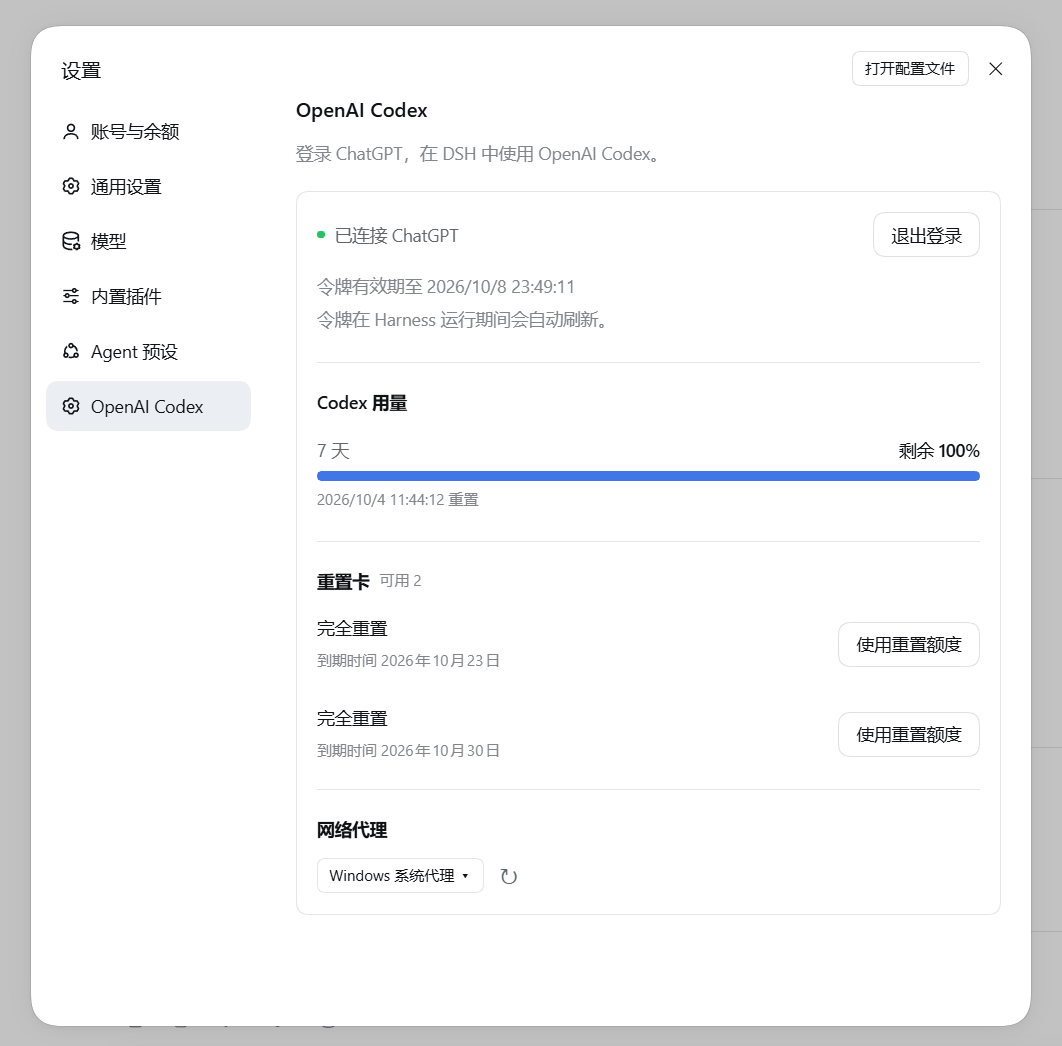
- 在设置页显示登录状态、滚动用量周期、重置时间和 Credits。
- 显示重置卡数量和到期时间,支持选卡并确认后兑换;
- 无需重启即可切换跟随 DSH 宿主或 Windows 手动系统代理。
要求
- DSH
0.2.0-rc.2Web 或 Windows 桌面版(已测试的宿主版本); - CLI 安装需要 Node.js
>=22.19.0;桌面版自带运行时,无需另装; - 具有 Codex 使用资格并已启用设备码登录的 ChatGPT 订阅。
模型来自宿主的 pi-ai 目录。DSH 0.2.0-rc.2 自带的 pi-ai 0.87.1
已包含 GPT-6 Sol 和 GPT-6 Luna,实际访问权限仍取决于账号;插件不会替换宿主目录或安装另一套 provider 运行时。
安装或更新
CLI / Web
dsh plugin --profile web add dsh-openai-codex-auth
安装或更新后重启 DSH。
Windows 桌面版
在桌面版插件管理器中输入 [email protected] 安装。
管理器会安装到当前桌面版 profile 并启用 bundle,无需另外安装全局 Node.js、pnpm 或 CLI。
如果更新后提示需要重启,请重启桌面版再检查新界面。
桌面版 0.2.0-rc.2 内置独立的 DSH 运行时,使用 desktop profile。
安装到 web 不会自动安装到桌面版。插件仍使用 dsh.client.platform: web,
因为桌面版复用 Web 插件界面。
先打开一次桌面版以初始化 profile,再完全退出(包括托盘进程), 然后在 PowerShell 中调用桌面版自带 CLI:
$desktopDsh = "$env:LOCALAPPDATA\Programs\DeepSeek Harness\resources\runtime\cli\bin\dsh.cmd"
& $desktopDsh plugin --profile desktop add [email protected]
自定义安装位置需调整路径,不要用 npm 全局安装的 dsh 代替该命令。
重启桌面版后打开“设置 → OpenAI Codex”。卸载时同样先完全退出桌面版,
再用该 CLI 执行 plugin --profile desktop remove dsh-openai-codex-auth。
插件 0.6.1 面向 DSH 0.2.0-rc.2;仍使用 DSH 0.1.7-rc.2 的用户
请安装插件 0.4.2。不要绕过兼容性检查。
已验证隔离安装、桌面内置运行时及 Web 设置页/状态接口; 原生 Electron 窗口交互、真实 OAuth 和模型请求不在自动验证范围内。
从源码安装
以下命令针对 CLI / Web。桌面版请先完全退出,再使用自带 CLI 执行
plugin --profile desktop add .。
npm install
dsh plugin --profile web add .
这个包本身就是 DSH bundle,不需要再执行安装脚本。
使用
- 打开“设置 → OpenAI Codex”,选择“使用 ChatGPT 登录”;
- 打开验证页面,输入显示的设备码并完成授权;
- 在模型选择器的“OpenAI Codex”下选择模型。
DSH agent 也可以调用 codex_login、codex_status 和 codex_logout。
重置卡
用量下方展示可用重置卡数量和每张可用 Codex 重置卡的到期时间(本地时区),最近到期的排在前面。 每行的“使用重置额度”按钮指定该张卡,确认弹窗也会显示所选卡的到期时间。 接口未提供有效期或详情读取失败时会明确提示,不会误显示为零张。 点击“使用重置额度”后需在弹窗再次确认,才会发送可能消耗所选重置卡的请求。 具体重置哪些符合条件的额度由服务端决定;所选卡失效时不会自动改用另一张。 结果不确定时只能重试同一次请求,请勿在其他窗口另行发起重置。 此功能依赖非公开接口,其兼容性不保证;兑换仅做模拟测试,未消耗真实重置卡验证。
网络代理
在 设置 → OpenAI Codex → 网络代理 中选择模式,新请求立即生效,无需重启
(底层配置字段为本插件的 proxyMode):
host(默认):跟随 DSH 宿主。启动前配置HTTPS_PROXY/HTTP_PROXY/ALL_PROXY和NO_PROXY,或写入$DSH_HOME/.env。system:读取运行 DSH 的 Windows 用户的手动 HTTP/HTTPS 系统代理及绕过列表。 登录、令牌刷新、用量和模型请求均使用此模式;模型对话使用 SSE,不使用 WebSocket。 OAuth 在独立 Worker 内运行,不修改宿主的环境变量或全局连接管理器。
系统代理模式不支持 PAC、自动发现、SOCKS-only 或带用户名密码的代理地址;没有可用的 手动 HTTPS 代理时请求会报错,不会自动回退直连。系统绕过列表匹配的地址按系统策略直连。 此设置不控制外部浏览器中的授权页面。进行中的请求保留原连接直到结束;修改 Windows 代理后点击“重新读取系统代理”即可,切换失败保留原模式。修改宿主的环境变量仍需重启 DSH。
例如在 PowerShell 中(请替换为你的代理地址):
$env:HTTPS_PROXY = "http://127.0.0.1:7897"
dsh web
卸载
以下命令针对 CLI / Web。桌面版请通过插件管理器或上文自带 CLI 卸载; 卸载 Web profile 中的插件不会移除桌面版中的副本。
先在“设置 → OpenAI Codex”中退出登录,然后运行:
dsh plugin --profile web remove dsh-openai-codex-auth
最后重启 DSH。
安全
- OAuth token 以
PI_OAUTH_OPENAI_CODEX项保存在本地$DSH_HOME/.credentials.yaml,不会发送到设置页面; - 用量数据只保留聚合百分比、重置时间、Credits,以及重置卡数量、到期时间和选卡所需的卡片标识,不包含用户身份信息;
- 请勿提交或分享
.credentials.yaml、auth.json或环境变量文件。
安全问题请按 SECURITY.md 私下报告。
开发
npm run check
npm test
npm pack --dry-run
提交改动前请阅读 CONTRIBUTING.md。