dsh-sensenova-pool
已验证dsh-sensenova-pool · v0.1.2 · MIT · Web 界面
商汤日日新(SenseNova)多 Key 轮换池 — 填入多把 Key 即可零配置接入 DeepSeek Harness,遇 429 限流自动切换下一把 Key。
安装
dsh plugin add dsh-sensenova-pool 用 dsh --profile default --dump-config 确认 layer 已生效 —— 参见安装指南。
源码
标签
作者
说明文档
dsh-sensenova-pool
商汤日日新(SenseNova)多 Key 轮换池 · DeepSeek Harness 插件
在一个地方填入多把商汤 API Key,即可在 DSH 对话窗口里直接使用日日新的各种模型 —— 遇 429 限流自动切换到下一把 Key,全程无感。



中文 | English
功能
🔑 多 Key 轮换池
填入任意多把商汤 Key,请求在多把 Key 之间自动轮转,把每把 Key 的额度摊开使用。
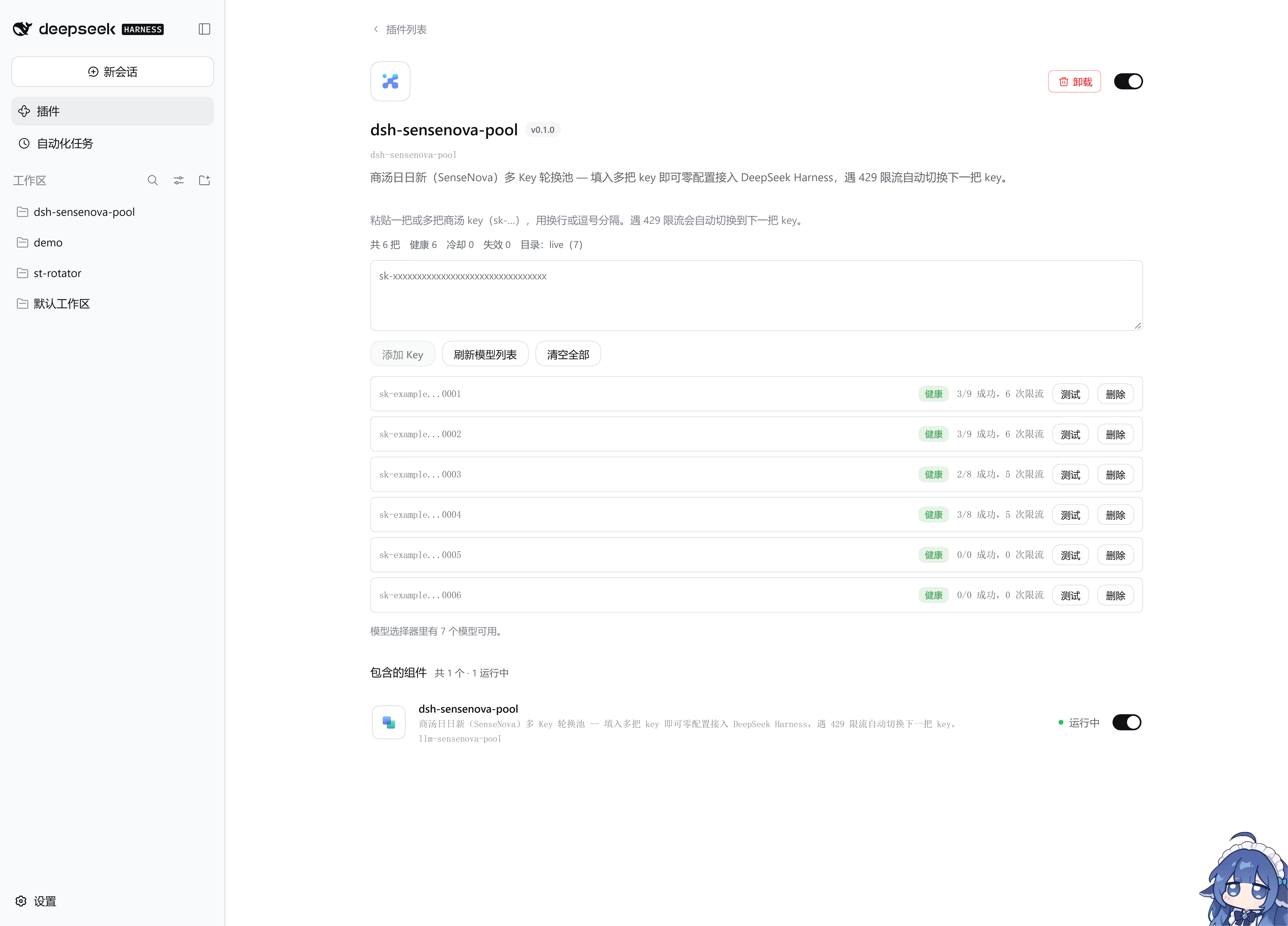
- 一次粘贴多把:换行、逗号、分号、空格分隔都可以
- 自动清洗:识别并去除
Bearer前缀、首尾引号、重复项、明显无效的短串 - 只看得到脱敏值:界面只显示
sk-example...0001这样的掩码,明文 Key 不会出现在任何界面上 - 单把可测:每把 Key 都能单独「测试」探活,看到真实的可用状态与延迟
- 单独删除:任意一把失效随时移除,不影响其他 Key
🛡 429 限流自动切换
这是本插件的核心能力。商汤的 Key 有较低的 RPM 上限(实测现有 Key 约 3 RPM),单靠重试无法解决。本插件的做法:
- 遇 429 立即切换到下一把 Key 重试,用户看不到任何报错
- 每把 Key 独立冷却,按指数退避 + 随机抖动错开解冻时间
- 本地 RPM 预限流主动排队,从源头避开限流,而不是挨打后再退避
- 池子真的耗尽时,回报
503 + Retry-After(而不是 429),交由 DSH 自行退避重试 - 429 计数与冷却状态在卡片上实时可见
截图中的 3/9 成功,6 次限流 就是真实发生的记录:这把 Key 触发了 6 次 429,全部被池子内部消化,上层没有收到过一个 429。
🧠 一次接入全部模型
装好插件后,模型选择器里自动出现「商汤日日新(Key 轮换池)」分组,包含以下模型:
| 模型 | 上下文 | 最大输出 | 图片输入 |
|---|---|---|---|
deepseek-v4.1-flash |
1,048,576 | 65,536 | – |
deepseek-v4-flash |
1,048,576 | 65,536 | – |
deepseek-v4-pro |
1,048,576 | 65,536 | – |
deepseek-flash |
1,048,576 | 65,536 | – |
glm-5.2 |
1,048,576 | 131,072 | – |
kimi-k3 |
1,048,576 | 65,536 | – |
sensenova-6.8-flash-lite |
262,144 | 65,536 | ✓ |
启动时内置一份保守目录(无需网络即可用),拿到有效 Key 后自动通过 /v1/models 刷新,商汤日后上线新模型无需升级插件。
思考等级同样支持,可选 none / low / medium / high / xhigh。
⚙️ 零配置
Key 存在 DSH 的凭据库里,不写进任何配置文件。填入即生效,无需重启 DSH、无需改 YAML。
安装
方式一:npm(推荐)
npm install dsh-sensenova-pool
或使用 pnpm:
pnpm add dsh-sensenova-pool
安装后,把 dsh-sensenova-pool 加入 profile package.json 的 dsh.profile.bundles:
{
  "dsh": {
    "profile": {
      "bundles": [
        "dsh-sensenova-pool"
      ]
    }
  }
}
方式二:本地开发
git clone https://github.com/Phoeky/dsh-sensenova-pool.git
cd dsh-sensenova-pool
npm install
npm run build

# 链接到你的 profile
pnpm --dir "$DSH_PROFILE_DIR" add "link:$PWD"
同样需要把 dsh-sensenova-pool 加进 dsh.profile.bundles。
重启 DSH
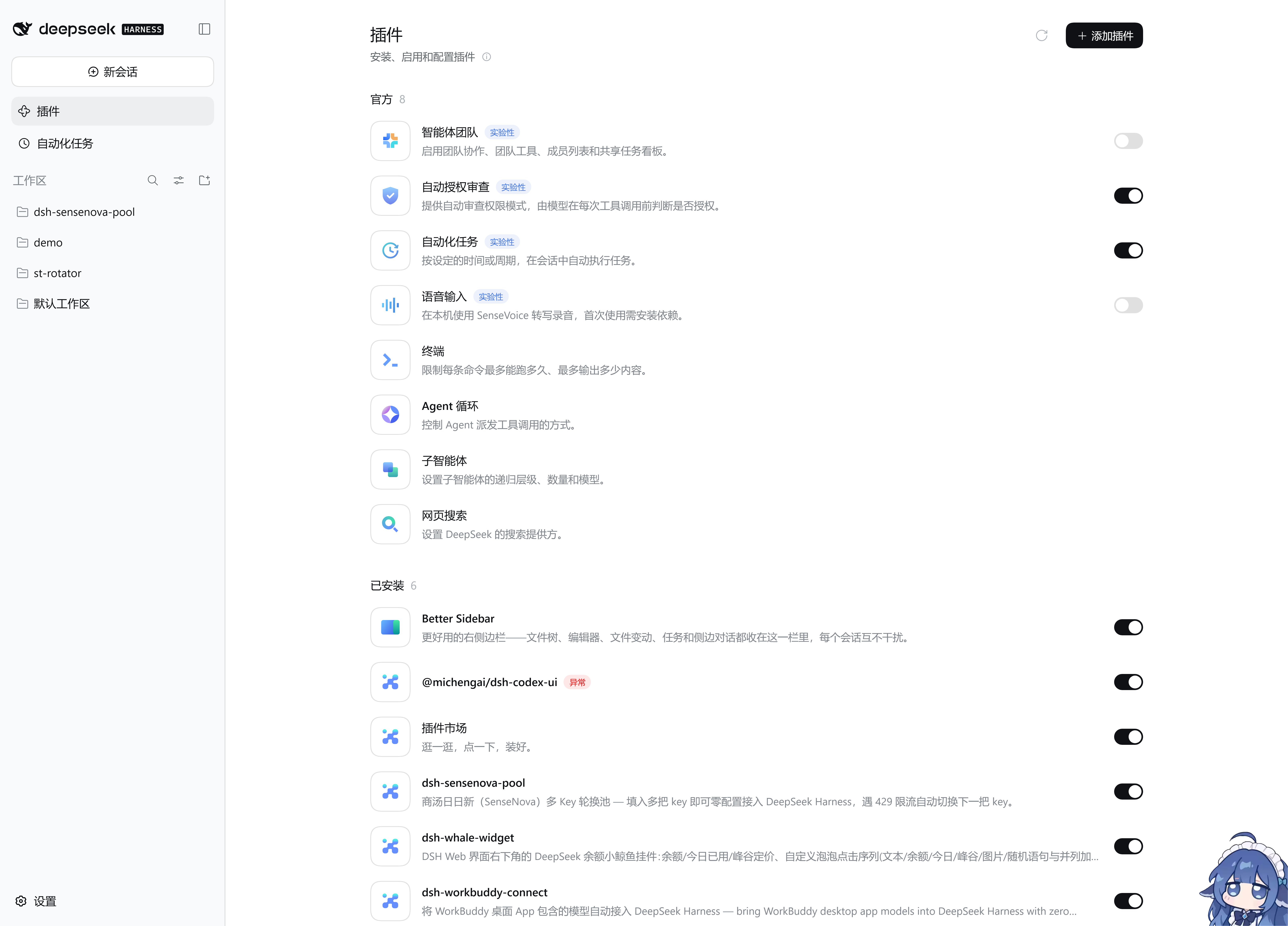
改完 package.json 后重启 DeepSeek Harness。确认安装成功:插件页的「已安装」列表里会出现本插件。
使用
1. 填入 Key
打开 插件 → dsh-sensenova-pool,在弹出的卡片里粘贴一把或多把商汤 Key:
sk-aaaaaaaaaaaaaaaaaaaaaaaaaaaaaa
sk-bbbbbbbbbbbbbbbbbbbbbbbbbbbbbb
sk-cccccccccccccccccccccccccccccc
点「添加 Key」。支持多种分隔方式,重复和无效项会被自动过滤。
2. 选择模型
新建会话,在模型选择器里选「商汤日日新(Key 轮换池)」下的任意模型,然后正常对话即可。
3. 需要时调整
| 按钮 | 作用 |
|---|---|
| 测试 | 对单把 Key 发一次极小请求,立刻看到是否可用与延迟 |
| 删除 | 移除单把 Key |
| 清空全部 | 移除所有 Key |
| 刷新模型列表 | 主动从商汤 /v1/models 拉取最新模型目录 |
配置项(可选)
绝大多数情况无需改动。如需微调,在 profile 的 cordis.patch.yml 里加入:
- id: llm-sensenova-pool
  name: dsh-sensenova-pool
  config:
    rpmLimit: 2          # 每把 Key 的本地 RPM 预限流上限;0 = 关闭
    maxAttempts: 6       # 单个请求最多尝试几把 Key
    maxConcurrency: 1    # 每把 Key 的并发上限;1 = 串行(推荐)
    acquireTimeoutMs: 180000
    requestTimeoutMs: 60000
    baseUrl: https://token.sensenova.cn/v1
rpmLimit: 2 是默认值,基于实测(真实上限约 3 RPM)。调大它不会提高吞吐,只会更容易被限流 —— 想提高吞吐应该增加 Key,而不是加压。
常见问题
模型选择器里没有「商汤日日新」分组?
确认 dsh.profile.bundles 里有 dsh-sensenova-pool,然后重启 DSH。
插件卡片打不开?
在插件页「已安装」列表里点本插件进入详情页。
一直失败怎么办?
在卡片上点某把 Key 的「测试」看真实原因。403 model is not available in the current token plan 表示该模型不在这个 Key 的套餐里 —— 换模型,而不是换 Key。
DSH 弹「The application could not start or stopped unexpectedly」,完全起不来?
先看崩溃日志里的失败插件名。如果 Failed plugins 指向 credentials,且错误是
record "dsh-sensenova-pool/keys" ... has unknown field "payload",说明凭据库里那条记录
的标签写错了 —— DSH 的凭据库对记录做白名单校验,api-key 只认 kind/key/env,
grant 只认 kind/payload,一条记录不合规就会让 credentials 插件激活失败,进而
中止整个应用启动(0.1.1 及更早版本存在这个写入 bug,已修复)。
手工修复:编辑 $DSH_HOME/.credentials.yaml,把该记录的 kind: api-key 改成
kind: grant(payload.keys 里的 Key 原样保留),然后重启 DSH。
records:
  dsh-sensenova-pool/keys:
    kind: grant          # ← 必须是 grant;api-key 不接受 payload
    payload:
      keys:
        - sk-…
崩溃日志位置:Windows 下为 %APPDATA%\@deepseek-ai\dsh-desktop\logs\crash-*-host.log。
Key 会泄漏吗?
不会。界面只显示掩码;明文只存在 DSH 凭据库($DSH_HOME/.credentials.yaml)中,不会写入任何配置文件,也不会出现在日志里。
环境要求
- DeepSeek Harness
0.2.0-rc.2或更高 - Node.js
^22.19.0 || >=24.0.0
致谢
本插件在设计与实现上参考了以下开源项目,特此致谢:
- corrinehu/dsh-workbuddy-connect —— 将第三方模型接入 DSH 的插件范式。本插件的 provider 注册方式与浏览器卡片结构参考了该项目。
- Phoeky/st-rotator —— 商汤 Key 轮换网关。本插件的轮换调度、冷却退避与本地预限流策略参考了该项目。
许可
English
A multi-key rotation pool for SenseNova (商汤日日新) as a DeepSeek Harness plugin.
Paste one or more SenseNova API keys in one place and use every SenseNova model directly in the DSH chat window — rate-limited keys (HTTP 429) are switched out automatically and transparently.
Features
- Multi-key pool — paste any number of keys at once (newline / comma / semicolon separated); prefixes, quotes, duplicates and junk are cleaned automatically
- Automatic 429 failover — on rate limiting the pool immediately retries with the next key; each key cools down independently with exponential backoff and jitter, plus local RPM pre-throttling to avoid 429s in the first place
- Never leaks a 429 upward — when every key is exhausted the plugin reports
503 + Retry-Afterso DSH backs off on its own - All models, zero config — a built-in catalogue works offline and refreshes from
/v1/modelsonce a valid key is present, so new models need no plugin upgrade - Keys are masked — only
sk-example...0001style masks are ever displayed
Install
npm install dsh-sensenova-pool
Add "dsh-sensenova-pool" to dsh.profile.bundles in your profile package.json, then restart DeepSeek Harness.
Usage
Open Plugins → dsh-sensenova-pool, paste your keys, click Add keys, then pick any model under the "商汤日日新(Key 轮换池)" group in the model picker.
Acknowledgements
- corrinehu/dsh-workbuddy-connect — the plugin pattern for bringing third-party models into DSH
- Phoeky/st-rotator — the SenseNova key-rotation gateway this plugin's rotation strategy derives from