dsh-file-explorer
已验证@jaxzhou/dsh-file-explorer · v0.1.11 · MIT · Web 界面
DeepSeek Harness plugin: a workspace file browser with a per-format preview (rendered Markdown, a JSON tree, 24 syntax grammars, images), shown as a Conversation View tab beside Chat and Trajectory
安装
dsh plugin add @jaxzhou/dsh-file-explorer 用 dsh --profile default --dump-config 确认 layer 已生效 —— 参见安装指南。
源码
标签
作者
说明文档
dsh-file-explorer


English | 中文
Published on npm as
@jaxzhou/dsh-file-explorer— the unscoped namedsh-file-explorerbelongs to a different author's plugin.
A Files tab for DeepSeek Harness, beside Chat and Trajectory: the session workspace as a tree, and a preview that adapts to what the file is — rendered Markdown with its diagrams, a page of HTML, a JSON tree, highlighted source, an image, a PDF, or an unpacked Word, Excel or PowerPoint document. Read-only, no configuration, nothing stored.
dsh plugin --profile web add @jaxzhou/dsh-file-explorer
dsh --profile web
Demo
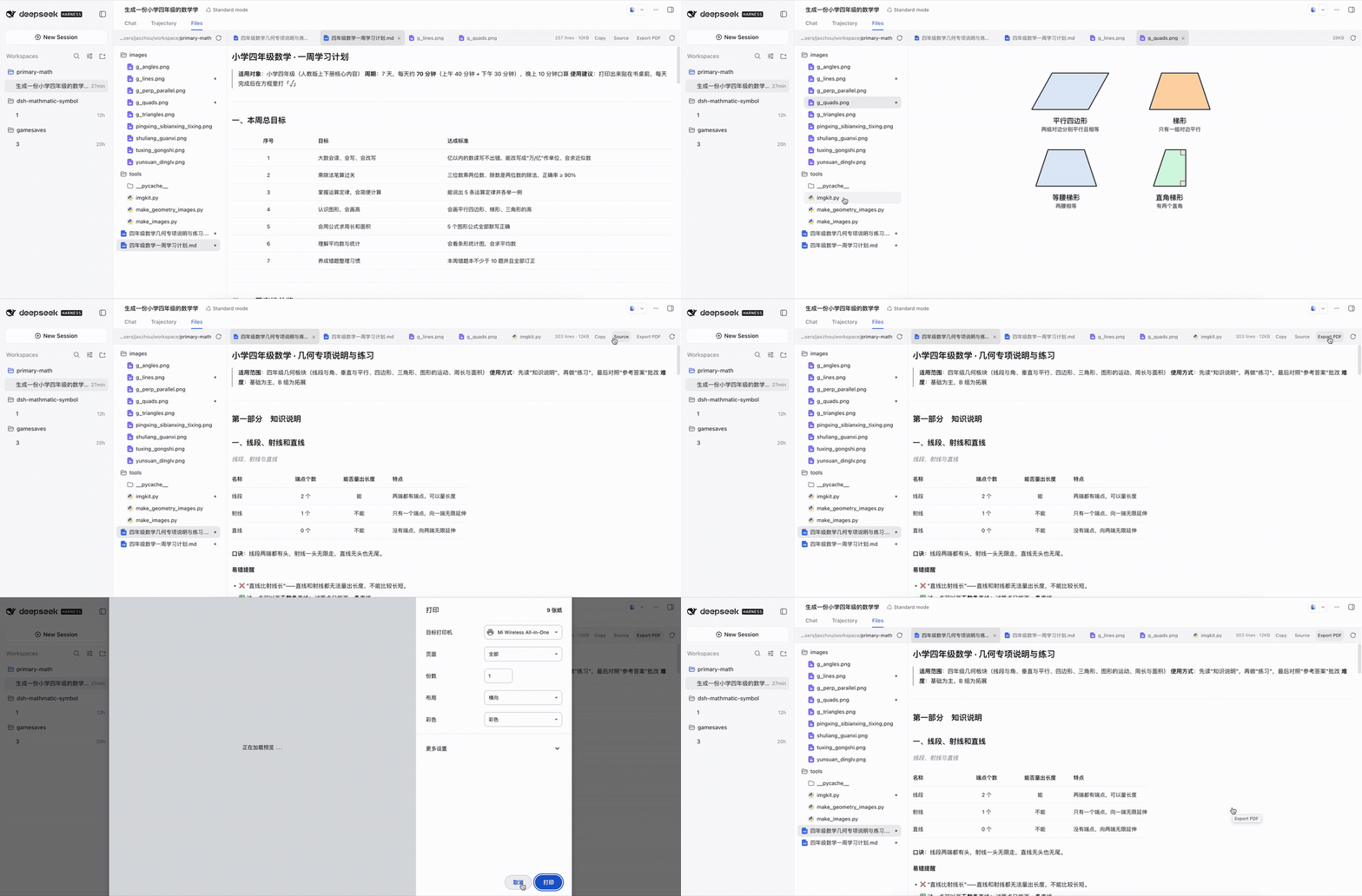
15 seconds — click for the full-quality MP4. A primary-school maths workspace: a lesson document rendered with its tables, the Source toggle showing the Markdown behind it, a second document open beside it in its own tab, and an export of it to PDF.
The recording is an older build than the list below. It predates Mermaid diagrams, the PDF and Office previews, and downloading a file from the pane at all, and it still shows an export handing the page to the browser's print dialog — which no export does now.
What you get
The left pane is the session's working directory, listed one level at a time, directories first. An expanded level stays expanded while you move between preview tabs, and the pane itself folds away — by its own control, or by opening a file. That last one is also how the pane behaves on a phone: below 720 pixels the tree and the preview take turns instead of sharing a width neither of them fits in, and a finger gets bigger controls, a taller header, and a tab close button that is not waiting for a hover it will never see.
Clicking a file opens it in a tab, so several files stay open at once — each with its own body and its own wrap setting. A file that is already open is focused rather than reopened, tabs whose names collide show their directory, and the tab's × or a middle click closes one. Right-click a tab for the rest of the strip: Close, Close others, and Close all, opening where the pointer was.
The right pane picks each tab's body from the file:
| Category | Preview |
|---|---|
| Markdown | Rendered GFM — headings, tables, task lists, quotes, math, footnotes, images referenced beside the file, highlighted code fences, and Mermaid diagrams — with a Source toggle and an Export menu |
| HTML | Drawn as a page in a sandboxed frame: the file's own CSS applies, and its scripts run in an opaque origin that cannot reach this application. With a Source toggle and an Export menu |
| JSON | A collapsible tree with per-value copy, and the same toggle |
| Source code | Syntax highlighting, line numbers, and a copy button for 24 grammars: TypeScript/JavaScript, shell, Python, Ruby, Go, Rust, Java, C, C++, C#, Kotlin, Swift, PHP, YAML, TOML, INI, HTML, CSS, SCSS, Less, SQL, XML, Lua, MDX |
| Images | PNG, JPEG, GIF, WebP, AVIF, BMP, ICO and SVG, drawn to the pane. An SVG goes through <img>, so its scripts never run |
| Drawn by the browser's own PDF reader, from the file's bytes — so its text is real text | |
| Word, Excel, PowerPoint | .docx, .xlsx and .pptx unpacked in the page: a document's headings, lists, quotes, tables, pictures and code, drawn with the formatting the document itself carries — each run's font, size, bold, italic, underline, strikethrough, super- and subscript, colour and highlight, and each paragraph's alignment, indents and spacing, all read through its style chain rather than off the run; a workbook's sheets as a grid, with the dates it stores as numbers shown as dates; a deck's slides as an outline of their text and pictures |
| Anything else | Numbered plain text — an unmapped suffix (.vue, .proto, .txt) stays plain rather than guessing a wrong grammar. The legacy binary Office formats (.doc, .xls, .ppt) are not previewed: the pane says so and offers the download |
A Mermaid code fence (```mermaid) is a diagram, not source, so the pane
draws it: flowcharts, sequence diagrams, state, class, ER, gantt, pie and the
rest of what Mermaid 11 understands. The drawing is a picture everywhere it
appears — the preview, the PDF page, and the Word document all carry the same
image — so what you see is what exports. A diagram Mermaid cannot parse keeps its
source, with the failure named above it.
Text previews wrap at their spaces and keep every word whole; an image reads its complete bytes.
Every preview carries one Export button in the pane's toolbar. Its first row is Download, which saves the file itself — not a conversion of it — so that row is there for every kind of file, including the ones this pane will not draw. Its size is not a limit: a download is read a window at a time rather than all at once, so a file larger than a preview can hold still saves normally — a 260 MB release tarball included. Up to 32 MiB it goes quietly to the browser's downloads; past that it asks where to put it and streams there, which keeps the memory it costs flat however large the file is. Several downloads run at once, each with its own row, its own progress and its own Cancel, and one failing leaves the others alone.
Every text body carries Copy, which copies the file's own text — a rendered Markdown document copies its Markdown source.
Every control in the pane is an icon rather than a word: its tooltip and its accessible label name it, and a toggle states itself by its fill.
A rendered Markdown or HTML document adds two rows to that menu — PDF and Word — and each downloads a file directly, with no print dialog:
| Format | What it is |
|---|---|
| A picture of the page, laid out as A4 and sliced to fit. The text in it is not selectable. That is deliberate: a text-mode PDF of a Chinese document would need a CJK font embedded in the plugin, which is megabytes for a preview tool | |
Word (.docx) |
A real Word document: headings, lists, tables, code and images, with the text still text — editable, searchable, and rendered with Word's own fonts. Chinese included |
A document's own local assets come with it: the images a Markdown file references beside it, and the images and stylesheets an HTML file links to.
Requirements
DeepSeek Harness 0.1.5-rc.2 or 0.2.0-rc.2 on the Web surface — dsh web,
or a profile composed from @deepseek-ai/dsh-base + @deepseek-ai/dsh-web-app. A
headless or SDK profile has no browser and gets no tab. The plugin declares no
configuration, so nothing in cordis.yml needs setting.
One artifact serves both: 0.2.0 renamed the shared icon set and reshaped the byte
read, so the plugin asks the running shell which spelling and which shape it has
(see src/client/shell.ts) rather than assuming either.
Install
dsh plugin --profile web add @jaxzhou/dsh-file-explorer
dsh --profile web                 # bundle membership is read at startup
A custom profile needs the Web composition first. --from-default-profile creates
the profile and boots it, so stop the first command once it prints its URL:
dsh --profile myprofile --from-default-profile web   # creates it, then serves it
dsh plugin --profile myprofile add @jaxzhou/dsh-file-explorer
dsh --profile myprofile
Prefer a checkout or a git ref? Nothing needs building — the runtime artifacts are committed:
dsh plugin --profile web add /path/to/dsh-file-explorer
dsh plugin --profile web add github:jaxzhou/dsh-file-explorer
Then open a session that has a workspace and click Files. To confirm the layer landed:
dsh --profile web --dump-config | grep -A 2 jaxzhou-file-explorer
Disable or uninstall
Disable the tab without uninstalling by adding an override to the profile's
cordis.patch.yml — it is applied after every bundle layer, and a
patchReload: live profile picks it up without a restart:
- id: jaxzhou-file-explorer
  disabled: true
Uninstall with dsh plugin --profile web remove @jaxzhou/dsh-file-explorer, then
restart the profile.
Privacy
- Read-only. Reads go through the harness's own
workspaceFilesRemote namespace; the Host's filesystem decides what is readable. The plugin holds no file access, no path resolution, and no credentials of its own. - Nothing stored. No disk writes and nothing added to the session log; view state lives in memory and is discarded with the session.
- Inert Host half. The package's Node side registers no service, tool, prompt section, or event.
- Diagrams are drawn in the page. Mermaid is bundled into the plugin and runs locally; drawing a diagram fetches nothing from anywhere.
- Office documents are unpacked in the page. A
.docx,.xlsxor.pptxis read here, by this plugin's own reader; nothing about it leaves the browser. A PDF is handed to the browser's reader as a local blob URL. - HTML runs sandboxed. A previewed page's scripts execute in an opaque origin,
which cannot read this application's DOM, storage, or session; an exported page
is printed with its scripts removed. An SVG draws through
<img>, so its scripts never run at all.
Known limitations
- Preview only — no editing, saving, or diffing.
- Strict JSON. Comments or a trailing comma make a file JSONC, which
JSON.parserejects —tsconfig.jsonis the common case. The pane says so and shows the highlighted source instead of guessing at a tree. - Text previews stop at 2 000 lines, with a truncation note and no "load more"; binary files report why they cannot be shown.
- Fixed grammar set. A suffix the shared highlighter does not carry is plain text, never an approximation.
- Listing only — no search, rename, context menu, or file watching; a level refreshes through Reload.
- Loaded previews are bounded. A working set of five tabs keeps its content; an older tab stays open and reads again when you return to it.
- One root. The tree is rooted at the session's working directory, and the Host refuses directory listings outside the workspace root.
- Markdown pulls in the images beside it. A destination relative to the document is read through the same workspace reader the file itself came from — up to 24 images per document and 8 MiB each. A file mention in inline code, a remote URL, and an absolute path are left to the renderer's own rules: the first stays inert, the second loads directly, and the third is not fetched.
- HTML previews do not resolve relative assets. A page drawn from a Blob
document has no base to resolve its own
style.cssor images against, so only absolute URLs load there. An export does resolve them — the file it writes is read from a copy that has been made to stand alone — so a document can export with pictures it does not show in the preview. - An exported PDF's text is a picture. Nothing in it can be selected or searched — a previewed PDF is the browser's own reader, where it can. Export Word instead when the text has to stay text.
- A Mermaid diagram is a picture too. It is drawn once, to a PNG, for the preview and for both exports — so its labels are not selectable, and it is always drawn on white, because a PDF page and a Word document are white and a diagram drawn for a dark pane would be invisible on them. Drawing supports the diagram types Mermaid 11 carries; a malformed one keeps its source and names the failure above it.
- An Office preview is content, not layout. A
.docxshows its headings, lists, quotes, tables and pictures, and the formatting the document carries: each run's font, size, weight, underline, strikethrough, super- and subscript, colour and highlight, and each paragraph's alignment, indents and spacing — resolved through the document's style chain, so text that is styled by a style rather than by the run is drawn the way the document means it. What is not there is everything that needs a layout engine: columns and page breaks, headers and footers, table borders and shading, text boxes, charts, SmartArt, and animations. A theme font is not resolved either — a run that names a theme gets the page's own default rather than a guess at what the theme says. A.xlsxshows its cells' values; a.pptxshows each slide's text and pictures. Formulas show the value the file cached, not a recalculation. - Only the OOXML formats are read.
.doc,.xlsand.pptare the older binary container, which this pane does not parse — it says so and offers the download instead. - A preview is bounded by one complete-file read, 32 MiB by default in the shipped Web composition: a larger PDF or Office package reports the refusal rather than being shown cut. A download is not bounded that way — it pages through the file — so something too large to preview can still be saved.
- A large download goes through the browser's save dialog. Past 32 MiB the bytes stream into a file you pick, which is what keeps the memory cost flat; a browser without that API collects the file first, so a very large download there costs its own size in memory.
- Long documents are cut at 60 PDF pages, and an image past 8 MiB is left out; both are stated here because a silent cut reads as a complete export.
Contributing
Build, checks, the artifact model, and how the client bundle reaches the browser: CONTRIBUTING.md.
License
MIT — see LICENSE.