dsh-mcp-mgmt-bundle
Đã xác minh@anht3889/dsh-mcp-mgmt-bundle · v0.0.6 · MIT · Giao diện web
DeepSeek Harness profile bundle for MCP connection management in Web Settings
Cài đặt
dsh plugin add @anht3889/dsh-mcp-mgmt-bundle Xác nhận layer đã áp bằng dsh --profile default --dump-config — xem hướng dẫn cài plugin.
Mã nguồn
Phát hành lên npm mà không có repository công khai. Hãy kiểm tra nội dung package trước khi cài.
Thẻ
Readme
dsh-mcp-management
Out-of-tree MCP connection management for DeepSeek Harness. Architecture and scope live in docs/design.md.
Install
From npm (after the packages are published):
npx @deepseek-ai/dsh plugin --profile web add @anht3889/[email protected]
From a local checkout (development), with a deepseek-harness checkout beside this repository — tsc resolves harness project references from there:
pnpm install && pnpm run build
npx @deepseek-ai/dsh plugin --profile web add ./packages/bundle
Restart the Web profile after installation.
Do not also mount @deepseek-ai/dsh-mcp-client for the same serverName — both register MCP tools and will conflict.
Settings UI
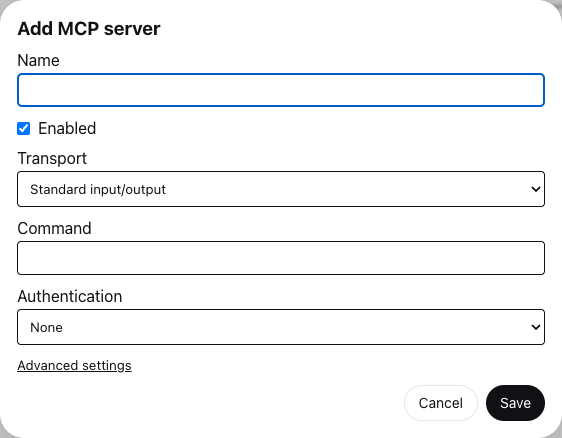
Add a server. Open Settings → MCP Servers and choose Add server. Fill in the name, transport (stdio or HTTP), command or URL, and authentication, then Save. Timeout and reconnect options live under Advanced settings.
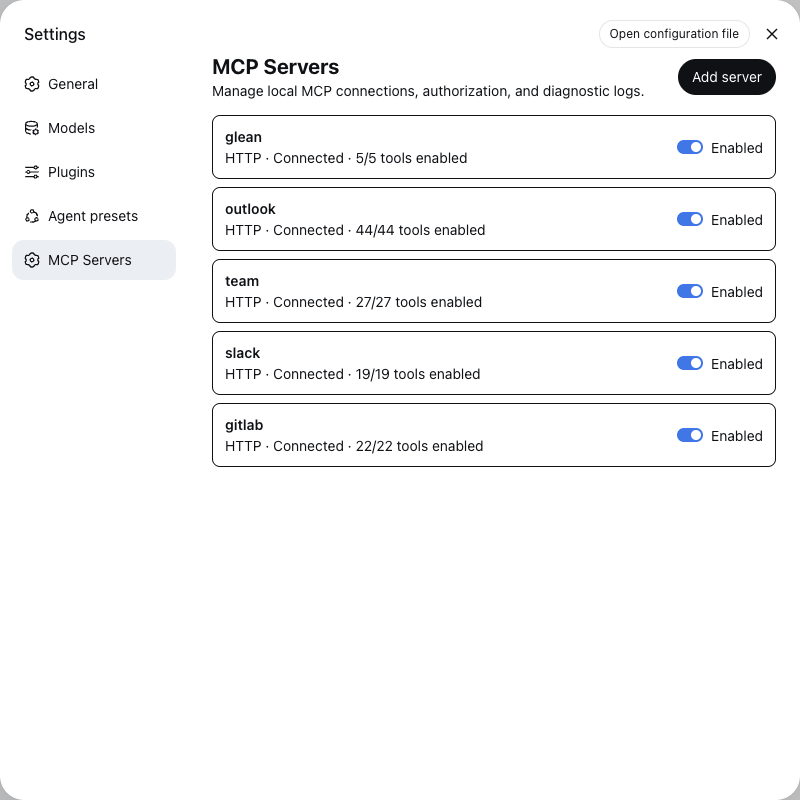
Server list. Each row shows the server name, an Enabled switch, and a summary of transport, connection state, and how many tools are enabled. Authorize appears only while an OAuth server has no token. Click the row to open details.
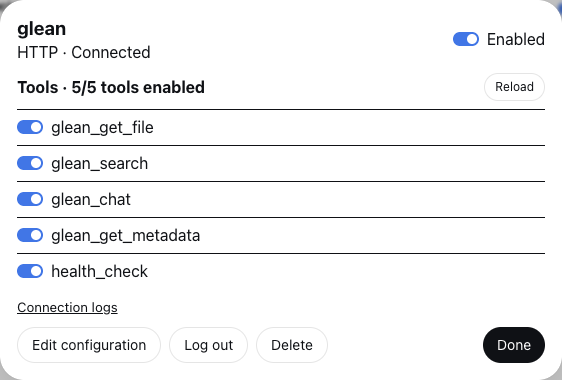
Server details. Toggle the server or individual tools, Reload to reconnect and re-list tools, open Connection logs, or use Edit configuration, Log out, and Delete. Disabling a tool unregisters it without dropping the connection; the choice is stored in the server record and survives a restart.
Storage
| Data | Default path |
|---|---|
| Non-secret server records, including disabled tool names | ~/.dsh/mcp/servers.json |
| Secrets (tokens, header values, client secret) | ~/.dsh/mcp/secrets.yaml, or ctx.credentials when mounted |
Override with the manager plugin's catalogPath / secretsPath config.
Servers behind a private certificate authority
Node trusts only its own bundled certificate authorities, so an HTTP server whose certificate comes from a corporate CA fails to connect with self-signed certificate in certificate chain even though a browser or curl reaches it. Set trustSystemCertificates: true on the manager plugin to trust the host's authorities as well, or launch the host with NODE_OPTIONS=--use-system-ca. Both widen TLS trust for the whole host process, which is why the config stays off by default.
OAuth
Each server's callback URL is the live web origin plus that server's auth.redirectPath (default /callback). Set publicOrigin on the manager when the browser reaches the host through a different origin. Authorization servers match the redirect URI exactly; a pre-registered public client usually allows /callback on any loopback port. The manager serves every configured path. Authorize and token requests also send the MCP URL as the RFC 8707 resource indicator.
Packages
| Package | Role |
|---|---|
@anht3889/dsh-mcp-mgmt-bundle |
Installable surface: patch, manager, Settings UI |
@anht3889/dsh-mcp-mgmt-mcp |
ctx.mcp vocabulary (library) |
@anht3889/dsh-mcp-mgmt-oauth |
PKCE OAuth + discovery (library) |