dsh-model-fold
Đã xác minhdsh-model-fold · v0.5.0 · MIT · Giao diện web
模型选择器按来源分组:悬停来源右侧滑出该来源模型子面板,当前模型与来源一眼可见,面板内可切换模式与字号。| Group the DSH model picker by provider: hover a source to slide its models out, see the active source and model at a glance, switch mode and font size right in the menu.
Cài đặt
dsh plugin add dsh-model-fold Xác nhận layer đã áp bằng dsh --profile default --dump-config — xem hướng dẫn cài plugin.
Mã nguồn
Thẻ
Readme
dsh-model-fold 📋
模型菜单别再一条道排到底。 给 DeepSeek Harness(DSH)的模型选择菜单加按来源(provider)分组的导航能力。
Stop scrolling one endless model list. Group the DSH model picker by provider — the menu lists sources first, and each source's models open in a slide-in side panel (hover / click) or inline below the title.
三种模式 / Three modes
| 悬浮模式(默认) | 列表模式 |
|---|---|
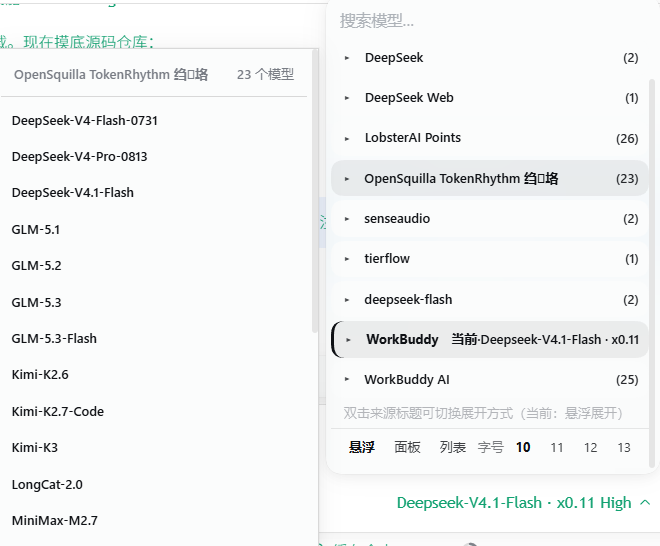 |
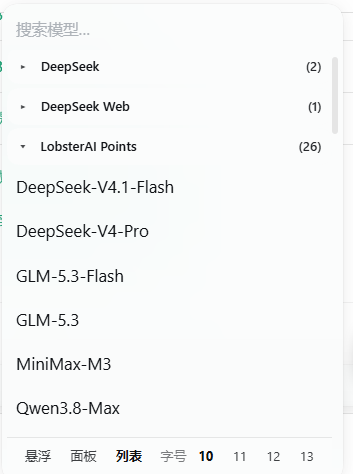 |
| 鼠标划过来源 → 右侧滑出该来源的模型;移开自动收起 | 点来源 → 在下方就地展开该来源的模型 |
第三种是面板模式(
panel):样子与悬浮模式相同,但需要单击来源才滑出面板(不做悬停触发)。
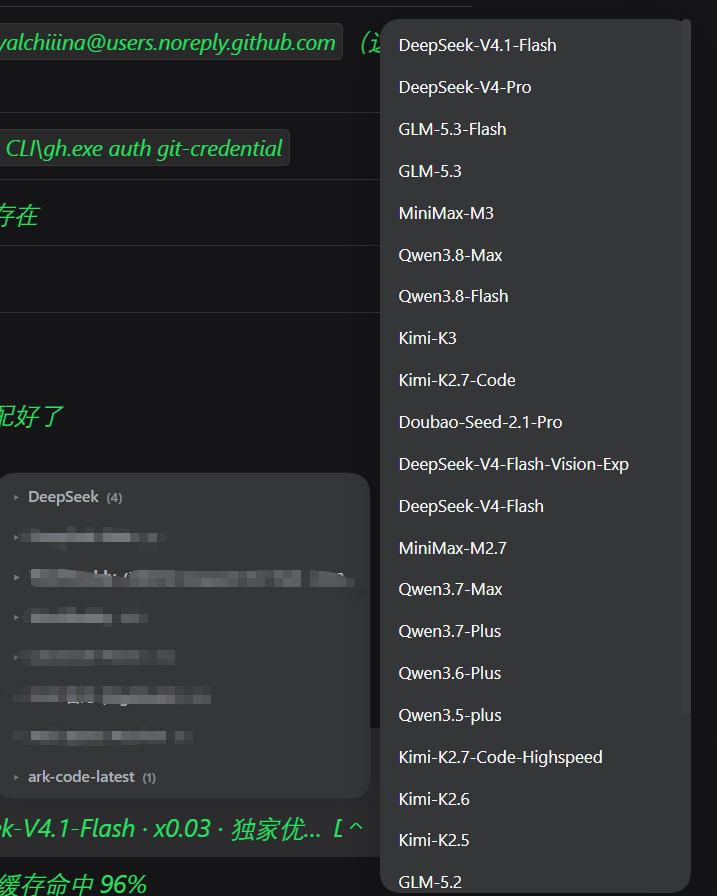
左下:折叠后的来源列表(
DeepSeek (4)、OpenSquilla TokenRhythm 网关 (23)…) 右侧:悬停/点击来源后从右滑出的模型子面板(DeepSeek-V4.1-Flash、GLM-5.3、MiniMax-M3、Kimi-K3…) 底部:设置条 —— 一键切换模式与字号 Left: the folded source list · Right: the slide-in model panel · Bottom: mode + font-size switcher
解决什么问题 / The problem
接了三五个来源之后,模型菜单能拉出一屏还滚不完——DeepSeek、GLM、MiniMax、Qwen、Kimi 二十几个模型挤在一起,每次选模型都要眯着眼找。
Add three or five providers and the model menu runs off the screen — two dozen models jumbled together, every switch a squint-and-hunt exercise.
功能亮点(v0.5.0,三模式)
- 🖱 悬浮展开(默认):鼠标划过来源标题,该来源的模型就从右侧滑出;移开自动收起。不用点击,选模型更快。
- 📋 来源优先:菜单只列来源(▾ 箭头 + 来源名 + 模型数),一屏看清有几个来源。
- 👁 当前来源与模型一眼可见:正在使用的来源标注
当前·模型名(加粗 + 品牌色),子面板内选中项保留 ✓。 - 🔄 三模式自由切换:双击任意来源标题循环切换
悬浮 → 面板 → 列表;菜单底部设置条也可直接点选,选择即时生效并记住。 - 🔤 面板内调字号:设置条提供
10 / 11 / 12 / 13四档字号,点一下即刻生效,全菜单与子面板同步。 - 💡 自带用法提示:菜单顶部有一行小字
双击来源标题可切换展开方式(当前:悬浮展开),新用户不必猜。 - 🎨 配色与排版跟随官方:背景、文字、悬停、圆角全部复用官方
--dsw-*主题变量,底色不透明、对比度充足;来源清单与子集清单尺寸与配色完全统一。 - 🧩 纯 DOM 增强,零侵入:面板与设置条都是插件自建 DOM,选择通过程序化点击原菜单真实按钮完成,不移动、不删除任何 React 管理的节点,与其他插件兼容。
- 🔒 不联网:插件没有任何网络请求,逻辑全在本地 DOM。
Features (v0.5.0, three modes)
- 🖱 Hover to open (default) — glide over a source heading and its models slide out from the right; they retract when you leave. No click needed.
- 📋 Sources first — the menu lists providers only (▾ arrow + name + model count).
- 👁 Active source & model at a glance — the current source is tagged
当前·model-name(bold + brand colour), with ✓ on the selection inside the panel. - 🔄 Three modes, switchable — double-click any source heading to cycle
hover → panel → inline, or use the in-menu switcher. Applied instantly and remembered. - 🔤 Font size right in the menu — pick
10 / 11 / 12 / 13; both the menu and the side panel follow. - 💡 Built-in hint — a one-line tip at the top of the menu tells new users about mode switching.
- 🎨 Colours and type follow the host — background, text, hover and radius all come from the SAME
--dsw-*tokens the official menu uses, with an enforced opaque background. - 🧩 Pure DOM enhancement, zero intrusion — the panel and the settings bar are plugin-owned DOM; selection happens by programmatically clicking the real menu buttons; no React-managed node is moved or removed.
- 🔒 No network access — zero requests, all logic runs locally in the DOM.
适配内核 / Compatibility
| 项目 | 版本 |
|---|---|
| DSH 桌面端(内核) | 2.0.15-next(dsh-desktop-next) |
| 官方模型选择组件 | @deepseek-ai/dsh-client-ui-model-selection 0.1.7-rc.2 |
| 客户端运行环境 | DSH Web GUI(Electron renderer,dsh-app://app/) |
engines.dsh |
>=2.0.15-next |
本插件增强的是 两级下钻菜单(root → model / effort):
div[role="menu"]                      ← 官方 portal 到 body 的浮层
├─ pane="root"   button[role="menuitem"]      (「模型」「推理等级」两个 cell)
├─ pane="model"  div.groups > section[role="group"][aria-labelledby]
│                 ├─ div(分组标题 = 来源名)
│                 └─ button[role="menuitemradio"](模型项)
└─ pane="effort" 扁平的 button[role="menuitemradio"](无 section[role="group"])
插件只增强 pane="model";root 与 effort 因不含 section[role="group"] 而完全不介入——这也是「思考等级」面板一直稳定的原因。
若你的 DSH 内核版本不同:官方若改动 section[role="group"] / aria-labelledby / menuitemradio 这套语义结构,插件会因选择器失配而静默不生效(不会报错、不会破坏原菜单)。可在 DSH 里按 Ctrl+Shift+I 打开 DevTools,确认上述结构后再提 issue。
两种模式的交互细节见 docs/modes.md,版本历史见 CHANGELOG.md。
安装 / Install
在 DSH profile 中安装(依赖 dsh.bundle 自声明,无需手动改 cordis.patch.yml):
dsh plugin --profile desktop add dsh-model-fold
或安装本地 tgz:
dsh plugin --profile desktop add ./dsh-model-fold-<version>.tgz
或把目录复制到 profile 的 node_modules 并在 profile package.json 的 dsh.profile.bundles 中加入 dsh-model-fold。
Install from npm:
dsh plugin --profile desktop add dsh-model-fold
回滚 / 模式说明 · Rollback
v0.3.0 起为双模式:默认 panel(右侧子面板),双击任意来源标题可切换为 inline(下方列表展开)模式;inline 模式下折叠状态跨菜单记忆。若需要回到 v0.2.0(单 inline 模式)版本,可从 GitHub Releases 获取历史版本。
Since v0.3.0 the plugin ships two modes: panel (side panel, default) and inline (expand below the heading), switched by double-clicking any source heading. To return to the v0.2.0 single-mode behaviour, grab a historical release from GitHub Releases.
更新日志 / Changelog
v0.4.7
- 🐛 修复「子面板一闪而过」:折叠隐藏按钮导致官方
onBlur关闭整个菜单;改为隐藏前先把焦点移回 trigger。 - 🐛 修复「点击来源没反应」:点击事件改为
document级委托,不再依赖会被 React 换掉的节点。 - 🐛 修复「面板透明 / 文字看不清」:支持 8 位 hex,把官方的半透明菜单表面色合成成不透明等价色,文字色按底色亮度确定对比度。
- 🎨 来源清单与子集清单统一:字号 15px / 字重 600 / 行高 22px / 条目高 38px / 内距 8px 10px,配色与悬停共用同一套令牌。
- 🎨 勾选更醒目:✓ 加大到 16px 加粗并用品牌色,选中项加品牌色左条。
- 🛡 单例守卫:
dispose()摘净所有监听器与定时器,启动新实例前先拆旧实例,杜绝热重载堆叠。 - 🧹 移除全部临时诊断代码(不再有任何日志上报或额外监听器)。
v0.4.2
- 子面板自适应主题;双模式切换。
(更早版本见 GitHub Releases。)
原理 / How it works
目标 DOM 是 @deepseek-ai/dsh-client-ui-model-selection 渲染、portal 到 body 的 div[role="menu"]:其中每个来源是一个 section[role="group"],首子 div 为分组标题。插件用 MutationObserver 捕获菜单出现,在标题元素上追加自定义 data 属性(React 不管理这些内容),用 CSS :has() 依据 data 属性隐藏组内模型项——不移动、不删除任何 React 管理的节点,因此不破坏原组件的渲染与状态。
The target DOM is the div[role="menu"] rendered by @deepseek-ai/dsh-client-ui-model-selection and portalled to body; each provider is a section[role="group"] whose first child div is the group heading. The plugin uses a MutationObserver to catch the menu appearing and attaches custom data attributes to the heading (content React does not manage), then hides the in-group model items via CSS :has() — moving and removing nothing React owns.
v0.4.7 修复的三个硬骨头 / Three fixes worth documenting
这几个坑都是与官方组件行为耦合才出现的,改官方 UI 的插件都可能撞上:
1. 事件必须用 document 级委托,不能挂在 React 管理的节点上
早期版本把 click/mousedown 挂在来源标题 div 上。但标题是 React 管理的节点,pane 切换或任何重渲染都可能换掉它——监听器留在旧节点上,用户点的是新节点,于是点击永不触发(实测日志 onTitleClick 触发 0 次),表现为「点了没反应 / 一闪而过」。
现在统一由 document 上的捕获期委托处理,并按落点反查所属分组,不再持有任何节点引用。
2. 折叠前必须先把焦点从将被隐藏的按钮上移走
折叠靠 CSS display:none 隐藏真实模型按钮,而官方在进入模型列表后会主动把焦点放到「当前选中」的那个按钮上。两者相撞:官方聚焦 → 插件隐藏 → 浏览器强制失焦 → 官方根节点 onBlur 收到 relatedTarget = null → close() → 整个菜单连同刚打开的面板一起消失。
修复:隐藏前若发现焦点落在该分组内,先 focus() 回菜单 trigger(trigger 在官方 rootRef 内,onBlur 会因此放行)。
3. 背景要取官方的「菜单表面色」并合成成不透明色
官方菜单的 background-color 是 transparent,真正的颜色来自 CSS 变量 --dsw-specific-menu,而它的值形如 #43454a73——8 位 hex,结尾 73 是 alpha ≈ 45%。
- 若只认
rgb()/rgba(),会解析失败 → 面板退到祖先底色 → 比菜单暗(颜色不一致); - 若直接照抄,又可能抄到
transparent→ 面板全透明(文字看不清)。
正确做法:解析 8 位 hex,把半透明色按 alpha 合成到祖先底色上,得到「看起来与菜单一致、但完全不透明」的等价色;再把同一套变量写到菜单节点上,让来源清单与子集清单共用同一底色。
与 React 共存的其余纪律
- 单例守卫:热重载会反复执行
apply,dispose()必须摘净所有监听器与定时器;启动新实例前还要显式拆掉上一个实例,否则多个实例同时处理同一次点击、互相 open/close 面板。 - 焦点不转移:面板项不设
tabindex、不主动focus()——面板挂在body,不在官方rootRef/menuRef内,焦点一旦进入面板就等于「离开菜单」,会触发官方close()。 - 面板挂
body:官方菜单是 React portal 子树,任何重渲染都会回收其非 React 子节点;面板必须挂在body并用fixed定位。
FAQ
- 装完没效果? 需要重启 DSH:客户端 bundle 在宿主启动时加载进浏览器,改动/新装后必须重启才生效。 No effect after install? Restart DSH — the client bundle is loaded into the browser at host startup.
/model命令弹窗里有分组折叠吗? 没有。本插件增强的是 composer 的模型菜单(div[role="menu"]结构);/model弹窗是另一套 UI 表面,暂不涉及。- 双击切换模式会丢折叠状态吗? 不会。inline 模式的展开/折叠记忆独立保存;panel 模式下所有来源保持收起、由子面板展示。
- 会上传任何数据吗? 不会。插件没有任何网络请求,全部逻辑在本地 DOM 完成。 Does it upload anything? No — zero network requests, everything stays in the local DOM.
License
MIT