dsh-model-garden
Đã xác minhdsh-model-garden · v0.7.1 · MIT · Giao diện web
A searchable, sortable model picker for the DeepSeek Harness Web UI — provider groups, favorites, hidden-models blacklist, live per-task cost, prices and context windows, plus a refresh button that re-syncs every provider model list from its live API.
Cài đặt
dsh plugin add dsh-model-garden Xác nhận layer đã áp bằng dsh --profile default --dump-config — xem hướng dẫn cài plugin.
Mã nguồn
Thẻ
Tác giả
Readme
dsh-model-garden
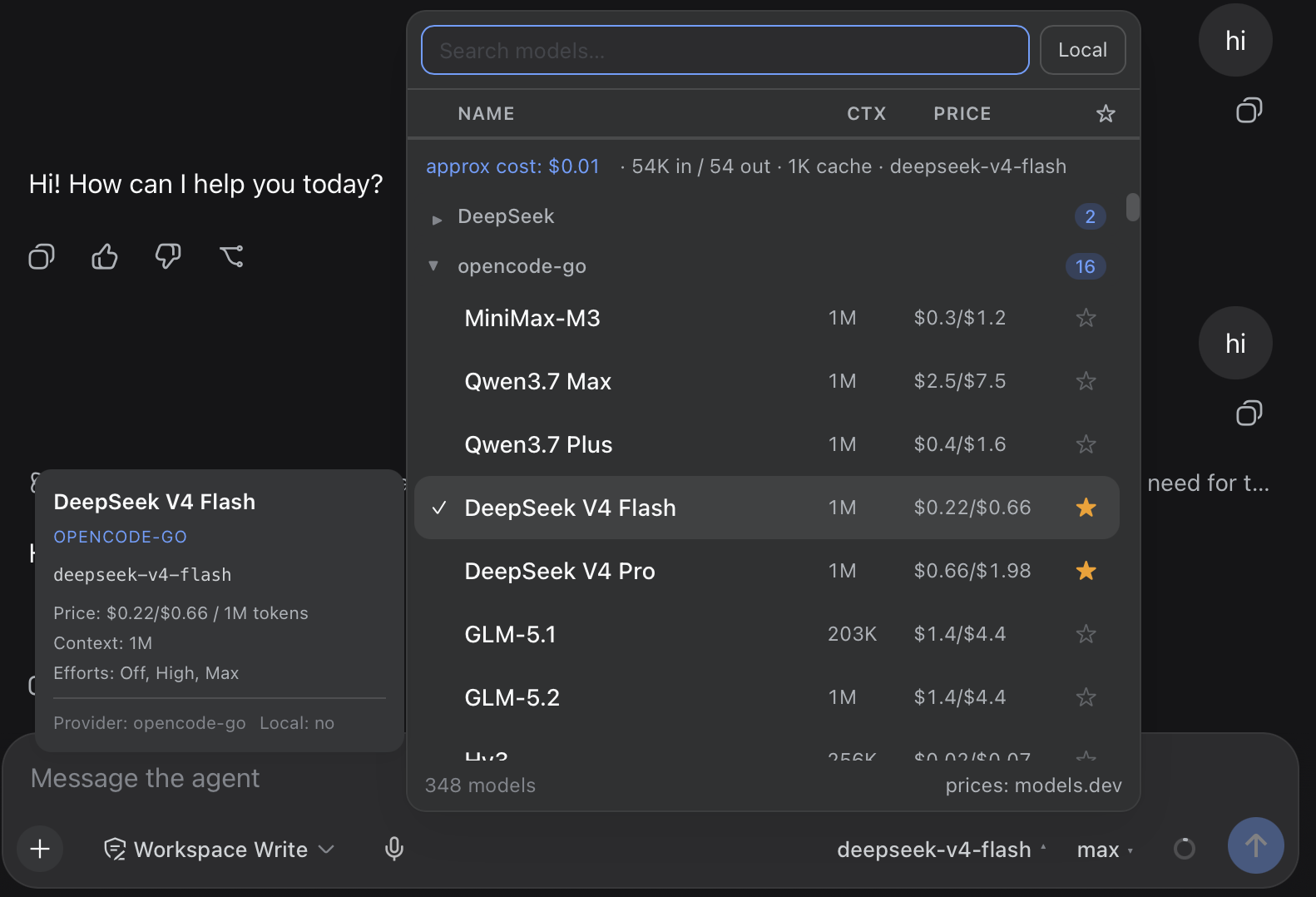
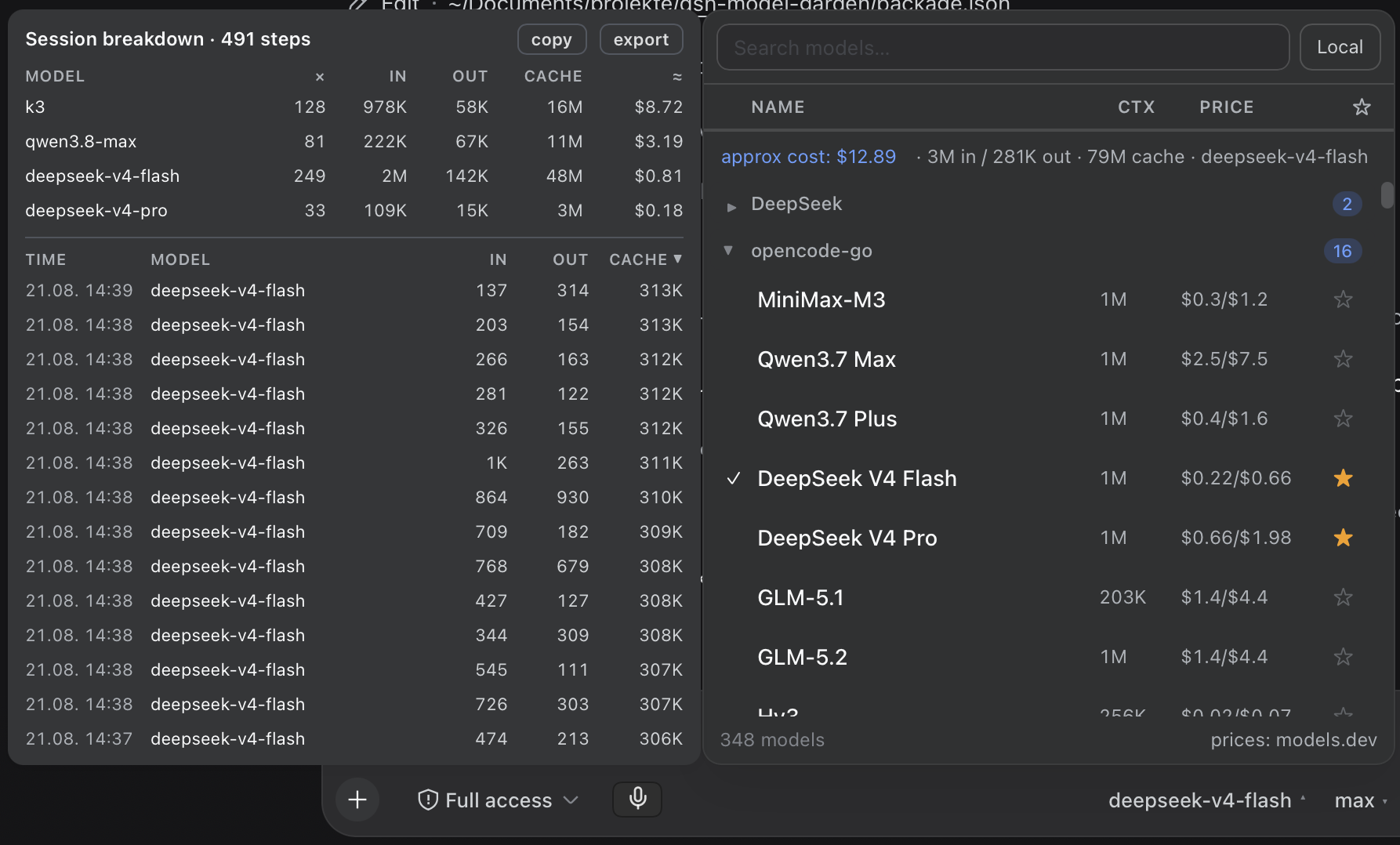
A searchable, sortable model picker for the DeepSeek Harness Web UI (dsh web). It replaces the native composer model seat with a table-style picker that adds everything the stock selector is missing:


 |
 |
Features
- 🔍 Instant search across model names and descriptions
- 📊 Sortable table columns — click
Name,CtxorPriceto sort asc/desc; a third click returns to the provider-grouped view - ⭐ Favorites — star models, toggle favorites-only from the table header; persisted in
localStorage - 🙈 Hide & shrink — a blacklist to make the picker smaller: hover a row and click ✕ to hide that model (or ✕ on a group header to hide a whole provider), then manage everything from the ⚙ button in the search bar — list what is hidden, un-hide single entries or click show all. Persisted in
localStorage, so your trimmed list survives reloads; hidden settings never touch the DSH configuration document - 🏠 Local tag — providers are flagged local by their real endpoint (baseURL from settings: loopback / RFC1918 / LAN hostnames), never by price guesswork; the Local box next to the search input filters to them
- ▾ Collapsible provider groups — collapse state is persisted per provider
- 🔄 Auto model-list update — while the picker is mounted, the provider/model directory is re-loaded automatically every 5 minutes (configurable), so locally added models show up without reopening the panel
- ⟳ Manual refresh from the provider APIs — the ⟳ button in the search row re-syncs every configured
llm-pi-aiprovider from its liveGET {baseURL}/modelsand writes the merged model lists back to the configuration document (details below); while a pass runs the button shows⟳ …and is disabled, and a per-provider tooltip reports+added / −removedplus any error - 🔌 Live inventory for local gateways — for routes that point at a local gateway the picker asks the gateway itself which models it currently serves (
GET /model-garden/server-models, 5 s per route); the Live toggle next to Local then hides configured entries the gateway does not actually serve, while unreachable routes keep their configured list - 💰 Model prices from models.dev (the same source OpenCode uses), shown as
$input/$outputper 1M tokens, cached for 24 h. Subscription routes (all-zero cost in the catalog, e.g. coding-plan providers) resolve a reference price from their pay-as-you-go provider viaPROVIDER_ALIASES, so plan models still show what their tokens would cost at API rates; only true local models stay unpriced - 🧠 Context windows — read live from the host
llmservice (adapter-owned data, works for local providers like llama.cpp / Ollama-style gateways too), with models.dev as fallback - 🎚️ Reasoning effort picker — models that support reasoning levels get a compact dropdown right next to the model name in the chat composer, styled and opening exactly like the model picker (same trigger pill, same floating menu surface, ✓ marks the active level, click outside /
Esc/ selecting closes it). Picking a model starts it at the adapter's own default level (reasoning.defaultEffort) — the plugin never invents an effort the adapter did not ask for, so cost and latency stay as the adapter intends (with no declared default the field is omitted and the adapter decides); the dropdown re-selects the current model with the chosen effort — no clutter inside the picker panel - 💸 Live per-task usage & cost — real provider-reported token usage (from the session log) is always shown while the panel is open (
in / out / cache). Each model's usage is multiplied by its own (reference) price — properly attributed even when a session switched models mid-way — the same math OpenCode uses (usage × price, not a heuristic) - 🧾 Session cost breakdown — hover the
approx costfigure for a popup sized like the picker and parked parallel on its left (1 px gap): a table-style breakdown with per-model totals (steps, In/Out/Cache in their own columns, ≈ cost) and a timestamped step table. Clickable column headers work like Excel / the main list (asc → desc → off, ▲/▼ indicator) on both tables; copy the summary or export the (sorted) step list as CSV (Excel-ready). The invisible hover target spans the cost row all the way to its left edge. Attribution of each step to its model comes straight from the session log (request/contextevents); nothing extra is stored - 🖱️ Detail tooltip that opens beside the panel (never covers the list): description, price, context window, max output, reasoning efforts
- 🎨 Native look — built on the harness design tokens only (
--dsw-alias-*,--dsw-elevation-prominent,--dsw-specific-menu); the picker panel and the effort menu use the native menu geometry (radius 20 px, elevation stroke, no border, no artificial darkening of the surface), while the detail tooltip and the cost popup are 12 px cards on the same surface token — light & dark themes follow the harness exactly
How it works
The package is a static profile plugin with two halves:
| Half | File | Role |
|---|---|---|
| Client | client.js |
Registers the conversation.input.model slot (priority -1, shadowing the native seat) and renders the picker |
| Host | index.js |
Serves same-origin JSON routes on the harness webServer service (cost, cost-history, catalog, server-models, refresh-models) |
Refresh button (⟳ in the picker)
A ⟳ button in the picker's search row re-syncs every configured llm-pi-ai provider from its live model API:
POST /model-garden/refresh-models
  → { summary, invalidateCatalog, results: [ { id, ok, changed, total, added, removed, error } ] }
The host reads the configured provider routes from the settings service, resolves each credential through the credentials service (~/.dsh/.credentials.yaml) with process env as fallback, queries the provider's OpenAI-compatible GET {baseURL}/models, and merges the live ids into the settings models lists — existing entries keep every hand-tuned field and their order, new ids arrive as minimal entries (OpenRouter entries carry live metadata), removed ids drop out. Changed lists are written back comment-preserving and hot-reload through llm-pi-ai, exactly as if a human had edited settings.yaml. A one-line German summary plus a per-provider tooltip report the result right in the picker.
The same logic is available as a standalone CLI that works without a running DSH — handy for cron or scripting:
node dsh-model-garden/bin/refresh-models.mjs [--dry-run] [--provider <id>]
       [--keep-removed] [--timeout-ms <ms>] [--home <dsh-home>]
Host endpoints
GET /model-garden/cost?session=<sessionId>
  → { inputTokens, outputTokens, cacheReadTokens, cacheWriteTokens, reasoningTokens, steps }

GET /model-garden/cost-history?session=<sessionId>&limit=<n>
  → { steps: [ { time, provider, model, turn, step, inputTokens, outputTokens, cacheReadTokens, cacheWriteTokens, reasoningTokens } ] (newest first, capped),
      models: [ { provider, model, steps, inputTokens, outputTokens, cacheReadTokens, cacheWriteTokens } ],
      totalSteps }

GET /model-garden/catalog
  → { "provider::model": { local, context?, maxOutput? } }   (cached 10 min)

GET /model-garden/server-models
  → { providers: { "<id>": { models: [ "<id>", … ] } | { error } } }   (live probe of local gateways)

POST /model-garden/refresh-models
  → { summary, invalidateCatalog, results: [ … ] }   (see "Refresh button" above;
     405 on another method, 403 on a cross-site request, 409 while a pass is
     already running — exactly one pass at a time — 504 on timeout)
The cost endpoint aggregates the real usage payloads of assistant/message events from the durable session log — no estimation. The cost-history endpoint additionally attributes each usage step to the model in effect: assistant/message events carry usage but not the model, so it tracks request/context (and request/header) events, which precede the request they describe with { provider, model } — a single pass over the same in-memory events, no extra persistence. The catalog endpoint resolves contextWindow / defaultMaxTokens per model through the host llm service (resolveModelInfo), so local/self-hosted providers report their real limits. Every route is same-origin only: no CORS wildcard is advertised, and the state-changing refresh rejects a cross-site request with 403 before it touches a provider — a website open in the same browser can neither read session usage nor trigger a re-sync with your stored provider credentials.
Installation
One command — the official plugin CLI installs the package and mounts it (the package carries a dsh.bundle.patch layer, so the CLI automatically appends it to the profile's bundle stack):
dsh plugin --profile <profile> add dsh-model-garden
Then restart the DSH server and hard-refresh the browser (Cmd/Ctrl+Shift+R).
The host half needs the web stack (
webServerservice). In minimal/TUI profiles without it the plugin stays inert by design — boot is never blocked.
Upgrading from a manual install? Remove the old
model-gardendependency and any manual- insert:row for it from your profile'scordis.patch.ymlfirst — otherwise the plugin mounts twice.
Verify
curl -s http://127.0.0.1:3080/model-garden/catalog | head -c 200
# → {"deepseek::deepseek-chat":{"local":false,"context":...}, ...}  (JSON, not HTML)
Manual install (without the CLI)
If you manage the profile with plain npm: add the dependency, list dsh-model-garden in dsh.profile.bundles in the profile package.json, reinstall, restart. The bundle patch inside the package inserts the loader row for you — no cordis.patch.yml edit needed.
Configuration
No configuration is required. Several tweakable constants live at the top of the respective file:
- Auto model-list update interval —
MODEL_LIST_REFRESH_MSinclient.js(default 5 min) controls how often the provider/model directory is reloaded while the picker is mounted. - Hidden provider routes —
HIDDEN_PROVIDER_PREFIXESinclient.js(andSKIP_PREFIXESinindex.js). Some plugins mirror providers as internal routes (e.g. a vision toolkit duplicating every provider asvision-toolkit-<id>); such prefixes are excluded from the picker and the catalog. - Price aliases —
PROVIDER_ALIASES/MODEL_ALIASESinclient.jsmap DSH route ids to models.dev catalog ids. They serve two cases: renamed routes (deepseek-official→deepseek) and subscription routes whose catalog entry is all-zero (kimi-for-coding→moonshotai,alibaba-tp→alibaba-cn,oneprovider→anthropic), giving plan models their pay-as-you-go reference price. - Price cache TTL —
PRICE_TTL(default 24 h) and catalog TTL —CATALOG_TTL(default 10 min). - Refresh timing in
index.js—REFRESH_TIMEOUT(default 15 s per provider),REFRESH_HARD_CAP_MS(default 60 s hard fence for a whole refresh pass) andSERVER_MODELS_TIMEOUT(default 5 s per local gateway probe for the Live inventory).
Favorites, collapsed providers, the hidden-models/provider blacklist (dsh.modelgarden.hidden) and the price cache live in the browser's localStorage under dsh.modelgarden.*.
Compatibility
Developed and tested against DeepSeek Harness 0.1.0-rc.6 … 0.1.5-rc.1 (@deepseek-ai/dsh-host-webserver, dsh-session, dsh-llm, dsh-client-ui-model-selection). The client half is plain React via window.__ModuleLoader__ — no build step, no dependencies.
The cost endpoints read the durable session log through the session facade (snapshotEvents(), falling back to ownEvents() and to the older public events array), so token usage and the cost breakdown work across session-facade generations.
Slot note: the client half declares
remote+remote.sessionin itsinjectlist.modelDirectories.directoryFor()reaches intoctx.remote.session, and a cordis service proxy bindsctxto the calling fiber — without those declarations the slot's inject factory throws, the entry abdicates and the native picker (priority0) silently takes the seat back.
Credits
- Pricing data: models.dev API (also used by OpenCode)
- Design tokens & slot API: DeepSeek Harness