dsh-search-switcher
Đã xác minhdsh-search-switcher · v0.2.0 · MIT · Giao diện web
One-click web search-engine switcher beside the DeepSeek Harness model picker.
Cài đặt
dsh plugin add dsh-search-switcher Xác nhận layer đã áp bằng dsh --profile default --dump-config — xem hướng dẫn cài plugin.
Mã nguồn
Thẻ
Tác giả
Readme
dsh-search-switcher

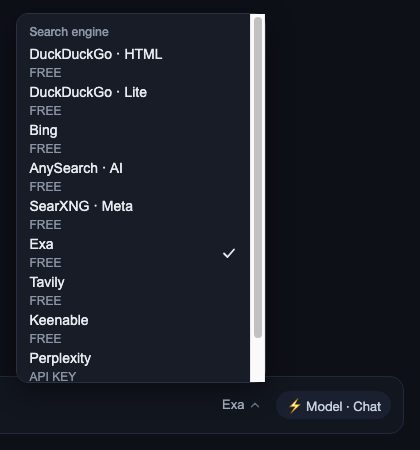
A compact web-search-engine switcher for the DeepSeek Harness composer. It renders immediately to the left of the model picker and changes the preferred engine without opening Settings or typing a slash command.
中文:在 DeepSeek Harness 输入栏的模型切换器左侧提供搜索引擎热切换下拉菜单,无需打开设置或输入命令。
Features
- Composer control next to the model picker via
conversation.input.right. - Scrollable engine list with the current engine marked.
- Reads and writes the
free-search.providersetting through the loopback bridge. - Supports the ten engines exposed by
dsh-free-search:- DuckDuckGo HTML
- DuckDuckGo Lite
- Bing
- AnySearch AI
- SearXNG
- Exa
- Tavily
- Keenable
- Perplexity
- DeepSeek Official
- Uses the Harness theme variables.
- Full keyboard support: Arrow keys open the menu from the trigger and move between engines, Home/End jump to the first/last entry, Enter/Space activate, Escape dismisses and returns focus to the trigger.
Requirements
- DeepSeek Harness Web profile with Node.js 20 or newer.
dsh-free-search>=0.4.7, which owns the settings bridge and the search provider.
The switcher only changes the preferred provider. It does not bypass provider authentication, API-key requirements, or network restrictions.
Blocked-network use case
Overseas university and campus networks often block api.deepseek.com, which makes the DeepSeek Official provider unavailable while the rest of the harness keeps working. This switcher exists so you can fall back to Bing, DuckDuckGo, SearXNG, or another reachable provider in one click — no Settings page, no provider editing by hand.
Screenshots
The trigger beside the model picker, and the open engine menu:

Install
Using the Harness plugin CLI:
dsh plugin --profile web add https://github.com/Hudson-Junior-Wang/dsh-search-switcher.git
If your CLI uses the profile as the current default, this is equivalent:
dsh plugin add https://github.com/Hudson-Junior-Wang/dsh-search-switcher.git
Install dsh-free-search as well if it is not already present:
dsh plugin --profile web add https://github.com/DDDMUC/dsh-free-search.git
Then restart the Harness host or reload the Web UI. The new control appears immediately left of the model selector in an active conversation.
Manual profile installation
Add the package to the profile dependencies and add dsh-search-switcher to dsh.profile.bundles. The package's cordis.patch.yml loads its entry automatically.
If the profile already contains a manually inserted dsh-search-switcher entry, remove that manual patch before using dsh plugin add; otherwise the same loader entry can be registered twice.
Development
npm test          # bundle smoke test (manifest, patch, syntax)
npm run check     # node --check on both lib files
The client bundle is intentionally a self-contained ModuleLoader bundle so it can be served by the Harness client-module system without a separate build step.