dsh-theme-whalegirl
Đã xác minhdsh-theme-whalegirl · v0.2.0 · MIT · Giao diện web
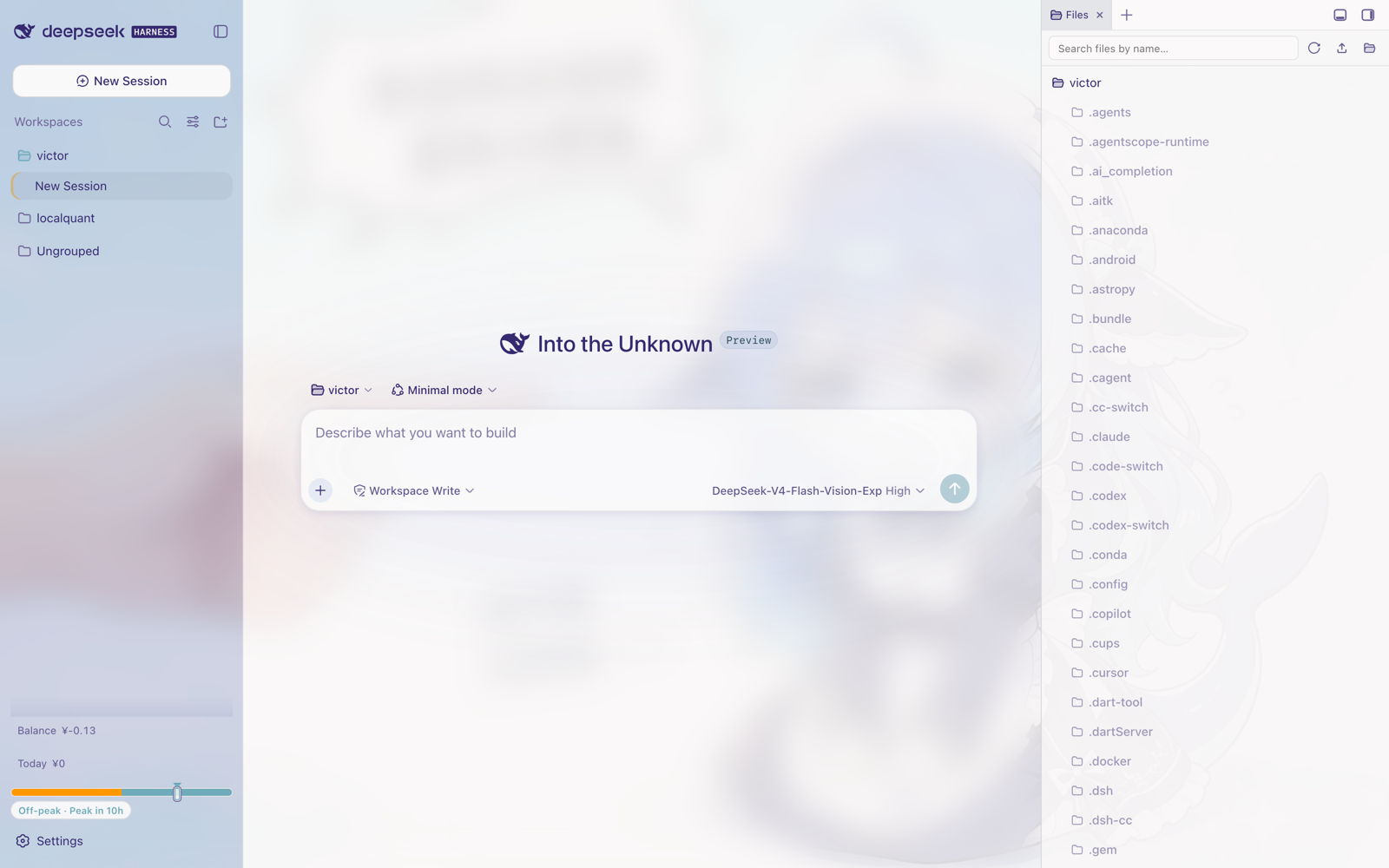
DeepSeek-鲸鱼娘 (Whale Girl) theme for the DeepSeek Harness web GUI — ported from the DreamSkin skin package: full --dsw-* token remap on the native theme runtime, ambient whale-girl wallpaper behind a lightly frosted rose/periwinkle UI with user-adjustable
Cài đặt
dsh plugin add dsh-theme-whalegirl Xác nhận layer đã áp bằng dsh --profile default --dump-config — xem hướng dẫn cài plugin.
Mã nguồn
Thẻ
Tác giả
Readme
dsh-theme-whalegirl
DeepSeek-鲸鱼娘主题,面向 DeepSeek Harness(DSH)Web UI——移植自 DreamSkin 皮肤包 ver_cb557ececaa5de3f3dbe。
English | 中文
功能
- 完整令牌重映射 —— 在 DSH 原生主题系统注册一套亮色主题(
deepseek-whalegirl),携带完整的--dsw-*令牌字典(174 个):表面、文字、边框、按钮、代码块、滚动条、状态色的每一档都由 DreamSkin 调色板推导。 - 默认轻磨砂 —— 鲸鱼娘插画作为固定背景衬在界面之后;自 0.2.0 起大幅降低磨砂感:主框背景模糊从 18px 降到 4px,各表面不透明度大幅提高,只保留一丝壁纸的透光。
- 玻璃与壁纸可调 —— 主框模糊、表面/气泡透明度、壁纸遮罩、壁纸显示与模糊、输入框聚焦光晕均可在设置页的插件卡片中实时调节(保存在浏览器本地),并附带三套预设:清爽玻璃 / DreamSkin 原味 / 纯净实底。
- DreamSkin safe-css 意图移植 —— 圆角侧边栏、咖啡色输入框聚焦光晕(可关)、沙金色选中文本、紫调柔和阴影。
- 原生集成 —— 插件挂载时通过
theme.setTheme()固定主题;内置「外观」设置重置偏好为跟随系统时会自动恢复。你在「外观」里显式选择亮/暗色则优先,直到在市场主题页把插件关开一次后恢复。
取自源皮肤的调色板锚点:
| 角色 | 源值 | 用途 |
|---|---|---|
| 文字 text | #352970 |
主标签、墨色阶梯 |
| 高亮 highlight | #455b78 |
品牌与主按钮 |
| 强调 accent | #7a4e29 |
输入框聚焦光圈 |
| 次强调 accentAlt | #ceb683 |
导航选中描边、选区 |
| 次色 secondary | #85c1cc |
蓝/信息色阶梯 |
| 面板 panel / panelAlt | #abb4cf / #c3cee4 |
长春花蓝侧边栏玻璃 |
| 背景 background | #bd9999 |
玫瑰纸色调、气泡 |
安装
从 dsh-market 插件的主题 Tab 搜索 "whalegirl",或在终端:
# GitHub Release 预构建包(免构建)
dsh plugin --profile web add -w https://github.com/ZHOUcourier/dsh-theme-whalegirl/releases/latest/download/dsh-theme-whalegirl.tgz
其他来源:
# git 仓库
dsh plugin --profile web add -w github:ZHOUcourier/dsh-theme-whalegirl

# npm
dsh plugin --profile web add -w dsh-theme-whalegirl

# 本地目录
dsh plugin --profile web add -w link:/path/to/dsh-theme-whalegirl
重启 profile 生效:
dsh --profile web
插件挂载后主题立即应用。想切走:在 设置 → 通用 → 外观 选择偏好即可(插件会让位);想切回:在市场主题页把插件关闭再开启。
自定义
打开 设置 → 插件配置页,找到 「鲸鱼娘 · 玻璃与壁纸」 卡片。所有改动即时生效,仅保存在当前浏览器的 localStorage(dsh-whalegirl.prefs.v1),不写入 profile。
| 控制项 | 范围 | 默认 | 说明 |
|---|---|---|---|
| 预设 | — | 清爽玻璃 | 一键切换 清爽玻璃 / DreamSkin 原味 / 纯净实底 |
| 主框背景模糊 | 0–24px | 4px | 应用主框毛玻璃的模糊半径(旧版硬编码 18px) |
| 表面透明度 | 0–100% | 45% | 0 = 表面全不透明,100 = 原版半透设计 |
| 用户气泡透明度 | 0–100% | 60% | 玫瑰色用户气泡的透出程度 |
| 壁纸遮罩浓度 | 0–100% | 55% | 壁纸上纸色薄纱的强度 |
| 显示环境壁纸 | 开/关 | 开 | 关闭后回到纯净纸色背景 |
| 壁纸模糊 | 0–16px | 0px | 柔化插画细节 |
| 输入框咖啡色聚焦光晕 | 开/关 | 开 | DreamSkin 原版输入框聚焦描边 |
恢复默认 按钮还原上表默认值。从 0.1.x 升级直接使用新默认值(更轻的磨砂),不做迁移。
卸载:
dsh plugin --profile web remove dsh-theme-whalegirl
兼容性
- 需要 DSH web 客户端 profile(
dsh.client.platform: "web",客户端入口经exports["./client"]暴露)。 - 仅提供亮色外观——忠实还原源皮肤的单套亮色调色板。
- 与其他插件共存;禁用时不触碰任何东西,只依赖受控的 body 属性
data-dsh-whalegirl。
开发
npm run build   # 将 src/client.js 包装为 lib/client.js 并内嵌 assets/background.jpg
npm test        # 冒烟测试:对 mock DOM 走一遍 register/guard/dispose
npm run check   # 校验 lib/ 与 src/ 一致(CI 用)
构建零依赖(纯 Node)。lib/ 已提交入库,安装方无需执行任何构建。
致谢
- 主题插画与配色:DeepSeek-鲸鱼娘(DreamSkin)。
- 插件结构遵循官方
dsh.bundle清单约定。
许可
MIT。随包分发的插画来自上述 DreamSkin 皮肤包,原作品权利归其作者所有。