dsh-lens-rail
Đã xác minh@hzpeng/dsh-lens-rail · v0.1.1 · MIT · Giao diện web
Codex-style LEFT message navigation rail for DeepSeek Harness: a vertical column of short lines, one per message (user + assistant), with a linear lens hover effect, scroll-spy highlight, and click-to-jump.
Cài đặt
dsh plugin add @hzpeng/dsh-lens-rail Xác nhận layer đã áp bằng dsh --profile default --dump-config — xem hướng dẫn cài plugin.
Mã nguồn
Thẻ
Tác giả
Readme
@hzpeng/dsh-lens-rail
为 DeepSeek Harness(DSH)Web 对话界面提供的 Codex 风格左侧消息导航轨道。
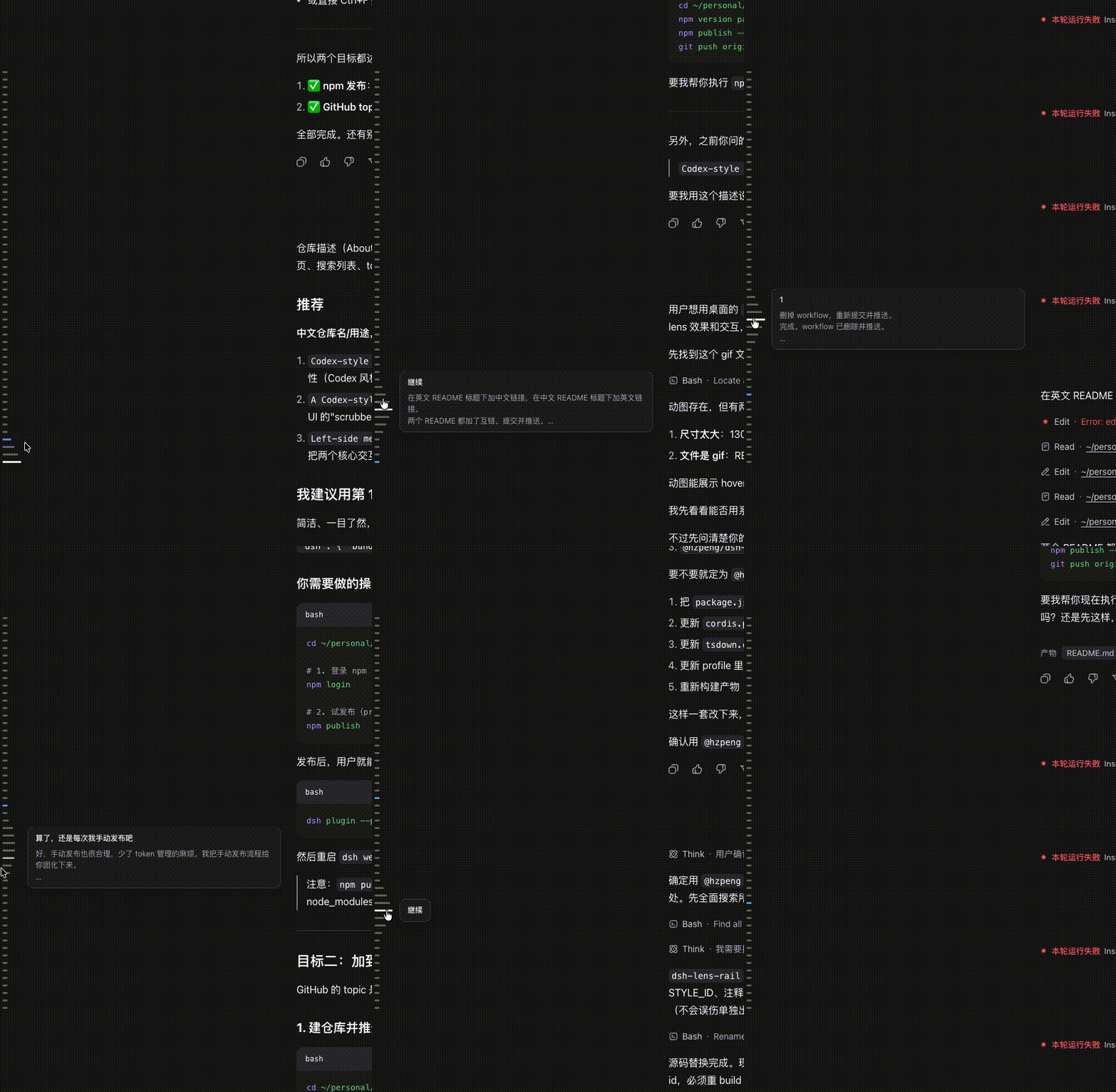
在对话记录左侧边缘,有一列短横线——每一条横线代表一轮对话(包含你的提问和 agent 的回复)。它是一个 scroll-spy 定位器:当前阅读位置对应的横线以品牌色高亮;鼠标悬停时,光标下的横线变长、上下相邻的横线向两端平滑渐短(Codex 的「镜头」效果);点击任意横线可跳转到对应消息(必要时自动加载更早的历史)。
特性
- 左侧定位——位于对话滚动区(scrollBody)内、距左侧约 8px,垂直居中,高度不超过滚动区的 60%;上下两端带淡出渐变。
- 每条消息一条线——每个用户 turn 及其后的 agent 回复都对应一条横线;工具行、命令、turn-tail 不参与,轨道呈现的是「对话」而非「步骤流水」。
- 镜头悬停——聚焦的横线最长,向上下各 4 条内线性衰减回基准长度(与 Codex 一致:从聚焦线向上下数到第 4 条即回到未激活长度)。
- 连续悬停区——每条横线是一个 30×12 的命中块,块之间零间距,鼠标上下移动不会在间隙处丢失悬停(无跳变)。
- 滚动定位高亮——距视口 40% 线最近的横线高亮(品牌色),跟随阅读位置;滚动不会反向改变横线长度。
- 悬停预览——用户消息(单行高亮省略)+ agent 回复(最多 3 行省略)在横线右侧浮出。
- 点击跳转——
loadOlder按需翻页加载更早历史,再滚动到目标行;长跳转时顶部显示「正在加载历史消息…」提示。 - 主题适配——使用 DSH 别名 token(
--dsw-alias-*),浅色/深色主题均正常。
安装
dsh plugin --profile web add @hzpeng/dsh-lens-rail
然后重启 dsh web 并硬刷新浏览器。
卸载
dsh plugin --profile web remove @hzpeng/dsh-lens-rail
License
MIT